
4 Bibliography Examples 2026: MLA, APA, Chicago, Harvard
Last updated June 2026 · Examples follow the latest MLA 9th, APA 7th, Chicago 17th, and Harvard style guides.
A bibliography is the list of sources you consulted while researching a paper, formatted according to the citation style your assignment requires. The important part is not memorizing every punctuation mark; it is knowing which style you are using, what source details to collect, and how to verify the final entry. The four common academic styles in 2026 are MLA (humanities), APA (psychology, sciences, and education), Chicago (history, arts, and theology), and Harvard (business and social sciences). This guide gives working examples in all four styles, plus visual checklists you can use before submitting.
The 4 main bibliography styles at a glance:
| Style | Used In | Author Format | Title Format | Date Position |
|---|---|---|---|---|
| MLA 9th | Humanities, literature | Last, First Middle. | Italics for books; "Quotes" for articles | After publisher |
| APA 7th | Psychology, sciences, education | Last, F. M. | Sentence case; italics for books | After author |
| Chicago 17th | History, arts, theology | Last, First Middle. | Title Case; italics for books | Year at end |
| Harvard | Business, social sciences | Last, F.M. | Sentence case; italics for books | Year after author |
Start with a clear bibliography example and meaning
A good bibliography example does two jobs at once: it shows what the finished page should look like, and it reveals the small style decisions that affect every entry. If you have ever asked, “bibliography what is it?” or wondered why a teacher marked down punctuation in a source list, start here. The difference between a bibliography, a reference list, and a works cited page determines which sources appear, how they are ordered, and which heading you should use.
What a bibliography includes
At its core, to define bibliography is to describe a list of sources you consulted while researching and writing your assignment. But what is bibliography in practical terms? It’s more than just a list of books: it captures the full range of materials—articles, websites, interviews, and more—that informed your work. Unlike a reference list or works cited page, a bibliography can include sources you read for background but didn’t directly cite in your text.
• Author (Who created the work?)
• Title (What is the name of the work?)
• Container (Where was it published? For articles, this is the journal or website.)
• Publisher (Who made it available?)
• Date (When was it published?)
• DOI/URL (How can someone find it?)
Bibliography vs works cited vs references
Here’s where things get interesting. You’ll notice that “bibliography or works cited” are sometimes used interchangeably, but there are key distinctions:
• Reference List: Only includes sources you cited directly in your paper. Each entry matches an in-text citation. (Common in APA and Harvard styles.)
• Bibliography: Lists everything you consulted—cited or not. This offers a broader view of your research depth. (Often used in Chicago and some university guidelines.)
• Works Cited: The MLA-specific version of a reference list. Only sources you cited appear here, but the formatting follows MLA rules.
Match the style your assignment specifies, not what a sample shows.
When your instructor’s style guide overrides defaults
Sounds complex? It can be—especially since different academic fields and institutions have their own preferences. Always check your assignment brief or syllabus. If your instructor asks for a bibliography but expects only cited sources, follow their lead. When in doubt, ask for clarification.
And remember: the example of a bibliography you find online may follow MLA, APA, or Chicago rules. This guide will show you examples that align with the latest conventions for MLA, APA 7th edition, and Chicago (17th edition) so you can confidently build your own, no matter the style.
Up next, we’ll explore the unique requirements for each major style, so you can spot the differences at a glance and avoid common mistakes.
How MLA, APA, Chicago, and Harvard Bibliographies Differ
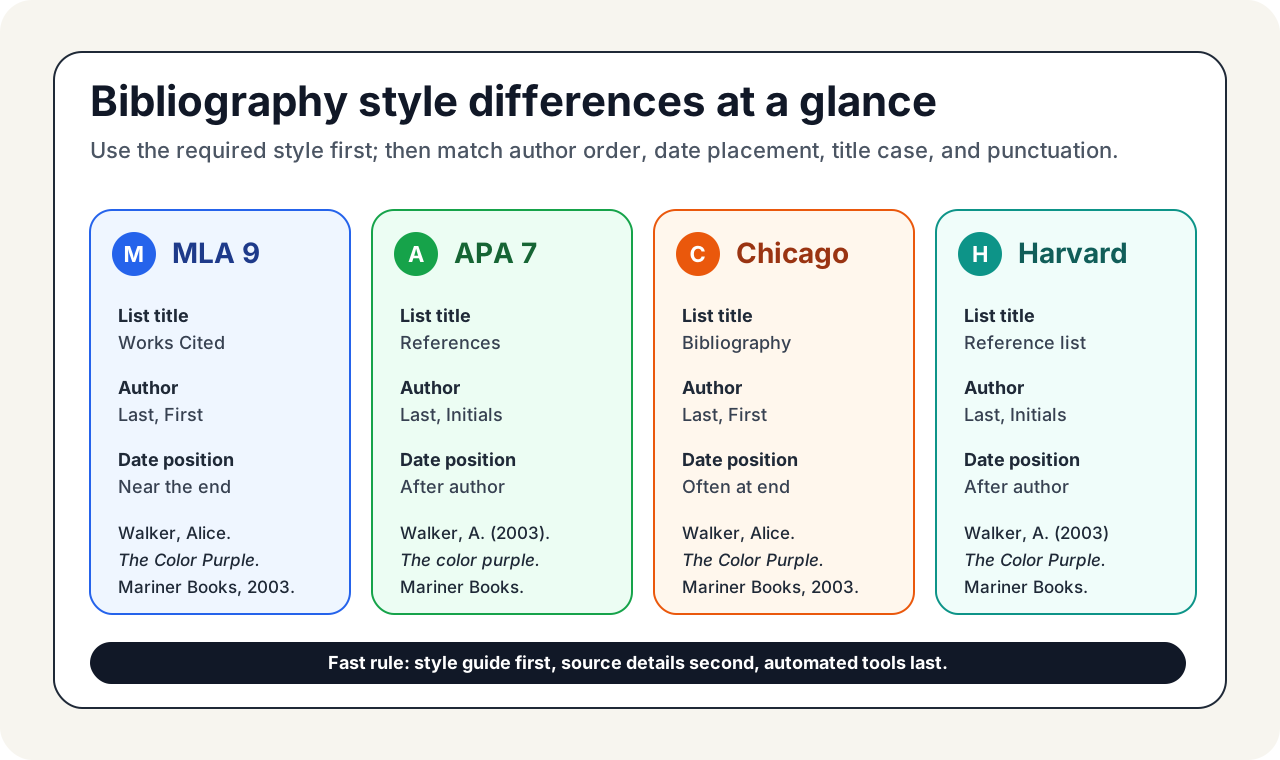
When you look up a bibliography example, the first thing to check is the style label. A correct MLA example can still be wrong for an APA assignment. The main differences are predictable: page title, author format, title capitalization, date position, DOI/URL treatment, and whether the page includes every source consulted or only sources cited.
MLA Entry Patterns and Capitalization
MLA format, widely used in the humanities, focuses on clarity and authorship. You’ll spell out authors’ full first and last names, and titles use title case —meaning most words are capitalized. Container titles (like journals or websites) are italicized. The source page is called Works Cited. Here’s a quick mla citation example for a book:
• Works Cited: Walker, Alice. The Color Purple. Mariner Books, 2003.
APA Reference List Rules You Must Not Skip
APA style is the go-to for social sciences and education. The source list is titled References , and you’ll use author initials instead of full first names. Titles are written in sentence case —only the first word and proper nouns are capitalized. APA 7th edition has some unique rules: no publisher location is needed, and DOIs are formatted as URLs. Here’s an apa formatting example for the same book:
• References: Walker, A. (2003). The color purple. Mariner Books.
Notice the subtle differences? For more on APA reference rules, compare your entry with the official APA Style reference examples or your library's required guide.
Chicago Bibliography and Note System Basics
Chicago style is popular in history and some humanities. It offers two systems: Notes and Bibliography (footnotes/endnotes plus a bibliography) and Author-Date (similar to Harvard). The bibliography spells out authors’ full names and uses headline-style capitalization (like MLA). Here’s a chicago bibliography entry for a book:
• Bibliography: Walker, Alice. The Color Purple. Mariner Books, 2003.
To see how the chicago format citation works for different sources, check the Chicago Manual of Style Quick Guide.
Harvard Author-Date Nuances
The Harvard citation style is common in the UK and Australia. It closely resembles APA but may vary by institution. The reference list is called Reference List and entries are ordered alphabetically by author surname. Author initials are used, and titles are in sentence case. Here’s a Harvard example:
• Reference List: Walker, A. (2003) The color purple. New York: Mariner Books.
| Feature | MLA | APA | Harvard | Chicago |
|---|---|---|---|---|
| Source List Name | Works Cited | References | Reference List | Bibliography |
| Author Format | Surname, First Name | Surname, Initials | Surname, Initials | Surname, First Name |
| Title Capitalization | Title Case | Sentence Case | Sentence Case | Title Case |
| Date Placement | End (if used) | After Author | After Author | End (in footnotes/bibliography) |
| DOI/URL Handling | Included if online | DOI as URL | DOI/URL if online | May include if online |
| Hanging Indent | Yes | Yes | Yes | Yes |
Always check your instructor’s requirements—some institutions have their own variations on these rules.
Still unsure which style to use? Bookmark guides like CiteWithMe’s referencing style comparison for quick answers, and remember to review edge cases such as sources with multiple editors or no clear author. Up next, we’ll walk through a step-by-step process to help you build a correct entry in any style, so you can confidently create your own bibliography example from scratch.
Build a correct entry step by step
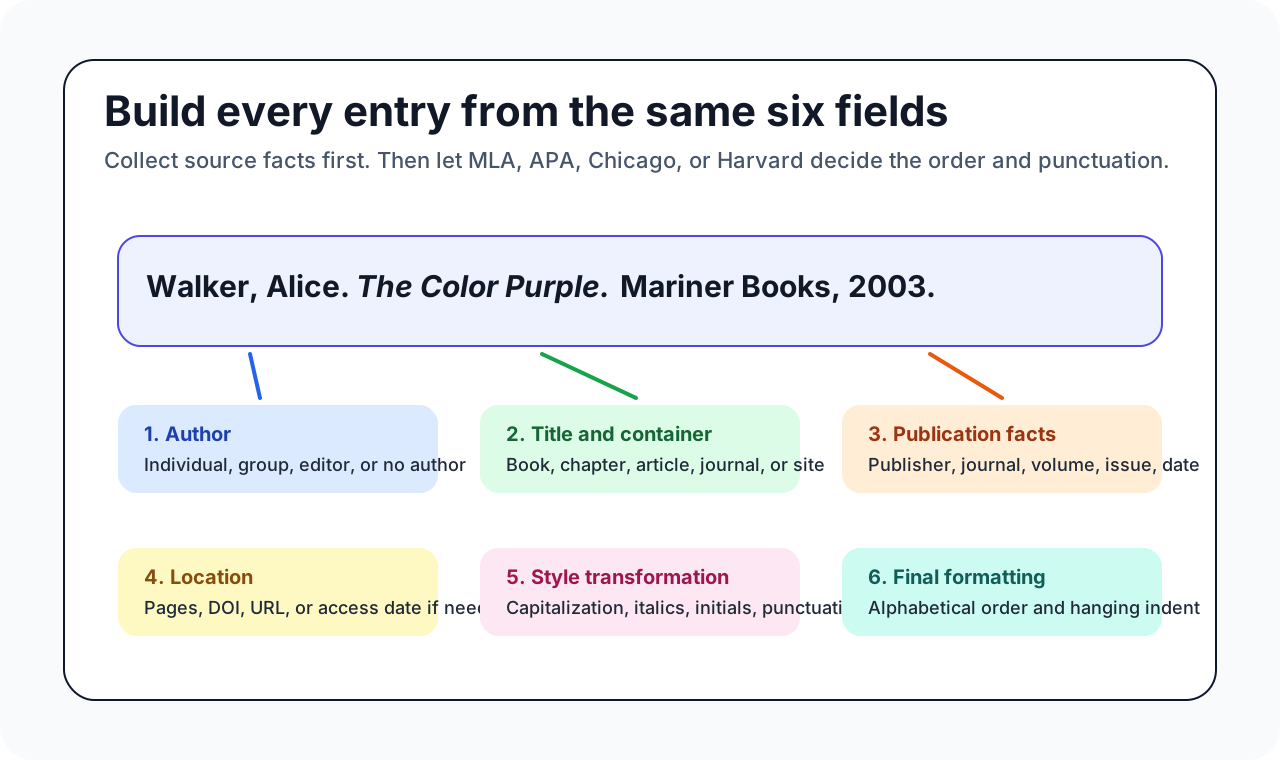
A reliable bibliography entry starts before formatting. First collect source facts; then apply the required style. This prevents the most common mistake: trying to fix punctuation before you have confirmed the author, title, container, date, and DOI or URL. Use this workflow for MLA, APA, Chicago, Harvard, or a local university variant.
Identify and order the core elements
Before you worry about punctuation or spacing, focus on gathering the right details. Every bibliography example —no matter the style—relies on a few core elements. Here’s what you’ll need:
-
Author(s): Who created the work? List individual authors, corporate authors, or editors as required.
-
Title: What is the name of the work? For articles or chapters, include both the title and the container (journal, book, or website).
-
Publication Details: This includes the publisher, journal name, volume/issue, and publication date.
-
Location or Identifier: Page range for articles, DOI, or URL for online sources.
Once you have these, you’re ready to start formatting.
Master punctuation and capitalization patterns
Sounds simple, right? But every style has its quirks. Here’s a style-agnostic workflow you can adapt:
-
Arrange your elements in the order required by your chosen style (MLA, APA, or Chicago).
-
Apply the correct capitalization:
• MLA & Chicago: Use title case for titles (capitalize major words).
• APA: Use sentence case (capitalize only the first word and proper nouns).
-
Insert punctuation exactly as the style guide specifies:
• Periods separate major elements.
• Commas, colons, and parentheses are used for volume/issue numbers and publication details.
-
Place the date, publisher, and DOI/URL where your style requires:
• APA: Date follows the author; publisher at the end; DOI as a URL.
• MLA: Date near the end; publisher before the date; DOI/URL last.
• Chicago: Date at the end; publisher before the date; DOI/URL as needed.
Never invert first names unless the style expects Last, First. For example, MLA and Chicago bibliography entries use Last, First; APA uses Last, Initial.
Finish with hanging indents and spacing
Formatting matters just as much as content. Most styles require:
• Double-spacing throughout the bibliography or reference list.
• Hanging indents : The first line of each entry is flush left; all subsequent lines are indented 0.5 inches.
Here’s how to type a bibliography with a hanging indent in Microsoft Word:
-
Highlight your bibliography entries.
-
Right-click and select “Paragraph.”
-
In the “Indentation” section, choose “Hanging” from the Special dropdown. Set it to 0.5".
-
Click OK, and your entries will be formatted correctly (Microsoft Support).
For a plain-text demonstration:
  Smith, John. "The Art of Reference." _Journal of Research_ , vol. 10, no. 2, 2025, pp. 45-67.


    Johnson, Sarah. "Why Citations Matter." _Academic Review_ , vol. 5, no. 1, 2025, pp. 12-30.
Quick checklist for final verification
• All required elements are present (author, title, publication, date, DOI/URL).
• Elements are in the correct order for your style.
• Punctuation matches the style guide.
• Capitalization follows sentence or title case as needed.
• Entries are double-spaced and use hanging indents.
• List is alphabetized by the first element (usually author’s last name).
Style-specific tweaks: MLA, APA, Chicago
As you refine your entries, keep these differences in mind:
• MLA: “Works Cited” title; Last, First author format; container titles in italics; access date for online sources.
• APA: “References” title; Last, Initials; publication date after author; use DOI as URL.
• Chicago: “Bibliography” title; Last, First author format; headline-style capitalization; publisher and date at the end.
If you’re wondering how to insert a bibliography in Word , most word processors have built-in tools that let you select your style, add sources, and generate a formatted list automatically. But always double-check the output against the official style guide.
Ready to create your own bibliography?
With these steps, you’ll never need to ask “how do I create a bibliography” or “how do I write a bibliography in MLA format” again. The next section will provide copy-ready templates and a complete sample bibliography page, so you can see these rules in action and model your entries with confidence.
Copy-ready templates and sample bibliography page
Use the templates below as patterns, not as automatic answers. Replace every placeholder with details from your own source, and then check the result against the style your instructor named. If your course has a local citation sheet, it overrides any generic reference list template or mla citation page example you find online.
Templates for books, chapters, and journal articles
Let’s start with the most common source types you’ll encounter. Each bibliography example below is formatted for MLA, APA, Chicago, and Harvard. Use these as a guide or copy and adapt for your own bibliography page example.
| Source Type | MLA | APA 7th | Chicago | Harvard |
|---|---|---|---|---|
| Book citation | Walker, Alice. The Color Purple. Mariner Books, 2003. | Walker, A. (2003). The color purple. Mariner Books. | Walker, Alice. The Color Purple. New York: Mariner Books, 2003. | Walker, A. (2003) The color purple. New York: Mariner Books. |
| Book Chapter | Doyle, Kathleen. "The Queen Mary Psalter." The Book by Design: The Remarkable Story of the World’s Greatest Invention , edited by P. J. M. Marks and Stephen Parkin, University of Chicago Press, 2023. | Zeleke, W. A., Hughes, T. L., & Drozda, N. (2020). Home-school collaboration to promote mind-body health. In C. Maykel & M. A. Bray (Eds.), Promoting mind-body health in schools: Interventions for mental health professionals (pp. 11-26). American Psychological Association. https://doi.org/10.1037/0000157-002 | Doyle, Kathleen. "The Queen Mary Psalter." In The Book by Design: The Remarkable Story of the World’s Greatest Invention , edited by P. J. M. Marks and Stephen Parkin. University of Chicago Press, 2023. | Zeleke, W. A., Hughes, T. L. & Drozda, N. (2020) Home-school collaboration to promote mind-body health. In Maykel, C. & Bray, M. A. (eds) Promoting mind-body health in schools: Interventions for mental health professionals , pp. 11-26. American Psychological Association. |
| Journal Article | Niepel, Christoph, et al. "Understanding Mean-Level and Intraindividual Variability in State Academic Self-Concept: The Role of Students' Trait Expectancies and Values." Journal of Educational Psychology , vol. 117, no. 5, 2025, pp. 772-788. | Niepel, C., Hausen, J. E., Weber, A. M., & Moller, J. (2025). Understanding mean-level and intraindividual variability in state academic self-concept: The role of students' trait expectancies and values. Journal of Educational Psychology, 117(5), 772-788. https://doi.org/10.1037/edu0000946 | Niepel, Christoph, J. E. Hausen, A. M. Weber, and J. Moller. "Understanding Mean-Level and Intraindividual Variability in State Academic Self-Concept: The Role of Students' Trait Expectancies and Values." Journal of Educational Psychology 117, no. 5 (2025): 772–788. https://doi.org/10.1037/edu0000946. | Niepel, C., Hausen, J. E., Weber, A. M. & Moller, J. (2025) Understanding mean-level and intraindividual variability in state academic self-concept: The role of students' trait expectancies and values. Journal of Educational Psychology, 117(5), pp. 772-788. https://doi.org/10.1037/edu0000946 |
APA 7th: Use the DOI as a URL (https://doi.org/...), and do not include publisher location. Chicago: Headline-style capitalization, full author names, and publisher at the end.
Templates for webpages and online reports
Online sources are everywhere. Here’s how to cite them in each style—just fill in your details:
• APA webpage template: Author, A. A. (Year, Month Day). Title of page. Site Name. URL
• MLA web article template: Author Last, First. "Title of Webpage." Site Name , Date, URL.
• Chicago online report template: Author. Title of Report. Date. URL.
• Harvard online report template: Author (Year) Title of Report. Available at: URL (Accessed: Day Month Year).
A complete sample bibliography page
Wondering what a polished chicago style bibliography example or mla citation page example looks like? Here’s a sample reference page with entries from different source types. Use it as a checklist for your own work.
  Works Cited


 Walker, Alice. _The Color Purple_. Mariner Books, 2003.


Niepel, Christoph, et al. "Understanding Mean-Level and Intraindividual Variability in State Academic Self-Concept: The Role of Students' Trait Expectancies and Values." _Journal of Educational Psychology_ , vol. 117, no. 5, 2025, pp. 772-788.


Taras, Z. "Situational Irony Can Be Funny, Tragic or Even Terrifying." _HowStuffWorks_ , 30 May 2024, [https://entertainment.howstuffworks.com/arts/literature/situational-irony.htm](https://entertainment.howstuffworks.com/arts/literature/situational-irony.htm).


   References


 Walker, A. (2003). _The color purple_. Mariner Books.


Niepel, C., Hausen, J. E., Weber, A. M., & Moller, J. (2025). Understanding mean-level and intraindividual variability in state academic self-concept: The role of students' trait expectancies and values. _Journal of Educational Psychology_ , 117(5), 772-788. [https://doi.org/10.1037/edu0000946](https://doi.org/10.1037/edu0000946)


Taras, Z. (2024, May 30). Situational irony can be funny, tragic or even terrifying. _HowStuffWorks_. [https://entertainment.howstuffworks.com/arts/literature/situational-irony.htm](https://entertainment.howstuffworks.com/arts/literature/situational-irony.htm)


   Bibliography


 Walker, Alice. _The Color Purple_. Mariner Books, 2003.


Niepel, Christoph, J. E. Hausen, A. M. Weber, and J. Moller. "Understanding Mean-Level and Intraindividual Variability in State Academic Self-Concept: The Role of Students' Trait Expectancies and Values." _Journal of Educational Psychology_ 117, no. 5 (2025): 772–788. [https://doi.org/10.1037/edu0000946](https://doi.org/10.1037/edu0000946).


Taras, Z. "Situational Irony Can Be Funny, Tragic or Even Terrifying." _HowStuffWorks_. May 30, 2024. [https://entertainment.howstuffworks.com/arts/literature/situational-irony.htm](https://entertainment.howstuffworks.com/arts/literature/situational-irony.htm).
"Double-check punctuation and capitalization: APA uses sentence case for titles, while MLA and Chicago use title case. Chicago places the publisher and date at the end."
With these templates and the sample reference page , you can confidently build your next bibliography page example. In the next section, we’ll explore annotated bibliographies, so you can take your citation skills to the next level.
Master the annotated bibliography with real examples
An annotated bibliography example adds a short analytical paragraph after each citation. That paragraph proves you understood the source, assessed its usefulness, and know why it belongs in your project. The citation still has to follow MLA, APA, Chicago, or Harvard rules; the annotation adds summary, evaluation, and research relevance.
Summary, Evaluation, Reflection: The Three Parts
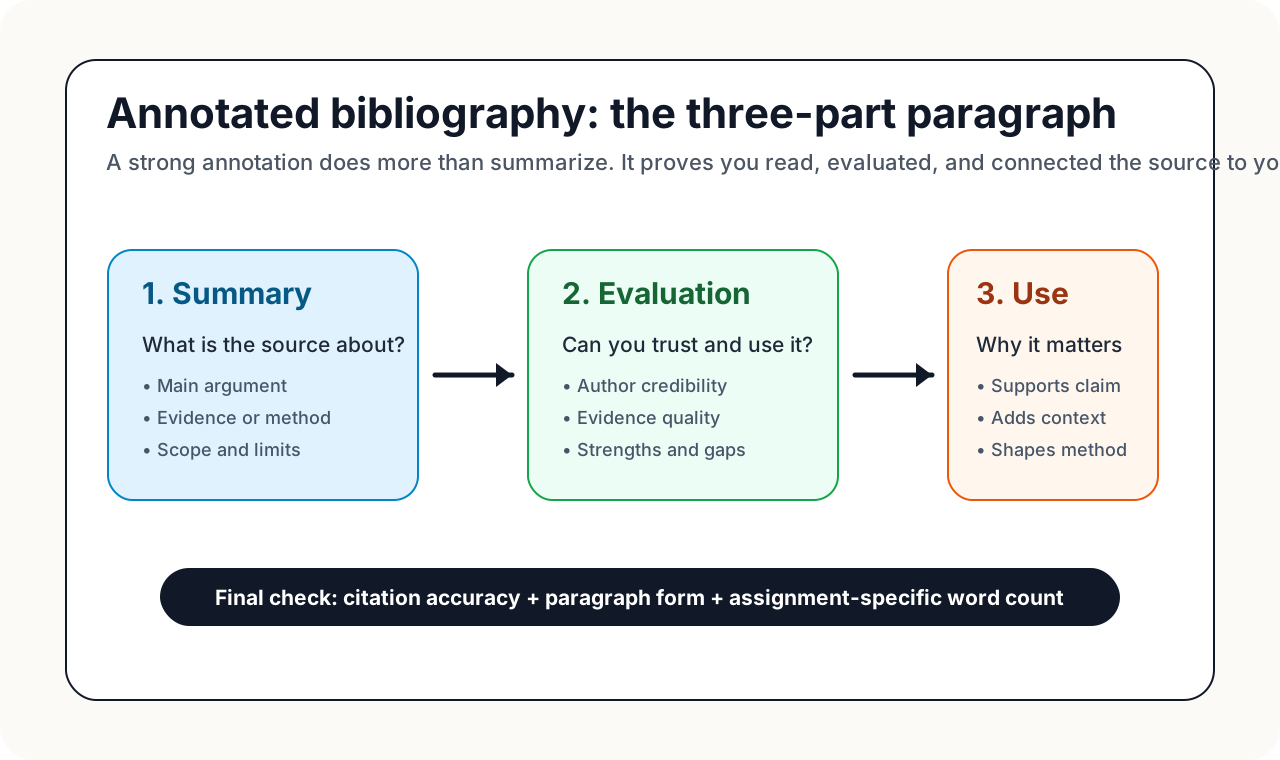
At its core, an annotated bibliography is more than a list of sources—it’s a set of mini-analyses that help readers (and you!) quickly understand the value of each item you’ve included. Most annotated bibliography examples are built from three core components:
• Summary: Briefly describe the main argument, findings, or scope of the source.
• Evaluation: Assess the source’s credibility, strengths, weaknesses, or relevance to your topic.
• Reflection: Explain how the source fits into your research, how it influences your thinking, or how you might use it in your project.
Some assignments may only require summary and evaluation, while others expect all three. Always follow your instructor’s guidelines.
Indicative vs Critical Annotations
Not all annotations serve the same purpose. You’ll encounter two main types:
• Indicative (Descriptive): Focus on summarizing the content without making judgments. Useful for giving a quick overview.
• Critical (Evaluative): Go beyond summary to analyze the source’s authority, methodology, or impact. These are common in upper-level or graduate work—and are often expected in an annotated bibliography APA or MLA assignment (Cornell University Library).
Keep evaluation criteria consistent across entries—use the same lens for each source.
Length and Tone Expectations by Assignment
How long should your annotation be? Most mla annotated bibliography examples and apa annotated bibliography examples use 100–200 words per entry, but always check your assignment brief. Annotations should be concise, objective, and written in academic tone. Avoid first-person statements unless your instructor requests reflection on your learning process.
• MLA annotated bibliography: Place the annotation after the full citation, indented one inch (per MLA 9th edition). Entries are double-spaced and formatted like a standard Works Cited page.
• Annotated bibliography APA format: List your citation using APA 7th rules, then follow with a 0.5-inch indented annotation paragraph, double-spaced throughout.
How to Write an Annotation: Practical Steps
| Step | What to Include |
|---|---|
| 1. Cite | Format the source using MLA or APA citation rules. |
| 2. Summarize | State the main argument, topic, or findings of the work. |
| 3. Evaluate | Assess the author’s credentials, research methods, or contribution. |
| 4. Reflect | Explain how you’ll use the source in your own project or what you learned. |
| 5. Proofread | Check formatting, grammar, and alignment with assignment requirements. |
Short Examples: MLA and APA Annotated Bibliography
Imagine you’re working on a paper about changing family roles. Here’s how an entry might look in each style:
• MLA annotated bibliography example:
  Waite, Linda J., et al. "Nonfamily Living and the Erosion of Traditional Family Orientations Among Young Adults." _American Sociological Review_ , vol. 51, no. 4, 1986, pp. 541-554.


    The authors, researchers at the Rand Corporation and Brown University, use data from the National Longitudinal Surveys of Young Women and Young Men to test their hypothesis that nonfamily living alters young adults’ attitudes about families and gender roles. The study is well-designed and widely cited, making it a credible source for research on social change. This article will help support my thesis about the impact of living arrangements on values.
• Annotated bibliography APA format example:
  Waite, L., Goldschneider, F., & Witsberger, C. (1986). Nonfamily living and the erosion of traditional family orientations among young adults. _American Sociological Review_ , 51(4), 541-554.


    The authors analyze national survey data to examine how living away from family before marriage affects attitudes toward gender roles. Their findings show significant changes for young women in particular. The authors are established researchers, and the article appears in a respected journal. I will use this source to illustrate generational shifts in attitudes in my literature review.
Notice how each annotation follows the required citation format, then provides a focused paragraph that summarizes, evaluates, and reflects on the source’s usefulness. For more annotated bibliography examples , see the full samples at Purdue OWL and IRSC MLA Guide.
Checklist: What to Include in Every Annotation
• Accurate citation in correct style (MLA or APA)
• Concise summary of the source’s main points
• Evaluation of authority, bias, or methodology
• Reflection on how the source fits your research
• Proper indentation and line spacing
-
Cite
-
Summarize
-
Evaluate
-
Reflect
-
Proofread
By mastering these steps, your annotated bibliography will do more than simply list sources—it will provide a roadmap for your research and demonstrate your critical thinking. Up next, we’ll tackle tricky names and Chicago-style notes, so you’re ready for any citation challenge.
Handle tricky names and Chicago notes with confidence
Ever found yourself stuck on how to alphabetize a bibliography entry that starts with a number, or wondered how to cite a source with six authors? Or maybe you’ve looked at the Chicago style and thought, “What’s the difference between a footnote citation and the bibliography entry?” These edge cases can trip up even experienced writers. Here’s how to handle them with clarity—so your bibliography example stands up to any review.
Alphabetizing nonstandard names and titles
When you organize your bibliography or reference list, everything should be in alphabetical order. But what happens when your entry starts with a title, a government agency, or a name that doesn’t fit the usual pattern? Here are a few quick tips:
• Titles without authors: Alphabetize by the first significant word of the title (skip articles like "A," "An," or "The").
• Corporate or government authors: List under the official organization name—ignore abbreviations or "The" at the start.
• Non-English names: Use the spelling as it appears in the source, following the order given.
• Entries starting with numbers: Alphabetize as if the number were spelled out (e.g., "1984" would be alphabetized as "Nineteen Eighty-Four").
When and how to use et al. correctly
Working with sources that have many authors? That’s where et al. citation rules come in. Et al. (meaning “and others”) helps you avoid listing every single contributor, but each style has its own threshold for when you can use it. Here’s what you need to know:
• APA: In the reference list, for works with more than 20 authors, list the first 19, then add an ellipsis and the final author. In in-text citations, use et al. after the first author for works with three or more authors. For a clear et al example apa , see:Jones, A., Smith, B., Johnson, C., et al. (2020). The effects of climate change on marine biodiversity. Science, 367(6485), 979-983. (Enago)
• MLA: Use et al. for sources with three or more authors both in the works cited and in-text citations.
• Chicago : In the bibliography, for works with four to ten authors, list all of them. For works with more than 10 authors, list the first seven followed by et al. In notes, use et al. after the first author for works with four or more authors.
Remember, et al. is always punctuated with a period after "al." and is not italicized in APA, MLA, or Chicago.
Chicago note, full note, shortened note, and bibliography entry
The Chicago Notes and Bibliography system is famous for its use of footnotes endnotes chicago style. But what’s the difference between a full note, a shortened note, and the bibliography entry? Here’s a side-by-side comparison using a single book source:
| Type | Example |
|---|---|
| Full Note (first citation) | 1. Charles Yu, Interior Chinatown (Pantheon Books, 2020), 45. |
| Shortened Note (subsequent citations) | 2. Yu, Interior Chinatown , 48. |
| Bibliography Entry | Yu, Charles. Interior Chinatown. Pantheon Books, 2020. |
"In the Notes and Bibliography system, you should include a note (endnote or footnote) each time you use a source, whether through a direct quote, paraphrase, or summary."
Full notes provide all publication details for the first mention, while shortened notes use just the author’s last name, a short title, and page number(s). The chicago citation footnote system lets you add context or commentary in your notes, while the bibliography is a complete alphabetical list at the end of your document.
Tips for edge cases and error-free lists
• Multiple works by same author: Alphabetize by title after grouping all works by that author together.
• Unknown author: Start with the title and alphabetize accordingly.
• Government or corporate authors: Use the full official name; avoid abbreviations unless commonly known.
• Footnotes vs. endnotes: Footnotes endnotes chicago style can be used interchangeably, but check your instructor’s preference.
By following these rules, you’ll create a bibliography that’s not only accurate but also easy to navigate. Want to see a chicago style bibliography sample in action? Check the Chicago Manual of Style citation guide for more examples and best practices. Next, we’ll explore how smart citation tools can help you format these entries in minutes, even for the trickiest sources.
Build your bibliography faster with smart tools
Reliable ways to speed up citation work
Citation tools are useful when they speed up mechanical formatting without replacing your judgment. Use them after you have verified the source details, not before. The best workflow is: collect source facts, choose the style, generate or format the entry, then compare the output against a trusted style guide.
Let’s break down the landscape. Citation generators fall into two main categories: robust reference managers with plug-ins for word processors, and web-based tools that let you build and export bibliographies on demand. Both can help you quickly create a bibliography template tailored to MLA, APA, or Chicago style.
Template-driven workflows that prevent errors
Imagine you’re working on an annotated bibliography template for a major research project. Instead of copying and pasting from scattered examples, you use a tool that walks you through each required element—author, title, date, DOI—ensuring nothing is missed. This is the advantage of template-driven citation tools: they reduce the risk of formatting mistakes that can cost you points or credibility.
To help you compare, here’s a quick overview of leading citation generators and what they offer for students and researchers:
| Tool | Supported Styles | Template Depth | Export Options | Collaboration | Offline Access |
|---|---|---|---|---|---|
| AFFiNE Citation Generator Template | MLA, APA, Chicago | Guided templates for books, articles, web, and more | Copy-paste, download, export to Word/Google Docs | Supports team workflows | Yes |
| Mendeley Cite | 10,000+ styles | Reference library, plug-in for Word | Direct insert into Word, export options | Library sharing | Yes |
| Zotero | 10,000+ styles | Reference manager, Google Docs add-on | Export to Word, Google Docs | Group libraries | Yes |
| EasyBib / Citation Machine | 7,000+ styles | Quick templates for common sources | Copy-paste, download, export | Limited (premium) | No |
| KnightCite | MLA, APA, Chicago | Simple web templates | Copy-paste | No | No |
From example to finished bibliography in minutes
Why spend hours reformatting when you can use a bibliography template that automatically adapts to your needs? With AFFiNE’s Citation Generator Template, you can move from viewing a bibliography example to producing a submission-ready sample reference list in just a few clicks. The tool supports all major styles and allows you to export or copy entries directly into your document—ideal for students juggling multiple assignments or researchers managing complex projects.
Of course, even the best annotation generator or chicago style citation machine can’t replace your final review. Always double-check capitalization, italics, and page ranges against trusted sources like APA Style, Purdue OWL, or the Chicago Manual of Style. Automated tools are designed to save time and reduce errors, but your careful eye ensures every detail meets academic standards.
Use templates and citation tools to speed up your process, but always proofread before submitting your bibliography.
Ready to put your bibliography together quickly and accurately? In the next section, we’ll share a final checklist so you can validate every entry and submit your work with confidence.
Finalize your bibliography with a fail safe checklist
One pass for structure, one pass for punctuation
After spending hours researching and formatting, you might wonder: how do you create a bibliography that is truly submission-ready? The answer is a systematic review process. Start by checking the overall structure—are all your entries present and in the correct order? Then, make a second pass focused solely on punctuation, capitalization, and style-specific details. This two-step approach helps you spot inconsistencies that a single read-through might miss.
Final checks for URLs, DOIs, and access dates
What should a bibliography look like when it comes to digital sources? Pay special attention to URLs, DOIs, and access dates. Each style guide has its own requirements:
• APA: Use DOIs as hyperlinks (https://doi.org/...), and include URLs for online sources without a DOI. No retrieval date is needed unless the content is likely to change.
• MLA: Provide the full URL for online sources and include an access date if required by your instructor.
• Chicago: Include the URL or DOI for online sources; access dates are optional but may be requested for unstable content.
• Harvard: Always include the access date for online materials, formatted as (Accessed: Day Month Year).
If you’re unsure how to format a bibliography entry for a website or report, double-check against recent examples from trusted guides or use a citation tool to preview the output.
Submission-ready formatting checklist
Before you upload your assignment or hit print, use this reference list sample checklist to ensure every detail is correct:
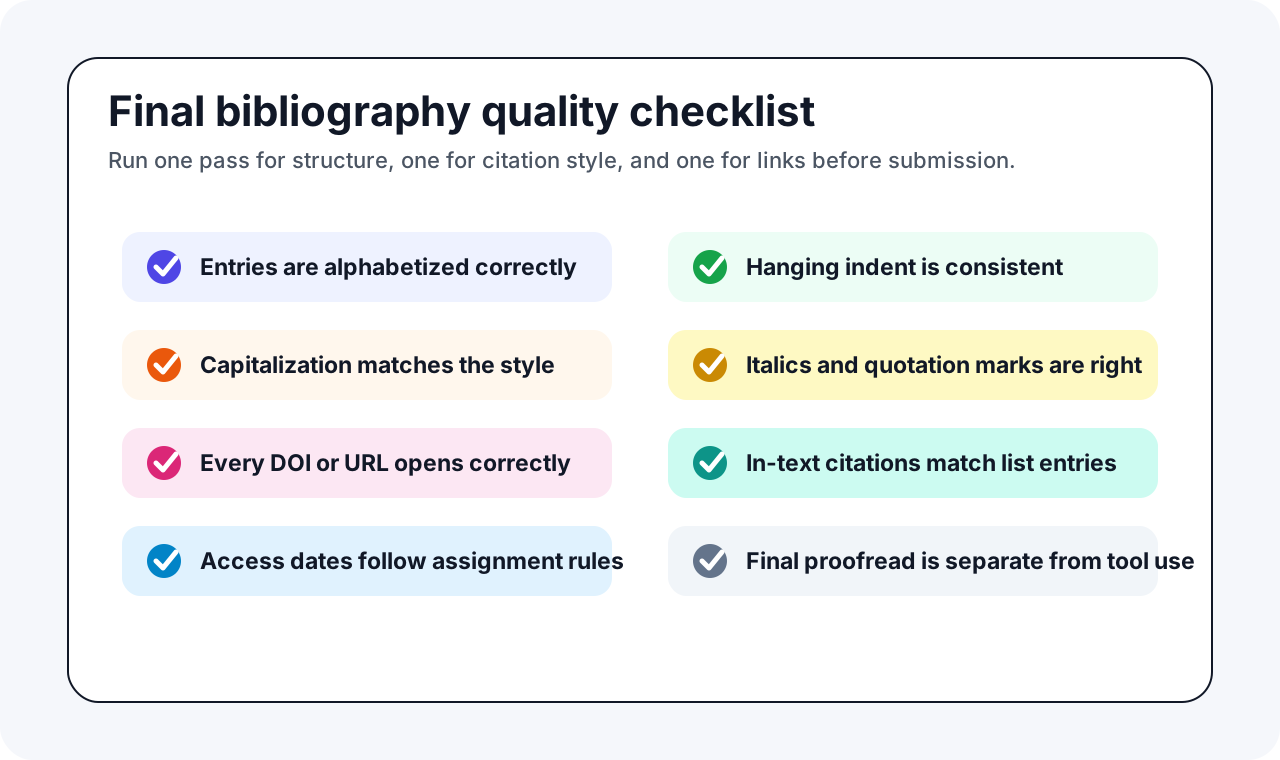
• Entries are alphabetized by author’s last name (or by title if no author).
• Consistent indentation (hanging indent) and double-spacing throughout.
• Correct use of italics for book, journal, and website titles.
• All required elements are included: author, title, publication details, date, DOI/URL, and access date if needed.
• Punctuation and capitalization match your chosen style guide.
• In-text citations match entries in your bibliography or reference list.
• Digital sources are up to date and all links work.
• Entries are separated into primary and secondary sources if required (University of Reading).
Consistency beats perfection in ambiguous cases—follow one style source.
Leverage tools but always proofread
Tools like the AFFiNE Citation Generator Template can help you organize sources and apply consistent templates for MLA, APA, and Chicago styles. This is a great way to quickly see what an example of a bibliography page should look like. However, even with the best tools, a human review is essential. Double-check capitalization, author order, and date placement against trusted sources like APA Style, Purdue OWL, and CMOS Online before you submit.
• Review your assignment instructions or journal guidelines—these always take precedence over general rules.
• Ask yourself: does my bibliography reflect what's in a bibliography for my field and assignment?
• Save your final document as a PDF to preserve formatting, if required.
By following this checklist, you’ll know exactly what does a bibliography look like at its best: clear, consistent, and ready for any instructor’s review. With these final steps, your bibliography example becomes a flawless submission—no last-minute surprises.
Frequently Asked Questions About Bibliography Examples
1. What is a bibliography and can you provide an example?
A bibliography is a list of sources you consulted during research. For example, an MLA book entry can look like this: Walker, Alice. The Color Purple. Mariner Books, 2003. The exact punctuation and capitalization change by style, but every entry should identify the author, title, publication details, date, and location information such as a DOI, URL, or page range when required.
2. How do you write a bibliography for a school project?
To write a bibliography for a school project, gather all the sources you used, including books, articles, and online materials. List each source with the author's name, title, publication details, and the date. Choose the citation style (MLA, APA, Chicago, or Harvard) required by your teacher, and format each entry accordingly using a consistent structure. Templates and citation generators can help streamline this process.
3. What is the difference between a bibliography, reference list, and works cited?
A bibliography lists all sources you consulted, whether cited or not. A reference list only includes sources you directly cited in your work, common in APA and Harvard styles. A works cited page, used in MLA, includes only the sources you referenced in your text. Always follow your assignment's required style for the correct format.
4. How can I quickly create a correctly formatted bibliography?
You can use citation tools like AFFiNE's Citation Generator Template to build entries in MLA, APA, Chicago, or Harvard style. Tools are best for arranging fields and punctuation after you have confirmed the source details. Always proofread the generated entry against your assignment guide, especially for capitalization, missing authors, DOIs, URLs, and access dates.
5. What should I check before submitting my bibliography?
Before submitting, make sure entries are alphabetized, use a consistent hanging indent, and follow the spacing your assignment requires. Verify author names, titles, dates, publishers, page ranges, DOIs, and URLs against the original sources. Then check that every in-text citation has a matching list entry when your style requires one, and that your bibliography does not include sources your instructor told you to exclude.