When you need to understand a dataset's distribution without getting lost in the details, a box and whisker plot is one of the most effective tools available. It provides a concise visual summary of a variable's key characteristics, making it perfect for both initial data exploration and comparing different groups. By the end of this guide, you’ll be able to interpret any box plot with confidence.
A box and whisker plot is a graphical method of displaying variation in a set of data through its quartiles.
The power of the box whisker plot comes from its ability to display a full five-number summary in a single, compact graphic. This allows you to quickly assess the center, spread, and shape of your data.
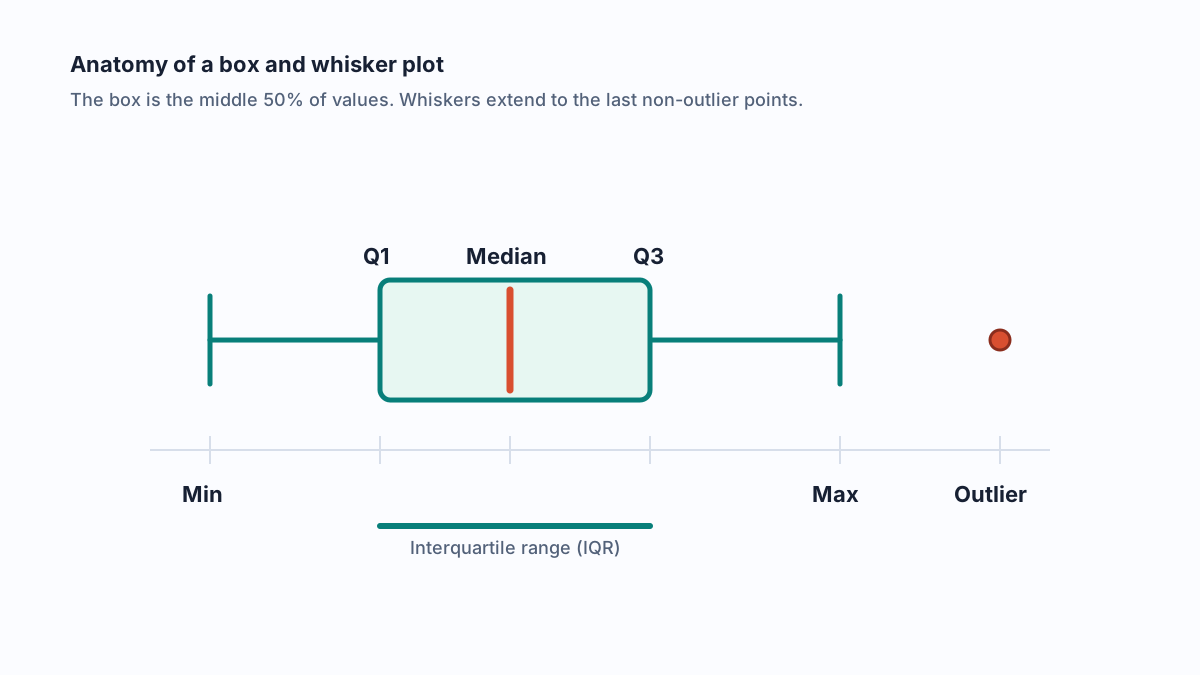
• The Box: This central rectangle represents the middle 50% of the data, a range known as the Interquartile Range (IQR).
• The Median Line: The line inside the box marks the median (or 50th percentile), which is the central point of the dataset.
• The Whiskers: These lines extend from the box to show the range of the remaining data, typically to the minimum and maximum values, excluding any outliers.
• Outliers: Individual points plotted beyond the whiskers represent values that are unusually far from the rest of the data.
| Plot Element | Statistic Represented |
|---|---|
| Bottom of Whisker | Minimum Value |
| Bottom of Box | First Quartile (Q1) - 25th Percentile |
| Line in Box | Median (Q2) - 50th Percentile |
| Top of Box | Third Quartile (Q3) - 75th Percentile |
| Top of Whisker | Maximum Value |
While a histogram is excellent for visualizing the overall shape and frequency of your data, a box plot offers distinct advantages. It more clearly identifies the median and quartiles and is especially powerful for comparing distributions across multiple groups in a single graph. A good box plot example can make differences between categories immediately obvious.
You might wonder why box plots use the five-number summary instead of the more common mean and standard deviation. The reason is robustness. The median and quartiles are less sensitive to skewed distributions and outliers. This makes box plots a trustworthy tool during exploratory analysis, when you may not yet know if your data contains extreme values. In the following sections, we'll explore more box and whisker plot examples and dive deeper into interpreting their features.
To truly understand a box plot, you need to know the components that give it shape and meaning. The entire graphic is built upon the five-number summary , a set of descriptive statistics that provides a clear snapshot of a dataset. Understanding how these numbers are calculated is the first step toward mastering plot interpretation.
The five-number summary consists of the minimum, first quartile (Q1), median, third quartile (Q3), and maximum. Here’s how you find these values and calculate the interquartile range:
Order Your Data: Arrange your dataset from the lowest value to the highest value.
Find the Minimum and Maximum: Identify the smallest and largest values in your ordered set.
Calculate the Median (Q2): Find the middle value of the entire dataset.
Determine Quartiles (Q1 and Q3): Q1 is the median of the lower half of the data, and Q3 is the median of the upper half. It's important to note that statistical software can use slightly different methods (e.g., inclusive or exclusive of the median) to find quartiles, which can cause minor variations in results.
The most critical measure in a box plot is the interquartile range (IQR). So, how do you find the IQR? It's the difference between the third and first quartiles (IQR = Q3 – Q1). This range contains the middle 50% of your data and forms the “box” in the interquartile range box and whisker plot. The IQR is considered a robust measure of spread because it isn’t influenced by outliers, making it highly reliable for skewed distributions.
The whiskers extend from the box to indicate the data's range outside the middle 50%. However, their length is determined by a specific rule, which you should always report. The most common is the 1.5 IQR rule , introduced by John Tukey.
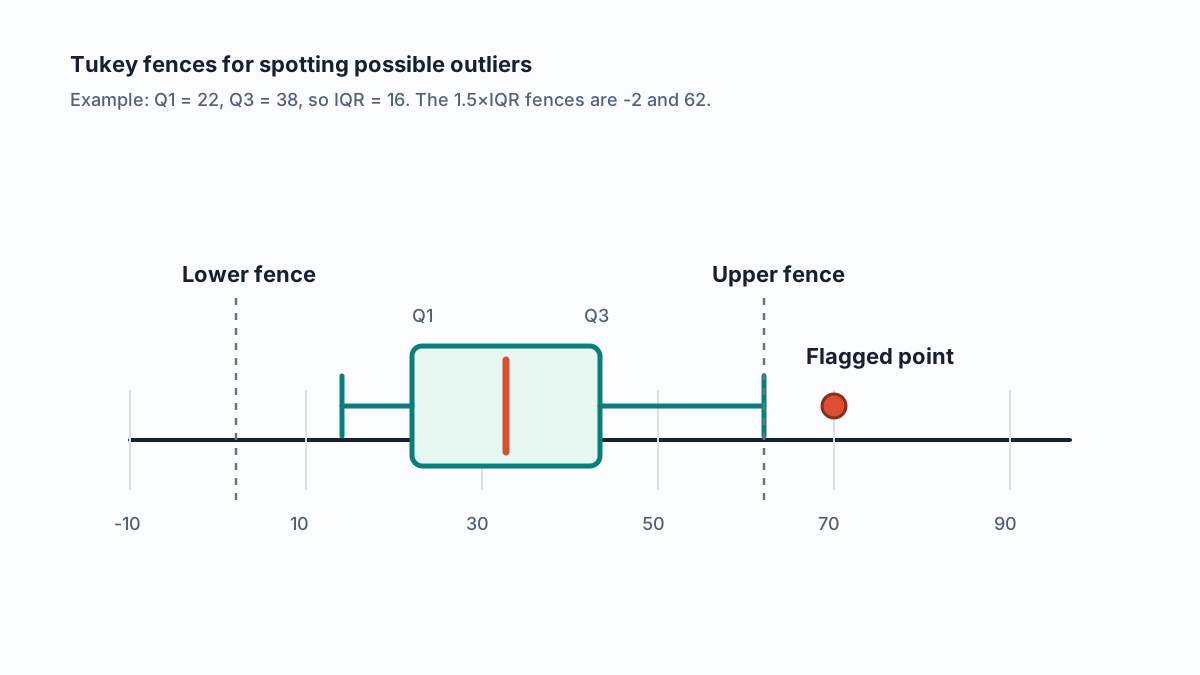
The standard Tukey rule defines invisible “fences” beyond which any data point is considered an outlier: a lower fence at Q1 − 1.5×IQR and an upper fence at Q3 + 1.5×IQR.
The whiskers are then drawn to the last data points that fall within these fences. Any data point lying outside the fences is plotted individually as an outlier. This is a key feature of the iqr in box and whisker plots.
| Whisker Definition Comparison Whisker Rule | Whisker Extends To... | Impact on Outliers |
|---|---|---|
| Minimum & Maximum | The absolute lowest and highest values. | No outliers are shown. |
| 1.5 x IQR (Tukey) | The last data point within the fences. | Flags points beyond the fences as outliers. |
| Percentiles | A specified percentile (e.g., 2nd and 98th). | Defines outliers as the top and bottom 2% of data. |
Once you understand the components of a box plot, the next step is learning how to interpret them to reveal the story in your data. Knowing how to read a box and whisker plot lets you quickly assess a distribution's central tendency, variability, and shape, making it an invaluable skill for data analysis.
To quickly understand your data's distribution, focus on a few key visual cues. When learning how to read box plots, check for these features to extract meaning instantly:
• Median Position: The line inside the box shows the central value. Comparing its position across different plots reveals which groups have a higher or lower central tendency.
• Box Length: The height of the box represents the interquartile range (IQR), which contains the middle 50% of your data. A taller box indicates greater variability or spread in the central part of the distribution.
• Whisker Length: The lines extending from the box show the overall data range. Long whiskers suggest that values are spread out, potentially indicating heavy tails in the distribution.
• Outliers: Individual points beyond the whiskers highlight unusual values that may warrant further investigation.
A wide IQR indicates high variability; long whiskers signal heavy tails or heterogeneity.
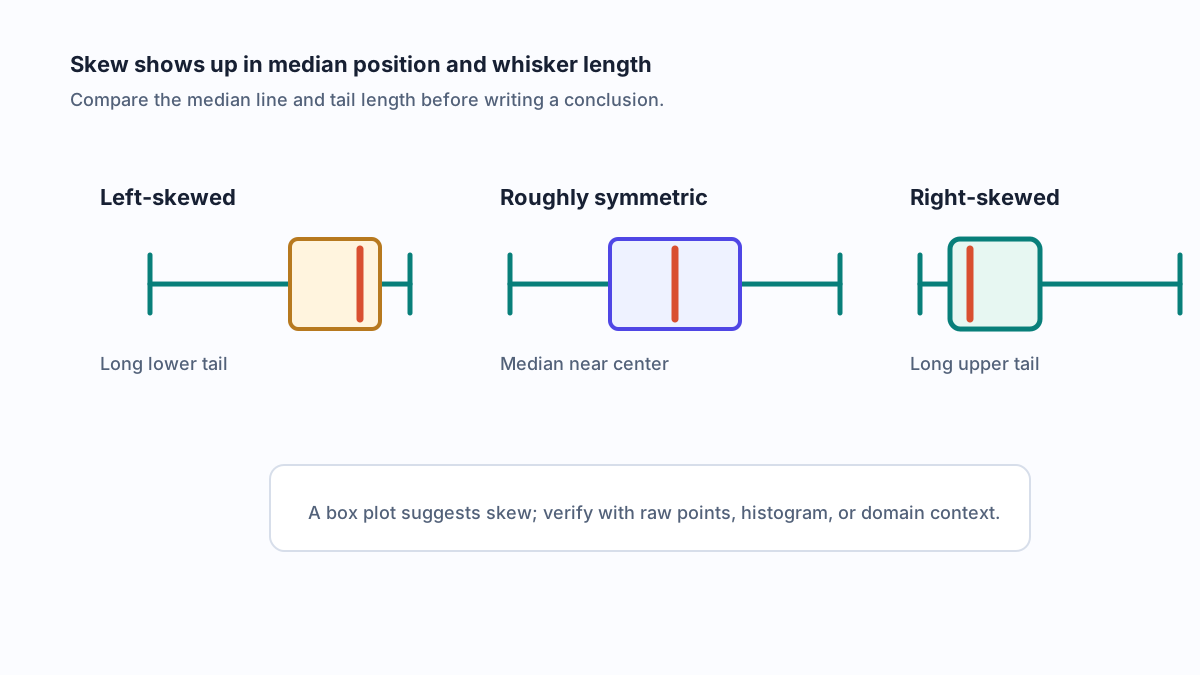
The symmetry of the box and whiskers provides strong clues about the data’s skewness. Here’s how to interpret box plots for skew:
• A right-skewed box plot (or positively skewed) appears when the median is closer to the bottom of the box (Q1) and the upper whisker is longer than the lower one. This shows a long tail of high values.
• A left-skewed box plot (or negatively skewed) occurs when the median is closer to the top of the box (Q3) and the lower whisker is longer. This indicates a long tail of low values.
• A symmetrical distribution is suggested when the median is roughly in the center of the box, and the whiskers are of similar length.
Box plots truly excel when placed side-by-side to compare distributions across different groups. When comparing, assess the median, spread (IQR), and skewness for each group. If the boxes of two plots overlap significantly, it may suggest that the difference between their medians is not statistically significant. For clear reporting, you can summarize your findings in a table.
| Group Comparison Summary Group | Median | IQR (Q3 - Q1) | Notes on Skew/Spread |
|---|---|---|---|
| Group A | |||
| Group B |
While these visual checks offer a powerful overview of your data and its box plot quartiles, those individual points beyond the whiskers—the outliers—deserve a closer look to understand what they truly represent.
While the box and whiskers provide a great summary of a distribution’s core, the individual points plotted beyond them—the outliers—often attract the most attention. Understanding the rigorous, rule-based logic behind their identification is key to interpreting your data correctly and avoiding common pitfalls with outliers and box plots.
Most modern statistical software creates a modified box plot by default, which uses a specific rule to identify outliers. This rule relies on creating invisible boundaries, or "fences," based on the IQR. Here’s how to determine outliers using this standard method:
Calculate the Interquartile Range (IQR): As a reminder, this is Q3 – Q1.
Compute the Lower Fence: The lower boundary is found using the formula: Q1 – 1.5 × IQR.
Compute the Upper Fence: The upper boundary is calculated as: Q3 + 1.5 × IQR.
Any data point that falls outside these fences is flagged as a potential outlier, typically marked with an asterisk or dot. In a modified box plot, the whiskers do not extend to the minimum and maximum values. Instead, they are drawn to the last data points that are still inside the lower and upper fences.
The 1.5×IQR rule is a widely accepted convention for identifying what statistician John Tukey called "mild outliers." Some analysts take this a step further, using a 3×IQR rule to flag "extreme outliers." When presenting your findings from an outlier box and whisker plot or an iqr box and whisker plot, it's crucial to state which rule you used. Most importantly, remember that flagged points require context and investigation.
Outliers are not necessarily errors; they are values beyond a rule-based threshold that may be the most interesting part of your dataset.
Real-world data is rarely perfect, and certain characteristics can affect how a plot appears. When dealing with outliers in box and whisker plots, be aware of these situations:
• Ties at Quartiles: If many identical values exist at Q1 or Q3, the box can appear compressed, making the IQR seem smaller than it is.
• Discrete Data: For data on a fixed scale (like survey ratings from 1 to 5), flagged outliers may appear stacked on a single value. This is a normal result of the data's nature, not an error.
• Shrinking Whiskers: When many repeated values are clustered just inside a fence, a whisker may appear unusually short or even be absent.
Before deciding to remove any box plot outliers , always investigate them. Check for data entry mistakes, measurement errors, or whether the point belongs to a different population. These flagged values are not just noise; they are prompts for deeper analysis. While this systematic approach helps clarify your data, it's also true that box plots have limitations, especially when datasets have unusual shapes.
While box and whisker plots are excellent for summarizing data, their simplicity can sometimes hide important details. Relying on them alone can lead to misinterpretation, especially with complex datasets. Understanding their limitations is crucial for accurate data analysis and reporting.
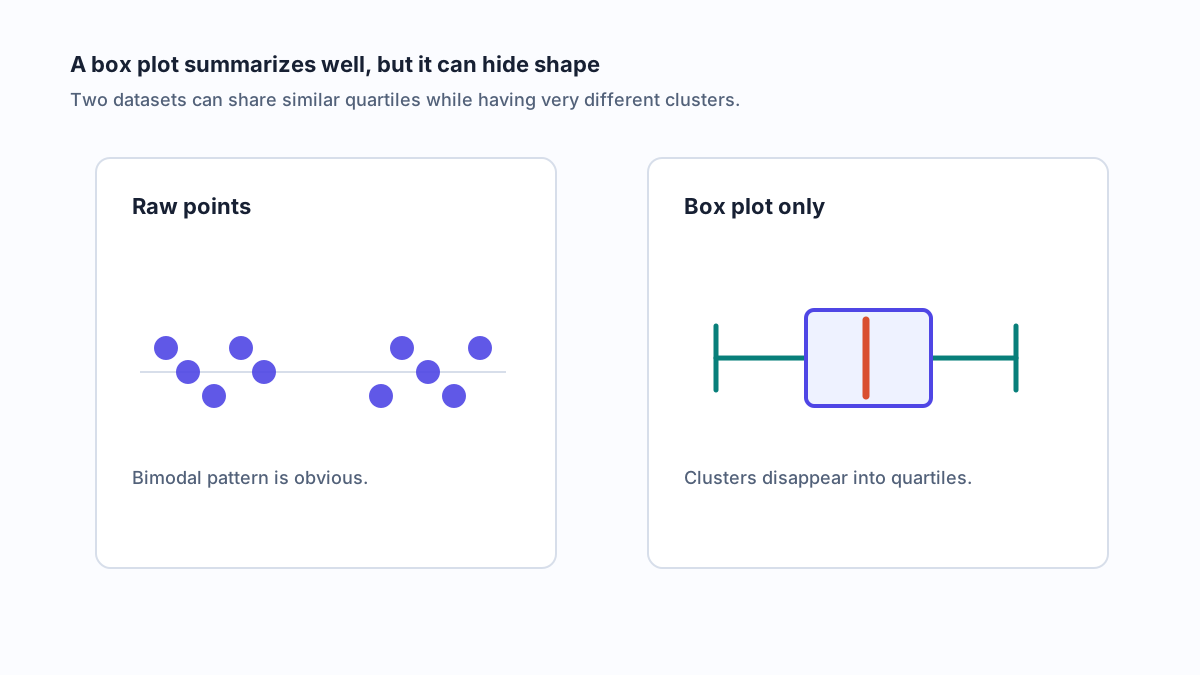
The primary drawback of a box plot is that its summarization can obscure the actual distribution of the data. Different datasets can produce nearly identical box plots, masking critical features like gaps or multiple peaks. For instance, a simple rectangular box might trick you into assuming the data is evenly spread when it's actually clustered into two distinct groups (a bimodal distribution).
• Masking Multimodality: A box plot cannot show if your data has one peak (unimodal) or several, a feature easily seen in a histogram.
• Hiding Sample Size: The plot gives no indication of how many data points are in the distribution, making it hard to judge the significance of what you see.
• Small Datasets (e.g., n < 10): With too few points, the calculated quartiles and whiskers in a box plot may not be meaningful representations of the underlying distribution.
To avoid being misled, you should use box plots as part of a broader exploratory analysis, not as the only tool. Combining them with other visualizations provides a more complete and honest picture of your data.
• Violin Plot: This is a powerful alternative that combines a box plot with a kernel density plot, showing the data's distribution shape and peaks.
• Jittered Strip Plot: For smaller datasets, plotting each individual data point with a small amount of random variation (jitter) reveals the true distribution, including clusters and gaps.
• Histogram: This classic chart is still one of the best ways to visualize the frequency and shape of a single variable, clearly showing a skewed box plot distribution or multiple modes.
• Summary Statistics: Always accompany your plots with a table of key summary statistics (like mean, standard deviation, and sample size) to provide full context.
Always report your sample size and the specific whisker rule used when presenting a box plot. This transparency helps your audience understand the context and limitations of your visualization. Be cautious about making strong claims based on a single graphic, especially with small or complex datasets.
Use multiple views to triangulate the story your data is telling.
Now that you understand both the power and the pitfalls of these plots, let's move on to the practical steps of creating them in popular data analysis tools.
Moving from theory to practice, creating your own box plots is straightforward with modern data tools. Whether you're using a spreadsheet or a programming language, the fundamental steps are similar. Below are reproducible instructions for three of the most popular platforms, showing you exactly how to make a box and whisker plot to visualize your data.
If you're wondering, "how do I create a box and whisker plot in a program I already have?", Microsoft Excel is a great place to start. It has a built-in chart type that makes the process simple. Here’s how to draw a box plot using its dedicated feature:
Prepare Your Data: Organize your data into a single column (for one plot) or multiple columns (for comparing groups).
Select Your Data: Highlight the entire data range you want to plot.
Insert the Chart: Navigate to the Insert tab on the ribbon. In the Charts group, click on Insert Statistic Chart (it looks like a histogram), and then select Box & Whisker.
Customize Your Plot: Once the chart appears, you can right-click on it and select Format Data Series to customize its appearance, such as showing the mean marker or adjusting whisker rules if needed.
For those who prefer coding, creating a matplotlib boxplot in Python or a box and whisker plot r graphic is just a few lines of code. This approach offers greater control and reproducibility.
**Python with Matplotlib:**Python's Matplotlib library is a powerful tool for data visualization. The boxplot() function uses the standard 1.5xIQR rule for whiskers by default.
import matplotlib.pyplot as plt
import numpy as np
# Sample data
data = [np.random.normal(0, std, 100) for std in range(1, 4)]
# Create the plot
plt.boxplot(data, vert=True, patch_artist=True)
plt.show()
You can control whisker length with the whis parameter. For example, whis=1.5 explicitly sets the Tukey rule.
**R with ggplot2:**R's ggplot2 package is renowned for creating elegant graphics. The geom_boxplot() layer automatically generates the plot and, like Matplotlib, defaults to the 1.5xIQR whisker rule.
library(ggplot2)
# Sample data frame
data <- data.frame(
Group = rep(c("A", "B", "C"), each = 100),
Value = c(rnorm(100), rnorm(100, mean=2), rnorm(100, mean=-1))
)
# Create the plot
ggplot(data, aes(x=Group, y=Value)) +
geom_boxplot()
| Key Parameter Comparison Across Tools Tool | Whisker Rule Parameter | Default Behavior |
|---|---|---|
| Excel | Chart Options > Series Options | Inclusive or Exclusive Quartile calculation can be set. |
| Python (Matplotlib) | whis | 1.5 (Tukey's 1.5xIQR rule) |
| R (ggplot2) | coef (inside geom_boxplot) | 1.5 (Tukey's 1.5xIQR rule) |
While these steps show you how to make a boxplot, you might notice slight differences in the final visual depending on the software. Understanding why these variations occur is the key to creating truly consistent and reproducible results across different platforms.
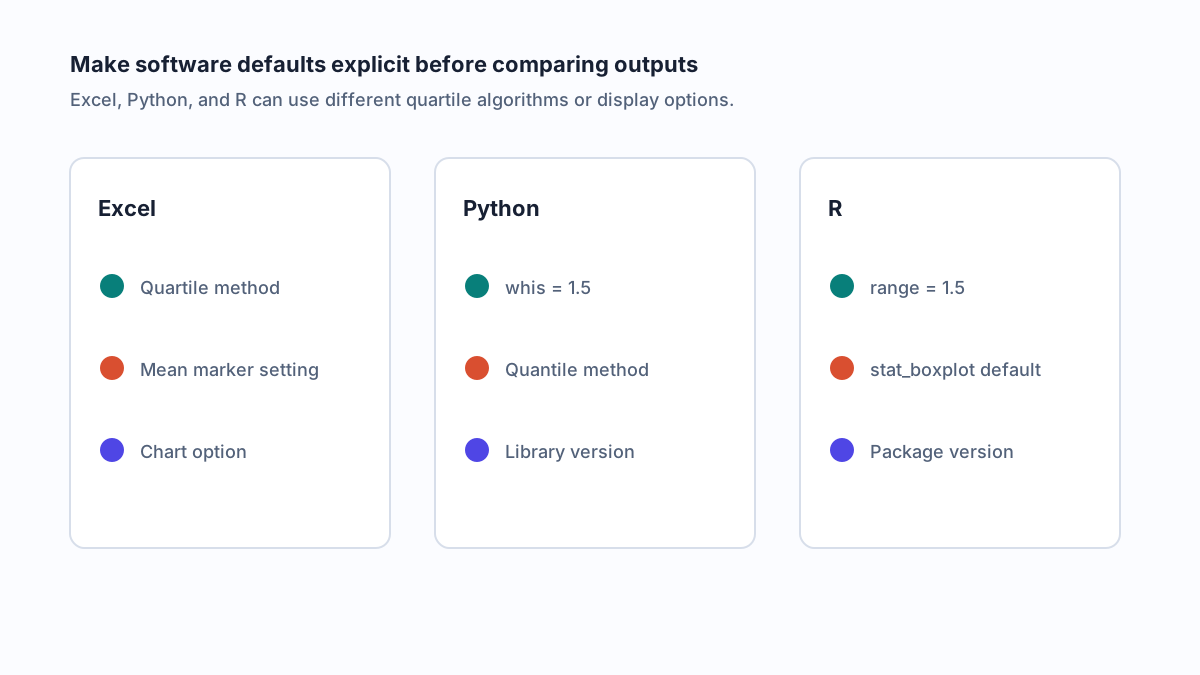
If you've ever created the same plot in different programs, you may have noticed a frustrating inconsistency: the quartiles and whiskers don't always match. An excel box and whisker plot might look slightly different from an r box and whisker graphic, even with identical data. This happens because there is no single, universally mandated standard for these calculations.
The primary source of variation lies in how different software calculates quartiles. There are multiple algorithms, each with a valid mathematical basis, leading to small but noticeable differences in Q1 and Q3. For example, R and Python libraries often default to an interpolation method known as "R-7," while the standard box plot for excel uses a slightly different method similar to "R-6". These approaches reflect different statistical philosophies, and similar discrepancies can be found in other software like the boxplot matlab function. While most modern tools have adopted Tukey’s 1.5×IQR rule for whiskers, the underlying quartile values they use can shift the entire plot.
To ensure your results are comparable and reproducible, you must acknowledge and manage these differences. The first step is to consult the documentation for your specific tool and version to understand its default behavior. When possible, explicitly set the parameters for your plot. For example, in Python's Matplotlib, you can define the whisker rule, and in R, you can specify which of the nine different quantile algorithms to use. While you may not be able to make a box plot excel chart perfectly match an R plot without manual calculations, being aware of the differences is crucial for accurate interpretation.
State your algorithm and whisker rule to make results reproducible.
Another feature that varies is the "notched" box plot. Notches are a narrowing of the box around the median that provides a rough visual guide to the significance of the difference between medians. If the notches of two plots do not overlap, it suggests a statistically significant difference. This feature is readily available in R and Matplotlib but is not a standard option in the built-in box and whisker chart excel tool.
| Software Default Comparison Feature | Excel (Chart Tool) | Python (Matplotlib) | R (ggplot2) |
|---|---|---|---|
| Quartile Algorithm | QUARTILE.INC (R-6 type) | Linear Interpolation (R-7 type) | Linear Interpolation (R-7 type) |
| Default Whisker Rule | 1.5 × IQR | 1.5 × IQR | 1.5 × IQR |
| Outlier Display | Points beyond whiskers | Points beyond whiskers | Points beyond whiskers |
| Notch Availability | No | Yes (notch=True) | Yes (notch=TRUE) |
While aligning these technical details is crucial for accuracy, choosing the right tool for collaboration and exploration can make the entire process smoother.
Choosing the right box and whisker plot maker depends on your specific goals, from creating a quick visual in a spreadsheet to programming a highly customized graphic for a scientific publication. The modern data visualization landscape offers a tool for every need, whether you're looking for an automated box plot calculator or a flexible boxplot maker that gives you full control.
While dedicated statistical software provides the most power, many tools can serve as an effective box chart maker. The best choice balances ease of use, customization, and your need for collaboration.
| Feature Comparison of Popular Tools Tool | Key Features | Best For | Pricing |
|---|---|---|---|
| AFFINE | Infinite canvas, text-to-visual workflow, real-time collaboration, shape library. | Storyboarding, annotating, and presenting comparative plots in a single workspace. | Freemium |
| Excel | Built-in statistical charts, familiar interface, wide availability. | Quick, simple plots for users already working in spreadsheets. | Included with Microsoft 365 |
| Python / R | Full customization (Matplotlib, ggplot2), reproducibility, advanced statistical features. | Data scientists needing precise control and integration into larger analyses. | Open Source (Free) |
| Canva | Drag-and-drop interface, vast template library, strong aesthetic design. | Creating visually appealing, simple charts for presentations and reports. | Freemium |
| Looker Studio | Interactive dashboards, seamless Google ecosystem integration, automated reporting. | Building dynamic, shareable dashboards from various data sources. | Free |
While a powerful box and whisker plot generator like R or Python is essential for the creation process, the analysis workflow doesn't start or end there. This is where a visual workspace can transform your productivity. Tools like Affine offer an infinite canvas that helps you bridge the gap between raw data and a compelling narrative. You can storyboard your analysis by placing multiple box plots side-by-side, annotating outliers with questions, and drawing connections between different visualizations. The ability to seamlessly switch from structured notes to a freeform canvas allows you to organize your thoughts and plan your comparisons before finalizing the graphics.
Effective data storytelling is often a team effort. A collaborative box and whisker plot creator or workspace enhances this process by allowing multiple stakeholders to contribute in real time. Using a platform with an edgeless mode, your team can build a comprehensive dashboard that includes not just the plots but also the summary tables, interpretive text, and action items. This integrated approach ensures that the context behind the data is never lost. Arranging grouped plots, statistical outputs, and qualitative notes together in one view makes complex comparisons intuitive and easy to present, turning a simple box plot maker into a complete analytical environment.
Once you've chosen your tools and created your visuals, the final step is to report your findings clearly and reproducibly.
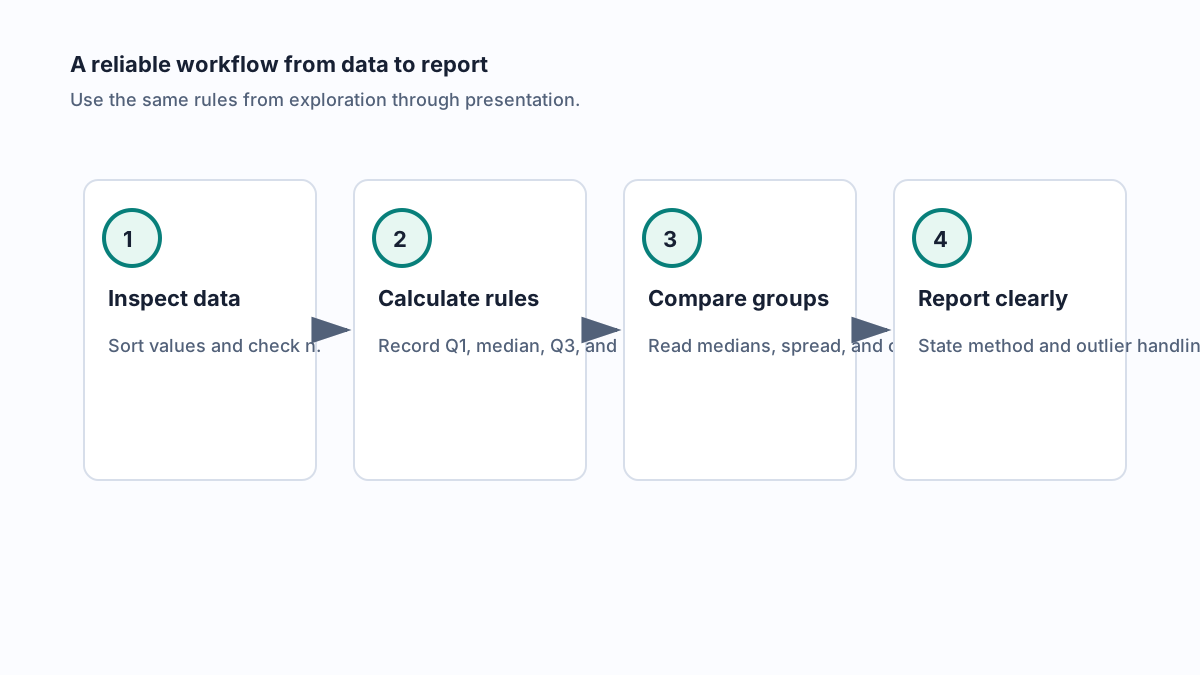
After creating your plots, the final step is to communicate your findings clearly and transparently. A reproducible analysis depends on documenting your methods so others can understand and replicate your results. This wrap-up provides actionable templates and a checklist to ensure your work is robust and easy to interpret.
When describing your visualization in a report or presentation, use precise language that leaves no room for ambiguity. Here is a copy-ready sentence you can adapt for your methods section to provide a complete box plot explanation.
Data are summarized using box plots displaying the median and interquartile range (IQR). Whiskers extend to the last data point within 1.5×IQR of the upper and lower quartiles (Tukey’s method). Points beyond the whiskers are flagged as outliers.
For comparing groups, a simple table logging the key 5 number summary statistics is invaluable for your audience.
| Group Summary Statistics Group | Median | IQR |
|---|---|---|
| Group A | ||
| Group B |
To ensure your analysis is fully transparent, always include the following details. This checklist helps answer common box and whisker plot questions before they are asked.
• Tool and Version: Specify the software used (e.g., R v4.2, Python Matplotlib v3.5).
• Sample Size (n): State the number of observations in each group.
• Quartile Algorithm: Mention the method used if it deviates from the tool's default.
• Whisker Rule: Clearly state the rule applied (e.g., 1.5×IQR, min/max).
• Outlier Handling: Describe how flagged outliers were investigated or treated.
A good visualization often raises new box plot questions. To keep your analysis organized from initial plot to final report, a visual workspace can be invaluable. Using a tool with an edgeless canvas, like Affine, allows you to arrange your box plots, reporting templates, and follow-up notes in one place. This ensures your complete analysis and resulting questions are captured together, streamlining your workflow from discovery to documentation.
A box and whisker plot is summarized by its five-number summary: the minimum, first quartile (Q1), median, third quartile (Q3), and maximum. The central box shows the middle 50% of the data (the interquartile range or IQR), the line inside is the median, and the whiskers extend to show the range of the data, with any points beyond them marked as outliers.
The main advantage of a box plot is its efficiency in comparing distributions across multiple groups in a single visualization. While a histogram is excellent for showing the shape of a single dataset, side-by-side box plots make it easier to quickly compare medians, variability (IQR), and the range of different datasets at a glance.
You can identify skewness by observing the median's position within the box and the length of the whiskers. If the median is closer to the bottom of the box (Q1) and the upper whisker is longer, the data is right-skewed. Conversely, if the median is closer to the top (Q3) and the lower whisker is longer, the data is left-skewed. A symmetrical plot has a central median and whiskers of roughly equal length.
No, outliers are not necessarily errors. They are simply data points that fall beyond a statistical threshold, typically 1.5 times the interquartile range from the box. An outlier should be investigated as it could be a data entry error, a measurement issue, or a genuinely unusual value that is the most interesting part of the dataset.
Box plots can sometimes be misleading because they summarize the data so heavily. Their primary limitation is that they can hide the underlying distribution shape, such as bimodal (two-peaked) distributions, which might look like a simple symmetrical box plot. They also don't display sample size, so it's best to use them with complementary charts like histograms or violin plots for a complete analysis.