All posts
Last edited: Dec 04, 2025

Excalidraw Alternative: Side-By-Side Comparison With Quick Picks

Allen

Start here to pick the right whiteboard for your workflow

When you search for an excalidraw alternative , you’re probably not just chasing a new app—you’re looking for a whiteboard tool that fits how your team thinks, collaborates, and gets work done. Maybe you’ve heard of Excalidraw’s sketchy charm, but you’re running into blockers. Or perhaps your workflow needs more structure, security, or integrations than what Excalidraw currently offers. Let’s break down what drives this search and how this guide will help you decide.

Why teams seek an Excalidraw alternative

Sounds familiar? You need to brainstorm quickly, wireframe a new feature, or map out a process flow with your team. Excalidraw is famous for its low-friction, hand-drawn style that makes ideas feel approachable and editable. But as your team grows or your needs get more complex, you might notice some friction points:

• You want more ready-to-go templates for flowcharts, workshops, or product maps.

• Your company requires enterprise controls like SSO or audit logs.

• You need a robust offline mode or self-hosting for privacy or compliance.

• Integrations with tools like Jira, Confluence, or Slack are mission-critical.

• You need to export diagrams in specific formats for documentation or presentations.

In short, the search for an excalidraw alternative is often about scaling from creative chaos to structured collaboration—without losing momentum.

Where Excalidraw excels and where it struggles

Wondering what is Excalidraw really good at? According to developers who’ve made the switch, Excalidraw shines in:

• Rapid, low-friction brainstorming—think napkin sketches, not polished slides

• Real-time, multiplayer collaboration in the browser

• Simple, intuitive interface with minimal learning curve

But it’s not perfect for everyone. Some common limitations include:

• Limited template and icon libraries compared to traditional diagramming tools

• No advanced enterprise controls (like SSO, detailed permissions, or audit logs)

• Basic export options and less support for presentation-ready diagrams

• Fewer integrations with project management or documentation platforms

• Missing features like layers for progressive reveals during presentations

For some, these are minor trade-offs. For others, they’re dealbreakers—especially as teams grow or compliance needs increase. If you’ve ever typed “excellidraw” or “exceli draw” by mistake, don’t worry—you’re not alone. These common misspellings show just how many people are searching for the right fit, even if they don’t spell it perfectly.

How to use this guide

This article is designed for clarity and action. Here’s how it’s structured so you can skim or deep-dive as needed:

Methodology first: See how we evaluated each tool, including what matters most for teams switching from Excalidraw.

Individual product reviews: Get concise, unbiased rundowns of top alternatives, with pros, cons, and best-fit scenarios.

Side-by-side comparison: Scan a feature matrix and persona-fit checklist to quickly narrow your shortlist.

Practical recommendation: Find actionable next steps and a quick migration plan so you can test your top pick today.

Before you dive in, here are the primary decision factors to keep in mind as you evaluate each excalidraw alternative :

• Collaboration fidelity (real-time, multi-cursor, comments)

• Template and icon library depth

• Export formats (SVG, PNG, PDF)

• Security and SSO/enterprise controls

• Offline and self-hosting support

• Integration with your existing tool stack

• Cost and licensing flexibility (see excalidraw pricing and alternatives)

Choose the tool that fits your team’s workflow—not just the one with the longest feature list. The best whiteboard is the one everyone actually uses.

Ready to find the right match for your next project? Let’s get started.

Our evaluation method and trial checklist

When you’re searching for the right excalidraw alternative , it’s easy to get lost in a sea of features and promises. How do you know which tool will truly support your team’s needs? Our approach is to cut through the noise by relying on transparent, repeatable criteria—so you can make a confident, informed decision that sticks.

Selection criteria we used

Imagine you’re comparing tools for the first time. What matters most? We focused on the practical features and controls that teams actually use, not just what looks good on a landing page. Here’s what we looked for in every excalidraw alternative :

• Real-time collaboration (multi-cursor, live updates)

• Availability and variety of templates

• Export formats (SVG, PNG, PDF) for sharing or documentation

• Offline mode and self-hosting options for privacy and control

• AI assistance or smart diagramming features

• Security: SSO/SAML, encryption, and compliance support

• Flexible pricing tiers and transparent costs

We also considered workflow boosters like sticky notes, shape libraries, and advanced search. If you’re looking for features like an excalidraw checkbox or want to download excalidraw windows 11 free , we made sure to highlight tools with similar quick-access elements and offline installers where available.

Sources and validation

Sounds complex? To keep things fair, we gathered our data from official vendor documentation, pricing pages, changelogs, and product feature lists. When possible, we referenced hands-on user guides or institutional best practices—like the Excalidraw official guide—to ensure accuracy and real-world relevance. For pricing or security details, always check the latest numbers on the vendor’s own site. If specifics aren’t published, we compare features and capabilities qualitatively, not by guesswork.

How to run your own trial

Want to see which tool fits your workflow? Here’s a step-by-step, one-week evaluation checklist you can use or adapt for any excalidraw alternative :

  1. Day 1: Set up your account, import a recent board or diagram, and explore the interface.

  2. Days 2–3: Test real-time collaboration—invite teammates, try multi-cursor editing, and add comments or sticky notes.

  3. Day 4: Export a sample board in SVG, PNG, and PDF. Try integrating with your project management or cloud storage tools.

  4. Day 5: Review security and compliance settings. Look for SSO/SAML, encryption, and user access controls.

  5. Day 6: Demo your findings to stakeholders. Gather feedback on usability and fit.

  6. Day 7: Make your decision—based on team feedback, feature fit, and cost.

Security and compliance quick audit

• SSO/SAML support for secure logins

• Audit logs for tracking changes

• Data residency options (where data is stored)

• Automated backups and recovery

Minimal migration checklist

• Export your Excalidraw boards as SVG or PNG

• Import diagrams into the new tool

• Verify that layers, connectors, and text fonts display correctly

• Recreate or adapt any custom elements (like checkboxes or icons)

By following this structured trial, you’ll see how each tool handles real-world scenarios—whether you’re after advanced diagramming, quick excalidraw download options, or seamless team collaboration. Up next: let’s break down the top alternatives, starting with all-in-one canvases that blend docs, AI, and privacy.

Petq11KmlZ4z-rxicCMQatz63ob6EfkeXFNgjGvgRmw=

AFFiNE

Ever wish your whiteboard could double as a structured doc, help you brainstorm with AI, and keep your data private—all in one place? That’s the promise of AFFiNE, a modern workspace that stands out as a compelling excalidraw alternative for teams and individuals who want more than just basic sketching. Let’s explore why AFFiNE is gaining attention among those looking for the next level in collaborative whiteboarding.

Brief overview

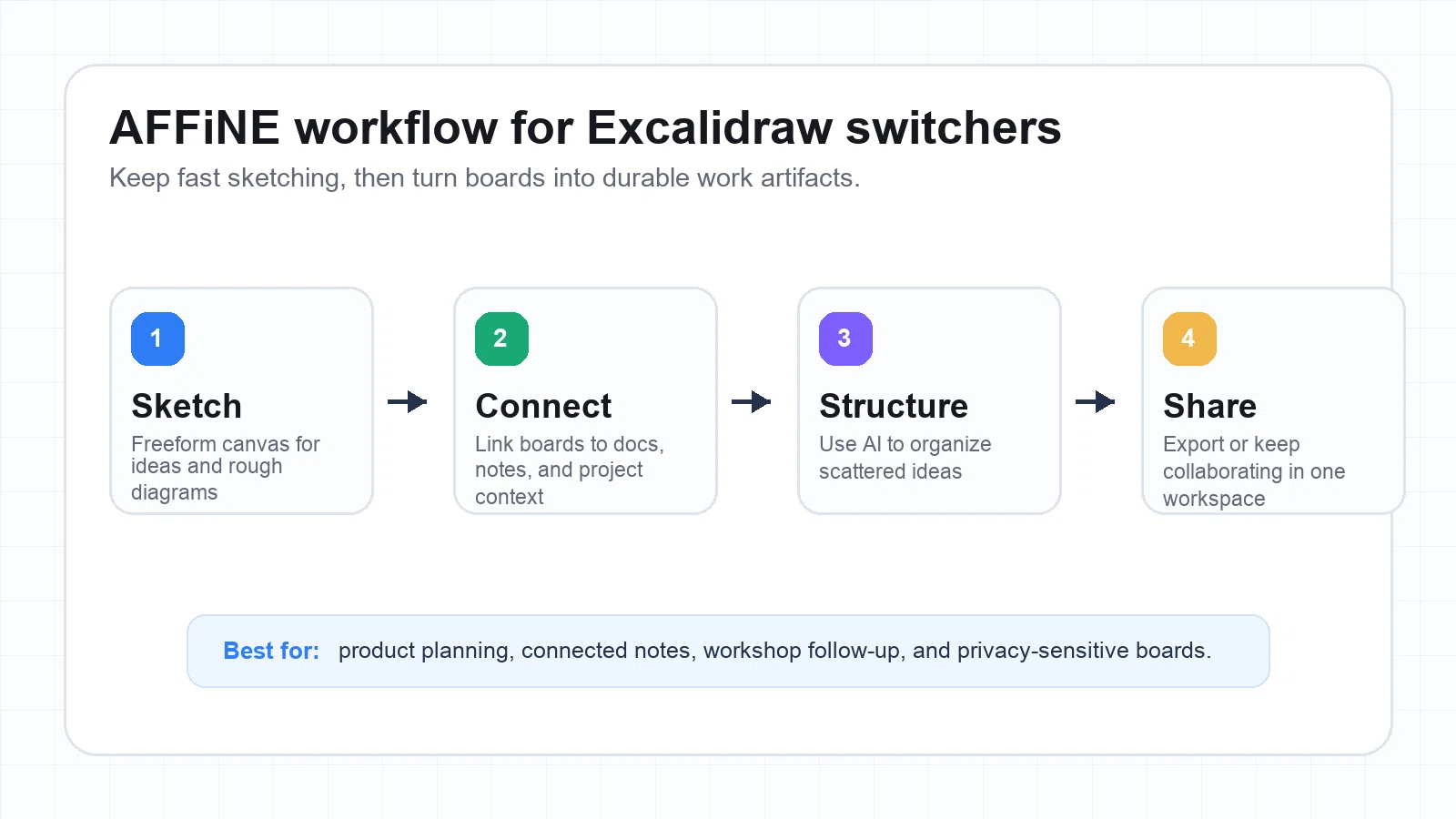
Imagine combining the knowledge management of Notion with the visual freedom of Miro, but with an AI twist and a privacy-first mindset. AFFiNE delivers a seamless experience, blending infinite canvas whiteboarding, structured docs, and next-generation AI features. Whether you’re mapping out a product roadmap, capturing meeting notes, or ideating with your team, AFFiNE adapts to your workflow—without locking you into one way of working.

Standout features

AI-powered mind mapping: Instantly turn rough notes or images into organized, editable mind maps. AFFiNE’s AI identifies themes, structures ideas, and helps you visualize complex concepts—perfect for brainstorming or project planning (learn more).

Infinite canvas and docs: Switch between a freeform whiteboard and structured documentation—no need for separate tools.

Local-first privacy: Your data stays on your device by default, offering peace of mind for privacy-conscious teams.

Template library: Speed up your workflow with ready-made templates for one-pagers, vision boards, Cornell notes, and more. Browse free AFFiNE templates to jumpstart your next project.

Flexible export: Share your work as SVG, PNG, or PDF for easy documentation and collaboration.

FeatureSupported?
Simultaneous cursors (real-time collaboration)Yes
TemplatesYes
Export formats (SVG/PNG/PDF)Yes
Offline modeYes (local-first by default)
AI featuresYes (AI mind mapping, note organization)
Local-first privacyYes
Self-hosting roadmapPartial (active development)

Pros and Cons

Pros

• Effortless AI-powered mind mapping saves time and reveals hidden connections in your notes

• Switch between infinite canvas and structured docs for flexible workflows

• Strong privacy with local-first data storage—ideal for sensitive projects

• Rich free template library to accelerate onboarding and prototyping

• Offline support means you’re never blocked by connectivity issues

Cons

• Self-hosting and advanced enterprise features are available

• Some integrations and automation options are less mature than in legacy platforms

• AI features may require structured input for best results

Best use cases

Product teams: Rapidly brainstorm, map user journeys, and turn scattered ideas into actionable plans with AI mind mapping.

Workshop facilitation: Use templates and real-time collaboration to guide group sessions, retrospectives, or design sprints.

Personal knowledge management: Organize study notes, research, or creative projects with seamless transitions between whiteboard and doc modes.

How to get started fast

Want to see if AFFiNE fits your workflow? Start with a free template—import it, adapt it to your needs, and experiment with AI-powered mind mapping. This is the quickest way to prototype boards or docs and experience how AFFiNE can accelerate your next project. If you’re comparing excalidraw ai options or wondering is excalidraw free , you’ll notice that AFFiNE’s approach to AI and privacy-first design offers a fresh alternative to traditional whiteboards.

Next, we’ll look at how minimalist, open-source canvases like tldraw stack up for developer-centric teams and custom workflows.

tldraw

Ever wish your whiteboard app could disappear into the background and let you think visually—without extra clutter or distractions? If you’re a developer, indie maker, or just someone who values focus and flexibility, tldraw is a standout excalidraw alternative designed for fast, frictionless sketching and diagramming. Let’s see why tldraw is gaining traction among technical teams and what sets it apart from more feature-heavy platforms.

Brief overview

Imagine opening a whiteboard and instantly sketching out ideas, logic flows, or quick diagrams—no learning curve, no waiting. That’s the tldraw experience. As a free, open-source whiteboard tool, tldraw is built for speed and simplicity. You can use it right in your browser, or, if you’re technically inclined, fork the tldraw GitHub repo to customize, self-host, or embed it in your own apps (learn more).

Unlike heavier tools, tldraw doesn’t overwhelm you with options. You get a clean design surface, real-time collaboration, and the freedom to build your own extensions or tweak the UI. It’s ideal for quick system design interviews, technical brainstorming, or embedding a whiteboard widget in your own product.

Standout features

Minimalist, fast interface: Jump from idea to diagram in seconds—no extra steps or distractions.

Open-source and free: Fork, customize, or self-host for complete control and privacy.

Real-time collaboration: Multiple users can sketch, annotate, and connect ideas live.

Extensible via SDK: Integrate tldraw into React apps, customize appearance, or add plugins (installation guide).

Self-hosting and asset control: Serve assets from a CDN or your own infrastructure for compliance or branding.

AI-powered features: Access innovative tools like "make real," which turns hand-drawn diagrams into functional components using GPT.

FeatureSupported?
Simultaneous cursors (real-time collaboration)Yes
TemplatesPartial (basic, not extensive)
Export formats (SVG/PNG)Yes
Offline supportYes (via self-hosting or local builds)
Plugins/extensionsYes (SDK, custom UI)
Self-hosted optionsYes (open source repo)

Pros and Cons

Pros

• Lightning-fast, distraction-free interface for instant sketching

• Fully open source—ideal for developers needing custom embeds or integrations

• Easy to fork, self-host, or extend for privacy, compliance, or branding

• Innovative AI features like "make real" for turning sketches into components

• Great fit for technical interviews, developer workshops, or rapid prototyping

Cons

• Template library is limited compared to enterprise whiteboards

• May require technical setup for advanced features or self-hosting

• Lacks some enterprise controls (SSO, granular permissions) out of the box

• Not as polished for non-technical audiences or large-scale facilitation

Best use cases

Developers and indie makers: Sketch system designs, API flows, or quick UI mockups before coding.

Custom whiteboard widgets: Embed tldraw in your own excalidraw app or product for a seamless drawing experience.

Technical interviews: Practice or conduct interviews where hand-drawn diagrams are required.

Workshops and diagramming basics: Run lightweight brainstorming sessions or technical workshops with minimal friction.

Many teams comparing tldraw vs excalidraw pick tldraw for its open-source flexibility and developer-centric workflow—even if it means trading off advanced templates or turnkey enterprise features.

Curious about deploying tldraw on your own infrastructure or integrating it into your stack? Check out the official GitHub repository and installation docs for hands-on guidance. Next, let’s see how enterprise-ready whiteboards stack up for larger teams and structured collaboration.

48XGIUmJWtEM9EuovNNRSYCwxvvnrUr5ns1cI7szb0U=

Miro

When your team outgrows basic sketching and you need a digital whiteboard that can handle complex projects, large groups, and enterprise requirements, Miro stands out as a leading excalidraw alternative. But what makes Miro a go-to choice for organizations scaling up their visual collaboration? Let’s explore its capabilities, where it shines, and how it supports everything from excalidraw flowchart replacements to multifaceted workshops.

Brief overview

Imagine a platform where brainstorming, diagramming, and cross-functional teamwork happen in real time—no matter where your colleagues are. Miro is a robust visual collaboration suite designed for modern enterprises, providing a digital canvas that supports everything from sticky-note ideation to detailed process mapping. Its flexibility lets you manage multiple projects, run workshops, and build out product roadmaps, all while keeping security and compliance in check.

Standout features

Massive template library: Over 300 pre-built templates for brainstorming, agile rituals, flowcharts, and more.

Real-time multi-cursor collaboration: See every teammate’s actions live, making remote sessions feel like you’re in the same room.

Advanced facilitation tools: Built-in timers, voting, frames, and presentation mode keep meetings structured and interactive.

Enterprise security: SSO/SAML, granular permissions, audit logs, and compliance features for regulated industries.

Integrations: Connect with Jira, Confluence, Slack, and other core business apps for seamless workflows.

Flexible exports: Download boards as SVG, PNG, or PDF for documentation or sharing.

FeatureSupported?
Multi-cursor (real-time collaboration)Yes
Template libraryYes (300+ templates)
Export formats (SVG/PNG/PDF)Yes
Timer, voting, framesYes
Integrations (Jira, Slack, etc.)Yes
Enterprise controls (SSO/SAML, audit logs)Yes

Pros and Cons

Pros

• Extensive template library accelerates onboarding and ideation

• Facilitation tools make workshops, retrospectives, and sprint planning efficient

• Scales from small teams to large organizations with robust admin and security controls

• Deep integrations with popular business tools streamline workflows

• Supports complex excalidraw flowchart diagrams and structured documentation

Cons

• Feature-rich interface can feel overwhelming for new users

• Pricing may be higher than basic tools—review the official pricing page for current tiers

• May require training for full adoption in large enterprises

• Some advanced features (like Blueprints) are only available in paid plans

Best use cases

Product discovery and mapping: Use templates and integrations to align teams and visualize user journeys.

Sprint planning and retrospectives: Facilitate agile rituals with timers, voting, and structured boards.

Cross-functional workshops: Run engaging sessions for distributed teams, leveraging real-time collaboration and facilitation tools.

Enterprise process documentation: Create and share detailed diagrams with export options for reporting and compliance.

Migration note: Moving from Excalidraw to Miro

Migrating your boards is straightforward—export your Excalidraw content as SVG or PNG, then import it into Miro using the intuitive import tools. For complex diagrams, you may need to redraw connectors or adjust layouts to take full advantage of Miro’s interactive features. This process ensures your team’s work stays interactive and editable in its new home.

Collaboration fidelity checklist

• Test real-time collaboration with multiple users—watch for cursor lag or sync issues

• Simulate a workshop: add 50+ sticky notes, use voting, and try presentation mode

• Export a board in all formats (SVG, PNG, PDF) and verify layout consistency

For organizations seeking a scalable, secure, and feature-rich upgrade from basic whiteboards, Miro delivers—whether you’re a growing excalidraw company or simply need more than what’s excalidraw free offers. Next, we’ll explore FigJam’s playful, design-first approach for creative teams and Figma users.

FigJam

Ever wondered what happens when whiteboarding meets the energy of a design studio? If you’re searching for an excalidraw alternative that feels fun, expressive, and tightly woven into your team’s creative process, FigJam is worth a close look. Let’s break down why this tool is a favorite for design-led teams and how it stacks up in the figma vs excalidraw debate.

Brief overview

FigJam is Figma’s collaborative online whiteboard, purpose-built for brainstorming, critique sessions, and workshops. Unlike traditional diagramming tools, FigJam brings a playful vibe—think stickers, emojis, and live reactions—while staying practical for mapping out flows, gathering feedback, or running retros. Its real strength? Seamless integration with Figma design files, so you can move from sticky notes to polished prototypes in a single workflow.

Standout features

Expressive collaboration: Use stickers, dot voting, stamps, and emojis to capture feedback and keep sessions lively.

Widgets and templates: Access a growing library of widgets—timers, polls, icebreakers—and templates for meetings, mapping, and more.

Real-time collaboration: Jam with teammates using multi-cursor editing, cursor chat, and open sessions (no Figma account needed for guests).

Smooth Figma integration: Copy assets between Figma and FigJam, keep special objects editable, and access shared component libraries.

Lightweight diagramming: Quickly sketch flows, wireframes, or user journeys—ideal for early ideation, though less suited to advanced technical diagrams.

FeatureSupported?
Real-time cursors (multi-user)Yes
Templates libraryYes (team meetings, mapping, etc.)
Export formats (SVG/PNG/PDF)Partial (PNG/PDF; SVG via Figma export)
Widget ecosystemYes (timers, polls, games, etc.)
Figma integrationYes (copy/paste, shared libraries)
SSO optionsYes (in paid tiers)

Pros and Cons

Pros

• Playful, low-friction interface encourages creativity and team engagement

• Deep integration with Figma makes it easy to move from whiteboard to design

• Open sessions let guests join without Figma accounts—great for workshops

• Rich widget and sticker ecosystem for interactive meetings and icebreakers

• Templates speed up setup for critiques, stand-ups, and mapping

Cons

• Flowcharting and technical diagram depth is lighter than in dedicated tools like excal draw or calidraw

• Enterprise admin controls and compliance features may lag behind heavy-duty platforms

• Export options for SVG are indirect (requires moving content to Figma Design)

• Some advanced integrations and automations are still evolving

Best use cases

Design critiques and workshops: Run feedback sessions, map user flows, or brainstorm features in a visual, interactive space.

Team stand-ups and retrospectives: Use sticky notes, voting, and templates to keep meetings engaging and actionable.

Lightweight user flows and wireframes: Quickly sketch early concepts before moving to high-fidelity design in Figma.

Cross-functional ideation: Invite non-designers to participate easily—no steep learning curve, just start jamming.

Choose FigJam when collaborative rituals and creative energy are core to your team—especially if you already use Figma. It’s about making feedback, ideation, and early design feel effortless, not just functional.

While FigJam may not replace every technical diagramming need, its blend of playfulness and practical design integration makes it a top excalidraw alternative for creative teams. Next, we’ll see how diagrams.net (draw.io) serves those who need precision and offline control.

diagrams.net (draw.io)

Brief overview

Ever needed a diagramming tool that feels more like a technical instrument than a digital whiteboard? If your work involves engineering diagrams, network maps, or detailed process flows, diagrams.net (formerly draw.io) stands out as a top excalidraw alternative. Unlike tools focused on freeform sketching, diagrams.net is built for precision, structured documentation, and secure, offline work environments. It’s open source, free to use, and offers both a web app and a downloadable desktop app that works on Windows, Mac, and Linux—making it ideal for teams prioritizing data control or operating in restricted environments.

Standout features

Extensive flowchart and diagram libraries: Access a wide range of shapes, connectors, and symbol sets for software, network, and business process diagrams.

Flexible export formats: Save diagrams as SVG, PNG, or PDF. You can even embed diagram data in image files for later editing or sharing.

Offline desktop app: Work entirely offline with the draw.io desktop application—no internet required. Your diagrams are stored locally for maximum security.

Cloud and local integrations: Seamlessly connect with Google Drive, OneDrive, and other storage platforms, or keep everything file-based for strict control.

File-based collaboration model: Share diagrams as files (XML, PNG, SVG) and use version control or shared drives for team workflows. While real-time editing is lighter than some whiteboards, file-based workflows excel for documentation and audit trails.

Self-hosting options: Deploy diagrams.net on your own infrastructure if your organization requires total control over data and access.

FeatureSupported?
Flowchart librariesYes
Export formats (SVG/PNG/PDF)Yes
Offline desktop appYes
Integrations (Google Drive/OneDrive)Yes
Collaboration modelFile-based (not real-time multi-cursor)
Self-hosting optionsYes

Pros and Cons

Pros

• Highly precise diagramming—ideal for engineering, architecture, and technical documentation

• Full offline support for secure or disconnected environments

• Flexible file-based workflows—easy versioning, backups, and controlled sharing

• Open source and free, with optional self-hosting for total data control

• Rich export/import options for sharing or migrating diagrams

Cons

• Real-time collaboration is limited compared to live whiteboards

• Interface is less playful—better for technical users than creative workshops

• Requires manual file management for collaboration and version control

• Some advanced features (like cloud integrations) are unavailable offline unless preconfigured

Best use cases

Engineering diagrams: Map out system architecture, database schemas, or network topologies with precision.

Architecture maps: Document software or infrastructure designs for technical teams.

BPMN-style flows: Create business process models and flowcharts for compliance or process improvement.

Technical documentation: Embed diagrams in wikis, handbooks, or audit reports—especially when strict versioning or offline access is required.

Migration note: Moving from Excalidraw to diagrams.net

If you’re switching from Excalidraw, you can import your boards as SVG or PNG images into diagrams.net. For the best results, redraw connectors and shapes using diagrams.net’s libraries to maintain clean semantics and editability. This approach ensures your diagrams remain precise and easy to update as your documentation evolves.

Comparing excalidraw vs draw.io , you’ll notice that diagrams.net (sometimes misspelled as excalidaw or excalidrwa) excels in precision, offline control, and technical documentation—while offering a different collaboration style than real-time whiteboards. Next, we’ll pull all these alternatives together in a side-by-side feature comparison to help you quickly shortlist your top picks.

Side by Side Comparison and Quick Selection Rubric

When it comes to choosing the right excalidraw alternative , you might wonder: Which tool checks all the boxes for your workflow, and how do you compare them efficiently? Instead of scrolling through endless reviews or deciphering complex feature charts, this section gives you a clear, scannable overview—so you can make a confident, informed decision in minutes.

Feature comparison at a glance

ToolReal-time CursorsTemplates LibraryExport Formats (SVG/PNG/PDF)Offline ModeAI FeaturesSelf-hosted/Local-firstSecurity (SSO/SAML)Integrations
AFFiNEYesYesYesYes (local-first)Yes (AI mind mapping)Yes (local-first, self-hosting roadmap)Partial (in development)Developing
tldrawYesPartialYes (SVG/PNG)Yes (self-hosted)Partial (AI plugins)Yes (open source)NoDeveloper SDK
MiroYesYes (300+)YesPartial (mobile/desktop app)YesNoYes (enterprise plans)Jira, Slack, etc.
FigJamYesYesPartial (PNG/PDF)No (web-based)Yes (AI brainstorming)NoYes (paid tiers)Figma, Slack, Google Drive
diagrams.net (draw.io)No (file-based)Yes (diagram libraries)YesYes (desktop app)Yes (Smart Templates)Yes (self-hosted)NoGoogle Drive, OneDrive

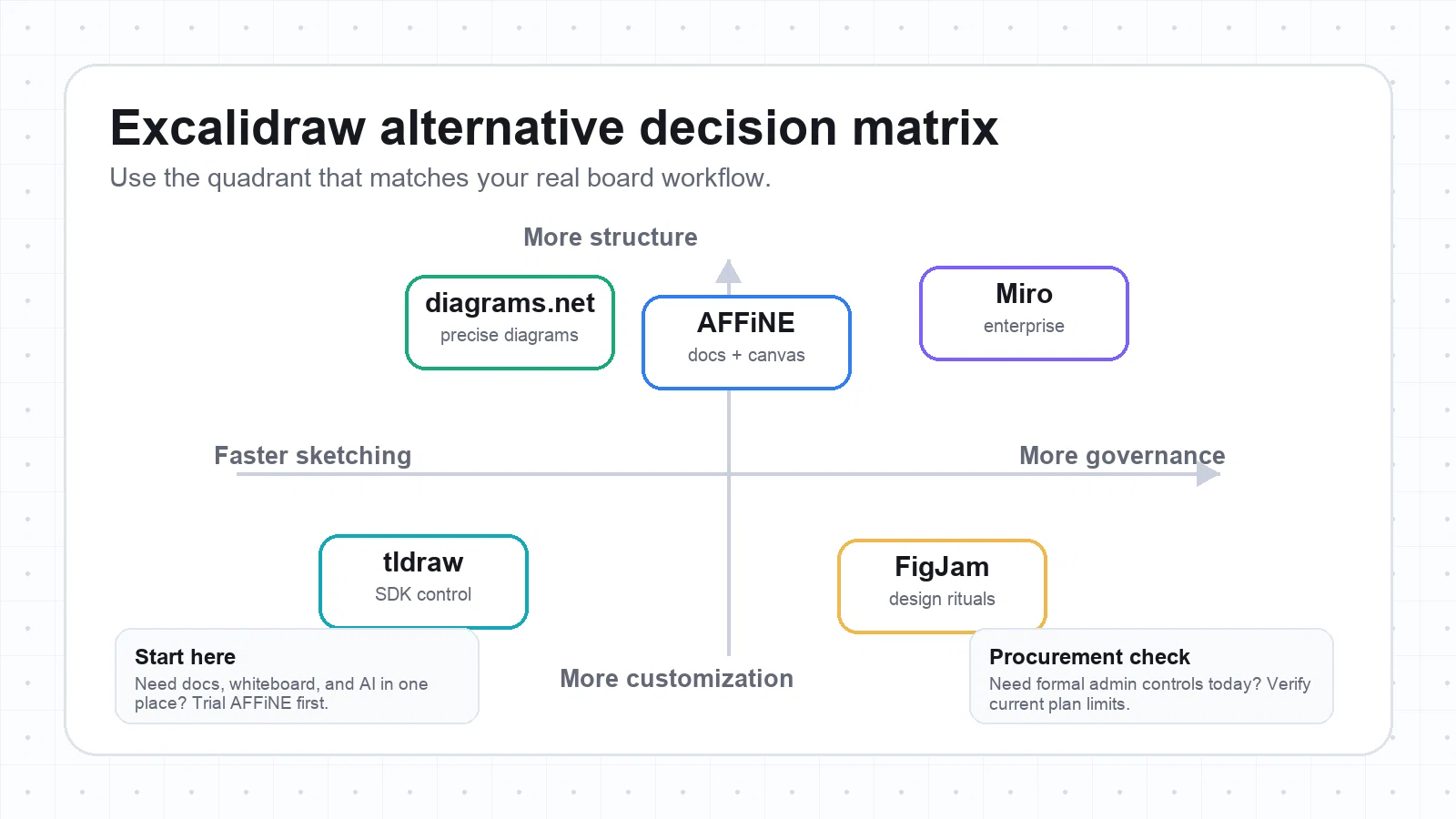
While this matrix covers the essentials, you’ll notice that some tools (like AFFiNE and tldraw) prioritize privacy and local-first workflows, whereas others (like Miro and FigJam) excel in integrations and enterprise controls. If you’re exploring whiteboard fox alternatives or even looking for tools that use whiteboard fox codes for quick session sharing, pay special attention to collaboration and guest access features in this table.

Who each tool fits

Design teams: FigJam —best for playful, visual ideation and seamless Figma handoff.

Product teams: AFFiNE —ideal for blending structured docs, infinite canvas, and AI-powered brainstorming.

Educators: Miro or whiteboard fox alternative —great for interactive workshops and large group collaboration.

Engineers: diagrams.net (draw.io) —precise technical diagrams, offline use, and robust file management.

Enterprise IT: Miro —advanced admin controls, SSO/SAML, and scalable integrations for compliance-driven teams.

Imagine running a virtual classroom or large workshop: tools supporting whiteboard fox codes or similar session-sharing methods will make spontaneous collaboration easier—something to consider if you need fast, link-based access.

Quick trial rubric

  1. Collaboration fidelity: Does the tool support real-time editing, multi-cursor, and easy guest access?

  2. Diagram power: Are templates and export formats robust enough for your needs?

  3. Facilitation features: Look for timers, voting, sticky notes, and presentation tools.

  4. Security: Check for SSO, audit logs, data residency, and compliance options.

  5. Total cost of ownership: Consider both free and paid tiers, and any hidden costs for advanced features.

Score each tool from 1–5 on these criteria during your trial. This approach works whether you’re comparing top-tier platforms or lighter whiteboard fox alternatives for quick, code-based sessions. Up next, we’ll help you map your shortlist to a fast migration plan and actionable next steps.

gukorl8sDccoC8-avUtGisjxl8rPvZWEVGSHRR9j4S8=

Final Recommendation and Quickest Next Steps for Choosing Your Excalidraw Alternative

Still weighing your options after comparing all those excalidraw alternatives? Let’s break it down to the essentials—so you can confidently pick the tool that matches your workflow, migrate your boards in under an hour, and start collaborating better, faster.

Pick this if you need…

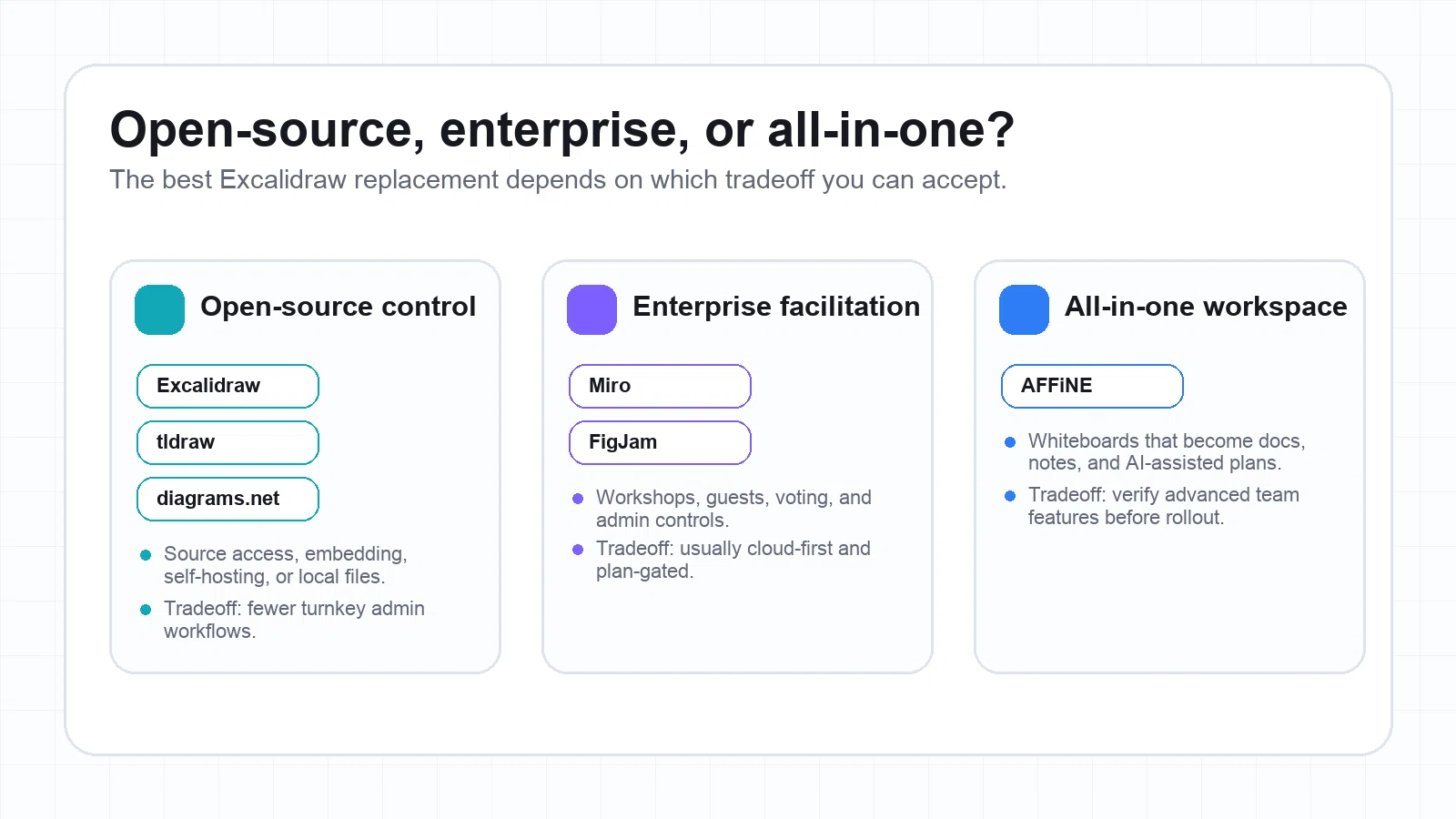
All-in-one ideation, docs, and privacy: AFFiNE is your best fit if you want to blend structured docs with an infinite whiteboard, leverage AI-powered mind mapping for instant brainstorming, and keep your data local-first for privacy. Its rich template library means you can prototype a new board in minutes—no blank-page anxiety, just pick a free AFFiNE template and go. If privacy or data residency is top of mind, AFFiNE’s local-first approach will give you peace of mind.

Enterprise workshops and scale: Choose Miro if your team needs robust facilitation tools, a massive template library, and enterprise controls like SSO/SAML, audit logs, and deep integrations. Miro is a powerhouse for large-scale collaboration—think sprint planning, cross-team workshops, and interactive sessions with dozens of participants.

Open-source customization and developer control: Go with tldraw if you want a minimalist, open-source whiteboard you can self-host, extend, or embed in your own products. Perfect for developers, indie teams, or anyone who values control and flexibility over a polished UI or enterprise features.

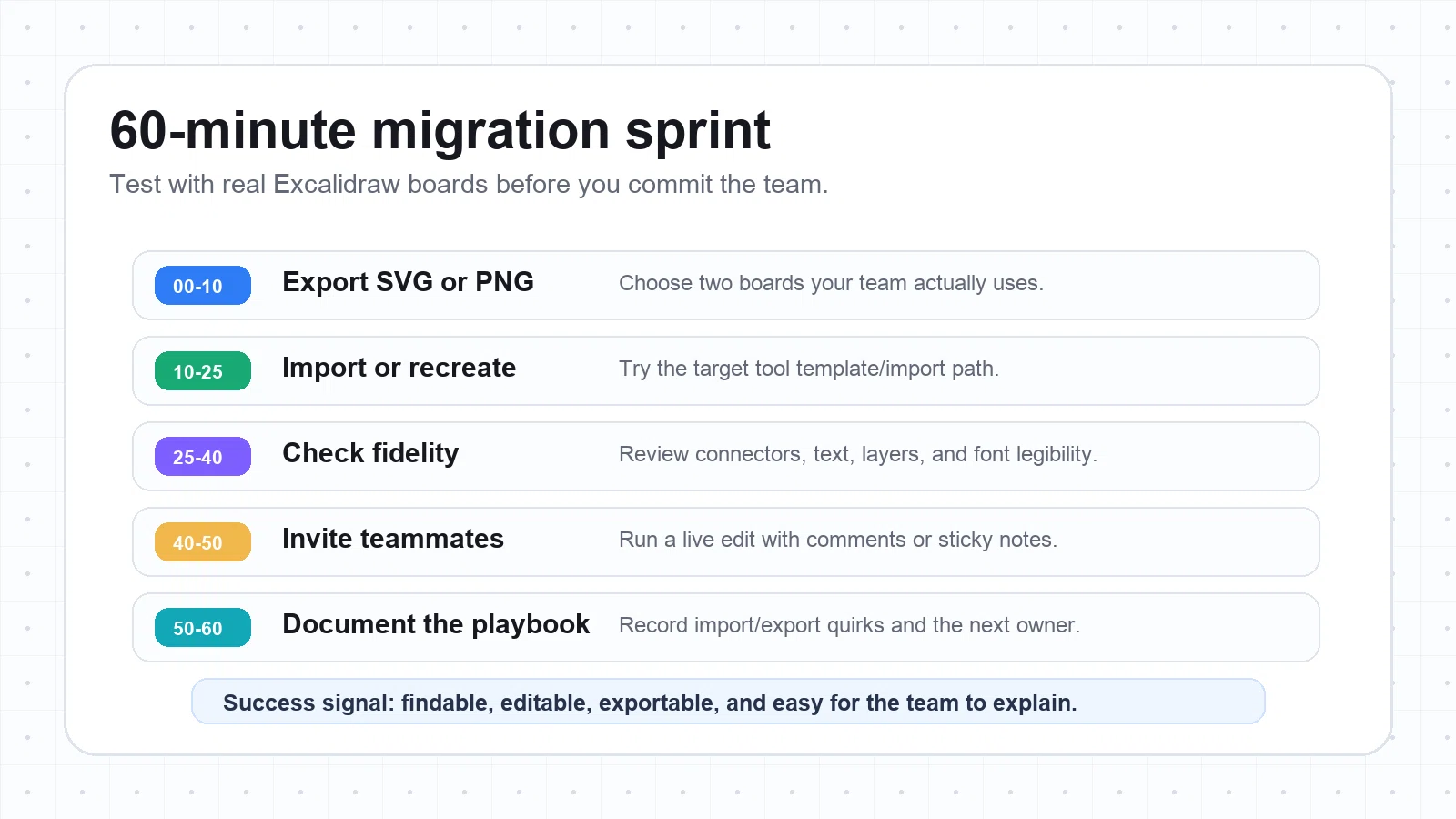
Fast migration plan (60-minute sprint)

Ready to switch from ecalidraw or excalidrw to your new platform? Here’s a step-by-step migration sprint you can follow in under an hour:

  1. Export your key Excalidraw boards as SVG or PNG files. Choose the diagrams you use most often or those you’ll need for upcoming projects.

  2. Create two test boards in your chosen tool. Use a template in AFFiNE to jumpstart your first board, or use the import function in Miro, tldraw, or diagrams.net to bring in your exported files.

  3. Validate connectors and text legibility. Check if lines, arrows, and text import cleanly. Redraw connectors if needed for clarity.

  4. Test collaboration by inviting two peers. Try real-time editing, comments, or sticky notes to ensure the new platform supports your team’s workflow.

  5. Finalize your import/export workflow. Document any quirks or steps for future migrations, and save your updated boards in the new tool’s preferred format.

This approach works whether you’re moving from Excalidraw, ecalidraw, or another variant.

Next steps: Jumpstart your hands-on trial

Start with a template: Don’t waste time reinventing the wheel. If you’re trying AFFiNE, browse the free template library and pick one that matches your use case—whether it’s a product roadmap, vision board, or meeting notes. Templates are shared across your workspace and can be customized for your team’s needs (learn how to use templates).

Experiment with AI mind mapping: For fast ideation, try AFFiNE’s AI-powered features to turn rough notes into structured mind maps—ideal for brainstorming or planning sessions.

Test privacy and offline workflows: If privacy is crucial, validate AFFiNE’s local-first mode by working offline or reviewing how your data is stored. For enterprise needs, check Miro’s security settings or tldraw’s self-hosting docs.

Compare collaboration fidelity: Invite a teammate for a real-time session. See how the tool handles multi-cursor editing, comments, or guest access—especially if you’re used to Excalidraw’s simplicity.

Verify export/import options: Export a board in SVG/PNG/PDF and import it into your documentation or project management tool to ensure seamless workflows.

"Start with the tool that feels intuitive and fits your team’s rhythm—not just the one with the flashiest features. A fast trial with real content will reveal more than any feature list ever could."

By following this plan, you’ll move from research to real-world results—no more analysis paralysis. Whether you’re prioritizing privacy, scale, or pure customization, the right excalidraw alternative is the one that helps your team create, collaborate, and deliver without friction. Ready to see what’s possible? Jump into AFFiNE’s template gallery and start your evaluation today.

Frequently Asked Questions

1. What are the best free alternatives to Excalidraw?

Top free alternatives include AFFiNE for AI-powered mind mapping and privacy, tldraw for minimalist open-source sketching, diagrams.net (draw.io) for technical diagrams, and FigJam for design-focused collaboration. Each offers unique features like offline support, template libraries, and extensibility to fit different team needs.

2. Is Excalidraw free to use, and how does its pricing compare to alternatives?

Excalidraw offers a free, open-source editor with no account required. Alternatives like AFFiNE also provide generous free tiers, while Miro and FigJam have limited free plans with paid options for advanced features and enterprise controls. Always check each vendor’s site for the latest pricing details.

3. How do I migrate my boards from Excalidraw to another tool?

Export your Excalidraw boards as SVG or PNG files, then import them into your chosen alternative. Tools like AFFiNE and Miro support direct imports, while diagrams.net lets you redraw connectors for cleaner diagrams. Use templates in AFFiNE to speed up your transition and maintain workflow continuity.

4. Which Excalidraw alternative is best for enterprise security and compliance?

Miro stands out for enterprise-grade security, offering SSO/SAML, audit logs, and compliance features. AFFiNE is ideal for privacy-focused teams with its local-first approach, while tldraw and diagrams.net provide self-hosting options for organizations needing full data control.

5. Can I use Excalidraw alternatives offline or in self-hosted environments?

Yes. AFFiNE and diagrams.net (draw.io) both offer robust offline modes and desktop apps. tldraw is open source and can be self-hosted for complete privacy. These options are suitable for teams needing secure, local-first workflows or operating in restricted environments.

Related Blog Posts

  1. Best Miro Alternatives: Find Your Free or Paid Match 2025 ...

Get more things done, your creativity isn't monotone