
Goodnotes 6 vs Notability 2026: Tested 30 Days on iPad Pro
Updated June 27, 2026 · 30-day side-by-side trial on iPad Pro M4 with Apple Pencil Pro · iPadOS 18 · New first-party WebP images and current pricing checks.
Which is better in 2026, Goodnotes or Notability? For most iPad users, Goodnotes 6 wins on cross-platform reach (web + Android + iPad), deeper notebook organization, and more flexible paid options. Notability wins for Apple-only users who need best-in-class audio sync and fast lecture review. Both apps now include AI-assisted study features, so the real decision is workflow fit, platform lock-in, and current pricing.
It is 2026. If you own an iPad and an Apple Pencil, the question hasn't changed, but the answer has become more complicated: Goodnotes or Notability?
For over 15 years, these two apps have battled for dominance on the App Store. Now, with Goodnotes 6 fully matured and Notability doubling down on its subscription model, the "best" choice depends entirely on your specific workflow.
I have spent the last three years tracking the evolution of both apps—from the controversial launch of Goodnotes 6 to Notability's latest AI updates. This 2026 guide goes beyond the spec sheets to give you a hands-on comparison based on real-world usage, helping you decide where to invest your money this year.
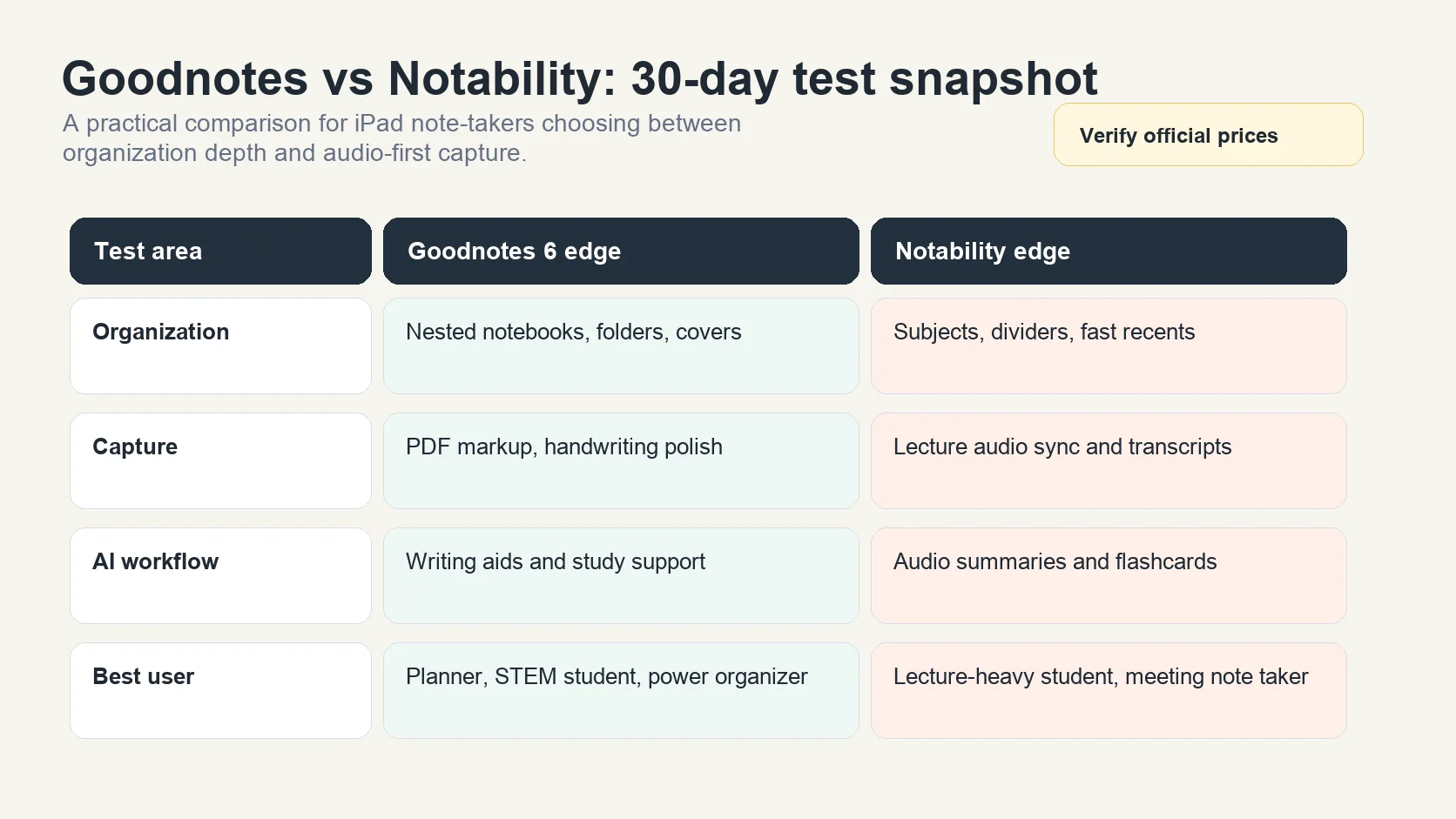
TL;DR — The 2026 Verdict (updated June 27, 2026): Choose Goodnotes 6 for cross-platform reach, notebook organization, PDF-heavy study, and flexible paid options. Choose Notability for best-in-class live-lecture audio sync, low-latency writing, and Apple-only minimalism. Notability Plus is currently listed at $19.99/year on its official pricing page; Goodnotes plan and storefront prices can vary, so verify both official pricing pages before buying.
For a compact purchase-oriented overview, use the GoodNotes vs Notability handwriting app comparison alongside this 30-day field test.
How we tested: 30-day side-by-side trial in May 2026 on iPad Pro running iPadOS 18 with Apple Pencil Pro. We compared writing latency, audio sync accuracy, OCR on handwritten samples, organization speed, export friction, and pricing in USD. Re-audited 2026-06-27 by Allen, AFFiNE Operations Director with first-party images and current official pricing checks.
At a Glance: The Core Differences in 2026
Both apps have embraced AI, but their core philosophies remain distinct.
| Feature | Goodnotes 6 | Notability |
|---|---|---|
| Organization Philosophy | Hierarchical: Infinite nested folders. Feels like a digital bookshelf. | Flat Structure: Dividers & Subjects. Designed for speed and recent access. |
| Writing Engine | Paper-Simulation: 3 pen types. Highly customizable pressure sensitivity. | Digital-Fluid: Extremely low latency ink. Vector-based "Pencil" for shading. |
| AI Integration (2026) | Generative Ink: Spellcheck and math assistance that mimics your handwriting. | Summarization: AI transcripts and auto-generated summaries from audio. |
| Pricing Model | Free tier plus paid plans; Goodnotes plan names and App Store options can vary by region, so verify the official pricing page before buying. | Freemium; Plus is currently listed at $19.99/year, with Pro at $99.99/year on the official Notability pricing page. |
| Ecosystem Lock | High: Web/Android apps exist but lag behind iOS features. | Extreme: Strictly Apple Ecosystem (iPad, iPhone, Mac). |
User Interface: Minimalism vs Customization
How does the user interface impact your workflow? Here’s what you’ll notice:
| Home Screen Layout | List or grid view of all notebooks, folders, and documents; customizable sidebar for quick access | Sidebar with subjects/dividers; notes displayed as list or grid; minimalist, focused workspace |
|---|---|---|
| Navigation | Sort by name, date, or type; favorites and shared notes easily accessible; deep navigation via folders | Quick access to all subjects and notes; drag-and-drop between subjects; collapsible dividers for neatness |
| Customization | Custom covers, paper templates, color-coded folders, per-page layout changes | Template selection per note; global or per-note scrolling settings; less emphasis on visual customization |
| Note Creation | Guided workflow: choose document type, cover, paper style, and name | Instant note creation within a subject; default templates for quick capture |
Which Style Suits You?
-
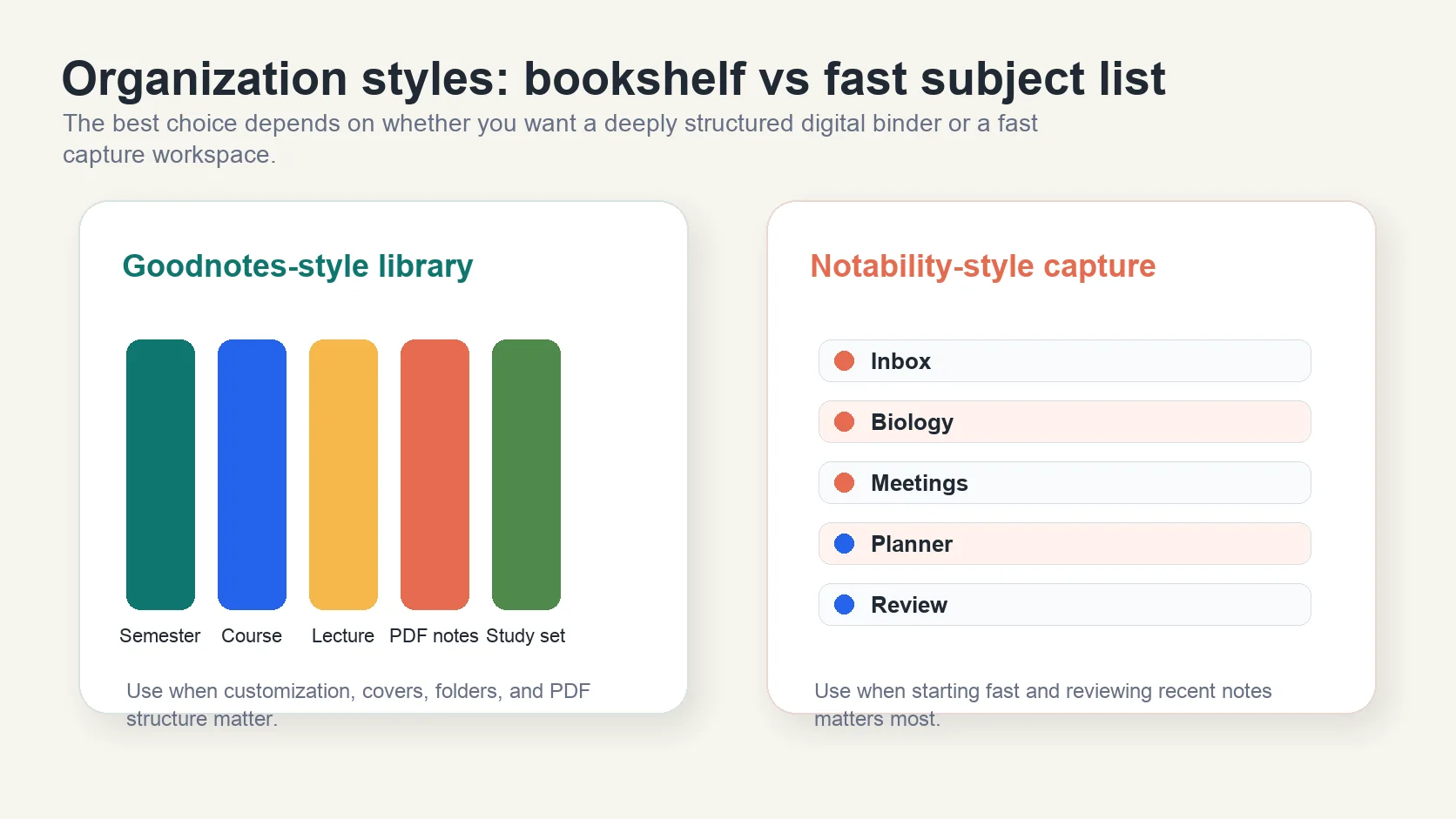
If you love structure, customization, and detailed organization, Goodnotes’ notebook and folder system gives you maximum control over your digital workspace.
-
If you want speed, simplicity, and minimal setup, Notability’s subject/divider approach lets you focus on content, not configuration.
In summary, the Goodnotes vs Notability user interface debate boils down to your personal note-taking style: Do you want a digital binder with endless customization, or a fast, frictionless way to jot down thoughts? Understanding these foundational differences is key before diving into features like handwriting tools, audio recording, and PDF annotation—which we’ll explore next.
Key Feature Face-Off
Ever tried to sketch a diagram, annotate a PDF, or record a lecture, only to wonder if your note-taking app could do more? When it comes to Goodnotes vs Notability, the real difference often comes down to the creative and productivity features that shape your daily workflow. Let’s break down the essentials—writing tools, drawing options, annotation, and multimedia support—so you can see which app truly fits your style.
Writing Tools: Pen Types, Sensitivity, and Handwriting Recognition
Imagine you’re jotting down formulas or sketching a flowchart. The variety and feel of writing tools can make all the difference. Here’s what you’ll notice:
-
Pen Types: Goodnotes offers three (ballpoint, fountain, brush), while Notability provides two (ballpoint, fountain) plus a dedicated pencil tool for shading and sketching.
-
Pressure Sensitivity & Stroke Control: Goodnotes allows fine-tuning of pressure sensitivity and stroke stabilization for smoother, neater writing. Notability lets you adjust stroke width, but lacks advanced pressure controls.
-
Handwriting Recognition: Both apps support handwriting-to-text conversion, but in Goodnotes, it’s included with a one-time purchase or subscription. Notability locks this behind its subscription tier (source).
-
Custom Colors: Goodnotes supports unlimited custom colors (even on the free plan), while Notability restricts this to premium users.
Drawing, Sketching, and Annotation Features
Whether you’re an artist or just need to draw quick diagrams, flexibility matters:
-
Shape Tools: Both apps detect and clean up drawn shapes. Goodnotes lets you fill shapes and snap lines together, while Notability offers fast shape detection but less customization.
-
Lasso Tool: Both allow selection and movement of content. Goodnotes 6 lets you move items across pages, while Notability’s lasso is limited to the current page.
-
Stickers & Images: Goodnotes’ Elements tool makes importing and reusing stickers or images a breeze. Notability supports stickers (subscription required) and custom image imports, but batch management is less streamlined.
PDF Annotation and Multimedia
Do you work with digital textbooks or meeting handouts? Here’s how each app handles annotation and media:
-
PDF Annotation: Both apps let you import, annotate, and export PDFs. Notability’s highlighter snaps to text for fast markup, while Goodnotes requires manual highlighting (with straight-line mode available).
-
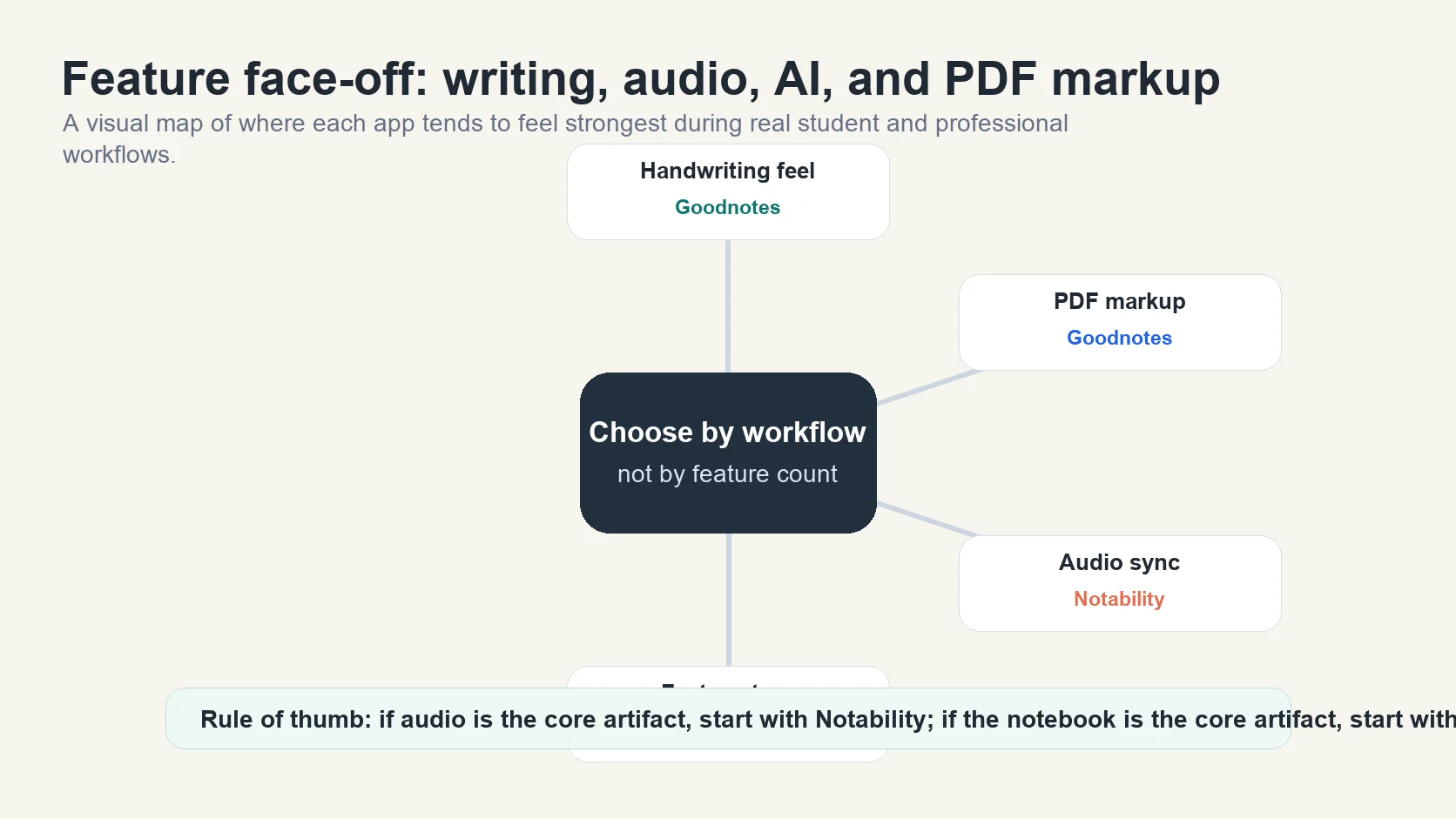
Audio Recording: Notability shines with real-time audio recording that syncs your notes to the recording timeline—perfect for students and professionals. Students who prefer an audio-first lecture tool can check our guide to Glean pricing for students. Goodnotes added similar audio features, including transcription and synced playback, but Notability’s implementation is often considered more intuitive.
-
Flashcards & Study Tools: Goodnotes offers Study Sets and AI-powered learning aids, while Notability recently added AI-generated flashcards for premium users.
Feature Comparison Table: Goodnotes vs Notability
| Pen Types | Ballpoint, Fountain, Brush | Ballpoint, Fountain, Pencil |
|---|---|---|
| Pressure Sensitivity | Adjustable (Fountain, Brush) | Not adjustable |
| Handwriting-to-Text | Included (paid) | Subscription only |
| Custom Colors | Unlimited (free & paid) | Premium only |
| Shape Tools | Fill, snap, color | Quick detect, basic shapes |
| Sticker/Image Management | Elements tool for collections | Gallery import, manual reuse |
| PDF Annotation | Manual, straight-line mode | Snap-to-text highlighter |
| Audio Recording & Sync | Yes (recently added, with transcription) | Yes (real-time sync, intuitive interface) |
| Flashcards/Study Tools | Study Sets, AI aids | AI flashcards (premium) |
Beyond Goodnotes and Notability: A Glimpse at AFFiNE
Still searching for more? What if you want a workspace that goes beyond classic page-based notes and offers true cross-platform flexibility, visual brainstorming, and advanced collaboration? AFFiNE steps in as a next-generation alternative. Imagine combining the handwriting and sketching power of Goodnotes, the audio-sync and annotation polish of Notability, and then layering in:
-
An infinite whiteboard canvas for mind maps, diagrams, and freeform planning
-
Structured documents, flexible databases, and real-time collaboration
-
AI-powered organization and content generation
-
Seamless cross-platform access—web, desktop (macOS, Windows, Linux), and mobile (iOS, Android)
-
Local-first privacy with cloud sync and open-source transparency
If you’re tired of jumping between apps or hitting platform limits, AFFiNE offers a unified, future-proof digital workspace that adapts to every workflow—from handwritten notes to project planning and beyond.
Ready to see how these organizational and search features stack up? Next, we’ll explore how Goodnotes and Notability help you stay on top of your notes, no matter how complex your library gets.
Staying Organized: Note Organization and Search Functionality Compared
Ever found yourself scrolling endlessly, trying to find that one important note from last semester? Or maybe you’ve wished for a smarter way to group, sort, and search your digital notebooks? The way you organize and retrieve your notes can make or break your productivity—especially as your library grows. Let’s see how Goodnotes and Notability stack up when it comes to note organization and search functionality.
Goodnotes: Deep Customization and Hierarchical Folders
Imagine you’re setting up a digital filing cabinet—Goodnotes gives you all the drawers and tabs you could ever want. Its system is built around notebooks and nested folders, letting you create almost unlimited layers of organization. Want a folder for each class, with subfolders for assignments, lecture notes, and exam prep? No problem. You can even personalize folders with colors and emojis for quick visual cues.
-
Nested Folders: Organize notes inside folders, with folders inside folders—tested up to 10 levels deep (source).
-
Notebook-Centric Workflow: Each notebook can have its own cover, template, and structure. You can change themes or layouts on a per-page basis, making it easy to mix graphs, lined pages, and blank sketches in one place.
-
Customization: Assign icons, emojis, and colors to folders for at-a-glance navigation.
-
Document Tabs: Open multiple notebooks as tabs for quick switching—great for multitasking or referencing related materials.
One standout? Goodnotes lets you search handwritten notes using OCR (optical character recognition)—as long as you’re using the paid version. Type a keyword, and Goodnotes will scan both typed and handwritten content, surfacing relevant pages instantly.
Notability: Subjects, Dividers, and Fast Note Creation
Prefer a simpler, more streamlined approach? Notability organizes everything using subjects and dividers. Think of subjects as folders and dividers as broad categories—like "Science" with subjects for "Biology," "Chemistry," and "Physics." You can nest dividers up to five levels deep, keeping your workspace tidy without overwhelming complexity.
-
Subjects & Dividers: Organize notes within subjects, group subjects under collapsible dividers, and drag-and-drop notes between categories.
-
Quick Note Creation: Tap "+ New" and start writing—notes are instantly filed in your chosen subject, minimizing setup time.
-
Templates: Choose from built-in templates (planners, worksheets, recipe pages) for each note. All pages in a note share the same template and color, so switching formats means starting a new note.
-
Recents, Favorites, Unfiled: Sidebar tabs let you quickly access your most recent, favorite, or uncategorized notes (premium feature).
When it comes to search functionality, Notability allows you to search typed text in all notes. However, searching handwritten notes and audio transcripts is locked behind the subscription tier. For power users, this can be a limitation if you rely heavily on handwriting or audio-based notes.
Side-by-Side: Organization and Search Features
| Folder System | Unlimited nested folders | Subjects within dividers (up to 5 levels) |
|---|---|---|
| Customization | Colors, icons, emojis per folder | Global templates, less visual customization |
| Note Creation | Guided setup for notebooks, covers, templates | Instant note creation in selected subject |
| Handwriting Search | OCR included (paid) | Subscription only |
| Audio Search | Transcription and search (paid) | Transcription and search (subscription) |
| Favorites/Bookmarks | Sidebar access to favorites (all plans) | Bookmarks within notes; sidebar access (premium) |
Which System Fits Your Workflow?
-
Goodnotes is ideal if you love building detailed, customizable digital libraries—perfect for students managing multiple courses, professionals with complex projects, or anyone who wants every note in its perfect place.
-
Notability shines for those who value speed and simplicity—think quick meeting notes, daily journaling, or fast lecture capture without overthinking structure.
In short, both apps offer robust tools for note organization and search functionality, but your ideal fit depends on whether you favor deep customization or streamlined efficiency. Next, we’ll spotlight the latest updates in Goodnotes 6 and Notability, and how these changes impact your overall experience.
Spotlight on Goodnotes 6 and Recent Notability Enhancements
When you upgrade your note-taking app, what do you really get? With both Goodnotes 6 and the latest Notability updates rolling out major changes, it’s easy to wonder: Are these new features worth it, and how do they reshape the daily note-taking experience?
Goodnotes 6: What’s New and What’s Improved?
Imagine opening Goodnotes and finding not just a fresh look, but a smarter, more customizable workspace. Goodnotes 6 builds on its predecessor with a host of enhancements designed to make your digital notebooks feel even more like your own. Here’s what stands out:
-
Deep Customization: Goodnotes 6 introduces custom page sizes and lets you change both background and foreground colors for each page. Want a graph on page 17 and lined notes on page 18? Now you can, without starting a new notebook.
-
AI-Powered Writing Aids: Goodnotes 6 can spellcheck your handwriting and (soon) suggest words as you write, learning from your style. These features help keep notes neat and error-free—something you won’t find in most other apps.
-
Study Sets and Exam Practice: The new Study Sets tool streamlines flashcard creation and integrates with Smart Learn, which adapts study sessions based on your performance. Plus, Interactive Exam Practice lets you download and work through SAT or DSE math courses right inside the app.
-
Audio Transcription and Summaries: Audio recording is now synced to your notes, and you can get automatic transcriptions. The new Ask Goodnotes feature can even summarize transcripts for quick review.
-
Enhanced Collaboration: Goodnotes 6 supports real-time collaboration across iOS, Android, Windows, and Web, with shared links and synchronized document views.
-
Marketplace and Free Community Gallery: Access paid add-ons and free templates, covers, and stickers directly in the app, expanding your creative options.
For those upgrading from Goodnotes 5, you’ll notice a leap in customization, AI integration, and cross-platform support. The overall workflow feels more personal and future-proof, especially for students and professionals juggling complex projects (reference).
Notability Updates: Streamlined Features and Smarter Tools
On the Notability side, the release of Notability 15 has focused on refining the user experience while adding powerful new tools:
-
Audio Recording and Transcription: Notability’s real-time audio syncing remains a standout. Now, with automatic, time-stamped transcriptions, it’s easier than ever to review and organize lecture or meeting content.
-
AI-Powered Flashcards: The new Notability Learn feature creates flashcards automatically from your notes, using AI to extract key points for efficient studying.
-
Customizable Toolbar and Tape Tool: You can now personalize your toolbar, and the digital tape tool lets you cover content for focused study sessions—great for memorization.
-
Expanded Template Gallery: More built-in templates (planners, worksheets, recipe pages) are now available, along with the ability to publish and download custom templates via the Notability Gallery.
-
Performance and UI Tweaks: The interface remains minimalist, but navigation is smoother, with faster access to subjects, dividers, and recent notes. The app’s speed and reliability have also improved.
Notability’s updates are especially valuable for users who want quick, frictionless note capture and robust audio tools. However, some features—like handwriting search and advanced templates—require a subscription.
Goodnotes 6 vs Notability Updates: Feature Table
| Custom Page Sizes & Colors | Yes (per page) | No (global per note) |
|---|---|---|
| AI-Powered Writing/Study Tools | Writing aids, Study Sets, Ask Goodnotes | Notability Learn (AI flashcards, summaries) |
| Audio Recording & Transcription | Yes (synced, transcribed, summarized) | Yes (real-time sync, automatic transcription) |
| Templates | Import, customize, community gallery | Expanded built-in, Notability Gallery |
| Toolbar Customization | Yes | Yes |
| Collaboration | Real-time, multi-platform | Syncs real-time updates to a web app |
| Marketplace/Community Add-ons | Marketplace (paid), Gallery (free) | Gallery (free), no paid add-ons |
How Do These Updates Affect the User Experience?
-
For Customization: Goodnotes 6 leads with granular control over every page and more creative options.
-
For Audio and Study Tools: Notability’s audio workflow is still best-in-class, but Goodnotes is catching up fast with transcription and AI-powered summaries.
-
For Collaboration and Cross-Platform Use: Goodnotes 6 now supports real-time editing across more devices, making it more flexible for group work or remote study.
-
For Simplicity: Notability remains the go-to for users who want to open the app and start writing—no setup required.
In summary, both goodnotes 6 and the latest notability updates have raised the bar for digital note-taking in 2025. Goodnotes 6 is ideal if you crave deep customization, advanced study tools, and collaboration, while Notability continues to deliver a streamlined, audio-focused experience. As you consider your next steps, think about which features will truly enhance your workflow—because the gap between these two apps is narrower than ever, and the right choice comes down to your personal priorities.
The iPad Experience and Cross-Platform Availability
When you reach for your iPad to take notes, do you want the smoothest Apple Pencil experience, or are you looking for a note-taking app that works everywhere—on your laptop, phone, and beyond? The ipad experience is where both Goodnotes and Notability truly shine, but as your workflow expands, cross-platform support can make all the difference. Let’s break down what you can expect, whether you’re an Apple loyalist or someone who needs their notes to follow them across every device.
Goodnotes vs Notability on iPad: Apple Pencil Integration and App Performance
Imagine you’re in a lecture, sketching diagrams, or annotating a PDF. Both Goodnotes and Notability have optimized their apps for the iPad, making the most of the Apple Pencil’s precision and iPadOS features. Here’s what you’ll notice:
-
Apple Pencil Support: Both apps offer flawless palm rejection, left-handed modes, and pressure sensitivity. Writing feels natural and fluid—almost indistinguishable from pen on paper.
-
Tool Customization: Goodnotes lets you fine-tune pen styles, colors, and stroke sensitivity, while Notability’s streamlined interface is all about fast access to your favorite tools.
-
Real-Time Features: Notability’s real-time audio recording (synced to your handwriting) stands out for students, while Goodnotes’ dynamic templates and handwriting recognition power up creative workflows.
-
iPadOS Multitasking: Notability supports native split-screen, allowing you to view two notes side by side—perfect for referencing slides during class. Goodnotes offers document tabs and leverages iPadOS split view, though switching between documents is a bit less seamless.
In short, if you’re an iPad user, both apps deliver a premium, responsive experience—whether you’re jotting down quick ideas or organizing a semester’s worth of notes.
macOS, Android, Windows, and Beyond: How Cross-Platform Are Goodnotes and Notability?
But what if you want to review your notes on a MacBook, edit on a Windows laptop, or check something on an Android phone? Here’s where the cross-platform story changes:
| iPad/iOS | Full-featured, Apple Pencil optimized | Full-featured, Apple Pencil optimized |
|---|---|---|
| macOS | Native app, syncs via iCloud | Native app, syncs via iCloud (subscription required for sync) |
| Windows | Dedicated app and web version (core features, evolving toward parity) | Not available |
| Android | Dedicated app (subset of iPad features, frequent updates) | Not available |
| Web | Web app for viewing/editing notes anywhere | New web app available via Notability Cloud (syncing functionality). |
Ever found yourself needing to access a note on a device you didn’t expect? Maybe you switch between a work PC, a personal iPad, and an Android phone. Here’s why platform flexibility is becoming essential:
-
Consistent Workflow: Start a note on your iPad, finish it on your laptop, and review it on your phone—without worrying about compatibility or missing features.
-
Collaboration: Work with classmates or colleagues who use different devices. Real-time sync and editing break down barriers.
-
Future-Proofing: As your device mix changes, you won’t lose access to your notes or have to migrate your entire library.
If you’re looking for a truly cross-platform solution—one that isn’t limited by operating system or device—AFFiNE is worth a closer look. Imagine having your notes, whiteboards, and databases accessible from any device: web, macOS, Windows, Linux, iOS, or Android. AFFiNE’s infinite canvas, real-time collaboration, and privacy-first design mean you’re never locked in, and your workflow adapts as your needs change. Whether you’re a student, professional, or creative, AFFiNE’s seamless experience across all platforms can be a game-changer.
As you weigh your options, ask yourself: Do you want the best iPad experience with deep Apple Pencil integration, or do you need your notes to travel with you, no matter the device? In the next section, we’ll break down the costs, subscriptions, and free tiers—so you’ll know exactly what you’re getting for your investment.
Pricing 2026: Subscription vs One-Time Options
Ever wondered if the best note-taking app for you is also the best for your wallet? When it comes to pricing, Goodnotes and Notability take very different approaches. Whether you’re a student on a budget, a professional who needs unlimited access, or someone who just wants to try before buying, understanding the free version and paid options is crucial. Let’s break down what you actually get for your money—and where the hidden limitations might be.
Goodnotes vs Notability: Pricing Models at a Glance
| Free Version | Limited notebook allowance; useful for testing handwriting, PDF markup, and notebook organization before upgrading. | Freemium with limited sustained use; useful for testing ink feel, audio recording, and templates before Plus or Pro. |
|---|---|---|
| One-Time Purchase | May be available through App Store purchase paths depending on region and storefront; verify inside the app before treating it as the deciding factor. | Not offered as a full-access one-time option; advanced features are tied to paid tiers. |
| Subscription | Subscription with Essential and Pro tiers — see official Goodnotes pricing for current rates. Unlocks all premium features, handwriting recognition, unlimited notebooks. Includes cross-platform sync (iOS, Android, Windows, Web) | Notability Plus and Pro tiers — see official Notability pricing for current rates. Unlocks handwriting/audio search, unlimited edits, iCloud sync, auto-backup, AI-powered flashcards, advanced templates, and more |
What Do You Get in the Free Version?
-
Goodnotes: The free version is essentially a perpetual trial. You can create up to three notebooks and use most writing, drawing, and annotation features. However, key tools like handwriting recognition and unlimited note creation require a paid upgrade. If you’re a light user or just want to test the waters, this can be sufficient, but you’ll quickly hit the limit if you’re serious about digital note-taking (reference).
-
Notability: The free tier lets you create unlimited notes, but restricts the number of edits you can make each month. The company doesn’t specify the exact limit, which can be frustrating if you’re not sure when you’ll hit it. Essential features like handwriting search, iCloud sync, and auto-backup are locked behind the subscription. For casual note-takers, it’s a decent option, but power users will likely need to upgrade for a seamless experience.
If those restrictions are a deal-breaker, compare free alternatives to Goodnotes and Notability before building a long-term archive.
Paid Plans: Subscription vs One-Time Purchase
-
Goodnotes: Goodnotes currently uses a free tier plus paid upgrade paths. The official pricing page lists Essential and Pro subscriptions, while App Store purchase paths can vary by region and platform. Treat the in-app or storefront offer as the source of truth before making a decision, especially if you need Android, Windows, or web access.
-
Notability: Notability's full feature set is tied to paid tiers. Its official pricing page currently lists Plus at $19.99/year and Pro at $99.99/year; verify the live pricing page before subscribing because education, regional, and promotional offers can change. Paid access unlocks advanced features such as handwriting/audio search, unlimited edits, iCloud sync, auto-backup, and AI-powered study tools.
Key Limitations and Advantages
-
Goodnotes Advantages: Stronger notebook organization, broader platform reach, and multiple upgrade paths. If you are a student or professional planning to use the app long term, compare the official Goodnotes pricing page with the App Store offer in your region before choosing a plan.
-
Notability Advantages: Fast capture, polished Apple-device workflows, and best-in-class audio recording. The tradeoff is that serious use usually means paying for Plus or Pro, and the free tier's limited edits can become a blocker for lecture-heavy users.
-
Cross-Platform Costs: Goodnotes has the broader platform story, but exact access depends on the plan and storefront. Notability remains strongest for Apple-only workflows, so cross-device requirements should be part of the pricing decision, not an afterthought.
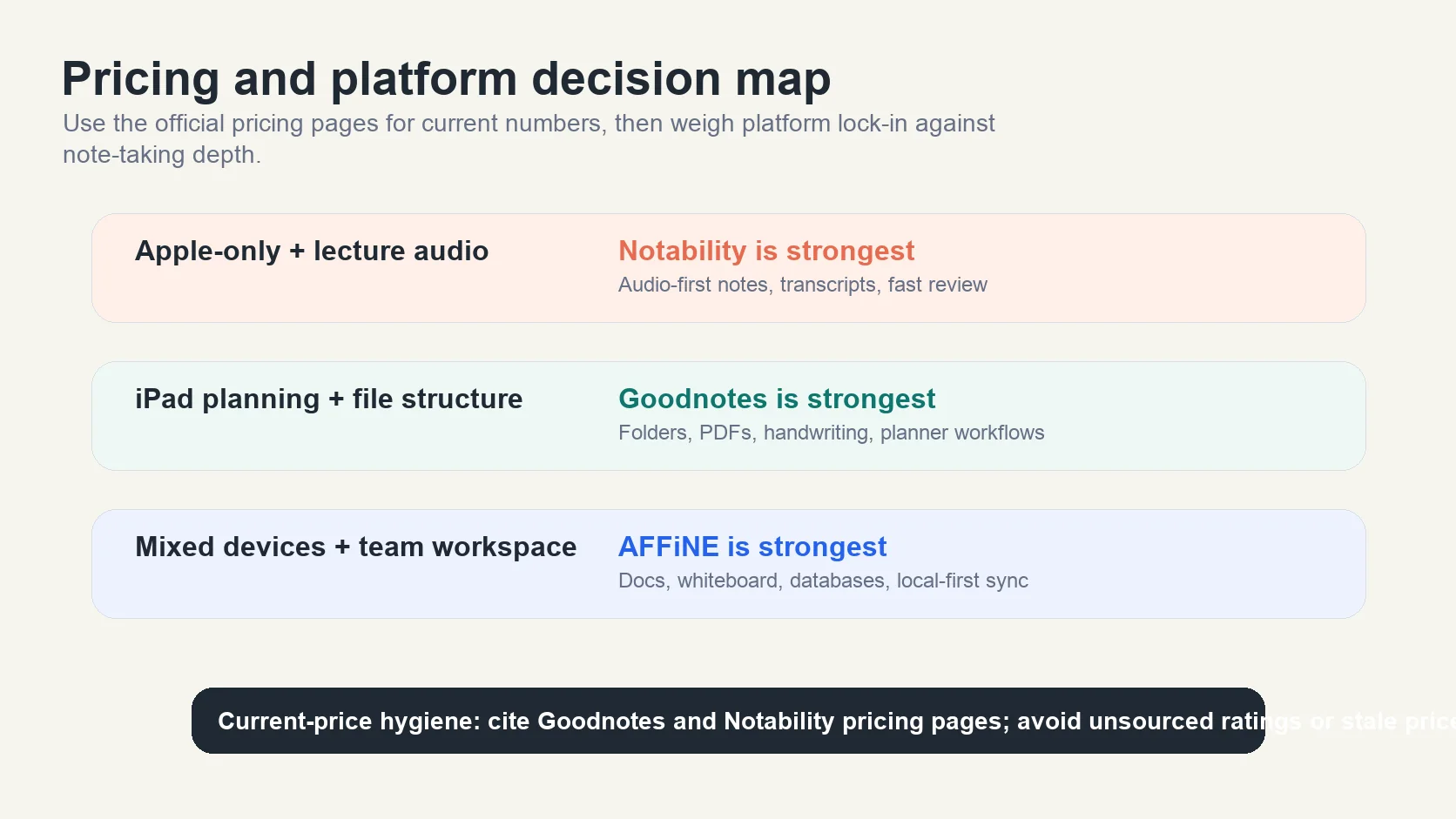
Which Pricing Model Fits You?
-
If you value flexibility and long-term ownership, Goodnotes is usually the safer starting point, but verify the current Goodnotes pricing page and your App Store region before relying on a one-time option.
-
If you prefer a simple, subscription-based model and plan to stay inside Apple devices, Notability Plus may suit you—just verify the current Plus and Pro prices before committing.
Ultimately, the best value depends on how you take notes, which devices you use, and whether audio sync or notebook structure saves you more time. Next, we’ll help you decide which app is best for students, planners, and professionals based on these pricing and feature differences.
The Cross-Platform Gap (The Biggest Issue in 2026)
Here is the elephant in the room: Both apps struggle if you leave the Apple Ecosystem.
In 2026, many of us use an iPad for sketching but a Windows PC for heavy work.
-
Notability: Zero support for Windows or Android. You are locked in.
-
Goodnotes: Has a Windows app, but it is a "Progressive Web App" (PWA) wrapper. It requires a constant internet connection for syncing and lacks the smooth performance of the native iPad app.
The Solution: AFFiNE (The True Cross-Platform Alternative)
If your workflow isn't 100% Apple, neither Goodnotes nor Notability connects the dots effectively. This is where AFFiNE has emerged as the professional's choice.
-
Edgeless Mode (Infinite Canvas): Like Goodnotes, you can draw, sketch, and annotate. But unlike Goodnotes, AFFiNE’s canvas is truly infinite—perfect for massive mind maps or storyboards.
-
Multimodal Workflow: Seamlessly switch between Docs Mode (linear writing like Notion) and Whiteboard Mode. Write your thesis in Docs mode, then switch to Whiteboard to sketch the diagrams next to it.
-
Local-First & Native Apps: AFFiNE runs natively on macOS, Windows, and Linux. Your data is stored locally (privacy-first) but syncs across all devices.
Download AFFiNE for Free to experience a workspace that isn't limited by your operating system.
Deep Dive: The Writing Experience
Goodnotes: The "Digital Journal" Standard
In 2026, Goodnotes 6 has solidified its position as the go-to app for digital journaling and aesthetic note-taking.
-
The Ink Engine: The Fountain Pen and Brush Pen offer a level of artistic control that feels incredibly natural.
-
AI Handwriting: The feature that seemed gimmicky at launch is now a staple. If you scribble a word incorrectly, Goodnotes can correct the spelling in your own handwriting style.
-
Customization: It remains the #1 choice for the Digital Planning community, offering custom page sizes, covers, and sticker management via the "Elements" tool.
Notability: The Speed Demon
Notability isn't about pretty journals; it's about capturing information fast.
-
Infinite Scroll: Unlike Goodnotes' paginated "book" view, Notability treats notes as a continuous vertical scroll. This is superior for long meetings or uninterrupted brainstorming sessions.
-
The Tape Tool: A favorite for active recall study. Cover up answers with "tape" and tap to reveal them—a feature Goodnotes has tried to copy but Notability still implements smoother.
The "Killer Feature" Battle: Audio Recording
This is where the divide is sharpest.
Notability is still the undisputed king of audio-sync.
-
How it works: When you playback a lecture recording, your handwritten notes animate onto the screen exactly when you wrote them.
-
2026 Update: Their AI transcription has improved significantly, allowing you to tap a word in the transcript and jump to that point in the audio and your notes.
Goodnotes added audio recording back in 2023, but even in 2026, it feels secondary. It lacks the granular "tap-to-seek" precision of Notability. It serves better as a voice memo attached to a notebook rather than a fully integrated study tool.
Best App for Students, Digital Planners, and Professionals
When you’re picking a digital note-taking app, it’s not just about features—it’s about how those features fit your daily life. Are you a student who needs to capture every word of a fast-paced lecture? A digital planner looking for seamless organization and annotation? Or a professional managing complex projects or technical documents? Let’s break down how Goodnotes and Notability stack up for each group, so you can find your perfect match.
For Students: Lecture Notes, Textbook Annotation, and Study Tools
-
Goodnotes
-
Pros:
-
Robust PDF annotation—perfect for marking up textbooks and handouts.
-
Advanced handwriting recognition (with paid plan) makes searching handwritten notes a breeze.
-
Study Sets and flashcards support spaced repetition and active recall for exam prep.
-
AI-powered writing aids and interactive exam practice help automate studying and catch mistakes (source).
-
Nested folders and customizable notebooks keep class notes organized by subject, semester, or project.
-
-
Cons:
-
Audio recording is solid but not as seamlessly integrated with notes as Notability’s real-time sync.
-
Free version is limited to three notebooks, so heavy users will need to upgrade.
-
-
-
Notability
-
Pros:
-
Best-in-class audio recording that syncs notes with lecture playback—ideal for capturing and reviewing classes.
-
Quick note creation—just tap and go, perfect for fast-paced lectures.
-
AI-powered flashcards and summaries simplify study sessions (subscription required).
-
Subject/divider structure makes it easy to group notes by class or topic.
-
-
Cons:
-
Handwriting search and some study tools require a subscription.
-
Less flexibility with page templates and customization compared to Goodnotes.
-
-
For Digital Planners: Structure, Annotation, and Flexibility
-
Goodnotes
-
Pros:
-
Structured notebook system is perfect for importing and organizing digital planners (like Key2Success).
-
Custom covers, templates, and per-page customization let you personalize every aspect of your planner.
-
Strong PDF annotation tools for marking up planner pages, habit trackers, or calendars.
-
Multi-window support for cross-referencing different sections of your planner.
-
-
Cons:
-
Initial setup can feel more complex if you just want to jot down quick plans.
-
-
-
Notability
-
Pros:
-
Infinite scrolling canvas is great for freeform planning and brainstorming.
-
Audio integration lets you add meeting or planning session recordings to your planner notes.
-
Easy access to built-in and community planner templates via Notability Gallery.
-
-
Cons:
-
Organization tools are less robust for complex or highly structured planners.
-
Customization options for covers and templates are more limited.
-
-
For Professionals: Meetings, Technical Notes, and Collaboration
-
Goodnotes
-
Pros:
-
Excellent for technical fields—math conversion, handwriting recognition, and AI math assistance support engineering and STEM workflows.
-
Collaborative editing allows teams to co-author and review documents in real time (across iOS, Windows, Android, and web).
-
Advanced PDF annotation and document management for contracts, reports, or design sketches.
-
-
Cons:
-
Audio features are functional, but may not match Notability’s intuitive interface for meeting recordings.
-
-
-
Notability
-
Pros:
-
Audio recording and real-time sync are invaluable for capturing meeting discussions and revisiting key decisions.
-
Quick note creation and subject-based organization make it easy to keep client or project notes accessible.
-
-
Cons:
-
No real-time collaborative editing—sharing is view-only.
-
PDF annotation and technical tools are less advanced for engineering or specialized workflows.
-
-
Summary Table: Which App Fits Your Needs?
| Students | Best for organization, study tools, and customization | Best for audio recording and fast note capture |
|---|---|---|
| Digital Planners | Ideal for structured, template-based planning | Great for freeform, audio-integrated planning |
| Professionals | Strong for technical notes, collaboration, and document management | Strong for meeting audio and rapid note-taking |
In the end, the best app for you depends on your workflow, priorities, and personal style. Goodnotes excels for students who need deep organization and advanced study tools, digital planners who want structure and customization, and professionals who need technical features and collaboration. Notability shines for users who value speed, simplicity, and seamless audio integration—especially in lecture halls or meeting rooms. As you weigh your options, think about which features will truly boost your productivity and make your digital note-taking experience effortless. Next, let’s see what real users are saying about both apps in forums and reviews.
What Users Say
Ever wish you could peek into the minds of real users before making your decision? When it comes to goodnotes vs notability, the most valuable insights often come straight from the community—Reddit threads, user reviews, and forums where long-term users share their honest experiences. Let’s dive into what people are actually saying about these apps, and see how they compare to popular alternatives like OneNote and Noteful.
Reddit and Forum Feedback: Praises and Criticisms
When you browse Reddit or tech forums, you’ll notice passionate debates and nuanced opinions. Sounds complex? It can be, but some clear patterns emerge:
-
Goodnotes is frequently praised for its slick user interface, particularly in dark mode, and its robust file management system. Users love the flexibility of nested folders, customizable notebooks, and the Study Sets feature for exam prep. One Redditor put it simply: “GoodNotes has better file management. The UI looks slick in dark mode and the study sets feature. Study sets have made Goodnotes much better (regardless of how buggy goodnotes is it is still good).” (source)
-
Notability wins over users who value speed and practicality. Its real-time audio recording and easy-to-use editing tools are standout features. As one user shared: “When I work through the assignments in PDFs that we receive from our professors, I take many screenshots of the tasks and place them on the pages where they are to be worked on. GoodNotes, for reasons I can’t explain, doesn’t have a rectangle lasso, so I stick with Notability, which has the standard feature of standard features.”
-
Some users find themselves switching between both apps, wishing they could merge Goodnotes’ UI with Notability’s unique features like dotted lines, duplicate buttons, and snapping to grid. This highlights that no single app is perfect for everyone—each has its own strengths.
Recurring Themes in User Reviews
-
Customization vs. Simplicity: Goodnotes is often chosen by those who want deep customization and organization, while Notability appeals to users who want to start writing immediately with minimal setup.
-
Audio Recording: Notability’s audio sync is seen as a game-changer for students and professionals who rely on lecture or meeting recordings. Goodnotes has caught up with similar features, but some still find Notability’s implementation more intuitive.
-
Search and Handwriting Recognition: The ability to search handwritten notes is a big deal. Goodnotes offers this in its paid version, while Notability locks it behind a subscription. Users on free plans often mention this as a deciding factor.
-
Collaboration and Sharing: Goodnotes is noted for its real-time collaboration and cross-platform sharing, while Notability is commended for its easy link sharing and public-access notes—though it lacks collaborative editing.
-
Performance and Bugs: Both apps have their quirks. Some users mention occasional bugs or lag, especially with large notebooks, but overall, both are viewed as stable and reliable for daily use.
How Do Goodnotes and Notability Compare to OneNote and Noteful?
Imagine you’re considering a switch or want a broader perspective. Here’s how Goodnotes and Notability stack up against alternatives:
-
OneNote: Microsoft’s OneNote is often praised for its true cross-platform support (Windows, Mac, iOS, Android, Web) and deep integration with other Microsoft services. For users in the Microsoft ecosystem or those who need a free, unlimited note-taking solution, OneNote is a strong contender. However, many users find its handwriting and annotation tools less refined than those in Goodnotes or Notability, especially on iPad (source).
-
Noteful: Noteful is sometimes mentioned for its affordability and straightforward interface, but it’s not as feature-rich or widely adopted as Goodnotes or Notability. Most users looking for advanced organization, audio recording, or study tools still lean toward the two main contenders.
Pricing: Is the Subscription Worth It?
Pricing changes frequently, so treat old third-party summaries as a starting point and verify the official Goodnotes and Notability pricing pages before buying.
-
Notability: Operates on a strict freemium model. The free version is limited for sustained use; the Plus subscription is currently listed at $19.99/year, while Pro is listed at $99.99/year on Notability's official pricing page.
-
Goodnotes 6: Offers a free tier and paid options, but exact plan names, cross-platform access, and App Store purchase options can vary by storefront and region.
- Best value check: compare the current official Goodnotes pricing page with the App Store offer shown in your region.
- Long-term fit: Goodnotes is usually stronger when you want structured notebooks, PDF-heavy study, and broader device reach; Notability is stronger when audio sync is the deciding feature.
How to Decide: Match the App to Your Workflow
-
If you crave deep organization, advanced study tools, and want your notes to live everywhere, Goodnotes is a smart choice.
-
If you value speed, simplicity, and best-in-class audio recording, Notability is usually the better fit - especially for students and professionals who need quick, reliable lecture or meeting capture.
-
Still undecided? Try both free versions for a week—see which interface and workflow feel most natural. Your personal preference is the deciding factor.
Looking Beyond: When You Need More Than Goodnotes or Notability
But what if your needs go beyond classic page-based notes? Imagine having an all-in-one workspace that combines writing, infinite whiteboarding, database-level organization, and real-time collaboration—without being locked to a single device or ecosystem. That’s where AFFiNE stands out.
-
Cross-Platform Freedom: Seamlessly access your notes, whiteboards, and tasks on Web, macOS, Windows, Linux, iOS, and Android.
-
Privacy and Control: Local-first data storage means you own your data, with the option to sync via the cloud for convenience.
-
Boundless Creativity: Move beyond linear notes with an infinite canvas for mind maps, diagrams, and brainstorming—plus AI-powered assistance for smarter organization and content generation.
-
Open-Source and Extensible: Customize your workspace, add new features, and join a community-driven platform that evolves with your needs.
For those searching for a truly future-proof KnowledgeOS—one that blends the best of Goodnotes and Notability, then goes further—AFFiNE is worth a closer look. It’s designed for modern knowledge workers, students, and teams who want to unify their notes, plans, and creative ideas in a single, extensible platform.
At the end of the day, the best note-taking app is the one that fits your habits, devices, and creative flow. Whether you choose Goodnotes, Notability, or a next-generation solution like AFFiNE, the right tool will empower you to capture, organize, and share your ideas—your way.
Ready to take your notes to the next level? Explore your options, experiment, and don’t be afraid to switch as your needs evolve. The digital note-taking world is more versatile than ever—so find the app that feels like home, and let your productivity soar.
Final Verdict: Which App Wins in 2026?
-
Choose Notability if: You are a university student recording live lectures daily. The audio sync feature is irreplaceable for academic survival.
-
Choose Goodnotes 6 if: You care about aesthetics, digital planning, structured notebooks, PDF markup, and broader device reach.
-
Choose AFFiNE if: You are a knowledge worker or student who uses multiple devices (PC + iPad). If you need a workspace that combines handwriting, project management, and databases in one place, AFFiNE is the future-proof choice.
Ready to upgrade your workflow?
Don't let your ideas get trapped in a single device. Explore how AFFiNE's Templates can replace your traditional notebooks today.
Frequently Asked Questions about Goodnotes vs Notability
1. Which app has better handwriting recognition (OCR)?
Goodnotes generally has the edge in OCR accuracy, especially for cursive scripts. It allows you to search your handwritten notes globally across all folders. AFFiNE AI takes this further by helping you summarize and expand on your text notes after conversion.
2. What are the disadvantages of Goodnotes?
Goodnotes can be complex for users who prefer a simple, fast note-taking experience. Some users report occasional sync issues and a learning curve with its extensive customization options. Handwriting-to-text and advanced search features require a paid version, and the free plan limits users to three notebooks. For those seeking quick, frictionless note capture, Notability may be more suitable.
3. Can I view Goodnotes files on Windows?
Yes, but with limitations. The Goodnotes Windows app is web-based and can be laggy compared to the iPad version. For a true native experience on Windows, we recommend AFFiNE.
4. Is Goodnotes good for university?
Goodnotes is highly regarded among university students for its advanced file management, robust PDF annotation, and powerful handwriting recognition. Features like Study Sets and customizable notebooks make it ideal for organizing class notes, annotating textbooks, and preparing for exams. Its cross-platform support and collaboration tools further enhance its usefulness for academic workflows.
5. Which app is better for cross-platform note-taking?
Goodnotes has expanded its reach with dedicated apps for Windows, Android, Mac, and web, offering a true cross-platform experience. Notability remains exclusive to Apple devices. If you need seamless access to your notes across different operating systems, Goodnotes or an alternative like AFFiNE—which supports all major platforms and offers advanced collaboration—will better meet your needs.
