
Granola.ai Note Taking: Is It Enough for Your Team? (2026 Review)
Granola is a strong AI note taker when your main job is quiet meeting capture. If you need the meeting to become shared tasks, project context, whiteboard decisions, and a long-term knowledge base, AFFiNE is the better workflow layer.
Reviewed by the AFFiNE content team. Updated June 2026 with current Granola platform positioning, fresh first-party WebP images, nofollow Granola links, and a cleaner privacy and workflow comparison.
Quick Verdict: Who Should Use Granola Note Taking?
Granola note taking is best for professionals who want an AI notepad that listens to meetings without adding a visible meeting bot. Granola describes itself as an AI notepad for back-to-back meetings, and its current product positioning covers macOS, Windows, and iOS. That makes it useful for founders, sales reps, recruiters, product managers, and consultants who spend the day in calls and want a searchable recap with less manual typing.
The harder question is what happens after the recap. A transcript or summary is useful, but many teams still need owners, deadlines, project context, source notes, and follow-up work. That is where an AFFiNE AI workspace fits better than a standalone meeting note utility: it helps you turn rough notes, pasted transcripts, and decisions into docs, whiteboards, task lists, and reusable team knowledge.
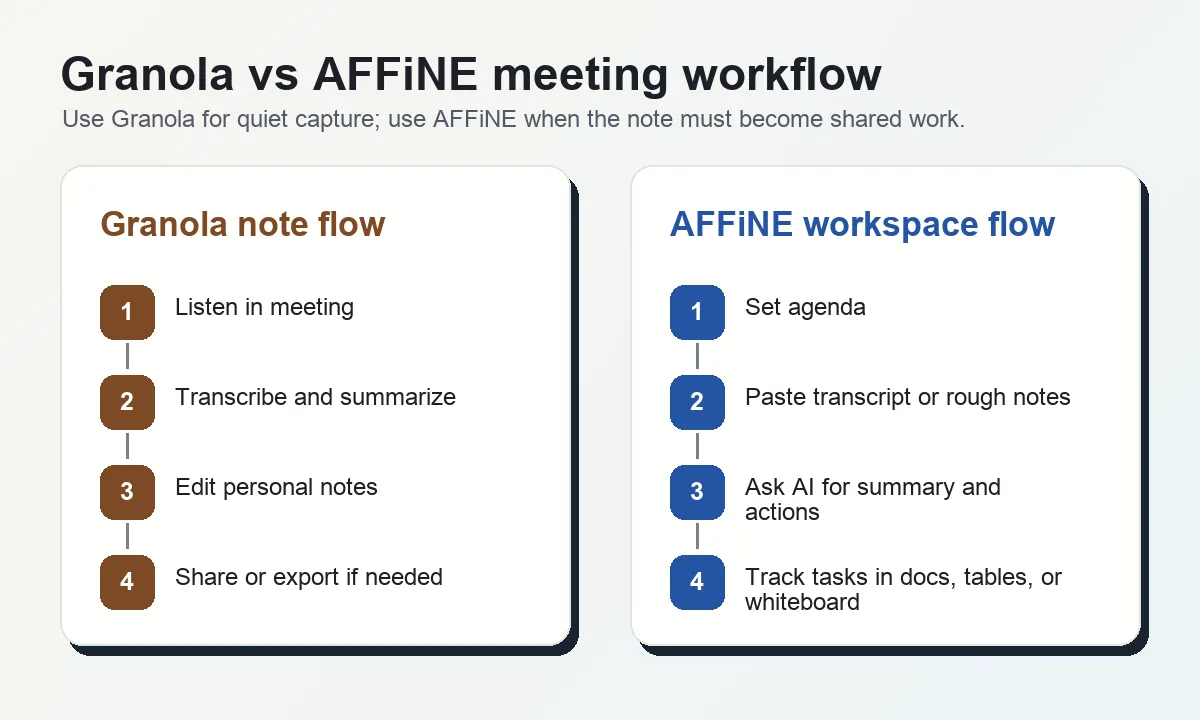
What Is Granola Note Taking?
Granola note taking is the workflow of using Granola as a meeting companion: it captures conversation audio, creates AI-enhanced notes, and lets you edit or shape the final recap. The appeal is simple: you can stay present in the meeting instead of writing every point by hand.
Granola's most useful pattern is user-guided AI note taking. You can jot down a few live bullets, then the AI expands those bullets with context from the meeting. For busy meeting days, that is more practical than starting from a blank page after the call.
This gives Granola three clear strengths:
- Low-friction capture: It is built for people who move from one call to the next and need a recap quickly.
- No-bot meeting experience: It avoids the social friction of adding an obvious bot participant. For a deeper category comparison, see AFFiNE's guide to bot vs. no-bot AI recorders.
- Editable notes: The output can be shaped by your own bullets, not only by a raw transcript.
The limitation is not capture quality alone. The limitation is lifecycle. A meeting recap still has to become a decision record, task list, project update, or knowledge base entry.
Granola vs. AFFiNE: Different Jobs, Different Tools
Do not compare Granola and AFFiNE as if they solve the same narrow job. Granola is primarily a meeting capture and recap tool. AFFiNE is a workspace for thinking, planning, and executing across notes, docs, whiteboards, and databases.
| Question | Granola note taking | AFFiNE AI workspace |
|---|---|---|
| What is the primary job? | Capture meeting audio and generate notes | Turn notes and context into shared work |
| Best user | Individual meeting-heavy professional | Team or individual managing follow-through |
| Strongest moment | During and immediately after the call | Before, during, and after project work |
| Output | Meeting notes and summaries | Docs, whiteboards, task lists, databases, and linked knowledge |
| Platform fit | macOS, Windows, and iOS based on current Granola positioning | Web, desktop, and cross-platform workspace access |
| Privacy question | Review audio, transcript, retention, sharing, and AI processing settings | Local-first workspace model and optional sync choices |
| When it is enough | You mainly need personal meeting recaps | You need decisions to become action and memory |
If your team is still choosing a meeting tool, start with the practical comparison in this AI meeting note taker guide. If you already have transcripts, AFFiNE can become the place where those transcripts are cleaned, linked, and turned into project work.
Decision Matrix: When Granola Is Enough
Granola is enough when the output you need is a better personal record. It can be the right choice if your meetings are mostly one-on-one interviews, sales calls, research calls, or founder updates where the final deliverable is a recap you personally own.
Granola may be less complete when:
- Multiple teammates need to edit the same meeting record in real time.
- The meeting decisions need to become tasks, owners, and deadlines.
- You need to connect the recap to a project hub, product brief, research archive, or whiteboard.
- Your organization has strict review requirements for audio capture, transcript storage, and AI processing.
- You want one workspace for preparation, notes, decisions, and follow-up instead of a separate note silo.
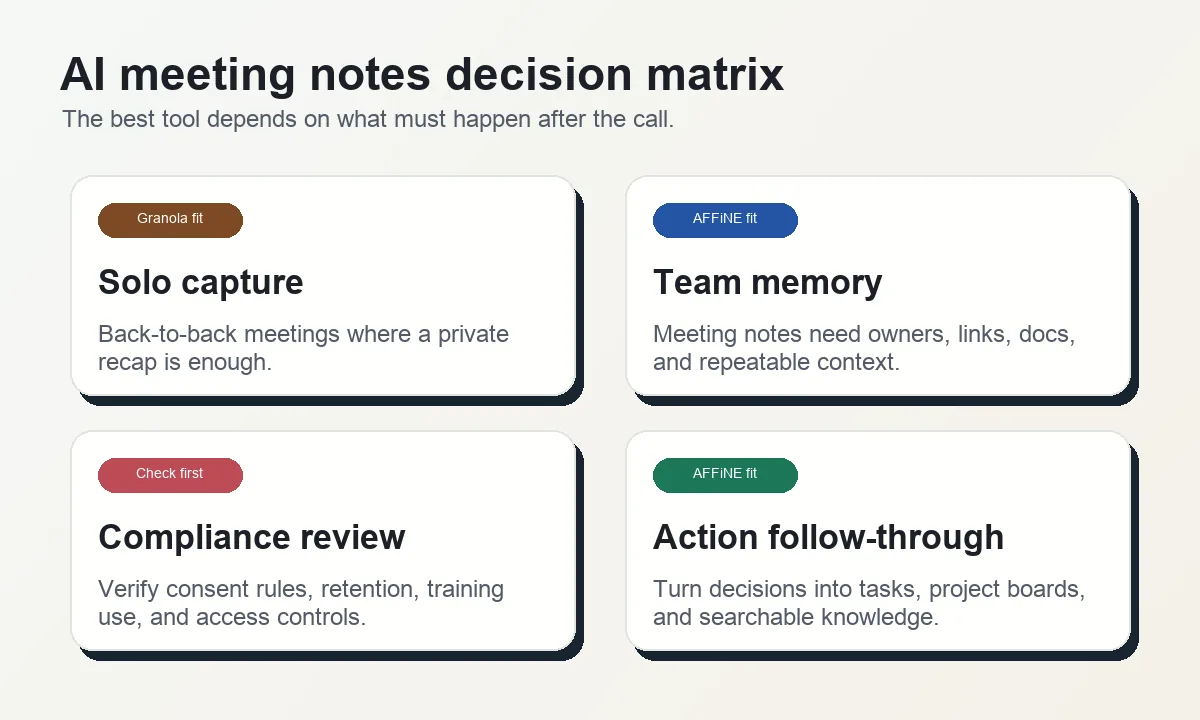
A useful rule: choose Granola when the meeting note is the final artifact. Choose AFFiNE when the meeting note is only the starting point.
Privacy and Security Questions to Ask Before Recording Meetings
Meeting notes can include customer names, pricing, hiring feedback, product strategy, medical context, legal strategy, and confidential roadmap details. Any AI note taker deserves a privacy review before it becomes a default workflow.
Granola's security page covers topics such as SOC 2 Type 2, GDPR, audio and transcript handling, model training controls, retention, encryption, and third-party processors. That is a good starting point, but your team should still match those controls to its own risk model.
Ask these questions before using Granola, or any AI meeting note taker, for sensitive calls:
- Consent: Do participants know audio is being captured and processed?
- Retention: How long are audio, transcript, and generated notes stored?
- Training use: Can your workspace data be used to improve models, and where are opt-out controls documented?
- Access: Who can view, share, export, or delete meeting notes?
- Regulated work: Does your use case require a BAA, DPA, regional storage, or other compliance commitment?
- Exit path: Can you export or move important meeting knowledge into a workspace you control?
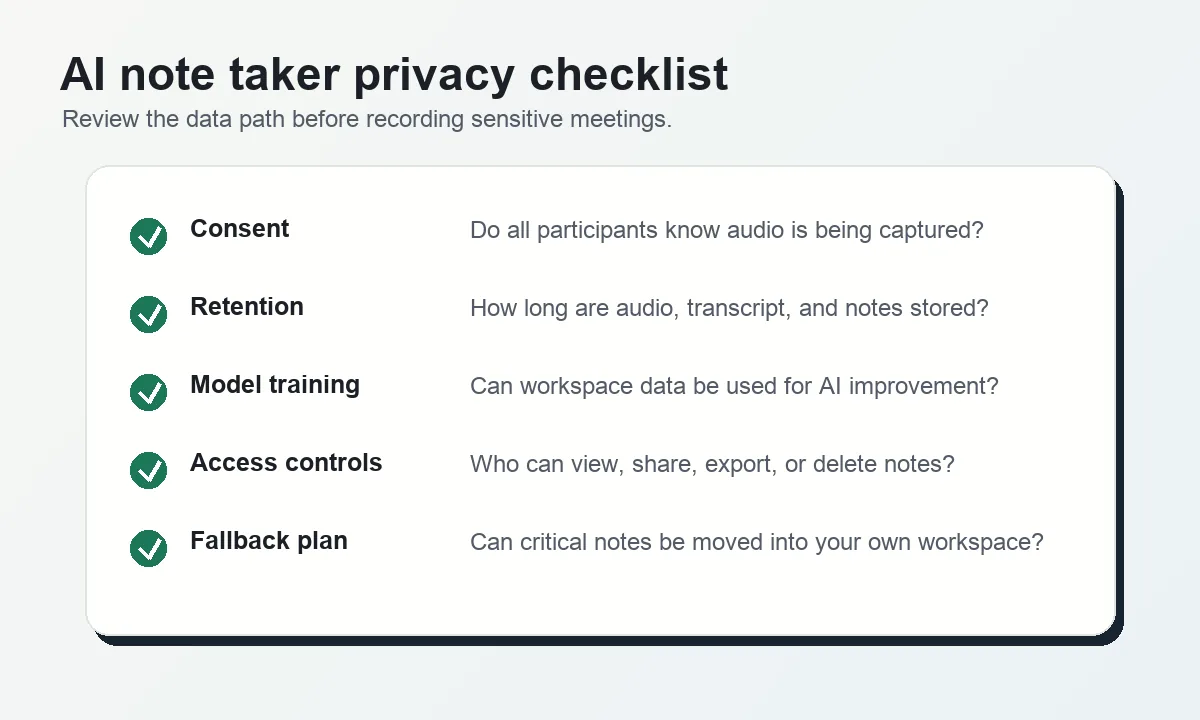
For a deeper checklist, read AFFiNE's guide to AI note taker security concerns. The safest workflow is not only about which tool sounds private. It is about knowing what data is captured, where it goes, who can access it, and how you can remove it later.
How AFFiNE Improves the Post-Meeting Workflow
AFFiNE does not need to pretend to be a direct audio recorder to be useful after a meeting. Its strength is the layer after capture: cleaning rough notes, turning transcripts into structured summaries, connecting decisions to project context, and keeping the result searchable.
A practical AFFiNE workflow looks like this:
- Prepare the agenda: Start from meeting notes templates or the AI meeting note taker template so the meeting has an expected structure.
- Capture rough notes or paste a transcript: Use the meeting tool you prefer, then bring the useful text into AFFiNE.
- Ask AFFiNE AI to extract decisions: Summarize the meeting into decisions, open questions, risks, and action items.
- Convert actions into work: Move follow-ups into a task list, project table, roadmap page, or whiteboard.
- Keep the source context: Link the meeting record to the relevant customer, project, research topic, or team hub.
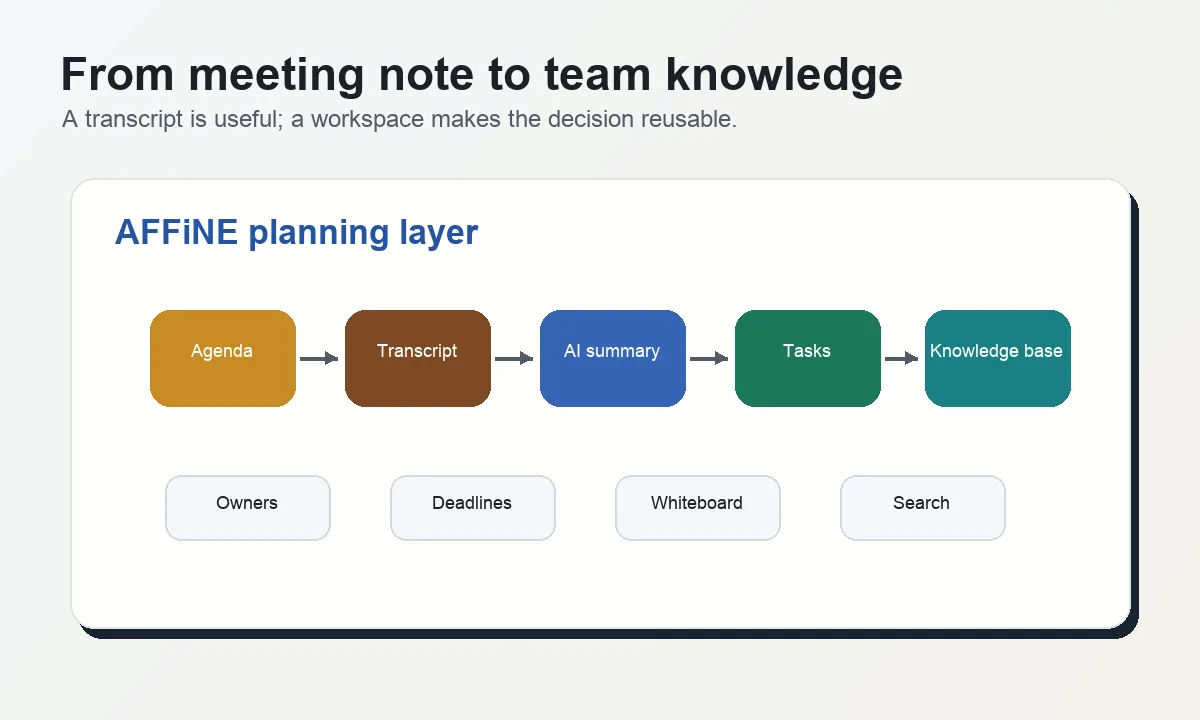
This matters because the cost of meetings is rarely the note itself. The cost is forgetting what was decided, losing owners, or making the next meeting repeat the same context. AFFiNE helps keep the decision attached to the work that follows.
E-E-A-T Review: What Makes This Comparison Trustworthy?
For a product comparison page, trust depends on balance and specificity. This review does not claim that Granola is bad, because that would be inaccurate. Granola has a clear job and a strong user experience for AI meeting capture. The more precise conclusion is that Granola is not a full workspace replacement.
This article uses three checks:
- Current product positioning: Granola is described using its current public positioning instead of the older Mac-only framing.
- Use-case fit: The recommendation separates capture, privacy review, collaboration, and follow-through instead of ranking tools with a single generic score.
- Actionable next step: Readers get a concrete workflow for moving meeting knowledge into AFFiNE rather than only a broad product pitch.
That is also why every image on this page now describes a specific decision point, not a decorative screenshot. The visuals support the article's core answer: Granola helps capture meetings; AFFiNE helps teams use the meeting afterward.
Final Recommendation
Use Granola if you mainly need a quiet AI notepad for meetings and you are comfortable with its current security, retention, and sharing model. It is especially compelling for individuals who want personal recaps without adding a bot to every call.
Use AFFiNE when your meeting notes must become team memory. If the next step is a project update, customer brief, decision log, task board, or whiteboard plan, an AFFiNE AI workspace gives the note somewhere productive to live.
The best setup for many teams is not either-or: capture the meeting with the tool that fits the call, then move the valuable decisions into AFFiNE so they remain connected to the work.
Granola Note Taking FAQ
Is Granola good for AI meeting notes?
Yes. Granola is a good fit when you want no-bot meeting capture and fast AI-enhanced recaps. It is strongest for personal productivity and back-to-back calls where a clean note is the main deliverable.
Is Granola available outside Mac?
Granola's current public positioning lists macOS, Windows, and iOS. That is why older descriptions of Granola as only Mac-focused should be updated when comparing it with cross-platform workspaces.
Does AFFiNE replace Granola?
AFFiNE can replace the post-meeting workflow, but it is not a native audio recorder. Use AFFiNE to organize agendas, pasted transcripts, decisions, action items, whiteboards, and project context. If you still need automatic meeting capture, use a recorder first and move the useful output into AFFiNE.
Is Granola safe for confidential meetings?
It depends on your threat model and compliance requirements. Review Granola's security documentation, consent requirements, retention settings, access controls, and model-training controls before recording confidential meetings. For regulated work, confirm whether your organization needs a BAA, DPA, or other formal agreement.
What is the best Granola alternative for team follow-up?
AFFiNE is a strong alternative when the problem is not transcription but follow-through. It keeps notes, tasks, whiteboards, and project context in one workspace, so meeting decisions are easier to reuse after the call.
What should I do with Granola notes after a meeting?
Extract decisions, owners, deadlines, and unresolved questions. Then move those items into a workspace such as AFFiNE, where they can connect to project pages, task boards, meeting templates, and a searchable team knowledge base.
