Knowledge Base Software Buyer’s Guide: Evaluate Tools in 2026
Understanding Knowledge Base Software Foundations
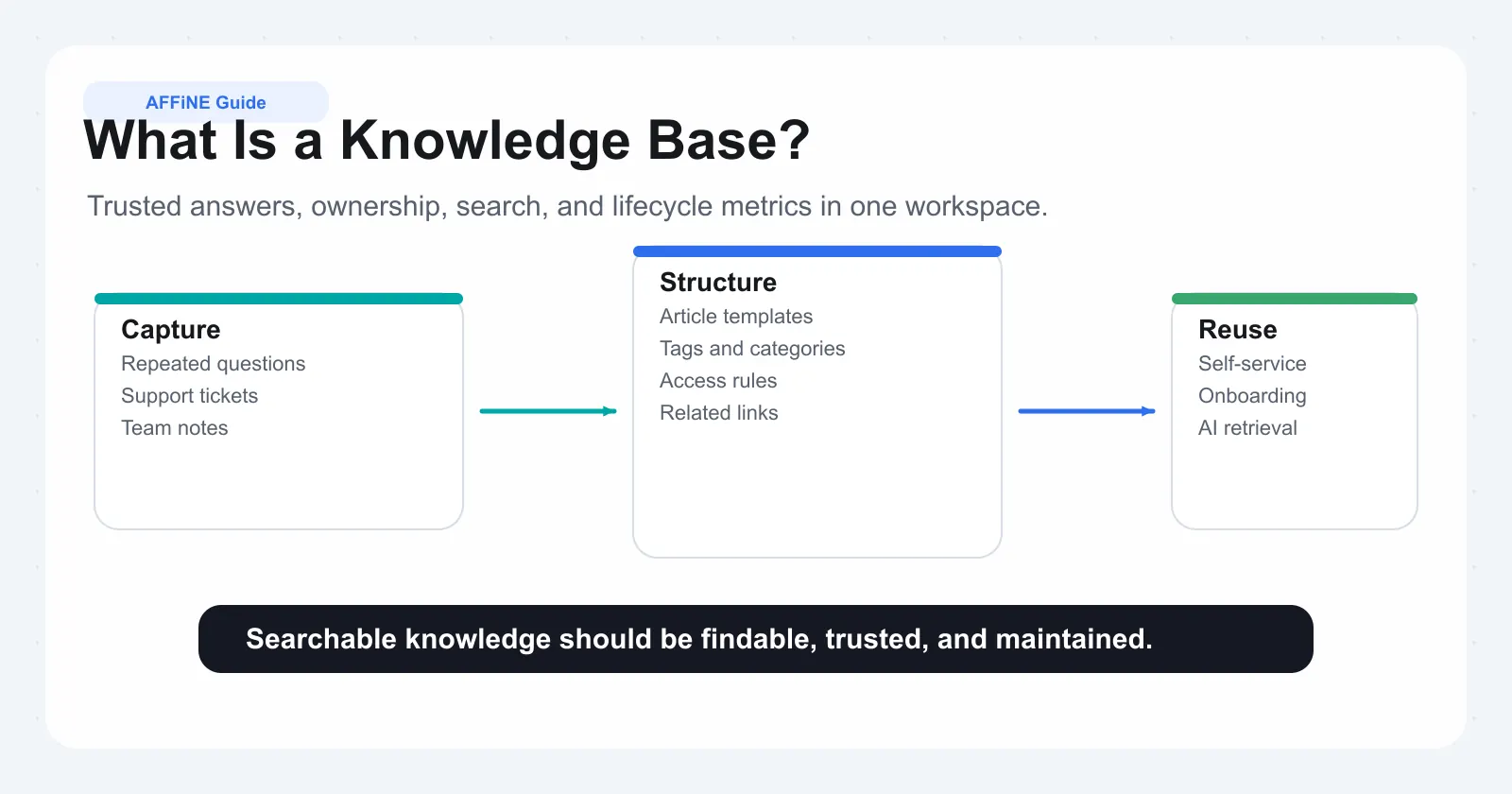
Knowledge base software is a governed, searchable system for storing approved answers, procedures, product knowledge, and support content. In 2026, the strongest tools do more than host articles: they help teams control ownership, tune search relevance, ground AI answers in trusted sources, protect sensitive information, and measure whether people actually find what they need.
What a Knowledge Base Is and Is Not
Knowledge base software is the tooling layer behind what a knowledge base is in practice. It brings together articles, FAQs, process guides, troubleshooting steps, decision records, and policies into an easily searchable hub. If you are still shaping structure, ownership, and rollout, use this knowledge base blueprint before you compare vendors. Unlike general document storage, a knowledge base platform emphasizes structured content, source-of-truth ownership, version control, analytics, permissions, and reusable answers—making it far more than a digital filing cabinet.
Use this guide as a buyer checklist. A good evaluation should test real user questions, real content samples, governance workflows, security controls, AI citation behavior, and migration risk before anyone signs a long-term contract.
Internal vs Customer-Facing Knowledge Bases
When considering knowledge base platforms , it’s essential to understand the difference between an internal knowledge base and a customer knowledge base (sometimes called an external or online knowledge base). Internal knowledge bases empower employees with company policies, onboarding materials, product specs, and troubleshooting guides—everything needed to work smarter and faster. For a practical example, see our AI scribe for event planners guide on capturing meeting notes and SOPs that feed your knowledge base. For multilingual teams, see our AI scribe for non-native English speakers guide to capture conversations accurately and convert them into structured notes that plug into your knowledge base. If your main comparison is wiki versus structured KB, use this corporate wiki playbook as the adjacent operating model. Customer knowledge bases, on the other hand, provide self-service resources like FAQs, product tutorials, and troubleshooting steps, enabling customers to solve problems independently and reducing support ticket volume.
• Internal Knowledge Base: Ideal for onboarding, training, and day-to-day employee support.
• Customer Knowledge Base: Best for self-service support, product guidance, and reducing repetitive inquiries.
Core Capabilities You Should Expect
Modern knowledge base software goes well beyond simple document storage. The best platforms combine an editor people will actually use, a search layer people trust, and administrative controls that keep the library accurate over time. Here’s what you should look for in a robust solution:
• Content Authoring & Management: Create, edit, and organize articles, guides, and templates in a collaborative environment.
• Advanced Search: Quickly find relevant answers using keyword, semantic, or intent-based search.
• Permissions & Roles: Control who can view, edit, or publish content, ensuring sensitive information stays protected.
• Versioning & Audit Trails: Track changes, roll back updates, and maintain a clear history of content evolution.
• Analytics & Reporting: Gain insights into usage patterns, content gaps, and user satisfaction to continuously improve your online knowledge base.
• Integrations: Seamlessly connect with CRM, helpdesk, or other business systems for unified workflows.
Focus on findability—not just storage—when evaluating knowledge base platforms for your organization.
Knowledge Base Platforms vs. Document Repositories
It’s tempting to think that a shared drive or document management system is enough. However, the difference lies in structure and lifecycle management. Knowledge base platforms are purpose-built for discoverability, content reuse, and lifecycle control—making them indispensable for organizations that value speed, accuracy, and self-service. Document repositories may store files, but they often lack the emphasis on taxonomy, search intelligence, and analytics for knowledge sharing that purpose-built knowledge base platforms provide (Helpjuice).
Ultimately, whether you’re supporting onboarding, customer support, or employee enablement, mapping your needs to the right capabilities ensures your knowledge base delivers value from day one. By investing in a solution that prioritizes structured content, robust search, and actionable insights, you’ll set the stage for a knowledge-driven culture—one that empowers both your team and your customers.
Evaluation Criteria That Actually Matter
Choosing the best knowledge base software for your organization can feel overwhelming. With so many features and flashy interfaces to compare, how do you know what truly matters? Imagine spending months rolling out a new system, only to find that users avoid it because the search doesn’t work or content quickly becomes outdated. To avoid these pitfalls, focus on evaluation criteria that drive real user outcomes—not just feature lists.
Decision Criteria That Matter Most
When conducting a knowledge base software comparison , prioritize elements that directly impact usability, adoption, and long-term value. Here’s a practical table to help you compare knowledge base software options based on what matters most:
| Criteria | What to Look For | Implementation Effort | Risk Level | Search Relevance Tuning | Editorial Workflows | Migration Support |
|---|---|---|---|---|---|---|
| Search Quality | Fast, accurate, intent-based results | Medium | High if poor | Customizable, supports synonyms | Not required | Not required |
| Authoring Experience | Easy editing, templates, multimedia | Low | Medium if clunky | Not required | Supports drafts, review, approval | Not required |
| Permissions & Security | Granular access, role-based controls | Medium | High if weak | Not required | Approval flows, audit trails | Not required |
| Analytics & Reporting | Usage stats, feedback, content gaps | Low | Medium if missing | Not required | Not required | Not required |
| Scalability & Extensibility | Integrations, API access, growth support | Medium to High | High if limited | Not required | Not required | Migration tools, import/export |
As you can see, the best knowledge base tools make it easy to find information, contribute content, and protect sensitive data—all while providing actionable analytics and room to grow.
Common Pitfalls When Selecting Tools
It’s tempting to be swayed by modern aesthetics or long feature lists, but these can distract from what matters most. Here are some common mistakes organizations make when choosing software for knowledge base projects:
• Over-indexing on visual design and ignoring search or structure
• Skipping a clear content governance strategy
• Neglecting search optimization and user testing
• Using jargon or technical language that confuses users
• Failing to plan for ongoing content maintenance
• Ignoring analytics and feedback loops
• Not training staff on usage and contribution
• Forgetting about user experience
These mistakes can leave even the best knowledgebase software underused and ineffective (KPSOL).
Proof-of-Concept Steps That De-Risk Buying
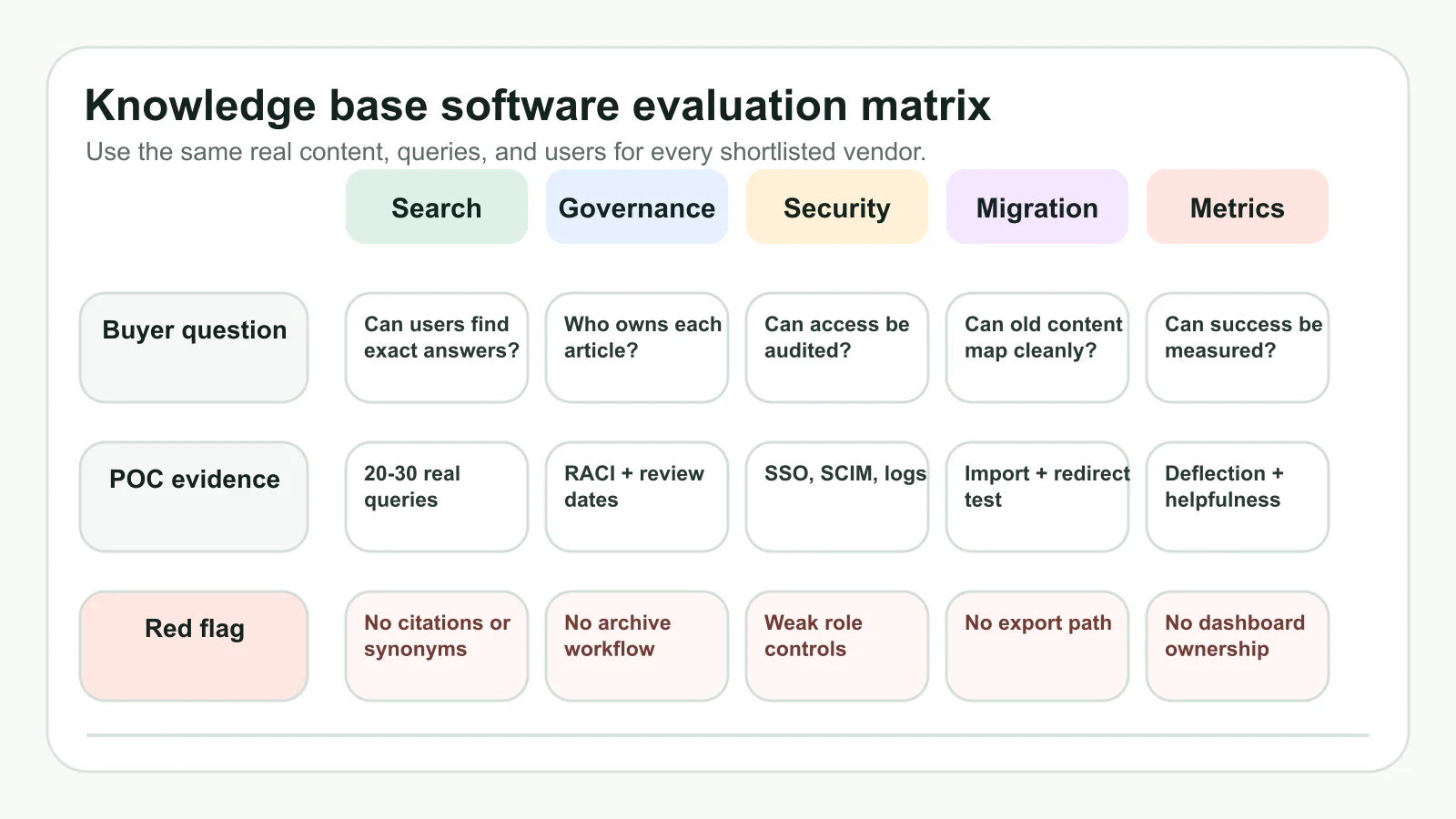
Before making a final decision, always run a proof of concept (PoC) with your top candidates for top knowledge base software. A credible PoC should use real content, real users, and measurable acceptance criteria, not a vendor's sample workspace. Define success before the trial starts: for example, target a minimum search-success rate, a review workflow that owners can complete without workarounds, and a migration sample that preserves links, permissions, and canonical article ownership. Here’s how to get started:
• Select 20–30 representative articles or FAQs
• Invite a cross-section of stakeholders (support agents, editors, IT, end users)
• Test search accuracy, content creation, and permissions
• Simulate a migration of legacy content
• Gather user feedback and identify friction points
• Assess vendor responsiveness and support during the trial
This process gives you confidence that the customer support knowledge base software you select will work in your environment and meet your needs. If a vendor cannot pass a small, instrumented PoC, the same issues usually become more expensive after migration.
Never skip a real-world proof of concept—what works on paper may not fit your workflows in practice.
By focusing on user-centered evaluation, avoiding common pitfalls, and insisting on hands-on trials, you’ll be well-prepared to choose the best knowledge base software for your team. Next, let’s explore how to keep your knowledge base accurate and trusted through strong governance and lifecycle management.
Governance And Content Lifecycle Playbook
A knowledge base fails when nobody owns stale answers. Search and AI features can surface content faster, but they cannot make outdated procedures trustworthy. Strong governance and content lifecycle management define who writes, reviews, approves, archives, and measures every important article. That operating model is what keeps your company knowledge base useful for both employees and customers.
RACI For Article Ownership
Who does what—and when? That’s where a RACI matrix (Responsible, Accountable, Consulted, Informed) comes in. It clarifies roles across the entire content lifecycle, ensuring nothing slips through the cracks. Imagine launching a new employee knowledge base: contributors draft content, reviewers check for accuracy, approvers give the green light, and managers oversee the process. Here’s a sample RACI table for core activities:
| Activity | Contributor | Reviewer | Approver | System Owner |
|---|---|---|---|---|
| Create Article | R | C | A | I |
| Review Article | C | R | A | I |
| Approve/Publish | C | C | R/A | I |
| Retire/Archive | I | C | R | A |
Editorial Standards and Versioning
Consistency is key for any knowledge base management system. Set clear editorial standards—such as using descriptive titles, task-oriented language, and consistent tagging—to make content easy to find and understand. But what happens when updates are needed? That’s where versioning and change logs come in. Each article should have a history of edits, with the ability to roll back to previous versions if necessary. This not only supports transparency but also helps maintain quality as your knowledge base systems grow and evolve.
Use clear titles, task-first language, and consistent tags to maximize clarity and findability.
Review Cadence and Archival Policy
How often should you review content? Match cadence to risk. High-impact articles about billing, security, product limits, or incident response may need monthly or release-triggered review. Stable onboarding and policy pages can be quarterly or biannual. Automated reminders should alert article owners before content expires, and obsolete content should move to an archived state rather than disappearing without trace. This preserves institutional memory while keeping current answers clean.
-
Draft: Contributor creates a new article or updates an existing one.
-
Review: Reviewer checks for accuracy, completeness, and adherence to standards.
-
Approval: Approver validates and schedules the article for publishing.
-
Publish: Article goes live for the intended audience, with permissions set by the system owner.
-
Periodic Review: System or manager triggers a scheduled review based on defined cadence.
-
Archive/Retire: Outdated or redundant articles are archived, retaining a record for compliance.
For example, a knowledge management system software might automatically notify authors when their articles are due for review, ensuring that your employee knowledge base stays current and reliable (PHPKB Article Life Cycle).
By establishing clear ownership, editorial standards, and a disciplined review process, your knowledge base management can scale with confidence. Next, let’s explore how AI-powered search and quality controls can further enhance your knowledge base systems and user experience.
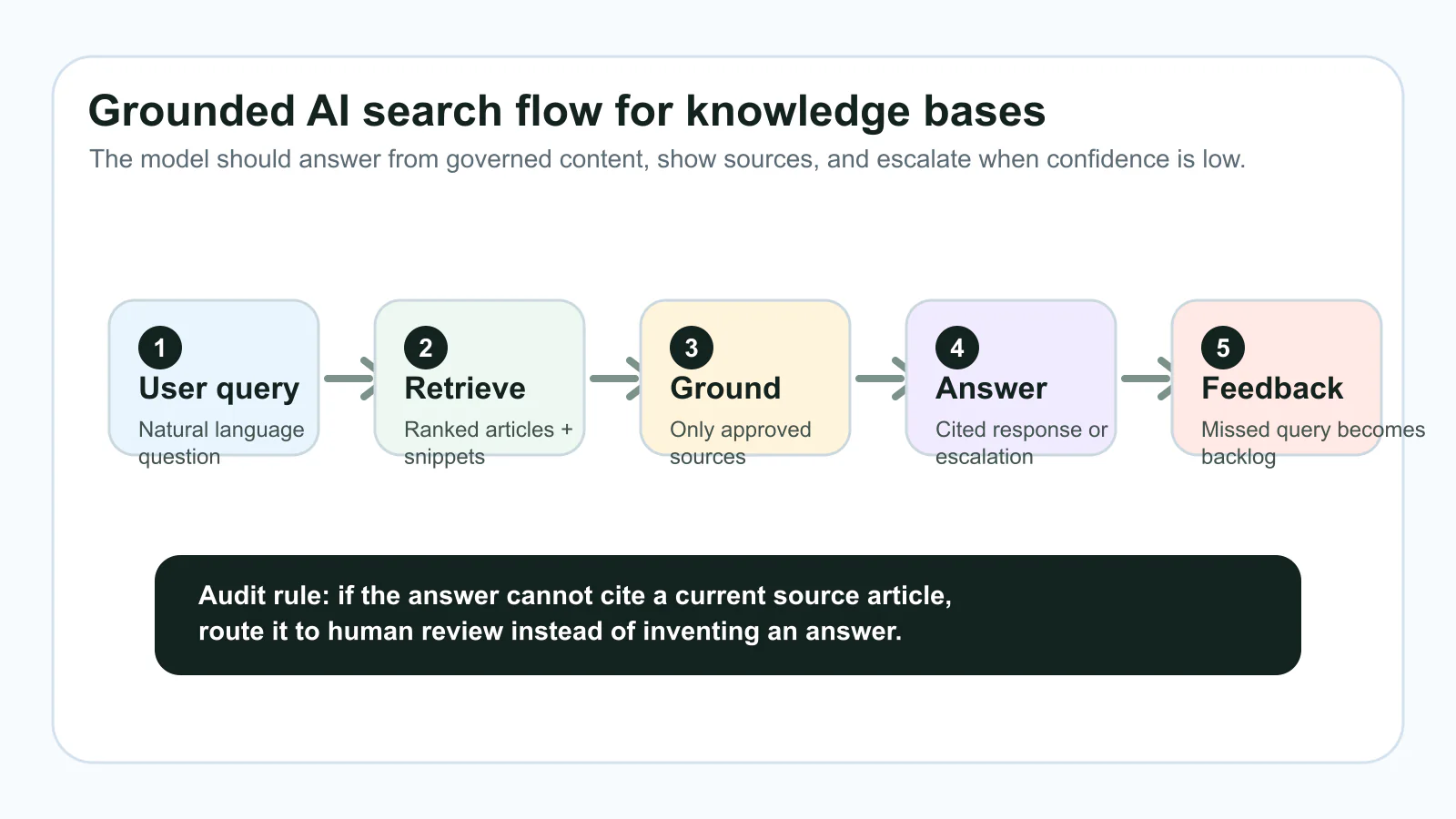
AI Search Relevance And Hallucination Control
AI can make a knowledge base feel dramatically faster, but only when it is grounded in governed content. The real work of evaluating ai knowledge base solutions is not asking whether the product has a model label; it is testing whether the system retrieves the right source, cites it, respects permissions, and escalates gracefully when the answer is uncertain. Let’s break down how to assess the AI powered knowledge base software so your team can trust what they find.
Relevance and Retrieval Testing
When you type a question into your knowledge management search engine , you expect relevant, accurate answers—fast. But not all AI-powered knowledge base tools deliver the same quality. Sounds complex? Here’s how to make it simple:
• Embedding-Based Search: Test how well the AI understands meaning, not just keywords. For example, does “reset password” also find “change login credentials”?
• Query Intent Handling: Try ambiguous or multi-part questions to see if the system grasps true user intent.
• Synonym Expansion: Enter industry-specific terms and their synonyms—does the AI connect them?
• Multilingual Scenarios: If your organization is global, ask questions in different languages and check the consistency of results.
To make this concrete, imagine you’re evaluating a search knowledgebase for your support team. You’d want to use sample queries like:
• "How do I update my billing information?"
• "Error code 403: what does it mean?"
• "Can I export data in CSV format?"
• "Change password" (in Spanish or French)
| Engine | Relevance | Explainability | Feedback Loops | Admin Controls |
|---|---|---|---|---|
| AI Engine A | High | Shows source articles | User thumbs up/down | Customizable synonyms |
| AI Engine B | Medium | Basic source links | Limited feedback | Role-based access |
| AI Engine C | Low | No source shown | No feedback | Minimal controls |
This scoring approach helps you objectively compare how different ai powered knowledge base tools stack up for your actual needs.
Hallucination Mitigation and Citations
Ever seen an AI-generated answer that sounds confident but is factually wrong? That’s called a hallucination. For a clinical perspective on preventing AI hallucinations and improving documentation accuracy, see our clinician's guide to AI scribe accuracy. To keep your knowledge base ai trustworthy, require answer-level traceability and define what the system should do when no reliable source is available:
• Grounded Generation: Require the AI to cite its sources for every answer. This helps users trace information back to original articles or documents.
• Content Scope Controls: Limit the AI’s access to only verified, up-to-date knowledge base content to prevent it from pulling in outdated or irrelevant material.
• Threshold Scoring: Use similarity scores (like cosine similarity) to set a cutoff—if the AI isn’t confident, it should escalate the query rather than risk a bad answer.
• Prompt Engineering: Structure prompts with clear role, task, and output instructions to minimize confusion and reduce hallucination rates.
For example, a best practice is to show users which document or article the AI answer is based on, and to flag when no relevant source is available. This transparency builds trust and helps you spot gaps in your ai knowledge base software before users do.
Cost and Maintenance Implications
AI isn’t set-and-forget. You’ll notice that the quality of your best ai knowledge base depends on ongoing tuning and feedback. Consider these factors:
• How easy is it to update your content and metadata for better search relevance?
• Does the platform support user feedback loops to capture and act on missed queries?
• Are there admin controls for managing permissions, audits, and retraining the AI?
• What are the latency and error rates under real-world usage? For example, a robust knowledge management search engine should have low error rates and quick response times.
AI quality is built on strong content structure, smart metadata, and active feedback—not just the model label or vendor promises.
By focusing on measurable search performance, robust hallucination controls, and ongoing maintenance, you’ll unlock the full power of ai knowledge base tools. Next, we’ll examine how to plan integrations and APIs—so your knowledge base connects seamlessly with the rest of your tech stack.
Integrations, APIs, and SSO Without Surprises
Ever tried to connect your knowledge base to a help desk, CRM, or Slack—only to discover a maze of manual exports or missing connectors? As your organization grows, seamless knowledge base integration isn’t just a nice-to-have; it’s essential for reducing manual work, keeping information current, and avoiding vendor lock-in. Let’s break down how to evaluate integrations, APIs, and SSO capabilities in saas knowledge base software —so your knowledge truly flows where it’s needed.
APIs and Webhooks to Evaluate
When you’re reviewing enterprise knowledge base software , start by asking: How open and flexible is the platform? APIs (Application Programming Interfaces) and webhooks allow your knowledge base to send and receive data automatically, enabling real-time updates and workflow automation. Here’s what to look for:
| Integration Feature | What to Check | Why It Matters |
|---|---|---|
| API Rate Limits | Requests per minute/hour | Prevents slowdowns as your usage scales |
| Webhook Coverage | Supported event types (create, update, delete) | Enables real-time sync with other tools |
| SDK Availability | Official libraries for your tech stack | Simplifies custom development |
| Export/Import Formats | CSV, JSON, XML, HTML | Ensures data portability for migrations |
| SSO/SCIM Support | SAML, OAuth, SCIM protocols | Streamlines identity management and access control |
Native Connectors That Save Time
Why reinvent the wheel? The best online knowledge base software offers pre-built connectors for popular business tools, saving you hours of custom scripting. Here are common integration scenarios and how to approach them:
-
Slack Notification Flow: Use webhooks or a native Slack connector to push article updates, new FAQs, or critical alerts directly to relevant channels.
-
Zendesk or Help Desk Handoff: Sync resolved tickets and related articles to your knowledge base, or surface suggested articles for agents during ticket triage.
-
Salesforce Knowledge Surfacing: Embed knowledge base search within Salesforce, enabling sales and support teams to find answers without leaving their workflow.
-
SharePoint Migration Checkpoints: Export documents from SharePoint, map metadata fields, and import content into your new platform, preserving structure and permissions (MatrixFlows Migration Guide).
For each integration, test with a small set of articles or records in a sandbox environment. Validate that permissions, field mappings, and formatting are preserved before scaling up.
Provisioning, Backup, and Portability
Imagine switching vendors or expanding your hosted knowledge base —can you easily export your content, user data, and permissions? Portability is critical for future-proofing your investment and avoiding lock-in. Here’s a quick decision table to help you compare platforms:
| Criteria | Must-Have | Nice-to-Have | Red Flag |
|---|---|---|---|
| Provisioning | SCIM, SSO integration | Bulk user import/export | Manual only |
| Backup | Automated, scheduled exports | API-triggered backups | No backup options |
| Portability | Full content export (articles, media, metadata) | Granular export (by category, date, etc.) | Export blocked or incomplete |
Always prioritize portability—your knowledge should never be locked in to one external knowledge base software provider.
For organizations migrating from legacy systems like SharePoint, prioritize platforms that support structured imports, metadata mapping, and permission translation. This ensures a smooth transition and reduces the risk of data loss or broken workflows.
In summary, robust integrations, open APIs, and strong SSO/SCIM support are non-negotiable for scalable, future-ready knowledge management. By planning integrations up front and validating with real-world tests, you’ll save time, reduce manual errors, and empower every team—whether you’re running a modern hosted knowledge base or managing complex knowledge base software SharePoint migrations. Next, we’ll tackle security, compliance, and data governance—so your knowledge base is not only connected, but also protected.
Security Compliance And Data Governance Checklist
When you’re evaluating a new knowledge base SaaS or rolling out an enterprise knowledge base, security, compliance, and data governance need to be part of the buying decision from day one. Knowledge bases often contain internal procedures, customer details, troubleshooting logs, product decisions, and employee information. The right knowledge base application must therefore satisfy users, IT, legal, and security teams at the same time.
Security Controls to Verify
Every knowledge base service should offer more than just basic password protection. Here are the essentials to look for in your knowledge base management software and it knowledge base software :
• Encryption at Rest and In Transit: All data—whether stored or being transferred—must be encrypted to prevent unauthorized access.
• Role-Based Access Controls (RBAC): Grant users only the permissions they need, reducing the risk of data leaks.
• Single Sign-On (SSO) and SCIM: Integrate with your corporate identity provider for streamlined, secure authentication and automated user provisioning.
• Audit Logs: Maintain detailed records of who accessed or changed what, when, and how—crucial for both security and compliance.
• Incident Response and Monitoring: Ensure your provider has a documented process for detecting, reporting, and responding to security incidents.
• Regular Backups: Automated, encrypted backups protect your knowledge base from accidental loss or ransomware attacks.
| Requirement | Why It Matters | Vendor Response Field |
|---|---|---|
| SOC 2 Certification | Ensures vendor meets security, availability, processing integrity, confidentiality, and privacy standards | SOC 2 report, renewal cadence |
| ISO 27001 | Demonstrates global best practices for information security management | Certificate, audit date |
| GDPR Compliance | Protects personal data and supports regulatory obligations (especially for EU data) | DPA, data flow diagrams, processing agreements |
| Audit Logs | Tracks user activity for security, troubleshooting, and compliance | Log retention policy, access controls |
| Data Loss Prevention (DLP) | Prevents unauthorized sharing or exfiltration of sensitive information | DLP configuration, alerts policy |
| Data Residency | Ensures data is stored in approved geographic regions | Data center locations, residency options |
Compliance Evidence to Request
Don’t just take a vendor’s word for it—ask for proof. During due diligence for any enterprise knowledge base or it knowledge base deployment, request:
• Recent SOC 2 or ISO 27001 certificates
• GDPR compliance statements (or other regional privacy documents)
• Sample audit logs and retention schedules
• Data protection agreements (DPAs) and incident response plans
• Details on backup frequency, restoration testing, and disaster recovery
If your use case involves regulated industries, check for HIPAA, PCI DSS, or other sector-specific certifications as well. For more on security frameworks, see ISO 27001 and GDPR.
Access, Audit, and Data Residency
How does your knowledge base application manage access and data location? Here’s a checklist for your security review:
• Can you assign granular permissions by user, group, or content type?
• Are audit logs immutable and protected from tampering?
• Does the system support least-privilege access—so users see only what they need?
• Can you specify where your data is stored (region/country)?
• Are logs and backups encrypted and retained for the required period?
• Is there a clear process for user deprovisioning and emergency access removal?
Test least-privilege access in a staging environment before going live to ensure your knowledge base service protects sensitive information by default.
Strong security and compliance controls aren’t just boxes to check—they’re the foundation of trust for your company and users. By verifying certifications, enforcing robust access management, and demanding transparency from your vendors, you’ll ensure your knowledge base management software stands up to scrutiny and scales securely. Next, we’ll show how to build a metrics dashboard to prove your knowledge base’s value and guide ongoing improvements.
Metrics Dashboards That Prove Value
Ever wondered if your knowledge base is truly making a difference? You might have a sleek interface and plenty of articles, but without clear metrics, it’s impossible to know if your efforts are paying off. A good knowledge base isn’t just about content—it’s about measurable impact. Let’s explore how to design a metrics dashboard that demonstrates the knowledge base benefits to your team and organization.
KPIs That Matter for Adoption and Deflection
What should you actually measure? Start with KPIs that tie directly to user experience and operational efficiency. Here are the most valuable metrics for any knowledge base page or system:
| Metric Name | Definition | Source System | Review Cadence |
|---|---|---|---|
| Ticket Deflection Rate | Percent of users who resolve their issue via the knowledge base without submitting a ticket | Help desk + knowledge base analytics | Monthly |
| Article Helpfulness Score | Average user rating (thumbs up/down or stars) for each article | Knowledge base platform | Monthly |
| Search Success Rate | Percent of searches that return a relevant, clicked result | Search analytics | Weekly |
| Search Failure Rate | Number of searches with no results or high bounce rate | Search analytics | Weekly |
| Article Update Frequency | Percent of articles reviewed or updated in a set period | Knowledge base platform | Quarterly |
| Contributor Activity | Number of new or updated articles per contributor | Knowledge base analytics | Monthly |
| Average Time-to-Answer | Time from user search to answer found | Platform analytics | Monthly |
Tracking these KPIs not only proves the knowledge base advantages —like ticket reduction and improved self-service—but also highlights where users are struggling or content is out of date.
Data Sources and Instrumentation
Sounds complex? It doesn’t have to be. Most modern knowledge base platforms offer built-in analytics and dashboards. For deeper insight, connect your knowledge base to help desk systems and product telemetry tools. Here’s where your data will typically come from:
• Platform Analytics: Tracks article views, ratings, and update history.
• Search Analytics: Captures queries, results, and failed searches for each knowledge base page.
• Help Desk Integration: Measures ticket deflection and correlates tickets with knowledge base usage.
• Product Telemetry: Reveals in-app help usage and user journeys.
Combining these sources gives you a holistic view of how your search knowledge base is performing—and where to focus improvements.
How to Interpret Trends and Take Action
Metrics are only useful if you act on them. Imagine noticing a spike in search failures for a popular topic—this signals a content gap or confusing terminology. By tracking the right KPIs, you’ll spot these issues before they become widespread problems.
Track search failures weekly and convert them into backlog items for new or improved articles.
• If ticket deflection drops, review recent changes to top articles or search relevance.
• If article helpfulness scores decline, prioritize rewrites or clarifications.
• If contributor activity stalls, check for bottlenecks in your editorial workflow.
• If article update frequency falls below target, trigger a content review cycle.
• If the average time-to-answer increases, analyze knowledge base page structure and search performance.
Set internal thresholds for each KPI (for example: aim for 20–30% of articles updated quarterly, as recommended by TOPdesk). If a metric falls below your target, schedule a focused review session or assign ownership for corrective action.
Ultimately, a well-instrumented metrics dashboard turns your knowledge base from a static repository into a living resource—one that delivers ongoing value, supports continuous improvement, and gives you the data you need to advocate for further investment. Up next, we’ll walk through implementation and migration strategies to ensure your knowledge base keeps pace as your organization grows.
Implementation And Migration Made Repeatable
Thinking about building a knowledge base or moving your existing content into a new system? It can feel overwhelming—especially if you’re juggling legacy documents, multiple stakeholders, and the pressure to get it right the first time. But with a structured implementation and migration plan, you can reduce risk and accelerate value, whether you’re using a free online knowledge base builder or a sophisticated enterprise platform.
Project Phases and Role Assignments
Every successful migration starts with clear phases and defined roles. Imagine you’re about to create a knowledge base from scratch or migrate to the best free knowledge base software. Who leads the charge? Who reviews content? Who manages technical checks? A solid implementation and migration plan covers these steps:
-
Discovery & Scope: Define project objectives, what’s in and out of scope, and key stakeholders.
-
Current State Assessment: Inventory all existing content—articles, FAQs, manuals—across departments.
-
Information Architecture: Design the new structure: categories, tags, templates, and permissions.
-
Content Audit & Mapping: Assign ownership, check for duplicates, assess freshness, and tag canonical sources.
-
Pilot Launch: Select a representative segment (e.g., one department or product line) to test the new system and workflows.
-
Full Rollout: Migrate remaining content, train users, and monitor adoption.
-
Ongoing Support: Establish feedback loops, continuous improvement, and regular audits.
Content Audit and Mapping
Before you build a knowledge base that’s reliable and easy to use, you need to know exactly what you’re working with. A thorough content audit helps you avoid clutter, outdated articles, and confusion. Here’s a simple table template to organize your audit and migration mapping:
| Source Article | Destination Location | Status | Owner | Freshness (Last Updated) | Duplicates? | Canonical Tag | Review Date |
|---|---|---|---|---|---|---|---|
| Employee Handbook 2026 | HR > Onboarding | Ready | Jane Smith | 2026-05-10 | No | Yes | 2026-07-01 |
| Product X FAQ | Support > Product X | Needs Update | John Doe | 2026-03-15 | Yes | No | 2026-07-15 |
This approach—adapted from real-world audit processes—ensures every article is accounted for, updated, and mapped to its rightful place. Tagging canonical sources and identifying duplicates streamlines your migration and prevents confusion down the line.
Pilot, Rollout, and Change Management
Sounds complex? Here’s how to make it manageable. Start with a pilot rollout: pick a single team or set of articles to move first. This lets you test the new structure, search, and permissions in a low-risk setting. Gather feedback, fix issues, and refine your approach before a full-scale migration. Effective change management is crucial—communicate the why, what, and how early and often, and provide hands-on training for all users.
-
Announce the migration and its benefits to all stakeholders.
-
Provide clear timelines and expectations.
-
Offer training sessions, quick-start guides, and live Q&A.
-
Set up feedback channels (surveys, forums, direct contacts).
-
Monitor adoption and address issues promptly.
-
Celebrate milestones—a successful pilot or full go-live.
Before going live, always test a small batch for redirects, links, search relevance, and permissions—catching issues early prevents major headaches later.
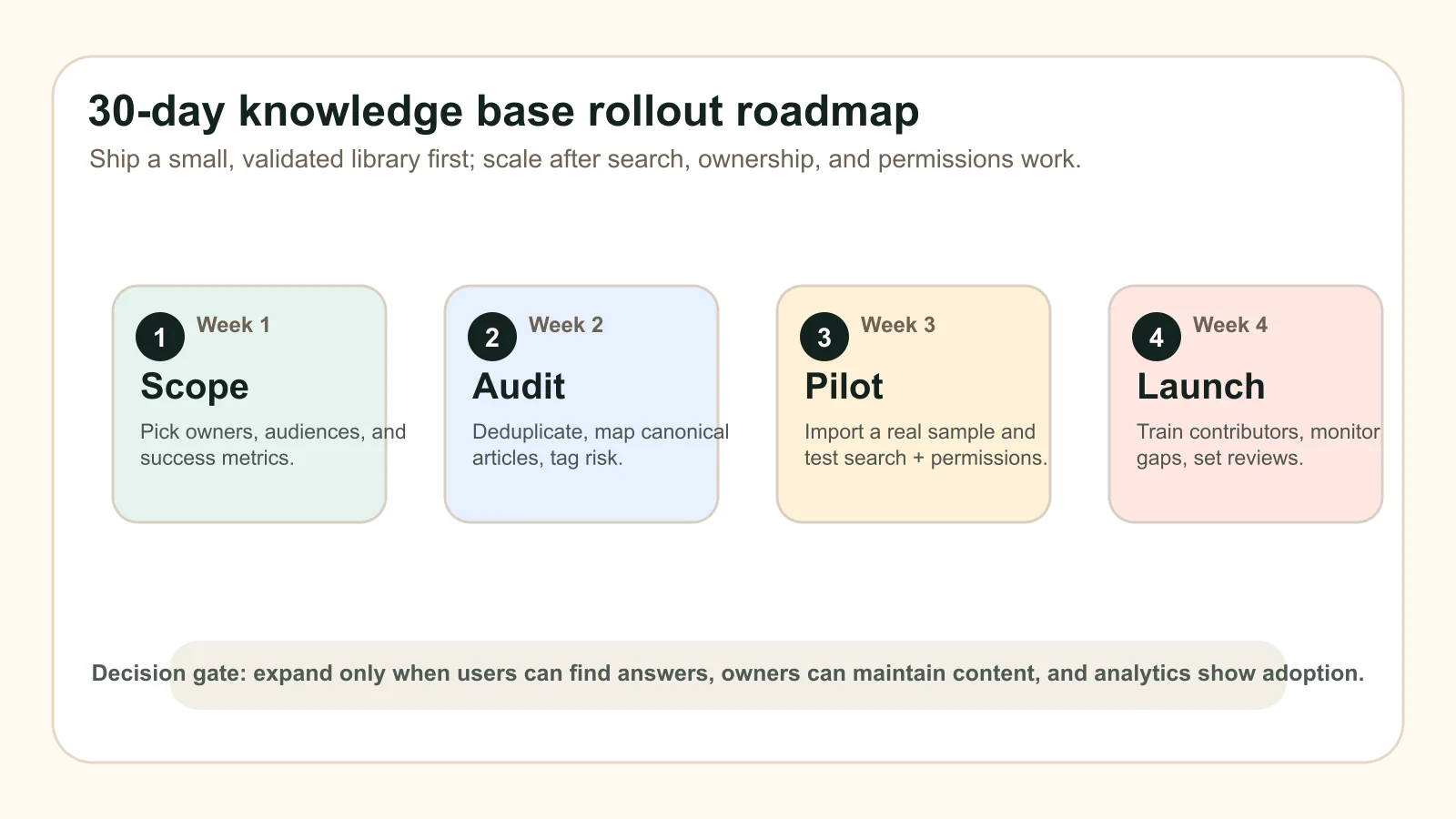
Whether you’re using a free knowledge base platform or investing in a robust enterprise solution, following a structured, repeatable process ensures smoother transitions and long-term success. A disciplined approach to how to build a knowledge base not only reduces risk but also builds trust with your users—making your knowledge base a go-to resource from day one. Up next, we’ll explore how a Zettelkasten-inspired approach can help you connect and grow your knowledge base content for the long term.
Build A Connected Knowledge Base With Zettelkasten
Ever wonder why so many knowledge base apps end up as static archives instead of living, breathing resources? Imagine if your knowledge database could spark new ideas and surface connections you didn’t even know existed. That’s where the Zettelkasten method comes in—a proven approach that transforms scattered notes into a powerful, interconnected personal knowledge base or team resource.
Why Interlinked Notes Beat Isolated Articles
Most knowledge bases start as collections of articles, but over time, isolated content gets lost, forgotten, or duplicated. The Zettelkasten method, pioneered by Niklas Luhmann, solves this by treating every note as an atomic, stand-alone idea—and then linking related notes together (AFFiNE). This networked approach mirrors how the human brain works: you jump from thought to thought, making associations that lead to deeper insights. Instead of hunting for information, you follow a trail of connections, making your knowledge base more discoverable and useful.
• Atomic notes: One idea per note makes it easy to link, update, and reuse.
• Bidirectional links: Connect notes in both directions, so you can navigate from any idea to related topics.
• Emergent topics: Clusters of connected notes reveal patterns and new areas for exploration.
Connection density matters more than sheer volume—focus on building bridges, not just adding notes.
From Scattered Notes to a Cohesive Graph
Sounds complex? Actually, it’s about simplifying your workflow. Instead of dumping everything into long documents, you create short, focused notes—then link them as your understanding grows. Over time, this forms a web or graph, making your personal knowledge base easy to navigate and expand. For example, reading a book on productivity? Summarize a key idea in one note, then link it to related notes on focus, time management, or deep work. The result is a living knowledge database that grows with you.
Ready to try it? Here’s a quick-start checklist for applying Zettelkasten to your knowledge base:
• Start with a template: The AFFiNE Digital Zettelkasten Template gives you a ready-made structure for atomic notes, linking, and tagging—no need to build from scratch.
• Capture fleeting ideas: Jot down quick thoughts or insights as they come, then process them into permanent notes.
• Distill and link: Write each note in your own words, focusing on a single idea, and add links to related notes.
• Tag and revisit: Use tags or categories to group notes, and review them regularly to spot new connections.
• Expand with context: When you notice a cluster forming, create index or summary notes to map the relationships.
When to Apply Zettelkasten in Teams
Is the Zettelkasten method just for academics or solo learners? Not at all. Teams can benefit by using atomic, linked notes for project documentation, meeting outcomes, or shared research. The approach helps avoid knowledge silos and ensures everyone can trace ideas back to their source. In fact, many of the best knowledge base examples use Zettelkasten-inspired linking to boost discoverability and collaboration (Medium).
Here’s how to get started as a team:
-
Agree on a simple note template (title, content, references, links).
-
Encourage everyone to create atomic notes during meetings or research.
-
Link new notes to existing ones wherever relevant—don’t worry about perfection.
-
Review the note graph regularly to identify gaps, duplicates, or emergent topics.
-
Use tools that support bidirectional linking and graph views for easier navigation.
Choosing Tools and Adapting Practices
Not every knowledge base platform is built for dense linking or visual graphs. If you’re already using another system, focus on applying Zettelkasten principles—atomicity, clear titles, and explicit links—regardless of the tool. The AFFiNE Digital Zettelkasten Template makes it easy to pilot this approach, but you can adapt the structure to fit your existing stack. The key is to prioritize connection density and regular review over just adding more content.
As your knowledge base evolves, you’ll notice certain knowledge base synonyms —like “information hub,” “help center,” or “support wiki”—don’t fully capture the power of a truly connected system. In other words for knowledge base, Zettelkasten turns a static archive into a living network—a synonym for knowledge base that emphasizes growth, creativity, and insight.
By embracing these practices, your personal or team knowledge base becomes more than a collection of articles—it becomes a dynamic resource for learning, problem-solving, and innovation. Next, we’ll wrap up this playbook with concrete action steps and recommendations to help you launch or level up your knowledge base journey.
Action Plan And Tool Recommendations
Ready to put your knowledge base vision into action? Treat the buying process like an implementation rehearsal. Whether you’re starting from scratch or leveling up an existing internal company knowledge base, the goal is to prove that users can find answers, owners can maintain content, and admins can govern risk before you scale the platform. Here’s how to make it happen, step by step.
Your 30-Day Action Plan
-
Define Success Metrics: Identify the KPIs that matter most (e.g., search success rate, ticket deflection, article helpfulness). Make sure these align with your business goals and user needs.
-
Assemble Your Project Team: Bring together stakeholders from IT, support, content, and product. Assign clear roles for ownership, editorial review, and technical support.
-
Run a 2-Week Proof of Concept (POC): Select 20–30 representative articles from your current documentation. Import them into your shortlisted knowledge base platform(s) and test real-world queries, authoring, permissions, and integrations. Learn more about POC best practices.
-
Instrument Analytics: Enable dashboards and analytics tools to track your chosen KPIs from the start. This will help you spot gaps, measure adoption, and make data-driven improvements.
-
Validate Integrations: Test connections with help desk, CRM, or other business systems. Ensure permissions, field mappings, and SSO/SCIM are working as expected.
-
Pilot Contributor Onboarding: Train a small group of users to create and update articles. Encourage feedback on editorial workflows, tagging, and review processes.
-
Adopt Review Cadences: Establish a regular content review schedule—even in the pilot phase—to keep your knowledge base fresh and trusted.
-
Iterate and Decide: Gather feedback, analyze results, and refine your approach. Use these insights to select the best internal knowledge base software for full rollout.
Adopt review cadences before scale—regular updates are the backbone of a trusted knowledge base.
Proof-of-Concept Checklist
Not sure where to start with your POC? Use this simple checklist to ensure you’re covering all the essentials:
• Import a diverse set of articles (FAQs, process docs, troubleshooting guides)
• Test advanced search and synonym handling with real user queries
• Check permissions and role-based access for sensitive content
• Validate integrations with your help desk or CRM
• Review analytics dashboards for actionable insights
• Solicit feedback from both authors and end users
• Experiment with linking and tagging practices (see below)
Next Steps and Governance Anchors
Once your POC wraps up, you’ll be in a strong position to make an informed decision. But don’t stop there! The most successful knowledge base consulting projects set clear governance anchors from the start. This means documenting editorial standards, assigning content ownership, and scheduling regular reviews. It’s the foundation for scaling your knowledge base from pilot to enterprise-wide adoption—and for becoming one of the top rated knowledge base software success stories in your industry.
Tool Recommendations and Zettelkasten for Connected Notes
When evaluating the best knowledge base platforms , look for solutions that support structured content, advanced search, analytics, and flexible integrations. But don’t overlook the power of connection: using a Zettelkasten-inspired approach, such as the AFFiNE Digital Zettelkasten Template, can help you seed a best knowledge base with atomic, interlinked notes. This method makes it easy to validate linking standards, tags, and contributor onboarding during your POC—without disrupting your existing editorial norms. If your current stack doesn’t support dense linking, adapt the principles: focus on atomic notes, clear titles, and explicit connections between related topics.
Remember, the goal isn’t to chase every feature but to build an internal company knowledge base that’s easy to navigate, keeps content fresh, and evolves with your organization. By following this action plan and leveraging proven frameworks, you’ll be well on your way to launching—and sustaining—a knowledge base that truly works for your team.
Related Guides By Use Case
Use this buyer's guide as the canonical evaluation page for knowledge base software. For narrower jobs, follow one supporting guide instead of creating another near-duplicate comparison page:
| Use case | Supporting guide | When to use it |
|---|---|---|
| Definition and scope | what is a knowledge base | Clarify meaning, article types, and wiki/FAQ/documentation differences before vendor evaluation. |
| Planning and rollout | knowledge base blueprint | Build taxonomy, ownership, launch steps, and review workflows before a tool shortlist. |
| Ranked shortlist | best knowledge base software | Compare AFFiNE, Notion, Confluence, Zendesk, and other tools after you know the buying criteria. |
| Internal teams | internal knowledge base software | Focus on employee enablement, private docs, AI search, and adoption inside a company. |
| AI retrieval | AI powered knowledge base software | Evaluate RAG, embeddings, citations, permissions, and hallucination controls. |
| Free and open options | free knowledge base software | Separate free tiers, open-source tradeoffs, local-first control, and hidden migration costs. |
| Customer support | customer support knowledge base software | Optimize self-service, ticket deflection, article analytics, and support workflows. |
| Hosting model | hosted knowledge base | Decide between hosted, self-hosted, and local-first deployment based on risk and ownership. |
| Team workflows | knowledge base software for teams | Match tools to a specific team's workflow, security, and scale needs after you know the core criteria. |
| Adoption and maintenance | knowledge base best practices | Prevent stale content and low adoption with governance, search tuning, and lifecycle rules. |
| Security rollout | how to secure your team knowledge base | Apply RBAC, MFA, permission audits, encryption, and training after you pick a platform. |
Knowledge Base Software FAQs
1. What is knowledge base software and how does it work?
Knowledge base software is a centralized platform for organizing approved answers, articles, FAQs, procedures, and guides so employees or customers can find trusted information without asking another person. Unlike basic document repositories, it adds structured content, ownership, version control, permissions, analytics, and often AI-assisted search to improve self-service and content reliability.
2. Is knowledge base software free to use?
Many providers offer free online knowledge base builders or free plans with basic features, ideal for small teams or those starting out. However, advanced capabilities like analytics, integrations, and granular permissions are typically available in paid versions. Always review the feature set to ensure it matches your needs before choosing a free or paid solution.
3. How do I choose the best knowledge base software for my company?
Focus on user-centered evaluation: prioritize search quality, authoring experience, permissions, analytics, scalability, security, and integration options. Run a proof of concept with real content and stakeholders, test search relevance with common and edge-case queries, verify governance workflows, and make sure migration preserves links and ownership. Avoid overemphasizing aesthetics or long feature lists.
4. What are the key benefits of implementing a knowledge base?
A well-managed knowledge base reduces support tickets, accelerates onboarding, improves internal collaboration, and empowers customers to solve issues independently. It provides measurable value through increased ticket deflection, faster time-to-answer, and higher user satisfaction, while supporting continuous improvement via analytics and regular content reviews.
5. How can I make my knowledge base more effective and interconnected?
Adopt practices like atomic note-taking, bidirectional linking, and regular content reviews. Using frameworks such as the Zettelkasten method or templates like the AFFiNE Digital Zettelkasten Template can help transform static articles into a dynamic, connected network of knowledge, making information easier to discover and maintain.