What Is a Knowledge Base? Definition & Examples
Updated August 2026: clarified the definition, types, and examples to match what readers ask first.
What Is a Knowledge Base, Really?
Quick answer: A knowledge base is a structured, searchable collection of trusted information that helps customers or employees find answers without asking someone else. It typically includes FAQs, how-to guides, troubleshooting steps, policies, and reference documentation.
A knowledge base can be public for customer self-service, private for internal teams, or both. Unlike a basic folder of files, it organizes content so people can search, browse, and act on a clear answer quickly.
Knowledge Base Definition In Plain English
A knowledge base is a searchable collection of organized information that helps people find the right answer quickly.
A practical knowledge base description is "the place where repeatable answers live." For customers, that may mean product help and self-service articles. For employees, it can mean onboarding documents, internal procedures, or policy references, often backed by deeper technical notes when the work involves systems, tools, or implementation detail. The goal is the same in both cases: make useful information easy to find, easy to trust, and easy to reuse.
That is why the knowledge base definition matters. It is not just a folder full of files. It is information arranged so users can search, browse categories, and reach a clear answer fast. At its next evolution, this becomes what AFFiNE calls a "KnowledgeOS"—a unified system where documents, whiteboards, and databases are no longer separate tools, but a single workspace that adapts to how you naturally create and organize information. By merging these modes, the system ensures that every piece of knowledge is searchable and connected, so teams can turn scattered context into reusable answers.
How Teams Use The Term Differently
The core idea stays the same, but the emphasis changes by team and use case.
-
Customer support: a self-service library with FAQs, how-to articles, troubleshooting steps, and product guidance.
-
Internal documentation: a private source of truth for employees, covering training, policies, workflows, and best practices.
-
ITSM and IT support: a repository of fixes, workarounds, service instructions, and technical notes that speed up issue resolution.
-
AI and search tools: a body of organized content that software can index, retrieve, and use to surface relevant answers.
So one team may picture a help center full of readable articles, while another may think of knowledge arranged so a system can pull the right answer with less guesswork. Both uses fit the broader knowledge base description, but they solve slightly different problems.
Knowledge Base Versus Knowledge Database Definition
A database mainly stores structured data, such as records, fields, and transactions, for fast retrieval. A knowledge base stores usable understanding, including explanations, steps, context, and proven solutions. Put simply, a database tells you what is there. A knowledge base helps you know what to do.
Some people use "knowledge database" as a casual synonym, but the practical difference matters. A searchable article repository is built first for people to read and act on. A more structured form of knowledge can also support software retrieval and AI-assisted knowledge base answers. That distinction shapes everything that follows, from self-service value to team efficiency.
Why Knowledge Bases Matter Across Teams
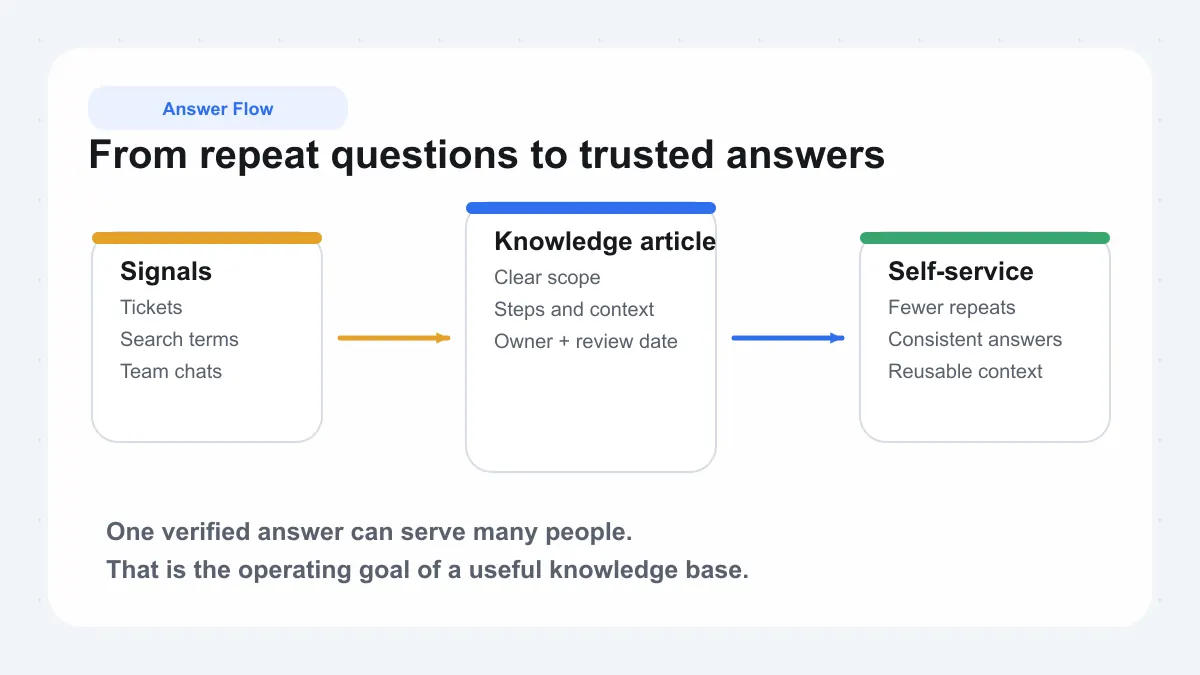
Definitions explain the term. Value explains the investment. Organizations build knowledge bases because repeated questions consume time, create inconsistent answers, and force teams to solve the same problem again and again. When one verified answer can serve many people, a knowledge base stops being just a content library and starts acting like an operating model for support, IT, and daily operations. That is where the benefits of knowledge base adoption become easy to see.
Benefits Of Knowledge Base For Customers
For customers, the biggest win is control. A customer service knowledge base gives people a way to fix common issues, learn features, or follow setup steps without waiting for an agent. Research shared by Kayako notes that 69% of consumers try to resolve issues on their own before seeking live help. That is why a customer support knowledge base is not just a nice extra. It is part of the service experience itself.
It also improves consistency. Instead of hearing one answer in chat and another over email, customers can find the same approved guidance in one place, any time of day. That reduces friction and makes self-service feel reliable rather than risky.
How Internal Knowledge Base Content Helps Teams
Inside the company, the logic is similar but the impact spreads wider. Support teams reuse troubleshooting steps. Operations teams standardize recurring processes. New hires learn faster because answers are documented instead of trapped in someone else's inbox. Bloomfire highlights a useful benchmark: organizations with knowledge management programs cut average search time from 8.5 hours to 4.6 hours per employee per week. Those reclaimed hours are one of the clearest benefits of knowledge base work.
This is also where a help desk knowledge base becomes valuable. When fixes, policies, and approved workflows are easy to find, teams spend less time repeating themselves and more time handling exceptions that actually need human judgment.
| Team | Audience | Typical outcome |
|---|---|---|
| Customer support | Customers | Faster self-service and fewer repetitive tickets |
| Operations and HR | Employees | Quicker onboarding and more consistent processes |
| IT service desk | Employees and agents | Faster incident resolution and fewer escalations |
Where ITSM Knowledge Management Fits
In IT, the value becomes even more operational. ITSM knowledge management captures known fixes, workarounds, and service instructions so teams do not rediscover the same solution every week. The monday.com overview connects this approach to faster resolutions, stronger first-contact success, lower costs, and better compliance support. In practice, ITSM tools like InvGate Service Management use centralized knowledge bases alongside incident, request, and change management workflows to help agents resolve issues faster and deliver more consistent support. In practice, that makes a customer support knowledge base, an internal team resource, and an IT service library parts of the same system: capture knowledge once, reuse it many times.
The only thing that changes is audience. Some answers should stay internal, some should be public, and some need controlled access, which is where knowledge base strategy starts to split into different models.
Internal, Customer, and Enterprise Knowledge Base Models
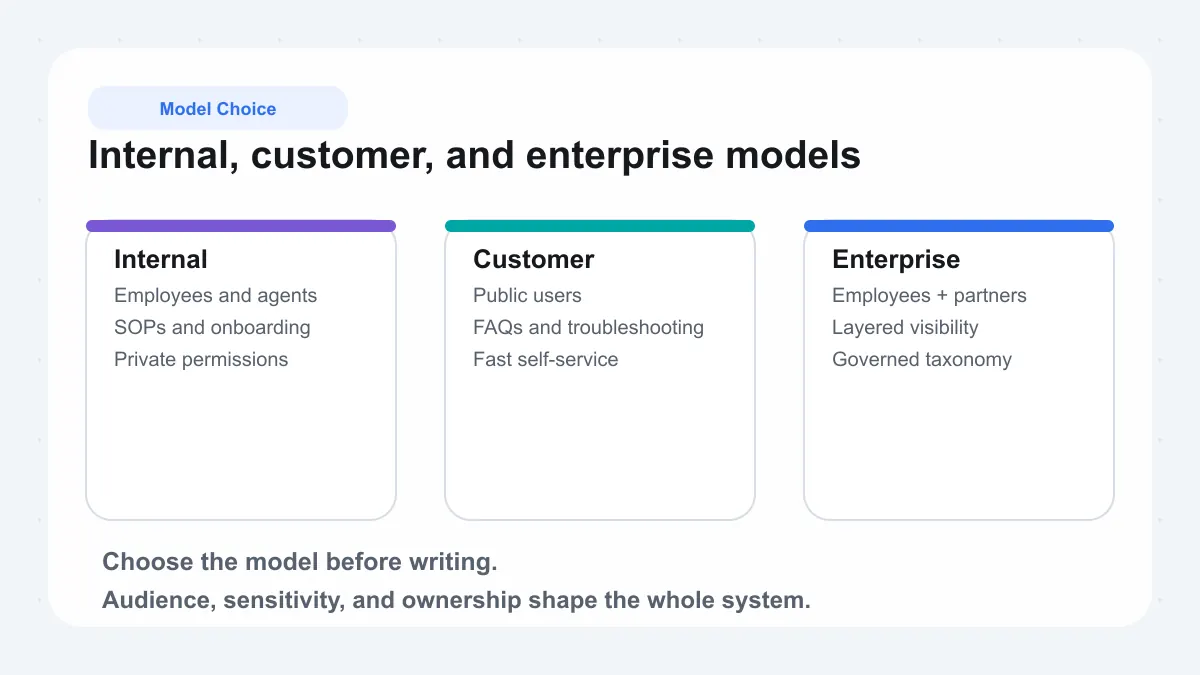
A knowledge base becomes much more useful when its audience is clear. A private resource for staff should not be planned the same way as a public self-service library. The main decision points are audience, permissions, content sensitivity, and maintenance load. Those factors determine whether you need an internal knowledge base, dedicated knowledge base software for customer self-service, or a combined model with controlled access.
Internal Knowledge Base For Employees
An internal knowledge base is built for people inside the organization. Hiver describes this kind of system as a secure, centralized place for SOPs, policy documents, training materials, and other internal resources. That makes it a strong fit for onboarding guides, escalation paths, process updates, and technical runbooks.
Because this content often includes sensitive or proprietary information, governance needs are stricter. KnowledgeOwl highlights authentication, authorization, and the principle of least privilege as core access-control concepts. In plain terms, an employee knowledge base should let teams find what they need quickly without exposing every document to every user.
Customer Knowledge Base For Self Service
A customer knowledge base serves a public or customer-only audience. Hiver points to common uses such as FAQs, guides, troubleshooting help, and product documentation. The purpose here is different from internal documentation. Customers need clear answers, simple navigation, and content that is safe to publish without internal context, hidden workarounds, or confidential business detail.
Maintenance also changes. Customer-facing articles need fast updates whenever products, workflows, or policies change, because stale self-service content creates confusion instead of reducing effort.
When A Hybrid Enterprise Knowledge Base Makes Sense
An enterprise knowledge base often needs both public and private layers. Bloomfire describes a federated model in which central teams set standards while business units manage their own domain content. That structure works well when some knowledge should be public, some should stay internal, and some should be visible only to specific partners, clients, or teams.
| Model | Audience | Article purpose | Governance needs | Findability requirements |
|---|---|---|---|---|
| Internal knowledge base | Employees, managers, support agents, IT staff | Policies, SOPs, onboarding, internal troubleshooting, process guidance | Login required, role-based permissions, owner assignment, review rules for sensitive content | Strong internal search, department-based categories, consistent naming, private navigation |
| Customer knowledge base | Customers, prospects, end users | Self-service help, setup guides, FAQs, billing help, product education | Publishing workflow, brand and accuracy review, no confidential information, frequent refreshes | Plain-language titles, intuitive categories, fast search, browse paths that match user intent |
| Hybrid enterprise knowledge base | Employees, customers, partners, contractors | Shared core knowledge with audience-specific versions or permission layers | Segmented access, least-privilege controls, central standards with local ownership, visibility labels | Unified taxonomy, filters by audience, clear article relationships, cross-links between related versions |
The hybrid route is often the best answer when the same topic needs multiple depths of explanation. A public troubleshooting article may help customers fix the basics, while the employee knowledge base holds the deeper diagnostic steps. That distinction shapes not just who sees the content, but which article types belong in each space.
Knowledge Base Article Types and Template Essentials
Audience and access rules decide who can see your content. The content itself decides whether the knowledge base is actually useful. So, what is a knowledge base article? In plain English, it is one focused piece of documentation that answers a recurring question or helps someone complete a repeatable task. Sources like Help Scout, InvGate, and Zendesk all describe strong articles as clear, task-oriented, and easy to scan.
Knowledge Base Article Types That Solve Real Needs
The most effective knowledge base article types map directly to the jobs users are trying to get done. A healthy library usually includes a mix of these formats:
-
Troubleshooting articles: fix one specific issue with likely causes, checks, and solutions.
-
How-to articles: walk a user through one task step by step.
-
Onboarding guides: help new customers or employees get started in the right order.
-
Policy articles: explain rules, limits, approvals, or compliance expectations.
-
Process or SOP articles: standardize recurring workflows so teams get consistent outcomes.
-
Reference articles: explain features, settings, terms, requirements, or product details.
-
Release articles: summarize changes, new features, and what those updates affect.
-
Escalation guidance: tell agents or staff when to hand an issue off and what information to include.
In other words, knowledge base articles should not all sound the same. A password reset guide, a refund policy, and an internal escalation path solve three very different problems.
What A Strong Knowledge Base Article Template Includes
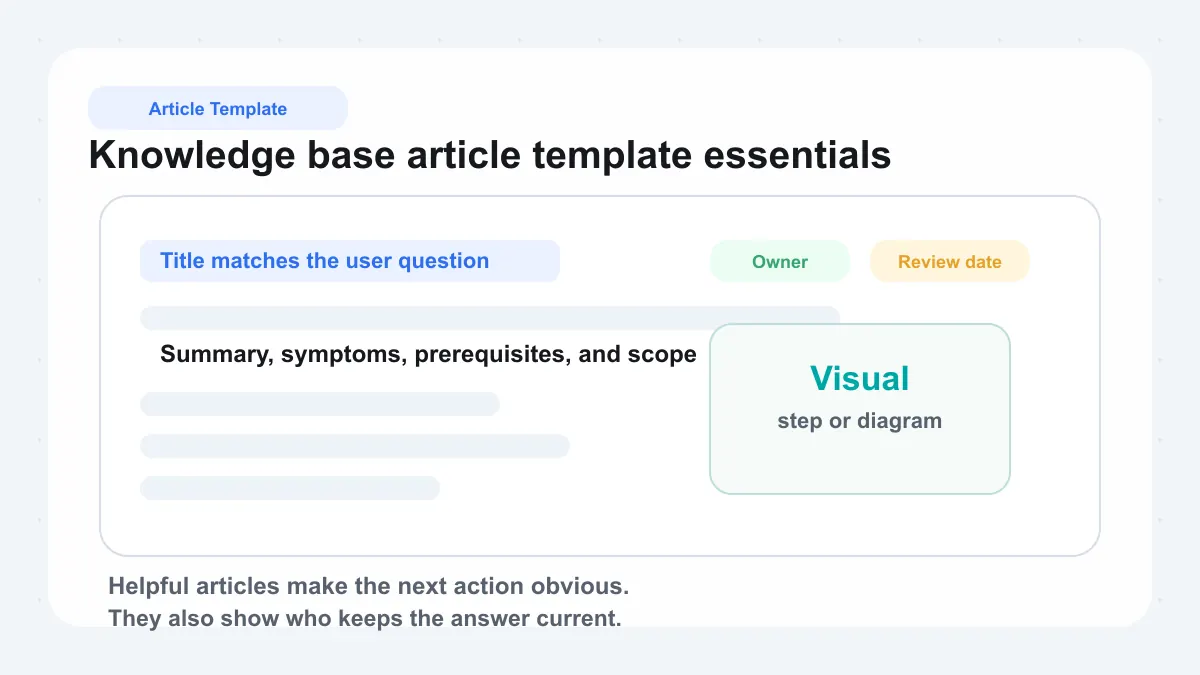
A practical knowledge base blueprint keeps authors from reinventing the structure every time. Whether you use a general knowledge base article template or a format tailored to troubleshooting or FAQs, the core fields are remarkably consistent.
| Field | Why it matters |
|---|---|
| Title | Matches the question or task users are likely to search for |
| Summary | Explains the article's purpose in one or two lines |
| Symptoms or issue | Helps readers confirm they are in the right place |
| Prerequisites | Lists access, tools, permissions, or setup needed first |
| Steps or instructions | Gives the action in a logical order |
| Visuals | Reduces ambiguity with screenshots, GIFs, or diagrams |
| Related links | Connects users to next steps, deeper reading, or exceptions |
| Owner | Shows who is responsible for accuracy |
| Review date | Signals when the content should be checked again |
How Article Purpose Changes By Audience
The easiest way to answer what is a knowledge base article for different teams is to look at intent. Customer-facing articles should use plain language, short steps, and visuals. Internal articles can include system names, workarounds, and escalation notes. Employee onboarding content may group several tasks into one guided flow, while a customer article should usually answer one question at a time for faster search and cleaner self-service.
That is why choosing among knowledge base article types matters as much as writing clearly. As the library grows, the lines between article, FAQ, wiki page, and formal documentation start to blur, and those labels affect how people search, trust, and use the content.
Knowledge Base vs Wiki, FAQ, and Documentation
Labels matter because they shape expectations. If someone opens a page looking for a step-by-step fix and finds a loose collection of notes instead, trust drops fast. That is why the knowledge base vs faq question, and the broader difference between wiki and knowledge base, matters in practice, not just in theory.
A knowledge base is a curated source of trusted answers. It may include FAQs and may sit inside a help center, but it is not the same thing as either.
Knowledge Base Vs FAQ
An FAQ page is usually the quickest format. It answers common questions in short, skim-friendly chunks. Helpsite describes FAQs as best for narrow topics and early-stage questions, while a knowledge base is a deeper, structured repository of guides, troubleshooting steps, and best practices. In other words, faqs and knowledge base content can work together, but they do not play the same role.
A useful rule of thumb is simple. Use FAQs for short answers. Use a knowledge base when the answer needs context, steps, screenshots, or related articles. Many teams bundle faqs and knowledge base articles in one support experience, which is fine. The formats are complementary, not interchangeable.
Knowledge Base Vs Wiki
The wiki vs knowledge base distinction comes down to control and authority. HubSpot frames a wiki as a collaborative space where many people can add or update information, while a knowledge base is more formal, structured, and typically edited by selected contributors. That makes a wiki great for brainstorming notes, internal know-how, and fast-moving team context. A knowledge base is better when accuracy, consistency, and review matter more.
So, in the knowledge base vs wiki comparison, the difference is not whether both store information. They do. The real difference between wiki and knowledge base is whether the content is open and collaborative or curated and verified as a source of truth. AFFiNE bridges this gap by offering a multimodal environment: you can use its "Edgeless" mode as a freeform wiki canvas for visual brainstorming, then instantly transition to a structured, curated document mode for your final knowledge base article. This allows teams to "To Shape, Not to Adapt," providing the flexibility of a wiki alongside the authority of a governed knowledge repository within a single platform.
Knowledge Base Versus Documentation And Data Systems
Confusion grows when people mix support content with technical information systems. A help center, per Helpsite, is the broader support destination that can house a knowledge base, contact options, and FAQs. A documentation portal is usually focused on product or technical docs. A database stores records. A knowledge graph, as PuppyGraph explains, models entities and relationships so machines can reason over them. An ontology defines the concepts and rules behind that semantic structure.
| Format | Structure | Primary audience | Governance | Search behavior |
|---|---|---|---|---|
| Knowledge base | Structured articles, guides, and troubleshooting content | Customers, employees, or both | Reviewed and curated | Keyword search plus category browsing |
| FAQ page | Short question-and-answer blocks | Prospects or users with common questions | Light editorial control | Fast scanning, limited depth |
| Wiki | Collaborative pages with looser structure | Mostly internal teams | Open contribution, lighter oversight | Search-heavy, can get messy at scale |
| Help center | Umbrella support hub containing multiple assets | Customers | Managed as a service destination | Search across FAQs, articles, and contact options |
| Documentation portal | Reference-heavy manuals and technical docs | Users, developers, admins | Controlled by product or technical teams | Search by feature, topic, or API detail |
| Database | Structured records in tables or fields | Applications and staff | Technical administration | Query-based retrieval, not reader-oriented guidance |
| Knowledge graph | Entities and relationships in graph form | Machines, analysts, advanced systems | Schema and semantic modeling required | Relationship-aware querying, not simple article lookup |
| Ontology | Concept model defining types, relationships, and rules | System designers and semantic applications | Highly controlled conceptual design | Supports reasoning, not end-user browsing |
That comparison makes one thing clear. A knowledge base is still about helping people find usable answers. Once that boundary is clear, the practical question stops being what to call the content and becomes what to publish first, how to structure it, and how to keep it useful as it grows.
How To Build A Knowledge Base That Scales
A clear definition helps. Useful results come from execution. If you are wondering how to build a knowledge base, think less about launching a giant library and more about creating a system your team can sustain. The strongest approach is iterative: publish the highest-value answers first, learn from usage, and expand with structure. That is the core of smart knowledge base creation.
Create Knowledge Base Goals And Scope
Start with purpose, not software. Help Scout recommends defining goals and audience before writing because those choices shape every article, permission setting, and success metric. Pick one primary outcome first: reduce repetitive tickets, improve onboarding, support internal operations, or standardize technical guidance.
Then narrow the audience. Customers, employees, and technical teams do not need the same depth or wording. Keep the first release small. Choose one product area, one department, or one set of recurring issues. When teams try to create knowledge base content for every possible scenario at once, quality usually drops and maintenance gets harder.
Building A Knowledge Base From Existing Content
Most teams already have the raw material. Building knowledge base content often starts with support tickets, chat transcripts, onboarding docs, internal policies, shared drives, PDFs, and older wiki pages. Frontline teams are especially helpful here because they hear the same questions every day.
Audit what already exists, then sort it into three buckets: content worth reusing, content that needs rewriting, and gaps that still need documentation. Prioritize frequent questions, high-friction tasks, and first-use guidance. If you are learning how to create a knowledge base from scratch, this shortcut matters: you do not need to write everything new, but you do need to standardize it.
Knowledge Base Creation Workflow From Draft To Launch
-
Set a primary goal and metric. Decide what success means, such as fewer repeated requests or faster onboarding.
-
Define the audience. Write separately for customers, employees, or specialized teams.
-
Choose the first scope. Start with a small collection of high-impact topics.
-
Audit existing material. Pull from resolved tickets, internal docs, and repeated questions.
-
Plan a simple taxonomy. Group topics into clear categories and keep navigation shallow. Help Scout suggests avoiding structures that go more than three clicks deep.
-
Create article templates. Use a consistent format for how-to guides, troubleshooting articles, and policy content; for process documentation, ready-made SOP templates can seed the section.
-
Set up workflow and ownership. Decide who drafts, reviews, approves, and updates each article.
-
Launch a pilot. Publish a small set, test whether people can find answers quickly, and collect feedback.
-
Plan maintenance. Assign owners, review dates, and a simple archive process so outdated content does not linger.
That is usually the real answer to how to build a knowledge base that lasts: start focused, make ownership clear, and improve based on real use. The moment the library grows, another challenge appears just as quickly. People still need to find the right answer fast, which turns structure, naming, and search into the next make-or-break layer.
Knowledge Base Design for Better Findability
A library of helpful articles still fails if people cannot reach the right one fast. That is why knowledge base design matters so much. Information architecture, described by Document360 using the standard Usability.gov framing, is the practice of organizing, structuring, and labeling content so users can find information and complete tasks. In a knowledge base, that affects every click, every search, and every moment of hesitation.
Knowledge Base Design For Fast Findability
Good structure reduces guesswork. Poor structure forces users to rely on trial and error. The strongest setups match how people think about problems, not how the content team happened to create files. MatrixFlows notes that effective taxonomy works best when it reflects how users search and browse, rather than internal folder logic.
In practice, that means keeping top categories clear, hierarchy shallow, and article titles predictable. It also means treating each article like a possible entry page. Document360 highlights the "Every Page is Page One" idea: users may land on any article first, especially from search engines or internal site search.
| Information architecture element | User benefit |
|---|---|
| Category structure | Makes broad topics easy to browse |
| Nested navigation | Shows where deeper subtopics live without cluttering the top level |
| Tags and facets | Helps users filter content across multiple attributes |
| Metadata | Improves sorting, filtering, and search relevance |
| Naming conventions | Reduces confusion by using consistent, searchable labels |
| Article relationships | Connects prerequisites, related fixes, and next steps |
| Breadcrumbs | Shows location and supports easy backtracking |
| Synonyms and search suggestions | Bridges the gap between user language and content language |
| Internal links | Guides users forward when one article is not enough |
Knowledge Base Components That Improve Navigation
The most useful knowledge base components do not just store content. They guide people through it. A simple taxonomy usually works best when it follows a few rules:
-
Use category names people already understand.
-
Keep hierarchy to a few levels so users do not get buried.
-
Give each article one clear primary home, then use tags for overlap.
-
Avoid vague labels like "Resources" or "Other."
-
Link related articles, common follow-up tasks, and prerequisite steps.
-
Use breadcrumbs and anchored menus to preserve context.
This is also where knowledge base search becomes more than a search box. Search suggestions, synonym mapping, and related-article links help users recover when their first query is incomplete or slightly off. That matters because users often do not know the exact term for their issue when they search knowledge base content.
Knowledge Base Search And SEO Best Practices
For internal content, findability depends on strong labels and metadata. For public content, knowledge base SEO adds another layer. Search-friendly articles need titles that match real questions, clean headings, and language that mirrors search intent. Document360 stresses signposting and interlinking, while MatrixFlows emphasizes controlled vocabulary and synonym mapping for better retrieval.
-
Add metadata for product, audience, content type, and platform where relevant.
-
Use one preferred term consistently, then map common synonyms to it.
-
Write article titles in plain language, not internal jargon.
-
Include related links so each page can stand alone yet lead somewhere useful.
-
Optimize public pages for intent-based queries users actually type into search.
When knowledge base search, navigation, and metadata work together, users spend less time hunting and more time solving. That is the visible side of findability. The invisible side is governance, because even the best structure breaks down when no one owns quality, review cycles, or performance.
Knowledge Base Management and Metrics That Preserve Trust
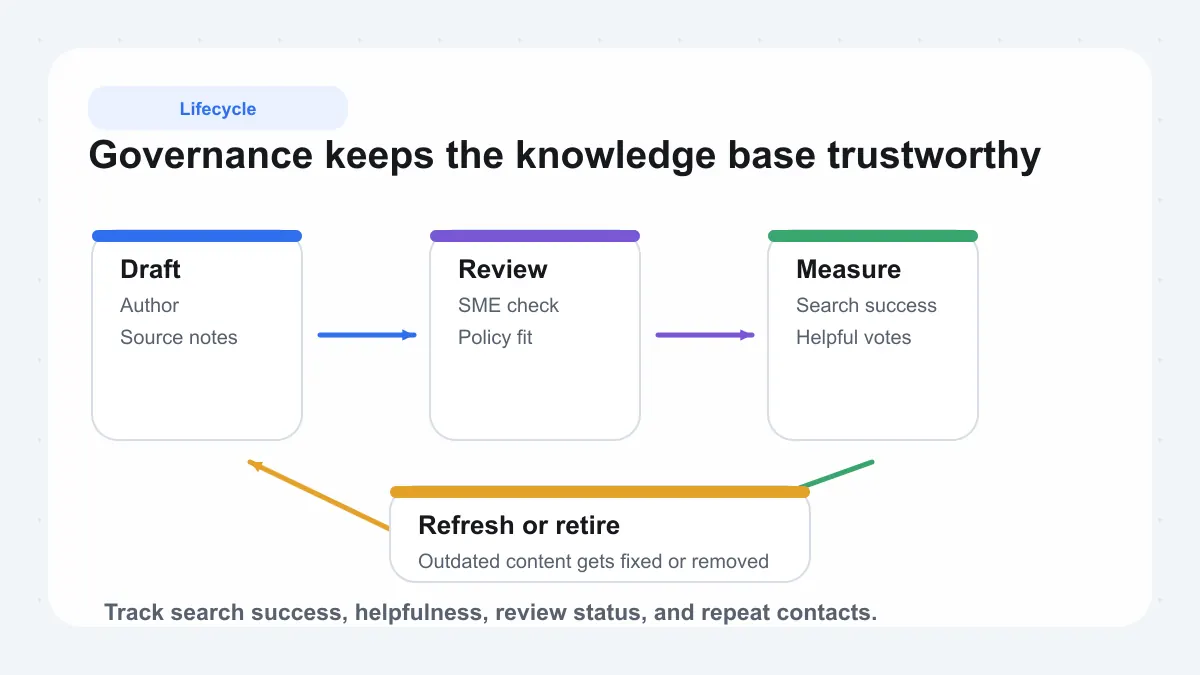
Findability gets people to an article. Governance decides whether they trust it. Without ownership, review rules, and measurement, even a well-organized library starts to drift into outdated steps, duplicate advice, and quiet risk. That is where knowledge base management becomes essential. It is the operating discipline that keeps a knowledge base accurate after launch, not just attractive on day one. For the full adoption and maintenance playbook, see our knowledge base best practices guide.
Knowledge Base Management Roles And Responsibilities
Bloomfire breaks governance into four pillars: roles, process, metrics, and policies. It also outlines three ownership models: centralized, distributed, and federated. The right model varies by organization, but the core responsibilities should never be vague.
-
Executive sponsor: secures resources and keeps the program tied to business goals.
-
Knowledge manager or program lead: sets standards, priorities, and reporting.
-
Authors and contributors: draft and update articles in their area.
-
Reviewers or approvers: verify accuracy, policy fit, and compliance before publishing.
-
Subject matter experts: validate complex technical or process content.
-
Coach or team lead: reinforces daily adoption so teams actually use the content.
One of the simplest knowledge management best practices is giving every article an owner, a review date, and a clear status. ScreenSteps also stresses assigning ownership by topic so someone is accountable when procedures change. Knowledge base training should cover both sides of the system: contributors need to know how to write, review, and update content, while frontline users need to know how to find answers and flag gaps.
Review Workflows And Content Lifecycle Rules
Strong governance treats content as a lifecycle, not a one-time publishing task. The shared pattern across Bloomfire, ScreenSteps, and Fast Slow Motion is practical: draft, review, publish, measure, refresh, and retire.
-
Set review frequency by risk and change rate, not by one blanket schedule.
-
Require extra approval for high-risk topics like billing, security, legal, or compliance.
-
Use version control so teams can track changes and restore earlier guidance if needed.
-
Archive or retire obsolete articles instead of leaving them searchable.
-
Communicate important updates so users know the answer changed, not just the page.
This is also where knowledge base training makes a visible difference. If contributors do not understand the workflow, content quality becomes inconsistent and publishing slows down.
How To Measure Knowledge Base Management System Health
A healthy knowledge base management system is measurable. Bloomfire identifies metrics as a core governance pillar, while ScreenSteps and Fast Slow Motion point to usage, feedback, freshness, and deflection signals as the practical scorecard.
| Metric | What it indicates | When to act |
|---|---|---|
| Search success rate | Whether users find and open useful results | Act when failed or no-click searches increase |
| Article helpfulness | Whether the article solved the problem | Rewrite content with low ratings or repeated negative feedback |
| Time-to-publish | How efficiently new knowledge moves through review | Act when approvals become a bottleneck |
| Freshness review status | How much content may be aging out of trust | Act when overdue reviews start piling up |
| Deflection rate or case creation after search | Whether self-service is reducing repeated support demand | Act when high-traffic articles do not lower repeat contacts |
When these numbers slip, the problem is often operational before it is technical: unclear ownership, weak review habits, missing feedback loops, or articles that do not match real questions. Once governance is solid, the software itself matters more, because the right platform can make permissions, analytics, version history, and upkeep much easier to manage at scale.
How to Choose Knowledge Base Software
Governance tells you how the system should run. Software determines how easy that system is to sustain. The best knowledge base software is not automatically the one with the biggest feature list. It is the one that helps your team publish trusted answers, control access, and surface the right article fast. When buyers compare knowledge base solutions, fit matters more than hype: who the content serves, how sensitive it is, and whether the platform supports the workflows behind it.
Knowledge Base Software Evaluation Criteria
monday.com's guide highlights the adoption drivers that matter most in enterprise settings: intuitive search, native integrations, role-based permissions, governed AI assistance, scalable structure, multilingual support, and cross-device access. Add analytics, version history, portability, and privacy controls, and you have a practical framework for comparing knowledge base platforms.
| Evaluation criterion | Why it matters | What to verify in a demo |
|---|---|---|
| Search quality | Users will abandon the system if answers are hard to find | Test vague, misspelled, and natural-language queries |
| Permissions | Internal, public, and restricted content often need different visibility | Check role-based viewing, editing, and publishing controls |
| Analytics | Shows content gaps and whether self-service is actually working | Look for search reports, article usage, and failed-query signals |
| Multilingual support | Global teams need localized content without losing consistency | Review translation workflows and language management |
| Integrations | Knowledge works better when connected to service desks and daily tools | Confirm links with ticketing, chat, docs, and identity systems |
| AI-assisted retrieval | AI can speed discovery, but only if it respects approved sources | Ask how answers are grounded and how access rules are enforced |
| Version history and portability | Your content should not be trapped in one vendor forever | Check revision tracking, export options, and migration support |
| Privacy and deployment | Security needs vary by industry, region, and data sensitivity | Verify storage model, hosting choices, and admin control |
Best Knowledge Base Software Features To Prioritize
-
Start with search, not visuals. If people cannot find the answer, the rest barely matters.
-
Match permissions to your content model, especially if you mix customer help with internal guidance.
-
Prioritize analytics that reveal what users searched for, where they failed, and which articles actually helped.
-
Choose integrations that reduce context switching for support, IT, and operations teams.
-
Treat AI as an accelerator, not a substitute for governed content.
-
Use free knowledge base software for pilots if needed, but judge long-term fit by control, scale, and maintainability.
Choosing A Future Proof Knowledge Base Platform
Future-proof does not just mean adding AI. It means your knowledge base software can adapt if your team grows, your stack changes, or privacy requirements tighten. This is why AFFiNE prioritizes a local-first architecture, ensuring full data sovereignty and offline access so your organization’s intellectual property remains entirely under your control. Built on a CRDT-based engine for conflict-free collaboration, it offers the perfect balance of cloud-like real-time syncing and enterprise-grade privacy for any team building a long-term knowledge asset.
That does not make every team an AFFiNE team. You may be replacing a zendesk knowledge base, expanding a servicenow knowledge base, or starting from scratch. The right choice depends on how your knowledge is created, governed, found, and reused.
-
List must-have use cases before booking demos.
-
Pilot with a small set of high-value articles.
-
Test real queries, real users, and real permission boundaries.
-
Confirm export and migration options before committing.
-
Use broader market research only after your requirements are clear.
In the end, the best knowledge base software is the one that reduces repeated work without creating a new maintenance problem. If the platform makes answers easy to publish, easy to trust, and easy to find, it is doing exactly what a knowledge base should do.
Common Questions About Knowledge Bases
1. What is a knowledge base in simple terms?
A knowledge base is an organized collection of trusted answers, instructions, and reference content that people can search or browse on their own. It is more than a folder of files because the information is structured to help users solve repeat questions quickly and consistently.
2. What is the difference between a knowledge base and an FAQ?
An FAQ is usually a short list of common questions with brief answers. A knowledge base goes deeper by adding step-by-step help, troubleshooting guidance, related articles, and stronger organization, so it can support both quick questions and more complex tasks.
3. Should a business use an internal or external knowledge base?
Use an internal knowledge base for employee-only content such as SOPs, onboarding, policies, and technical notes. Use an external knowledge base for customer self-service. Many organizations eventually need a hybrid setup so public answers stay simple while sensitive internal guidance remains restricted.
4. What should every knowledge base article include?
A useful article should start with a clear title that matches what someone would search for. It should also include a short summary, any prerequisites, easy-to-follow steps, helpful visuals when needed, related links, and clear ownership so the content can be reviewed and updated on time.
5. How do you choose the right knowledge base software?
Start with the essentials: strong search, flexible permissions, analytics, version history, integrations, multilingual support, and export options. If privacy and control are major concerns, it can also make sense to look at knowledge base platforms with local-first ownership and AI-assisted retrieval, such as AFFiNE, then test them with real content and real user workflows before deciding.
Related Blog Posts
Related Articles
Knowledge Base Software Buyer’s Guide: Evaluate Tools in 2026

Knowledge Base Blueprint: Turn Scattered Docs Into Findable Answers
Knowledge Base Best Practices: Build One People Actually Use
Stop Repeating Yourself: How To Create A Knowledge Base