Assignment Tracker Template
Download the best free Assignment Tracker template. Visualize deadlines, manage homework, and boost productivity with AFFiNE's all-in-one whiteboard and doc workspace.
Stop missing deadlines and start acing your projects with the ultimate visual assignment tracker.
Managing multiple courses, complex projects, and tight deadlines can be overwhelming. The AFFiNE Assignment Tracker Template is not just a to-do list; it is a comprehensive productivity system designed to help students, researchers, and professionals maintain a clear overview of their workload in one unified workspace.
Unlike rigid spreadsheets or simple checklist apps, AFFiNE offers a multimodal experience. Our assignment tracker leverages the power of a database combined with a creative whiteboard, giving you the flexibility to plan how you think.
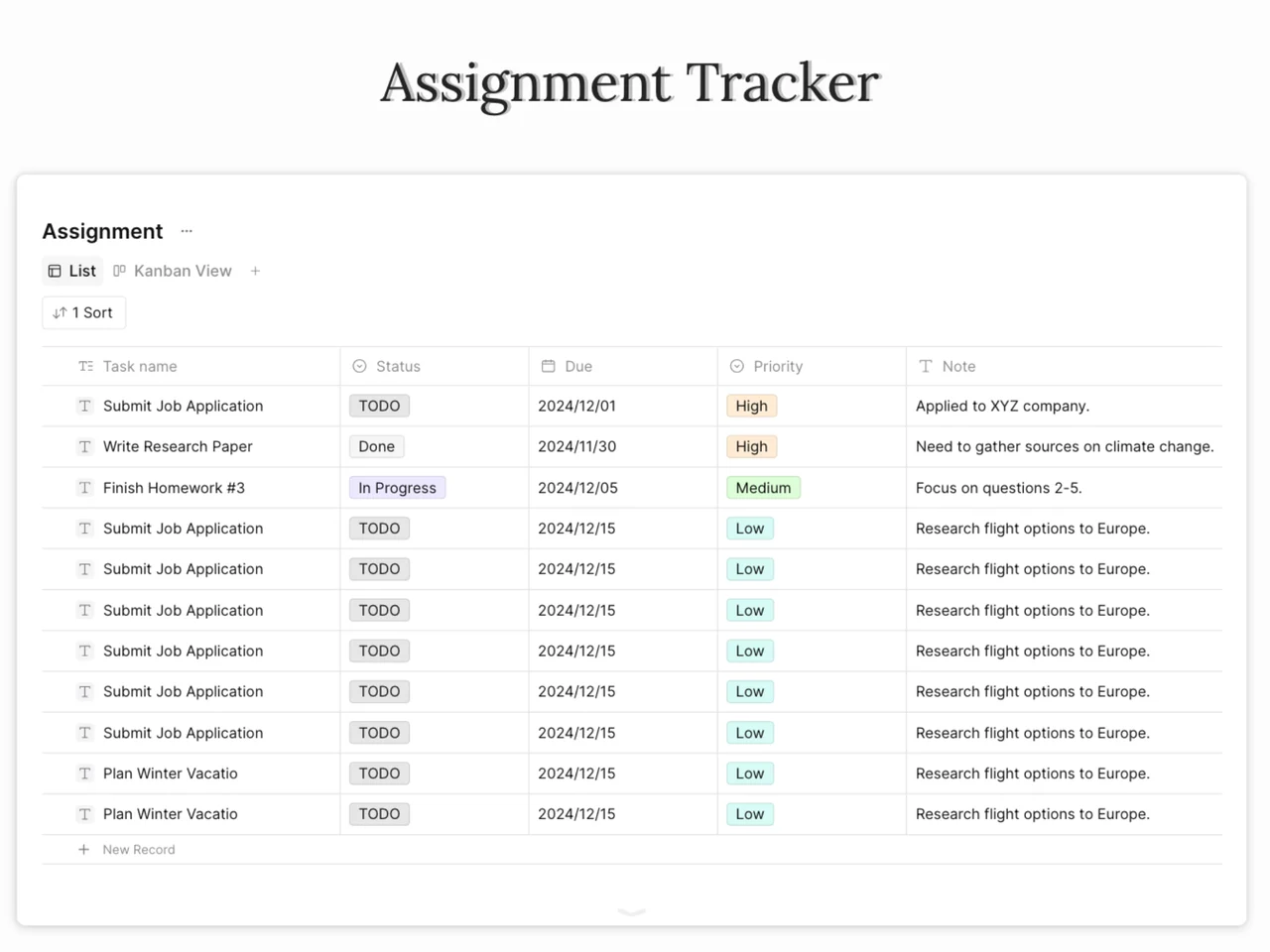
Switch seamlessly between Table View for detailed data (dates, subjects, status) and Kanban View to visualize your progress. See exactly what is "To Do," "In Progress," or "Completed" at a glance.
Don't just track the deadline; manage the work. With AFFiNE, you can embed your lecture notes, PDFs, and research links directly into the assignment card. Keep your references and your tasks in the same place.
Our template comes pre-built with priority tags (High, Medium, Low). Filter your assignments to ensure you are focusing on the most critical tasks first, effectively managing your time and energy.
We have designed this template to be "plug-and-play" while remaining fully customizable. Here is what you will find:
Master Assignment Database: A structured table to input Course Name, Assignment Type (Essay, Lab, Exam), Due Date, and Status.
Progress Tracker: Visual indicators to show how close you are to completion.
Resource Repository: A dedicated section to link related pages, textbooks, or online resources.
Calendar View Integration: (Tip: Switch your database view to Calendar to visualize your month ahead).
Maximize your productivity by following this workflow within AFFiNE:
At the start of your semester or project, input every assignment from your syllabus into the Master Table. Don't worry about order yet; just get the data in.
Assign a Due Date and Priority Level to each item. Use AFFiNE’s sort function to arrange tasks by "Due Date (Ascending)" so the most urgent deadlines appear at the top.
For larger projects like a thesis or a group presentation, convert the task into a specific Page. Inside that page, use Edgeless Mode (Whiteboard) to brainstorm ideas, draw mind maps, and break the assignment into smaller, manageable sub-tasks.
Make it a habit to review your tracker every Sunday night. Update the status of items to "Done" and adjust priorities for the coming week.
University & High School Students: Juggle homework, exams, and extracurriculars without burning out.
Researchers & PhD Candidates: Manage citations, paper drafts, and submission deadlines for conferences.
Lifelong Learners: Track progress on online courses (MOOCs) and personal development projects.
Is this Assignment Tracker template free?
Yes, the Assignment Tracker template is completely free to use. You can duplicate it directly into your AFFiNE workspace.
Can I customize the columns in the tracker?
Absolutely. AFFiNE is built for flexibility. You can add new properties (columns) such as "Professor Name," "Group Members," or "Grade Received" to fit your specific needs.
Does this work offline?
AFFiNE supports local-first data storage, meaning you can access and manage your assignment tracker even without an internet connection.
Can I switch between Kanban and Table views?
Yes. This template utilizes AFFiNE's database blocks, allowing you to view your assignments as a list, a Kanban board, or even a calendar view with a single click.
Ready to get organized?
Don't let deadlines sneak up on you. comprehensive assignment tracker today.
[Button: Get Started for Free]