The Ultimate Monthly Meal Plan Template (Free Digital Download 2026)
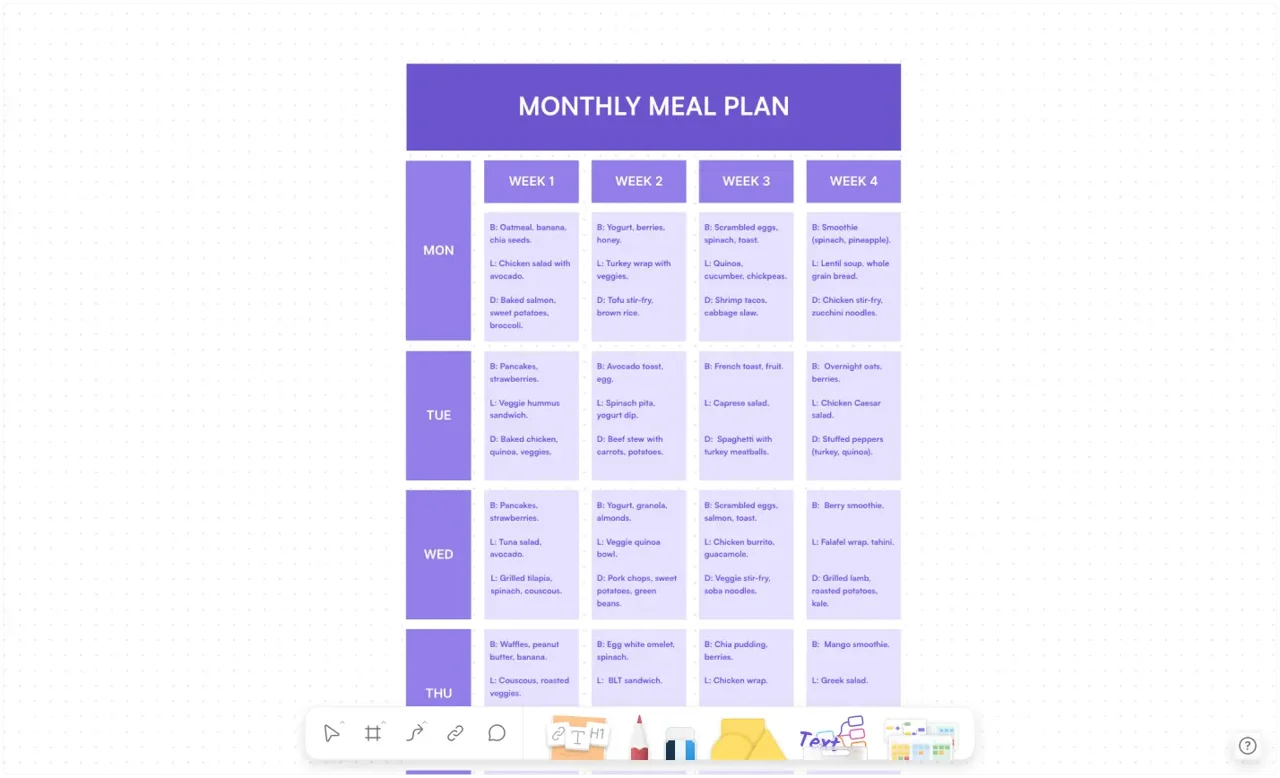
Stop asking 'What's for dinner?' Plan 30 days of meals in minutes with our free Monthly Meal Plan Template. Features automated grocery lists, recipe databases, and macro tracking.
We all know the dread of 5:00 PM. You open the fridge, stare at a random assortment of ingredients, and ask the eternal question: "What are we eating tonight?"
Usually, this ends with takeout or a bland, repetitive meal.
The solution isn't just "willpower"; it's a system. The AFFiNE Monthly Meal Plan Template is designed to take the cognitive load off your brain. Unlike a static PDF or a messy Excel sheet, this is a living, breathing database that connects your recipes, ingredients, and schedule in one place.
Paper planners are great until you change your mind.
Drag-and-Drop Flexibility: Did you miss Taco Tuesday? Just drag the card to Thursday. No eraser marks.
Integrated Recipe Box: Don't search through bookmarks. Click the meal in your calendar to open the recipe and ingredients list instantly.
Syncs with Life: View your meal plan alongside your work tasks and family events in AFFiNE's calendar view.
This template leverages AFFiNE's "Database" and "Edgeless" modes to give you a 360-degree view of your nutrition.
A bird's-eye view of the next 4 weeks. This helps you visualize variety and ensure you aren't eating pasta 5 days in a row.
Stop looking for that one Instagram recipe you saved months ago. Store them all here.
Properties: Cooking Time, Calories, Protein, Main Ingredient.
Tags: #Vegan, #Quick(Under 30mins), #BatchCook.
The template includes a linked checklist. When you plan a meal, you can quickly copy ingredients to your shopping list, categorized by aisle (Produce, Dairy, Pantry).
Planning 90 meals (3 meals x 30 days) sounds impossible. But with this template and the "Theme Night" Strategy, it's easy.
Before you add a single new item, look at what you already have. Frozen chicken? Half a bag of rice? Add meals that use these up to the first week of the template. This saves money and reduces waste.
Decision fatigue is the enemy. Assign themes to days so you only have to choose the type of dish, not the whole concept.
Meatless Mondays (e.g., Lentil Soup, Veggie Stir-fry)
Taco Tuesdays (e.g., Beef Tacos, Burrito Bowls)
Pasta Wednesdays
Slow Cooker Thursdays
Pizza/Takeout Fridays
Leftover Saturdays
Roast Sundays
Pull recipes from your Master Database into the calendar slots. Since you have themes, you aren't starting from a blank page—you're just filling in the blanks.
Weekly planning is good, but monthly planning prevents "ingredient waste." If you buy a big jar of pesto for Week 1, a monthly plan ensures you schedule another pesto meal in Week 3 to use it up before it spoils. It also allows you to buy meat in bulk, saving significantly on costs.
Life happens. You might get invited out for dinner unexpectedly. In a digital template like AFFiNE, you simply drag that day's planned meal to the "Freezer/Backlog" section or move it to next week. No food (or paper) wasted.
Yes. The recipe database in this template has custom columns for Calories, Protein, Carbs, and Fats. You can see a summary of your daily intake at the bottom of each calendar column.
Absolutely. There is a "Family Rating" property in the database where you can track which meals the kids actually ate and which ones were a disaster, so you know what to rotate back in next month.
By planning 30 days out, you can:
Buy non-perishables in bulk.
Eliminate "emergency" grocery runs (where you inevitably buy snacks you don't need).
Significantly reduce food waste by planning around expiring ingredients.
Nutrition shouldn't be stressful. With the right system, you can eat healthier, save money, and reclaim your mental energy.
👉 [Click here to clone the Monthly Meal Plan Template to your AFFiNE Workspace]
(Free, customizable, and ready to use)