6 Lead Databases Compared: What You Actually Get for the Price in 2026
Every lead database markets the same three things: a very large number of contacts, a very high accuracy percentage, and a price that looks reasonable on the plan card. None of those three numbers tells you what a usable contact will actually cost you, because the contact count includes records nobody has touched in two years, the accuracy figure is an aggregate across the whole database rather than your segment, and the plan price rarely includes the add-on you will need by week three.
This comparison takes six widely used lead databases and looks at what each one actually gives you for the money: the coverage model, the credit mechanics, the add-ons that change the real bill, and the situations where each tool is the wrong choice. Pricing below was checked in August 2026 against each vendor's own pricing page; verify before you buy, because every one of these vendors changes plan structure regularly.
Key takeaways
- Verification that happens when you pull a record behaves differently from verification baked into a periodically refreshed export.
- Bundled convenience often trades against raw data accuracy; decide which one your motion actually depends on.
- Add-ons — LinkedIn automation, phone credits, bulk features — can change the real cost of a subscription more than the headline price does.
- Bulk search claims should be tested on your own segment before you plan a campaign around them.
Three Questions to Ask Before Buying Any Lead Database
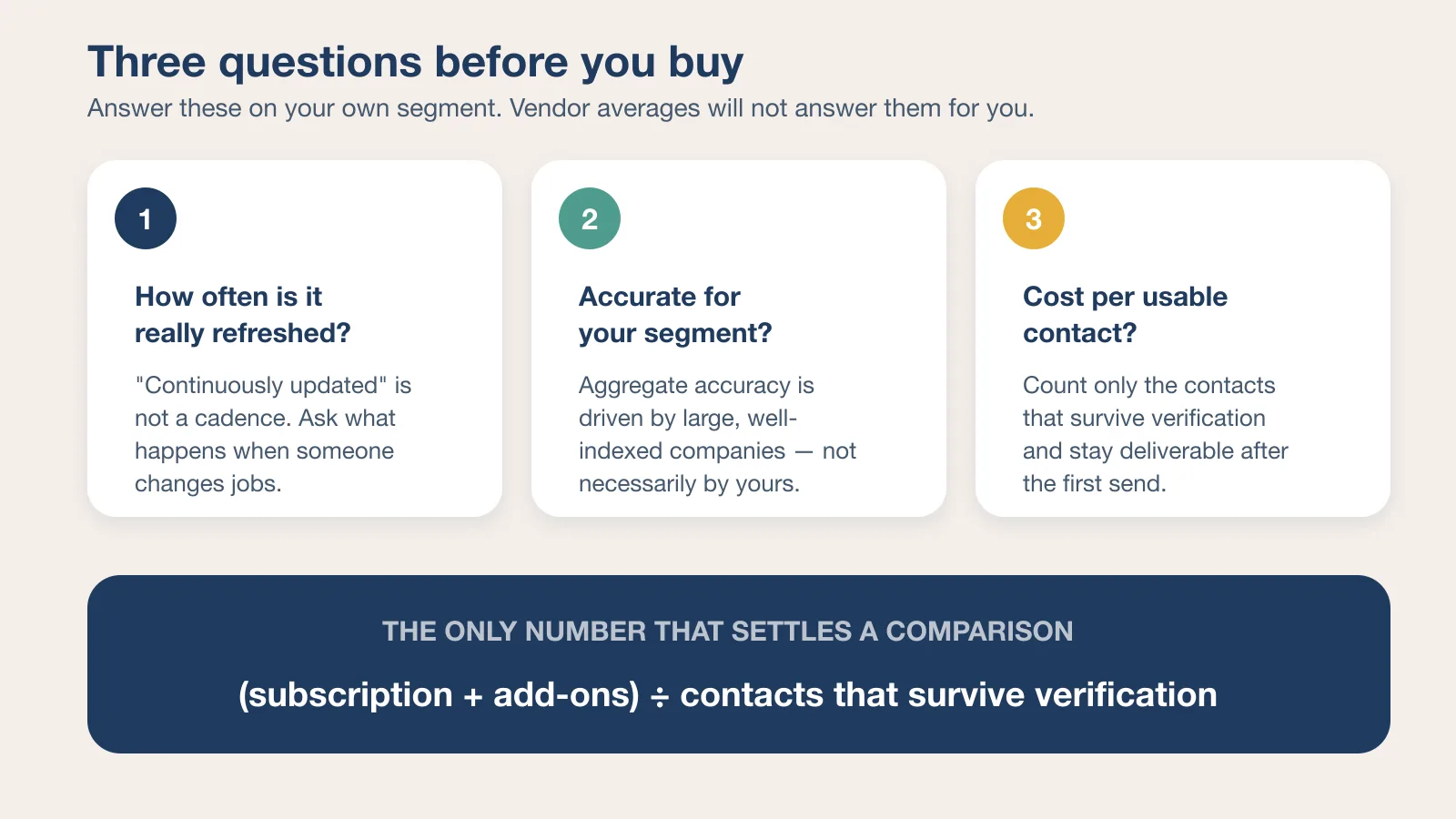
Before comparing a single feature, answer these three questions honestly.
How often is the database actually refreshed, not just claimed to be refreshed? "Continuously updated" is not a refresh cadence. The useful question is what happens to a record when the person in it changes jobs, and how long that gap lasts.
What percentage of contacts in your specific target segment will genuinely be accurate? Aggregate accuracy is dominated by large, well-indexed companies in the US. If you sell to 20-person firms in a non-English market, the headline number tells you almost nothing about your list.
What does it actually cost per usable, non-bouncing contact? Take the subscription plus every add-on you will realistically enable, then divide by the number of contacts you expect to survive verification and stay deliverable. That number is usually several times the price on the plan card.
With those questions in mind, here are six lead databases worth evaluating in 2026.
Apollo.io
Apollo's database of roughly 275 million contacts comes bundled with sequencing and intent signals, which makes it attractive for teams that want a lead database and an outreach engine under one subscription. Paid plans start at $49 per seat per month billed annually, with credits granted per seat per year rather than per month, and unlimited sequences from the entry paid tier upward.
The convenience is real. The tradeoff is what "verified" means at volume. Apollo documents a seven-step verifier and states a 91% accuracy rate for its verified emails, arguing that its own network can resolve catch-all domains that plain SMTP checks cannot. Independent user reports of real-world bounce rates on Apollo exports vary widely, and the spread itself is the point: a verification status attached to a stored record tells you when the record was last checked, not whether it holds for your segment today. If you send at volume, verify a sample of your own list before the first large send.
Worth it if: you want a lead database and sequencing bundled and can tolerate independently verifying accuracy before large sends. Skip if: a low first-send bounce rate is a non-negotiable requirement.
SignalHire
SignalHire's lead database spans over 850 million profiles, and the company describes them as verified in real time at the point of search rather than pulled from a periodically refreshed static snapshot. Credits are spent per profile revealed, and paid plans do not charge per seat — the vendor lists unlimited users on all tiers, with separate plan families for emails only, phones only, and emails plus phones.
That real-time model is the core reason Signalhire holds up well against decay: a lead pulled today reflects today's reality, not a database refresh from months earlier. The practical consequence for budgeting is that cost scales with lookups rather than headcount, which suits a small team doing targeted research more than a large team running high-volume exports.
Worth it if: you want real-time-verified leads with combined email and phone data without enterprise pricing. Skip if: you specifically need built-in intent signals as a core feature.
Hunter.io
Hunter's approach centers on domain-level indexing: give it a company website, get back the email address patterns it has crawled and confirmed for that domain. Free accounts get 50 credits a month, and the Starter plan runs $34 per month billed annually with 24,000 credits per year, shared across Domain Search, Email Finder, and the verifier. Team members are unlimited on every plan.
This works well for established, well-indexed companies and considerably less well for newer or smaller organizations with a thinner public web footprint. Hunter is a precision instrument for a known target list, not a discovery engine for a segment you have not defined yet.
Worth it if: you already know which companies you are targeting and need reliable pattern-based addresses. Skip if: your motion depends on discovering unfamiliar companies at scale.
Skrapp
Skrapp pulls its lead database from websites, LinkedIn, and its own proprietary sources simultaneously, with a Chrome extension purpose-built for extracting entire LinkedIn Sales Navigator search result lists. The Professional plan starts at $29 per month billed annually ($39 month-to-month) for 2,000 credits a month and two users, with unused credits rolling over.
For teams whose lead generation motion is built entirely around Sales Navigator filtering, this specific integration is a genuine time-saver that general-purpose lead databases do not replicate as smoothly. Watch the daily search caps rather than the credit total: the entry tier limits people and company searches per day, which matters more than the monthly allowance if you work in bursts.
Worth it if: Sales Navigator is where your list-building actually happens. Skip if: you need a large seat count or API access at the entry price.
Snov.io
Snov.io bundles its lead database with built-in verification and drip sequencing, at a starting price of $39 monthly for 1,000 credits, dropping to $29.25 with annual billing. Credits are shared between prospect search and email verification, so heavy verification reduces how many new contacts the same plan will find.
LinkedIn automation is not included at that base price. It runs as a separate subscription at $69 per month per LinkedIn account slot ($62 with annual billing) — a detail worth factoring into any real cost comparison against competitors, because it can more than double the entry price for a team that assumed it was bundled.
Worth it if: you want lead database, verification, and sequencing in one accessibly priced tool. Skip if: you assumed LinkedIn automation was included in the base price.
RocketReach
RocketReach draws on a database it describes as 700 million professionals and 60 million companies, with 50-plus search filters, giving it broad coverage for tech and startup-stage leads. The Essentials plan is $33 per month billed annually ($399 per year) and is email-only with 1,200 exports a year; phone numbers require the Pro tier at $75 per month billed annually.
Worth noting for anyone weighing it against SignalHire: RocketReach also markets on-demand, real-time verification, so "real-time" alone does not separate the two — the separation is in coverage depth, phone availability at each tier, and how the credits are metered. Bulk search functionality, meanwhile, has been repeatedly flagged as inconsistent in user reviews, occasionally requiring manual one-off lookups on plans specifically marketed around bulk capability. Test it on your own segment during a trial rather than after committing to an annual plan.
Worth it if: you need broad tech and startup coverage and mostly work email-first. Skip if: phone data at the entry price is essential, or your campaign design depends on reliable bulk export.
Pricing at a Glance
Entry pricing as listed on each vendor's pricing page in August 2026. Annual-billing rates are noted where the vendor advertises them as the default.
| Database | Entry paid price | Credit model | Cost detail that catches people out |
|---|---|---|---|
| Apollo.io | $49 per seat/mo, billed annually | Credits granted per seat per year | Costs scale with seats, not lookups |
| SignalHire | From about $57/mo | Credits per profile revealed, unlimited users | Email, phone, and email+phone are separate plan families |
| Hunter.io | $34/mo, billed annually | Shared credits for search, finding, and verification | Coverage depends on a company's public web footprint |
| Skrapp | $29/mo billed annually ($39 monthly) | 2,000 credits/mo, roll over | Daily search caps and a two-user limit at entry |
| Snov.io | $39/mo ($29.25 billed annually) | 1,000 credits shared with verification | LinkedIn automation is $69/mo per account slot |
| RocketReach | $33/mo billed annually ($399/yr) | Lookups and exports metered per year | Essentials is email-only; phone starts at Pro |
Free tiers exist on all six and are the right place to run the segment test described below.
What Actually Drives Cost Per Usable Contact
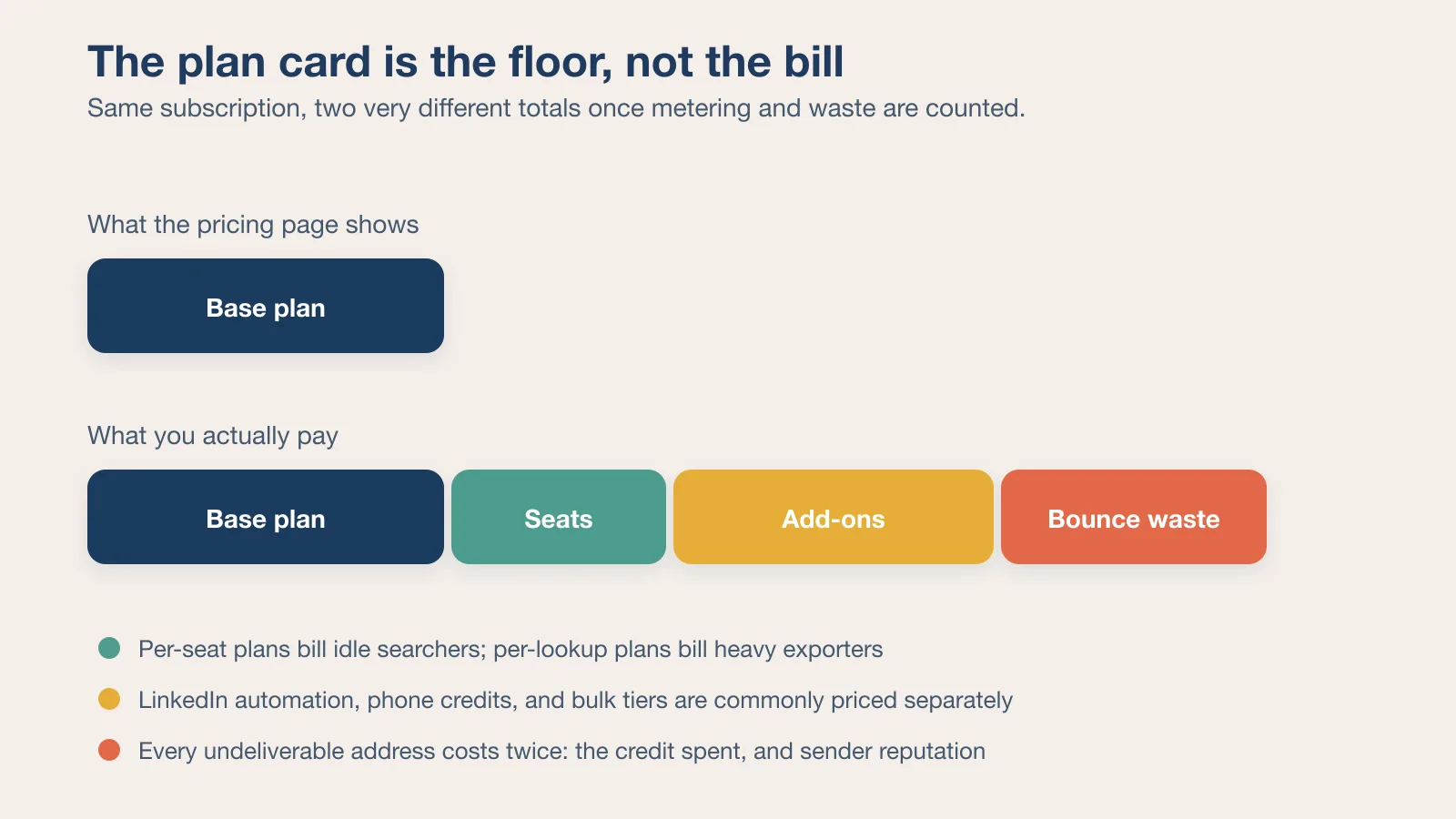
Four variables move the real number far more than the plan price does.
Credit weighting. A credit is not a contact. On some platforms a phone number costs several times an email, and on others verification spends from the same pool as discovery. Two plans at the same monthly price can differ by a factor of three in usable output.
Seat structure. Per-seat pricing punishes teams where several people search occasionally. Per-lookup pricing punishes one person running large exports. Match the metering to how your team actually works, not to the plan the vendor recommends.
Add-ons you will definitely enable. LinkedIn automation, phone credits, bulk export tiers, and dialers are priced separately often enough that the base plan should be treated as a floor.
Bounce waste. Every undeliverable address costs twice: the credit spent finding it and the domain reputation spent sending to it. Bounce rates above a few percent are a deliverability problem, not just a data problem, and they degrade every campaign that follows.
A twenty-minute test on a free tier answers more than a week of comparing feature grids: pull fifty contacts from your real target segment on each shortlisted tool, run them through an independent verifier, and count what survives. The winner is rarely the one with the largest database.
Where the Data Should Live After You Export It
A lead database is a source, not a system of record. The moment an export lands, the useful context starts accumulating somewhere else: which segment the list came from, which filters produced it, what the verification pass removed, who owns follow-up, and what the campaign learned. Teams that keep that context only in a spreadsheet attached to a message end up buying the same data twice.
The practical fix is boring and effective. Keep the buying criteria, the segment definitions, and the test results in the same shared workspace where the campaign is planned, so the next person can see why a list was built the way it was. That is the same discipline described in integrating AI sales technology into team collaboration: the tool produces a signal, and the workspace preserves the context and the owner.
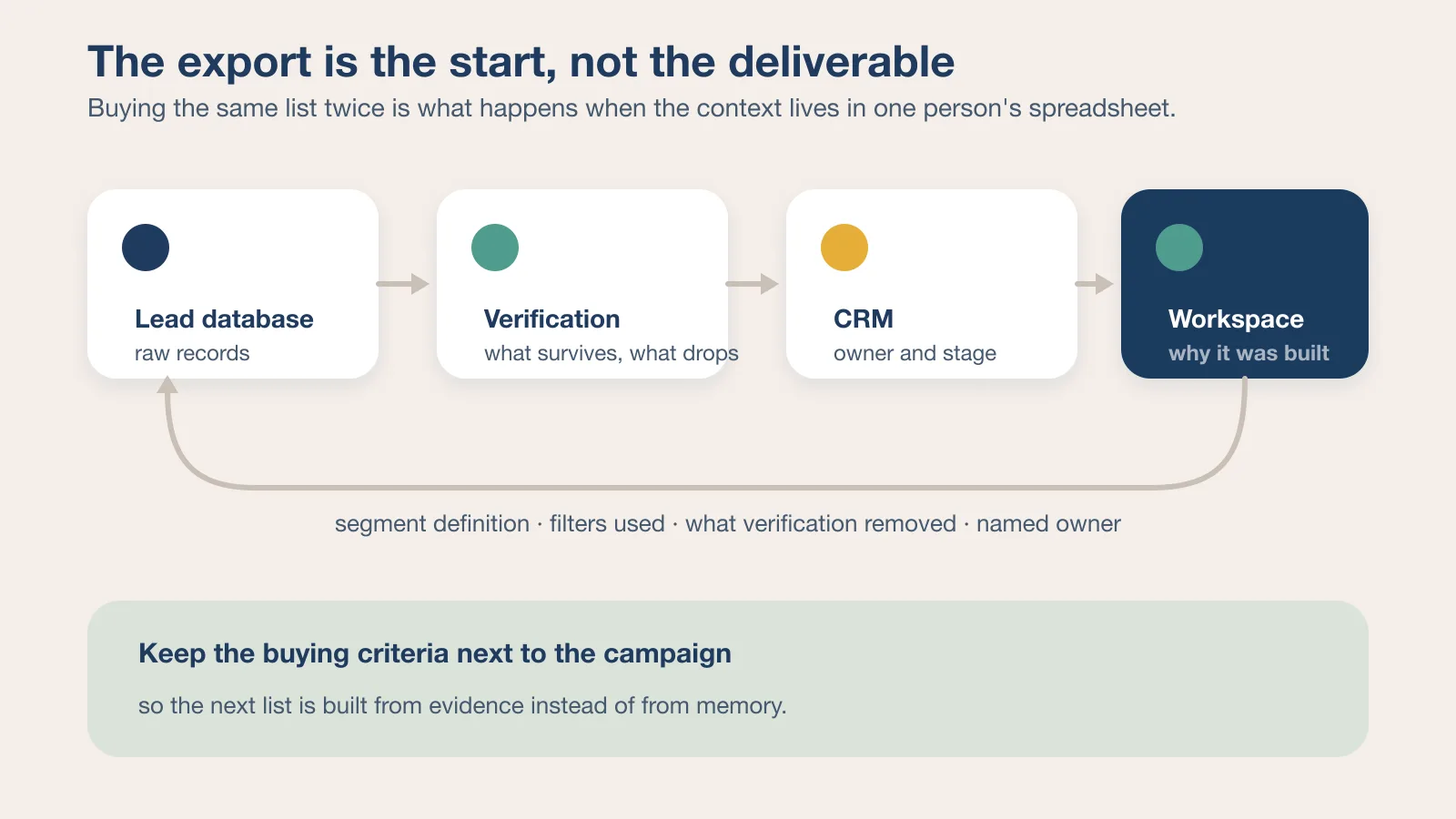
Two habits make that concrete. Map where each list enters your funnel using your existing sales pipeline stages, so a bad list is visible as a stage-conversion problem rather than a mystery. And decide deliberately what syncs into the CRM versus what stays in the workspace — the CRM integration tradeoffs are the same whether the data comes from a note-taker or a lead database: copy less, link more, and name an owner for the authoritative record.
Key Takeaways
- Real-time verification at the point of lookup consistently behaves better against data decay than periodically refreshed static databases — but it is now marketed by several vendors, so compare mechanics rather than the phrase.
- Bundled convenience often trades against raw data accuracy; know which one your specific motion depends on.
- Add-on pricing for features like LinkedIn automation can meaningfully change the real cost of a lead database subscription.
- Bulk search claims should be tested directly, on your own segment, before being trusted for high-volume campaigns.
Frequently Asked Questions
What's the difference between a lead database and a contact discovery platform?
A lead database is primarily a data source, while a discovery platform typically layers search, verification, and workflow tools on top of that underlying data. The distinction matters at renewal: you can replace a data source without rebuilding your process, but replacing a platform means moving sequences, lists, and integrations too.
Is SignalHire priced per seat or per lookup?
SignalHire uses a per-profile credit model rather than per-seat pricing, and lists unlimited users on its paid plans. That tends to favor teams with targeted, moderate-volume lookup needs over massive bulk campaigns, where per-seat plans with large bundled credit allowances usually work out cheaper.
How do I calculate the real cost of a lead database subscription?
Factor in the base subscription price plus any add-ons like phone number credits or automation features, then divide by the number of genuinely usable, non-bouncing contacts you expect to generate. Run the calculation on a sample from your own target segment rather than on the vendor's aggregate accuracy figure.
Why do bulk search features sometimes not work as advertised?
Several vendors have been flagged in independent reviews for inconsistent bulk performance, likely due to backend rate limiting or database query constraints that are not disclosed on marketing pages. Test bulk export during a trial, at the volume you actually plan to use, before it becomes a dependency.
Which lead database is best for a small team on a tight budget?
There is no single answer, but the structure of the pricing points to one: if two or three people search occasionally, per-lookup credit models avoid paying for idle seats; if one person runs large exports, a per-seat plan with a big bundled credit allowance is usually cheaper. Start on the free tiers, test the same fifty contacts on each, and let the survival rate decide.