11 Best Free Daily Planner Apps for 2026 (Visual, Simple & Aesthetic)
As we approach 2026, the search for the perfect daily planner app is more intense than ever. Whether you are trying to organize a chaotic work schedule, manage ADHD symptoms, or simply want to stick to your New Year's resolutions, the right tool makes all the difference.
But with hundreds of apps on the market, which one is actually free and worth your time?
We tested the top contenders and narrowed it down to the 11 best free daily planner apps for 2026.
Quick Comparison: Top 5 Planner Apps
Don't have time to read the full list? Here is a quick snapshot of the top performers based on privacy, visualization, and ease of use.
| App | Best For | Visual / Whiteboard | Offline Mode | Platform |
|---|---|---|---|---|
| 1. AFFiNE | Visual Planning & Privacy | ✅ Yes (Edgeless) | ✅ Yes (True Local) | Web, Mac, Win, Linux |
| 2. Todoist | Quick Task Capture | ❌ | ❌ | All Platforms |
| 3. Google Cal | Time Blocking | ❌ | ⚠️ Partial | All Platforms |
| 4. Notion | Aesthetic Customization | ❌ | ❌ | All Platforms |
| 5. TickTick | Focus & Pomodoro | ❌ | ⚠️ Partial | All Platforms |
What is the definition of Daily Planner apps?
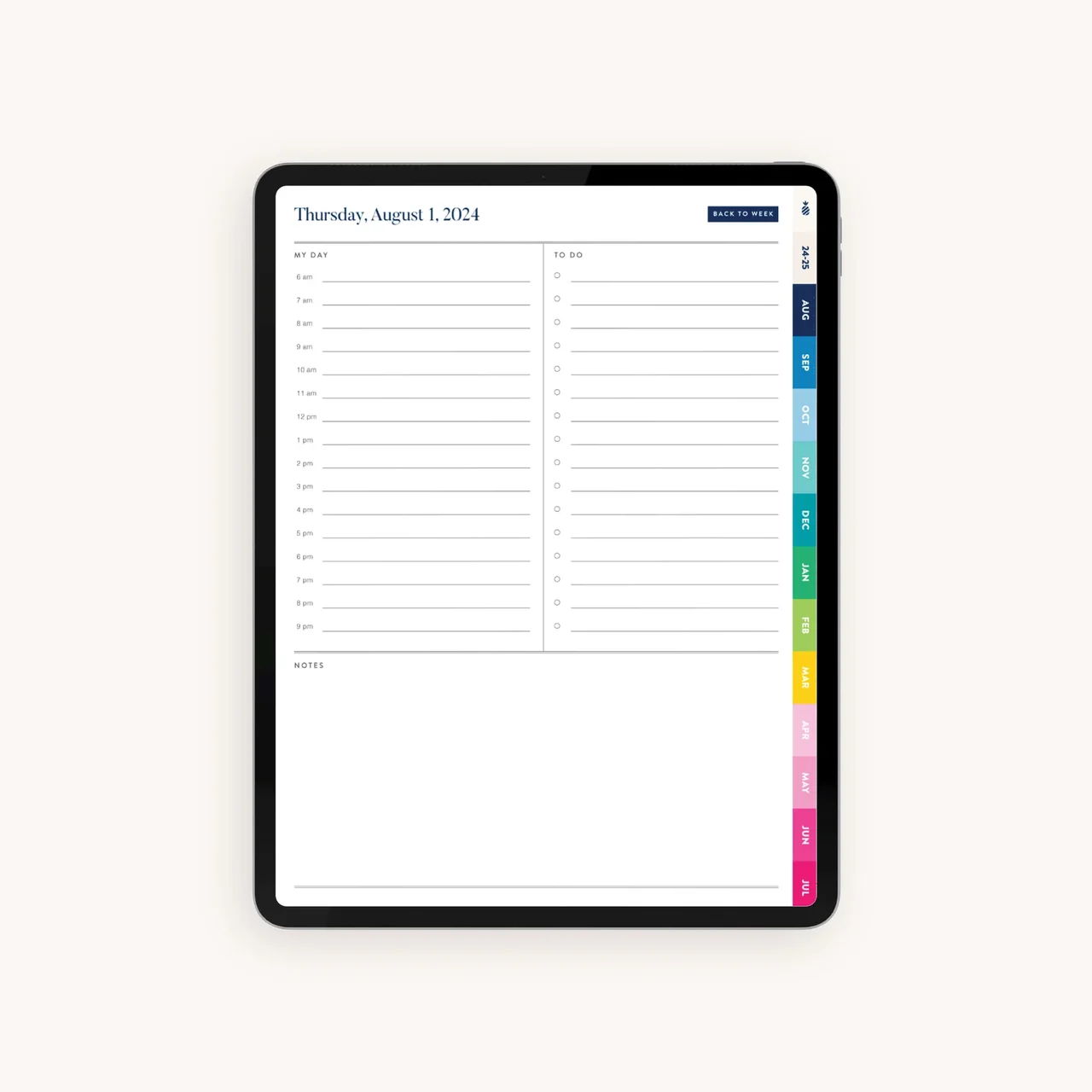 Digital planner apps are powerful tools designed to help users organize, manage, and prioritize their daily tasks and goals through a digital platform. These apps replicate and enhance the functions of traditional planners by adding convenient, interactive, and customizable features to streamline productivity and organization.
Key Features of Digital Planner Apps
• Task Management: Easily add, organize, and prioritize tasks for daily, weekly, or monthly planning.
• Goal Tracking: Set and monitor long-term goals, breaking them into actionable steps.
• Calendar Integration: Sync with calendars like Google or Outlook to consolidate events and deadlines in one view.
• Reminders and Notifications: Receive timely reminders to ensure you stay on track with important tasks and appointments.
• Customization Options: Personalize themes, layouts, and views to make the planner visually engaging and suited to your needs.
• Progress Visualization: Use charts, timelines, or progress bars to monitor task completion and goal achievements.
• Cloud Syncing: Access your planner across multiple devices, ensuring your information is always up-to-date.
• Collaboration Features: Share tasks and schedules with others, ideal for team projects or family planning.
• Notes and Attachments: Add notes, files, or links directly to tasks or calendar events for easy reference.
Why Use a Digital Daily Planner?
A Daily Plannerapp helps users stay organized by focusing on one day at a time, offering an effective way to manage immediate tasks and responsibilities. With the ability to schedule down to the hour, set reminders, and adjust for last-minute changes, daily planners support productivity, reduce stress, and allow users to approach each day with a clear, actionable plan.
11 Best Digital Planner apps For 2026
1. AFFiNE
Best for: Visual thinkers, ADHD brains, and privacy-conscious users.
Most planner apps force you into a rigid list format. AFFiNE is different. It is an open-source, local-first workspace that combines Docs, Whiteboards (Edgeless Mode), and Databases in one place.
If you find standard to-do lists boring or stressful, AFFiNE’s whiteboard approach allows you to "draw" your day, map out tasks visually, and connect ideas freely.
What you can do with AFFiNE’s key features:
- Write: Drag-and-drop blocks for easy paperwork
-
Plan: Kanban & Database to better plan your daily arrangements
-
Unlike typical Kanban boards limited to tagging, we provide unparalleled customization. Now, you can classify based on almost any property, allowing for personalized categorization that aligns perfectly with your needs.
-
Experience synchronization between Kanban and table views. Any changes made in the Kanban view will automatically reflect in the corresponding table view. Enjoy the convenience of two ways to manage your data seamlessly.
-
-
Draw: Switching to the whiteboard for Smooth drawing and Visualizationand creative brainstorming
-
Visualize and connect your daily ideas smoothly with better cartoon-style shape, slick pen, and connectors. No constraints. Limited only by your imagination. Ohhh, by the way, images now are supported to upload!! We just make everything easy for you, now you may enjoy your drawing time!
-
-
Diversified concept maps templates
-
Mobile app is focused on capturing/viewing rather than heavy editing (whiteboard).
-
In AFFiNE's recent release, we've curated a collection of the most requested templates, including the Gantt chart, Project Tracking Kanban, Monthly Calendar, Flowchart, and many more.
-
AFFiNE’s Price:
In addition to those mentioned above, AFFiNE is a fantastic, completely free daily planner app that wel··comes everyone to experience its powerful features, making it a delightful surprise for those seeking a comprehensive solution for their daily planning needs.
-
Come and check with our latest Stable version, enjoy your creative moments.
-
For more things related to AFFiNE, Come and check out our website: AFFiNE — All In One KnowledgeOS
👉 Download AFFiNE for Free
2. Clickup
ClickUp is an outstanding productivity app and one of the top online planners designed for individuals and teams of all sizes to manage their to-do lists effectively.
Regardless of your role — be it a task manager, a student handling assignments, or a parent putting together a grocery list — ClickUp has the potential to be your ideal weekly planner app.
Here’s a quick look into some useful Clickup features:
-
Task Management: Create tasks, subtasks, and checklists to break down your daily plan into manageable steps. You can easily set priorities, due dates, and assign tasks to team members.
-
Customizable Views: Choose from various views like list, board, calendar, and Gantt chart to visualize your daily plan in a way that suits your workflow best.
-
Time Tracking: Use the built-in time tracking feature to monitor the time spent on tasks, helping you stay on track with your daily plan and improve productivity.
-
Reminders and Notifications: Set reminders for important tasks and receive notifications about upcoming deadlines, ensuring you stay on top of your daily plan.
-
Goal Setting: Define and track your goals in ClickUp, which helps you stay focused on the objectives that matter most in your daily plan.
Clickup Price:
ClickUp has a Free Plan, but it won’t cover all the funtionalities you need most, $5/user per month is necessary if there’s more you wanna do with clickup
3.Notion
Notion is a versatile all-in-one workspace application designed to help users with note-taking, project management, and task organization. It has gained significant popularity among professionals and teams across various industries. As an excellent app for managing daily work plans, Notion’s flexibility and wide range of features cater to users with diverse requirements, making it a go-to choice for many.
-
Tasks and to-do lists: Create tasks and to-do lists to track and manage your daily responsibilities.
-
Project boards: Use Kanban-style project boards to visualize your daily work plan and monitor progress.
-
Calendar view: Plan and schedule your tasks in a calendar view, making it easy to see what’s coming up in your daily work plan.
-
Databases: Create and manage databases to store and organize information related to your daily tasks and projects.
-
Templates: Use templates to quickly set up pages or databases for recurring tasks or projects, saving time in your daily planning.
Notion price:
Notion’s free plan still provides a comprehensive set of features for individual users and small teams. However, for those who need more advanced capabilities, collaboration options, and support, upgrading to a paid plan might be necessary.
Knowing more about AFFiNE or Notion, which one is most suitable to you, can check this article: Best Open source alternative to Notion.
4.Trello
Trello is a popular visual project management app that uses boards, lists, and cards to help you organize your daily tasks. With its simple, drag-and-drop interface, Trello is easy to use and offers a variety of integrations with other productivity apps.
-
Create boards for projects or categories, lists for stages or tasks, and cards for individual tasks or subtasks, making it easy to organize and prioritize your daily work plan.
-
Drag-and-drop Interface: Trello’s intuitive drag-and-drop interface allows you to quickly move tasks between different stages or lists, making it simple to update your daily work plan as priorities change.
-
Due Dates and Reminders: Assign due dates to cards and receive reminders before the deadlines, ensuring that you stay on track with your daily work plan.
Trello price:
Trello also offers the Free Plan, but there are some limitations that might affect its usability for certain users or more complex projects. So you still need to pay extra $10 to have more useful features.
5.Todoist
Todoist is a popular to-do list and task management app that helps you organize and prioritize your daily tasks. With its clean and user-friendly interface, Todoist offers features like due dates, recurring tasks, and reminders to help you stay on top of your daily plan.
-
Task creation: Easily create tasks with deadlines, labels, and priorities to stay organized and focused on what matters most.
-
Project organization: Organize tasks into projects and sections to visualize and manage your daily work plan more effectively.
-
Recurring tasks: Set up tasks that repeat daily, weekly, monthly, or with a custom frequency to help you manage your routine activities.
Todoist price:
Todoist offers various pricing plans to cater to different users’ needs. These include a Free plan, a Premium plan, and a Business plan. However, the free plan doesn’t include reminders, which can be crucial for staying on track with daily tasks and deadlines.
6. TickTick: The Focus Booster
Best for: Students and workers using the Pomodoro technique.
TickTick is a to-do list app with a built-in Pomodoro Timer and Habit Tracker. If you struggle with procrastination, the combination of planning + timing is very effective.
Pros:
-
Built-in Pomo timer and white noise.
-
Voice input.
-
Habit tracker included in the free version.
Cons:
- Calendar view is a paid feature.
7. Microsoft To Do: The Office Companion
Best for: Windows users and Outlook heavy users.
Formerly Wunderlist, Microsoft To Do is a solid, free option that syncs perfectly with Outlook Tasks. The "My Day" feature wipes your slate clean every morning, forcing you to be intentional about what you pick.
Pros:
-
"My Day" feature helps reduce overwhelm.
-
100% Free.
8. Google Calendar: The Time-Blocker's Choice
Best for: Scheduling meetings and strict time-blocking.
If your day is defined by "where I need to be" rather than "what I need to do," Google Calendar is unbeatable. It’s completely free and integrates with everything.
Pros:
-
Deep integration with Google Workspace.
-
Color-coded events for visual organization.
-
Completely free.
Cons:
-
Not great for managing small tasks or sub-tasks.
-
Cluttered interface if you have too many calendars.
9. Apple Reminders: The Ecosystem Native
Best for: iPhone and Mac users.
Don't underestimate the default app. Apple has updated Reminders with Kanban views, tags, and smart lists. If you are deep in the Apple ecosystem, this might be all you need.
10. Habitica: Gamify Your Life
Best for: People who need extra motivation.
Habitica turns your life into an RPG game. Completing tasks levels up your character, while missing them causes you to lose health.
11. Any.do: The "Get it Done" App
Best for: Grocery lists and voice commands.
Any.do is famous for its unique "Plan my Day" moment and its grocery list features. It’s great for personal life management.
Which Digital Planner App offers the best solution?
The best digital planner app depends on individual needs, ranging from task management to visual organization and customization. For users who want a highly versatile, all-in-one tool, Notion stands out with its customizable templates and workspace, making it ideal for managing daily tasks, tracking goals, and organizing information in one place. Todoist is a great fit for those who prefer simplicity, offering straightforward task lists with reminders and priority levels to keep day-to-day responsibilities manageable and organized. Visual planners often choose Trello for its board and card layout, which allows for flexible organization of tasks and projects, and includes collaboration features that make it excellent for team use.
For those who appreciate handwritten or digital journaling experiences, GoodNotes provides a natural option, allowing users to take handwritten notes and work with custom templates. Lastly, Affine offers a unique open-source, canvas-based experience that emphasizes visual organization and gives users full control over their data, perfect for users who want a more customizable, flexible approach. Each app’s distinct features cater to specific planning styles, so the best choice ultimately depends on the user’s workflow and organizational preferences.
While each of the daily planner apps discussed offers its own unique and appealing features, we encourage users to choose the ideal option based on their specific needs and pain points. However, with a humble perspective, we still propose that AFFiNE emerges as the ultimate winner in this evaluation, providing a comprehensive and versatile solution for daily task management and goals setting, catering to a wide range of user requirements.
Final Verdict: Which One Should You Choose for 2026?
The "best" app depends on how your brain works:
-
Choose AFFiNE if you are a visual thinker, have ADHD, or care deeply about data privacy. The ability to switch between a structured document and a free-form whiteboard makes it the most flexible tool on this list.
-
Choose Todoist if you just want a fast text list.
-
Choose Google Calendar if you live by time-blocking.
Ready to start planning?
Download AFFiNE today and try our Free 2026 Digital Planner Template to kickstart your most productive year yet.