AFFiNE for Manufacturing

Manufacturing work instructions, clearly documented.

Manufacturing work instructions explain how to complete a specific task: the sequence, tools, checks and exceptions. Use AFFiNE to combine written steps, photos and process diagrams, with an owner and review notes for each instruction. Keep controlled approvals and production records in your approved systems.

30-minute Google Meet Workflow, deployment and team fit

Illustrative workspace: Fixture setup — working notes

Workspace view
Fixture setup — working notesVisual work instructionProblem reviewTeam handoverDesign decision record

Page · process team · synthetic example

Fixture setup — working notes

Purpose
Repeat a reliable setup
Reference
Fixture diagram · draft
Open question
Confirm the inspection step

Exception: record any deviation beside the step it affects.

Same project · Edgeless canvas
Fixture setup — working notes — illustrative canvasNodes: Prepare, Position, Inspect, Record, Fixture diagram, Deviation note. Connections: Prepare to Position; Position to Inspect; Inspect to Record (pass); Inspect to Deviation note (deviation); Fixture diagram to Position (reference mark).
Prepare
Position
Inspect
Record
Fixture diagram
Deviation note
pass
deviation
reference mark
  • The repeatable setup the note describes, step by step.
  • The fixture diagram linked from “Reference” points at the positioning step.
  • The open question sits on the inspection step; deviations branch to their own note.

Page

Visual work instruction

Pair each setup step with a photo and an expected result. Add a process diagram and record exceptions beside the step they affect.

Setup photo · placeholder

  1. Position the fixture

    Align against the reference edge.

  2. Check the reference mark

    Compare with the diagram before clamping.

Exception

Record any deviation in the linked note.

Same project · Edgeless canvas
Visual work instruction — illustrative canvasNodes: Prepare, Position, Inspect, Record, Fixture diagram, Deviation note. Connections: Prepare to Position; Position to Inspect; Inspect to Record (pass); Inspect to Deviation note (deviation); Fixture diagram to Position (reference mark).
Prepare
Position
Inspect
Record
Fixture diagram
Deviation note
pass
deviation
reference mark
  • The repeatable setup the note describes, step by step.
  • The fixture diagram linked from “Reference” points at the positioning step.
  • The open question sits on the inspection step; deviations branch to their own note.

Page + table

Problem review

Start with the observed issue. Map possible causes, attach supporting notes and record the next check in a table before drawing a conclusion.

  • Observed · Observation

    Variation at setup

  • Unverified · Hypothesis

    Reference mark unclear

  • Planned · Next check

    Review instruction wording

Observed → Possible cause → Check → Learning

Same project · Edgeless canvas
Problem review — illustrative canvasNodes: Prepare, Position, Inspect, Record, Fixture diagram, Deviation note. Connections: Prepare to Position; Position to Inspect; Inspect to Record (pass); Inspect to Deviation note (deviation); Fixture diagram to Position (reference mark).
Prepare
Position
Inspect
Record
Fixture diagram
Deviation note
pass
deviation
reference mark
  • The repeatable setup the note describes, step by step.
  • The fixture diagram linked from “Reference” points at the positioning step.
  • The open question sits on the inspection step; deviations branch to their own note.

Page

Team handover

Link SOPs, common exceptions and setup examples into a short reading path. Assign someone to maintain each instruction as the process changes.

Start here
Process overview
Read next
Common exceptions
Discuss
Open questions

Shared in the team workspace · edited together

Same project · Edgeless canvas
Team handover — illustrative canvasNodes: Prepare, Position, Inspect, Record, Fixture diagram, Deviation note. Connections: Prepare to Position; Position to Inspect; Inspect to Record (pass); Inspect to Deviation note (deviation); Fixture diagram to Position (reference mark).
Prepare
Position
Inspect
Record
Fixture diagram
Deviation note
pass
deviation
reference mark
  • The repeatable setup the note describes, step by step.
  • The fixture diagram linked from “Reference” points at the positioning step.
  • The open question sits on the inspection step; deviations branch to their own note.

Edgeless + table

Design decision record

Compare the current fixture with a proposed change. Keep the sketch, reasons for the proposal and trial questions together for the next review.

Option AOption B
ProposalRetain current fixtureRevise positioning guide
Why consider itKnown setupClearer reference mark
Decision

Review after trial

Same project · Edgeless canvas
Design decision record — illustrative canvasNodes: Prepare, Position, Inspect, Record, Fixture diagram, Deviation note. Connections: Prepare to Position; Position to Inspect; Inspect to Record (pass); Inspect to Deviation note (deviation); Fixture diagram to Position (reference mark).
Prepare
Position
Inspect
Record
Fixture diagram
Deviation note
pass
deviation
reference mark
  • The repeatable setup the note describes, step by step.
  • The fixture diagram linked from “Reference” points at the positioning step.
  • The open question sits on the inspection step; deviations branch to their own note.
Illustrative workspace — synthetic content, not a product screenshot or a customer case study. In Edgeless: drag objects, use Hand to pan, or Ctrl/⌘ + scroll to zoom. Drawing tools are visual references.

From task to workspace

From work instructions to process improvement.

Document a setup, investigate a variation, brief a colleague and record a proposed change.

Task-to-feature map for the four examples on this page
TaskDocsEdgelessTablesTeamExportOutput
01 · Process engineerCreate visual work instructionsDocsEdgelessVisual work instruction
02 · Improvement teamDocument a root cause analysisDocsEdgelessTablesProblem review
03 · Team leadBuild a manufacturing knowledge baseDocsTeamTeam handover
04 · Engineering teamRecord engineering change decisionsDocsEdgelessTablesDesign decision record

01Process engineer

Create visual work instructions

Pair each setup step with a photo and an expected result. Add a process diagram and record exceptions beside the step they affect.

Task
Explain a setup someone else will repeat
In AFFiNE
Image and text blocks in a page; the sequence drawn in Edgeless
Output
Visual work instruction

Features used

PageSynthetic example

Visual work instruction

  1. 01Position the fixtureAlign against the reference edge.
  2. 02Check the reference markCompare with the diagram before clamping.

ExceptionRecord any deviation in the linked note.
Illustrative layout with synthetic content — not a product screenshot.

02Improvement team

Document a root cause analysis

Start with the observed issue. Map possible causes, attach supporting notes and record the next check in a table before drawing a conclusion.

Task
Understand a variation without jumping to a cause
In AFFiNE
Review page with images; causes mapped on the canvas; a table for checks
Output
Problem review

Features used

Page + tableSynthetic example

Problem review

  • ObservedObservationVariation at setup
  • UnverifiedHypothesisReference mark unclear
  • PlannedNext checkReview instruction wording

ObservedPossible causeCheckLearning

Illustrative layout with synthetic content — not a product screenshot.

03Team lead

Build a manufacturing knowledge base

Link SOPs, common exceptions and setup examples into a short reading path. Assign someone to maintain each instruction as the process changes.

Task
Bring a new colleague up to speed
In AFFiNE
Linked pages in a shared workspace, edited together as the process changes
Output
Team handover

Features used

PageSynthetic example

Team handover

  1. Start hereProcess overview
  2. Read nextCommon exceptions
  3. DiscussOpen questions

Shared in the team workspace · edited together

Illustrative layout with synthetic content — not a product screenshot.

04Engineering team

Record engineering change decisions

Compare the current fixture with a proposed change. Keep the sketch, reasons for the proposal and trial questions together for the next review.

Task
Record why a change is being proposed
In AFFiNE
Sketch on the canvas; options and decision kept in a page and table
Output
Design decision record

Features used

Edgeless + tableSynthetic example

Design decision record

Option AOption B
ProposalRetain current fixtureRevise positioning guide
Why consider itKnown setupClearer reference mark

DecisionReview after trial

Illustrative layout with synthetic content — not a product screenshot.

From example to evaluation

Discuss your manufacturing workflow.

Talk through work instructions, process knowledge and how your team would maintain them.

Book a demo

Choose a time with the AFFiNE team.

One connected workspace

Write in a page. Switch the same doc to a canvas.

The examples above use the same building blocks.

  • Illustrative example

    Docs

    Readable pages with references, images and rich blocks.

    Explore Docs
  • Illustrative example

    Edgeless whiteboard

    A canvas to show how ideas and systems relate.

    Explore Edgeless
  • Illustrative example

    Tables and team workspace

    Track what is open and edit together in shared spaces.

    Explore Teamhub

Illustrative examples of docs, whiteboards and tables — not product screenshots or industry case studies.

Deployment and evaluation

Choose how the workspace runs.

Evaluate the workload, infrastructure and AI configuration together, with the people who will operate the workspace.

Illustration of a hosted cloud workspace

Hosted workspace

Try one workflow with permitted sample material before you scale it.

  • AFFiNE web app
  • One team workspace
  • No servers to run
Discuss cloud deployment
Self-host AFFiNE

Prerequisites

1 / Docker

Install Docker and Docker Compose on your machine.

2 / Download the latest Compose file

Download compose.yml from the AFFiNE repository.

3 / Prepare the environment file

Review the environment variables for your deployment.

Self-hosted

For self-hosted AFFiNE, Docker Compose is the documented deployment path. Workspace data and uploads use the infrastructure and storage you configure.

  • Docker Compose
  • PostgreSQL
  • File or S3 storage
  • OIDC sign-in
  • Sign in through your identity providerSelf-hosted AFFiNE supports OIDC. Review workspace roles and document access against your own requirements.
  • AI is optionalSelf-hosted AI needs a configured provider and can be turned off. Bring-your-own-key is marked experimental.
  • Licensing for restricted networksAn installable license activates without calling AFFiNE’s license servers. That alone does not make every feature work offline.
  • Backup and restoreThe process is documented, including a test restore. Run it in your own environment.
  1. Which documents should stay on infrastructure you operate?
  2. Who maintains each instruction after the pilot?
  3. Which systems remain the record for controlled production data?

This page makes no claim about SAML, SCIM, industry certifications, or approval for any specific workload.

Product references: AFFiNE Enterprise and documentation in English for Docker Compose, OIDC sign-in and AI configuration.

Continue exploring · General template

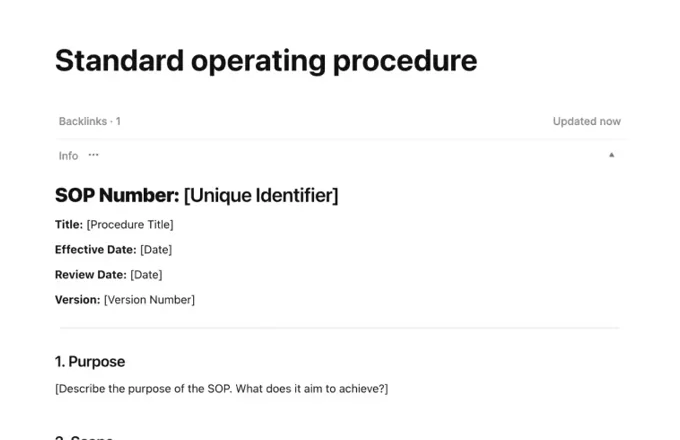
Existing SOP template

A general standard-operating-procedure template. Adapt its steps and exceptions to one real setup.

Before you start

Questions from your team.

Can AFFiNE be used as work instruction software?

Yes, for writing and sharing instructions. Combine photos, written steps and tables in a document, then draw the sequence on a whiteboard. Your team maintains the content; controlled approvals, electronic signatures and MES synchronization are outside this example.

How can we organize standard operating procedures?

Give each standard operating procedure (SOP) a purpose, owner, review date, step sequence and exception notes. Link task-level work instructions for detailed steps and checks. In AFFiNE, start from the SOP template and update the explanation when the process changes; keep formal approval records in your controlled system.

Method reference (English): ASQ quality glossary.

Does AFFiNE replace our MES, PLM or quality system?

No. Use AFFiNE for manufacturing knowledge management and process explanations. Keep controlled production records and specialist workflows in the systems approved for those jobs.

Can we evaluate self-hosting?

Yes. Docker Compose is the documented self-hosting path, with sign-in through your identity provider via OIDC. Review the Enterprise documentation with your infrastructure team, then test one representative workflow before a wider rollout.

Is AI required for this workspace?

No. These workflows use pages, canvases and tables without requiring AI. In self-hosted AFFiNE, AI needs a configured provider and can be turned off. Review the provider and data flows before enabling it.

How should our team start?

Choose one current documentation task and a small set of permitted sample material. Evaluate whether the team can find, understand and hand over the work before expanding.

A conversation about your team

Plan your documentation evaluation.

Talk through work instructions, process knowledge and how your team would maintain them.

30-minute Google Meet · Choose an available time

Prefer email? Contact sales