10 Social Media Content Plan & Calendar Templates
What changed (Nov 14, 2026): Rewrote the list as 10 social media content calendar templates grouped by format, each with format, signup requirement, contents, limits and a direct link checked on the vendor page. Removed Ayanza (no template page) and the AFFiNE startup template that does not exist, added Buffer, Hootsuite and Asana, a field checklist, a filled one-week example, an approval workflow section, FAQs and sources.
Short answer: If you want a free social media content calendar you can download without signing up, start with Smartsheet's spreadsheets or the Vertex42 content calendar (Excel and Google Sheets). If several people write, design and approve posts, use a database or project template such as Airtable or Asana, where every post has an owner, a reviewer and a status. None of the templates below publishes posts for you; you still need a scheduler or the platforms' own tools for that.
Disclosure: AFFiNE publishes this article, and one of the ten templates below (the AFFiNE content calendar) is ours. The list is grouped by format, not ranked. Every template link, format and signup requirement was checked on the vendor's own page on November 13–14, 2026. We did not test paid plans, and vendors can change their templates at any time.
Social media content calendar vs. content plan
A social media content plan sets the direction: goals, audience, content pillars, channels and how often you post. A social media content calendar turns that plan into dated posts: what goes out on which platform, when, who owns it and whether it is approved. Most of the templates below combine both. The spreadsheet templates are strongest as calendars; the Notion, Airtable and Asana templates can also hold the briefs, drafts and review notes behind each post.
If you are still working on the strategy itself, see these B2B social media marketing strategies or the free AFFiNE social media strategy template before you fill in a calendar.
How we chose these 10 templates
We kept only templates that have their own page or a direct download today, and we recorded the same facts for each one: the format, whether you need an account, what the template actually contains, and its main limit. Compared with earlier versions of this article we made these changes:
- Removed Ayanza. The company now positions itself as a team productivity tool, and we could not find a social media calendar template page to link to.
- Removed Stackby and Creately from the main list. Stackby's content marketing management template is a general editorial base for blogs, e-books and keywords rather than a social calendar, and Creately's social media content calendar covers the same visual-board need as Miro. Both pages still work if you want to try them.
- Added Buffer, Hootsuite and Asana. They answer the questions people ask most: a free Google Sheets template, a spreadsheet with weekly and monthly views, and a calendar with a review and approval step.
- Replaced the AFFiNE entry. The old "AFFiNE social media content calendar template for small startups" has no template page. The entry now points to the real AFFiNE content calendar template and describes what it does and does not include.
10 social media content calendar templates compared
| # | Template | Format | Account needed? | Status or approval tracking | Best for |
|---|---|---|---|---|---|
| 1 | Smartsheet social media calendar templates | Excel, Google Sheets, Word, PDF; some also PowerPoint and Google Docs | No | Status columns in some templates | A free download for weekly, monthly or yearly planning |
| 2 | Vertex42 Content Calendar | Excel (2013 or later), Google Sheets | No | Progress on a Gantt timeline, no approvals | One sheet with a Gantt timeline and a monthly view |
| 3 | Buffer Google Sheets social media calendar | Google Sheets | Google account to make a copy | Post status column | Solo creators and small teams who like spreadsheets |
| 4 | Hootsuite Social Media Calendar Template | Excel, Google Sheets | No account, but a lead form (business email, name, company) | Status column | Weekly and monthly calendars plus an evergreen content library |
| 5 | Notion Social Media Calendar | Notion database | Yes, free Notion account | Add your own status property | Teams that already write in Notion |
| 6 | Airtable Social Media Calendar | Airtable base | Yes, free Airtable account | Approval status field and automations | Multi-platform teams that need filters and views |
| 7 | Jotform Social Media Calendar | Jotform Tables (form plus table and calendar view) | Yes, free Jotform account | Labels and color codes | Collecting post requests from many people |
| 8 | Asana Social Media Calendar | Asana project | Yes, Asana account | Owner, reviewer and status; built-in Approvals on Advanced plans and up | Teams with a formal review step |
| 9 | Miro Social Media Calendar | Miro board | Yes, free Miro account | Manual | Planning a campaign visually as a team |
| 10 | AFFiNE Content Calendar Template | AFFiNE whiteboard (Edgeless) | Yes, for one-click import (free AFFiNE Cloud account) | None in the template | A visual weekly board next to your notes and docs |
Spreadsheet templates (Excel and Google Sheets)
Spreadsheets are the fastest way to start, work offline, and need no new tool. Their limit is collaboration: comments, approvals and asset links get messy once more than two or three people edit the same sheet.
1. Smartsheet social media calendar templates
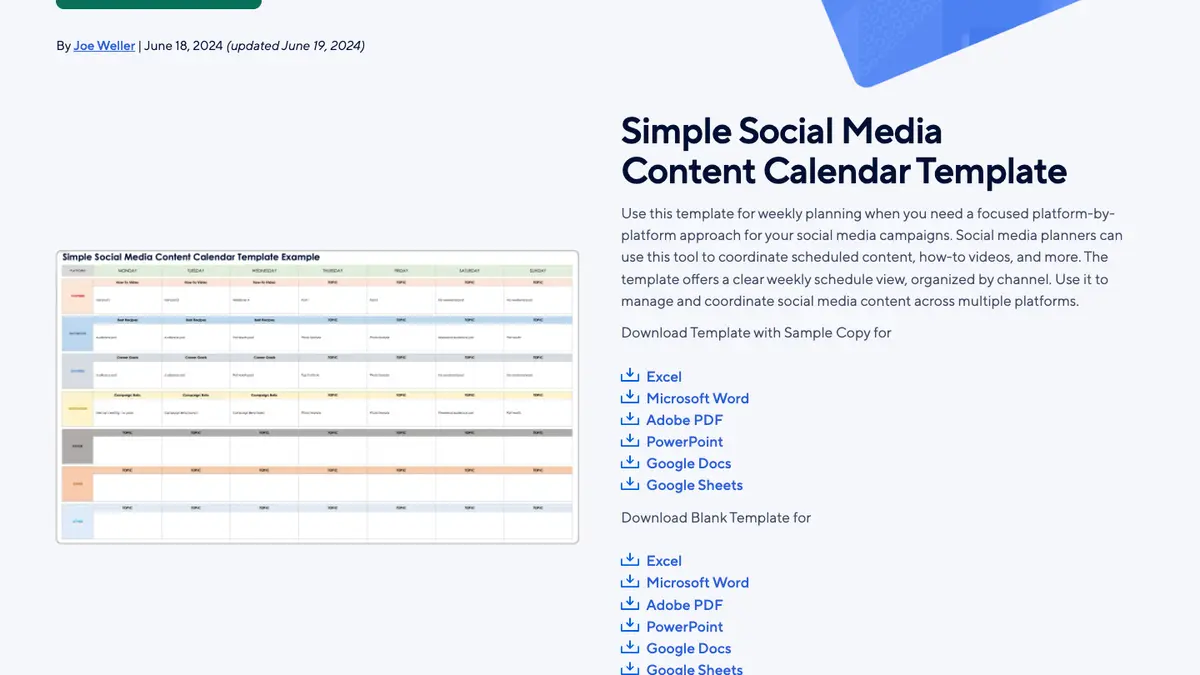
- Format: The simple weekly calendar downloads as Excel, Word, PDF, PowerPoint, Google Docs or Google Sheets, with or without sample copy. The other templates on the page come in Excel and Google Sheets, some also in PDF or Word.
- Account needed? No. The files download directly; you only need a Google account to copy the Google Sheets versions.
- What's included: Seven templates on one page: a simple weekly calendar organized by channel, a weekly calendar with visual and linked assets, task assignments and status, a monthly and quarterly editorial calendar, a calendar with a dashboard (posts per day, weekly totals, average character count), an annual content calendar, a blogging calendar and a social media audit sheet.
- Limits: The page was last updated in June 2024, and the files are static spreadsheets with no reminders or approvals.
- Get it: Smartsheet free social media calendar templates
2. Vertex42 Content Calendar
- Format: Excel 2013 or later, or Google Sheets.
- Account needed? No. It is a direct download under a private-use license (not for resale or redistribution).
- What's included: A Content worksheet where you enter titles, descriptions and dates, a monthly Calendar worksheet that shows up to three items per day, a Gantt chart timeline for tracking progress, and a Settings sheet with common U.S. holidays and observances for themed posts. There are no macros.
- Limits: Vertex42 notes that the spreadsheet does not schedule posts. It suits one planner better than a team.
- Get it: Vertex42 Content Calendar Template
3. Buffer Google Sheets social media calendar
- Format: Google Sheets. You can convert it to Excel from Google Sheets.
- Account needed? A Google account to make a copy. No Buffer account is needed.
- What's included: A "Start here" instructions sheet and a weekly planner with columns for platform, post status, media links and full captions, set up for Instagram, Facebook, TikTok, LinkedIn, YouTube and X. The same Buffer article also offers printable weekly and monthly PDFs, Canva versions and a Notion calendar.
- Limits: The sheet does not publish anything. Buffer's own scheduler is a separate product with its own free plan.
- Get it: Buffer's social media calendar templates (the Google Sheets version is template 7)
4. Hootsuite Social Media Calendar Template
- Format: Excel and Google Sheets.
- Account needed? No Hootsuite account, but you must fill in a form with a business email, name, company, company size and industry, and Hootsuite uses it to send marketing emails.
- What's included: Weekly and monthly calendar tabs and a network-specific evergreen content library for ideas you can reuse. Hootsuite's guide describes the sheet as columns for date, time, platform, caption, asset link and status.
- Limits: The lead form, and the sheet does not publish posts.
- Get it: Hootsuite Social Media Calendar Template
Database templates (Notion, Airtable, Jotform)
Database templates store each post as a record, so the same posts can appear as a table, a calendar or a board, and you can filter by platform, campaign or owner. They need an account, and their free plans have limits.
5. Notion Social Media Calendar
- Format: Notion database page. Notion currently lists it as "Social Media Calendar (w/ Notion AI) 2026".
- Account needed? Yes. You duplicate it into a Notion workspace, which needs a free Notion account.
- What's included: One database where you draft, plan and write each post, a calendar view to see timelines, and a board view grouped by platform. Notion AI features depend on your Notion plan.
- Limits: Notion does not publish to social networks, so you copy final posts into a scheduler.
- Get it: Notion Social Media Calendar template
6. Airtable Social Media Calendar
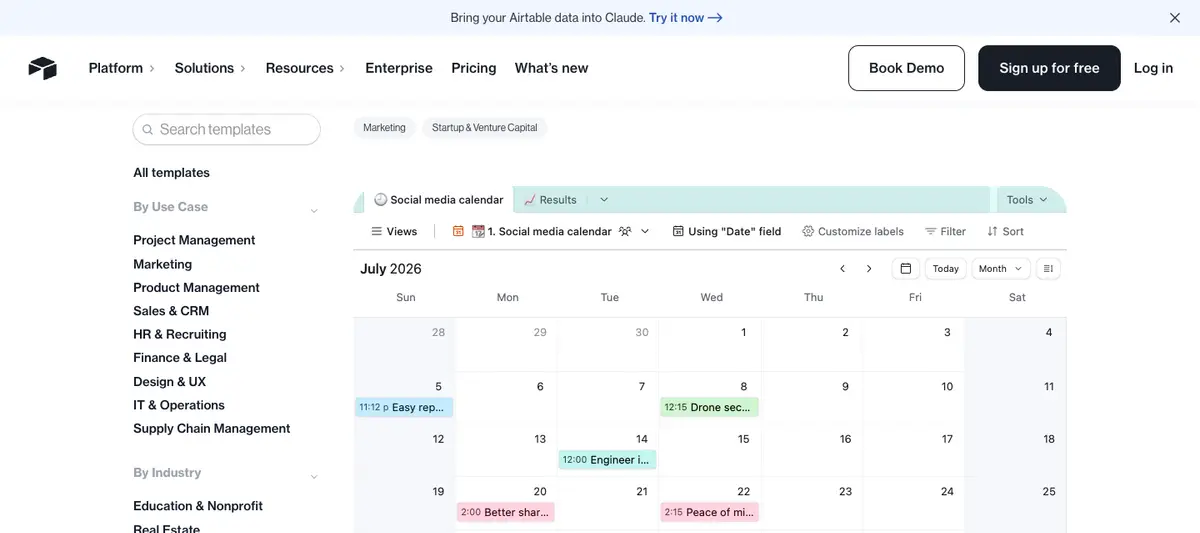
- Format: Airtable base. "Use template" copies it into your workspace.
- Account needed? Yes, a free Airtable account.
- What's included: A record for each post with copy, platform, publish date and time, images or videos, approval status and owner. Airtable describes a monthly calendar view, a kanban view for workflow stages, a grid view for bulk edits, and a timeline view for campaigns, plus automations for approval reminders.
- Limits: The base takes some setup before a team can use it well, and everyone who edits it needs an Airtable account.
- Get it: Airtable Social Media Calendar template
7. Jotform Social Media Calendar
- Format: A Jotform form that feeds a Jotform Tables spreadsheet, with a calendar view.
- Account needed? Yes, to save and share it. Jotform's free Starter plan allows 5 forms and 100 submissions a month.
- What's included: Team members submit an upcoming post through the form (content type, channels, publish date and time), and each submission lands in a color-coded table that you can also view as a calendar. You can add form fields to add columns, color-code labels, and add tabs for launches or holidays.
- Limits: It is built around intake, not drafting, and the free plan's submission cap is low for a busy team.
- Get it: Jotform Social Media Calendar template
Templates with a review and approval step
8. Asana Social Media Calendar
- Format: Asana project with a calendar view.
- Account needed? Yes. Asana's page says "Sign up to use this template." The free Personal plan is for one or two people.
- What's included: A task for each post with the platform, format, copy, images or video, publish time and time zone, an owner, a reviewer and statuses such as Planned, In design, Needs revision, Approved and Published. Asana's walkthrough adds subtasks for assets and review, each with a deadline before the publish date.
- Limits: Built-in Approvals are available only on Asana's Advanced, Enterprise and Enterprise+ plans; on other plans you use review subtasks and comments. Asana does not publish posts, though it connects to Hootsuite.
- Get it: Asana Social Media Calendar template
Visual board templates
9. Miro Social Media Calendar
- Format: Miro whiteboard.
- Account needed? Yes. Miro's free plan keeps your three most recent boards editable.
- What's included: A calendar board for planning posts across X (Twitter), LinkedIn, Instagram and Facebook, drafting copy and keeping links to images, videos and GIFs. Miro's page walks through seven steps: audit your content, choose channels, set the calendar's scope, name stakeholders, write posts, gather team feedback and schedule.
- Limits: A board is good for workshops and campaign overviews, but it has no status fields or reminders, and it gets crowded once you plan more than a few weeks.
- Get it: Miro Social Media Calendar template
10. AFFiNE Content Calendar Template
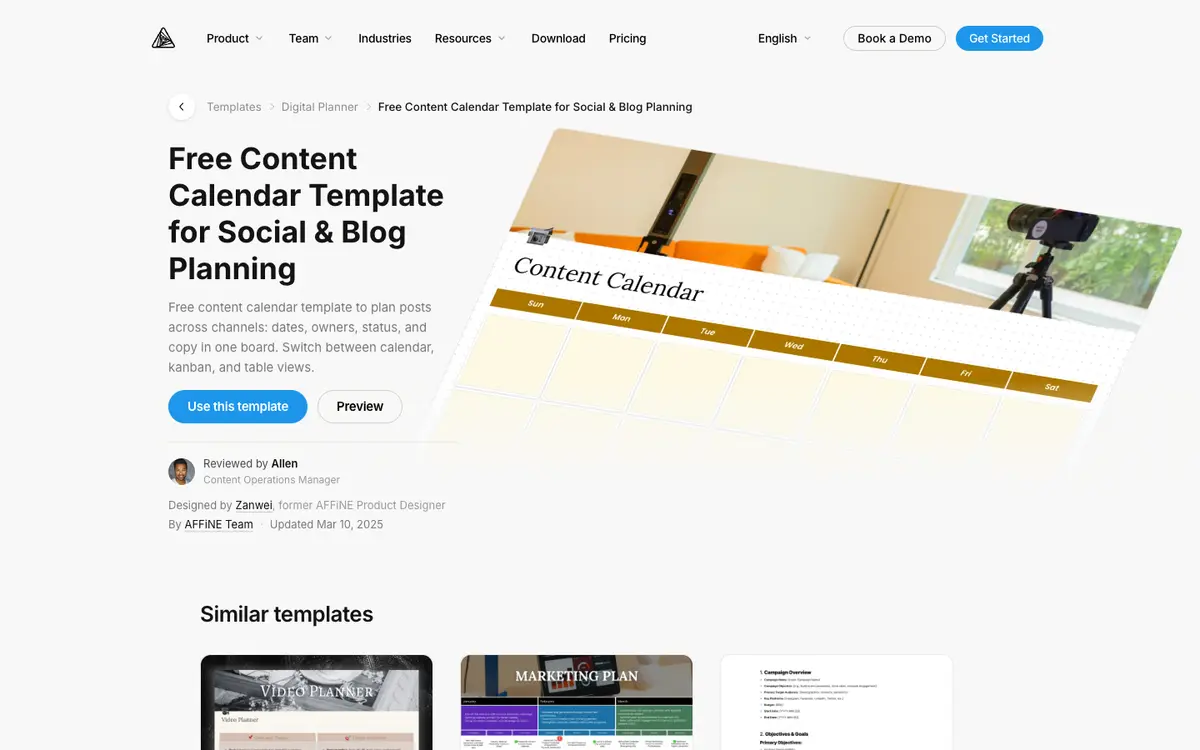
- Format: An AFFiNE doc in Edgeless (whiteboard) mode.
- Account needed? Yes for the one-click import. "Use this template" opens the AFFiNE Cloud sign-in; the free plan includes 10 GB of cloud storage and up to 3 members per workspace. AFFiNE itself also runs in local workspaces without an account, but in our test the template was not imported when we chose that option.
- What's included: A weekly board with a header image and one column per day, Sunday to Saturday, filled with empty note cards you can write post ideas, captions or links on, and move between days.
- Limits: The template has no status, owner or approval fields, and AFFiNE does not schedule or publish posts. To track status, add an AFFiNE database to the same doc and switch it between table and kanban views.
- Who it suits: Small teams or solo creators who want a visual week next to their campaign notes and briefs, and who are comfortable building the status columns themselves.
- Get it: AFFiNE Content Calendar Template
What to include in a social media content plan
Whichever template you choose, give every post the same fields. These are the columns most of the templates above share, and the ones that matter once more than one person is involved:
- Publish date and time, with the time zone if your audience or team spans regions.
- Platform and format, for example Instagram carousel, LinkedIn text post or TikTok video.
- Content pillar or campaign, so you can check the mix at the end of the month.
- Hook and caption, plus hashtags, mentions and the call to action.
- Asset link to the image, video or design file.
- Owner, the person who gets the post live.
- Reviewer and status, for example Planned, Drafting, In review, Approved, Scheduled and Published.
- Link to the live post after it is published.
- Result, one or two metrics you agreed on (reach, clicks, saves or replies), filled in a week later.
Example: a filled one-week social media content plan
This is an example for a small software team. Copy the columns into any template above.
| Day | Platform and format | Pillar | Hook | Asset | Owner | Reviewer | Status |
|---|---|---|---|---|---|---|---|
| Mon 10:00 | LinkedIn text post | Product | "Three things we changed after 200 support tickets" | none | Mia | Sam | Approved |
| Tue 15:00 | Instagram carousel | Education | "How to plan a month of posts in one hour" | 6-slide design | Leo | Mia | In review |
| Wed 12:00 | X thread | Community | "What our users asked most this week" | screenshot | Sam | Mia | Drafting |
| Thu 18:00 | TikTok video | Behind the scenes | "A day on the support team" | 30-second clip | Leo | Sam | Planned |
| Fri 11:00 | LinkedIn carousel | Customer story | "How one agency cut review rounds in half" | 5-slide PDF | Mia | Customer | Waiting on customer |
Approval workflows for multi-user content calendars
When several people draft, design and sign off on posts, the calendar has to show where each post is stuck. A simple workflow that works in any template:
- Draft: The owner writes the copy and links the asset.
- Review: The reviewer checks the copy, the asset, the link and the publish time, then comments or sets the status to Needs revision.
- Approve: Only the reviewer moves the post to Approved.
- Schedule: The owner copies the approved post into the scheduler and sets the status to Scheduled.
- Publish and log: After it goes live, add the post link and, a week later, the result.
Spreadsheets handle this with a status column and comments. Airtable can add automated approval reminders, and Asana supports reviewer subtasks on every plan and built-in Approvals on Advanced plans and up. If you need approvals and publishing in one place, look at a dedicated scheduler instead: Hootsuite's guide, for example, lists its paid Perch product with a multi-network calendar and approvals.
Related guides
- To compare tools rather than templates, including HubSpot, Trello, Hootsuite and ClickUp, see our free content calendar tools for social media and blogs.
- For a walkthrough from audit to first post, read how to build a social media content calendar in six steps.
- If you also plan blog posts and newsletters, our content calendar guide for blogs, newsletters and social covers editorial calendars beyond social media.
- For broader planning habits, see these social media planning strategies.
Frequently asked questions
What is a social media content plan template?
It is a ready-made spreadsheet, database or board with columns for the date, platform, format, content pillar, caption, asset, owner and status of each post. You fill in one row or card per post and review the plan every week.
What should a social media content calendar include?
At minimum the publish date and time, platform and format, caption, asset link, owner and status. Teams should add a reviewer, a campaign or pillar, the live post link and one or two result metrics.
Is there a free social media content calendar template in Google Sheets or Excel?
Yes. Smartsheet and Vertex42 offer free Excel and Google Sheets downloads without an account, Buffer offers a Google Sheets template you can copy with a Google account, and Hootsuite's Excel and Google Sheets template is free after a lead form.
Which content calendar templates support approval workflows?
Airtable's template has an approval status field and can send automated approval reminders, and Asana's template assigns an owner and a reviewer to each post, with built-in Approvals on Asana's Advanced plans and up. In a spreadsheet, Notion or AFFiNE you can add a status column such as Draft, In review and Approved.
How far ahead should you plan social media content?
Most teams plan two to four weeks of posts in detail and sketch the next quarter's campaigns and key dates, leaving room each week for timely or reactive posts.
Should I use Google Sheets or Notion for a social media content calendar?
Use Google Sheets if one or two people plan the posts and you want a free file that anyone can open. Use Notion or Airtable if you want each post to hold its draft, assets and comments, and to switch between table, calendar and board views.
Sources
- Smartsheet, Free Social Media Calendar Templates, updated June 19, 2024.
- Vertex42, Content Calendar Template.
- Buffer, Social Media Calendar: 11 Free Templates, published September 7, 2026.
- Hootsuite, Social Media Calendar Template and How to create a social media calendar.
- Notion, Social Media Calendar template.
- Airtable, Social media calendar template.
- Jotform, Social Media Calendar template and pricing.
- Asana, Social media calendar template, Approvals and pricing.
- Miro, Social Media Calendar template and pricing.
- AFFiNE, Content calendar template and pricing.
All pages checked on November 13–14, 2026.