Best Free Budget Templates (2026): Excel, Sheets & PDF
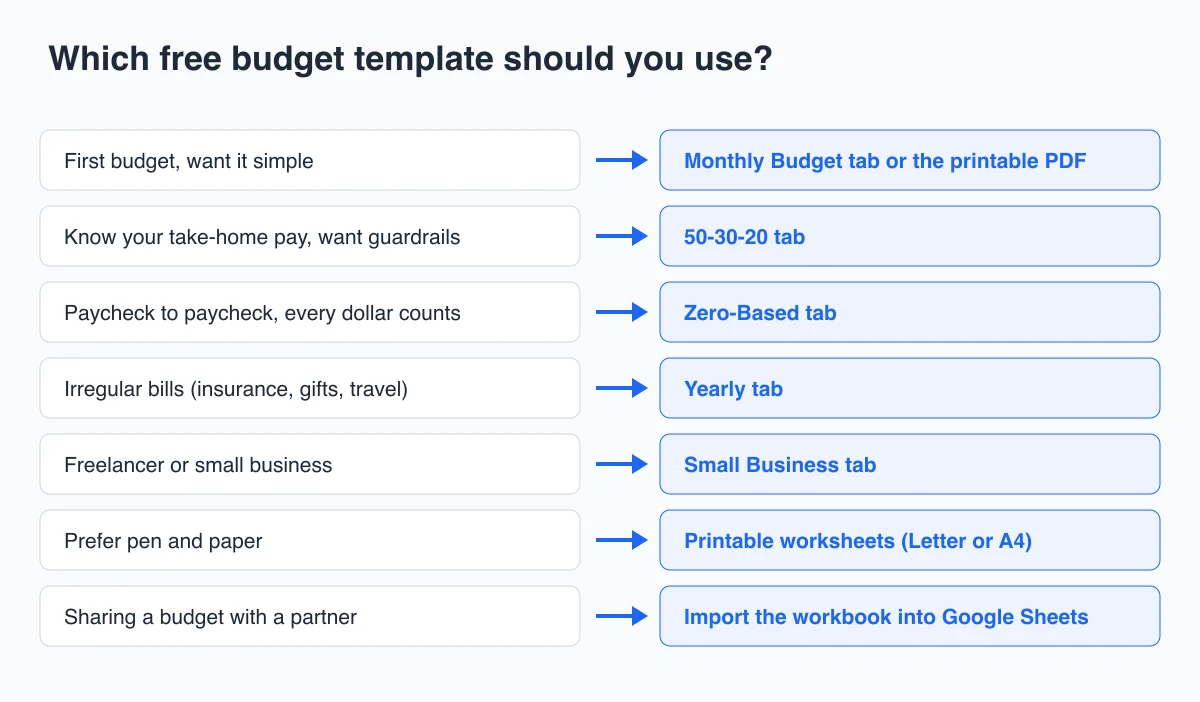
Short answer: The best free budget template is the one that matches how you get paid and how you like to track money. For most people that means a monthly budget with planned and actual columns. If you already know your take-home pay, use a 50/30/20 template. If money is tight, use a zero-based template. Below you can download all of them in one free Excel workbook that also imports into Google Sheets, plus printable PDF worksheets. We also list the third-party templates that held up when we checked them.
Free downloads (no sign-up):
- Free budget templates workbook (.xlsx): Monthly Budget, 50-30-20, Zero-Based, Yearly, Small Business and a filled-in example
- Printable budget worksheets, US Letter (PDF): monthly budget, 50/30/20 planner, weekly spending log
- Printable budget worksheets, A4 (PDF): the same three pages sized for A4 paper
Best Free Budget Templates at a Glance
| Template | Best for | Format | Cost | Get it |
|---|---|---|---|---|
| AFFiNE Monthly Budget | A first budget with planned vs actual | Excel, Google Sheets | Free, no sign-up | Workbook |
| AFFiNE 50-30-20 | Checking needs, wants and savings against targets | Excel, Google Sheets | Free, no sign-up | Workbook |
| AFFiNE Zero-Based | Giving every dollar a job | Excel, Google Sheets | Free, no sign-up | Workbook |
| AFFiNE Yearly | Irregular bills and a 12-month view | Excel, Google Sheets | Free, no sign-up | Workbook |
| AFFiNE Small Business | Budget vs actual with a tax set-aside | Excel, Google Sheets | Free, no sign-up | Workbook |
| AFFiNE printable worksheets | Pen and paper | PDF, Letter and A4 | Free, no sign-up | Letter, A4 |
| NerdWallet budget worksheet | A 50/30/20 spreadsheet or online planner | Excel, Numbers | Free | NerdWallet |
| Vertex42 Personal Budget Spreadsheet | A long list of category ideas | Excel, Google Sheets, OpenOffice | Free | Vertex42 |
| Microsoft Excel budget templates | Designed layouts inside Excel | Excel, Excel for the web | Free | Microsoft |
| consumer.gov Budget Worksheet | A one-page, plain-language start | Fillable PDF | Free | consumer.gov |
How We Chose These Templates
We built the AFFiNE workbook and PDFs for this guide in November 2026. To check the formulas, we recalculated the workbook in LibreOffice and confirmed that every total matches the filled-in example below. The workbook uses only SUM, SUMIF, AVERAGE and IFERROR, which Google Sheets supports, so the formulas keep working after you import the file.
For third-party templates, we opened each page on November 4, 2026 and describe only what that page states about its own file. A template made the list if it met three tests:
- Free to download and use. No trial that expires.
- Editable categories. You can rename, add or delete lines without breaking the totals.
- A clear way to compare plan and reality. Planned and actual columns, or a target to compare against.
We left out templates that only had a nice layout and no totals, and links that redirected to an unrelated page or returned an error.
Monthly Budget Template: Where Most People Should Start
The Monthly Budget tab is a single page with two parts. In the first part you list your income. In the second you list every expense and savings line. Each line has a Planned column, an Actual column, and a Left column that subtracts one from the other. A dropdown tags each line as Need, Want or Savings, so the same sheet also works with the 50/30/20 rule. When actual spending goes over plan, the cell turns red.
Two numbers at the bottom do most of the work:
- Left to budget (income minus planned) should be $0 or more before the month starts.
- Left over this month (income minus actual) tells you how the month really went.
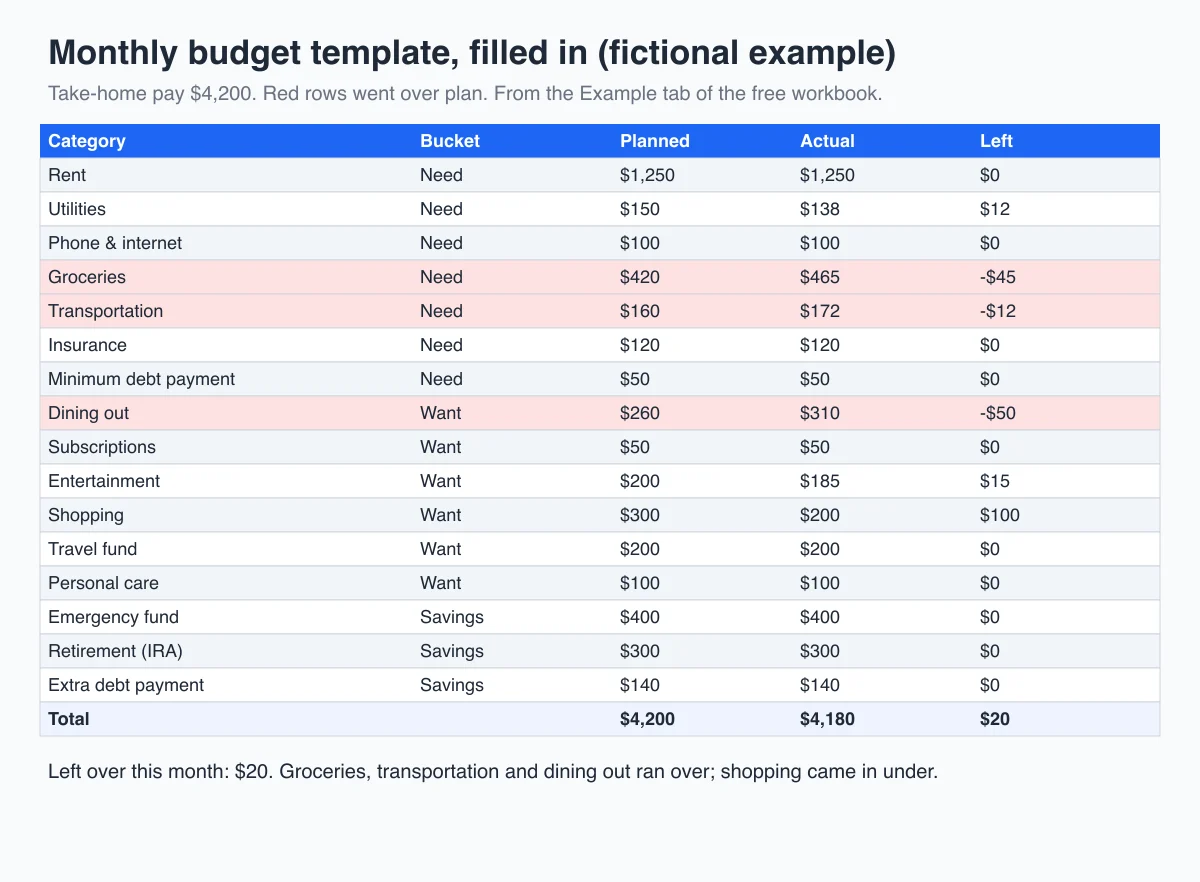
The workbook's Example (fictional) tab shows the same sheet filled in. The person in it takes home $4,200 a month. Groceries came in $45 over, transportation $12 over and dining out $50 over. Shopping came in $100 under and utilities $12 under. The month ended with $20 left over. One month like that tells you more than any rule of thumb: groceries need a higher plan, and dining out needs a lower one.
50/30/20 Budget Template
The 50/30/20 rule splits after-tax income into three buckets: 50% for needs, 30% for wants, and 20% for savings and extra debt payments. Senator Elizabeth Warren and Amelia Warren Tyagi popularized the rule in their 2005 book All Your Worth. It works well when you know your take-home pay and want a quick guardrail rather than a detailed plan.
In the 50-30-20 tab, you type your after-tax monthly income into one cell. The tab calculates the three dollar targets, adds up the lines you tag as Need, Want or Savings, and shows the gap for each bucket.
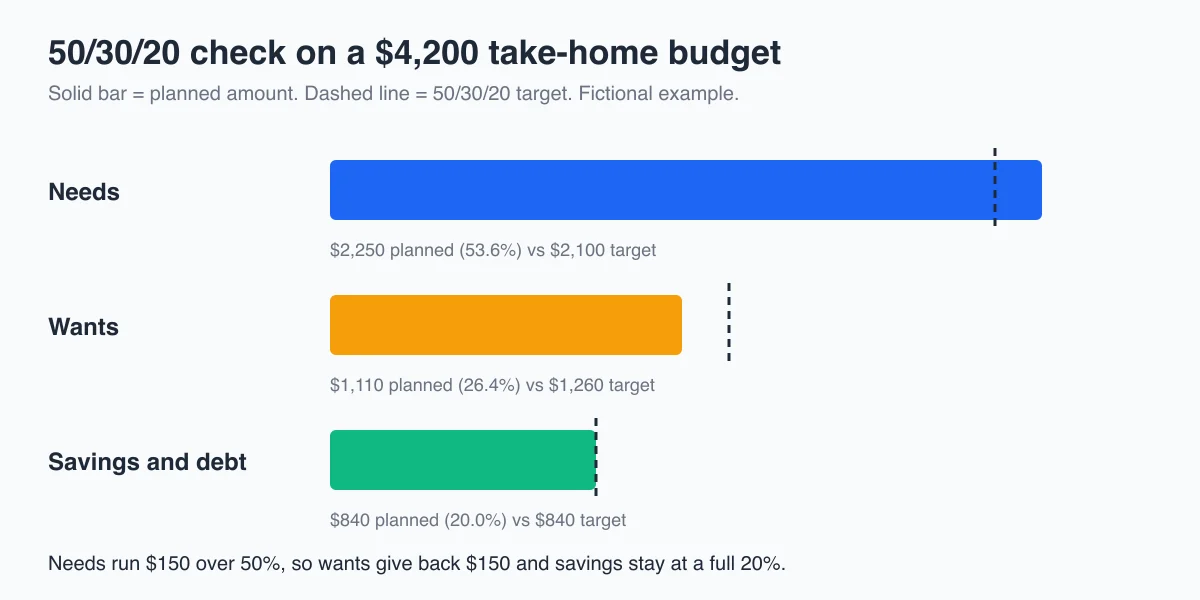
In the example, needs come to $2,250, which is $150 over the 50% line. That is common where rent is high. The fix is not to pretend rent is lower. Instead, the wants bucket gives back $150 so savings stay at a full 20%. If needs run more than 60% of your income for several months, the 50/30/20 split may not fit your situation. A zero-based budget usually works better then.
Zero-Based Budget Template
A zero-based budget assigns every dollar of income to a job, such as rent, groceries, savings or debt, until income minus assigned money equals zero. Zero does not mean you spend everything. It means savings is a planned line, not whatever happens to be left over.
The Zero-Based tab has one income cell, a list of jobs, and a Left to assign cell. That cell turns yellow until it reaches exactly $0. This method suits people living paycheck to paycheck and people with irregular income. If you are paid on different dates, build one zero-based plan per paycheck instead of one per month.
Yearly Budget Template for Irregular Expenses
Most budgets break because of bills that do not arrive every month: car insurance, annual subscriptions, holidays, school costs. The Yearly tab puts all 12 months side by side, with a total and a monthly average for every category.
Use it in two ways:
- At the start of the year, list every irregular bill you know about and divide it by 12. A $600 annual car insurance premium becomes a $50 monthly savings line.
- Each month, copy your actuals from the Monthly Budget tab. By March you will see which categories drift, and the monthly average gives you a realistic plan for next year.
Small Business Budget Template
The Small Business tab is a budget-vs-actual sheet for one month. It has sections for revenue, cost of sales, operating costs and set-asides, and it calculates the variance in dollars and as a percentage. Copy the tab once per month.
The set-aside section matters most for freelancers. The IRS says people in business for themselves generally need to make estimated tax payments during the year, and individuals generally have to pay estimated tax if they expect to owe $1,000 or more. Putting a fixed share of each payment into an "Estimated taxes" line keeps a tax bill from wiping out your cash. Businesses that outgrow spreadsheets can also compare dedicated tools for their financial management. For teams with several owners and tools, our guide to a shared budget board for small tech teams shows how to add an owner and review date to every cost.
Printable Budget Worksheets (PDF)
If you budget better on paper, print the PDF. It has three pages:
- Monthly Budget Worksheet: income, the same 16 expense and savings lines as the workbook, three blank lines, and the two bottom-line checks.
- 50/30/20 Budget Planner: income, the three targets and a short list for each bucket.
- Weekly Spending Log: date, item, category and amount for every purchase. Total each week and copy the totals to page 1.
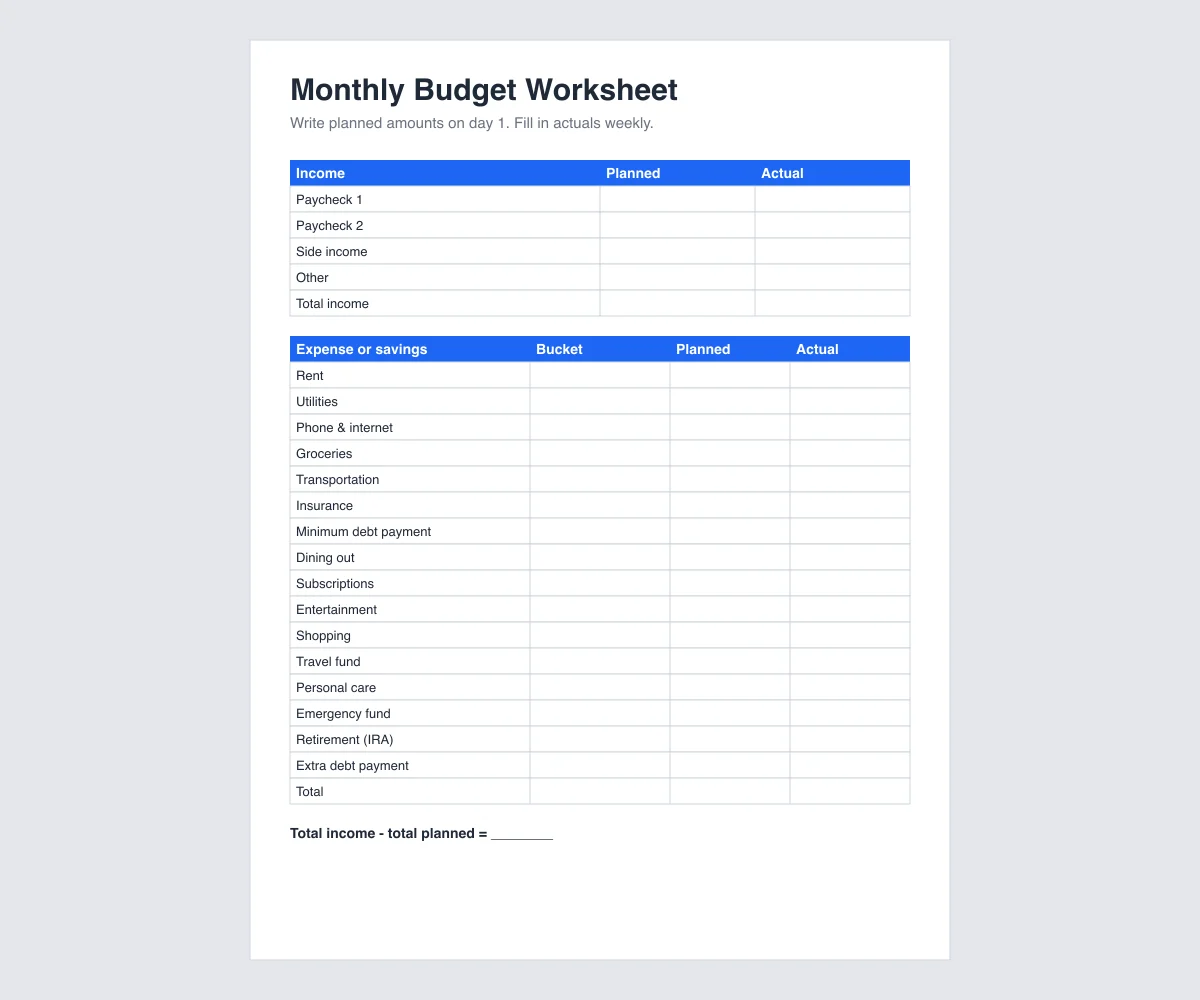
Download the US Letter version or the A4 version. Print one set per month and keep the weekly log where you keep receipts.
Other Free Budget Templates Worth Using
- NerdWallet budget worksheet. A downloadable spreadsheet built around the 50/30/20 rule. NerdWallet says it works in Excel and Apple Numbers, and it also offers an online planner if you would rather not use a spreadsheet.
- Vertex42 Personal Budget Spreadsheet. Vertex42 offers it for Excel, Google Sheets and OpenOffice. It is useful mainly for its long list of categories. For a lighter option, the same site has a Simple Budget Worksheet that focuses on how much you can save each month, and a Business Budget template that follows the layout of an income statement.
- Microsoft Excel budget templates. A gallery of designed templates, including a basic personal budget and an expense budget, that open in Excel or Excel for the web.
- consumer.gov Budget Worksheet. A one-page fillable PDF from the Federal Trade Commission's consumer site. You fill in income and expenses, then subtract. It is the plainest option here, and that is its strength.
- CFPB Your Money, Your Goals toolkit. The Consumer Financial Protection Bureau's toolkit includes worksheets for tracking income and bills. It is a good fit if you want to plan bills around paydays.
- Google Sheets template gallery. In Google Sheets, open Template gallery to find a monthly budget and an annual budget template. They are the fastest start if you already live in Google Drive.
How to Fill Out Your First Budget in 15 Minutes
- Write down your take-home pay. Use the amount that lands in your account after tax and deductions. If it varies, use your lowest month from the last three.
- List fixed bills first. Rent or mortgage, utilities, phone, insurance and minimum debt payments. Your bank statement is the fastest source.
- Estimate variable spending. Look at last month's groceries, transport and dining out. Round up. Most first budgets underestimate groceries.
- Add savings as a line, not a leftover. Even $50 counts. If you have no emergency fund, make that the first savings line.
- Check the bottom line. Income minus planned should be $0 or more. If it is negative, cut wants first, then look at the largest needs.
- Track actuals once a week. Fill in the Actual column every week. Ten minutes on a Sunday is enough.
- Adjust at month end. Move money between lines based on what really happened, then start next month's tab.
Using a Budget Template in Google Sheets
The workbook is an .xlsx file, so it opens directly in Excel. To use it in Google Sheets:
- Open Google Sheets and create a blank spreadsheet.
- Choose File > Import > Upload and select
free-budget-templates.xlsx. - Choose Replace spreadsheet so every tab, including the filled-in example, comes in together.
- To budget with a partner, use Share and give them edit access. Each of you can update actuals from your phone.
Budgeting Templates in AFFiNE
If you plan your week in AFFiNE, three free templates cover the money side:
- The Weekly Budget Planner tracks income, expenses and savings goals one week at a time. It suits people who are paid weekly.
- The Free Cute Bill Tracker Printable lists due dates, amounts and payment status. Use it next to the Monthly Budget so bills never surprise you.
- The trip expenses template splits shared costs for a group trip.
For a step-by-step guide to building your own budget layout, see how to set up a budgeting template. If you would rather not use a spreadsheet at all, compare the options in our best budget apps roundup.
Frequently Asked Questions About Free Budget Templates
Where can I find free budget templates?
You can download all five AFFiNE templates (monthly, 50/30/20, zero-based, yearly and small business) in one free Excel workbook on this page, plus printable PDF worksheets. Other free sources include NerdWallet's 50/30/20 worksheet, Vertex42, Microsoft's Excel template gallery, consumer.gov's one-page budget worksheet and the Google Sheets template gallery.
What is the 50/30/20 budget rule?
The 50/30/20 rule puts 50% of after-tax income toward needs, 30% toward wants and 20% toward savings and extra debt payments. On a $4,200 monthly take-home pay, that is $2,100 for needs, $1,260 for wants and $840 for savings and debt.
Does Google Sheets have a free budget template?
Yes. The Google Sheets template gallery includes a monthly budget and an annual budget template. You can also import the free AFFiNE workbook from this page into Google Sheets with File > Import.
Is Excel or Google Sheets better for a budget?
Both work with the same templates. Excel is better if you want a file that stays on your computer and works offline. Google Sheets is better if you share a budget with a partner or want to update it from your phone.
How often should I update my budget?
Set the plan once at the start of each month, record actual spending once a week, and review the month at the end. A weekly check catches overspending while there is still time to adjust.
Sources
- Federal Reserve Bank of New York, Household Debt and Credit Report, Q2 2026.
- Internal Revenue Service, Estimated taxes.
- Consumer Financial Protection Bureau, Your Money, Your Goals toolkit.
- Federal Trade Commission, consumer.gov Budget Worksheet.
- NerdWallet, Budget Worksheet.
- Vertex42, Personal Budget Spreadsheet.
- Microsoft, Excel budget templates.
All third-party pages were checked on November 4, 2026. The budget numbers in the examples are fictional.