How to Build an MCP Server (Tested TypeScript and Python)
Building an MCP server means writing one small program that declares typed tools and speaks the Model Context Protocol over stdio or HTTP — with the official SDKs, a working hello-world takes about fifteen minutes and fewer than forty lines. We built and ran both versions in this guide — TypeScript and Python — and tested them with raw JSON-RPC before publishing; the outputs you will see below are real.
One boundary before the first line of code: this guide is about building a server. If you just want your assistant to use existing tools, connecting one takes two minutes and no code — and thousands of servers already exist. Build when you own a system nothing on the shelf covers: an internal API, a proprietary data source, a workflow with rules of its own.
What a minimal server actually contains
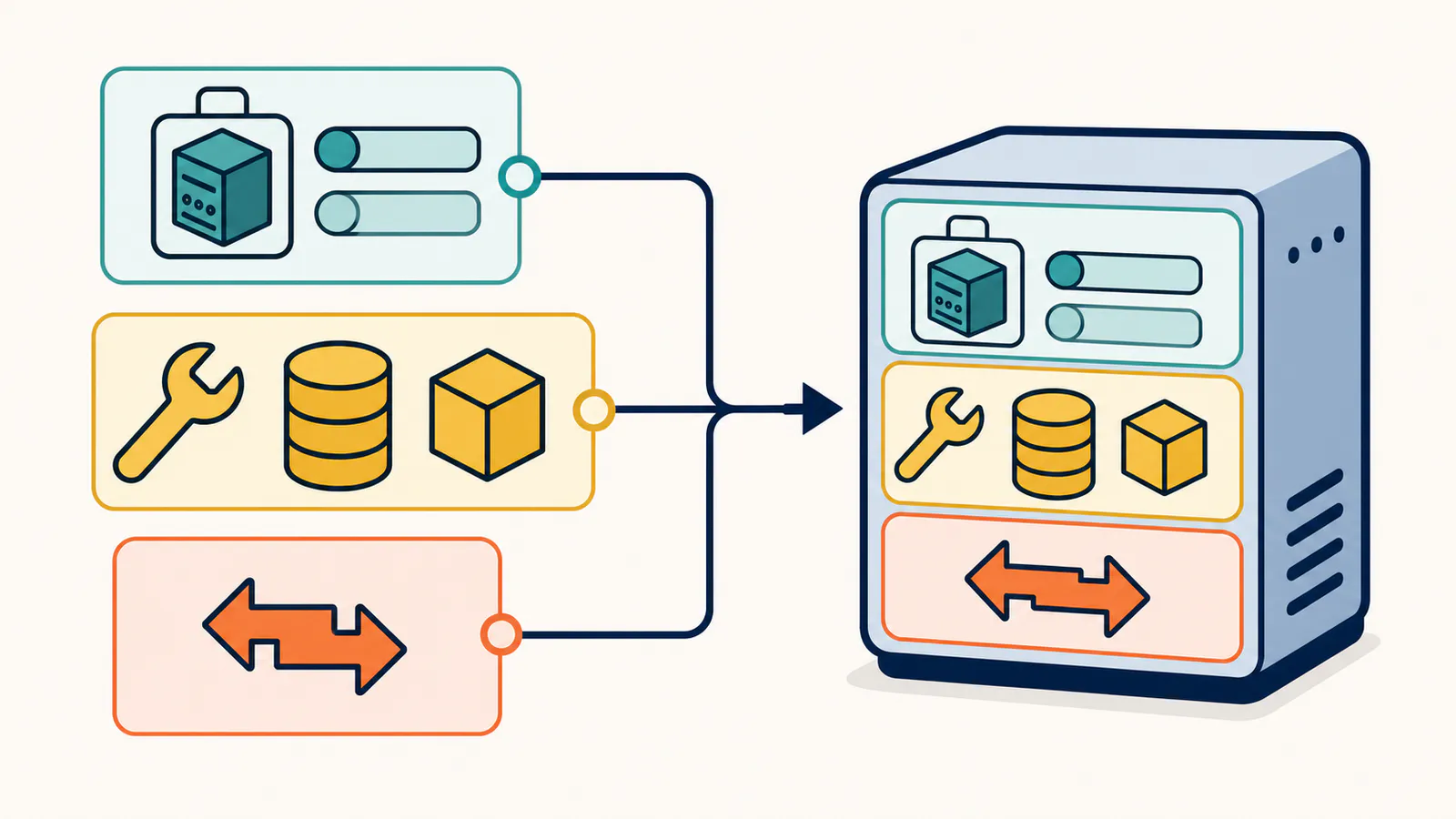
Strip any MCP server to its skeleton and three parts remain:
- A server identity — a name and version that clients receive during legacy initialization or from modern discovery metadata.
- Capability declarations — tools (actions with typed inputs), and optionally resources (readable context) and prompts (reusable templates). For a first server, tools are the part that matters.
- A transport — stdio if the client launches your process locally, Streamable HTTP if you host it. The SDK handles the protocol; you never hand-write JSON-RPC.
Everything else — discovery, schema validation, error envelopes — is the SDK's job. That is why the examples below stay small.
TypeScript: a working v2 server in ~30 lines
The current TypeScript SDK v2 replaced the monolithic @modelcontextprotocol/sdk package used by older tutorials. This example is a team-glossary server: one tool, define, that looks up a term. Swap the lookup for a real API call and the structure is production-shaped. Node.js 20 or later is required.
npm init -y
npm pkg set type=module
npm install @modelcontextprotocol/server zod
server.mjs:
import { McpServer } from "@modelcontextprotocol/server";
import { serveStdio } from "@modelcontextprotocol/server/stdio";
import * as z from "zod/v4";

const GLOSSARY = {
  mcp: "Model Context Protocol — the open standard connecting AI assistants to tools and data.",
  hreflang: "Annotation that tells search engines which language versions of a page exist.",
};

function createServer() {
  const server = new McpServer({ name: "team-glossary", version: "1.0.0" });
  server.registerTool(
    "define",
    {
      description: "Look up a term in the team glossary and return its definition.",
      inputSchema: z.object({ term: z.string().describe("The term to look up") }),
    },
    async ({ term }) => ({
      content: [{
        type: "text",
        text: GLOSSARY[term.toLowerCase()] ?? `No entry for "${term}".`,
      }],
    })
  );
  return server;
}

void serveStdio(createServer);
The z.object(...) schema is the contract clients show to the model and the validator the SDK applies before your handler runs. Tool descriptions are not comments — they are the interface the model reads. One more v2 detail matters in production: stdout carries JSON-RPC, so send diagnostic logs to stderr with console.error, never console.log.
Test it before any client touches it
Both current v2 SDKs still accept the handshake-era protocol used by older clients. That makes four lines of raw JSON-RPC useful as a compatibility smoke test: pipe an initialize, the initialized notification, a tools/list, and a tools/call into the process. This is not the default 2026-07-28 connection path, where a current client starts with server/discover and falls back only for an older server:
printf '%s\n' \
 '{"jsonrpc":"2.0","id":1,"method":"initialize","params":{"protocolVersion":"2025-06-18","capabilities":{},"clientInfo":{"name":"probe","version":"0.0.1"}}}' \
 '{"jsonrpc":"2.0","method":"notifications/initialized"}' \
 '{"jsonrpc":"2.0","id":2,"method":"tools/list"}' \
 '{"jsonrpc":"2.0","id":3,"method":"tools/call","params":{"name":"define","arguments":{"term":"mcp"}}}' \
 | node server.mjs
Running exactly that against the file above returned, on our machine:
initialize -> {"name":"team-glossary","version":"1.0.0"}
tools/list -> ["define"]
tools/call -> "Model Context Protocol — the open standard connecting AI assistants to tools and data."
That result verifies a handshake-era compatibility path plus the core tool path: list, call, and bounded response. It does not cover the complete modern v2 connection lifecycle; a current client in auto mode sends server/discover first and falls back to initialize only when the server does not support the 2026-07-28 protocol. For modern-path and interactive debugging, the official MCP Inspector (npx @modelcontextprotocol/inspector node server.mjs) is the standard next step when a tool misbehaves.
Python: the same server in SDK 2.0
Heads-up that saves you a confused half hour: the official Python SDK crossed to 2.0, and the from mcp.server.fastmcp import FastMCP import that most older tutorials show no longer exists there — on 2.x the decorated-function style lives in MCPServer. If a guide starts with fastmcp, it is describing the 1.x SDK. Requires Python 3.10+.
pip install "mcp[cli]"
server.py (SDK 2.x — we tested against mcp 2.0.0):
from mcp.server.mcpserver import MCPServer

GLOSSARY = {
    "mcp": "Model Context Protocol — the open standard connecting AI assistants to tools and data.",
    "hreflang": "Annotation that tells search engines which language versions of a page exist.",
}

server = MCPServer("team-glossary")

@server.tool()
def define(term: str) -> str:
    """Look up a term in the team glossary and return its definition."""
    return GLOSSARY.get(term.lower(), f'No entry for "{term}".')

if __name__ == "__main__":
    server.run()
We ran the identical four-line JSON-RPC probe against this file. The legacy handshake and call behave exactly like the TypeScript version, with one pleasant 2.0 upgrade visible in the wire output: the type hints generate both an input schema and an output schema, and the call response carries structuredContent alongside the text — richer typing for zero extra code. Two languages, one protocol, interchangeable behavior, which is the entire point of the standard.
Connect it to a real client
Once the probe passes, registration is the two-minute part — the same flow as adding any MCP server to Claude Code:
claude mcp add glossary -- node /absolute/path/to/server.mjs
Then ask a session "define hreflang" and watch /mcp show the connected server. Cursor takes the same command form in mcp.json; every compliant client speaks to the identical process.
Design rules that separate good servers from demos
- Fewer, sharper tools. Every tool description enters the model's context on every request. Ten precise tools beat forty vague ones — for selection accuracy and for your token bill.
- Bounded outputs. Return the passage, not the file; the row, not the table. Massive payloads degrade answers and widen the blast radius of a leak. AFFiNE's search tool returns bounded passages with page or canvas locators, while a separate full-document read returns page Markdown — keeping search results narrow without pretending a whiteboard is a document.
- Descriptions are prompts. Write tool descriptions the way you would write instructions to a careful junior: what it does, when to use it, what it returns. Vague descriptions produce wrong tool choices; the model only knows what you declare.
- Typed inputs, always. Schemas are not bureaucracy — they are the difference between a rejected malformed call and a runtime exception inside your handler.
- Fail with messages, not stack traces. Return actionable error text ("term not found; try list_terms first") so the model can recover in-conversation.
Going remote: when stdio is not enough
A stdio server lives and dies with one machine. The moment a team needs the same server — or you want it available without a local process — you move to Streamable HTTP hosting and inherit real infrastructure duties: TLS, authentication (the spec's 2025 revisions define OAuth resource-server behavior), credential scoping, logging. Our MCP security guide covers that checklist.
The honest question at that point: does the thing you want to expose already have a first-party server? Building a glossary server is a fifteen-minute exercise; operating a hosted, authenticated, multi-tenant one is a product. For team knowledge, that product already exists — AFFiNE ships its MCP server built in, workspace-scoped credentials and all, so building your own only makes sense for systems nobody has wrapped yet.
FAQ
How long does it take to build an MCP server?
A working single-tool server takes about fifteen minutes with the official TypeScript or Python SDK — ours ran on the first try at under forty lines. Production-grade remote servers take longer for the non-protocol parts: authentication, hosting, logging, and tool design.
Which language should I use to build an MCP server?
Whichever your team already writes; the protocol behaves identically. Official SDKs exist for TypeScript and Python (plus other languages in the modelcontextprotocol GitHub org), and our identical glossary server produced the same legacy compatibility, tool-discovery, and call results in both.
How do I test an MCP server without connecting a client?
Pipe a handshake-era JSON-RPC probe into the process: initialize, the initialized notification, tools/list, then tools/call. Clean results verify legacy compatibility and the core tool path, not the modern 2026-07-28 server/discover route. Use a current v2 client or the official MCP Inspector to exercise that path interactively.
Do I need to publish my server to a registry?
No — a private server registered with claude mcp add (or your client's equivalent) works without any listing. Publishing matters when you want discovery: the official MCP registry and community directories are how strangers find, vet, and install your server — our registry guide walks the publish flow.
Can my server expose data instead of actions?
Yes — MCP resources exist for readable context (files, schemas, documents) alongside tools for actions. Most first servers ship tools only, because tool calls cover retrieval-style needs ("search X, return the passage") with tighter control over output size.
Should I build a server for my team's notes?
Usually not — that wheel exists. AFFiNE's built-in MCP server already searches page documents and canvas text with scoped, read-only-by-default credentials; full-document reads return page Markdown. It is free on Cloud and on self-hosted instances with AI features enabled. Build custom servers for the systems that are genuinely yours: internal APIs, domain databases, proprietary workflows.
The fifteen-minute version is real — we timed it against the code above. What deserves your care is not the protocol plumbing but the tool design: names, descriptions, schemas, and output discipline. Get those right and every assistant your team uses inherits the same clean interface — including the one already connected to your workspace.