Decision Tree Template: How to Build One With Examples
A decision tree template turns a repeated choice into a visible sequence of questions, branch conditions, and terminal actions. Follow the branch that matches the evidence until the path ends in a named outcome. A useful tree makes policy reviewable; it does not make the decision automatically.
This guide covers operational decision trees—not machine-learning classifiers. It includes a copyable node register and a fictional SaaS release-readiness example with reproducible paths.
Definition: A decision tree is a branching diagram that begins with a question or choice, routes each answer through a labeled branch, and ends each path with an outcome or action.
What is a decision tree template?
A decision tree template is a reusable structure for documenting a rule with a start, internal nodes, labeled connectors, and terminal nodes. It can also keep evidence, ownership, and review details beside the visual.
OpenStax's institutional overview describes a decision tree as a tree-structured decision tool in which branches represent choices and outcomes, and identifies the root, splits, subtrees, and leaf nodes. This article uses that general structure to document a human-reviewed operating policy. It does not cover predictive model training, entropy, pruning, or model accuracy.
A template is valuable when the same bounded choice recurs, such as release readiness, escalation routing, approval gates, or incident triage. It is less useful for open exploration, multi-criteria comparison, or detailed process sequencing.
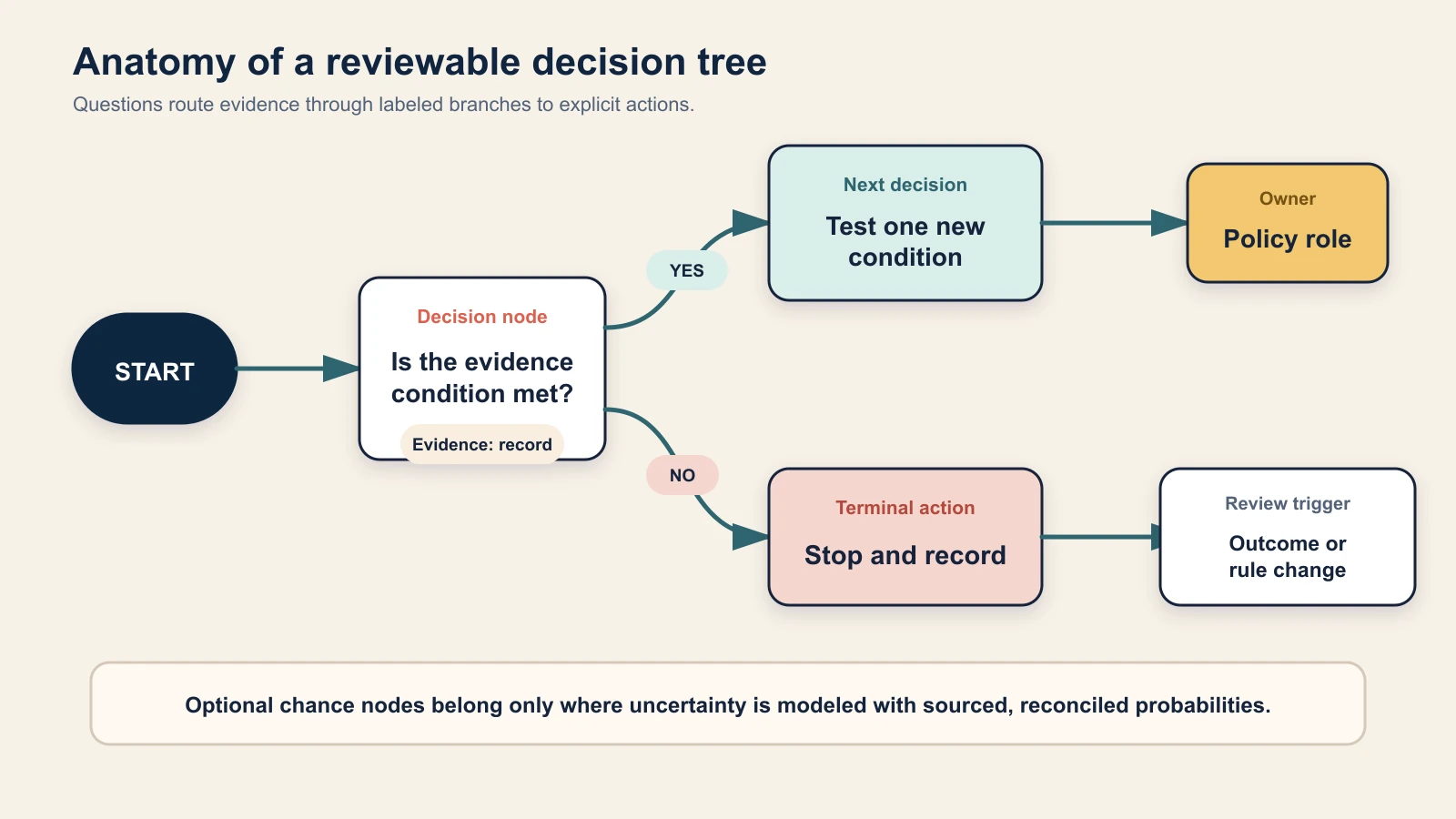
A reviewable decision tree connects one testable question at a time to labeled branches and explicit terminal actions.
Decision tree anatomy
Use only the elements your decision requires, but define each one consistently:
| Element | Job in the tree | Quality check |
|---|---|---|
| Decision scope | Names the choice, population, trigger, and policy owner | A reader knows when the tree applies and when it does not |
| Root or start node | Begins the path with the first question or choice | There is one unambiguous entry point |
| Decision node | Tests one observable condition | The wording can be answered from named evidence |
| Branch | Connects a node to the next node or action | Every outgoing connector has a distinct label |
| Chance node | Optionally represents an uncertain event with probabilities | Probabilities have a source, date, and reconciled total |
| Terminal node | Ends a path with an outcome or action | No path stops at an unanswered question |
| Evidence note | Identifies the record used to answer a node | The source and acceptable age are clear |
| Owner | Names the accountable role for the policy or action | Ownership is a role, not an anonymous “team” |
| Review condition | States when the rule must be revisited | Outcomes, policy changes, and failed assumptions can trigger review |
The familiar diamond is useful but not mandatory. A card or text outline can work if questions, branches, and endpoints remain unmistakable. Microsoft's current Visio guidance treats drawing a decision tree as a flowcharting task; the author still owns the logic.
Copyable decision tree planning table
Draft the logic in a table before polishing the diagram. The table exposes missing branches and makes review possible without interpreting a canvas.
| Node ID | Question or condition | Branch label | Next node | Terminal action | Evidence required | Owner | Review condition |
|---|---|---|---|---|---|---|---|
| D1 | Write one testable question | Yes | D2 or — | Action if this path ends | Record, test, or policy | Accountable role | Outcome, date, or rule change |
| D1 | Repeat the same question | No | D3 or — | Action if this path ends | Same evidence boundary | Accountable role | Outcome, date, or rule change |
Create one row for every outgoing branch. If an answer can be unknown, add an explicit Unknown branch or define how missing evidence is resolved. Do not silently treat unknown as no.
When should you use a decision tree?
Use a decision tree when:
- The decision is bounded and repeatable.
- Conditions are observable and understandable.
- The next question depends on an earlier answer.
- Each path can end in a named action.
- Someone owns the rule and reviews outcomes.
Choose another method when those conditions do not hold. For open exploration, start with online whiteboard templates for brainstorming. For comparing several viable options across weighted criteria, use a decision matrix template. For showing a process from start to finish, use a flowchart guide or a swimlane diagram when handoffs and roles are central.
How to make a decision tree in six steps
The following workflow is a recommended implementation practice. It is not a universal standard, and teams should adapt review rigor to the consequence of the decision.
1. Define one decision and its boundary
Write the trigger, population, accountable owner, and desired terminal actions. “Should we release this change under the current readiness policy?” is bounded. “What should the company do?” is not.
List conditions that require specialist judgment, legal advice, safety escalation, or emergency authority outside the tree.
2. Write one testable question per decision node
Use a condition that can be answered from evidence. “Does the release feel safe?” is subjective. “Is any critical defect unresolved under the current defect policy?” points reviewers to a named classification and record.
Avoid compound questions such as “Are tests passing and rollback ready?” A no answer hides which condition failed.
3. Label every outgoing branch
Yes and No suit binary conditions, but branches can use distinct categories or ranges. Make labels mutually exclusive where practical. If two branches can apply, define precedence or redesign the node.
4. End every path with a terminal action
A branch must lead to another decision or a named endpoint. “Review” is incomplete unless it says who reviews what and what happens next.
5. Walk-test paths and edge cases
Read each path using concrete evidence. Check unreachable nodes, missing connectors, loops, contradictory labels, and implicit defaults. Ask a new reviewer to follow a normal path, a stop path, and a missing-evidence path.
6. Add evidence, ownership, and review triggers
Record the evidence source and policy owner. Compare the prescribed route with real outcomes, and revise rules only through documented, versioned changes.
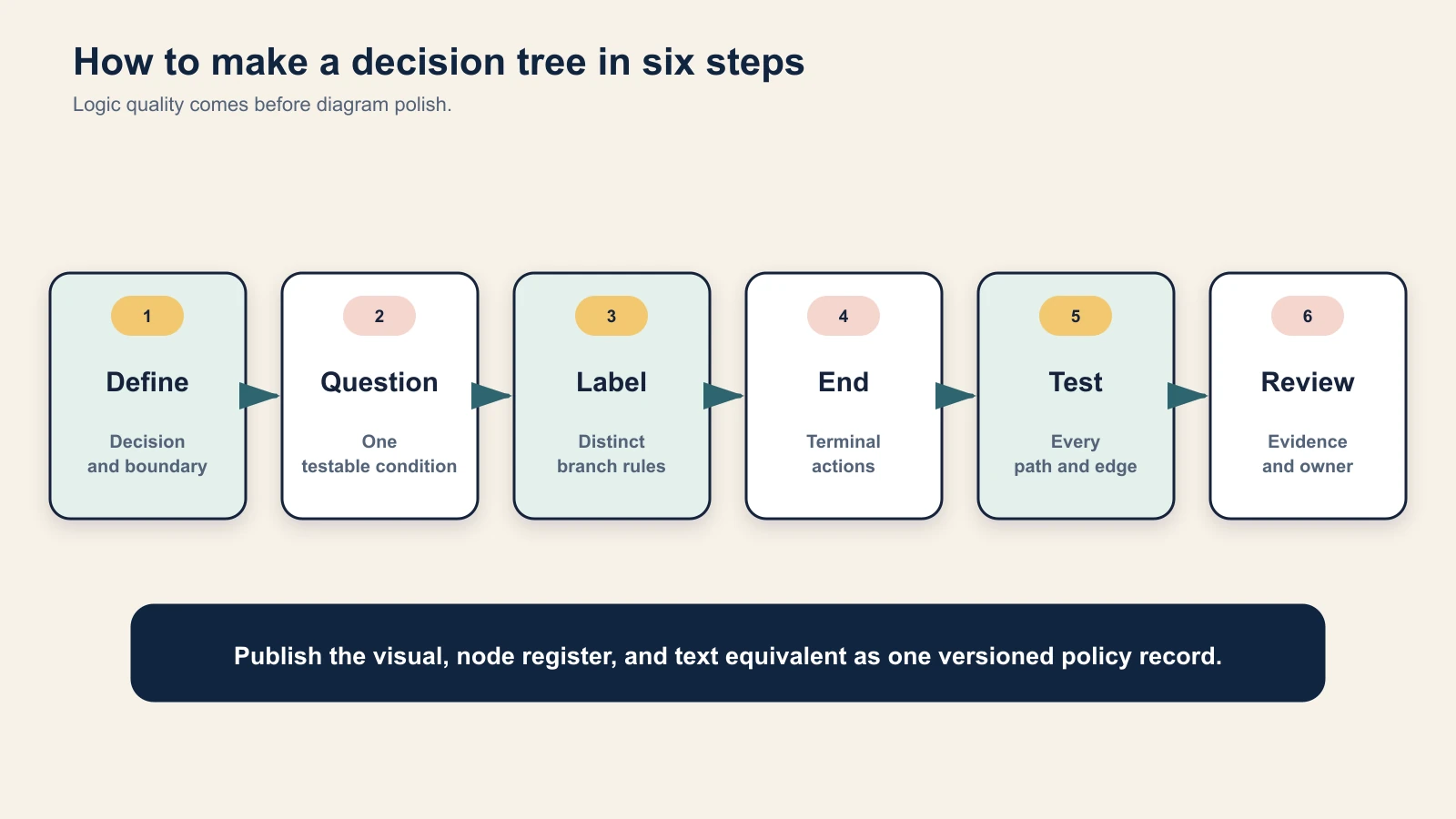
Define the boundary before drawing, then test every path and review the policy against real outcomes.
Worked decision tree example: fictional release readiness
This SaaS release-readiness tree is fictional teaching material—not AFFiNE policy, customer data, safety guidance, or a substitute for engineering, security, compliance, or incident procedures. It uses four decision nodes, five terminal actions, and no probabilities or costs.
Policy assumptions
- “Critical defect” is defined by the fictional team's existing severity policy.
- The release owner can inspect the unresolved-defect register and rollback test record.
- A migration means a change to persisted data or infrastructure that requires a staged validation path.
- Pilot exit criteria are written before the pilot and include technical and operational evidence.
- Unknown or missing evidence does not pass a gate; the owner stops at the relevant delay or remediation action.
Node register
| Node | Question | Yes route | No route | Evidence | Owner |
|---|---|---|---|---|---|
| D1 | Is any critical defect unresolved? | T1: stop and remediate | D2 | Defect register under current severity policy | Release owner |
| D2 | Has the rollback path been tested for this release? | D3 | T2: delay release and test rollback | Dated rollback test record | Release owner |
| D3 | Is a migration required? | T4: begin a controlled standard release | D4: begin a pilot release | Change record and migration plan | Technical lead |
| D4 | Does the pilot meet the predefined exit criteria? | T5: expand gradually | T3: roll back and investigate | Pilot evidence against the frozen criteria | Pilot owner |
Validation method for this teaching example: We enumerated all five root-to-terminal paths, checked each transition against the node register, and confirmed that every route ends in one of five explicit actions. This checks internal routing completeness only; it does not validate a real release policy or predict production outcomes.
At D3, No migration required routes to the controlled standard release, while Migration required routes to the pilot. Branch labels—not position or color—determine meaning.
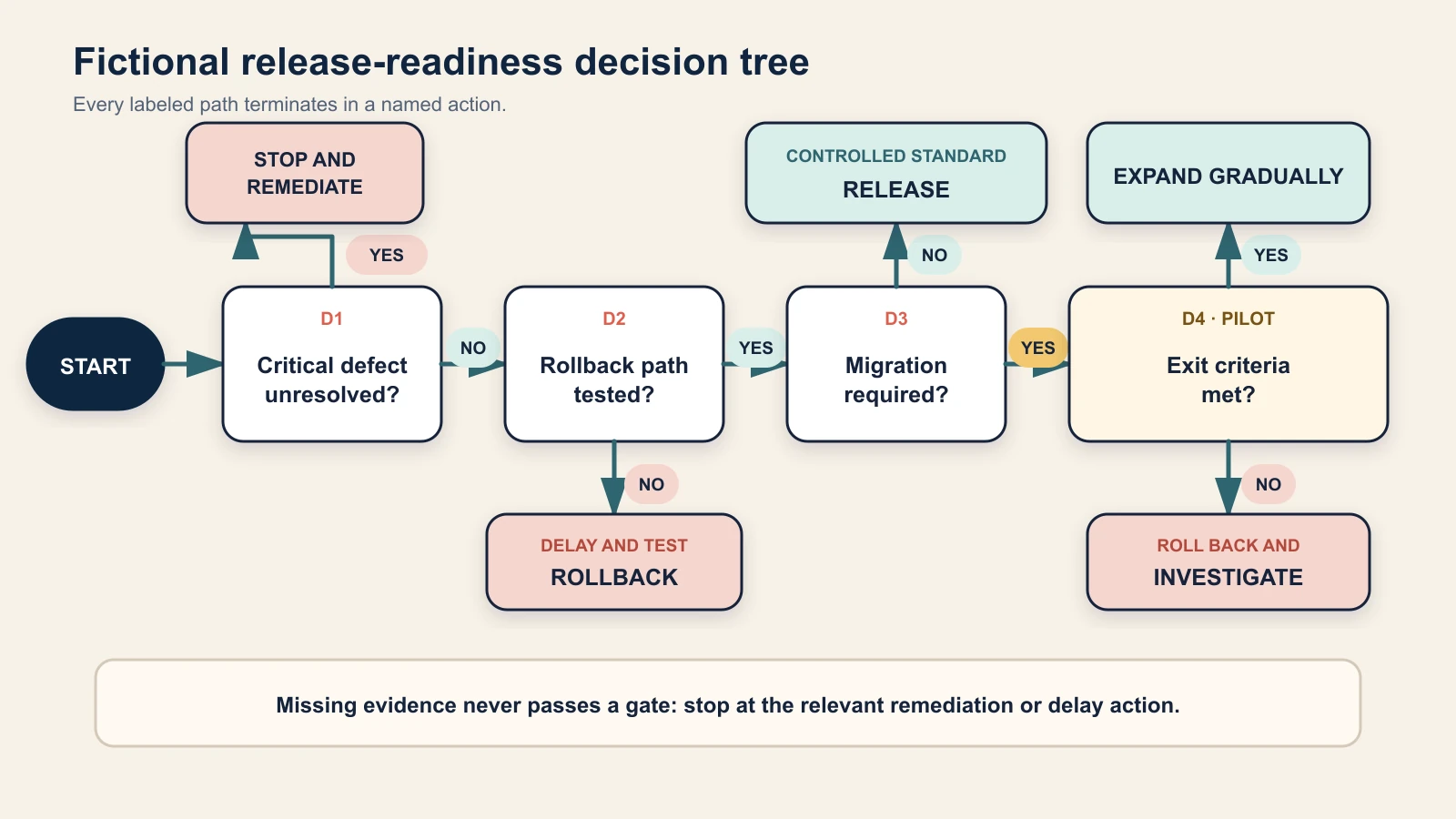
The fictional example stops for a critical defect or untested rollback, otherwise selecting a standard release or migration pilot with a defined exit check.
Text equivalent: every complete path
- If a critical unresolved defect exists, stop and remediate.
- If no critical defect exists but the rollback path is not tested, delay the release and test rollback.
- If no critical defect exists, rollback is tested, and no migration is required, begin a controlled standard release.
- If no critical defect exists, rollback is tested, a migration is required, and the pilot meets its predefined exit criteria, expand gradually.
- If no critical defect exists, rollback is tested, a migration is required, and the pilot does not meet its predefined exit criteria, roll back and investigate.
All five paths terminate without an undefined “continue.” A real policy would also define authorization, monitoring, rollback triggers, evidence retention, and emergency exceptions.
What the example does—and does not—decide
The tree makes a stated policy reviewable. It does not prove that the severity definition is sound, a rollback test predicts production behavior, or a pilot is risk-free. Record any owner override and rationale.
If the team discovers a gap between current evidence and a required gate, a gap analysis template can structure the current state, target state, causes, and actions. That is a different job from routing the immediate release decision.
Are probabilities required in a decision tree?
No. A rule-based decision tree can route observable conditions without probabilities. Chance nodes and expected values are optional additions for decisions under uncertainty, not defining features of every tree.
If you add probabilities, publish their source, period, sample boundary, and uncertainty. Sibling probabilities at one chance node should reconcile to 100%, allowing explained rounding. Use comparable value units and disclose assumptions.
Expected value can summarize probability-weighted outcomes, but it cannot capture every concern, including risk tolerance, irreversibility, legal duties, or unreliable inputs. Weak probability evidence is a reason to keep the tree rule-based.
Decision tree vs. matrix, flowchart, fault tree, and checklist
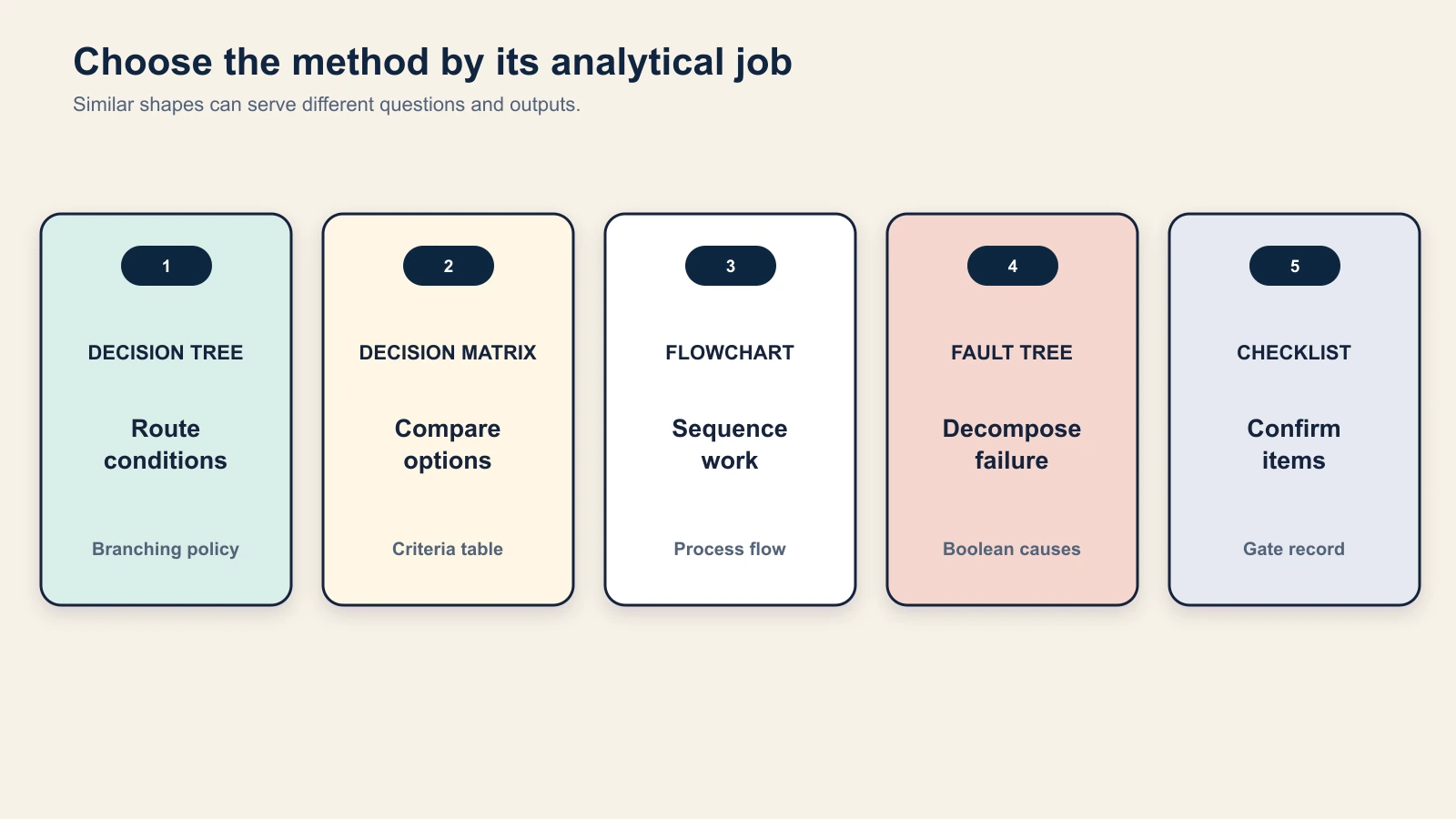
| Method | Primary question | Structure | Best output |
|---|---|---|---|
| Decision tree | What action follows from this sequence of conditions? | Branching paths with terminal outcomes | Reviewable decision policy or scenario routing |
| Decision matrix | Which viable option performs best against defined criteria? | Options-by-criteria table, optionally weighted | Transparent comparison with sensitivity checks |
| Flowchart | What steps and decisions occur in a process? | Sequential activities and decision points | Process logic from start to finish |
| Fault tree | How can a defined undesired event occur? | Top-down logical decomposition of failure events | Failure pathways for risk analysis |
| Yes/no checklist | Have required items been confirmed? | Independent or ordered checks | Completion record or gate evidence |
The distinction from a fault tree is especially important. NIST defines fault tree analysis as a top-down, deductive analysis of an undesired system state using Boolean logic to combine lower-level events. A decision tree routes choices or conditions toward actions and outcomes; a fault tree decomposes how a failure can occur. Similar branching shapes do not make the methods interchangeable.
A flowchart can contain decision diamonds, and a decision tree can be drawn with flowchart shapes. Choose the name from the analytical job, not the drawing library.
Make the decision tree accessible
A visual tree needs a text equivalent that preserves meaningful order. Publish the node register or complete paths next to the image, with readable type, adequate contrast, and clear connectors.
Do not use color as the only branch cue. The W3C guidance for use of color recommends adding shape or text when color conveys meaning. Label connectors directly with Yes, No, a category, or a range. The text equivalent should state the same routing in a linear order, supporting the W3C meaningful-sequence guidance.
For complex trees, use named subtrees and stable node IDs. Never distinguish branches solely by left-versus-right position.
Common decision tree mistakes
- Compound questions hide the failed condition. Use one testable condition per node.
- Branches overlap. Define distinct ranges, categories, or precedence rules.
- A path has no terminal action. End every connector at another node or explicit outcome.
- Unknown evidence silently becomes No. Add an Unknown path or a safe evidence-resolution rule.
- Connectors depend on color or position. Label them in text and publish a linear equivalent.
- The tree loops forever. Operational decision policies should reach a terminal action; handle later reviews as a new decision event.
- Probabilities do not reconcile. Check siblings at each chance node and document rounding.
- Assumptions are invisible. Put definitions, sources, and evidence age beside the node register.
- The tree becomes an automatic authority. Keep an accountable human owner and exception process.
- Old policy remains in circulation. Add a version, review date, change record, and archive rule.
Keep the tree and evidence together in AFFiNE
AFFiNE's current whiteboard and document surfaces can support a practical workflow: sketch nodes and connectors, keep the node register and text equivalent in a document, and store evidence notes, owners, and review decisions together. It is a collaborative record, not a decision engine; AFFiNE does not validate the policy, estimate probabilities, or authorize outcomes.
Start-now checklist
- Name one recurring decision and accountable policy owner.
- Define the trigger, scope, exceptions, and terminal actions.
- Draft one evidence-answerable question per node.
- Label every branch and handle missing evidence explicitly.
- Walk every path to a terminal action.
- Publish a node register and text equivalent.
- Review real outcomes and version any rule change.
Frequently asked questions
What is a decision tree template?
A decision tree template is a reusable structure for documenting a choice as a sequence of questions, labeled branches, and terminal outcomes. Teams fill it with their own evidence rules, actions, owners, and review triggers.
How do you create a decision tree?
Define one bounded decision, write one testable question per node, label every outgoing branch, end each path with an action, walk-test normal and edge cases, then add evidence sources, ownership, and a review trigger.
What is the difference between a decision tree and a flowchart?
A decision tree emphasizes how conditions or choices branch toward outcomes. A flowchart emphasizes the sequence of activities in a process, although it may include decision points. The same shapes can appear in both; the job and structure determine the name.
Do decision tree branches have to be yes or no?
No. Yes and No work for binary conditions, but branches can use mutually exclusive categories or ranges. Every label should be distinct, evidence-based, and complete enough to route the states the policy expects.
What symbols are used in a decision tree?
Common diagrams use a start or root, decision nodes, connectors, optional chance nodes, and terminal or leaf nodes. Consistent labels and complete routing matter more than using one mandatory shape set.
Does every decision tree need probabilities?
No. Rule-based trees often use observable conditions without probabilities. Add chance nodes only when uncertainty is central and the probabilities have defensible, documented sources.
Can a decision tree choose the best option automatically?
Not by itself. It applies the rules and inputs its authors provide. It cannot discover missing options, repair poor evidence, resolve ethical or legal duties, or replace an accountable decision owner.
Conclusion
A strong decision tree template is a compact policy record: one bounded decision, testable nodes, labeled branches, explicit terminal actions, evidence, ownership, and a review trigger. The fictional release example shows five complete paths without pretending that a diagram removes uncertainty. Build the tree in a table first, verify every route, publish a text equivalent, and treat the visual as decision support—not authority.
Last reviewed: August 15, 2026.
Recommended review: a product-operations or release-engineering practitioner should verify the decision logic, evidence boundaries, terminology, and exception handling before publication.