
Free Meet the Teacher Template: Editable Letter + 6 Examples
What changed (Nov 12, 2026): Rebuilt around a copy-and-paste Meet the Teacher letter with six role-based examples, a Meet the Teacher night invitation, Google Docs, Canva and AFFiNE steps, and a what-not-to-share list. Corrected the AFFiNE Teacher Planner and export descriptions and the Henderson and Mapp (2002) citation, replaced AI images that contained garbled text with labelled illustrative layouts, and rechecked third-party template sites on November 11, 2026.
Updated November 2026: rebuilt around a copy-and-edit template with six role-based examples (preschool, elementary, middle and high school, paraprofessional, student teacher, and specials or coaches), Google Docs steps, a Meet the Teacher night invitation, a "what not to share" list, and corrected tool and research descriptions. Third-party template sites were checked on 2026-11-11.
Short answer: A Meet the Teacher template (also called a "Meet your teacher" or "Get to know your teacher" sheet) is a one-page introduction you send to students and families before or during the first week of school. A good one fits on a single page and covers six things: who you are, what you teach, how families can reach you (and when you reply), what a normal day or class looks like, one or two personal details, and what you need from families right now. Copy the template below, replace the brackets, and adapt it with the example that matches your role.
What to include in a Meet the Teacher letter
Families read these letters quickly, often on a phone. Keep each section short and put practical information above personal details.
| Section | What to write | Keep it to |
|---|---|---|
| Greeting and name | Your name as students should say it, a pronunciation hint if useful, your grade or subject, and your room | 1–2 lines |
| About me | Teaching background and one connection to the school or community | 2–3 sentences |
| What we will learn or do | The big goals for the year or term, written in plain language | 2–4 bullets |
| How to reach me | One preferred channel, school contact details, and when you normally reply | 2–3 lines |
| A normal day or class | Routines families need to know: arrival, homework, materials, reading log | 3–5 bullets |
| Personal touch | Two or three favorites or hobbies students can connect with | 1 line or a small list |
| What I need from you | A specific first step: return a form, complete a short survey, label supplies | 1–3 bullets |
| Photo | A friendly, recent, school-appropriate photo | — |
If your school already sends rules, grading policies or a supply list, link to them rather than repeating them. Long rule lists push the friendly part of the letter off the first screen.
Free editable Meet the Teacher template (copy and paste)
Copy this into Google Docs, Word, Canva's text boxes, AFFiNE or any editor. Replace everything in brackets, delete any line that does not apply, and keep it to one page.
MEET THE TEACHER

Hello! I'm [Title + Last name] ([pronunciation hint, optional]).
I'll be teaching [grade / subject] in Room [number] at [school name] this year.

ABOUT ME
I have been teaching for [number] years, mostly [grade levels / subjects].
[One sentence about your training or why you teach.]
[One sentence connecting you to the school or community.]

THIS YEAR WE WILL
- [Big goal 1, in plain language]
- [Big goal 2]
- [Something students will make, read or do that they can look forward to]

HOW TO REACH ME
Best way: [school email / school messaging app]
I usually reply within [time frame you can keep] on school days.
For urgent same-day matters (pickup changes, absences), please contact the front office: [office phone].

A NORMAL DAY IN OUR CLASS
- [Arrival / morning routine]
- [Homework or practice expectation]
- [What students should bring each day]
- [How you will share updates: weekly email, folder, app]

A FEW OF MY FAVORITES
[Book] · [Snack] · [Hobby] · [Something students might ask me about]

WHAT I NEED FROM YOU THIS WEEK
- [Return / complete: form, survey link, contact sheet]
- [Optional: tell me one thing that helps your child learn best]

I'm looking forward to a great year together.
[Signature]
[Title + Last name]
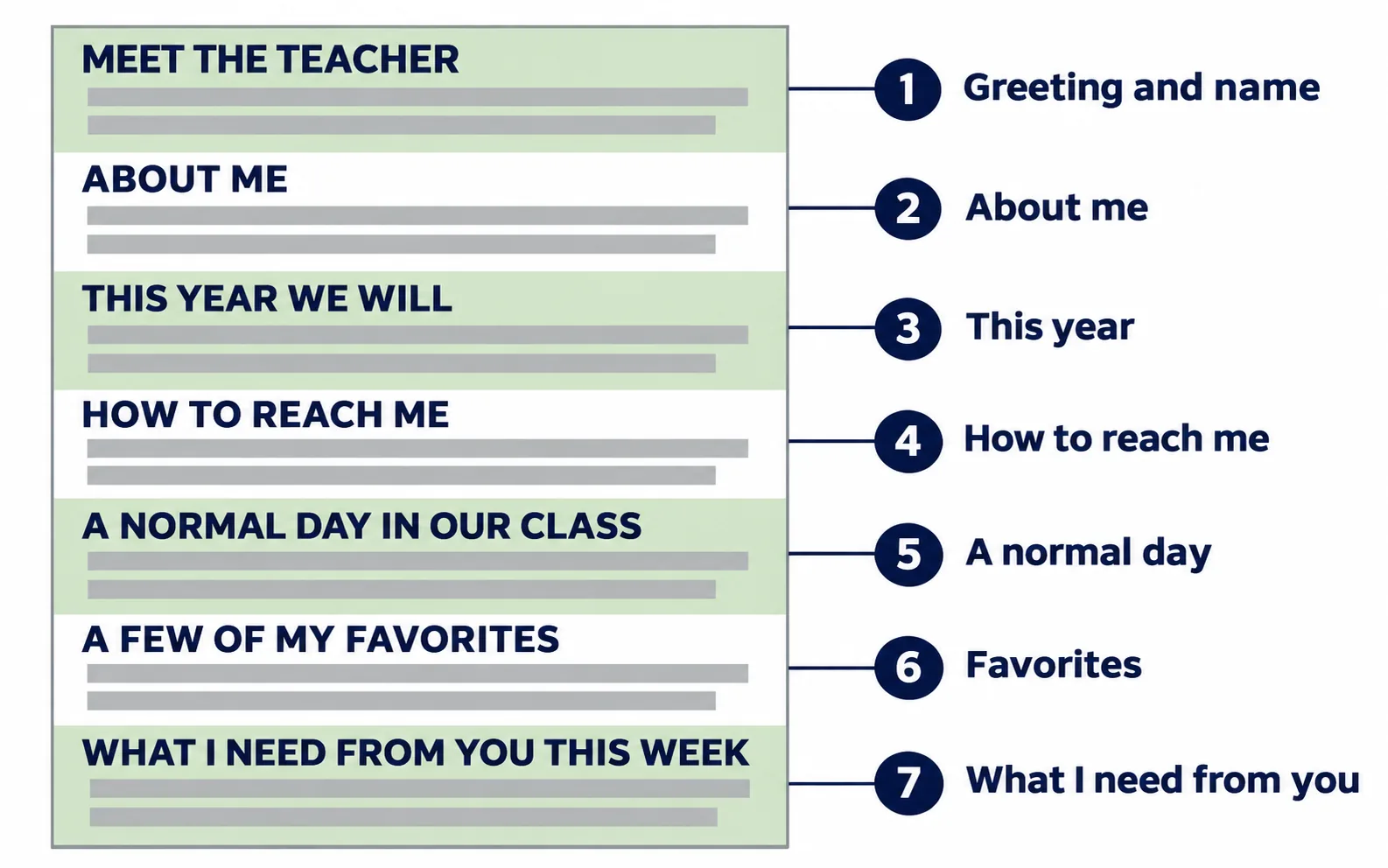
Illustrative layout: the seven sections of the template, in the order families read them.
6 Meet the Teacher examples by role
Each example below uses the template structure and changes only what that role needs. Names and details are fictional.
Jump to: preschool · elementary · middle or high school · paraprofessional · student teacher · specials or coach
1. Preschool or Pre-K teacher
Young children cannot read the letter, so write it for the family and add a picture-based version for the child.
Hello! I'm Ms. Rivera, and I'll be your child's teacher in the Sunflower Room this year. Our day: arrival and free play, circle time, snack, outdoor play, story time, rest, pickup. Please send: a labeled change of clothes, a refillable water bottle, and a family photo for our "Our Families" wall. How to reach me: the classroom app is best; I check messages before school and at rest time. For your child: I love butterflies, banana bread and singing silly songs.
Tip: keep a version with large photos (your face, the classroom door, the cubbies) that families can show their child before day one.
2. Elementary classroom teacher
This is the classic Meet the Teacher sheet: friendly, visual, and focused on routines.
Hi, I'm Mr. Okafor, and I'm thrilled to teach third grade in Room 12. This year we will: grow into chapter-book readers, master multiplication facts, and run a class science fair in spring. Homework: 20 minutes of reading most nights, logged in the green folder. How to reach me: school email; I reply within one school day. My favorites: soccer, mystery novels, and anything with mangoes. This week: please return the family contact sheet in the green folder by Friday.
3. Middle school or high school subject teacher
Older students and their families need course logistics more than favorites. Keep the personal part to one line and add where course materials live.
Welcome to Algebra I with Ms. Chen (Room 204, periods 1, 3 and 6). Course at a glance: linear equations, functions, systems, and an end-of-year modeling project. Where things live: assignments and the course syllabus are posted on [learning platform]; grades update on [grade portal]. Office hours: Tuesdays and Thursdays after school, Room 204. How to reach me: school email; I reply within one school day. Students can also message me through [platform]. Outside class: I coach the robotics club and will happily talk about board games.
4. Meet the paraprofessional or teacher assistant template
Families often do not know what a paraprofessional or assistant teacher does. Explain your role clearly and route questions to the right person.
Hello! I'm Mr. Alvarez, and I'm the paraprofessional in Room 8 with Mrs. Grant this year. What I do: I support small reading and math groups, help students during transitions, and work alongside Mrs. Grant to follow each student's plan. About me: this is my fourth year supporting elementary classrooms; before that I coached youth basketball. Questions about progress, grades or plans: please contact Mrs. Grant at [school email], and we will follow up together. Fun fact: I can solve a Rubik's cube in under two minutes, and students are welcome to challenge me at recess.
Check your school's policy before listing your own contact details; many schools prefer that families contact the lead teacher.
5. Meet the student teacher template
Families need to know who you are, how long you will be in the room, and that the lead teacher is still their main contact.
Hello, Room 5 families! I'm Mr. Lewis, a student teacher from [university]. I'll be working with Ms. Brown from [start date] to [end date]. What I'll be doing: observing at first, then teaching some reading and science lessons with Ms. Brown's guidance. About me: I'm in the final year of my teaching degree, and I've volunteered with an after-school reading club. Questions: Ms. Brown remains your main contact at [school email]; I'm happy to say hello at pickup. Fun fact: I have read every book in a well-known fantasy series twice, so students are welcome to quiz me.
6. Specials teacher, coach or co-teacher
Art, music, PE, library, specialists, coaches and co-teachers meet many classes, so the letter must say who you see and when.
Hi, families! I'm Ms. Patel, the music teacher for grades K–5. Your child has music with me once a week. This year we will: sing in two-part harmony, learn rhythm with hand drums, and perform at the spring concert. What to bring: nothing; all instruments are provided. How to reach me: school email; I teach about 400 students, so please include your child's name and homeroom teacher.
What not to put in a Meet the Teacher template
A Meet the Teacher letter is often forwarded, posted on a fridge, or shared in group chats. Before you send it:
- No personal phone number or home address unless your school expects it. Use school email, the school messaging app or the office line.
- No personal social media accounts. If you run a class account, make sure your school approves it.
- No student information or photos of students in the letter itself.
- No reply-time promise you cannot keep. "Within one school day" is more believable than "anytime."
- No full rulebook. Link to the handbook or syllabus instead.
- No jargon. Replace acronyms and program names with a short description families will understand.
Choose a format: paper, PDF, Docs, Slides, Canva or AFFiNE
The best format is the one your families actually open. Many teachers use two: a printed sheet for Meet the Teacher night and a PDF or link for email.
| Format | Best for | Watch out for |
|---|---|---|
| Printed one-page handout | Meet the Teacher night, open house, backpack folders | Print a few extra copies for families who arrive late |
| PDF attached to an email | A fixed layout that looks the same everywhere | Families cannot easily edit or translate it; add the text into the email body as well |
| Google Docs or Word | Fast edits each year and easy copying for colleagues | Check the layout on a phone before sending |
| Google Slides or PowerPoint | A short slideshow for back-to-school night | Keep a one-page version for families who cannot attend |
| Flyer (Canva or Adobe Express) | A designed flyer with your photo and school colors | Very small text and busy backgrounds are hard to read |
| AFFiNE | Keeping the letter, your yearly notes and a teacher planner in one workspace | AFFiNE does not ship a dedicated Meet the Teacher template; paste the text template above into a new doc |
How to make it in Google Docs, Canva or AFFiNE
Meet the Teacher template in Google Docs
- Open Google Docs and create a blank document.
- Paste the template and turn the capitalized section names into headings, so the letter is easy to skim.
- Add your photo with Insert > Image and place it next to your name.
- Replace every bracket, then delete lines that do not apply.
- Check the layout on your phone, then share it: download as PDF for email, or print.
- To send a translated copy, use Tools > Translate document, which creates a translated copy of your doc. Machine translation can be wrong, so ask a fluent colleague or your school's family liaison to check it when possible.
Canva and AFFiNE
Canva: search Canva's Meet the Teacher templates, pick a design, then replace the sample text section by section using the structure above. Keep body text large enough to read on a phone.
AFFiNE: open AFFiNE in the browser or desktop app, create a doc, and paste the template. Use headings for each section and add your photo as an image block. To share, open Share or the doc's ⋯ menu and choose an export: Markdown or HTML for reusing the text, or print / save as PDF where the print flow is available. Check the exported file before sending, because export options differ between Page and Edgeless modes. If you want to keep the rest of the year organized in the same workspace, the free Teacher Planner template adds sections for lesson planning, class schedules, student progress and grading logs. See Getting started with AFFiNE for the basic workflow.
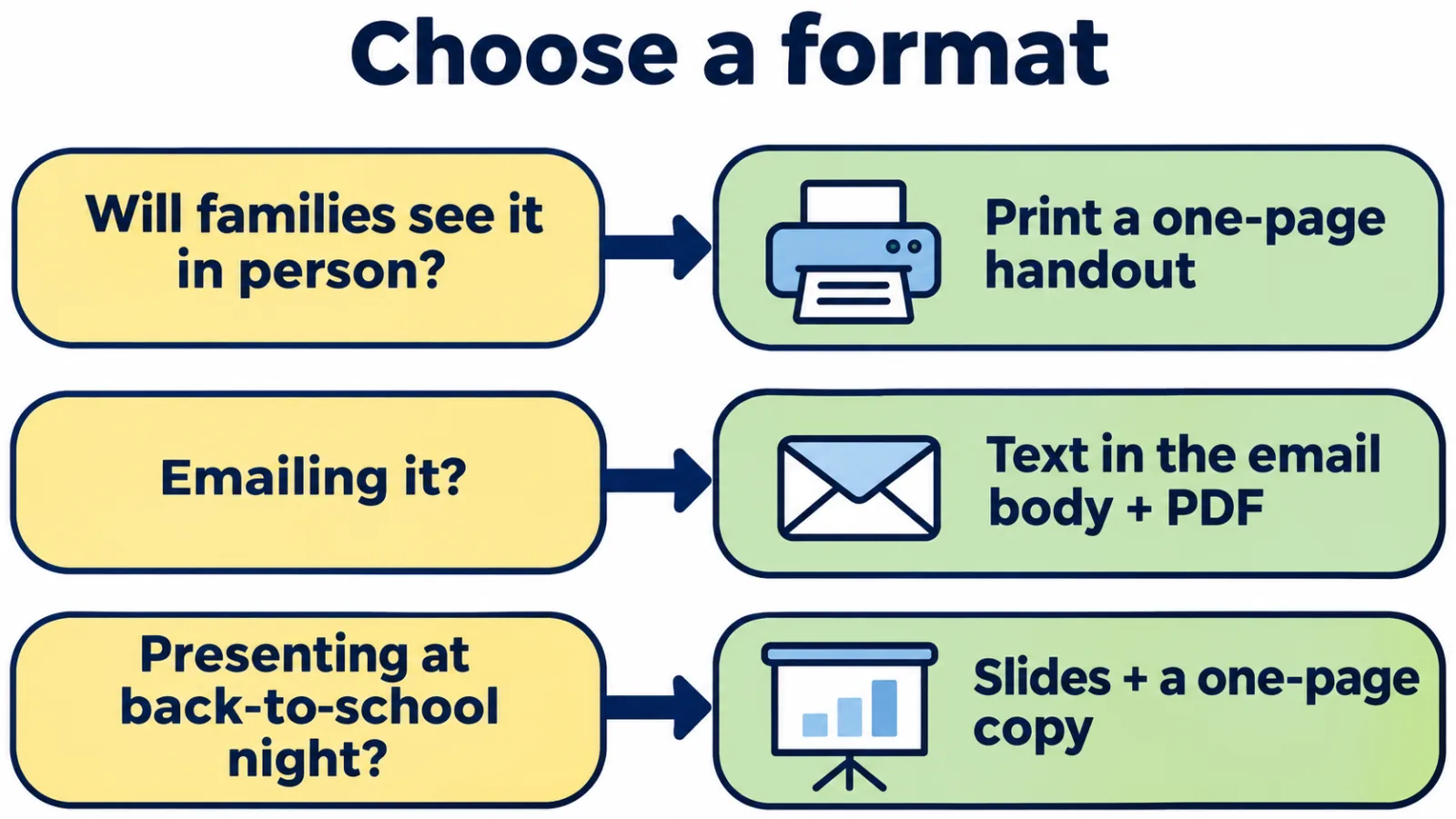
Illustrative layout: pick the format by how families will receive it; many teachers use two.
Make it work for every family
- Language: ask your school what languages families speak at home and whether the district provides translation. Send the letter in those languages, not only in English.
- Readability: use short sentences, a clear font, at least 11–12 pt body text in print, and strong contrast between text and background.
- Access: if you share a PDF, also paste the text into the email body so screen readers and phone translation tools can read it.
- Family structures: write "families" or "grown-ups" instead of "moms and dads."
- Optional QR code: a QR code can link to a welcome video or a short family survey. Print the web address under it for families who cannot scan it. Guidance on creating one for a file is in our PDF QR code generator guide.
Why a Meet the Teacher letter is worth the effort
The letter is a small piece of family outreach, and outreach is one area that education research has studied for decades. In A New Wave of Evidence (SEDL, 2002), Anne Henderson and Karen Mapp reviewed 51 studies on family and community connections. They reported that many studies found students with involved parents, whatever their income or background, were more likely to earn higher grades and test scores, attend school regularly, and graduate. The same synthesis reported that teacher outreach to parents was related to gains in reading and math, and listed effective outreach practices such as meeting face to face, sending materials home and keeping in touch about progress (Henderson and Mapp, 2002, PDF).
Two cautions: most of those findings are associations, not proof that one letter changes outcomes, and the report is more than 20 years old. The practical takeaway is modest: a clear first message makes the next contact easier, so make it easy to reply to.
When and how to send it
| When | What to do |
|---|---|
| 1–2 weeks before school | Email the letter (text in the body plus PDF), or post it where your school shares class information |
| Meet the Teacher night or open house | Print copies; put your photo and room number where families can see them |
| First week | Send home a paper copy with students who did not attend; collect the "What I need from you" items |
| Mid-year changes | Send a short update if your schedule, room, role or contact method changes |
The weeks shift with your school calendar; for example, schools in Australia and New Zealand start their year early in the calendar year rather than in August or September.
Save your final version. Next year you will only need to update the dates, goals and photo.
Meet the Teacher night invitation template
If your school holds a Meet the Teacher night or open house, send a short invitation separately from your letter. Keep it to the facts families need to show up.
You're invited to Meet the Teacher!

Come meet [Title + Last name] and see our classroom before school starts.

When: [Day, date], [start time]–[end time]
Where: [School name], Room [number] ([entrance or directions])
Who: Students and their families. Younger siblings are welcome.
Bring: [School supplies / completed forms / nothing at all]

Can't make it? Reply to [school email] and I'll send you everything you missed.
To design it, reuse the colors and photo from your letter so families recognize it, put the date and time in the largest text, and send it 1–2 weeks ahead with a reminder the day before. A Canva or Google Docs flyer layout works; if you print it, add the school's address and the web address of any online sign-up form.
Where to find designed Meet the Teacher templates
If you prefer a designed layout, these third-party sources offered Meet the Teacher templates when checked on 2026-11-11. Availability, pricing and sign-up requirements can change.
- Canva: editable flyer and document designs for classroom intros and parent nights.
- SlidesMania: free Meet the Teacher templates for Google Slides and PowerPoint.
- Edit.org: printable Meet the Teacher designs you customize online.
- WeAreTeachers: a free bundle with Pre-K–elementary and middle–high school designs, delivered after you submit a form.
- Microsoft PowerPoint teacher templates: presentation designs you can adapt for back-to-school night.
Whichever design you choose, check it against the "What to include" table above; many designed templates leave out reply times and the "What I need from you" step.
Frequently asked questions
What do you write in a Meet the Teacher letter?
Write your name and role, a short teaching background, what students will learn or do this year, how families can reach you and when you reply, a few routines, two or three personal favorites, and one concrete thing you need from families. Keep it to one page.
How long should a Meet the Teacher letter be?
One page, or about 200–350 words. Link to the handbook, syllabus or supply list instead of including them in full.
Should I put my personal phone number on a Meet the Teacher template?
Usually no. Use your school email, the school's messaging app, or the front office number, unless your school has asked you to share a different contact method.
What is a Meet the Paraprofessional template?
It is a Meet the Teacher letter written for a paraprofessional or assistant teacher. It explains what the para does in the classroom, who the lead teacher is, and where families should send questions about progress or plans. See example 4 above.
How do I make a Meet the Teacher template in Google Docs?
Create a blank Google Doc, paste the template from this page, turn the section names into headings, add your photo from the Insert menu (Insert, then Image), and replace the brackets. Download it as a PDF to email or print it for Meet the Teacher night.
What should a Meet the Teacher night invitation say?
State who is invited, the date and time, the room and entrance, what to bring, and how to reply if a family cannot attend. Send it 1–2 weeks before the event.
What should a Meet the Teacher presentation include?
Use 5–8 slides: welcome and photo, about me, what we will learn, a typical day or class, how to reach me, what I need from families, and time for questions. Share a one-page version afterward for families who could not attend.
Can I reuse the same Meet the Teacher template every year?
Yes. Keep the structure, then update the year, goals, routines, photo and any changes to your contact method or room.
