
Otter.ai Student Discount 2026: Price & How to Claim
Short answer: Otter.ai gives individual students, faculty and full-time staff at accredited schools 20% off Otter Pro. With the discount, Pro costs $13.59 per month on monthly billing or $79.99 per year (about $6.67 per month) on annual billing, instead of $16.99 per month or $8.33 per month billed annually. There is no Student Beans or SheerID step on Otter's official route. You sign in to the free Basic plan with an email address ending in .edu, open Upgrade plan, click Student & Teacher Discount, and the discount is applied at checkout. If your school email does not end in .edu, you contact Otter Support with proof of your school's accredited status.
Update note (October 30, 2026): rewritten to fix the claim steps and the plan limits. Earlier versions of this page described third-party verification and gave the wrong Pro minute allowance. Both were wrong. Prices, limits and eligibility rules below come from Otter's pricing page and its Student & Teacher discount help article, checked on October 30, 2026. For advice on using Otter well in class once you have it, see our Otter.ai tips for students.
Who qualifies for the Otter.ai student discount?
According to Otter's help article, the Student & Teacher program covers individual students, faculty members and full-time staff at:
- nonprofit educational institutions
- accredited primary and secondary schools, colleges and universities
Federal and state government offices, such as Departments of Education, are not eligible. A few other conditions also apply:
- Individual Pro plan only. The discount does not apply to Business or Enterprise. Workspace features are not included.
- You cannot be in a Workspace. If your account belongs to an Otter Workspace, the admin has to remove you first, or the Workspace has to be reverted to a Basic individual account.
- Already paying? If you are already on a paid plan, Otter says you need to cancel that subscription before you buy Pro at the discounted price.
- Schools buying for everyone use Otter for Education, which is a separate sales process. The student discount does not cover it.
How to claim the discount, step by step
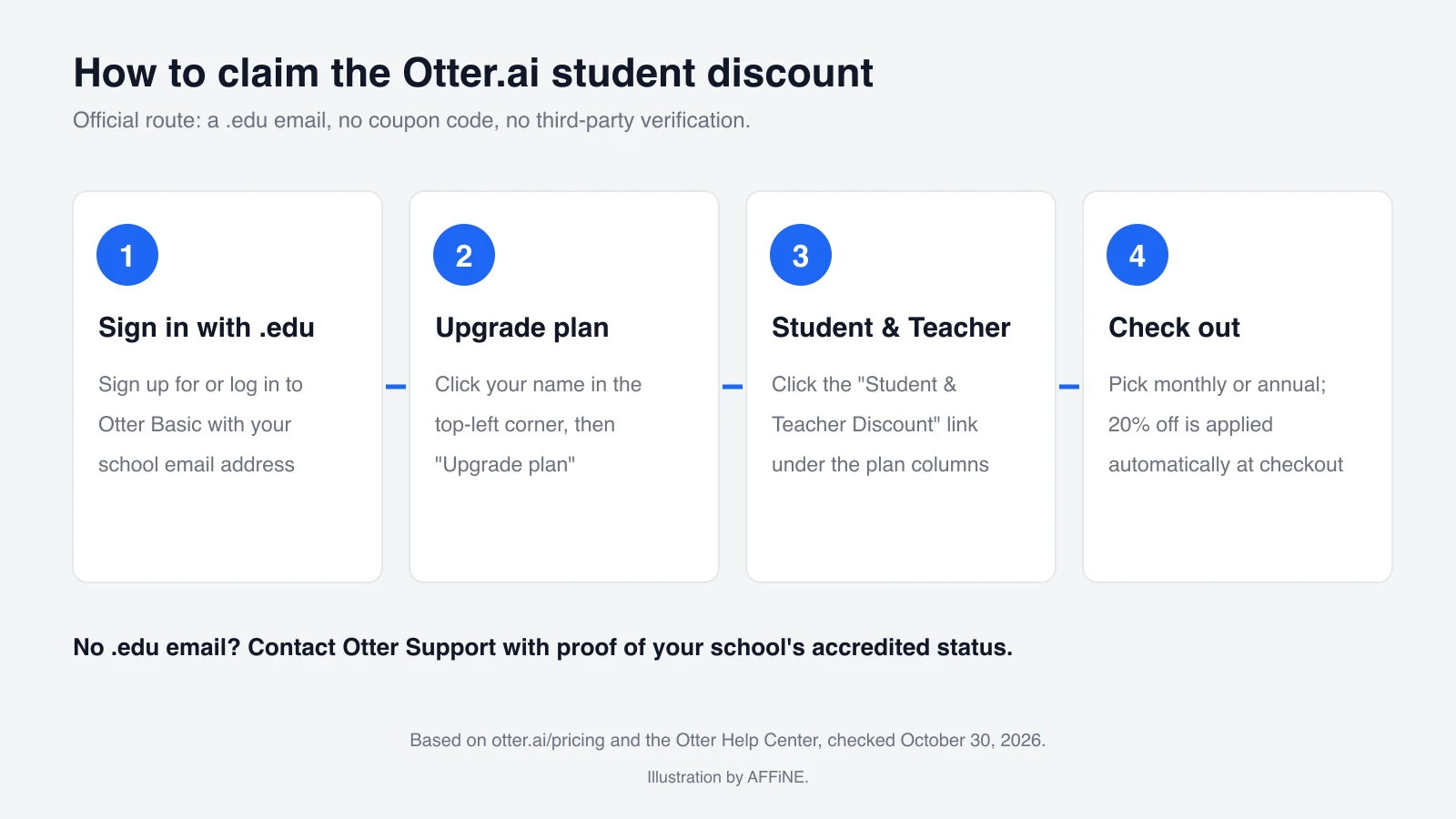
These steps follow Otter's pricing FAQ and help article:
- Sign up for, or sign in to, Otter Basic with your school email. The address has to end in .edu, for example name@stanford.edu. If you already use Otter with a personal email, you can change the account email or create a new Basic account with the .edu address.
- Open Upgrade plan. Click your name in the top-left corner of Otter, then click Upgrade plan.
- Click "Student & Teacher Discount." The link sits below the plan columns, under the Pro plan description.
- Choose monthly or annual billing and check out. On a Basic account with a .edu email, you can upgrade right away and the 20% discount is applied at checkout.
You do not need a coupon code, and the official flow does not send you to Student Beans, UNiDAYS or SheerID. Some coupon sites list Otter, but Otter's own pages do not mention them.
What if you don't have a .edu email?
Otter's help article says that if your school email domain does not end in .edu, the discount link will not let you continue. Instead:
- Contact the Otter Support Team and say that you want the Student & Teacher discount.
- Be ready to send documents that confirm your school's accredited status. Otter gives "a letter from your school's central administration" as an example.
- Wait for the support team to review your request. Otter does not publish a turnaround time.
This is the route for most schools outside the United States, which often use domains such as .ac.uk or .edu.au. Otter's pages do not promise that the request will be approved.
Price: standard vs. student
Prices in USD from otter.ai/pricing, October 30, 2026:
| Pro billing | Standard price | Student & Teacher price (20% off) |
|---|---|---|
| Monthly | $16.99 per month | $13.59 per month |
| Annual | $8.33 per month, billed annually | $6.67 per month, billed $79.99 annually |
On October 30, 2026, the pricing page also showed a separate "save 50%" Pro offer. Its footnote says it is valid only with an India-issued credit card, so it is not a student discount.
About the 50% back-to-school offer: on August 26, 2026, Otter announced 50% off an annual Pro plan for eligible .edu emails, running "through the end of September 2026." That end date has passed. Otter has not announced an extension, so plan around the standard 20% discount. If you see a 50% student price at checkout, treat it as a new promotion and check its terms there.
What you get: Free (Basic) vs. Pro
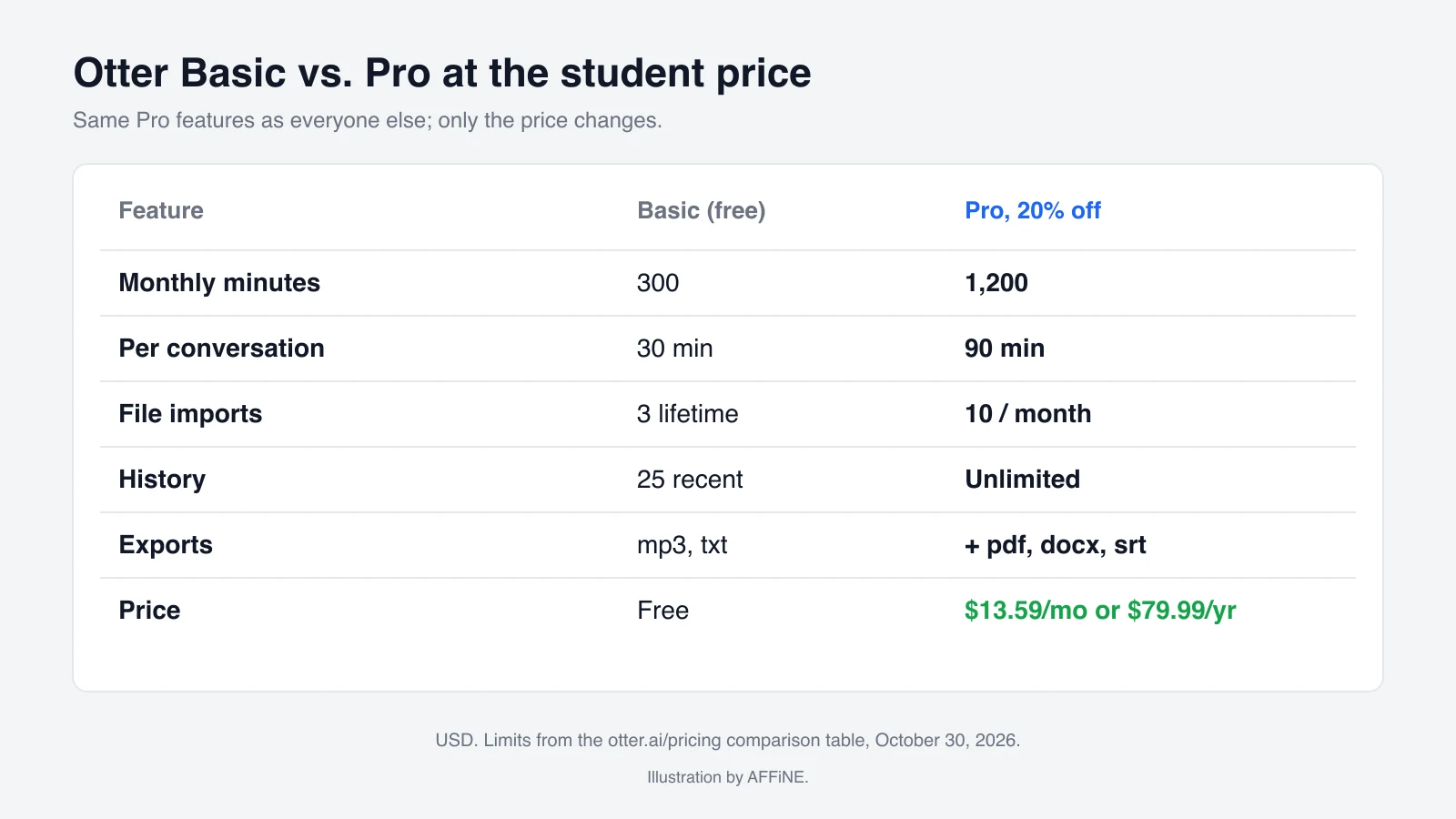
The student discount changes the price, not the features. You get the same Pro plan as everyone else. The limits below come from the comparison table on Otter's pricing page, October 30, 2026:
| Feature | Basic (free) | Pro (student price) |
|---|---|---|
| Meeting and recording transcription | 300 minutes per month | 1,200 minutes per month |
| Max length per conversation | 30 minutes | 90 minutes |
| Imported audio or video files | 3 lifetime | 10 per month |
| Conversation history | 25 most recent | Unlimited |
| Custom vocabulary | 5 terms | 100 names + 100 other terms |
| Otter AI Chat queries | 20 per month (3 per conversation) | 50 per month |
| Export formats | mp3, txt | mp3, txt, pdf, docx, srt |
| Playback speed | 1x | 0.5x to 3x, skip silence |
Minutes do not roll over. Both plans include the Otter MCP server, AI Chat across meetings, and the iOS and Android apps.
Is it worth it? Here is a rough calculation. If you record two 75-minute lectures a week, that is about 650 minutes a month. That already exceeds Basic's 300 minutes, and each lecture is longer than Basic's 30-minute cap. If you only record the occasional short meeting, Basic may be enough. Our Otter.ai Free vs Pro comparison covers the upgrade decision in more detail.
Alternatives if the discount doesn't work for you
- Stay on Basic. It works for short sessions, but the 30-minute cap per conversation is the main problem for full lectures.
- Ask your school. Some institutions buy Otter for Education licenses or already pay for another captioning or transcription tool through their accessibility office.
- Compare other note takers. Pricing for other tools changes often, so check their official pricing pages before you buy. Our Otter.ai alternatives for students guide compares the main options, and our honest Otter.ai review for students covers where Otter is strong and where it falls short.
Transcripts are only half of studying. Many students paste their Otter summaries into a separate notes app, where they connect them to readings and build revision material. AFFiNE is a free notes, whiteboard and docs workspace with an AI assistant you can use for that step. It does not record or transcribe lectures.
Frequently Asked Questions
1. How much is the Otter.ai student discount?
It is 20% off Otter Pro: $13.59 per month on monthly billing, or $79.99 per year (about $6.67 per month) on annual billing, according to otter.ai/pricing on October 30, 2026.
2. Do I need Student Beans or UNiDAYS to get the Otter discount?
No. Otter's official route uses your .edu email. Sign in to Otter Basic with it, open Upgrade plan, click Student & Teacher Discount, and the discount is applied at checkout.
3. Is the 50% Otter.ai back-to-school deal still available?
Otter announced the 50% annual Pro offer as running through the end of September 2026, and it has not announced an extension. The standing student discount is 20%.
4. Can teachers get the Otter.ai discount?
Yes. Individual faculty members and full-time staff at eligible nonprofit or accredited schools qualify, on the same terms as students.
5. How many minutes does Otter Pro include?
Pro includes 1,200 transcription minutes per month, up to 90 minutes per conversation and 10 file imports per month. The free Basic plan includes 300 minutes, 30 minutes per conversation and 3 lifetime imports.

