
SMART Goal Template: Free Word, PDF & Excel Tracker + Examples
A SMART goal template is a fill-in worksheet that turns a vague intention into one goal that is Specific, Measurable, Achievable, Relevant, and Time-bound. It has a box for each of the five criteria, a one-sentence goal statement, an action plan, and a weekly check-in, so you can see whether the goal is on track before the deadline.
Free downloads: Word worksheet (DOCX) · printable PDF, US Letter or A4 · Excel tracker (XLSX). Every file includes a blank version and the same filled example: a small support team that raises its support Net Promoter Score (NPS) from 32 to 45 in 12 weeks.
Download the Free SMART Goal Template (Word, PDF, Excel)
| Format | What you get | Best for |
|---|---|---|
| Word (DOCX) | Editable worksheet + 12-week log, blank and filled | Typing your goal, sharing with a manager |
| PDF, US Letter | The same 4 pages, print-ready | Printing, workshops, classrooms |
| PDF, A4 | The same 4 pages on A4 paper | Printing outside North America |
| Excel tracker (XLSX) | Weekly tracker with progress, forecast, and status formulas | Numeric goals you check every week |
| CSV example / blank | Tracker columns as plain text | Importing into another tool |
The Word and PDF files have four pages: a blank SMART goal worksheet, a blank 12-week review log, and a filled example of each. The Excel file has a Tracker tab to fill in, an Example tab with the support team's 12 weeks, and a How to use tab.
Google Docs and Google Sheets: upload the DOCX or XLSX to Google Drive and open it, or use File → Open → Upload inside Docs or Sheets. The tracker's formulas use standard functions (IF, INDEX, COUNT, DATEDIF, ROUNDUP), so they recalculate in Excel, Google Sheets, and Apple Numbers. The status column is color-coded with conditional formatting; Apple Numbers shows the same status text without the colors.
Reviewed by Allen, AFFiNE content team. Updated September 29, 2026. The SMART definition follows George T. Doran's original 1981 article, and the notes on when goals help or hurt follow Locke and Latham's 2002 review of goal-setting research (see Sources). The support team in the example is fictional. Every number in the example was recalculated from the downloadable Excel file before publication. See AFFiNE's editorial policy.
What Is a SMART Goal Template?
A SMART goal template is a worksheet for writing goals that are Specific, Measurable, Achievable, Relevant, and Time-bound. Each criterion becomes a question you have to answer in writing. A goal passes only when it names what will change, the number that proves it, the resources it needs, the reason it matters, and the date it is due.
| Letter | Question the template asks | Example answer |
|---|---|---|
| Specific | What exactly will change, and for whom? | Support NPS for customers who contacted support |
| Measurable | Which number proves it? | NPS from 32 to 45 |
| Achievable | What time, people, and budget does it need? | About 6 team hours a week, one writer for three weeks |
| Relevant | Which bigger goal does it support? | Renewals, where detractor comments point to support |
| Time-bound | When does it start, end, and get reviewed? | Jan 5 to Mar 29, 2026, reviewed every Monday |
The acronym comes from George T. Doran's 1981 Management Review article, "There's a S.M.A.R.T. way to write management's goals and objectives." In Doran's original version, A stood for Assignable (someone owns it), R for Realistic, and T for Time-related. Most templates today use Achievable, Relevant, and Time-bound. Doran also noted that not every objective can be fully quantified, so treat the criteria as a checklist for clarity, not a scoring test.
SMART goal formula
I will [raise / cut / finish] [metric] from [baseline] to [target] by [deadline] by [main actions], reviewed every [day].
Example: Raise our support NPS from 32 to 45 by March 29, 2026 by calling back every detractor within two business days and rewriting our five most-visited help articles, reviewed every Monday.
SMART Goal Criteria: Weak vs SMART, One Letter at a Time
Most weak goals fail on one or two letters, not all five. Fix the letter that is missing instead of rewriting the whole goal.
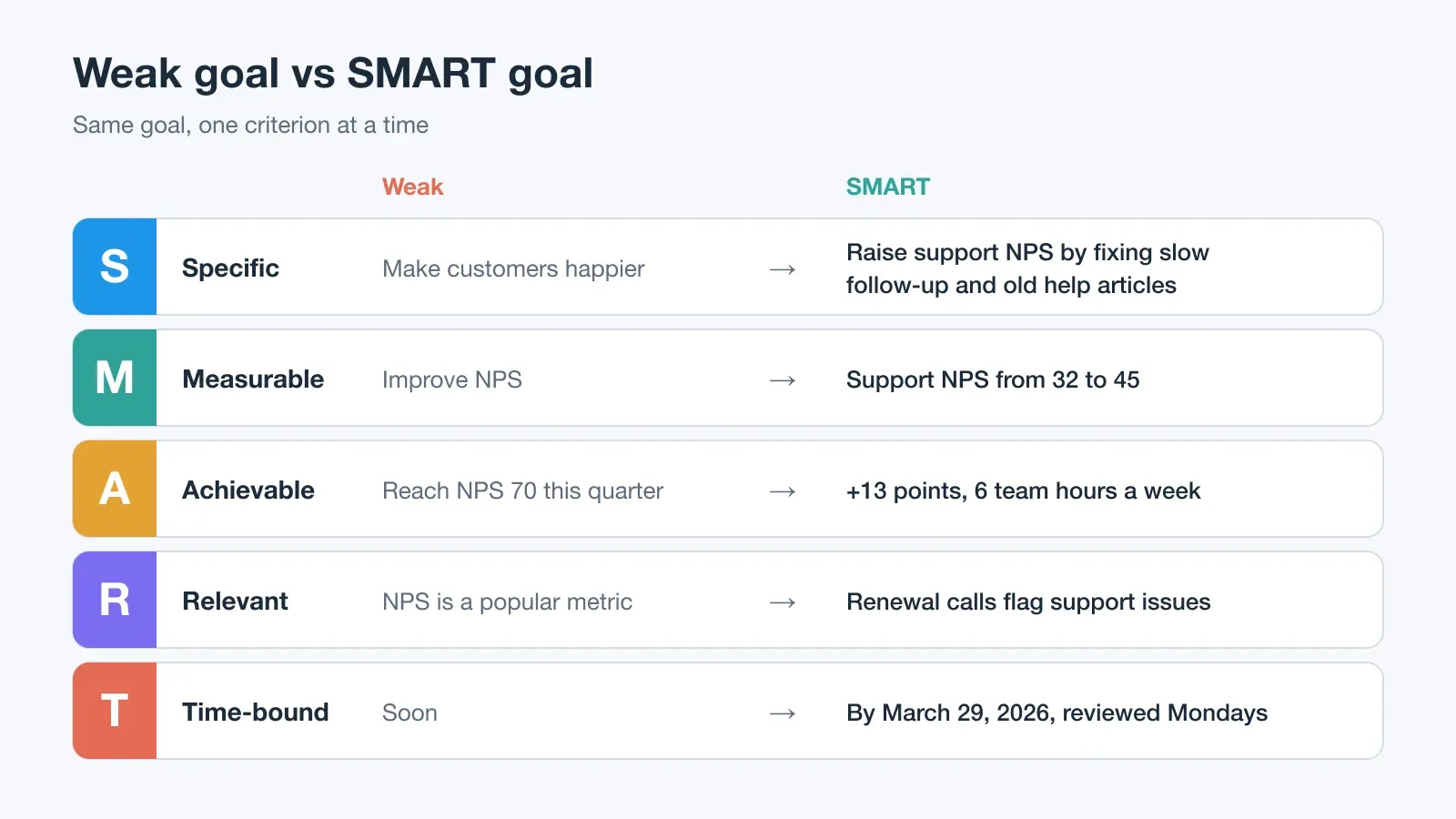
| Letter | Weak | SMART rewrite | What changed |
|---|---|---|---|
| Specific | Make customers happier | Raise support NPS by fixing slow follow-up and outdated help articles | Names the group and the two causes |
| Measurable | Improve NPS | Support NPS from 32 to 45 | Adds a baseline and a target |
| Achievable | Reach NPS 70 this quarter | +13 points with about 6 team hours a week | Sized to the team's time |
| Relevant | NPS is a popular metric | Renewal calls flag support problems | Tied to a business outcome |
| Time-bound | Soon | By March 29, 2026, reviewed every Monday | Deadline plus a review day |
A quick test for each letter: could someone else read the goal and know what you will do, how you will know it worked, and when to ask you about it? If not, the template still has an empty box.
How to Use This SMART Goal Template
Fill in the worksheet from top to bottom, then move the numbers into the tracker.
Step by step:
- Write the goal in plain words. Write one sentence about what you want to change before you apply any criteria. Example: Make customers happier with support.
- Answer the five SMART questions. Fill in one box per letter: what will change, which number proves it, what it needs, why it matters, and when it is due.
- Combine the answers into one sentence. Write the SMART goal as one sentence with the metric, baseline, target, deadline, and main actions.
- Enter the baseline, target, and dates in the tracker. Open the Tracker tab of the Excel file and fill in the yellow cells for baseline, target, start date, and deadline.
- Review progress every week. Log one actual value each week, read the forecast and status, and write one next action in the notes column.
Then list two or three actions with an owner and a due date, and write down the obstacle most likely to slow you down. If a task list grows out of the goal, sort it by urgency and importance before you assign dates.
Worked Example: Raising Support NPS From 32 to 45
This fictional example runs through every download. A six-person customer support team at a small software company sees detractor comments about support in renewal calls. Its support NPS, a rolling four-week survey score, is 32.
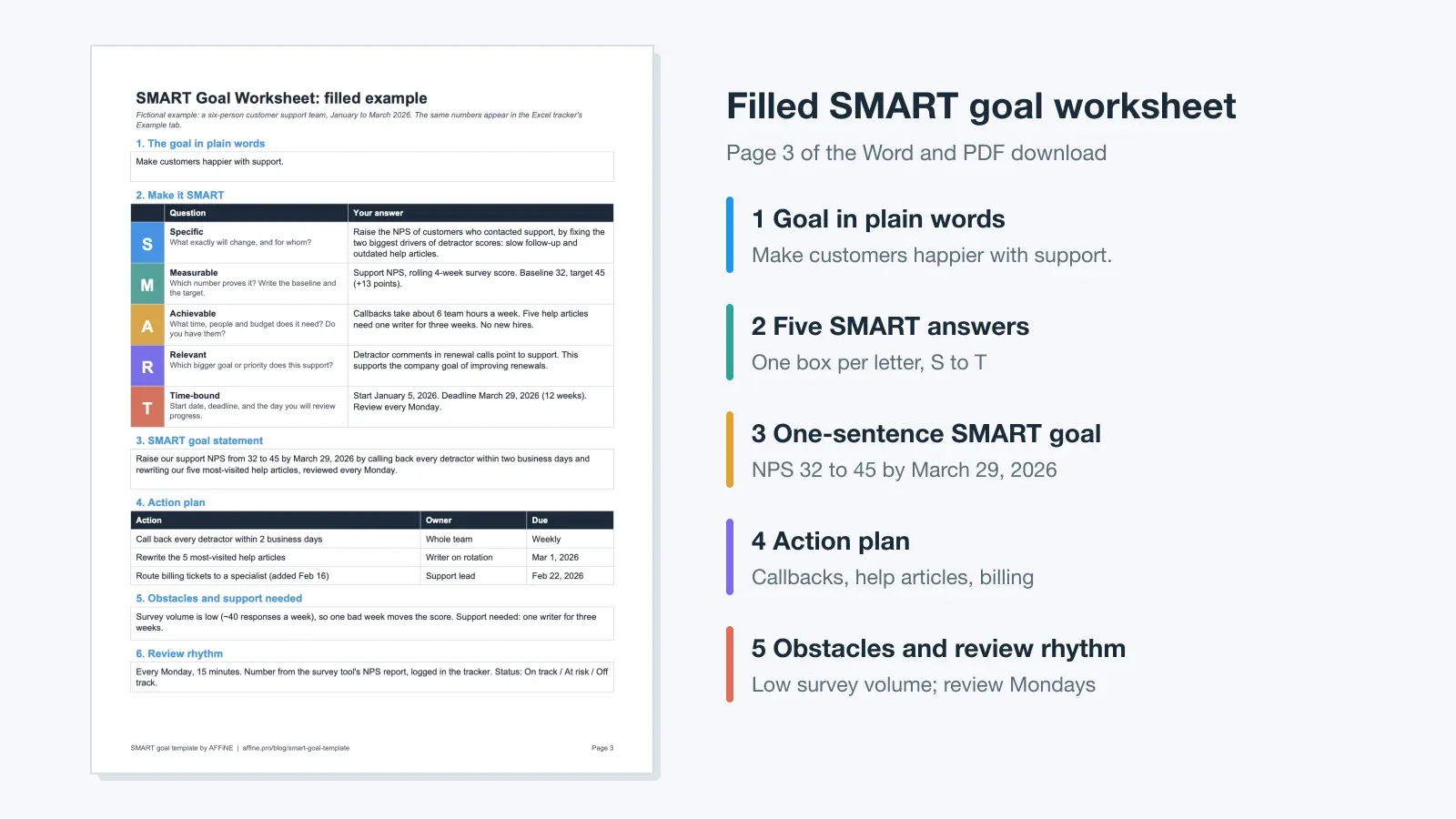
The team's filled worksheet:
- Goal in plain words: Make customers happier with support.
- SMART goal: Raise our support NPS from 32 to 45 by March 29, 2026 by calling back every detractor within two business days and rewriting our five most-visited help articles, reviewed every Monday.
- Actions: call back every detractor within two business days (whole team, weekly); rewrite the five most-visited help articles (writer on rotation, due March 1); route billing tickets to a specialist (added at the week 6 review, due February 22).
- Obstacle: survey volume is low, about 40 responses a week, so one bad week moves the score.
Here is how the 12 weeks went, straight from the tracker's Example tab:
| Week | Week ending | Planned | Actual | Forecast | Status |
|---|---|---|---|---|---|
| 1 | Jan 11 | 33.1 | 34 | 56.0 | On track |
| 4 | Feb 1 | 36.3 | 37 | 47.0 | On track |
| 5 | Feb 8 | 37.4 | 36 | 41.6 | Off track |
| 6 | Feb 15 | 38.5 | 37 | 42.0 | Off track |
| 7 | Feb 22 | 39.6 | 39 | 44.0 | At risk |
| 8 | Mar 1 | 40.7 | 41 | 45.5 | On track |
| 12 | Mar 29 | 45.0 | 46 | 46.0 | Achieved |
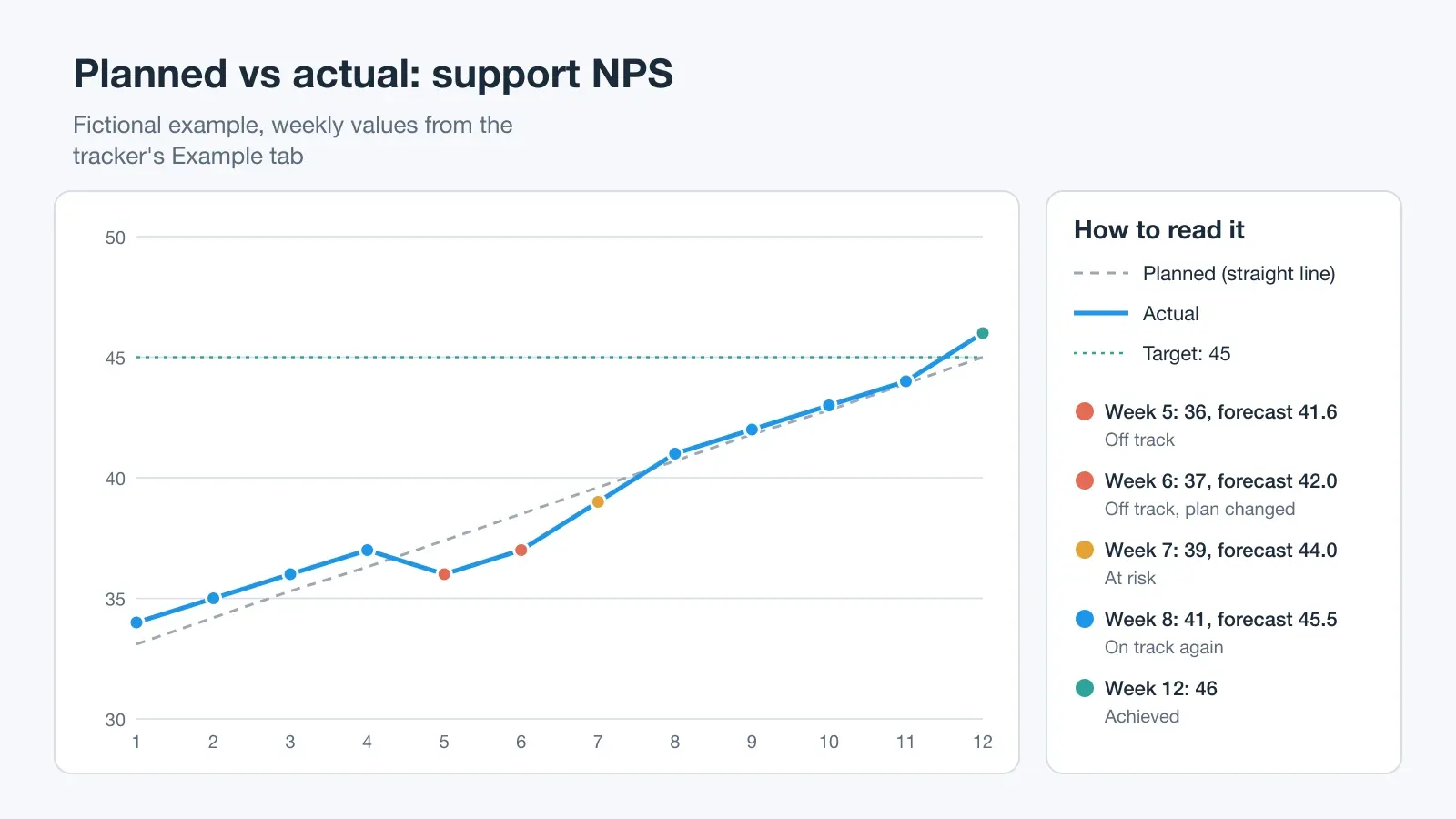
In week 5 a confusing billing email pushed the score down to 36. At the current pace the forecast was 41.6, short of the target, so the tracker marked the goal Off track. The team did not change the goal. It changed the plan: in the week 6 review it started routing billing tickets to one specialist. The score recovered to 41 by week 8 and finished at 46 on March 29.
The worked example shows why the tracker matters. Without a weekly number and a forecast, the dip in weeks 5 and 6 would have been a feeling, not a signal.
How the Excel SMART Goal Tracker Works
You enter four numbers once (baseline, target, start date, deadline) and one actual value per week. Everything else is a formula.
| Column | Formula | Week 5 in the example |
|---|---|---|
| Planned | baseline + (target − baseline) × week ÷ weeks in plan | 32 + 13 × 5 ÷ 12 = 37.4 |
| Progress % | (actual − baseline) ÷ (target − baseline) | (36 − 32) ÷ 13 = 31% |
| Forecast | baseline + (actual − baseline) × weeks in plan ÷ week | 32 + 4 × 12 ÷ 5 = 41.6 |
| Status | Achieved / On track / At risk / Off track | Off track |
The status rule is simple and editable:
- Achieved: the actual has reached the target.
- On track: the forecast reaches the target by the deadline.
- At risk: the forecast reaches at least 80% of the planned improvement. You can change the 80% threshold in the tracker.
- Off track: the forecast falls below that.
The forecast is a straight-line projection of your pace so far, so it swings a lot in the first two or three weeks. Read it as a prompt for the weekly review, not a prediction. The tracker also works for goals that go down, such as cutting response time from 9 hours to 4: enter the lower number as the target and the progress, forecast, and status columns handle the direction.
The Weekly SMART Goal Review
A SMART goal template fails when it is filled in once and filed away. A short weekly review keeps it alive. Put 15 minutes on the calendar on the same day each week and ask four questions:
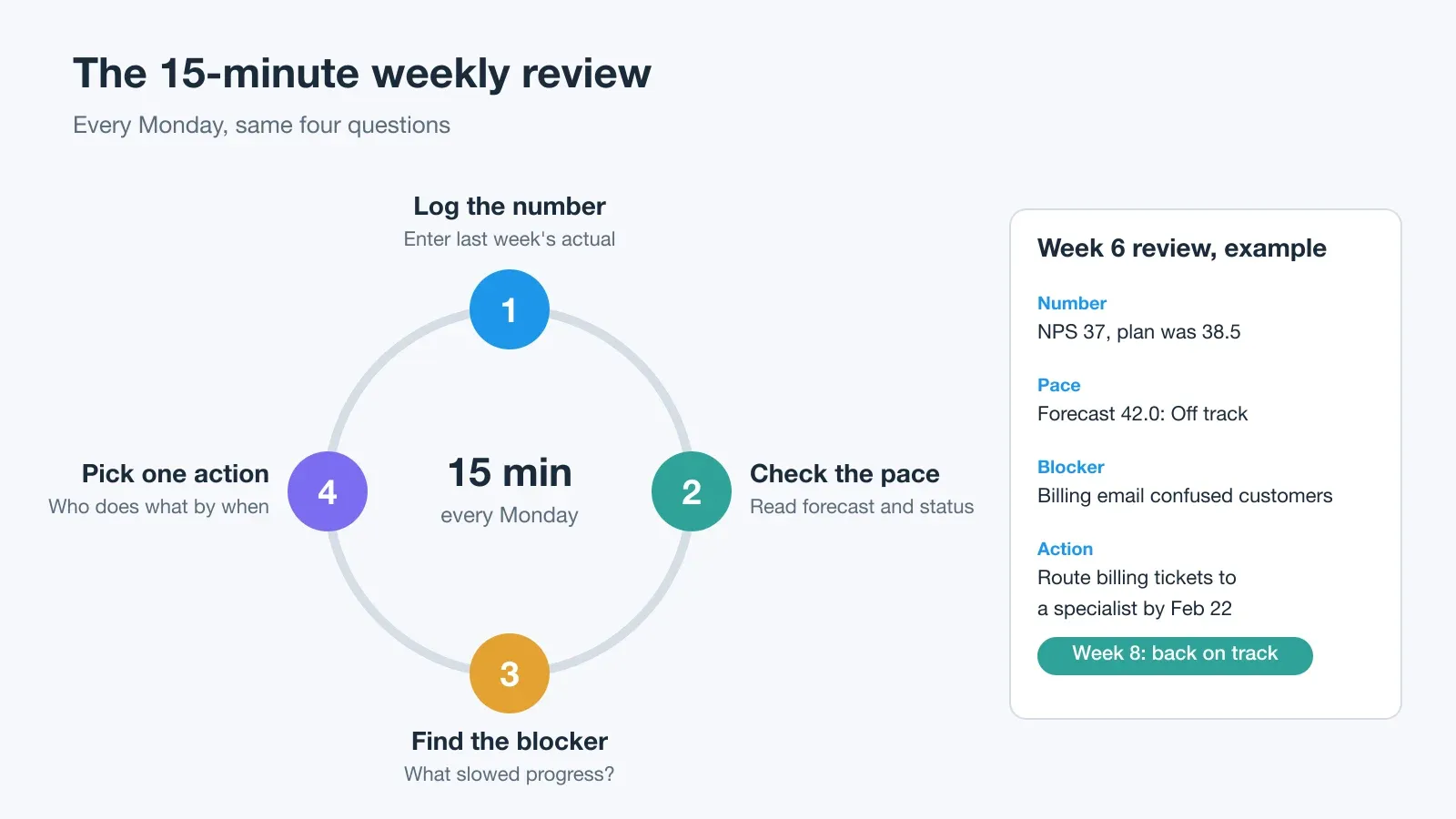
- What is this week's number? Log it in the tracker.
- Is the pace on track for the deadline? Read the forecast and status.
- What blocked progress? Name one cause, not a list.
- What is the one action for next week? Give it an owner and a date.
This rhythm matches what goal-setting research reports. In their 2002 review in American Psychologist, Edwin Locke and Gary Latham found that specific, difficult goals generally led to higher performance than vague "do your best" goals. They also found that goals work best when people get feedback on their progress. The weekly number is that feedback.
SMART Goal Examples You Can Copy
Replace the numbers and dates with your own. Each example has a baseline, target, deadline, actions, and a review day, so it drops straight into the worksheet.
Student SMART goal example
Weak goal: I want better grades in statistics.
SMART goal: I will raise my Statistics 101 average from 80% to 88% by the final exam on December 11 by completing two practice problem sets every week and bringing my missed questions to office hours every Thursday.
Career SMART goal example
Weak goal: I want to grow my network.
SMART goal: I will hold four informational interviews with product managers by November 30 by sending two outreach messages every Monday, and I will write a one-paragraph summary after each call. If career goals come out of a performance check-in, an employee review template keeps them next to the manager's feedback.
Team SMART goal example
Weak goal: We should make customers happier.
SMART goal: Our support team will raise support NPS from 32 to 45 by March 29 by calling back every detractor within two business days and rewriting our five most-visited help articles, reviewed every Monday.
Personal finance SMART goal example
Weak goal: I need to save more money.
SMART goal: I will build a $3,000 emergency fund by December 31 by transferring $250 to a separate savings account every payday for 12 paydays and checking the balance every other Friday.
Health SMART goal example
Weak goal: I want to be more active.
SMART goal: I will walk at least 30 minutes on five days a week for the next eight weeks, logging each walk in my phone's step app and reviewing the week every Sunday evening.
For health goals, the template helps you plan and track habits. It is not medical advice, so check targets with a clinician if you have a health condition.
When Not to Use a SMART Goal (SMART vs OKR)
SMART goals work best when you already know what to do and need to commit to a result. They are a poor fit when the path is still unknown.
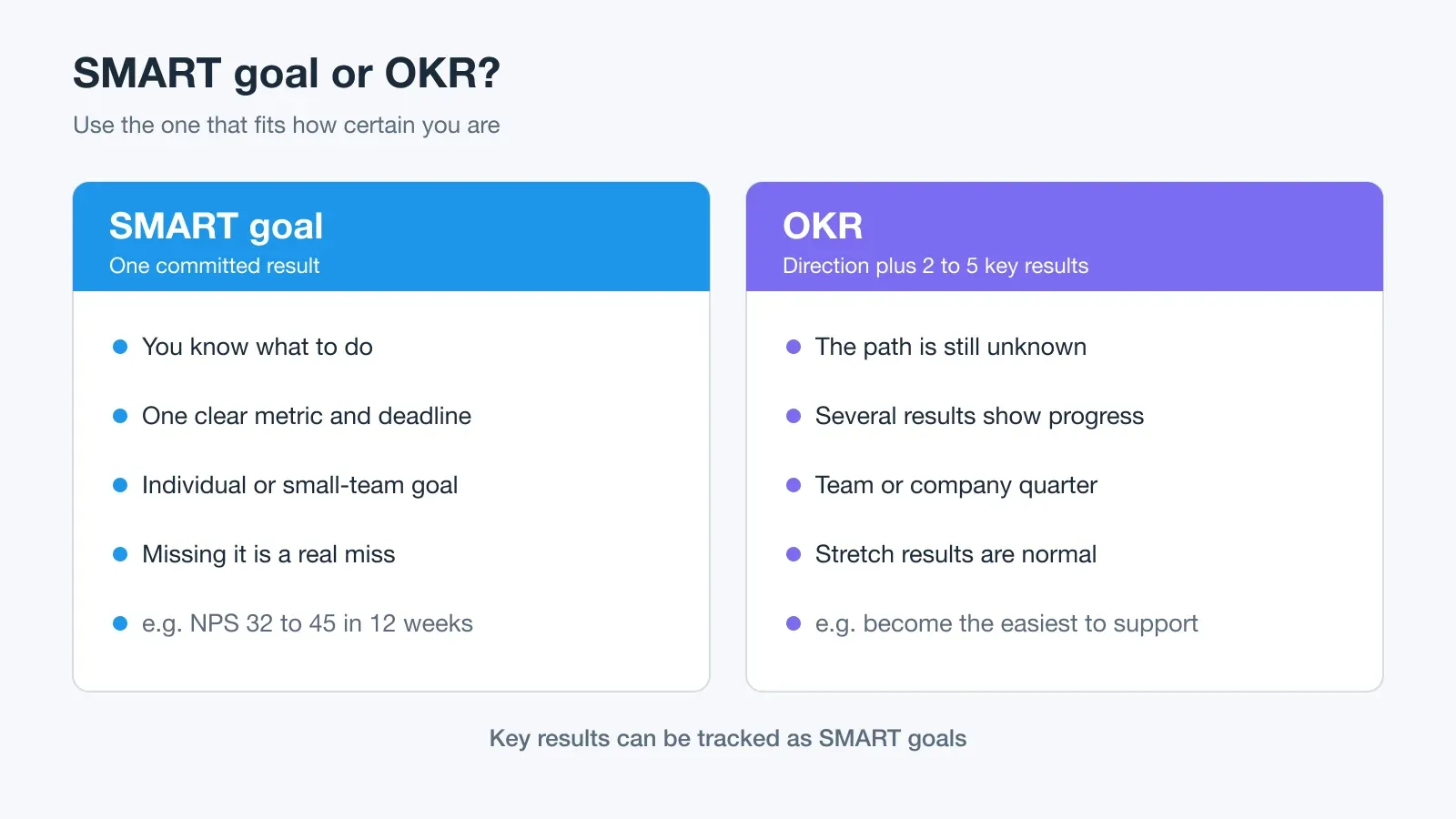
| Use a SMART goal when… | Use something else when… |
|---|---|
| You know the actions that move the number | You are exploring and don't know the actions yet |
| One metric captures success | Success needs several signals |
| Missing the target is a real miss | Stretch targets are expected (OKRs) |
| The deadline is weeks or months away | The goal is a long-term direction or a value |
Locke and Latham note an important exception: on complex tasks where people do not yet know the right strategy, a hard performance target can hurt results. A learning goal, such as "find and test three ways to cut response time by March 1," can work better. Write the learning goal first. Once you know which approach works, turn it into a SMART goal.
OKRs and SMART goals also work together. An OKR sets the direction ("become the easiest software company to get help from"), and each key result can be tracked in this template as its own SMART goal.
Common SMART Goal Mistakes
- Measuring activity instead of results. "Make 50 calls" is a task. "Raise NPS from 32 to 45" is a result, and the calls are one of the actions.
- No baseline. You cannot judge "improve by 10%" without knowing where you started. Measure first, then set the target.
- Too many goals at once. Each goal needs weekly attention. If you can't review a goal in five minutes, you have too many.
- Changing the target when the forecast turns red. Change the plan first. The support team kept 45 and changed how it handled billing tickets.
- A deadline with no checkpoints. A goal due in 12 weeks needs 12 check-ins, not one.
- Forcing every goal into SMART. Exploratory work, creative work, and values don't all fit one number. Use a learning goal or an OKR instead.
SMART Goal Template Checklist
Before you commit to a goal, check that:
- The goal names one outcome and who it is for.
- There is one number with a baseline and a target.
- The time and people it needs are actually available.
- It connects to a bigger priority you can name.
- It has a start date, a deadline, and a weekly review day.
- The first action can be done this week.
- There is a place to log the number and the blockers each week.
Use the SMART Goal Template in AFFiNE
The downloads above are standalone files. If you want the goal to live next to your notes, meeting docs, and task boards, you can use the free AFFiNE SMART Goal Template instead. It opens as an editable page in AFFiNE's whiteboard (Edgeless) mode, where you can lay out the five SMART boxes, link the goal to related docs, and keep weekly review notes on the same canvas. Browse the SMART goal template category for other layouts.
AFFiNE doesn't calculate forecasts or statuses the way the Excel tracker does. A practical split is to keep the numbers in the spreadsheet and the plan, notes, and decisions in AFFiNE. If you want an app to track many goals at once, see our goal tracker app comparison.
FAQ: SMART Goal Templates
What is a SMART goal template?
A SMART goal template is a worksheet that helps you write goals that are Specific, Measurable, Achievable, Relevant, and Time-bound. It has one box for each criterion, a one-sentence goal statement, an action plan, and a place to review progress every week.
Is there a free SMART goal template in Word, PDF, and Excel?
Yes. This page has a free Word (DOCX) worksheet, printable PDFs in US Letter and A4, and an Excel (XLSX) tracker. Each file has a blank version and a filled example. The Excel tracker calculates progress, a forecast, and an On track / At risk / Off track status from your weekly numbers.
What are the 5 parts of a SMART goal?
The five parts are Specific (what will change), Measurable (the number that proves it), Achievable (the time and resources it needs), Relevant (the bigger goal it supports), and Time-bound (the deadline and review dates). In Doran's original 1981 version, A was Assignable and R was Realistic.
What is a good SMART goal example?
"Raise our support NPS from 32 to 45 by March 29, 2026 by calling back every detractor within two business days and rewriting our five most-visited help articles, reviewed every Monday." It has a metric, a baseline, a target, a deadline, the main actions, and a review day.
Can I use this SMART goal template in Google Docs or Google Sheets?
Yes. Upload the DOCX or XLSX to Google Drive and open it in Google Docs or Google Sheets, or use File → Open → Upload. The tracker uses standard spreadsheet functions, so the progress, forecast, and status formulas keep working.
How often should I review a SMART goal?
Review it once a week for goals that last a few weeks to a few months. Log the number, check the forecast, name the main blocker, and pick one action. Weekly is frequent enough to catch a dip like the week 5 drop in the example before the deadline.
Who created SMART goals?
The SMART acronym was introduced by George T. Doran in the November 1981 issue of Management Review. His original letters stood for Specific, Measurable, Assignable, Realistic, and Time-related.
Sources and Verification
This guide and the downloadable files were checked on September 29, 2026.
- Doran, G. T. (1981). There's a S.M.A.R.T. way to write management's goals and objectives. Management Review, 70(11), 35–36. The article has no DOI; its bibliographic record is in EBSCO.
- Locke, E. A., & Latham, G. P. (2002). Building a practically useful theory of goal setting and task motivation: A 35-year odyssey. American Psychologist, 57(9), 705–717. doi:10.1037/0003-066X.57.9.705
The support team and its numbers are a fictional teaching example. The Planned, Progress, Forecast, and Status values in this article were recalculated from the downloadable XLSX in a spreadsheet app before publication.

