Free SOP Template: Word Download, Examples & Writing Guide
An SOP template is a reusable outline for a standard operating procedure: who performs a recurring task, what triggers it, how to complete it, and how to verify the result. A useful template also records the owner, version, approval, exceptions, and evidence of completion.
Start here: Download the free Word SOP template, download the Markdown version, or open the AFFiNE SOP template. The downloadable files require no signup. For Google Docs, upload the Word file to Drive and open it with Google Docs; check the table layout before sharing it.
This guide includes a blank template, a completed customer-support example, four format options, and a release checklist. It covers standard operating procedures for business processes, rather than academic statements of purpose.
Free SOP template you can copy
Copy the sections below into your team's document editor. Replace every bracketed field, remove instructions that do not apply, and ask the process owner to approve the completed procedure before use. Add steps as needed; three rows are a starting point, not a limit.
Document control
| Field | Fill in |
|---|---|
| SOP title and ID | [Task name] · [Department-number] |
| Version and status | [Version] · Draft / Approved / Retired |
| Process owner | [Role responsible for maintaining this SOP] |
| Approver | [Role or person authorized to approve it] |
| Effective date | [Date the approved procedure takes effect] |
| Next review date | [Date agreed by the owner] |
| Approved copy | [Link to the current controlled document] |
Purpose, scope, and starting conditions
- Purpose: [The outcome this procedure should produce.]
- Scope: [Where the procedure starts and ends; what it excludes.]
- Trigger: [The event that starts a new run.]
- Prerequisites: [Required access, tools, inputs, training, and applicable precautions.]
- Roles: [Who executes the work, checks it, and handles exceptions.]
Procedure and completion evidence
| Step | Responsible role | Action | Evidence or pass condition |
|---|---|---|---|
| 1 | [Role] | [Verb + object + system or location] | [What proves the input is ready] |
| 2 | [Role] | [Next action, including any decision rule] | [Expected result or saved record] |
| 3 | [Role] | [Verify the result and complete the handoff] | [What proves the task is finished] |
Exceptions and escalation: If [condition], stop at [safe point], record [information], and notify [role through channel]. Resume only when [authorized condition] is met.
Completion criteria: [Observable requirements that must all be true before closing the task.]
Records: [Where to store the completed checklist or evidence, who can access it, and the applicable retention policy.]
Related documents: [Links to the policy, detailed work instructions, forms, and reference material used in the steps.]
Revision history
| Version | Date | What changed | Approved by |
|---|---|---|---|
| [Version] | [Date] | [Change and reason] | [Approver] |
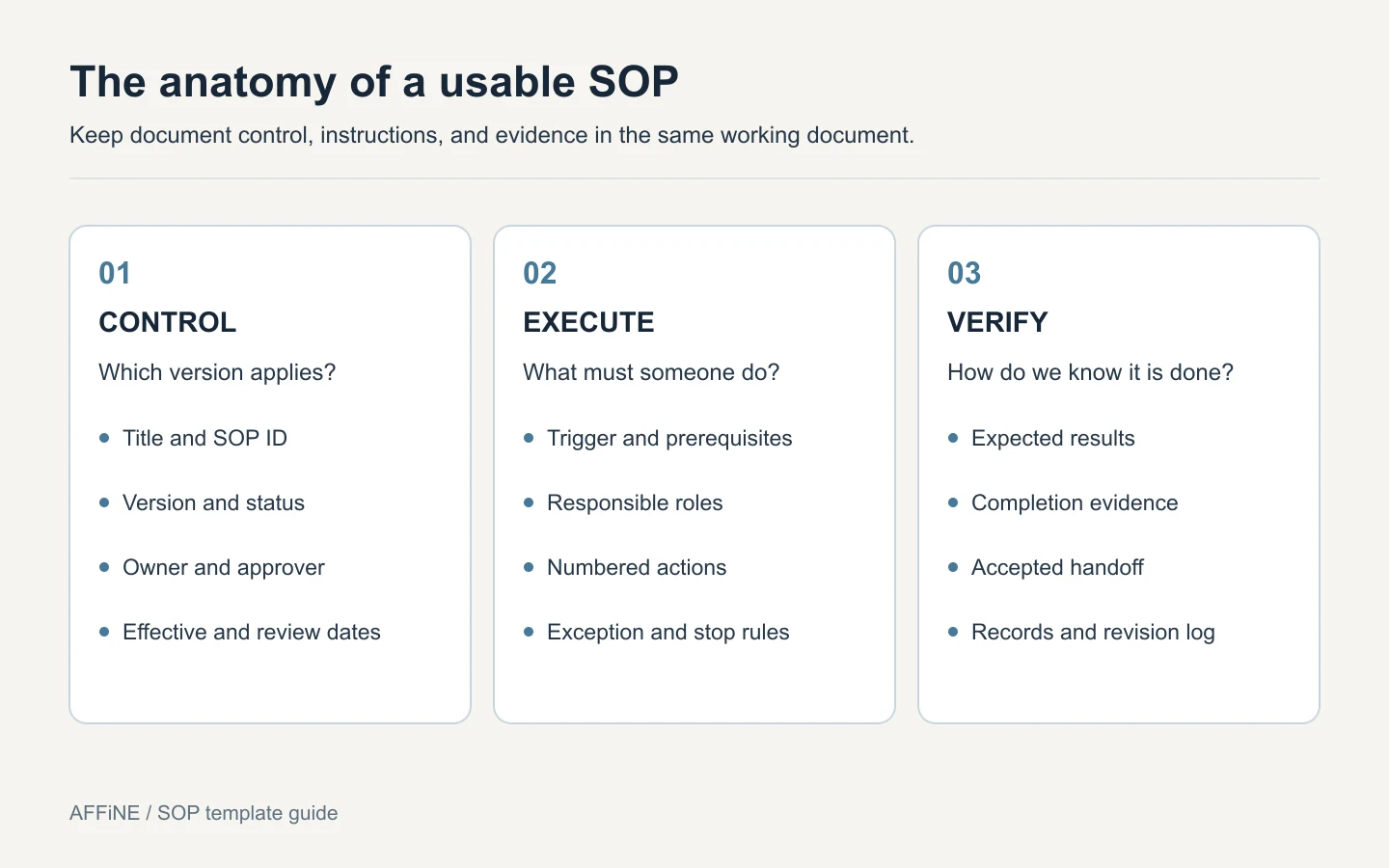
Figure: Pair the instructions with ownership and evidence so the next person can tell which procedure applies and when the work is complete.
Which SOP format should you use?
Choose the format by the decisions someone must make while doing the work. A linear task usually needs numbered steps. A task with conditional routes needs explicit branches. A checklist is useful for verification when the person already knows how to perform each action.
| Format | Use it when | Example | Keep this detail |
|---|---|---|---|
| Step-by-step | Actions follow one main sequence | Preparing a weekly report | Input and expected result for each step |
| Checklist | Trained staff need to confirm completion | Checking a room before an event | Pass criteria and a completion record |
| Hierarchical | Stages contain several detailed subtasks | Setting up a new employee's workspace | Numbered substeps and responsible roles |
| Flowchart | Different conditions lead to different actions | Routing a support escalation | Labeled decisions, stop points, and owners |
For a checklist, replace each procedure row with a checkable action and a place to record its result. For a hierarchical SOP, nest steps such as 2.1 and 2.2 under the relevant stage. For a flowchart, keep the document-control block and attach the decision diagram with linked work instructions.
Our collection of SOP formats and templates provides more examples to compare. If your team only needs to record whether familiar tasks were completed, start with a checklist template and link it from the relevant procedure.
SOP, policy, and work instruction: what is the difference?
| Document | Question it answers | Support example |
|---|---|---|
| Policy | What rule must we follow? | Which requests are eligible for escalation? |
| SOP | Who does what, in which order? | How does an agent route and hand off a case? |
| Work instruction | How do I carry out this specific action? | Which fields must I fill in on the escalation form? |
| Checklist | Have the required checks been completed? | Is the case summary attached and an owner assigned? |
Use links between these documents so a policy change does not require rewriting the same rule in every SOP.
Completed SOP example: customer-support escalation
The following is an illustrative example created for this guide, not an account of an AFFiNE customer or a tested internal procedure. It shows how the blank fields translate into an executable workflow. Replace its roles, routing rules, and response expectations with your team's approved policy.
Example document control and scope
- Title / ID: Route a support case to a specialist · SUP-001.
- Version / status: 1.0 example · Draft for adaptation.
- Owner / approver: Support Operations Lead / Support Manager.
- Effective date / next review: Set after approval / set by the owner.
- Purpose: Transfer a case with enough context for a specialist to act.
- Scope: Starts when an agent identifies a case they cannot resolve using approved guidance. Ends when a receiving owner accepts the handoff. Security incidents follow the separate incident-response procedure.
- Prerequisites: Access to the support queue, approved routing matrix, escalation form, and the appropriate incident procedure.
Example steps and decision rules
| Step | Owner | Action | Evidence or pass condition |
|---|---|---|---|
| 1 | Support agent | Check whether the case meets a security-incident trigger. If it does, stop this workflow and use the incident procedure. | Classification and route recorded in the case |
| 2 | Support agent | Record the issue, relevant product area, troubleshooting already completed, and the unresolved question. Include only information the receiving team needs. | Case summary and relevant evidence attached |
| 3 | Support agent | Select the receiving queue using the approved routing matrix. If no route applies, ask the Support Lead to select an owner. | Queue selected, or routing exception recorded |
| 4 | Receiving specialist | Review the summary and accept ownership, or return a specific request for missing information. | Named owner and acceptance recorded |
| 5 | Support agent | Tell the requester who owns the next step and when to expect an update under the applicable service policy. | Update logged in the case |
| 6 | Support agent | Verify ownership, the next action, and the next update time before closing the handoff task. | All three fields recorded; original support case remains open until resolved |
Exception: If no specialist accepts the case within the team's approved escalation window, notify the Support Lead. Keep the case assigned to the current owner until the receiving owner accepts it. Do not mark an unaccepted handoff complete.
Completion criteria: The receiving owner has accepted the case; the requester has an update; the next action and update time are recorded. A transferred case is not necessarily a resolved case.
Records and review: Keep the handoff log in the support system under the team's access and retention rules. Revisit this SOP when routing, ownership, tooling, or service expectations change. Its first revision-history entry should state which local rules were added during adaptation and who approved them.
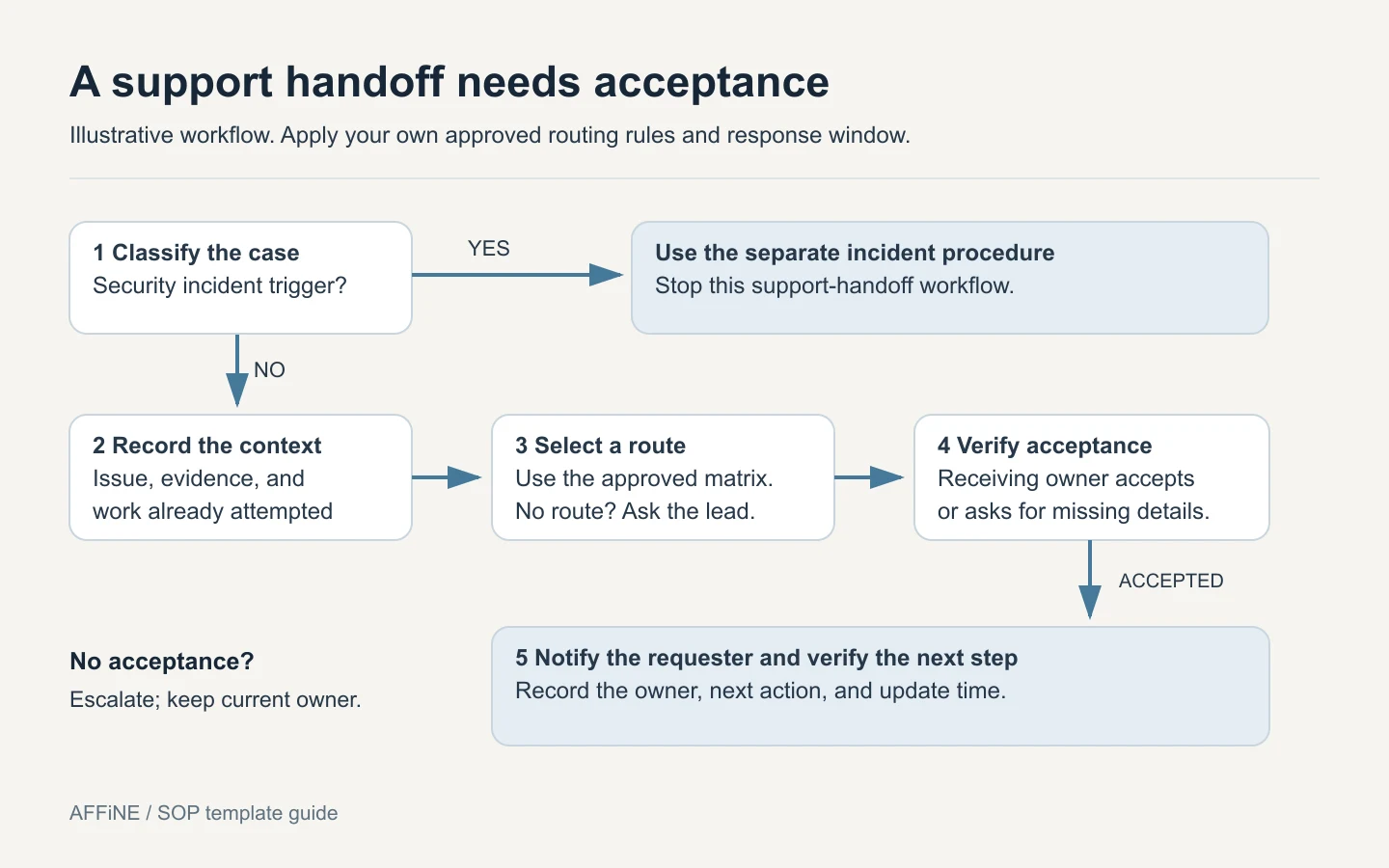
Figure: The example treats acceptance as a required checkpoint. Selecting a receiving queue alone does not complete the handoff.
How to turn the template into a working SOP
1. Observe one complete run
Walk through the task with someone who performs it. Capture the actual inputs, screens, handoffs, and exceptions. Identify the reader's required skills so the document gives enough detail without trying to replace training.
2. Define the start and finish
Write the trigger and completion criteria before writing the steps. “Handle customer issues” is too broad. “Route a case to a specialist and verify acceptance” has a clear endpoint. Split unrelated outcomes into separate SOPs.
3. Give every step an owner and an observable result
Write an action someone can perform and a result someone can check. Replace “process the request correctly” with a named action, its location, and the field or record that confirms success. Where a detailed screen sequence changes often, link a separate work instruction.
4. Write the exception route
Document what happens when an input is missing, access fails, a decision is unclear, or the result does not match expectations. State when to stop, who can resolve the problem, and what permits the work to resume.
5. Test the draft with a qualified colleague
Ask a colleague who has the required skills but did not write the draft to follow it. Record questions, missing access, ambiguous decisions, and steps requiring verbal explanation. Fix those points and repeat the affected steps before seeking approval.
6. Approve, publish, and set the review trigger
Record the approval and effective date, identify the current copy, and archive superseded versions according to your document policy. Set a review date and require an earlier review when a tool, owner, rule, or failure pattern changes.
For a broader walkthrough of documenting a process from scratch, see our step-by-step SOP writing guide.
The US EPA's Guidance for Preparing Standard Operating Procedures, published in April 2007, discusses review by experienced personnel, testing by someone other than the writer, revision control, and access to current copies in sections 2.1–2.6. It is a useful document-design reference in its environmental quality context, not a current universal compliance standard or certification for this template.
A practical test before you release an SOP
Use the following checklist during the trial run. These are editorial acceptance criteria for this template, not an industry certification. If a check fails, revise the relevant field and test it again.
| Check | Pass condition | If it fails |
|---|---|---|
| Find the current version | Reader can identify the approved copy, version, and owner | Add document control and a stable link |
| Start without guessing | Inputs, access, training, and trigger are clear | Add prerequisites and scope exclusions |
| Execute each step | Reader can perform the action with the available instructions | Add a specific action or linked work instruction |
| Handle an exception | Reader knows when to stop and whom to contact | Add the exception and resumption rule |
| Verify completion | A recorded result proves the outcome and handoff | Add evidence and acceptance criteria |
| Maintain the procedure | Owner knows the next review date and change triggers | Assign ownership and update the revision log |
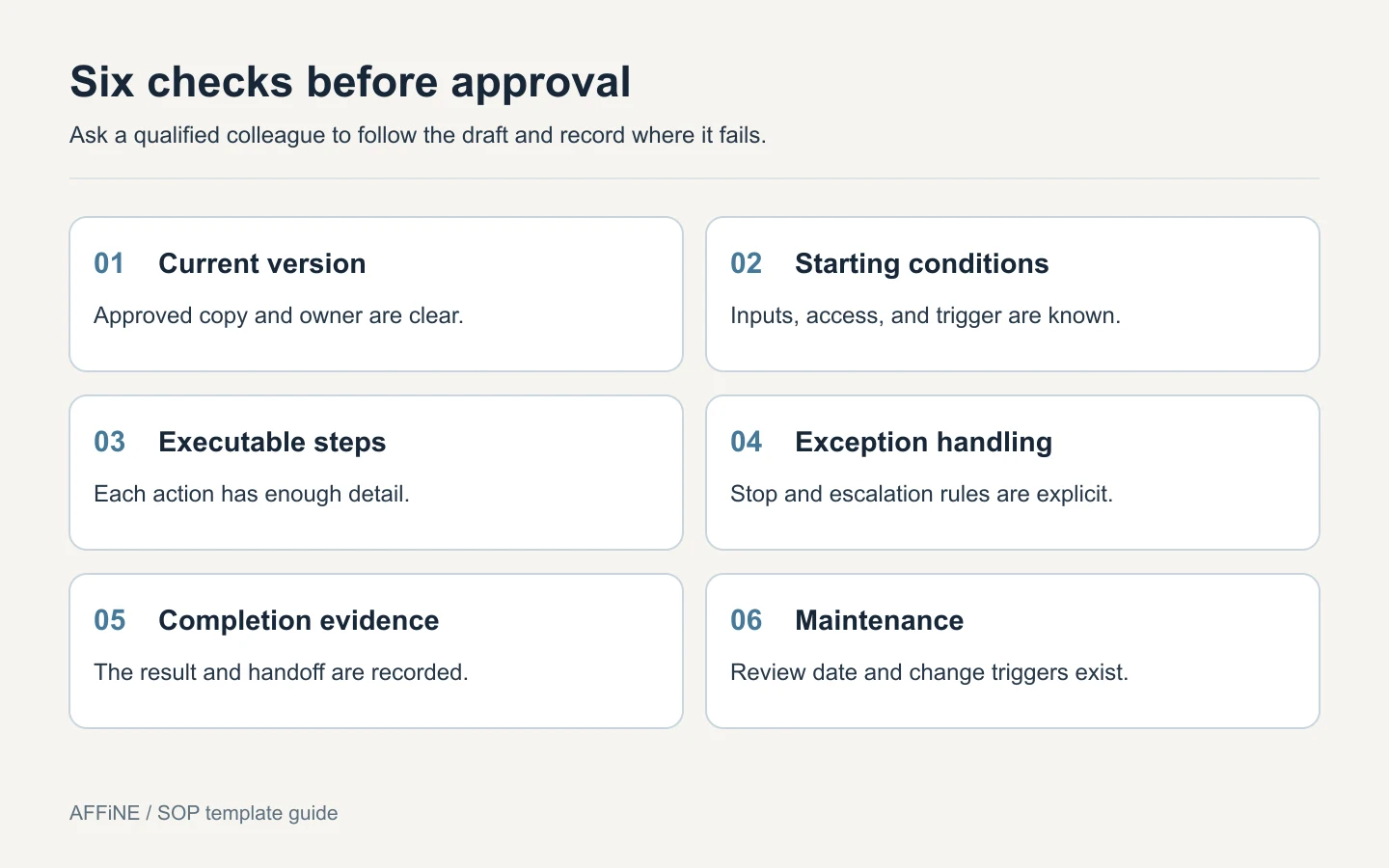
Figure: Test the procedure against observable conditions before marking it approved.
After adoption, track a small number of useful measures: trial runs requiring clarification, tasks returned because evidence was missing, and exceptions without a defined route. Compare similar tasks before and after a revision. A shorter document alone does not establish that the process improved.
Adapt the SOP template to your team
| Team or workflow | Add to the template | Example proof of completion |
|---|---|---|
| Employee onboarding | Role-specific access, equipment owner, and training links | Access verified and required training recorded |
| Content publishing | Editorial approval, asset rights, preview checks, and rollback owner | Approved version is accessible at the intended URL |
| Customer support | Routing matrix, handoff acceptance, and escalation window | Receiving owner accepts the case |
| Inventory checks | Item identifiers, count method, and discrepancy route | Count recorded and discrepancies assigned |
| Equipment or laboratory work | Approved technical method, qualifications, hazards, and required records | Evidence specified by the approved local procedure |
For regulated or safety-critical work, have the responsible specialist define and approve the relevant controls. Completing a generic template does not establish legal compliance, safe operation, or ISO certification.
Keep your SOP accessible in AFFiNE
AFFiNE combines documents and a visual canvas, which can be useful when a procedure needs both written instructions and a decision diagram. Start from the editable SOP template, then adapt the fields to the actual process.
Keep the approved instructions, exception diagram, and links to supporting material together. Treat owner, status, and approval fields as information your team must maintain; a label reading “Approved” does not itself enforce an approval workflow. Use the access and review controls your organization requires.
As the library grows, group procedures by the work people are trying to complete. These internal knowledge base examples show ways to organize departmental guidance and ownership. Link a specific SOP where someone starts the task, instead of relying only on a general resource index.
Editorial note: The blank template, worked example, diagrams, and release checklist on this page were prepared for this guide. The example has not been presented as a field-tested case study. AFFiNE is the publisher and one option for maintaining these documents; the downloadable template also works independently of AFFiNE. See our editorial policy.
Frequently asked questions about SOP templates
What should an SOP template include?
An SOP template should include a title and ID, version, owner, approver, purpose, scope, prerequisites, responsible roles, procedure steps, exceptions, completion criteria, records, and revision history. Add the safety, training, and regulatory details required for the specific process.
Can I use this SOP template in Word or Google Docs?
Yes. Download the Word file linked at the beginning of this guide and edit it in Word. For Google Docs, upload the file to Google Drive and open it with Google Docs. Review the table layout after conversion. You can also copy the blank template directly from this page.
What is the best SOP format for a small business?
Start with a step-by-step format for a task with one main sequence. Use a checklist for checks that trained staff already understand, a hierarchical format for detailed subtasks, and a flowchart when conditions change the route. Keep ownership and completion criteria in every format.
What is the difference between an SOP and a checklist?
An SOP explains the scope, ownership, actions, decisions, and expected outcome of a process. A checklist records whether specified checks or actions were completed. A checklist can form part of an SOP, but may not give enough instruction for someone unfamiliar with the task.
How often should an SOP be reviewed?
Set a review schedule based on the process's risk, frequency of change, and applicable requirements. Review sooner when tools, ownership, policies, or recurring exceptions change. Record the review even when no revision is needed; there is no single review interval suitable for every SOP.
Can AI write an SOP for my team?
AI can help organize notes and draft clear steps, but it cannot establish that an undocumented workflow is correct or approved. Give it verified process inputs, check every action and exception with the process owner, remove invented requirements, and test the draft before release.
![How to Write Your Own Standard Operating Procedure (SOP): A Step-by-Step Guide with 5 Best Free Tools [Templates & Examples]](/og.jpeg)