8 Free SOP Templates by Team, Format and Industry
An SOP template gives a repeatable process a fixed shape: who owns it, where it starts and ends, the steps, what to do when something goes wrong, and how you prove the work is done. This page collects 8 free SOP templates grouped by team, then shows how to pick an SOP format and adapt a template for manufacturing, restaurants, healthcare, or IT. Every template is free to copy into AFFiNE, and the blank template also comes as a Word file and a PDF. If you are writing a procedure from scratch, follow our guide on how to write an SOP, which walks through 8 steps and three complete examples.
8 free SOP templates at a glance
| # | Template | Best for | Format | Get it as |
|---|---|---|---|---|
| 1 | Blank SOP template | Any team writing its first procedure | Step-by-step with document control | Word, PDF, or AFFiNE |
| 2 | Universal business SOP template | Operations and company-wide processes | Step-by-step | AFFiNE |
| 3 | New hire onboarding SOP template | HR and hiring managers | Hierarchical | AFFiNE |
| 4 | Customer support response SOP template | Help desk and customer success | Step-by-step with escalation routes | AFFiNE |
| 5 | Technical deployment SOP template | Engineering, DevOps, and IT | Checklist with rollback steps | AFFiNE |
| 6 | Usability testing SOP template | Product and UX research | Step-by-step by phase | AFFiNE |
| 7 | LinkedIn marketing SOP | Marketing and paid social | Checklist plus weekly review | Guide with checklist |
| 8 | Internet outage SOP | IT and operations continuity | Flowchart with severity tiers | Guide with template outline |
You can also browse every SOP template on AFFiNE in one place.
What is an SOP template?
SOP stands for standard operating procedure: an approved, written set of steps for a recurring task. An SOP template is the empty structure you reuse for each new procedure. A completed SOP is one approved process written into that structure.
Whichever template you choose, check that it has a place for each of these fields:
- Document control: title, ID, version, owner, approver, and next review date.
- Purpose and scope: the outcome, where the procedure starts and ends, and what it excludes.
- Roles and prerequisites: who does the work and what must exist before step 1.
- Numbered steps: each with an owner and an expected result.
- Exceptions: stop conditions and who to escalate to.
- Completion evidence and records: how someone checks the work is done and where the proof is kept.
- Revision history: what changed, when, and who approved it.
If a template is missing one of these, add it before you publish. Teams usually skip the exception route and the completion evidence, and those gaps cause the most confusion during handoffs.
The 8 free SOP templates
1. Blank SOP template (Word, PDF, and AFFiNE)
Start here if no team template fits. The blank SOP template has fields for an SOP number, version, effective and review dates, purpose, scope, responsibilities, inputs, five numbered steps, quality checks, exceptions and escalation, references, approval, and revision history. It comes as an editable Word file, a printable PDF, and a filled example for employee account provisioning, so you can see what a finished entry looks like.
Best for: a first SOP, or any process that crosses several teams. Adapt it: add or remove steps to match the real process, and keep an acceptance check on every step.
2. Universal business SOP template
The universal business SOP template is a general page for documenting company-wide workflows in a shared knowledge base, such as purchase approvals, vendor onboarding, month-end close, or office procedures. Use it when several teams follow the same process and need one current version.
Best for: operations leads and small business owners. Adapt it: name one owner for each process, even when several teams use it.
3. HR: new hire onboarding SOP template
The new hire onboarding SOP template organizes onboarding from pre-boarding paperwork to 30-60-90 day milestones. It works best as a hierarchical SOP: each stage (before day one, day one, first week, first 90 days) holds numbered subtasks with an owner.
Best for: HR teams and hiring managers. Adapt it: tie every access request to an approved role access list, use a username generator when creating new employee accounts, and record who confirmed that each account works.
4. Customer support response SOP template
The customer support response SOP template holds approved response scripts, macros, troubleshooting paths, refund rules, and escalation routes for a help desk in one place.
Best for: support agents, team leads, and customer success managers. Adapt it: set response targets your team can actually meet, and make "the receiving owner accepts the case" the completion check for every escalation. The how-to guide linked above includes a complete escalation example.
5. IT: technical deployment SOP template
The technical deployment SOP template covers pre-deployment checks, database migrations, QA sign-off, rollback steps, and release communication.
Best for: engineering, DevOps, and IT teams that ship on a schedule. Adapt it: write down the condition that triggers a rollback and the person allowed to call it, so no one debates it during an incident.
6. Product: usability testing SOP template
The usability testing SOP template follows four phases: preparation (objectives, participants, and prototype), a moderation guide with a script and standard task instructions, insight synthesis with severity ranking, and a report of next steps.
Best for: product managers, designers, and UX researchers. Adapt it: add your consent wording and where recordings are stored and for how long.
7. Marketing: LinkedIn marketing SOP
The LinkedIn marketing SOP guide shows how to assign ad account owners and access levels, map the buying group before choosing audiences, run a launch checklist, and keep a weekly review with a decision log. The same structure works for other paid channels.
Best for: marketing teams and agencies that hand campaigns between people. Adapt it: replace the LinkedIn-specific checks with the settings of your own ad platform.
8. IT continuity: internet outage SOP
The internet outage SOP covers the first ten minutes after connectivity drops, severity tiers, a notification cascade for when chat and email are down, role-specific workflows, and post-outage reconciliation. It ends with a reusable outline.
Best for: IT, operations, and team leads at remote or hybrid companies. Adapt it: test the cascade with a short drill and record who did not receive the message.
How to choose an SOP format
Pick the format by the decisions someone makes while doing the work, not by how the document looks.
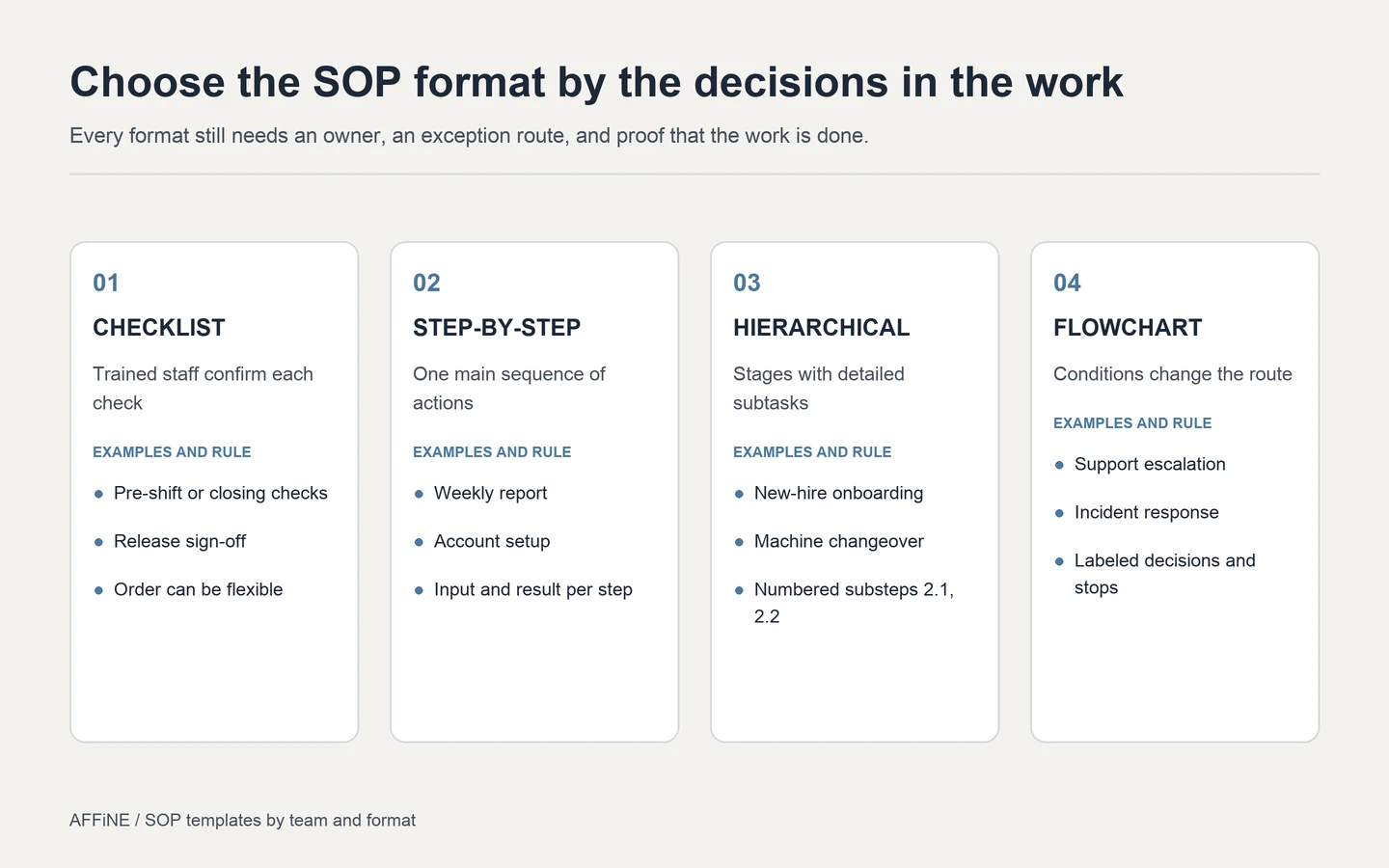
Figure: Every format still needs an owner, an exception route, and completion evidence.
| Format | Use it when | Example | Watch out for |
|---|---|---|---|
| Checklist | Trained staff confirm that each check is done | Closing checks, release sign-off | New staff may not know how to do each item |
| Step-by-step | Actions follow one main sequence | Weekly report, account setup | Long lists hide the steps that matter |
| Hierarchical | Stages contain several detailed subtasks | New-hire onboarding, machine changeover | Deep nesting becomes hard to scan |
| Flowchart | Conditions change the route | Support escalation, incident response | Unlabeled branches and missing stop points |
Screen recordings and video walkthroughs help with software tasks. Pair them with a written summary so people can search the steps and update them when the tool changes.
SOP templates by industry
The team templates above cover office work. For operational industries, start from the blank template and add the fields below.
| Industry | Add these fields | Typical SOPs | Who should approve |
|---|---|---|---|
| Manufacturing | Equipment ID, settings and tolerances, PPE, lockout steps, inspection points, nonconformance route | Machine changeover, line clearance, first-article inspection | Quality and safety leads |
| Restaurant and food service | Temperatures and times from your food safety plan, allergen controls, cleaning schedule | Opening and closing checks, receiving deliveries, cleaning | Kitchen or general manager |
| Healthcare and laboratory | Approved method reference, required qualifications, specimen and record handling, deviation reporting | Specimen handling, equipment calibration, patient intake | Qualified clinical or laboratory lead |
| IT and security | Systems and access levels, change ticket, rollback plan, incident severity | Access provisioning, deployment, backup and restore | IT or security owner |
| Retail and field service | Site, cash or stock handling, safety, customer handoff | Store opening, returns, site visits | Operations manager |
Manufacturing SOP outline
- Title, ID, version, and line or machine the procedure applies to.
- Safety: required PPE and the lockout or isolation steps that must be completed before work starts.
- Setup: settings, tolerances, and materials, each taken from the approved specification.
- Steps: numbered actions with the operator role and the expected result.
- Inspection: what to measure, how often, and the acceptance criteria.
- Nonconformance: stop the line, tag the affected parts, and notify the quality lead.
- Records: where checks, deviations, and sign-offs are logged.
Restaurant opening checklist outline
- Confirm that refrigeration and hot-holding equipment reads within the ranges in your food safety plan, and log the readings.
- Check deliveries and stock dates, and set aside anything past date or damaged.
- Confirm that handwashing stations and sanitizer are ready.
- Brief the shift on allergens, specials, and items that are not available.
- Record who completed the checklist and any exception that the manager must resolve.
These outlines show structure only. For regulated or safety-critical work, the controls, limits, and records must come from the regulations and quality system that apply to you, and a qualified person should approve them. A generic template does not make a process compliant.
SOP templates in Word, Excel, and Google Docs
Most teams keep SOPs in tools they already use. Each works, with trade-offs.
| Tool | Good for | Limits |
|---|---|---|
| Word | Formal controlled documents, printing, and signatures | Copies multiply; version control depends on file names |
| Google Docs | Shared drafting and comments | Tables can shift when you convert a Word file; permissions need care |
| Excel or Google Sheets | Checklists, logs, and step tables with a status column | Poor for explanations and diagrams |
| AFFiNE | Steps and a flowchart side by side in one workspace, with the templates above | Not a replacement for e-signature or training-tracking systems |
To use the blank Word template in Google Docs, upload the file to Google Drive, open it with Google Docs, and check the tables before you share it. Make a copy for each new procedure instead of editing the template itself.
If you need approval workflows, read receipts, or training records, compare dedicated SOP management software.
Which template should you start with?
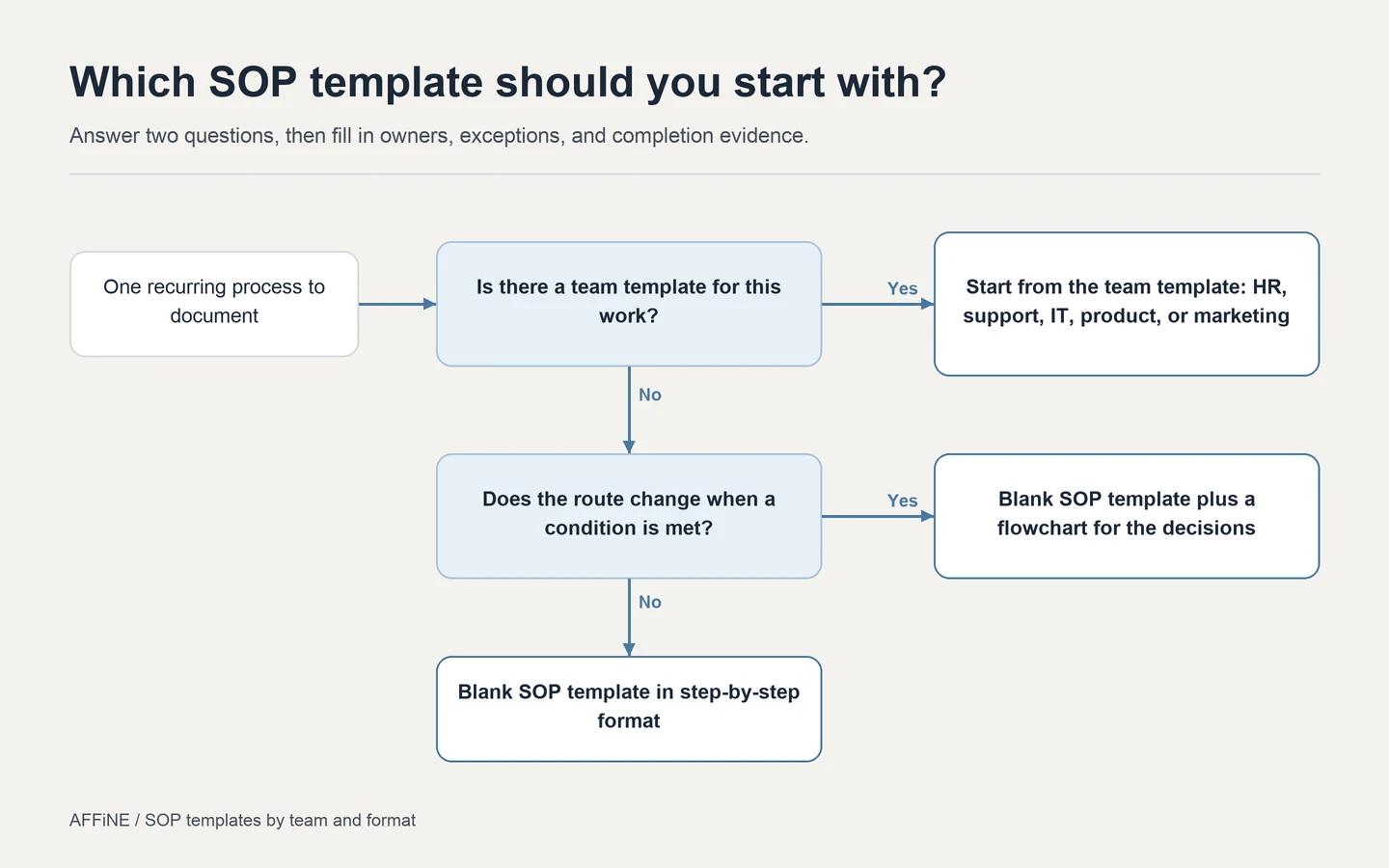
Figure: Two questions decide the starting point. The fields you fill in afterward are the same.
If one of the team templates matches the work, start there. If not, use the blank template, and add a flowchart only when a condition changes what happens next.
Frequently asked questions about SOP templates
What is an SOP template?
An SOP template is a reusable outline for documenting one repeatable process. It gives you fixed places for the owner, purpose, scope, steps, exceptions, completion evidence, and revision history, so every procedure on your team reads the same way.
Is there a free SOP template in Word?
Yes. The blank SOP template on AFFiNE comes as an editable Word file, a printable PDF, and a filled example. To use it in Google Docs, upload the Word file to Google Drive, open it with Google Docs, and check the table layout.
Can I make an SOP template in Excel?
Excel works well for checklist SOPs, audit logs, and step tables where each row is one action with an owner and a result. It is a poor fit for long explanations or flowcharts, so keep the narrative in a document and link the sheet from it.
What are the main SOP formats?
The four common formats are checklist, step-by-step, hierarchical, and flowchart. Use a checklist for checks trained staff already know, step-by-step for one sequence, hierarchical for stages with subtasks, and a flowchart when conditions change the route. Video can supplement any of them.
How long should an SOP be?
Most SOPs fit on one to three pages. If a procedure runs much longer, check whether it covers two processes with different owners or starting points, and split it.
What's the difference between an SOP and a workflow?
A workflow shows the path a task takes through a team or system. An SOP tells each person exactly what to do at each step of that path, including checks and exceptions. Many teams pair a one-page workflow diagram with an SOP for each critical step.
Who should write the SOP in a small business?
The person who does the task best should draft it. A second person should then follow the draft end to end without help, and every place they get stuck is a gap to fix. The owner or manager reviews it for accuracy and approves it.
Are free SOP templates enough for regulated work?
No. For manufacturing, food safety, healthcare, or laboratory work, use a template only for structure. The controls, records, and approvals must come from the regulations and quality system that apply to you, and a qualified person should approve them.
Next step: pick a template and fill it in
Pick the template that matches your team, write one real procedure into it, and ask someone who has not done the task to follow it. Fix every place they get stuck, then publish it with an owner and a review date. AFFiNE keeps the written steps and the decision diagram in the same workspace, so you can start from any template above and adapt it as the process changes.
Editorial note: AFFiNE publishes this page and makes the templates listed here. The industry outlines and diagrams were prepared for this guide and are not a substitute for the regulations or quality system that apply to your work. See our editorial policy.