Executive meeting minutes are the official record of a leadership or board meeting: who attended, what the group decided, and who owns each follow-up and by when. This page gives you the AFFiNE template, a filled quarterly strategy meeting example you can copy, and blank and filled Word and PDF versions.
What executive meeting minutes record
Minutes sit between private meeting notes and a transcript. Notes belong to one person and can be rough. Minutes are shared, checked by the group, and kept as the record. For an executive team, that record usually covers who was present, the decision on each agenda item, anything deferred, and the actions assigned.
Board meeting minutes follow the same pattern with more formality. Many boards work under Robert's Rules of Order or their own bylaws, which can set what the minutes must contain and how they are approved. Check those rules before you use this template for a board.
What the AFFiNE template includes
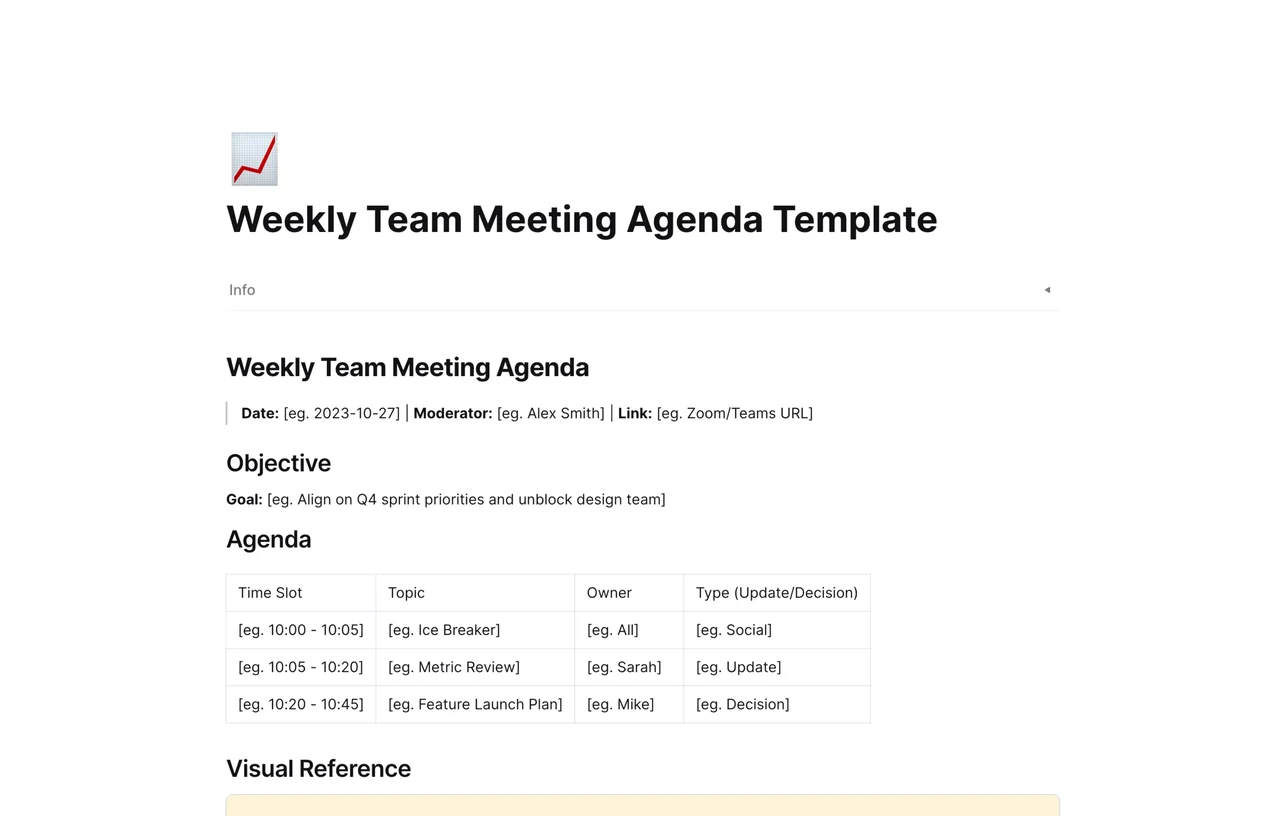
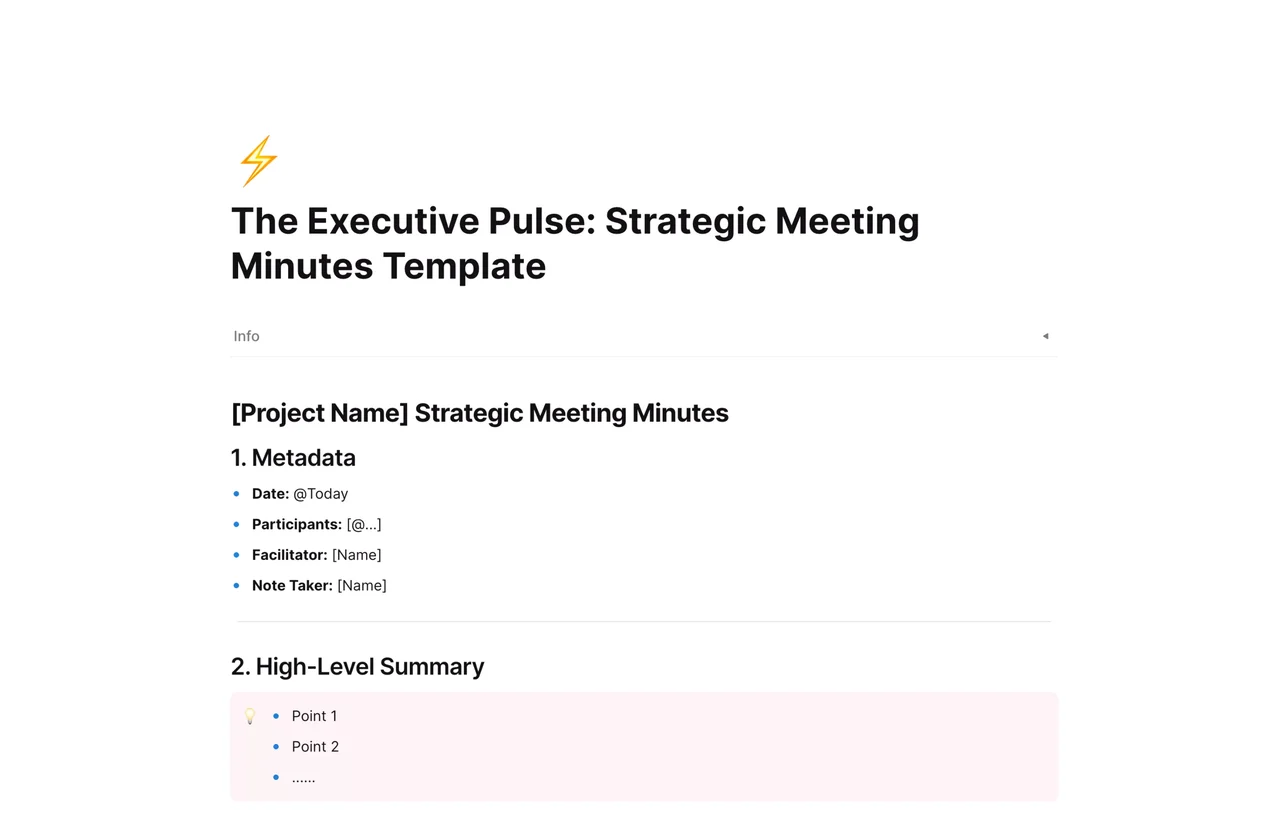
The AFFiNE template is one page titled "[Project Name] Strategic Meeting Minutes", with five numbered sections and a short AI guide:
1. Metadata. Date (an @Today date), Participants (mention teammates with @), Facilitator, and Note Taker.
2. High-Level Summary. Bullet placeholders for the outcome, placed at the top for readers who only skim.
3. Agenda & Discussion Points. One bullet per topic, with nested bullets for key insights, potential risks, and alternatives considered.
4. Key Decisions. Checkbox items in the form "Decision A: Description of the final choice."
5. Action Items. An Actions database with Task Description, Owner (a member field), Due Date, and Status columns and three sample tasks. Status has two options, Not Started and In Progress, so add a Done option when you set it up.
AFFiNE AI guide. Steps for using Summarize on highlighted text and for asking questions about the page, from a selection or from the AI sidebar. Its screenshots show a different AFFiNE note-taker page, not this template.
The template has no fields for absent members, the next meeting, or approval. The Word and PDF downloads add a Next meeting section and an Approval section; add them to your AFFiNE copy if you need them.
Filled example: a quarterly strategy meeting
Illustrative example: Lumen Freight, its people, and every figure are fictional. The example follows the template's five sections in order.
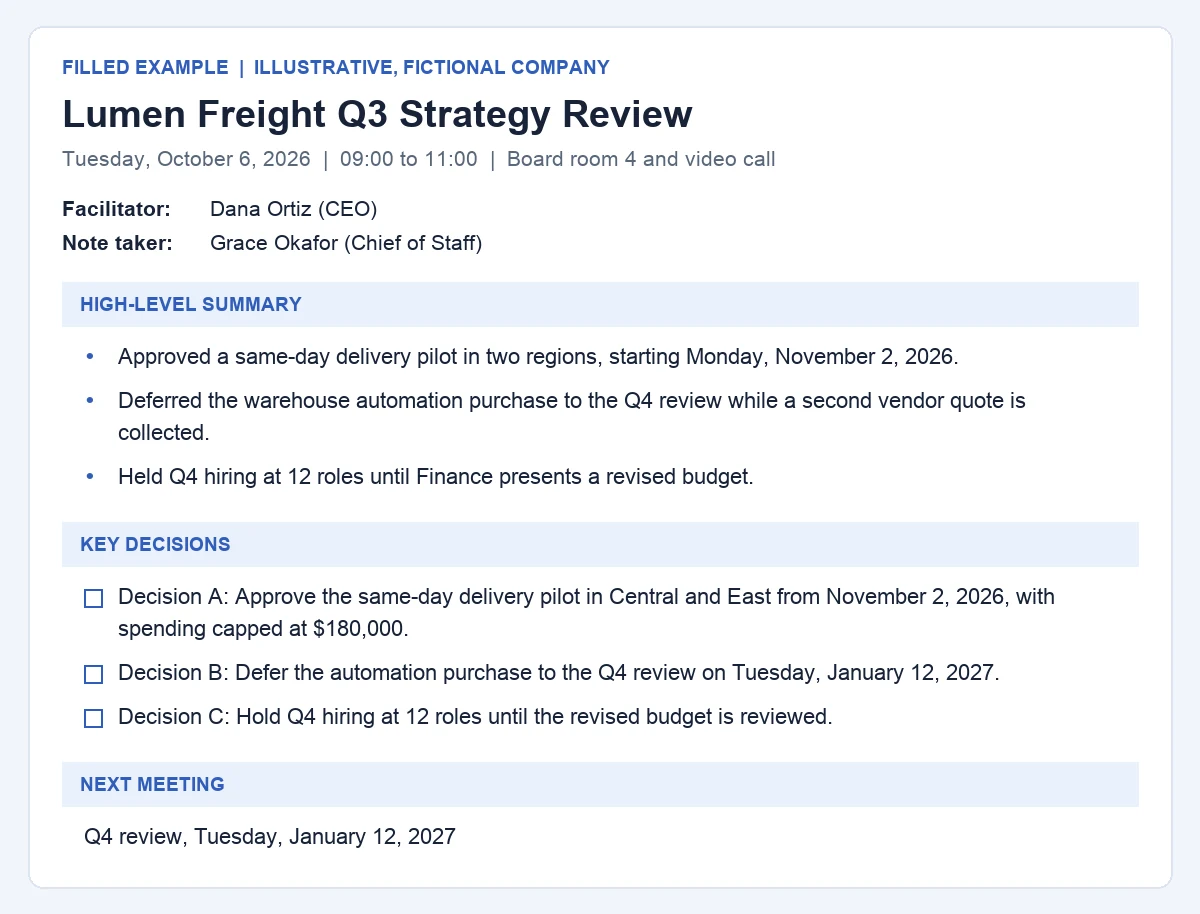
The filled example's summary and decisions, as they appear in the downloads.
1. Metadata
Date: Tuesday, October 6, 2026, 09:00 to 11:00, Board room 4 and video call
Participants: Dana Ortiz (CEO), Aisha Khan (COO), Rafael Moreno (VP Finance), Leo Martins (VP Sales), Mei Watanabe (CTO)
Facilitator: Dana Ortiz (CEO)
Note Taker: Grace Okafor (Chief of Staff)
2. High-Level Summary
Approved a same-day delivery pilot in two regions, starting Monday, November 2, 2026.
Deferred the warehouse automation purchase to the Q4 review while a second vendor quote is collected.
Held Q4 hiring at 12 roles until Finance presents a revised budget.
3. Agenda & Discussion Points
Point 1: Q3 results against plan
Key insight: Revenue finished 4% below plan; the gap traces to two lost accounts in the North region.
Potential risk: Further North region churn in Q4 if service issues are not fixed.
Point 2: Same-day delivery pilot
Key insight: Operations can cover the Central and East regions with the current fleet.
Potential risk: Driver availability during the December peak.
Alternatives considered: A national launch in January 2027, or a courier partnership.
Point 3: Warehouse automation
Key insight: Only one vendor quote has been received.
Alternatives considered: Leasing the equipment instead of buying it.
4. Key Decisions
Decision A: Approve the same-day delivery pilot in Central and East from November 2, 2026, with spending capped at $180,000.
Decision B: Defer the automation purchase to the Q4 review on Tuesday, January 12, 2027.
Decision C: Hold Q4 hiring at 12 roles until the revised budget is reviewed.
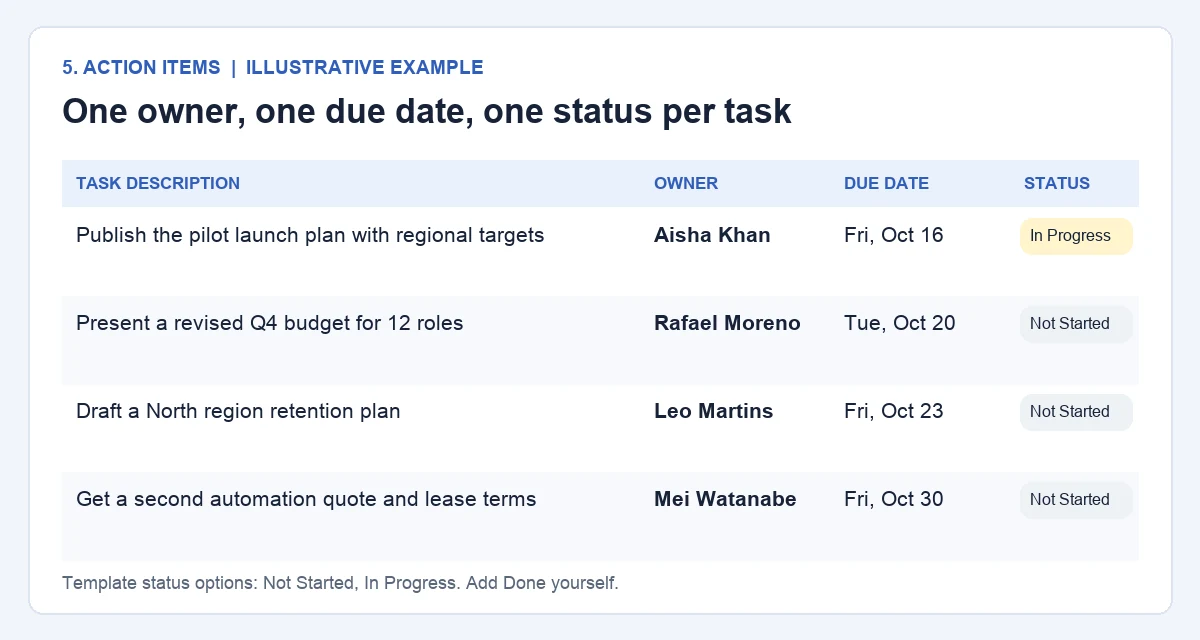
5. Action Items: the four tasks from this meeting are in the action item table below.
These files are a separate example. Use this template opens the original AFFiNE template, which has the placeholder text, not the Lumen Freight content.
What to record and what to leave out
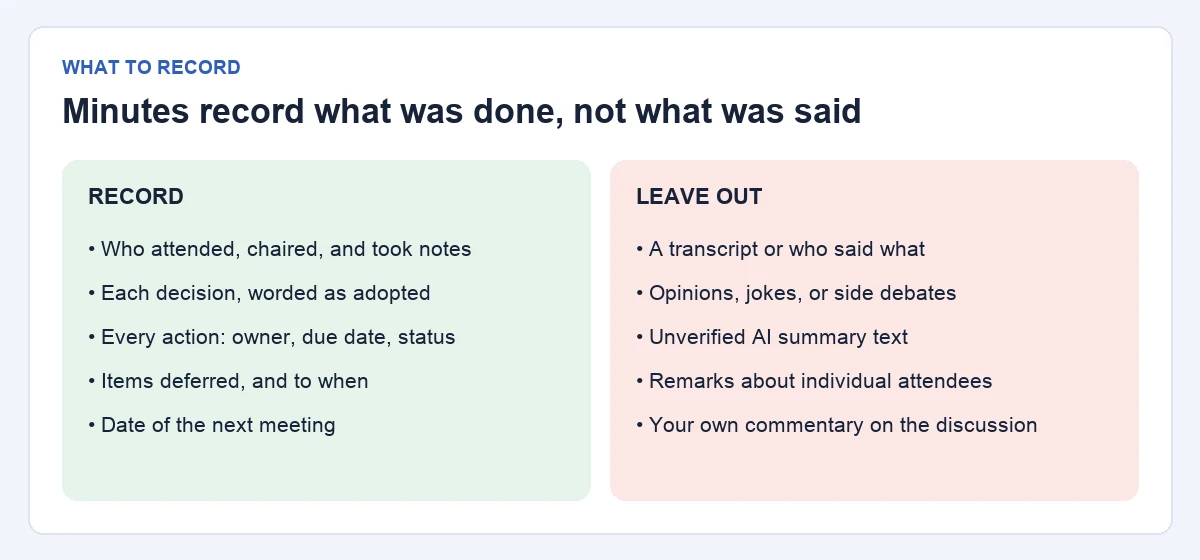
Robert's Rules of Order puts it plainly: minutes are "a record of what was done at a meeting, not a record of what was said" (Robert's Rules Association FAQ, citing RONR 12th ed. 48:2). Even if your leadership team does not follow parliamentary procedure, that rule is a useful filter.
Record: who attended, who chaired, and who took the minutes; each decision in the words the group agreed; every action with an owner and due date; items deferred and the date they return; the next meeting.
Leave out: a transcript or who said what; opinions, side debates, and jokes; remarks about individual attendees; your own commentary; any AI summary text you have not checked.
The template's "Key insight" and "Potential risk" bullets invite discussion notes. Keep each to one line that explains a decision or a risk the group acknowledged, and move longer analysis to a linked page.
Action item table: owner, due date, status
Task description
Owner
Due date
Status
Publish the pilot launch plan with regional targets
Aisha Khan
Fri, Oct 16, 2026
In Progress
Present a revised Q4 budget for 12 roles
Rafael Moreno
Tue, Oct 20, 2026
Not Started
Draft a North region retention plan
Leo Martins
Fri, Oct 23, 2026
Not Started
Get a second automation quote and lease terms
Mei Watanabe
Fri, Oct 30, 2026
Not Started
One owner per task. Name a person, not a team. In AFFiNE the Owner column is a member field, which picks people from your workspace.
A real date. "Next week" is not a due date.
A verb and a deliverable. "Draft a retention plan" can be checked; "Look into churn" cannot.
Review status first. Open the next meeting by walking through this table.
How to use the template in AFFiNE
Add the template. Click Use this template to copy it into your workspace, then replace "[Project Name]" with the meeting name.
Fill in the metadata before the meeting. Set the date, mention participants with @, and name a facilitator and a separate note taker.
Load the agenda. Add one Point bullet per agenda item so notes land under the right topic.
Record each decision as it is made. Write the agreed wording in Key Decisions, not only in the discussion bullets.
Log actions in the Actions database. Give each row an owner, a due date, and a status before the meeting ends.
Write the summary last. Write three bullets yourself, or highlight your notes, click Ask AI, choose Summarize, and edit the result.
Summarize works on the text you highlight, so it can only reflect what the note taker wrote down. It does not fill in the Actions database or decide which points were decisions. The AI panel itself warns that AI outputs can be misleading or wrong, so check names, figures, and decision wording before you share the minutes.
Approving and distributing the minutes
Circulate a draft quickly. In the example, Grace Okafor sends the draft the next day and asks for corrections within a week.
Approve at the next meeting. Under Robert's Rules, corrections made at that point go into the text being approved, and the new meeting's minutes simply note that the earlier minutes were approved "as corrected" (Robert's Rules Association FAQ, question 16).
Keep one approved version. Mark the page as approved and keep later edits out of it. If a correction is needed after approval, record it at a later meeting instead of quietly changing the text.
Share with the right people. Send the approved minutes to attendees and anyone who owns an action. Keep sensitive items, such as personnel or deal details, in a separate page with narrower access.
Formal board minutes: this template has no fields for quorum, motions, who moved or seconded them, or vote counts. Add them, and follow your bylaws or legal advice on what the record must include.
What is the difference between meeting minutes and meeting notes?
Meeting notes are informal and usually personal. Minutes are the shared record of attendance, decisions, deferred items, and assigned actions that the group checks and approves.
What should executive meeting minutes include?
The date, attendees, facilitator, and note taker; a short summary; the outcome of each agenda item; the decisions in the words agreed; and action items with one owner, a due date, and a status.
Can I use this as a board meeting minutes template?
Yes, as a starting point. Add quorum, motions, who moved and seconded them, and the vote result, and check your bylaws for anything else your board must record.
Should minutes record who said what?
Usually not. Robert's Rules treats minutes as a record of what was done, not what was said. Record the decision and, if useful, a one-line reason, rather than each person's comments.
Can AFFiNE AI write the minutes for me?
Not on its own. Summarize can condense notes you highlight, and the AI sidebar can answer questions about the page. A person still has to record decisions, assign owners, and check the summary before it is shared.
Sources
Robert's Rules Association, Frequently Asked Questions, questions 15 and 16, citing Robert's Rules of Order Newly Revised, 12th edition, 48:2, 48:4(5), and 48:15. Accessed November 1, 2026.