Free Online Sticky Notes: 8 Tools Compared (2026)
Disclosure: AFFiNE publishes this article, and AFFiNE is one of the tools it covers. How we review products
Free online sticky notes range from no-sign-up canvases to account-based team whiteboards. For the quickest draft, tldraw opens immediately and exports before you leave; for a temporary guest workshop, Miro Lite needs no account. Choose Google Keep, Miro, FigJam, Canva, Padlet, or AFFiNE when syncing, permissions, richer exports, or longer-lived work matters.
Quick picks: compare all eight tools, see our completed tldraw task, download the CSV worksheet, or choose by use case.
Updated September 28, 2026. We completed one no-account create–organize–share-attempt–export task in tldraw. The other product details are documentation checks, not hands-on tests. We did not create accounts, start trials, or buy plans. AFFiNE publishes this guide and therefore has a commercial interest in the AFFiNE option; it is not ranked as a universal winner.
Free online sticky notes compared
An online sticky-note tool lets you capture short ideas as movable cards. The important differences start after capture: whether the board survives the browser session, whether guests can edit without an account, who can discover a shared link, and whether you can take the work elsewhere.
The table uses current official documentation accessed September 28, 2026. “Not confirmed” means the cited material did not establish the capability; it does not prove the capability is impossible.
| Tool | Best for | Free limit | Account and guest access | Collaboration | Saving | Export | Mobile | Sharing and privacy boundary | Verification |
|---|---|---|---|---|---|---|---|---|---|
| tldraw | Immediate personal capture | No numeric note limit confirmed in our task | No account to create; the current share control required sign-in | Anonymous sharing was blocked in our test | Browser workspace behavior; export before relying on it | PNG, SVG in the tested UI | Web; mobile behavior not tested | Do not assume a no-login board is synced or shareable | Hands-on, Sep 28 |
| Miro Lite | Temporary no-account group session | Basic whiteboard; treat 24 hours as the safe working limit | No registration for creator or participants | Anyone with the link receives the same edit access | Editable for 24 hours; official pages disagree on whether a seven-day locked recovery window follows, so export before 24 hours | JPG, PDF | Browser; tablet pen input documented | The link acts as edit access; unsuitable for confidential notes | Official docs only |
| Google Keep | Synced personal notes and reminders | No note-count limit stated in the cited help | Google account; invite named people or a Google Group | Shared editing; live behavior not independently tested | Saved to the Google account | Google Takeout archive, not a one-click board export | Android and iOS apps | No public edit-link workflow in the cited collaborator help | Official docs only |
| Miro Free | Signed-in team workshops | 3 active team boards; unlimited team members | Members need accounts; public visitors can view but cannot edit or comment on Free | Real-time editing for team members | Cloud saved; boards outside the 3 active set become read-only | Low-resolution JPG/PDF; CSV is documented across plans | iOS 16+ and Android 7+ | No private boards on Free; every team member can see team boards | Official docs only |
| FigJam Starter | Design workshops and sticky-data export | 3 FigJam team files; unlimited drafts; 30-day history | Account for free team editing; no-account Open Sessions are a paid-plan feature | Real-time collaboration for signed-in participants | Figma cloud; team-file cap applies | PNG, JPG, PDF; stickies/tables to CSV; local .jam copy | View/comment on phones; FigJam editing on iPad | Starter team files are visible to plan members; private folders require paid access | Official docs only |
| Canva Whiteboards | Visual boards that become presentations | Canva describes free unlimited whiteboards and canvas space | Creator uses an account; anyone-link collaborators can edit without logging in when enabled | Real-time collaboration | Saved to the creator's Canva account | PNG, JPG, PDF | Web, desktop, and mobile apps | Anyone-link editing is convenient but broad; keep the default private for sensitive work | Official pages only |
| Padlet Neon | Classroom or asynchronous contribution wall | 3 padlets; unlimited posts; 20 MB per attachment | Account to create; visitors may post without logging in if the owner allows it | Real-time collaboration documented | Saved in the creator's account | PNG, PDF, CSV, XLSX, attachment ZIP for boards | Android 10+ and iOS 15.1+ | On individual Neon accounts, new padlets default to Secret; organization administrators may set different defaults | Official docs only |
| AFFiNE | Documents and a canvas in one local-first workspace | Unlimited local workspaces; Cloud Basic: 10 GB, 10 MB/file, 3 members, 7-day history, 3 logged-in devices | No Cloud account for a local workspace; sign-in for Cloud sync and collaboration | Up to 3 people per free Cloud workspace | Local on device or optional Cloud sync | Markdown/HTML documented for pages; current whiteboard export formats not confirmed in cited docs | Web, iOS, Android, macOS, Windows, Linux | Guest-link permissions were not confirmed in the cited material; validate before external sharing | Official docs only; publisher product |
If your real requirement is a full workshop platform rather than sticky notes, compare full online whiteboard platforms. If you need a long-lived personal knowledge system, the broader free note-taking apps comparison addresses a different job.
How we checked the tools
We used a narrow, repeatable standard:
- Start friction: can a new user create a note without an account?
- Free boundary: how many boards, files, members, or uploads does the free option allow?
- Guest behavior: can a visitor view, comment, or edit, and must that visitor register?
- Persistence: is the work tied to one browser, a time-limited session, a local device, or an account?
- Exit route: can the user export an image, PDF, structured CSV, document, or archive?
- Device coverage: is mobile a full editor, a limited companion, or merely a browser route?
- Access risk: does a public link behave like a key, and can free users create private boards?
We performed the complete task only in tldraw because it allowed an immediate anonymous start. For account-gated products, we stopped at the account boundary and used official product, pricing, and help pages. A claim such as “official docs only” is deliberately weaker than “hands-on.”
Hands-on test: create, group, try to share, and export in tldraw
On September 28, 2026, we opened tldraw in a fresh browser session without signing in. We created six fictional notes, arranged them into three color-coded columns, and used the labels Capture ideas, Add sources, Group by theme, Choose owner, Review together, and Export archive.
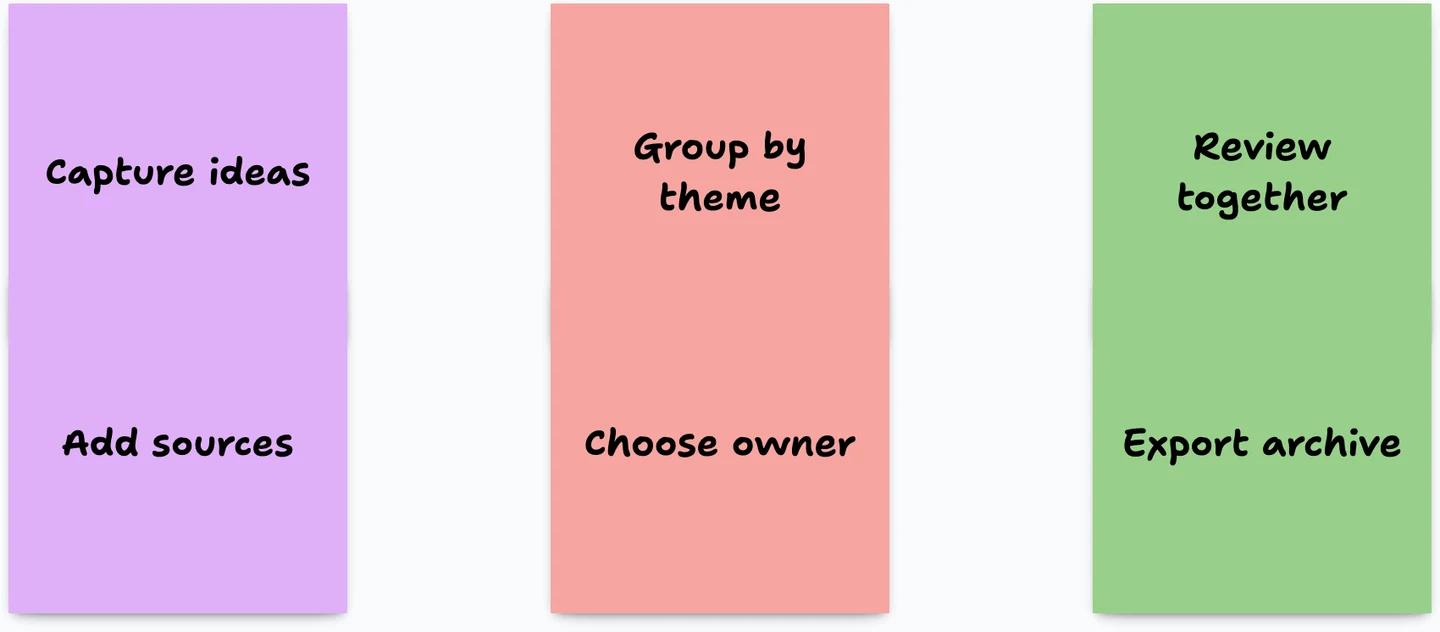
Figure: A web-optimized copy of the PNG exported from our anonymous tldraw task on September 28, 2026. The content is fictional and is not a customer board.
Creating, moving, resizing, recoloring, and grouping the notes worked without an account. The important constraint appeared when we tried the next step: the top-right control read Sign in to share. The anonymous workflow therefore passed capture and organization but did not pass no-account collaboration.
The export menu in that session offered SVG and PNG. We exported a valid PNG; the source measured 1700 × 746 before web optimization into the image shown above. This is useful for a quick visual archive, but it is not a structured list of notes, owners, or decisions. Use the CSV worksheet below when you also need transferable data.
We did not test account sync, multiplayer editing, mobile editing, or paid features. The result should be read as a completed no-account task with a documented share boundary, not a full product review.
No sign-up, saved, synced, and private are different claims
“No sign-up” describes entry friction. It says nothing by itself about persistence, collaboration, encryption, search visibility, or who controls the board later.
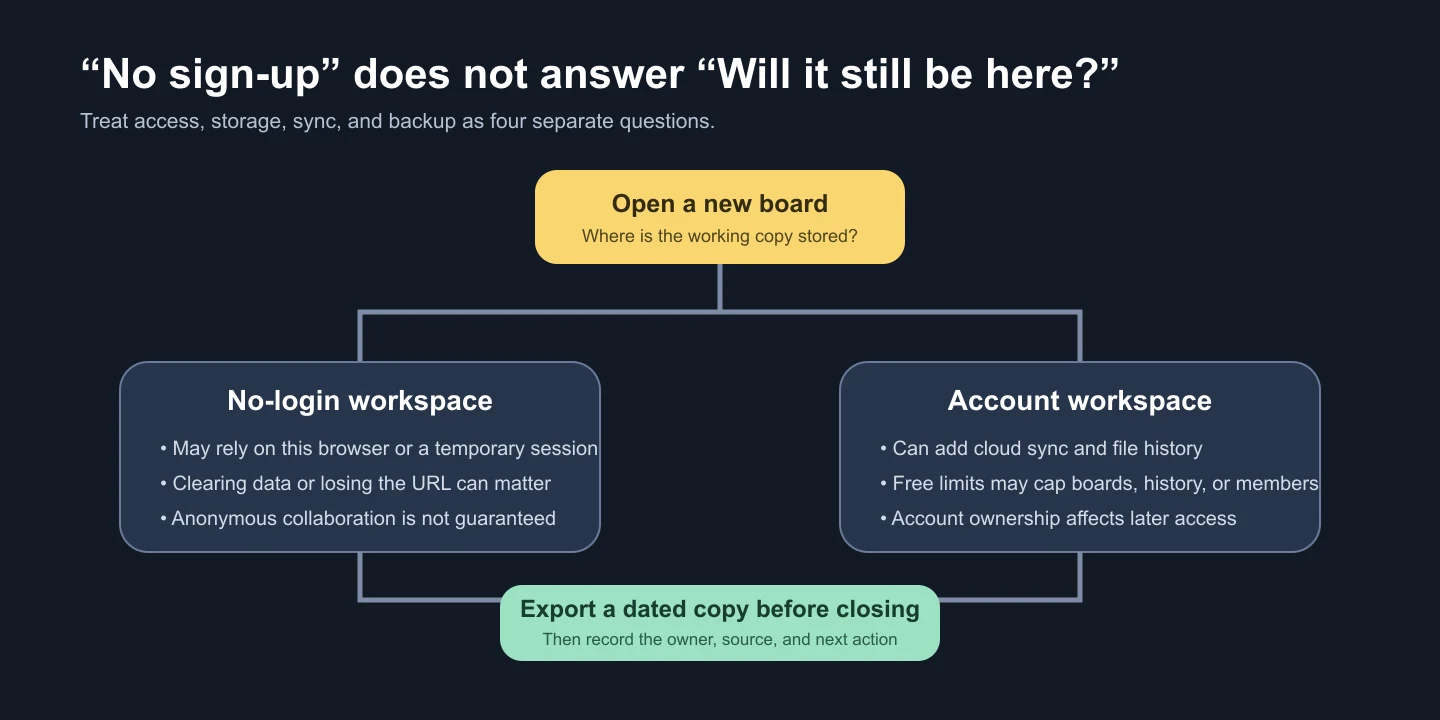
Figure: An illustrated storage decision, not an application screenshot. Confirm the current product behavior before treating a browser session or Cloud account as the authoritative copy.
For a no-account tool, ask where the working copy lives and what makes it disappear. Miro's official pages agree on a 24-hour working period but disagree about what follows. The Help Center says the board becomes locked for seven days before permanent deletion if it is not saved, while the Miro Lite product page says it is deleted after 24 hours. Treat 24 hours as the safe working limit and export or save the board before then. In tldraw, we verified export but did not establish a durable cross-device save promise.
For an account tool, ask who owns the account, what happens when a person leaves the team, and which free limits can make older work read-only. Cloud save improves continuity; it does not automatically produce a usable archive.
Privacy is another decision. A board can be unlisted yet accessible to anyone who receives its link. Do not put credentials, health information, unreleased financials, or personal student data on a guest-editable board merely because search engines cannot find it.
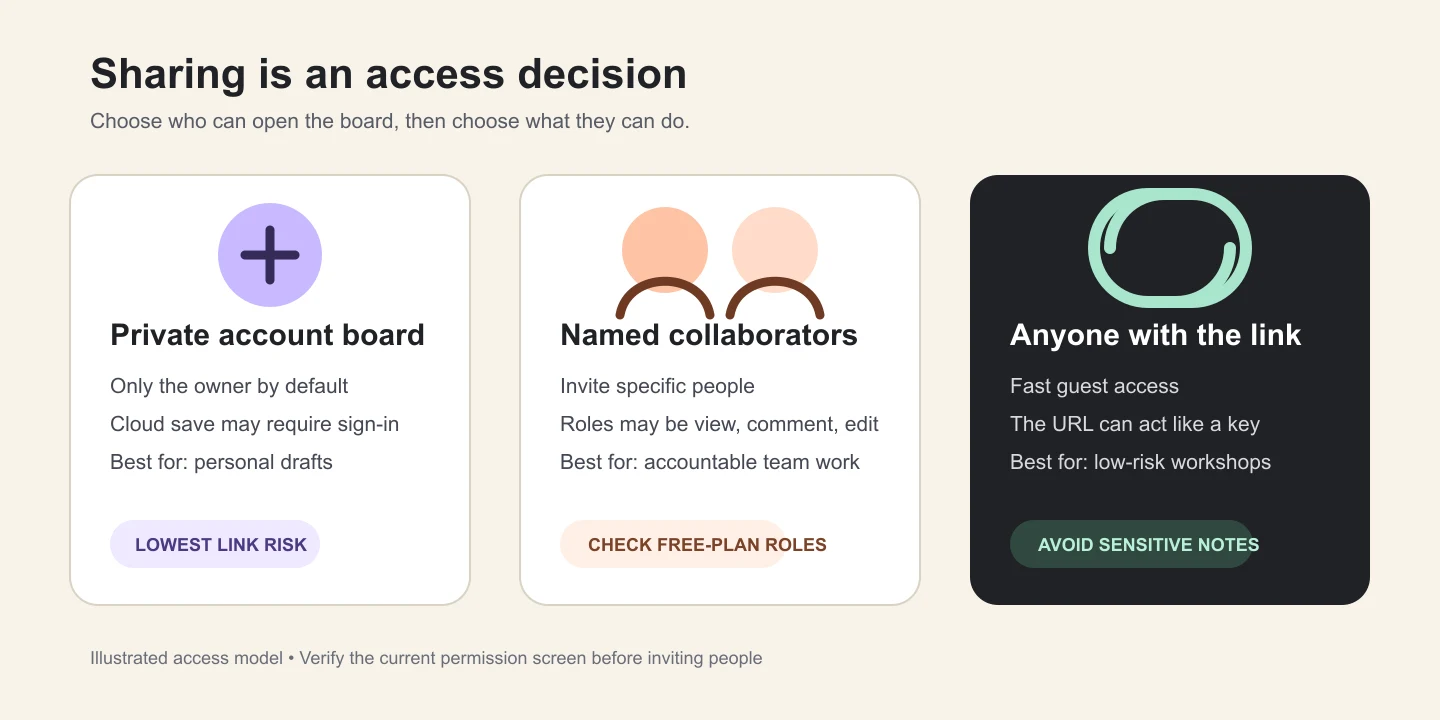
Figure: An illustrated access model, not product UI. Recheck the actual permission screen before inviting participants.
Use named collaborators when accountability and revocation matter. Use anyone-link access for low-risk, time-boxed participation, then disable the link or move the decisions to the system of record. For a larger rollout, the team collaboration tools playbook covers ownership, permissions, and launch checks beyond a single board.
Which free sticky-note tool fits each use case?
tldraw: fastest verified anonymous capture
Choose tldraw when you want to sketch and group notes immediately, you do not need anonymous collaboration, and PNG or SVG is an adequate exit. Its note shape is a true canvas object rather than a synchronized personal reminder.
The strength is the short path from blank canvas to visual structure. The weakness in our test was equally clear: sharing required sign-in. Export before leaving, and do not infer account sync or mobile behavior from the anonymous desktop task.
Miro Lite: no-account collaboration with a 24-hour clock
Miro Lite is the clearest option here for a temporary group session without registration. Its official web-whiteboard help says participants who receive the link can edit immediately during a 24-hour working period.
That convenience creates two boundaries. First, everyone with the link has the same edit access; there are no granular visitor roles in this mode. Second, Miro's first-party pages conflict on what happens after 24 hours: the Help Center describes a seven-day locked recovery window, while the Miro Lite product page says the board is deleted after 24 hours. Export or save before 24 hours and do not use it as the only record of a decision.
Google Keep: synced personal notes with named collaborators
Google Keep fits short personal notes, reminders, labels, and lightweight sharing better than a workshop wall. The Keep collaborator help supports inviting a person or Google Group, and collaborators can edit the note.
This is not a public guest-board workflow. It requires a Google account, and the cited help does not offer view-only versus edit roles for a collaborator. Google Takeout provides an account archive, but that is different from exporting a single visual board to PNG, PDF, or CSV.
Miro Free: signed-in workshops with three active boards
Miro Free supports a team with unlimited members but only three active team boards. Its Free Plan documentation also says free teams have no private boards: all team members can see all boards.
Public visitors can view a free board, but visitor commenting and editing require a paid or Education plan. Free exports are low-resolution JPG or PDF; the official export help also documents CSV across plans. Choose Miro Free when signed-in team members, templates, and live facilitation matter more than anonymous editing or private sub-projects.
FigJam Starter: workshops that need CSV from stickies
FigJam Starter allows three FigJam files in a team folder, unlimited drafts, and 30 days of version history. The Starter plan overview is important here: unlimited drafts do not create unlimited shared team files.
FigJam has the strongest structured sticky-note exit in this comparison. The official export guide supports PNG, JPG, PDF, and CSV for stickies or tables. However, no-account Open Sessions are a paid-plan feature with 24-hour session periods, not a free Starter capability. On mobile, phones support viewing and commenting; iPad supports FigJam editing.
Canva Whiteboards: visual boards that become shareable designs
Canva Whiteboards suits teams that want sticky notes next to graphics, diagrams, or presentation-ready material. Canva's whiteboard page describes free unlimited whiteboards and canvas space, while its sticky-notes page lists PDF, PNG, and JPG downloads.
The creator needs a Canva account. When the owner enables anyone-link editing, collaborators can make changes without logging in. That is efficient for a low-risk session, but it broadens access to whoever receives the URL. Leave the design private until the board is ready and avoid sensitive data on an open edit link.
Padlet Neon: asynchronous contribution with practical exports
Padlet's free Neon plan allows three padlets, unlimited posts, and 20 MB per uploaded attachment. It works well when people contribute at different times and the owner wants a wall rather than an infinite-canvas workshop. For live lessons on a shared canvas, see our picks of free whiteboards for teachers.
The owner needs an account, but visitors can post without logging in when that permission is enabled. On individual Neon accounts, Padlet says new padlets default to Secret: the board is not public or search-indexed, yet people with the link can receive reader, commenter, or writer access. Organization administrators may configure different defaults. Its export help documents PNG, PDF, CSV, XLSX, and an attachment download for boards. Anonymous visitors may lose the ability to edit or delete their own posts after closing the page, so set expectations before collecting contributions.
AFFiNE: local documents and an Edgeless canvas together
AFFiNE is useful when sticky-note thinking should remain beside long-form notes, linked pages, and a visual canvas. A local workspace can be used without enabling Cloud. The free pricing page lists unlimited local workspaces and Doc/Edgeless editing; Cloud Basic includes 10 GB, files up to 10 MB, up to three members per workspace, seven days of history, and three logged-in devices.
Those limits make AFFiNE a reasonable option for an individual or very small group, not an anonymous workshop recommendation. The cited documentation confirms Markdown and HTML export for pages but did not establish current whiteboard export formats or guest-link roles. Validate those exact actions in your environment before choosing it for external participants. See AFFiNE's collaborative whiteboard for the product context, or use brainstorming-ready whiteboard templates once the access model is settled.
Download a sticky-note board worksheet and example
A canvas image preserves the arrangement. A CSV preserves the notes as rows that can be sorted, assigned, and archived. Use both when a workshop produces decisions.
Download the two-row sticky-note board template CSV · Download the fictional filled example
The files use these columns:
| Column | What to record |
|---|---|
| Note ID | A stable short identifier such as N1 |
| Note | One idea, question, or action |
| Group | The theme, lane, or cluster |
| Owner | The person responsible for the next action |
| Status | Captured, in review, decided, or done |
| Decision or next step | The outcome that should survive the workshop |
| Due date | An optional ISO date |
| Source or context | A meeting name, document, or link |
The filled file uses expanded versions of the same six fictional labels as the tldraw task. It contains no customer data, formulas, macros, automation, or measured performance. It is a transfer and backup worksheet, not a universal import format for every product.
A 15-minute sticky-note workflow that ends with a record
- Define the question — 1 minute. Write the decision or problem at the top. A board titled “ideas” invites unrelated notes; “How can we reduce first-week setup friction?” gives contributors a boundary.
- Capture silently — 3 minutes. Put one idea on each note. Do not discuss or color-code yet. Short, independent notes are easier to move and de-duplicate.
- Group and label — 3 minutes. Move similar notes together and give each cluster a plain-language name. Preserve a minority idea rather than forcing it into the largest group.
- Clarify and de-duplicate — 2 minutes. Ask the author what an ambiguous note means. Merge true duplicates, but keep a specific example as context.
- Choose — 2 minutes. Vote, rank, or ask the named decision-maker. Record the selection criteria; a pile of popular notes is not yet a decision.
- Assign — 2 minutes. Convert each chosen note into a next action with one owner. If the work now needs stages, move it into free Kanban board templates.
- Export and close — 2 minutes. Save an image or PDF for the visual context, then copy the approved notes into the CSV or system of record. Include the date, owner, and source URL.
This workflow is editorial guidance, not a claim that every group finishes in exactly 15 minutes. Increase capture and discussion time for complex or sensitive decisions.
Export formats: choose the result you need
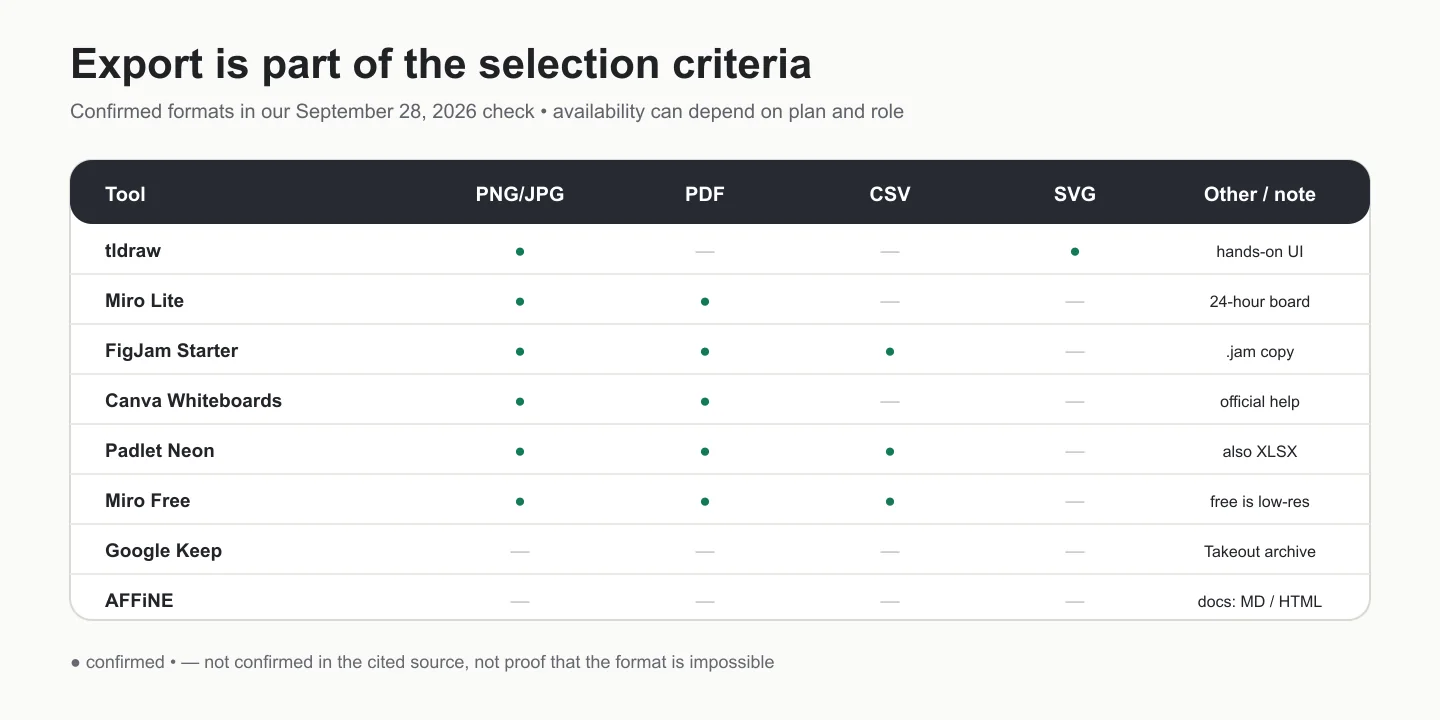
Figure: An illustrated export matrix based on formats confirmed by our tldraw task or the cited official material. It is not product UI. A dash means not confirmed here, not necessarily unavailable.
- PNG or JPG preserves appearance and is easy to share, but individual notes are no longer structured data.
- PDF is convenient for review and printing; text extraction and page boundaries vary.
- SVG keeps vectors editable in compatible design tools, but it is not a task list.
- CSV or XLSX is the most useful route when notes must become sortable rows, owners, or actions.
- Markdown or HTML works for document-oriented notes; it does not necessarily preserve a freeform canvas.
- A proprietary local file can preserve more product detail but may require the same app to reopen.
Test one real export before a workshop. Check the free plan, your role, and the device you will use; Miro, for example, does not support board export from its mobile apps. Open the exported file and verify that no note is clipped, tiny, or missing. For a detailed process, see how to export and share an online whiteboard.
Google Jamboard is no longer an available option
Google Jamboard should not appear in a current tools list. Google's Workspace Updates announcement states that users could no longer create or edit Jams starting October 1, 2024; existing Jams were view-only through December 31, 2024; and the Jamboard application was wound down on December 31, 2024.
If an old process still links to a Jam, treat the link as migration evidence rather than a working board. Locate any exported copy in your organization's storage, identify the decision owner, and move still-relevant content into a supported tool. Do not promise that an old Jamboard URL can be recovered.
Choose by the next action
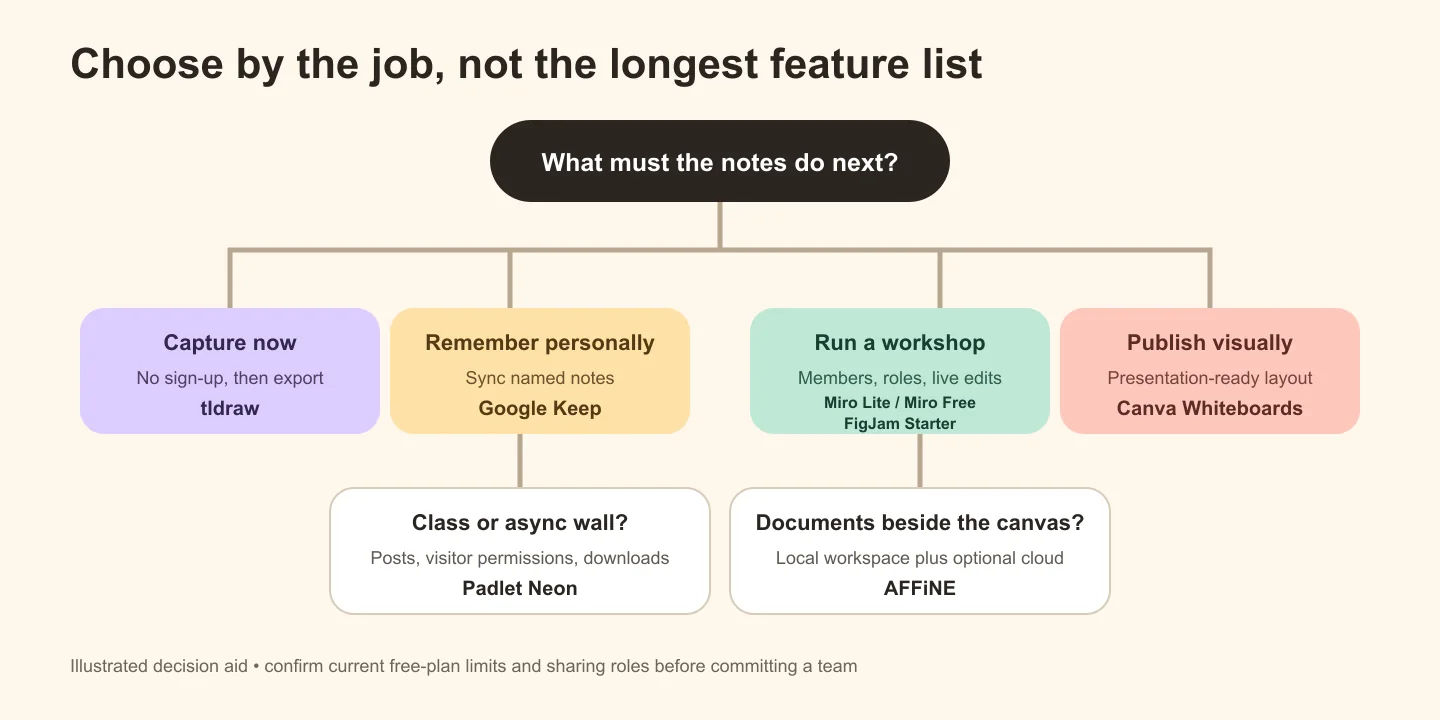
Figure: An illustrated decision aid, not a product ranking or application screenshot.
- Choose tldraw for immediate individual capture when you can export before leaving and do not need anonymous sharing.
- Choose Miro Lite for a disposable no-account group session when a 24-hour safe working limit and open edit link are acceptable; export before that limit because Miro's first-party pages disagree on the later recovery window.
- Choose Google Keep for short, synced personal notes and named collaborators rather than a workshop canvas.
- Choose Miro Free for signed-in team workshops that fit within three active boards and do not require private boards.
- Choose FigJam Starter when a design-oriented group needs CSV from stickies and can work within three team files.
- Choose Canva Whiteboards when visual presentation and guest editing by link matter more than granular anonymous roles.
- Choose Padlet Neon for an asynchronous class or community wall with visitor posting and multiple export formats.
- Choose AFFiNE when local-first documents and a whiteboard belong together, and a three-person free Cloud workspace is enough.
Before inviting a group, run a five-minute pilot with the exact free account, guest role, browser, and export format you plan to use. Product limits change; a pricing label alone is not an operational test.
Sources and editorial notes
All product limits and permission claims below were checked against first-party pages on September 28, 2026.
- tldraw canvas, note-shape documentation, and image-export documentation — context for the completed anonymous task and supported canvas concepts.
- Miro web whiteboard, Free Plan, visitor roles, board export, and mobile apps — retention, board count, visibility, visitor, export, and mobile boundaries.
- Google Keep desktop help, collaborator help, and Google Takeout — account-based notes, named collaborators, and archive export.
- FigJam Starter overview, Open Sessions, export guide, local-copy help, and mobile guide — file, visitor, export, history, and device limits.
- Canva Whiteboards, Canva sticky notes, and link-sharing help — free-board positioning, downloads, and anyone-link behavior.
- Padlet free plan, upload limits, anonymous posts, privacy options, export help, and mobile apps — padlet count, visitor identity, file limits, export, and device support.
- AFFiNE pricing, workspace documentation, download page, and whiteboard page — local and Cloud boundaries, supported platforms, and product context.
- Google Workspace Updates: Jamboard wind-down — primary source for the 2024 application shutdown timeline.
The hero is an editorial concept image generated for this update. The four diagrams were created for this guide and are labeled as illustrations. The tldraw board is an actual task export with fictional content. The CSV example is also fictional. No affiliate links were used. To request a correction, email contact@affine.pro with this page URL and the claim to review.
Free online sticky notes FAQs
Are there free online sticky notes without sign-up?
Yes. In our September 28, 2026 check, tldraw allowed note creation and PNG/SVG export without sign-up, but sharing required sign-in. Miro Lite also allows no-account creation and participation, but treat 24 hours as the safe working limit because Miro's official pages disagree about the later recovery window. Anyone with the link receives edit access, so export before relying on either workflow.
Which free online sticky-note tool is best for real-time collaboration?
There is no universal best choice. Miro Lite suits a temporary no-account session; Miro Free suits signed-in teams that fit within three active boards; FigJam Starter suits design workshops and CSV export; Padlet suits asynchronous visitor contribution. Check the exact guest role and free limit with a pilot before the meeting.
Do online sticky notes save automatically?
Some do, but “auto-save” does not guarantee permanent or cross-device access. Miro Lite has a 24-hour working period, and its official pages disagree about the later recovery window; account tools generally save to their cloud, while AFFiNE can keep a local workspace on a device. Confirm retention, ownership, and backup behavior, then export important decisions.
Can I export online sticky notes to CSV, PDF, or PNG?
It depends on the tool and plan. FigJam exports stickies or tables to CSV and boards to PNG, JPG, or PDF; Padlet boards support PNG, PDF, CSV, and XLSX; Miro Lite supports JPG and PDF; our anonymous tldraw task offered PNG and SVG. Verify your role and free plan before the session.
Is Google Jamboard still available?
No. Google stopped new Jam creation and editing on October 1, 2024, kept existing Jams view-only through December 31, 2024, and wound down the Jamboard application on December 31, 2024. Old links should be treated as migration references, not working boards.
Are no-login sticky-note boards private?
Not necessarily. No-login only describes account friction. A board may be temporary, stored in one browser, or accessible to anyone who has its link. Do not add sensitive information until you have verified retention, discoverability, participant permissions, and how to revoke access.