Free AI Resume Builders Tested: What Is Actually Free
Short answer: if you want AI help and a free PDF, start with Google Docs plus a free chatbot (ChatGPT or Gemini) or Reactive Resume, an open-source builder with no paid tier. Teal gives a few free AI credits and a free PDF. FlowCV, Kickresume, Canva and Adobe Express export free PDFs, but their resume AI is paid or very limited. Rezi, Enhancv and Novoresume are free with tight caps or branding. Resume.io, Resume-Now and Zety let you build for free, then charge at download: in our test, Resume-Now's download led straight to a $1.85 trial that auto-renews at $23.95 every 4 weeks.
How we tested (October 30, 2026): We opened all 14 tools in a browser and ran the same flow as a new visitor: start a resume for a fictional Marketing Coordinator ("Jordan Lee", example.com email, no phone or address), try the AI writing feature once, then click download. We stopped at the first sign-up wall or payment page and took the screenshots shown below. We did not pay, start a trial or create new accounts, so the limits you get after signing up come from each vendor's pricing or help page, opened October 29 and 30, 2026 and linked in the table. Prices change often and can vary by country.
Disclosure: AFFiNE publishes this guide. AFFiNE is a notes and whiteboard workspace, not a resume builder, and none of the tools below paid to be included.
Looking for a step-by-step guide to writing a resume with AI rather than a tool comparison? See the AI resume builder guide.
Free AI resume builders compared
| Tool | Free AI writing? | Free PDF download? | Account needed to start? (our test) | Paid plan |
|---|---|---|---|---|
| Google Docs + ChatGPT or Gemini | Yes, through the chatbot's free tier | Yes, no watermark | Google account | Optional chatbot upgrades |
| Reactive Resume | Yes, with your own AI API key | Yes, PDF and Word | Free account | None, open source (MIT) |
| Teal | 5 bullet, 2 summary and 2 cover letter credits | Yes, unlimited | Yes | Teal+ $13 per week |
| FlowCV | No, AI is Pro only | Yes, unlimited, no watermark | No to edit; yes to download | Pro |
| Kickresume | No, AI Writer is Premium | Yes | Yes | From $8/month yearly; $24 monthly |
| Canva | Limited Canva AI uses | Yes (PDF, JPG, PNG) | Yes | Canva Pro |
| Adobe Express | Limited generative credits | Yes | Yes (Adobe ID) | Premium $9.99/month |
| Rezi | Yes, within the free plan | 3 PDF downloads, 1 resume | Yes | Pro $29/month; lifetime $149 |
| Novoresume | 2 AI credits a month | Yes, with Novoresume branding | No to edit; yes to save | Pro $47.99 for 3 months |
| Enhancv | No, AI prompts asked us to sign up; suggestions are Pro | Free plan lasts 7 days, with branding | No to edit; yes to download | Pro from $69 per 3 months |
| Resume.io | Not reached | No, free plan downloads TXT only | Real email required | Trial, then $29.95 every 4 weeks |
| Resume-Now | Yes, "Enhance with AI" worked as a guest | No, paid trial at download | No | $1.85 for 14 days at checkout, then $23.95 every 4 weeks |
| Zety | Yes, AI suggestions worked as a guest | No, free plan downloads TXT only | No to edit; yes to download | $1.95 for 14 days, then $25.95 every 4 weeks |
| Word + Copilot | No, Copilot needs Microsoft 365 | Yes, from Word | Microsoft account | Microsoft 365 Personal $9.99/month; 1-month trial |
What "free" means on a resume builder
"Free" on a resume builder usually means one of three things:
- Free to build and download. You can finish and export a PDF without paying. Google Docs, Reactive Resume, Teal, FlowCV, Kickresume, Canva and Adobe Express fall here. The limits are on AI, templates or design options, not on getting your file.
- Free with caps or branding. Rezi allows 3 PDF downloads, Novoresume adds its branding to free PDFs, and Enhancv's free plan lasts 7 days and shows "Powered by Enhancv" on the resume.
- Free to build, paid to download. Resume.io and Zety only export TXT for free, and Resume-Now asks for a paid trial at download. All three let you spend several minutes filling in your history before the price appears.
Before you type in your work history, open the tool's pricing page and search for "download", "PDF", "trial" and "auto-renews". If you do start a trial, set a reminder to cancel before it renews.
Truly free picks (AI and PDF)
Google Docs with ChatGPT or Gemini
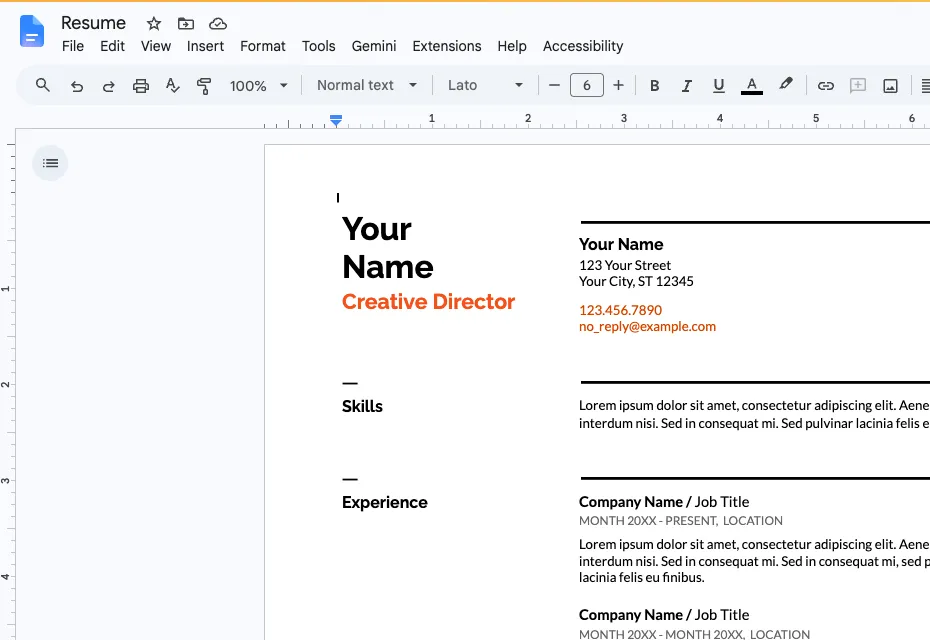
Google Docs "Resume Swiss" template, opened from the template gallery on October 30, 2026.
This is the only route in our test that produced a finished PDF without any sign-up step beyond an existing Google account. We opened a resume template from the Docs template gallery and downloaded it with File > Download > PDF in about a minute, with no watermark. Docs does not write the resume for you, so pair it with a free chatbot: paste one role at a time and ask for stronger bullet points, then edit the result in Docs. Some Google Workspace accounts also show a Gemini menu inside Docs, depending on the plan.
Best for: anyone who wants full control and zero cost. Watch out for: you do the formatting, and you should remove personal details before pasting text into a chatbot (see the privacy notes below).
Reactive Resume
Reactive Resume is an open-source builder under the MIT license with no paid tier. All of its templates, PDF and Word downloads, an ATS checker, cover letters and a job tracker are free. Its AI features work when you add your own API key from a provider such as OpenAI, Anthropic or Google Gemini, so AI costs depend on that provider rather than on Reactive Resume. In our test, the web app asked us to create a free account before opening the builder.
Best for: people who want a real builder with no upsell, or who want to self-host. Watch out for: without your own AI key, it is a free builder without AI writing.
Free with limits
Teal
Teal's free plan includes unlimited resumes, a job tracker, the top 5 keyword matches against a job description, and a small set of AI credits: 5 for bullet points, 2 for summaries and 2 for cover letters. Teal says free-plan PDF downloads are unlimited (Teal resume builder). Teal+ costs $13 per week. In our test, the builder required an account (email or LinkedIn) before we could add any content. Use the free credits on your most important bullets and write the rest yourself.
FlowCV
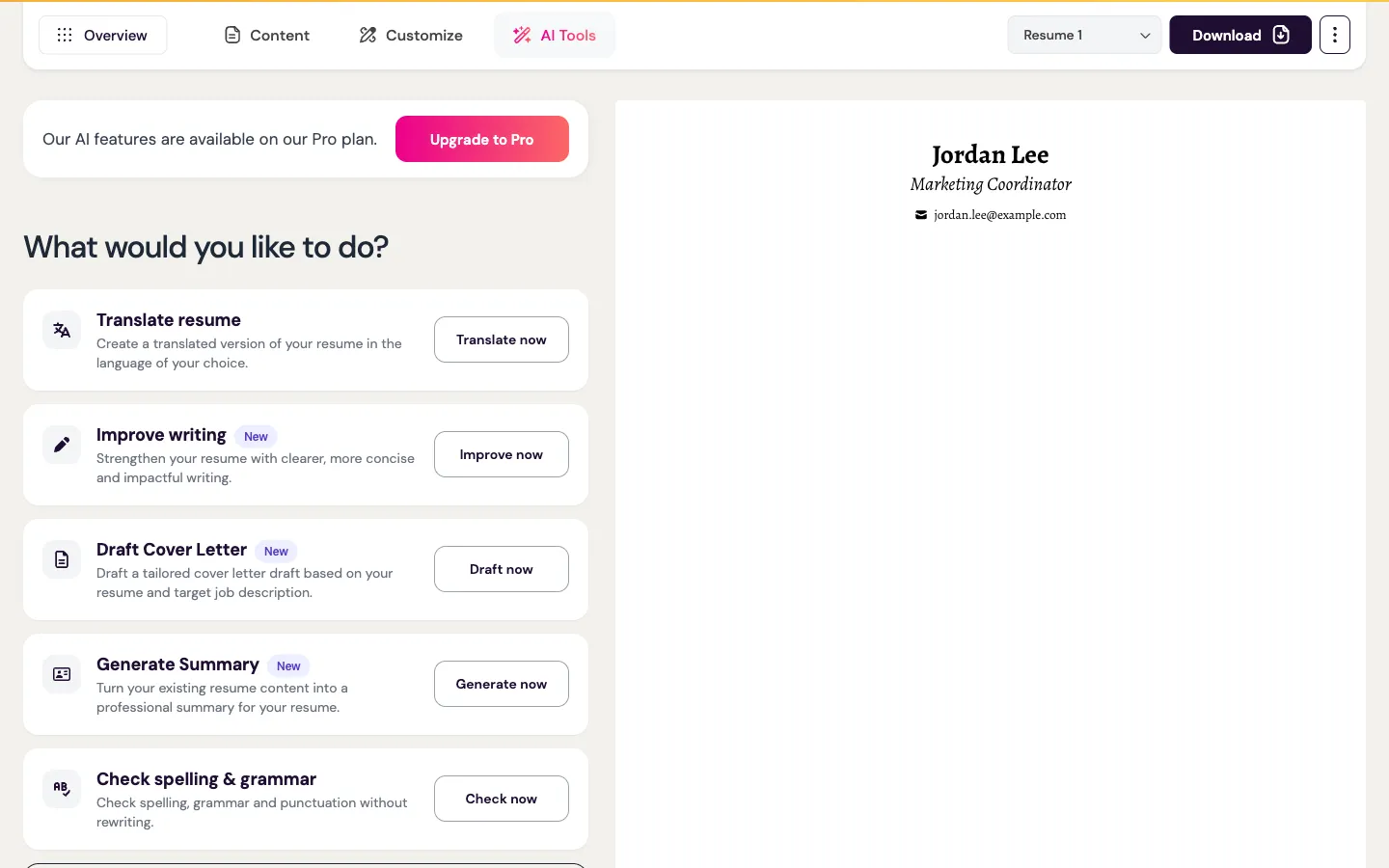
FlowCV guest editor: clicking the AI option opened a Pro upgrade message (October 30, 2026).
FlowCV let us start editing as a guest, which is rare. When we clicked the AI writing option, it said: "AI features are available on the Pro Plan. Your free plan still includes unlimited PDF downloads, access to all resume templates and design options." Clicking download asked us to create a free account. FlowCV is a good free builder if you write your own bullets, but it is not a free AI builder.
Kickresume
Kickresume's free plan includes 4 basic resume templates, 4 cover letter templates and 1 website template. The AI Writer and its library of pre-written phrases are Premium features, which costs from $8 a month billed yearly, $18 a month on a 3-month plan, or $24 month to month. In our test, "Create My Resume" went straight to a registration page.
Canva and Adobe Express
Both are design tools with free resume templates and free PDF export, plus a limited number of AI uses on their free plans. Adobe Express Premium is $9.99 a month. In our test, Canva opened a sign-up window as soon as we chose "Customize this template", and Adobe Express redirected to an Adobe ID login. Many Canva and Adobe templates use columns, icons and graphics, so check the ATS advice below before you send a designed resume through an online application form.
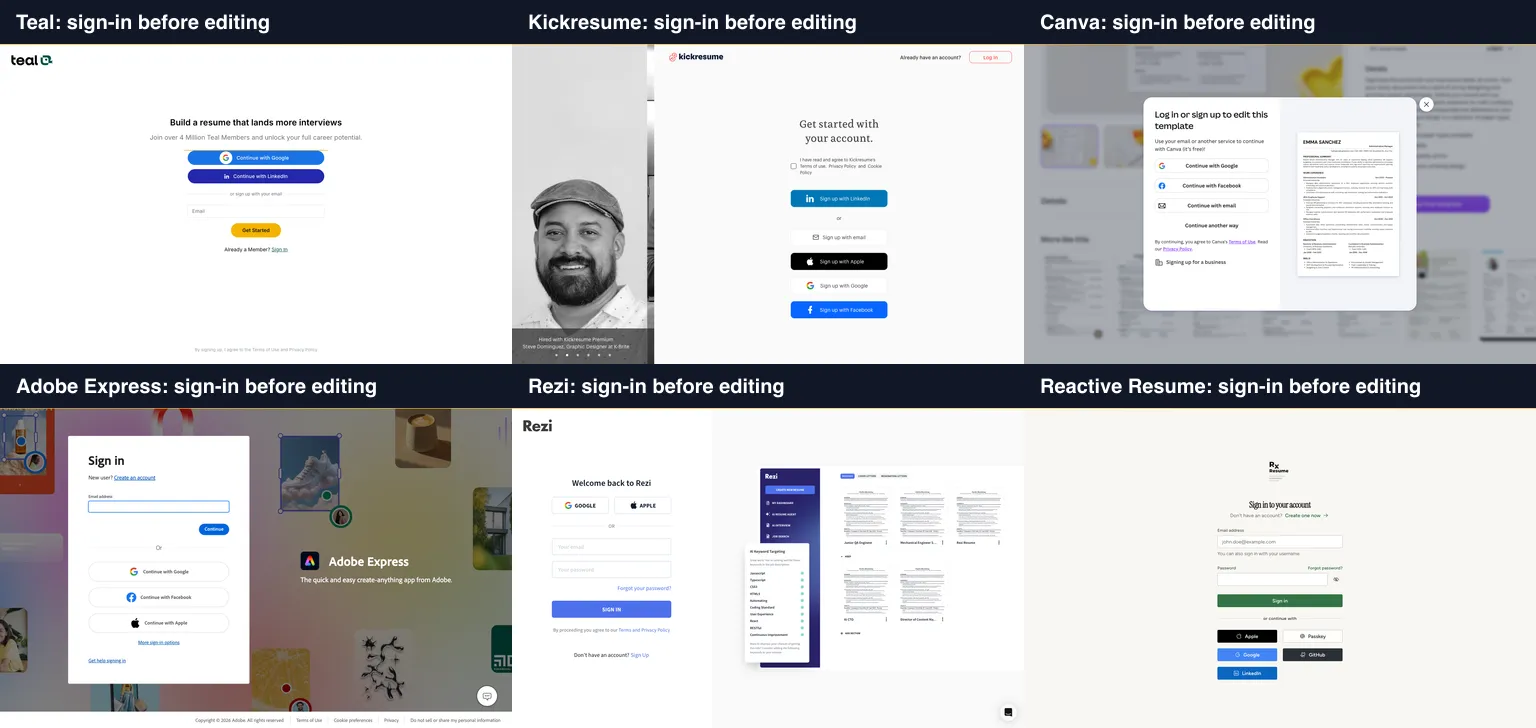
Six of the 14 tools asked us to sign in or create an account before we could add any resume content (October 30, 2026).
Rezi
Rezi's free plan covers 1 resume with its AI Resume Writer and Editor and 3 PDF downloads. Pro is $29 a month, or $149 for lifetime access. The app asked us to log in before showing the builder. Three downloads is enough for one carefully tailored resume, not for a long search with many versions.
Novoresume
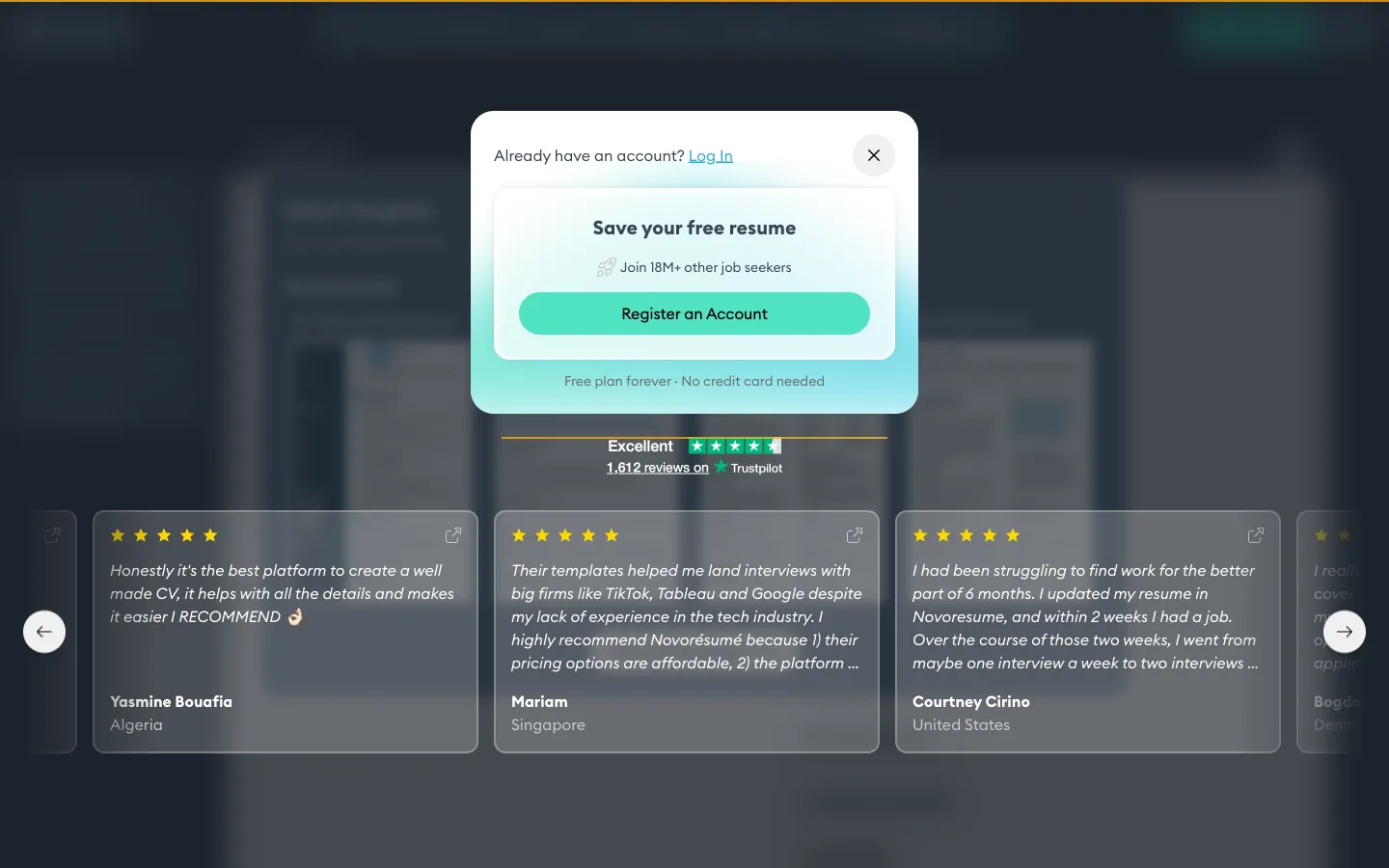
Novoresume asked us to register before saving or downloading (October 30, 2026).
Novoresume lets you start as a guest with a "Write it for me" form that takes your target title, career summary and a job posting. Its free plan includes 8 templates and 2 AI credits a month, and free PDFs carry Novoresume branding. When we tried to download, it asked us to register and stated "Free plan forever · No credit card needed". Pro is a one-time $47.99 for 3 months.
Enhancv
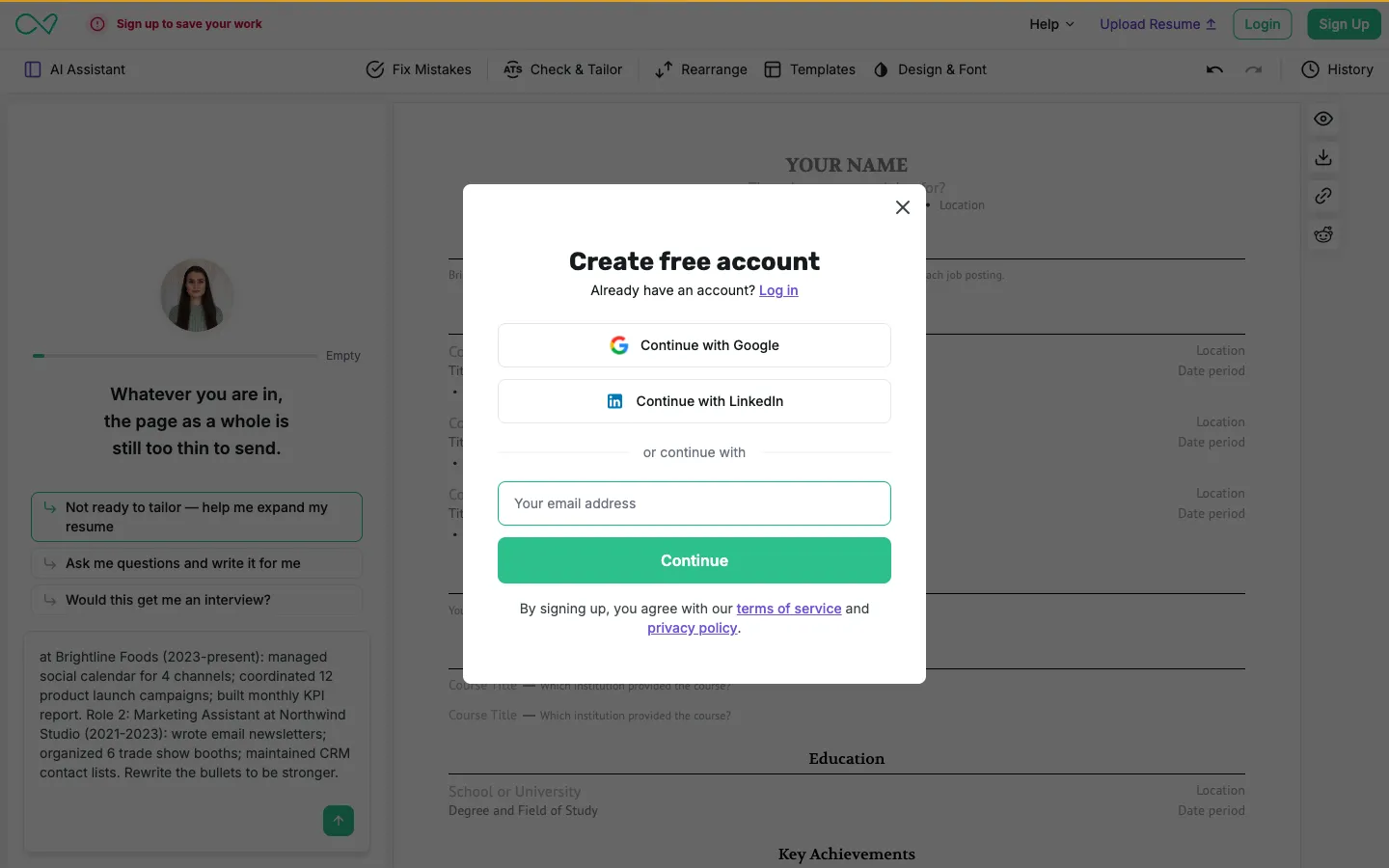
Enhancv: our first AI Assistant prompt opened a "Create free account" window (October 30, 2026).
Enhancv's guest editor works after a short onboarding quiz. When we sent one prompt to its AI Assistant, it opened a "Create free account" window, and the download button opened the same window. The free resume shows "Powered by Enhancv" with a "Remove branding" link. According to its pricing page, the free plan lasts 7 days and caps each section at 12 items, and content suggestions are a Pro feature, from $69 per 3 months.
Free to build, paid to download
Resume-Now
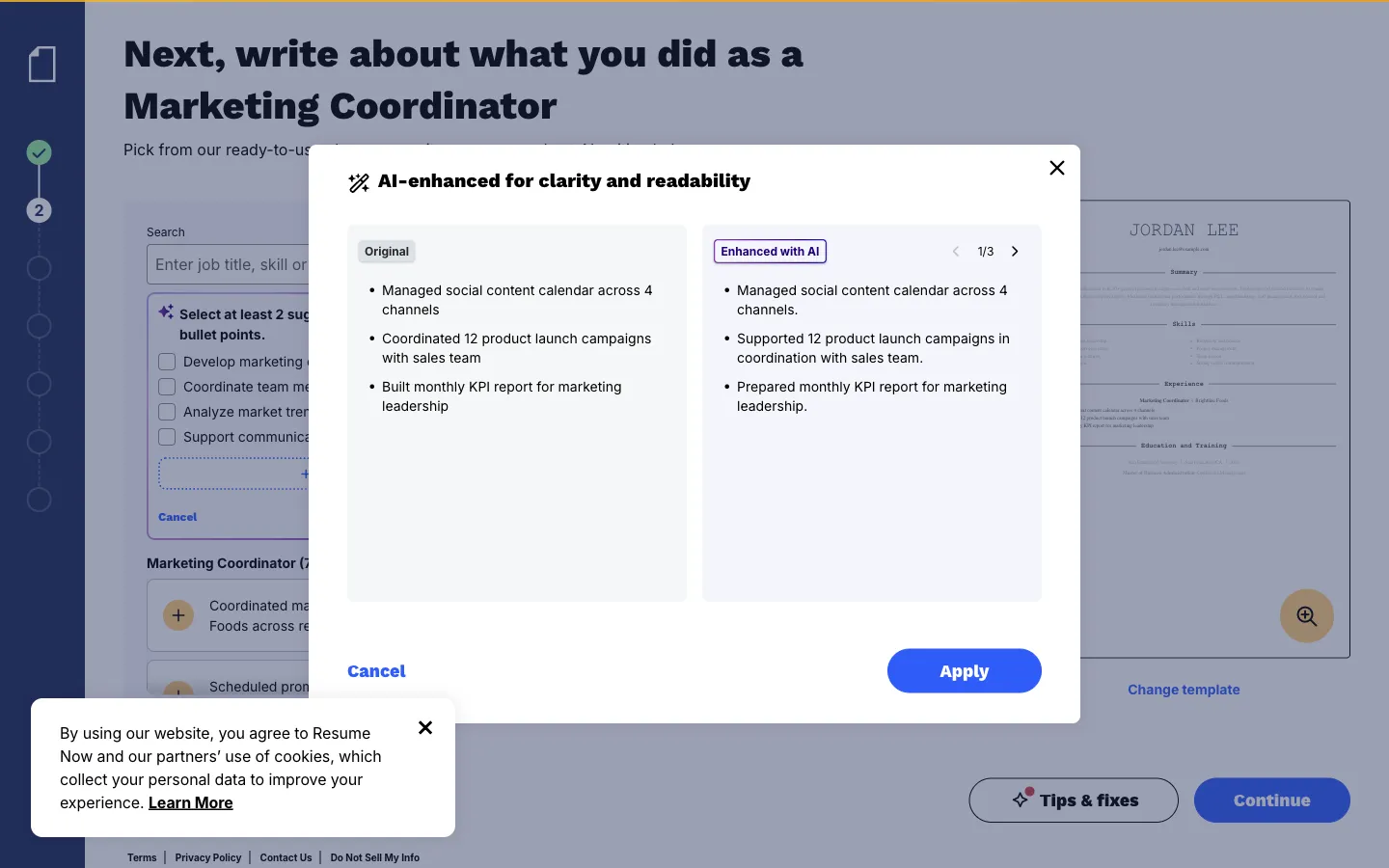
Resume-Now's "Enhance with AI" rewrote our bullets for free, as a guest (October 30, 2026).
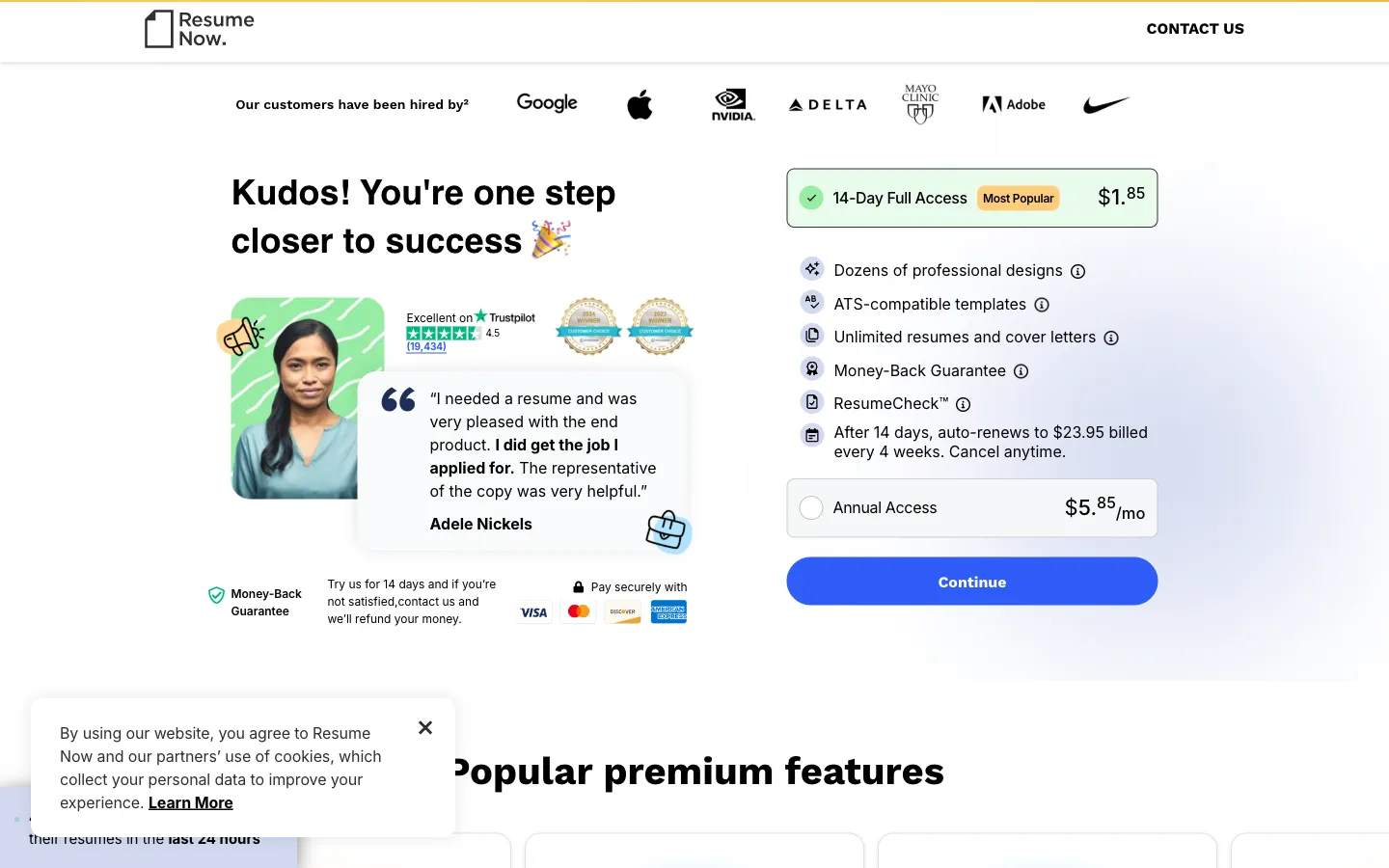
Clicking download led to this payment page. We stopped here and did not enter a card.
Resume-Now gave the most generous free AI in our test and the least free download. Its "Enhance with AI" button rewrote all three bullets in one click without an account. But after about 6 minutes of filling in the builder, Download > PDF led to a payment page: "14-Day Full Access $1.85 ... After 14 days, auto-renews to $23.95 billed every 4 weeks. Cancel anytime." The other option was Annual Access at $5.85 a month, paid as $70.20 up front. The checkout trial price we saw ($1.85) was lower than the $2.45 listed on its pricing page the day before, so expect the exact trial price to vary.
Zety
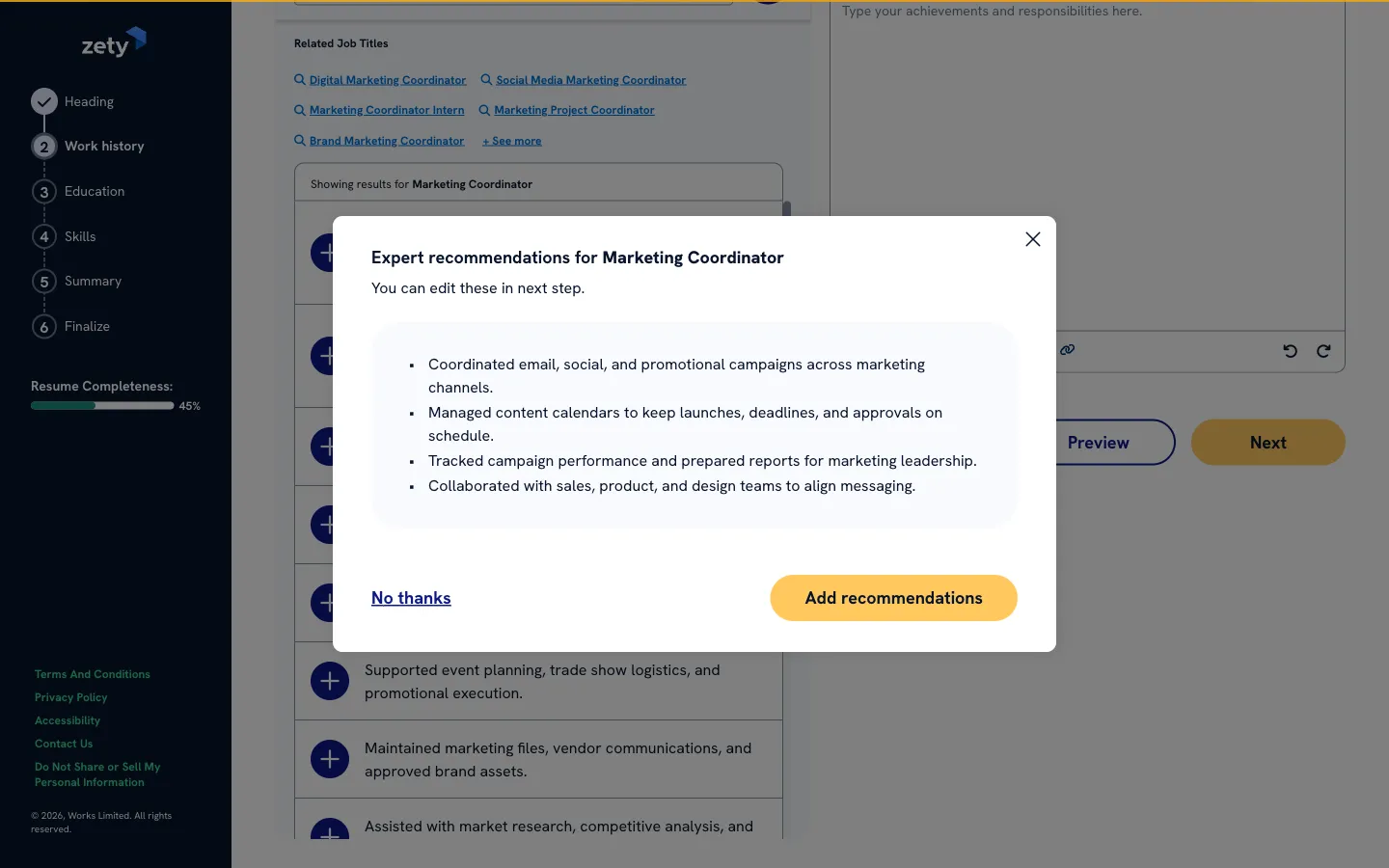
Zety generated AI bullet suggestions for our test role without an account (October 30, 2026).
Zety's flow is almost the same as Resume-Now's (both belong to the same parent company). AI suggestions for the Marketing Coordinator role appeared for free, but download opened an account window that asked for a password. Zety's pricing page says the free plan downloads TXT only, and its trial costs $1.95 for 14 days, then $25.95 every 4 weeks.
Resume.io
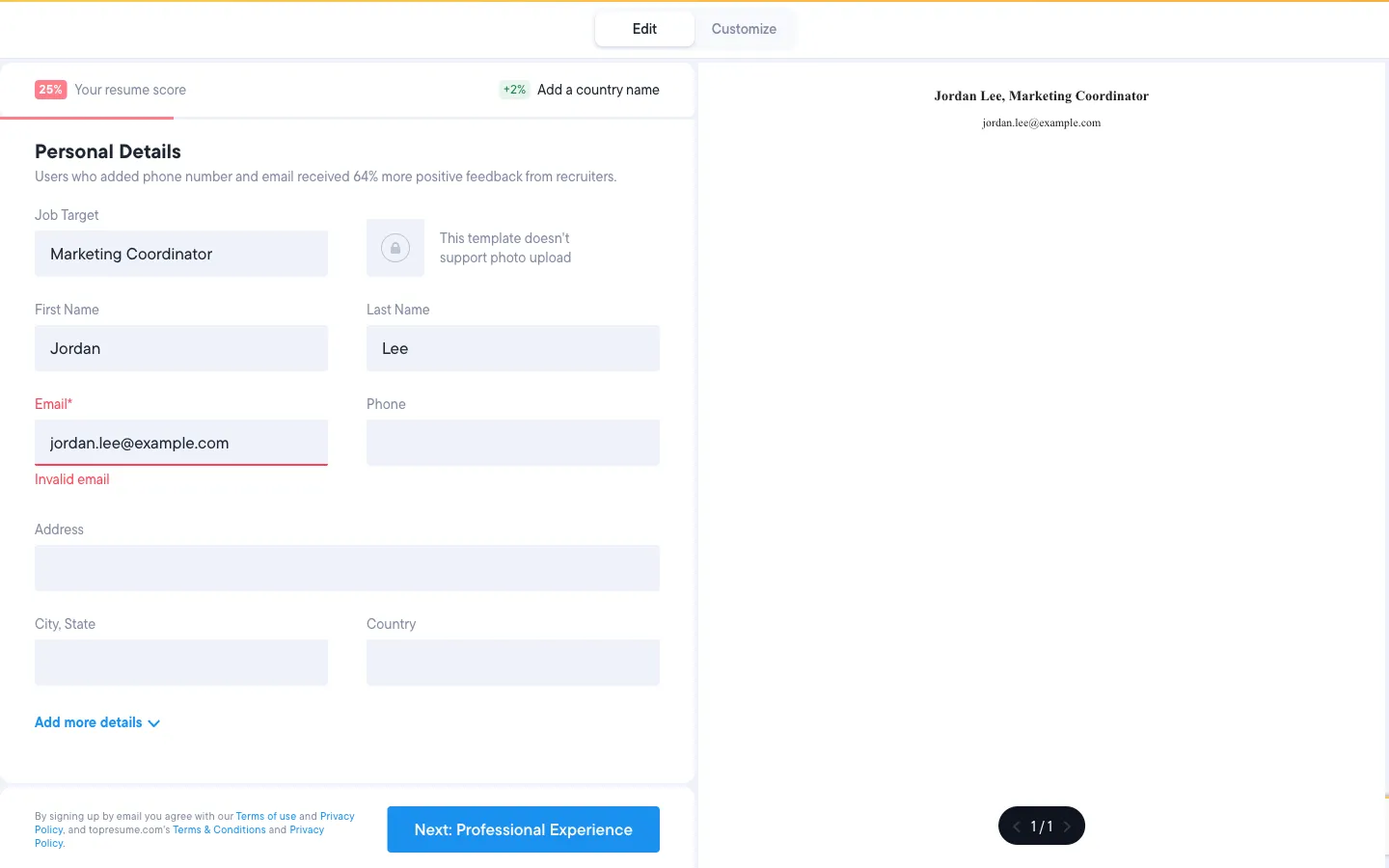
Resume.io's guest builder would not continue without a real email address (October 30, 2026).
Resume.io's guest builder opens, but the email field is required, and it rejected our example.com test address. Entering a real email also creates an account. Its free plan downloads TXT only. The paid trial lasts 7 days and then renews at $29.95 every 4 weeks.
Word with Copilot
Word's resume templates are free to use and export, but Copilot inside Word requires an eligible Microsoft 365 subscription, from $9.99 a month for Personal or $12.99 for Family, with a 1-month trial. Without a subscription, Word is a template tool, not an AI builder.
How to pick a free AI resume builder
- You want AI help and a free PDF, with no surprises: Google Docs plus ChatGPT or Gemini, or Reactive Resume with your own AI key.
- You want a dedicated builder with some free AI: Teal (9 free AI credits in total) or Rezi (free AI, 3 downloads).
- You write your own bullets and just want a clean template: FlowCV or Kickresume.
- You want a designed, visual resume: Canva or Adobe Express, but check how it parses (see the ATS basics below).
- You want a match score against one job ad: Jobscan's free plan includes 5 resume scans a month, and Resume Worded offers a free resume review. Use the results as a checklist, not a target score.
- You are applying to many roles over months: a paid month may cost less than your time. Pick one tool, cancel trials you do not use, and avoid overlapping subscriptions.
How to use AI on a resume safely
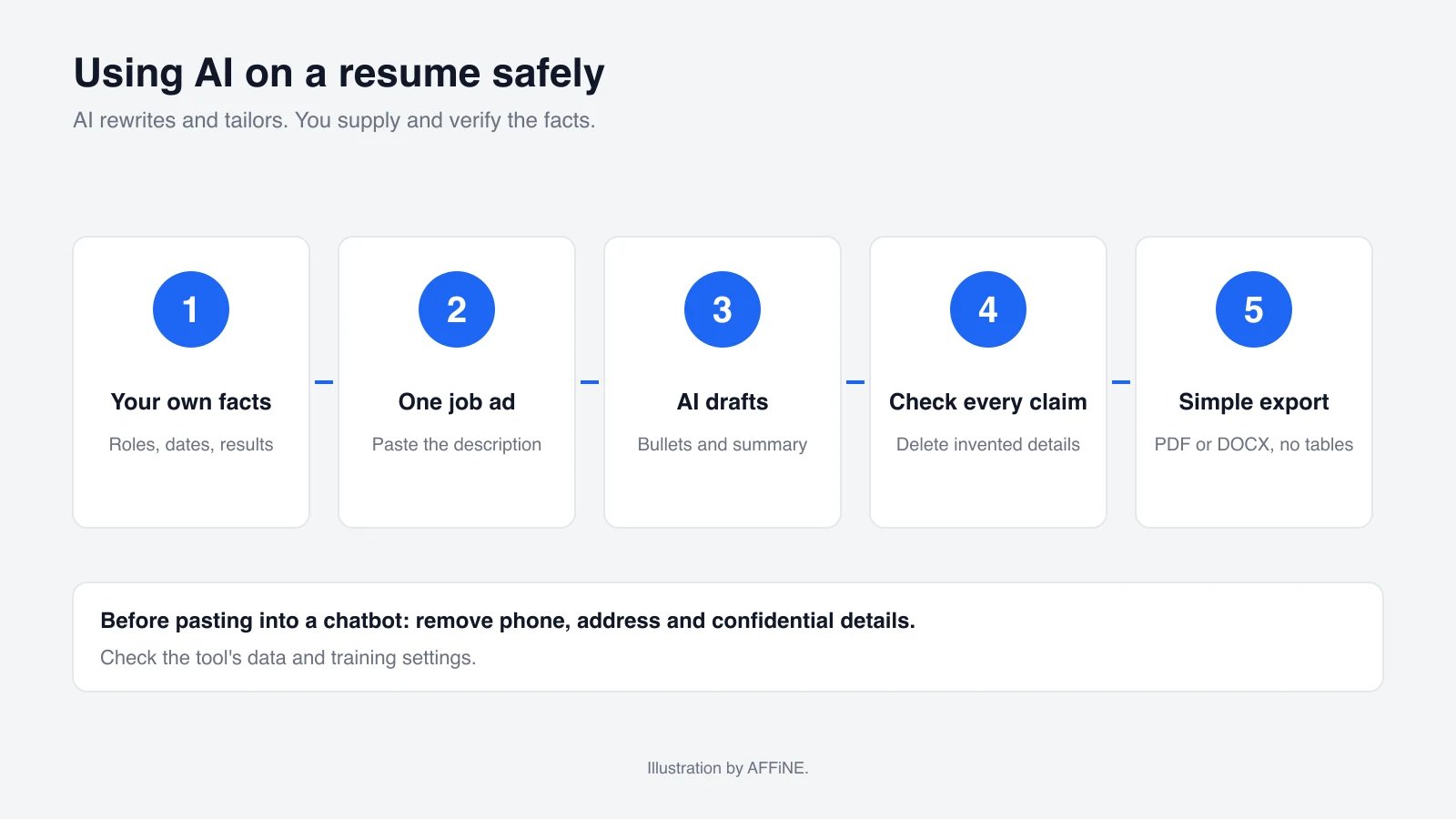
- Start from your own facts. Write a plain list of roles, dates, tools and results first. AI can rephrase, but it cannot know what you did.
- Tailor to one job at a time. Paste the job description and ask which of your existing experiences match it. Do not let the tool add skills you do not have.
- Check every claim. AI tools can invent numbers, titles and certifications. When we used Resume-Now's AI, it rewrote our bullets confidently, so read each one and delete anything you could not explain in an interview.
- Keep the layout simple for ATS. Indeed's ATS resume guidance recommends a .docx file and warns that text boxes, columns, headers and images can cause parsing problems. Candidates targeting senior roles can also work with a recruitment agency to reach hiring managers directly instead of relying on ATS filters alone.
- Protect personal data. Remove your phone number, address and anything confidential before pasting a resume into a chatbot. In ChatGPT, using your content to train models is on by default and can be turned off under "Improve the model for everyone" (OpenAI Help). Google says human reviewers may read some Gemini chats and asks users not to enter confidential information (Gemini Apps Privacy Hub). Resume builders also store what you type, often before you create an account.
For layouts that parse cleanly, see these ATS resume templates.
Where AFFiNE fits in a job search
AFFiNE does not write or format resumes, so use one of the tools above for the document itself. AFFiNE is useful for the work around it:
- Track applications: the Job Tracker & Master Resume template keeps roles, stages, contacts and follow-up dates in one place.
- Keep a master list of achievements: collect every project and result once, then copy the relevant ones into each tailored resume.
- Prepare for each role: keep notes on each company, the job description and interview questions next to your application.
AI resume builder free: frequently asked questions
Can I build a resume with AI completely free?
Yes. A Google Docs template plus the free tier of ChatGPT or Gemini costs nothing and exports a PDF without a watermark. Reactive Resume is also free, and its AI works with your own API key. Teal and Rezi include small amounts of free AI with a free PDF.
Which free resume builders charge to download a PDF?
In our October 30, 2026 test, Resume-Now asked for a $1.85 trial (renewing at $23.95 every 4 weeks) when we clicked download. Resume.io and Zety only download TXT on their free plans. Rezi allows 3 free PDF downloads.
Which builders let me try AI without an account?
Resume-Now and Zety generated AI bullets for us as a guest, but both require payment or an account to download. Enhancv, FlowCV and Novoresume let us edit as a guest but asked for an account before using AI or downloading.
Is it OK to use AI to write my resume?
Yes, if every fact is yours and accurate. Use AI to rephrase and tailor, then check each bullet. Recruiters may ask about anything on the page.
Is AFFiNE a resume builder?
No. AFFiNE is a notes, docs and whiteboard workspace. You can use it to track applications and keep job-search notes, but build the resume itself in a resume tool, Google Docs or Word.
Conclusion
The best free AI resume builder is the one that lets you download a clean PDF without a surprise charge. Google Docs with a free chatbot and Reactive Resume pass that test fully, and Teal, Rezi and Novoresume pass it with limits. FlowCV, Kickresume, Canva and Adobe Express give free PDFs but little or no free AI. Treat Resume-Now, Zety and Resume.io as paid tools with a free preview. Whatever you pick, keep the facts your own and the layout simple.