Free ATS Resume Templates (2026): Layouts We Tested
What changed (Nov 15, 2026): Rewrote the guide around free single-column ATS templates and a first-party parse test of one-column, two-column, table and white-text resumes in three PDF extractors; added PDF vs Word guidance from Greenhouse, Workable and Lever docs; merged three duplicate ATS resume posts into this page.
Short answer: an ATS resume template is a single-column document with standard headings (Summary, Work Experience, Skills, Education), real text instead of images, and no key details inside tables, text boxes, headers or footers. Start from one of the free templates below, change the wording for each job posting, save the file type the posting asks for, and check that the text copies out in the right order before you apply.
How we tested (November 15, 2026): We built the same resume for a fictional financial analyst ("Jordan Lee", example.com email) in three layouts: one column, two columns with a sidebar, and one column with the contact block and skills in tables. We printed each layout to PDF from Google Chrome and pulled the text out with three open-source PDF libraries: pypdf, pdfminer.six and PyMuPDF. Commercial ATS parsers are not public, so this shows what a parser receives from your file, not how a given employer's system scores you.
Disclosure: AFFiNE publishes this guide and some of the templates below. AFFiNE is a docs and whiteboard workspace, not a resume builder or an applicant tracking system.
Free ATS resume templates
All of these are free to use. Pick a single-column layout, since that was the only one our test read the same way every time.
| Template | Layout | Best for | Edit and export |
|---|---|---|---|
| AFFiNE ATS-Friendly Resume Template | One column, standard headings | Most job seekers, first resume | Edit in AFFiNE, print to PDF |
| AFFiNE Minimalist ATS-Friendly Resume | One column, high contrast | Clean look with plain structure | Edit in AFFiNE, print to PDF |
| AFFiNE Executive ATS-Ready Resume | One column, reverse chronological | Senior and management roles | Edit in AFFiNE, print to PDF |
| AFFiNE Software Engineer Markdown Resume | Markdown sections | Developers who keep a resume in Markdown | Edit in AFFiNE, export Markdown or print to PDF |
| Microsoft Word ATS templates | Varies by template | Postings that ask for a Word file | Edit in Word, save as .docx or PDF |
| Jobscan ATS resume templates | Varies by template | Free .docx downloads | Edit in Word, save as .docx or PDF |
| Google Docs template gallery | Varies by template | Quick edits in a browser | Download as .docx or PDF |
Some templates in these galleries use two columns, icons or tables. Before you fill one in, run the two-minute check further down. Among AFFiNE's own resume templates, the High-Impact Professional and Visual Storyteller layouts use a sidebar and visual blocks, so keep them for portfolios and email, not ATS uploads.
AFFiNE pages export to Markdown, HTML and PNG, or print to PDF. AFFiNE does not save Word files. If a posting asks for .docx, paste your finished text into Word or Google Docs, keep the headings, and save it there.
What makes a resume template ATS-friendly
"ATS-friendly", "ATS-compliant" and "ATS-compatible" all mean the same thing: an applicant tracking system can pull your name, contact details, jobs, dates and skills out of the file and put them in the right fields. A template helps when it has:
- One column. Text runs top to bottom in the order you want it read.
- Standard headings. Summary, Work Experience, Skills, Education, Certifications. Creative labels such as "My Journey" are harder to map to fields.
- Contact details in the body. Put your name, email, phone, city and LinkedIn URL as plain text on the first lines, not in the page header or footer.
- Real text, no pictures of text. No photos, icons standing in for words, charts or skill bars.
- Simple formatting. Common fonts such as Arial, Calibri or Times New Roman at 10 to 12 points, which is what Indeed's ATS resume guide recommends, plus plain bullets and one date format.
- Words from the posting. The skills and job titles the employer uses, wherever they truthfully describe your work.
Do ATS systems read two-column resumes? What our test showed
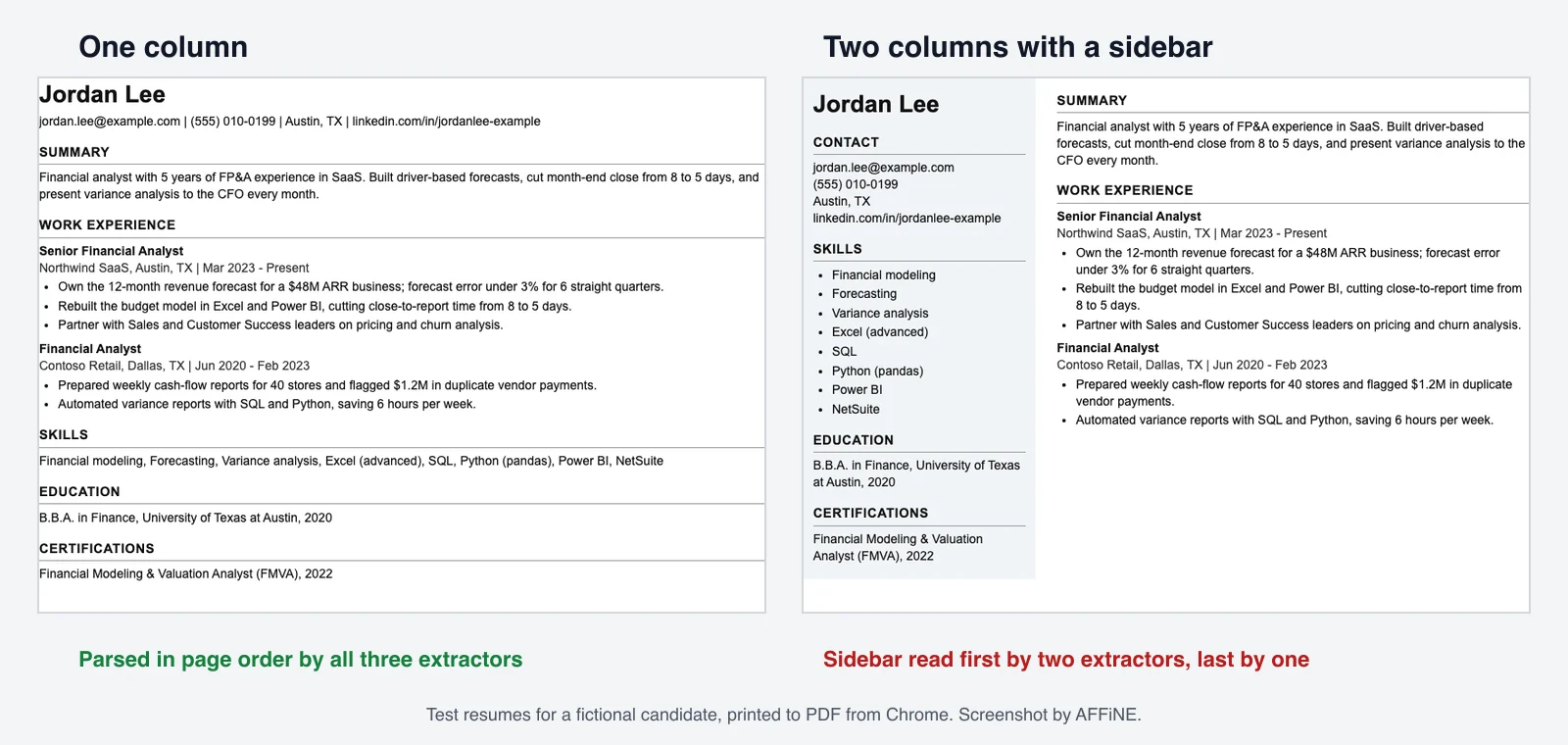
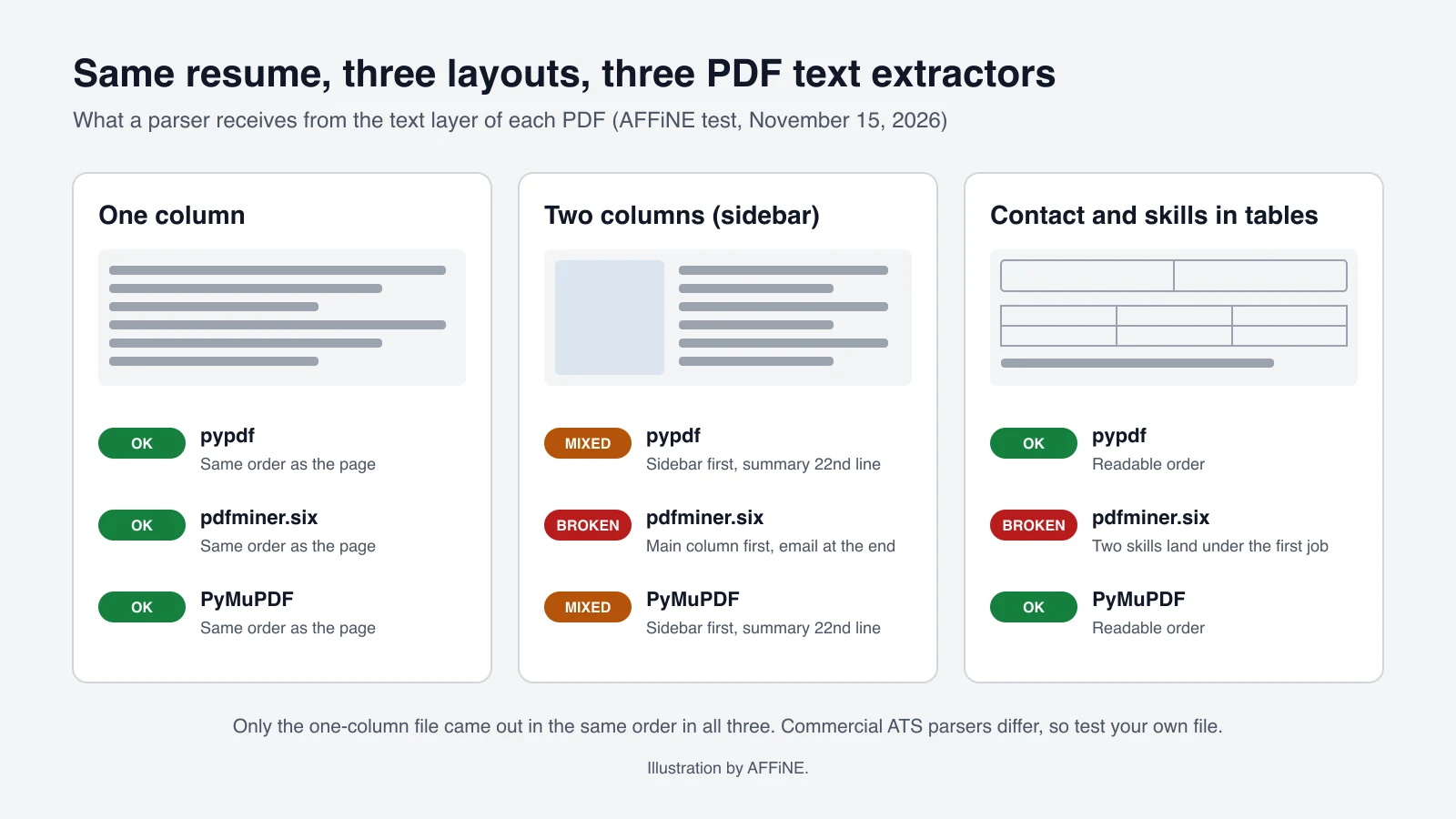
Same content, three layouts, three extractors. Here is what came out of each PDF:
| Layout | pypdf | pdfminer.six | PyMuPDF |
|---|---|---|---|
| One column | Page order | Page order | Page order |
| Two columns (sidebar) | Whole sidebar first; Summary is line 23 | Main column first; email moved to line 22, after the work history | Whole sidebar first; Summary is line 23 |
| Contact and skills in tables | Readable order | "Summary" heading above the contact lines; two skills placed under the first job title | Readable order |
What this means for you:
- Lines did not get mixed together. None of the three extractors blended sidebar and main-column text line by line, so a two-column resume is not automatically unreadable.
- The order depends on the parser. The same two-column file gave two different reading orders. In one, your email ends up 21 lines below your name. In the others, the summary recruiters see first is buried under the skills list.
- Narrow columns break long text. In the sidebar, the LinkedIn URL split into "linkedin.com/in/jordanlee-" and "example" in all three outputs. A parser that copies that into your profile gets a broken link.
- Tables can move words into the wrong section. In one extractor, "Variance analysis" and "Python (pandas)" from the skills table landed under the first job title.
Only the one-column file came out the same way in all three. If you cannot test the employer's system, that is the safest layout.
The sections an ATS expects, in order
- Contact: full name on the first line, then email, phone, city and state, and a LinkedIn or portfolio URL.
- Summary: two or three lines on your role, years of experience and best results.
- Work Experience: for each job, the title, company, location and dates, then three to five bullets that start with a verb and include a number where you have one.
- Skills: a plain comma-separated list or short bullets, using the posting's wording.
- Education: degree, school and year.
- Certifications, Projects or Volunteer work, if they help for this job.
Students and recent graduates can put Education before Work Experience. Keep each job's dates on the same line as the job, so a parser can attach them to the right role:
Senior Financial Analyst
Northwind SaaS, Austin, TX | Mar 2023 - Present
- Own the 12-month revenue forecast for a $48M ARR business; forecast error under 3% for 6 straight quarters.
PDF or Word: which file should you send?
Send the file type the posting asks for. If it does not say, a text-based PDF or a .docx is accepted by the major systems:
| System | Resume file types it accepts |
|---|---|
| Greenhouse | .doc, .docx, .pdf, .rtf, .txt (Greenhouse support) |
| Workable | .pdf, .doc, .docx, .rtf, .html, .odt, up to 5 MB (Workable help) |
| Lever | Parses Word, PDF, RTF, WordPerfect, HTML and OpenOffice files; cannot parse image files such as JPG or PNG (Lever help) |
Indeed's guide says a .docx "may be best for ATS compatibility, though some systems accept PDFs." Our rule of thumb:
- The posting names a format: use it.
- It asks for Word, or you are not sure: send .docx.
- PDF is accepted: a PDF exported from Word, Google Docs or AFFiNE is fine if the text can be selected.
- Never send a scanned PDF, a photo of your resume, or a PDF made from an image.
How to check your resume in two minutes
- Try to highlight the text. Open the PDF and drag across a line. Lever's help center uses this as its quick test: if you cannot highlight the text, it probably cannot be parsed.
- Paste it as plain text. Select all, copy, and paste into Notepad or TextEdit in plain-text mode. Read it top to bottom. Your name and contact details should be at the top, headings in order, dates next to each job and every skill present.
- Look for broken words. Long URLs, email addresses and hyphenated skills are the first things to split in narrow columns.
- Check the application form. Many forms fill in fields from your upload. If the name, email or job titles come out wrong, the parser had trouble with your layout. Fix the file, not just the form.
- Optional: compare against one job ad. As of October 2026, Jobscan's free plan included 5 resume scans a month. Use the report as a checklist, not a score to chase.
How to add keywords without stuffing
Use the employer's own words for skills you actually have. Here is how the test resume maps to a sample posting:
| Phrase in the posting | Where it goes | Example on the resume |
|---|---|---|
| "driver-based forecasting" | Summary and a bullet | "Built driver-based forecasts..." |
| "variance analysis" | Skills and a bullet | "present variance analysis to the CFO every month" |
| "SQL and Python" | Skills and a bullet | "Automated variance reports with SQL and Python" |
| "NetSuite" | Skills | "NetSuite" |
| "FP&A" | Summary, spelled out once | "Financial planning and analysis (FP&A)" |
- Match the exact phrase when it is true. If the posting says "project management", write that, not only "managed projects".
- Spell out acronyms once, then use the short form.
- Put each key skill in two places: the Skills list and a bullet that shows you used it.
- Do not hide keywords in white text. We added a line of white, 2-point keywords to the one-column test file, and all three extractors pulled it out as normal text. Anyone reading the plain-text version will see it.
Resume templates for AI screening
Newer hiring tools add AI ranking or matching on top of the ATS. They still start from the text parsed out of your file, so the same template rules apply: one column, standard headings, real text. What helps more with AI matching is evidence. Name the tools you used, the size of the work and the result ("forecast error under 3% for 6 straight quarters"), rather than repeating a keyword list. Keep it accurate. Recruiters can ask about any line.
Choose a template by career stage
| You are | Put first | Template to start from |
|---|---|---|
| A student or recent graduate | Education, internships, projects | ATS-Friendly Resume Template |
| Changing careers | A summary of transferable skills, then work history with dates | ATS-Friendly Resume Template |
| Experienced in your field | Work experience with numbers | Minimalist ATS-Friendly Resume |
| Applying for senior roles | Leadership results, team and budget size | Executive ATS-Ready Resume |
| A developer | Skills and projects with links | Software Engineer Markdown Resume |
| In research or teaching | Publications, grants, teaching (a longer CV) | Academic CV & Research Resume |
Career changers often reach for a functional resume, which groups skills and leaves out dates. A hybrid works better: a short skills summary at the top, then each job with its dates, so the parser and the recruiter both see a clear timeline.
How to convert a designed resume to ATS format
- Start a new single-column file from one of the templates above. Do not edit the old layout in place.
- Move sidebar content into the main flow: contact details to the top, skills and education to their own sections.
- Replace icons with words. Write "Email:" and "Phone:" or just list the details.
- Turn tables into lines. A skills grid becomes a comma-separated list. Job details become title, company, dates.
- Take contact details out of the page header and footer.
- Export again and run the two-minute check. Keep the designed version for networking or a portfolio.
Common mistakes that break ATS parsing
| Mistake | What happens | Fix |
|---|---|---|
| Two columns or a sidebar | Reading order changes by parser (our test) | One column |
| Skills or contact details in a table | Words can land in the wrong section (our test) | Plain lines and lists |
| Contact details in the header or footer | Indeed warns headers may not be read | Put them on the first lines of the body |
| Scanned PDF, JPG or PNG | Lever cannot parse image files | Export a text-based PDF or .docx |
| Long URLs in a narrow column | Links split across lines (our test) | Full-width line, short URL |
| Creative section names | Harder to map to fields | Standard headings |
| Missing or inconsistent dates | Jobs lose their timeline | Same date format, on the job line |
| Keyword lists or white text | Shows up in the plain-text version (our test) | Keywords in real bullets |
ATS myths to ignore
- "75% of resumes are rejected by ATS before a human sees them." We found no published study or dataset behind this figure. An ATS mainly stores applications, lets recruiters search them and applies any screening questions the employer sets up.
- "ATS cannot read PDFs." Greenhouse, Workable and Lever all accept PDF resumes. Image-only PDFs are the problem.
- "You need a special ATS template." Any single-column, text-based document with standard headings works. The templates above save setup time.
- "Only big companies use an ATS." It is close to universal at the top: Jobscan's 2026 report detected an ATS at 97.4% of Fortune 500 companies, with Workday at over 40% and SuccessFactors at 12%. Smaller employers use them too, so format for one either way.
Where AFFiNE fits in a job search
AFFiNE is not a resume builder, but it is a good place to keep the material around your resume:
- Write the resume in one of the AFFiNE templates above, then print to PDF, or move the text to Word when a posting needs .docx.
- Keep a master resume with every role, project and result, and copy the relevant lines into each tailored version. The Job Tracker & Master Resume template has both, plus a pipeline for applications and follow-ups.
- Compare tools if you want AI help with the wording: see what is actually free in our free AI resume builder comparison.
ATS resume template FAQ
What is the best ATS resume template?
A single-column template with standard headings (Summary, Work Experience, Skills, Education) and no tables, text boxes or images. In our test, it was the only layout that came out in the same order in all three PDF extractors.
Is a two-column resume ATS-friendly?
It is risky. In our test, a two-column resume did not get scrambled line by line, but different extractors read the columns in different orders, and one moved the email address below the work history. Use one column for online applications.
Should I submit my resume as a PDF or Word file?
Use what the posting asks for. If it does not say, a .docx is the safest choice, and a text-based PDF works in systems such as Greenhouse, Workable and Lever. Never upload a scanned or image-only file.
Are Google Docs resume templates ATS-friendly?
Some are. Our Google Docs resume template comparison covers the gallery options. Check the layout before you start: avoid templates with two columns, tables or contact details in the header. Then download as .docx or PDF and paste the text into a plain-text editor to check the order.
What is an ATS-compliant resume?
A resume an applicant tracking system can read correctly: one column, standard headings, text-based content, contact details in the body and a common file type such as .docx or PDF. "ATS-friendly" means the same thing.
How do I convert my resume to ATS format?
Copy your content into a single-column template, move sidebar and table content into plain sections, replace icons with words, take contact details out of the header and footer, then export and check the plain-text version.
Can I use an ATS resume template for a CV?
Yes. The same rules apply to an ATS CV. Academic CVs are longer and add publications, grants and teaching, so start from a CV template with those sections and keep the single-column layout.
Do I need a different template for AI screening?
No. AI screening tools work from the same parsed text. Use a single-column template and spend the effort on specific, accurate bullets with tools, numbers and results.
Conclusion
A good ATS resume template is a plain one: one column, standard headings, real text and contact details where a parser expects them. Pick one of the free templates above, tailor the wording to each posting, send the requested file type and run the two-minute check before every upload. That covers what you control. The rest is your experience.
This guide replaces three older AFFiNE articles on ATS resume templates, free ATS templates and ATS-friendly formatting. Their useful tips are included here.