6 Best AI Slideshow Makers for Business
Building a presentation used to take hours of work and require one slide at a time. AI presentation tools have changed that. Now they can assist you in organizing your ideas, setting up layouts, and converting the content to a complete deck in much less time.
The difficult part is finding a tool that will do more than make slides look good. The best options also know the content and can help to mold it into a presentable form. Here are 6 AI-powered presentation generators to consider for your business in 2026-2027.
Key takeaways
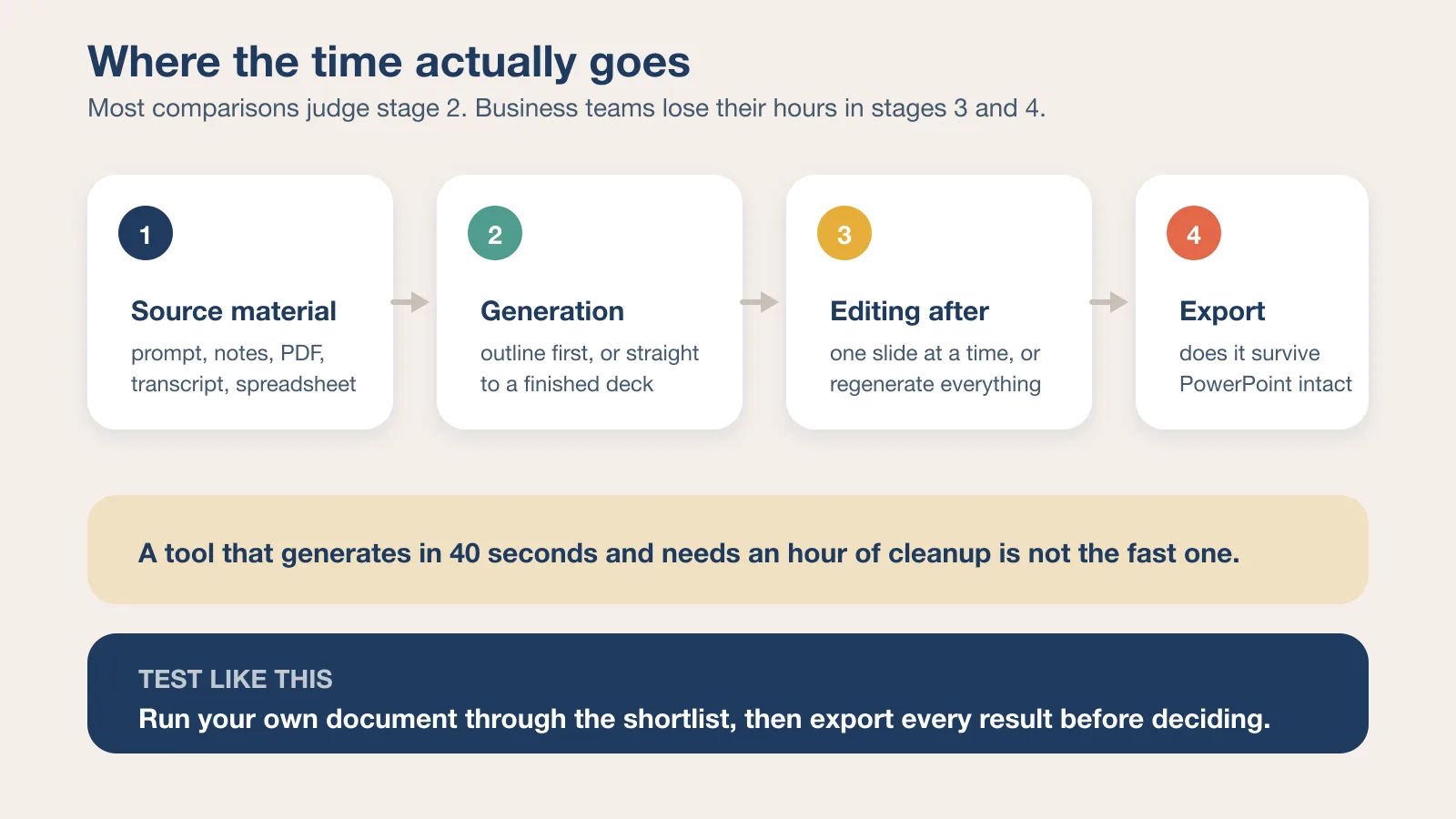
- The tool that saves the most time is usually the one that edits well after generation, not the one that generates fastest.
- Export fidelity to PowerPoint or Google Slides decides whether a deck is usable outside the tool that made it.
- Source material matters: some tools are built for short prompts, others for reports, transcripts, and long documents.
- Test with your own content. Sample prompts flatter every tool in this category.
Best Tools for Creating Presentations
We'll explore a few AI presentation tools that companies employ and examine their respective strengths. We pay special attention to their ability to take a prompt or document and create slides, the ease of editing the results, and whether the final document is usable in PowerPoint. The goal is not to gauge the best AI presentation maker for flawless demo decks, but to measure which one is helpful for real business tasks.
| Tool | Price | Main feature |
|---|---|---|
| Decksy AI | Free generation, then $10/month | Regenerate a single slide |
| Canva | Free; Pro about $15/month | Uses your brand style |
| Slideonic | Free; from $9.99/month billed annually | Builds an outline before slides |
| PowerPoint | From $9.99/month with Microsoft 365 | Makes slides from prompts |
| Gamma | Free; from $9/seat/month billed annually | Makes decks fast |
| Beautiful.ai | 14-day trial; from $14.50/month billed annually | Fixes layouts automatically |
Prices were checked against each vendor's own pricing page in August 2026 and change often — confirm before you buy. Where a vendor advertises annual billing as the headline rate, that is the figure shown.
Decksy AI
Unlike other AI presentation-generating tools, Decksy AI is logic-driven. Decksyai.com will take in any content you give it, whether it's raw PDFs or a Word document, meeting notes, Excel file, or a short prompt, and then build the structure of the narrative around it, adding design elements on top.
Single slide regeneration is the highlight for enterprise customers. Most AI presentation tools regenerate the entire deck the moment you have to modify a single slide, discarding all other changes. With Decksy AI, you can regenerate only one problem slide in seconds without affecting the rest of the deck. That one feature alone saves a significant amount of time when you're working on a long deck and one section just isn't landing right.
It provides one free presentation generation to get you started. The vendor also lists a 7-day trial and a $10/month plan after that, and includes full export rights. If you've ever rebuilt an entire deck because of one weak slide from a bad tool, Decksy AI is well worth the five minutes to try.
What it works best for
Decksy is particularly well suited to teams that work from raw source material: uploaded documents, meeting transcripts, or data exports. The AI reads what you give it and builds a narrative around it, rather than asking you to fill in a template. For business use cases where the content already exists but just needs to be shaped into something presentable, this approach saves a lot of back-and-forth.
The platform also integrates well into workflows where multiple stakeholders review presentations before they're finalized. Because you can regenerate individual slides rather than the whole deck, it's easier to incorporate feedback without losing work that's already been approved.
Canva
Using Canva's Magic Design, you can enter a prompt or upload a brief to generate a presentation. If you use Brand Kit, you can apply your saved fonts, colors, and logos to keep slides consistent with your brand. This is particularly useful for marketing teams that already use Canva for social posts and other content.
The trade-off shows up when you need something more structured. Canva's AI narrative structure is not as advanced as dedicated presentation software, and sometimes, the export to PowerPoint removes design elements that are unique to Canva's environment.
- Magic Design creates a deck from a prompt or uploaded document
- Brand Kit lets you apply your saved fonts, colors, and logos
- Free to start, with Pro at about $15 per month and Business at about $21 per person per month, both billed yearly
Canva is a solid choice if the presentation is part of a larger content library. It becomes less practical if standalone slide structure is the main requirement, since other tools handle that more precisely. That said, for marketing teams already inside the Canva ecosystem, the ability to pull from existing brand assets without any setup is a genuine time saver.
Canva vs. dedicated presentation tools
Canva sits in an interesting middle ground. It's not a purpose-built presentation tool, but it draws on a massive design library and a familiar interface that most teams already know. If your team is producing a high volume of branded content across multiple formats, Canva's value as a single platform for everything is difficult to argue with. If your main output is business presentations that need to be imported cleanly into PowerPoint or Google Slides, something more specialized will serve you better.
Slideonic
Slideonic.ai is a good option when you already have the information but do not want to spend time turning it into a slide structure yourself. You can start with a topic, paste in notes, or upload a PDF, DOCX, or TXT file. The AI picks out the main points and builds an outline first, so you can check the flow before it creates the deck.
That outline step is useful for business reports, proposals, and internal presentations where the order of ideas matters. It separates Slideonic from tools that jump straight to generating slides, which often produces decks where the narrative logic isn't quite right. Being able to review and adjust the outline before committing to a full deck means fewer rounds of revision afterward.
Once the slides are ready, you can export them to PowerPoint or PDF and keep editing from there. Slideonic has a free plan that allows one presentation per day, while paid plans start at $14.99 per month or $9.99 per month with annual billing.
When the outline step matters
For presentations that involve complex arguments or sequential reasoning, like a business case, a project proposal, or a quarterly review, the outline-first approach pays off clearly. You can see whether the logic flows before any visual design work has been done. This is less important for a quick status update or a short internal briefing, but for anything where you'd normally spend time on a Word document outline first, Slideonic compresses that step into the tool itself.
PowerPoint
PowerPoint remains a strong business choice thanks to broad compatibility and Microsoft 365 integration. Copilot can create slides from prompts or source files, while some newer workflows also let you review the structure first.
- Copilot supports prompt-based and file-based slide creation
- AI features are included in eligible Microsoft 365 plans
- Microsoft 365 Personal is $9.99 per month or $99.99 per year, and Microsoft 365 Premium is $199.99 per year
PowerPoint is especially useful for teams that work with Excel charts or need reliable offline access. However, the bigger problem often comes before the presentation itself. Notes may be scattered across different files while the outline is still incomplete. In that case, it can help to organize the material first with AFFiNE AI. Once the main points are in order, moving everything into PowerPoint becomes much easier.
Who PowerPoint is still the right answer for
Despite the newer tools available, PowerPoint remains the default for many enterprise environments for a straightforward reason: it's what everyone already uses. Files stay compatible across teams, clients, and external stakeholders without any conversion questions. Copilot has made the AI side more capable over the past year, and for teams already paying for Microsoft 365, it adds real value without an extra subscription. The main caveat is that Copilot works best when your source material is already organized, which is where a dedicated outlining or AI drafting tool can help as a first step.
Gamma AI
Speed was the way in which Gamma made its reputation. Just type in a prompt, and it comes back with a full deck in under a minute. The output has a modern, polished look, though it uses a card-based layout rather than fixed slide dimensions, which gives it a distinctive style that works well in some contexts and less well in others.
It is used by startups for pitch decks and internal updates where getting something presentable quickly matters more than fine-tuned control over layout.
- Instant deck generation from a single prompt
- Card-based layout instead of fixed slide dimensions
- Provides 400 starter credits that do not refill
- Paid plans start at $9 per seat per month billed annually, with the Pro tier at $18
PowerPoint exports may need some formatting adjustments because Gamma uses a card-based layout rather than standard slide dimensions. For sharing directly as a link or embedding in a browser, this is not an issue. For teams that need a clean PowerPoint file to hand off to a client, it adds an extra step.
Gamma's ideal use case
Gamma works well when the priority is speed and the audience will view the presentation through a link rather than opening a file. Internal updates, async team briefings, and early-stage pitch materials are all good fits. It's less suited to formal presentations where precise formatting and offline access are requirements.
Beautiful.ai
Beautiful.ai is designed to make slide design simpler for those with limited design experience. With its Smart Slides, the layout adjusts as you add text, images, or other content, so you don't have to manually rearrange things when a slide gets more crowded. It can be useful for teams looking to keep presentations consistent without hiring a designer for each one.
The main limitation is that Smart Slides follow predefined layouts. Classic Slides give you more freedom for custom designs, but that removes the automatic adjustment feature. Beautiful.ai also doesn't have a permanent free plan. A 14-day free trial is available, Pro costs $14.50 per month billed annually, and the Team plan starts at $40 per user per month.
Where Beautiful.ai fits in a team workflow
Beautiful.ai works well when design consistency is the priority and the content is relatively straightforward. Sales teams, for example, that produce a high volume of similar presentations for different clients benefit from the Smart Slide system because it keeps everything looking coherent without requiring design decisions each time. For highly custom or creative presentations, the constraints of the predefined layouts will start to feel limiting.
How to Choose the Right Tool for Your Team
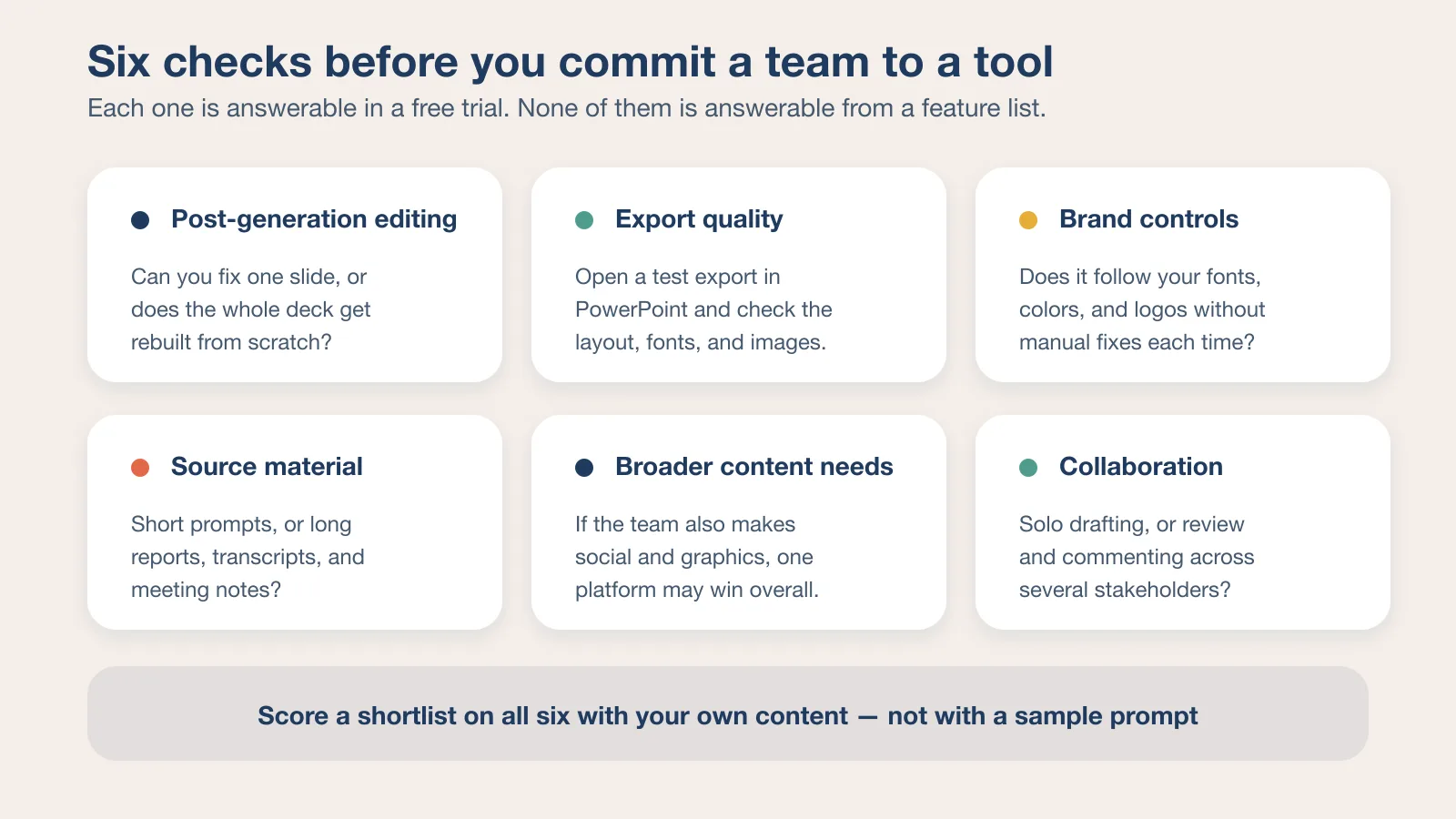
The decision of which AI presentation tool to use isn't just about price or how polished the output looks. It also depends on how well the tool fits your actual workflow, how much editing you'll need to do after generation, and how reliably the final file works in your environment. A few questions that simplify the decision:
- Post-generation editing: Tools that let you fix or regenerate one slide at a time save significant time compared to tools that require rebuilding the full deck.
- Export quality: It's worth opening a test export in PowerPoint or Google Slides to check whether layouts, fonts, and images survive the conversion intact.
- Brand controls: Teams with set fonts, colors, and logos should test whether the tool follows brand rules consistently or whether you're manually fixing branding after every export.
- Source material: Some tools work better with short prompts, while others handle reports, meeting notes, and longer documents more effectively.
- Broader content needs: If your team also creates social posts, graphics, or other visual content, a broader platform like Canva may be more practical even if it's not the strongest dedicated presentation tool.
- Collaboration requirements: Some tools are better suited to solo work while others have built-in review and commenting features that matter when multiple people are involved in a presentation.
Which One Should You Choose?
There's no single best AI presentation maker for all businesses, but there is usually one that fits the way a specific team works.
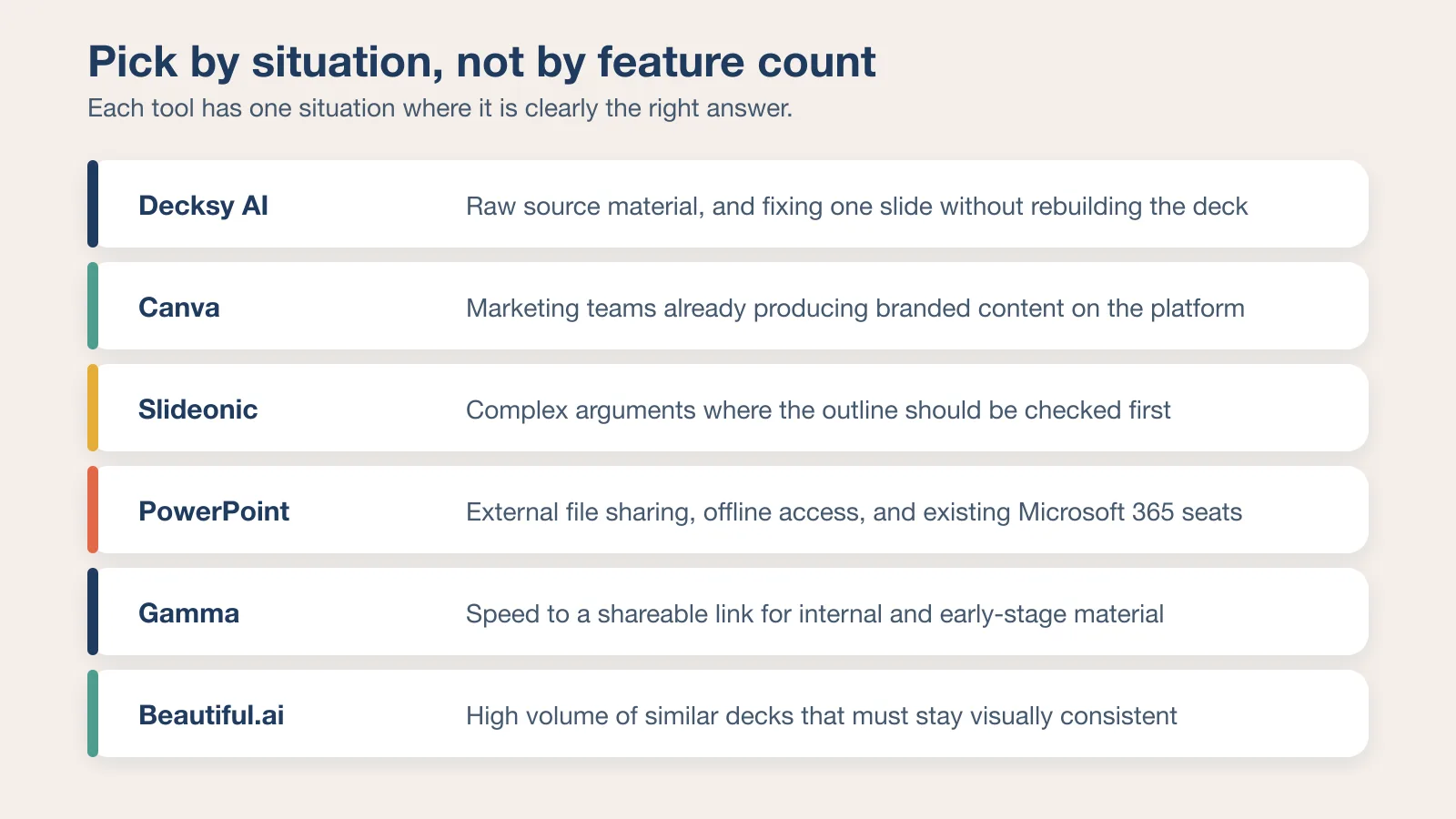
Canva makes the most sense for marketing teams already using the platform for other content. The brand consistency and template library are real advantages, and not having to switch tools is worth something. The presentation-specific features aren't class-leading, but they're good enough for a lot of use cases.
PowerPoint remains the most compatible option for teams that share files externally or need offline access. Copilot has made it meaningfully more capable, and for Microsoft 365 subscribers, it's already included.
Gamma is the fastest path from prompt to shareable deck. For internal use and early-stage materials, that speed advantage is significant. The trade-off is flexibility.
Beautiful.ai suits teams that want consistent-looking decks without ongoing design work. The Smart Slides system works well for repeatable presentation types.
Slideonic is worth considering when the structure of the presentation matters and you want to check the outline before committing to the full deck. The outline-first approach reduces revision cycles for complex presentations.
Decksy AI stands out on the structural side. The single-slide regeneration feature is genuinely useful rather than just a marketing point. Between the free generation and the $10/month entry price, it's easy to test.
When you evaluate any of these tools, use your actual content rather than a sample prompt. The results vary significantly depending on the quality and format of the input. If you want a version of this comparison built the other way round — the same prompt given to every tool, with the outputs judged side by side — we ran that experiment across 10 AI presentation makers tested and compared.
FAQ
What is the best AI presentation maker for business use in 2026?
There isn't a single best answer, because different tools suit different workflows. Decksy AI works well when you need logical structure and the ability to fix individual slides. Canva is strongest for marketing teams using it for broader content. PowerPoint with Copilot is the most compatible option for enterprise environments. Slideonic is a good fit when the narrative flow matters and you want to review an outline before generating the full deck.
Can AI presentation tools replace a designer?
For many business presentations, yes. Tools like Beautiful.ai handle layout automatically, and Decksy AI builds narrative structure from raw content. For highly custom or brand-critical presentations, a designer's judgment still adds value, but for routine business decks, most teams find AI tools sufficient.
Do these tools export to PowerPoint?
Most of them do, though the quality of the export varies. Slideonic and PowerPoint Copilot export cleanly by design. Decksy AI includes full export rights. Gamma and Canva sometimes require formatting adjustments after export because of differences in how they handle layouts. It's always worth opening the exported file before sharing it.
Which tool is best for teams with strict brand guidelines?
Canva, because of its Brand Kit feature, is the strongest option for applying saved fonts, colors, and logos automatically. Beautiful.ai also offers brand controls at the Team plan level. For teams where brand consistency is the top priority, testing the brand application before committing to a tool is a good idea.
Is there a free AI presentation maker worth using?
Canva has a functional free plan, and Gamma provides 400 starter credits without requiring a subscription. Slideonic allows one presentation per day on the free plan. Decksy AI includes one free generation. For occasional use, these free tiers are sufficient. For regular business use, the paid plans unlock features that matter in practice, particularly around export quality and generation limits.
How much do AI presentation tools cost?
Prices range from free to around $40 per user per month at the high end. Decksy AI is $10 per month. Canva Pro is about $15 per month billed yearly. Slideonic starts at $9.99 per month on annual billing. PowerPoint is included in Microsoft 365 from $9.99 per month. Gamma's paid plans start at $9 per seat per month billed annually. Beautiful.ai's Pro plan is $14.50 per month billed annually and its Team plan is $40 per user per month. Most tools offer a free trial or a limited free plan, making it practical to test before paying.
Can I use these tools if I'm not technical?
Yes. All six tools are built for non-technical users. The interfaces are designed around natural language prompts and document uploads rather than any kind of coding or technical setup. Canva and Beautiful.ai are particularly beginner-friendly. Slideonic's outline-first approach helps users who aren't sure how to structure a presentation, because the AI makes that decision and shows it to you before generating anything.