8 Best AI Visibility Tools in 2026: Prices and Picks
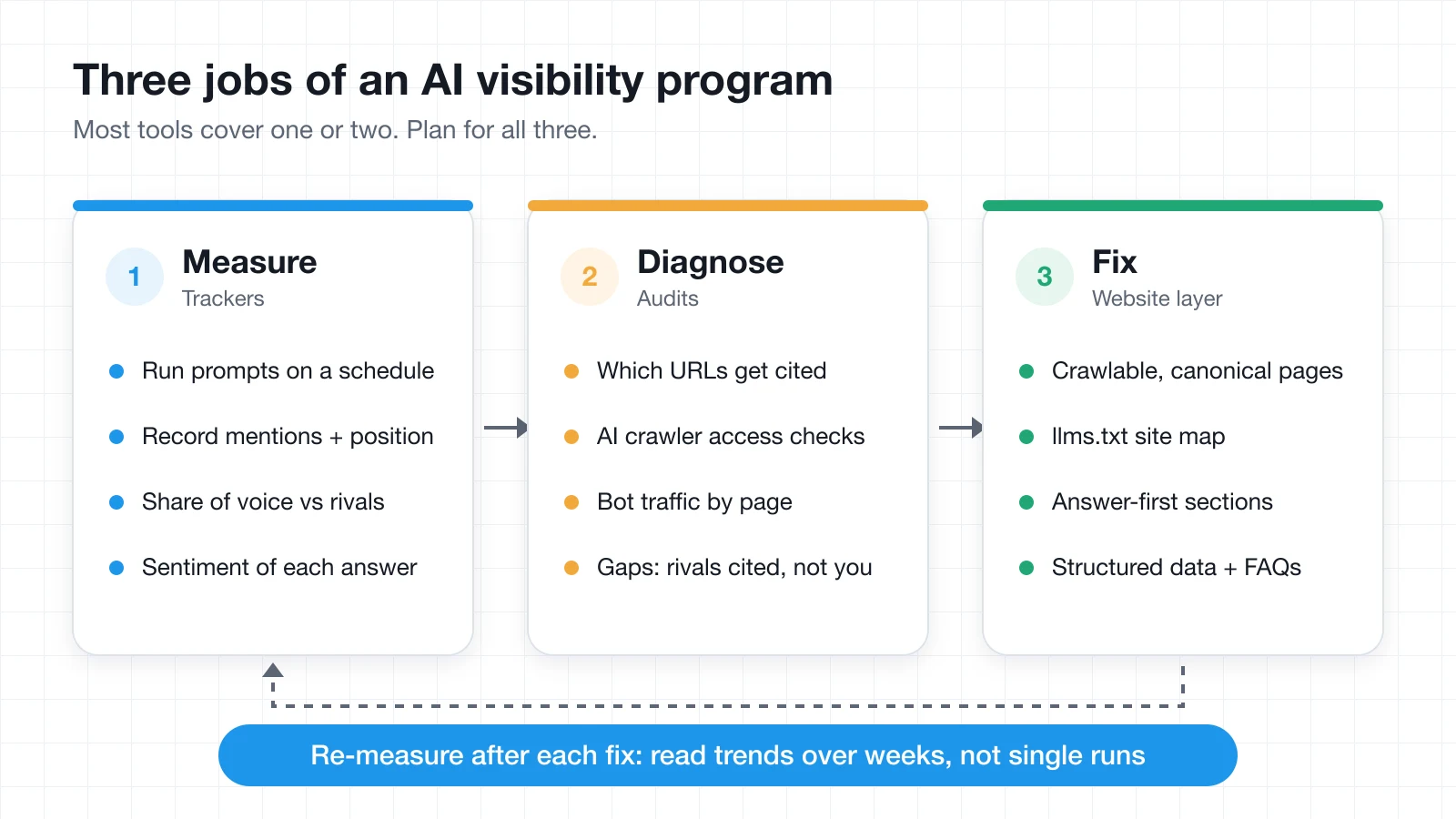
An AI visibility tool shows how often, where, and how favorably AI assistants such as ChatGPT, Google AI Overviews, Perplexity, Gemini, and Microsoft Copilot mention your brand when people ask the questions your buyers ask. The category has grown fast, and most products now do the same core thing: run a list of prompts on a schedule, record the answers, and report mentions, citations, sentiment, and share of voice against competitors.
What separates them is price per tracked prompt, which engines you get on the entry plan, how deep the citation data goes, and whether the tool helps you fix anything. This guide compares seven trackers and one tool built for the fix side, with every price checked on the vendor's own pricing page on September 29, 2026. Prices and plan limits change often, so confirm them before you buy.
Key takeaways
- Trackers and fixers are different jobs. Seven of the tools here measure what AI answers say. PolyDraft builds the site those answers draw on. Most teams need one of each, not two trackers.
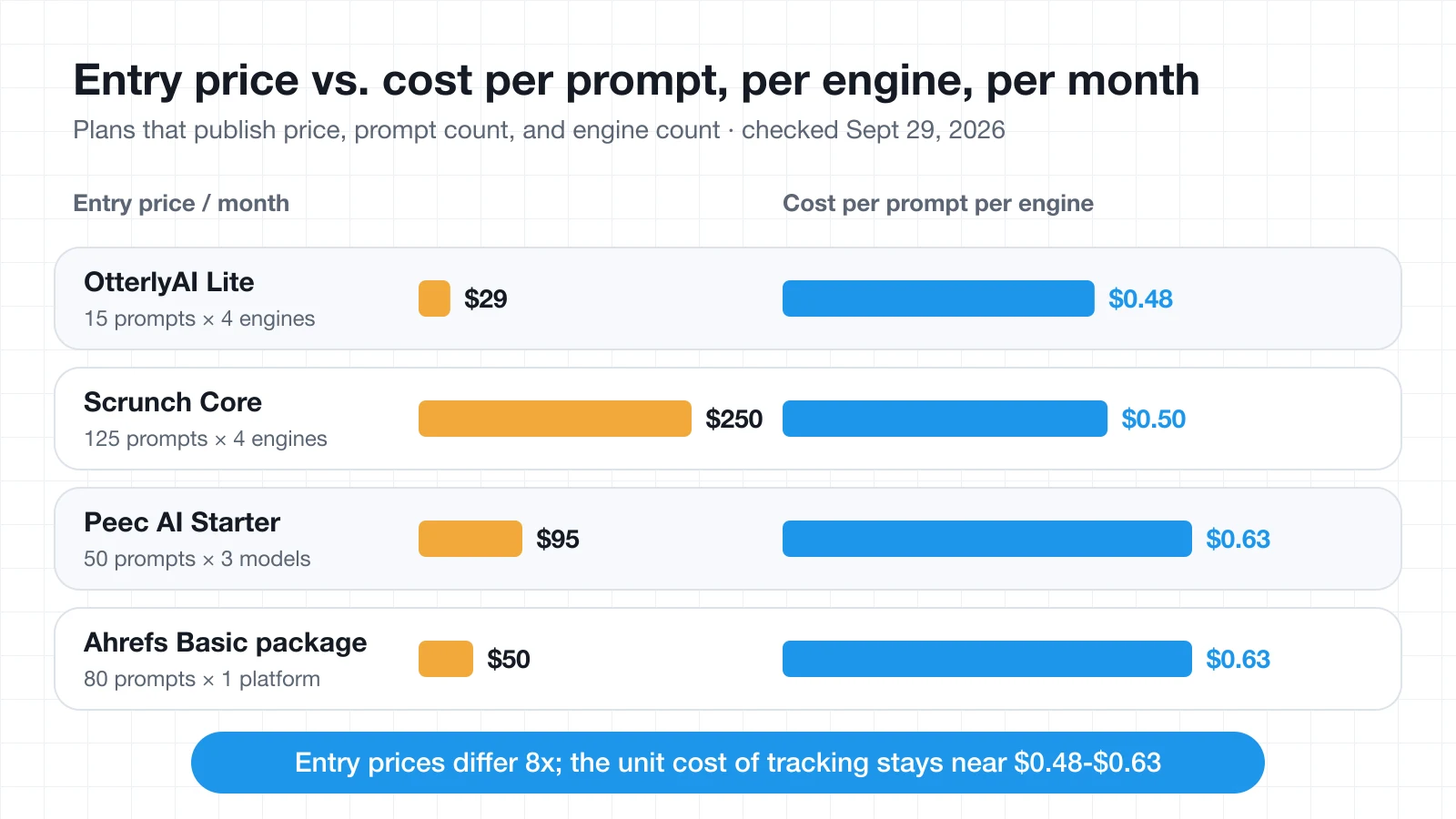
- Entry prices vary widely, but unit costs cluster. Entry plans run from $29 to $250 a month, yet the cost of tracking one prompt on one engine for a month lands between roughly $0.48 and $0.63 on the four plans that publish enough detail to compare.
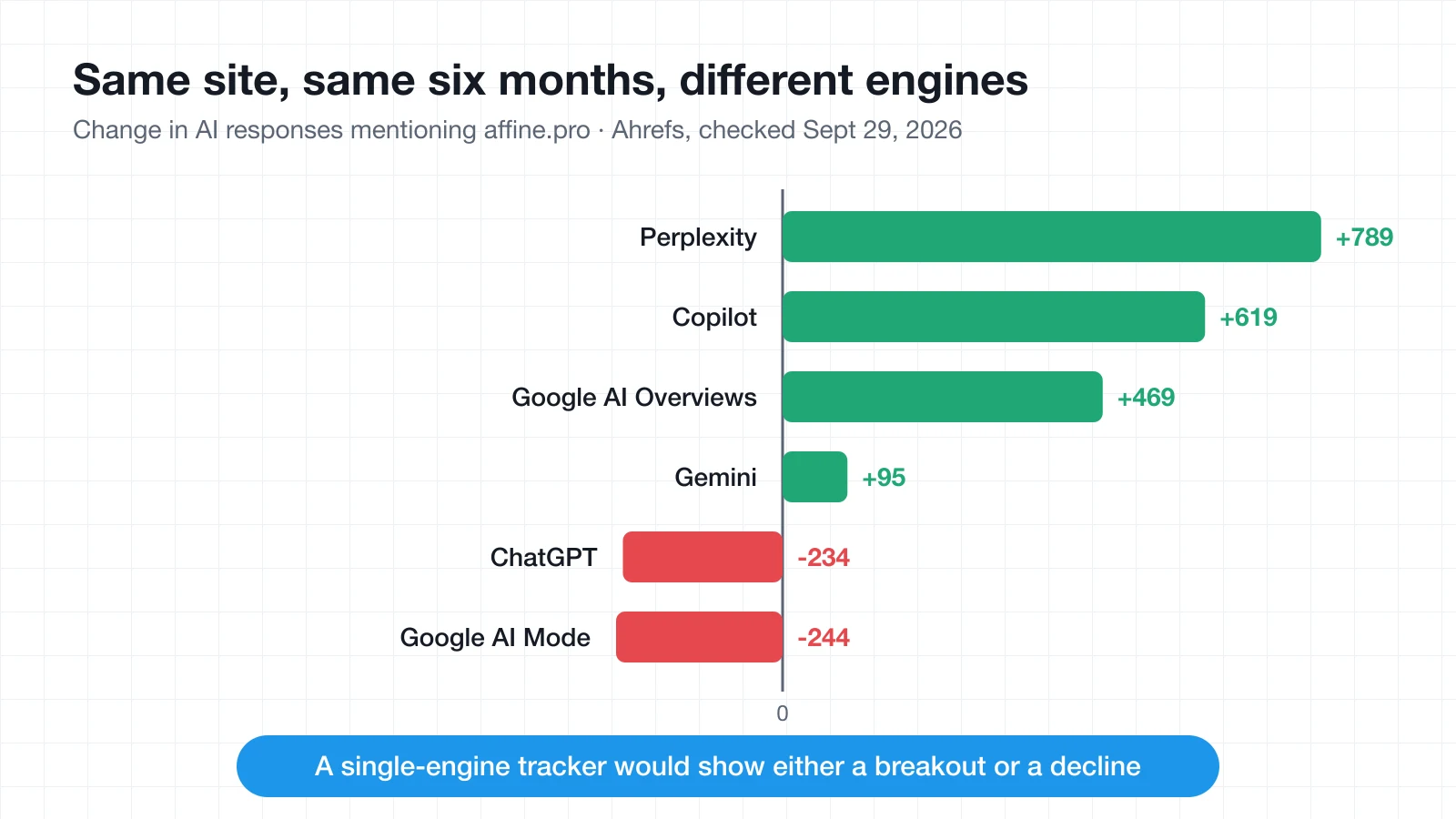
- Track more than one engine. In the same six months, one site we looked at gained 789 Perplexity mentions and lost 234 in ChatGPT. A single-engine dashboard would have told only half the story.
- Expect noise. Answer engines are non-deterministic, so the same prompt can return different answers on the same day. Read trends over weeks, not single runs.
- The work needs a home. Dashboards show gaps; someone still has to decide which prompts matter, fix pages, and record what changed. A shared workspace keeps that loop from falling apart.
What an AI visibility tool actually measures
Every tracker on this list is built around the prompt: a question you want your brand to appear in, such as "best invoicing software for freelancers" or "is [your brand] good for teams?" The tool sends each prompt to one or more AI engines on a schedule, stores the answers, and extracts a handful of signals:
| Signal | What it tells you | Why it matters |
|---|---|---|
| Mentions | Whether your brand name appears in the answer | The basic presence check |
| Position | Where you appear relative to other brands | First-named brands tend to get the click |
| Citations | Which URLs the engine linked or retrieved | Shows which pages, yours or third-party, shape the answer |
| Share of voice | Your mentions as a share of all tracked brands | The number most teams report upward |
| Sentiment | Whether the framing is positive, neutral, or negative | Catches outdated or unfair claims early |
| Crawler access | Whether AI bots can reach your pages | A blocked crawler caps everything else |
Two caveats apply to every product in the category. First, answers vary from run to run, so a single day's result is a sample, not a verdict. Second, prompt lists are chosen by you, which means a tracker can only report on the questions you thought to ask. Good tools help with that second problem by suggesting prompts from your keywords, competitors, or observed conversation data.
How we compared the tools
We did not rank tools on marketing claims. Each one was checked against the same criteria, using the vendor's public pricing page and documentation:
- Engines on the entry plan. Which AI engines are included before add-ons.
- Prompt allowance and cost per prompt. How many prompts the entry plan tracks, and at what frequency.
- Citation and source depth. Whether the tool shows which URLs and domains shape each answer.
- Diagnosis. Crawler, bot-traffic, or site audits that explain why you are missing.
- Action layer. Recommendations, content tools, or site changes that help you respond.
- Data access. Exports, Looker Studio connectors, APIs, or MCP access for your own reporting.
Where a vendor does not publish a number, we say so rather than estimate it.
The best AI visibility tools at a glance
| Tool | Best for | Starting price | Free option |
|---|---|---|---|
| OtterlyAI | Budget tracking | $29/mo | Free trial |
| Peec AI | Next-step actions | $95/mo | Ask vendor |
| ZipTie | Paying per engine | $42.75/mo | 7-day trial |
| Profound | Enterprise programs | Custom | 7-day trial |
| Scrunch | Tracking plus site audits | $250/mo | 7-day trial |
| Semrush | Existing Semrush users | $199/mo | Free plan |
| Ahrefs Brand Radar | Researching any brand | $199/mo | Free Ahrefs account |
| PolyDraft | Fixing the website side | $39/mo to publish | Free to build |
Prompt allowances and engine coverage for each entry plan are listed in the tool sections below.
Cost per tracked prompt
Entry prices are hard to compare because plans bundle different numbers of prompts and engines. Normalizing them to "one prompt on one engine for one month" gives a fairer view, for the four plans that publish all three numbers:
| Plan | Price | Prompts | Engines | Per prompt, per engine |
|---|---|---|---|---|
| OtterlyAI Lite | $29 | 15 | 4 | $0.48 |
| Scrunch Core | $250 | 125 | 4 | $0.50 |
| Peec AI Starter | $95 | 50 | 3 | $0.63 |
| Ahrefs Basic package | $50 | 80 | 1 | $0.63 |
The spread between the cheapest and most expensive entry plan is more than eight times, but the unit cost barely moves. What you are really choosing is volume, engine coverage, and the features around the tracking. Scrunch does not state a tracking frequency on its Core plan card, so confirm cadence before treating these as identical units.
1. OtterlyAI: best for small teams on a budget
OtterlyAI is the lowest-cost way to start tracking. The Lite plan costs $29 a month and tracks 15 prompts daily across ChatGPT, Google AI Overviews, Perplexity, and Microsoft Copilot, with unlimited team members. Claude, Google AI Mode, and Gemini are paid add-ons.
What makes it more than a cheap tracker is the audit side. Every plan includes a Brand Visibility Index, link citation analysis, a prompt research tool, and a generative engine optimization audit for your URLs (1,000 audits a month on Lite). That gives a small team both the "are we mentioned?" number and a starting list of page-level fixes.
- Standout: Low entry price with GEO audits and citation analysis included.
- Watch out for: Lite gives only three recommendations a week and no API or MCP access; those arrive on Standard at $189 a month with 100 prompts.
- Pricing checked: Lite $29/mo, Standard $189/mo, Premium $489/mo; 15% off annually; free trial available.
2. Peec AI: best for marketing teams that want next steps
Peec AI is built for teams that need to turn visibility data into a to-do list. Its Starter plan costs $95 a month for 50 prompts tracked daily, with unlimited users. You choose three models to track from its supported set, which includes ChatGPT, Google AI Mode, AI Overviews, Microsoft Copilot, Gemini, and Naver AI.
The feature list leans toward action. Gap analysis surfaces sources that mention competitors but not you, recommended actions are grouped into earned and owned opportunities, and a crawlability audit checks how your robots.txt treats more than 40 AI bots. Brand perception features go further than sentiment: you can set facts about your brand and have tracked answers checked against them.
- Standout: Gap analysis and fact-checking of AI claims about your brand.
- Watch out for: Three models on every self-serve tier; broader model coverage, API access, and SSO are Enterprise features.
- Pricing checked: Starter $95/mo, Pro $245/mo (150 prompts), Advanced $495/mo (350 prompts, multi-country, Looker Studio); Enterprise custom.
3. ZipTie: best for paying only for the engines you use
ZipTie replaces fixed tiers with a configurator. You pick engines from ChatGPT, Google AI Overviews, Perplexity, Google AI Mode, Microsoft Copilot, Bing AI Overview, and Gemini, then set how many prompts run monthly, weekly, or daily. The Starter preset begins at $42.75 a month, and every configuration includes unlimited teammates and projects.
That model suits teams with uneven needs, such as tracking a few high-value prompts daily and a long tail monthly. A useful detail: Google AI Overviews and Bing AI Overview checks also capture the top ten organic results at no extra cost, so you can compare classic rankings and AI answers side by side.
- Standout: Usage-based pricing and organic results captured alongside AI Overview checks.
- Watch out for: Costs climb as you add engines; UGC impact analysis adds 80% to the plan price, and API plus MCP access is a $10 add-on.
- Pricing checked: Starter preset from $42.75/mo; 7-day free trial with 25 daily prompts on ChatGPT, AI Overviews, and Perplexity, no card required.
4. Profound: best for enterprise programs
Profound targets large brands running AI search as a formal channel. There is no self-serve paid tier: after a free trial, pricing moves to custom Enterprise packages that track up to nine answer engines and include SSO/SAML and SOC 2 compliance.
Beyond prompt tracking, Profound bundles an "AI Marketer" agent that runs on credits, Agent Analytics that attribute AI-sourced traffic through CDN and hosting integrations such as Cloudflare, Fastly, AWS, and Vercel, and prompt volume data showing what people ask answer engines.
- Standout: Broad engine coverage, compliance features, and traffic attribution from server-side integrations.
- Watch out for: No public paid pricing; it is a sales-led purchase sized for enterprise budgets.
- Pricing checked: Free trial with 50 prompts run daily for 7 days on ChatGPT, Gemini, and Google AI Overviews; Enterprise custom.
5. Scrunch: best for monitoring plus site audits
Scrunch pairs answer monitoring with a clear focus on how AI systems consume your website. The Core plan costs $250 a month for 125 unique prompts across ChatGPT, Perplexity, Google AI Overviews, and Copilot, plus five site audits a month, AI bot traffic analysis, sentiment analysis, and five user licenses.
Its Enterprise tier adds the Agent Experience Platform, which serves AI agents a version of your pages optimized for machine consumption, along with nine supported LLMs, API access, and SSO. That makes Scrunch one of the few trackers that reaches into the website layer itself.
- Standout: Site audits and bot-traffic analysis included from the first paid tier.
- Watch out for: One brand workspace and one country on Core; the site-serving features are Enterprise-only.
- Pricing checked: Core $250/mo with a 7-day free trial; Enterprise custom.
6. Semrush: best for teams already running SEO in Semrush
Semrush now sells AI visibility inside combined SEO and AI search plans. The Starter SEO + AI Search plan costs $199 a month ($165.17 a month billed annually) and adds 50 daily-tracked prompts for one domain, 300 AI visibility reports a day, and an AI-ready site audit on top of the core SEO toolkit.
The value is in the connection. If a competitor appears more often in AI answers, you can move straight into keyword research, site audits, and backlink analysis without switching tools. If you do not already use Semrush for SEO, the bundle is a lot of platform to buy for AI tracking alone.
- Standout: AI visibility and classic SEO data in one subscription.
- Watch out for: The pricing card does not list which AI engines each plan tracks, so confirm coverage during the trial.
- Pricing checked: Starter $199/mo, Pro+ $299/mo (100 prompts), Advanced $549/mo (200 prompts); a free plan is available.
7. Ahrefs Brand Radar: best for researching any brand
Ahrefs Brand Radar starts from a database rather than from your own prompt list. It lets you research any brand across more than 448 million prompts in Ahrefs' database, then track your own prompts on top. Brand Radar starts at $199 a month and can be bought on its own, which also gives you an Ahrefs Free account. If you only need tracking, custom prompt packages start at $50 a month for about 80 prompts tracked daily on one platform.
In Ahrefs' reporting, AI responses are broken out by Google AI Mode, AI Overviews, ChatGPT, Gemini, Perplexity, and Copilot, which makes platform-by-platform comparisons easy. That database approach is especially useful for competitive research and for agencies pitching prospects before they have set up any tracking.
- Standout: Look up any brand's AI visibility without building a prompt list first.
- Watch out for: The full Brand Radar product costs more than entry-level trackers; the cheaper packages track one platform per check.
- Pricing checked: Brand Radar from $199/mo; custom prompt packages from $50/mo.
What platform-level data looks like in practice
To see why engine coverage matters, we pulled the AI response data Ahrefs reports for affine.pro, the site hosting this article, on September 29, 2026. Across all platforms it recorded about 4,300 AI responses mentioning the site over the previous six months, up about 1,400. The platform detail tells a more useful story than the total:
| Platform | Responses | Six-month change |
|---|---|---|
| Google AI Mode | ~1,400 | −244 |
| Perplexity | 847 | +789 |
| Copilot | 656 | +619 |
| Google AI Overviews | 922 | +469 |
| Gemini | 321 | +95 |
| ChatGPT | 106 | −234 |
The same site, over the same period, grew sharply in Perplexity and Copilot while slipping in ChatGPT and AI Mode. A tool tracking only ChatGPT would have reported a decline; a tool tracking only Perplexity would have reported a breakout. Neither would have been the whole picture.
8. PolyDraft: best for fixing the website side
PolyDraft is the odd one out, and deliberately so. It does not run prompts or report mentions. It is an AI website builder that ships the site-side inputs trackers keep pointing to: pages AI crawlers can reach, a machine-readable map of the site, and sections written to make sense when an assistant quotes them on their own.
According to PolyDraft's AI visibility layer documentation, every site it builds includes:
- An llms.txt file at
/llms.txt, following the public proposal at llmstxt.org and regenerated as pages change. - A robots.txt that names and allows AI crawlers such as GPTBot, ClaudeBot, and PerplexityBot, which you can change from the admin panel if you would rather block them.
- Answer-first sections, where key sections open with the claim, plus FAQ blocks whose structured data matches the visible text.
- Schema.org structured data, consistent entity naming, an RSS feed, and honest lastmod dates that change only when a page changes.
Two free tools work on any site without an account: a free llms.txt generator and a robots.txt generator for setting AI crawler access deliberately. They are a quick way to act on a tracker's crawler warnings even if your site runs on another platform.
- Standout: Fixes the crawler, structure, and markup issues that audits flag, by default, on every plan.
- Watch out for: It does not measure AI answers, so you still need a tracker. The full benefit applies to sites built on PolyDraft, access is currently invite-based, and nobody, PolyDraft included, can guarantee that an assistant will cite a site. llms.txt is a proposal, not a ratified standard.
- Pricing checked: Building and previewing are free; publishing starts at $39/mo (Starter), with Pro at $99/mo and Agency at $299/mo.
How to run a lean AI visibility program
Buying a tracker is the easy part. The programs that improve are the ones where someone owns the prompt list, reviews changes on a schedule, and records what was fixed. A simple four-week rhythm works for most small and midsize teams:
- Week 1: Build the prompt list. Start with 20 to 50 prompts across three groups: category questions ("best tool for…"), comparison questions ("X vs Y"), and brand questions ("is X good for…"). Pull ideas from sales calls, support tickets, and your top search queries. The competitor analysis template is a useful way to decide which rivals to benchmark.
- Week 2: Set a baseline. Run the list in one tracker across at least three engines. Record mention rate, share of voice, and the top cited domains for each prompt group. Do not react to single-day swings.
- Week 3: Fix what is fixable. Check crawler access first, because blocked bots cap everything else. Then rewrite the pages that should answer your highest-value prompts so each key section stands alone, and add FAQs where a direct answer is missing. Your content plan should now include pages written for questions, not only keywords.
- Week 4: Review and log. Compare against the baseline, note which changes shipped, and choose the next ten prompts to add. Keep a written log, because six months from now nobody will remember why a number moved.
Keep the program in a shared workspace
Trackers export CSVs and dashboards, but the decisions around them usually end up scattered across chats and slide decks. AFFiNE combines docs, whiteboards, and databases in one workspace, which suits this kind of recurring program:
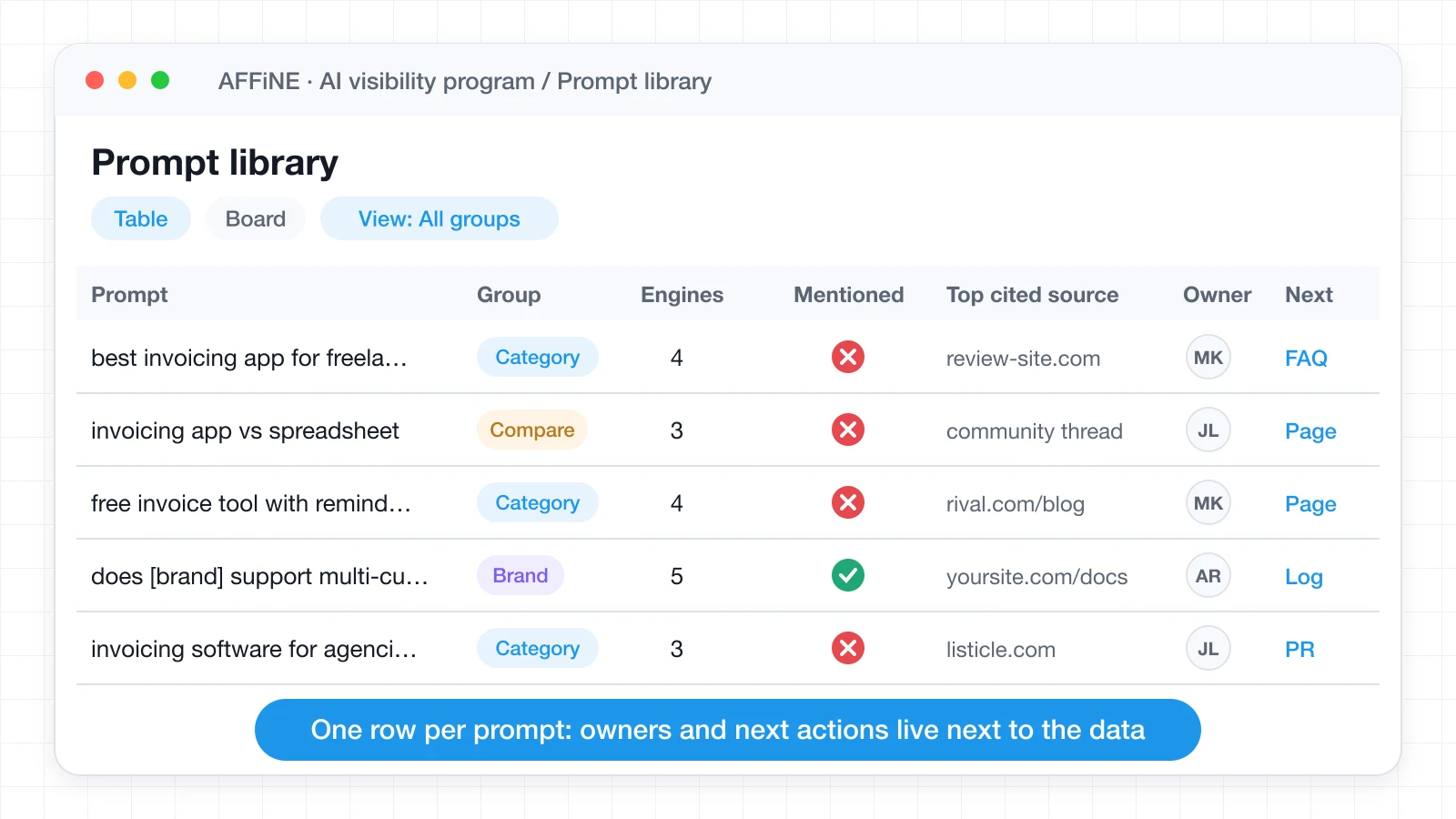
- A prompt library as a database. One row per prompt, with properties for prompt group, engines tracked, current mention status, top cited source, owner, and next action. Filter it into a view of "prompts where competitors are cited and we are not."
- A whiteboard for citation sources. Map the domains that keep appearing in answers, such as review sites, communities, documentation, and your own pages, and mark which ones you can influence.
- A monthly report doc. Summarize the tracker export, link the pages you changed, and record what you will test next. AFFiNE AI can help draft the summary from pasted data, and prompt management practices apply just as well to the prompts you track as to the prompts you write.
Because AFFiNE is open source and can be self-hosted, agencies that keep client visibility data separate can run one workspace per client without sending that data to another SaaS tool.
Which AI visibility tool should you choose?
Pick the tracker by situation, then add the fix side you are missing:
- You are a solo marketer or small team: Start with OtterlyAI Lite or a ZipTie Starter configuration, and fix crawler access with the free llms.txt and robots.txt generators.
- You need a weekly to-do list, not just charts: Peec AI's gap analysis and recommended actions are built for that.
- You already pay for Semrush or Ahrefs: Use their AI visibility features first; adding a second tracker rarely changes decisions.
- You run an enterprise program with compliance requirements: Shortlist Profound and Scrunch Enterprise.
- Your tracker keeps flagging site problems you cannot fix quickly: That is a website problem, not a tracking problem. Rebuilding on a platform such as PolyDraft that ships the AI-readable basics by default may be faster than patching an old site page by page.
Whatever you choose, give it a quarter. AI answers move slowly and noisily, and the teams that see results are the ones that keep the same prompt list long enough to see a trend.
If you work with an agency on this, our roundup of AI-powered SEO agencies covers firms that offer generative engine optimization as a service. If your team handles the content side in-house, our playbook for using AI in content marketing shows how to draft, fact-check, and optimize pages that AI answers can cite.
FAQ
What is an AI visibility tool?
An AI visibility tool tracks how AI assistants such as ChatGPT, Google AI Overviews, Perplexity, Gemini, and Copilot mention your brand. It runs a list of prompts on a schedule and reports mentions, position, citations, sentiment, and share of voice compared with competitors.
How much do AI visibility tools cost?
Entry plans checked in September 2026 range from $29 a month (OtterlyAI Lite) to $250 a month (Scrunch Core), with enterprise tools such as Profound priced on request. Normalized to one prompt on one engine for a month, the plans that publish full details cost roughly $0.48 to $0.63.
Do I need an AI visibility tool if I already do SEO?
If buyers in your category ask AI assistants for recommendations, yes. SEO tools show where your pages rank; AI visibility tools show whether assistants mention you in their answers. The technical foundations overlap heavily, which is why Semrush and Ahrefs now include AI visibility features.
How many prompts should I track?
Most small teams can start with 20 to 50 prompts split across category, comparison, and brand questions. Add prompts once you have a baseline and have acted on the first round of findings, rather than tracking hundreds from day one.
Why do AI visibility results change from day to day?
AI engines are non-deterministic, so the same prompt can produce different answers on the same day. Treat single runs as samples, compare weekly or monthly trends, and track several engines so one platform's swing does not distort your view.
Can a tool guarantee that ChatGPT will cite my website?
No. No AI provider offers a way to buy or guarantee citations. Tools can measure visibility and help you remove obstacles, such as blocked crawlers, unclear pages, or missing structured data, but whether an assistant quotes your site is its decision.