
AI for Content Marketing: A Practical 2026 Playbook
What changed (Nov 16, 2026): Rewrote the guide as a seven-step AI content workflow with a human checkpoint at each step, copy-ready prompts, tools by stage, risks and Google policy guardrails, ROI measurement, an AFFiNE example with dated screenshots, two downloadable templates, and sources. Removed dated model names, predictions, and claims we could not verify.
AI for content marketing means using AI tools to research, plan, draft, optimize, distribute, and measure content, while people stay responsible for the strategy, the facts, and the final call to publish. Used well, it removes the slow, repetitive parts of the job. Used badly, it produces more of the generic content that readers and search engines already ignore.
This playbook gives you a seven-step workflow with a human checkpoint at every step, copy-ready prompts, tools grouped by stage, a one-page AI content policy you can download, and a simple way to measure whether AI is actually paying off. Last reviewed on November 16, 2026.
Key takeaways
- Most teams already use AI. In CMI's survey for 2027, 88% of B2B marketers said their organization uses AI tools for content creation, but only 17% named quality as one of AI's main contributions.
- The biggest problems are accuracy, quality control, and brand voice. Build your workflow around those three, not around speed.
- Google does not penalize content for being made with AI. It acts against content made at scale mainly to rank, whoever or whatever wrote it.
- AI can't supply first-hand experience, original data, or real customer stories. Those are what make a page worth ranking and citing.
- Measure cost and time per published piece as well as results. Faster output that doesn't perform is not a win.
What AI for content marketing means in 2026
In practice, "AI for content marketing" covers two kinds of work.
- AI-assisted work. A person leads and AI helps: summarizing research, suggesting outlines, tightening a draft, writing ten headline options. This is where most teams get reliable value.
- AI-generated work. AI writes most of the piece and a person reviews it. This can work for low-risk formats such as product description variants or first drafts of social posts, but it needs stronger review and should never be the default for opinion, advice, or anything with your name on a claim.
The research backs this split. The 2027 B2B Content and Marketing Trends report from the Content Marketing Institute and MarketingProfs found that marketers credit AI mainly with speed (78%), efficiency (59%), and volume (44%). Quality came in at 17%. Their top challenges were ensuring accuracy (54%), maintaining quality control (54%), and keeping brand voice and authenticity (52%).
AI agents are also moving into content work. In the same survey, 59% of marketers who use AI said they use or are experimenting with AI agents (13% as a core part of their strategy, 46% experimenting), up from 28% a year earlier. Content management tasks such as ideation, scheduling, and distribution were the most common use.
When not to use AI: skip it for the parts of a piece where the value comes from you. That includes original research, customer interviews, expert opinion, sensitive topics, legal or medical claims, and any statistic you can't trace to a source.
Where AI fits in the content lifecycle
Content marketing runs in a loop: research, brief, draft, verify, optimize, distribute, and measure, with the results feeding the next round. AI can help at every stage, but a person should own one decision at each stage.
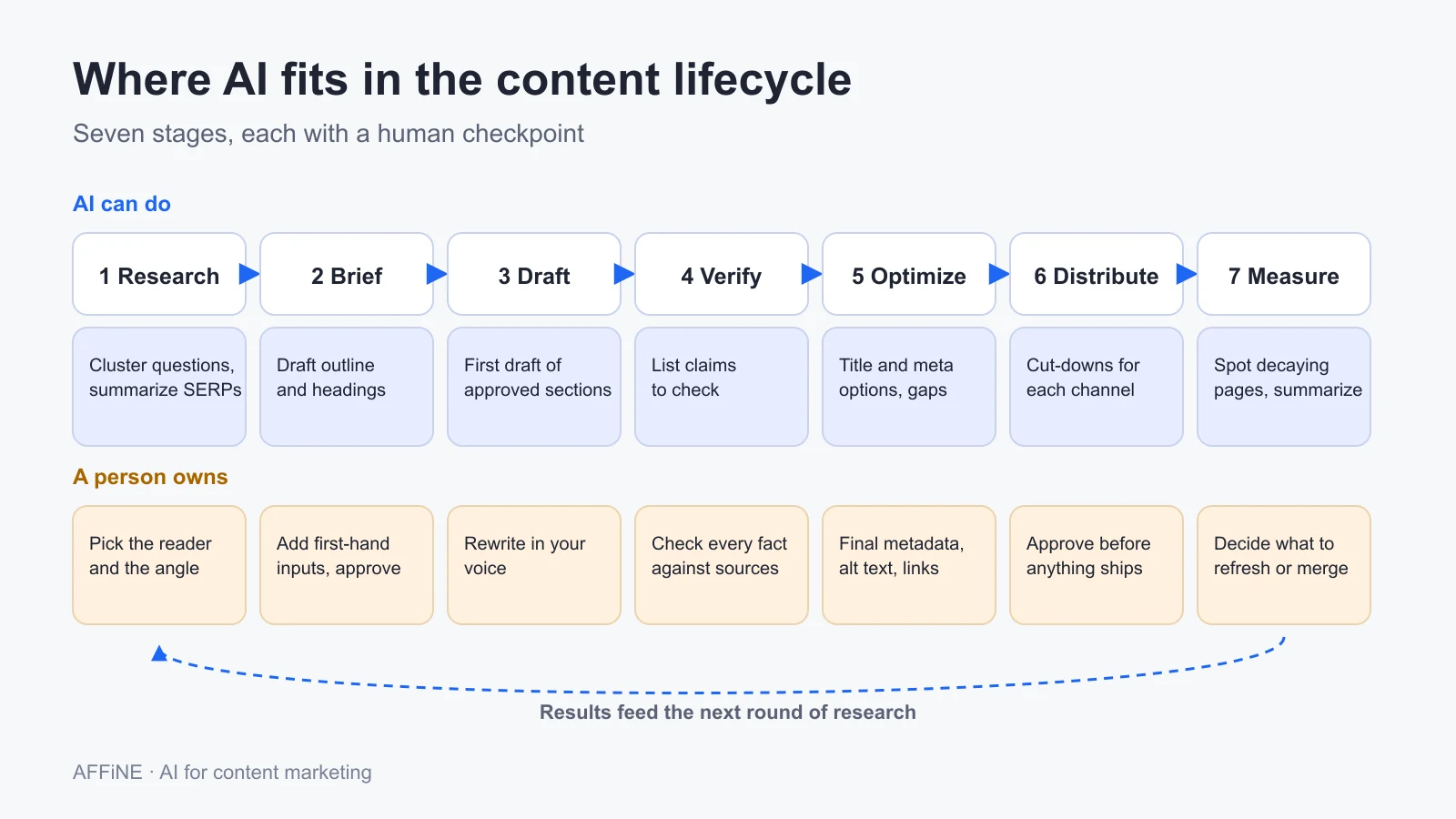
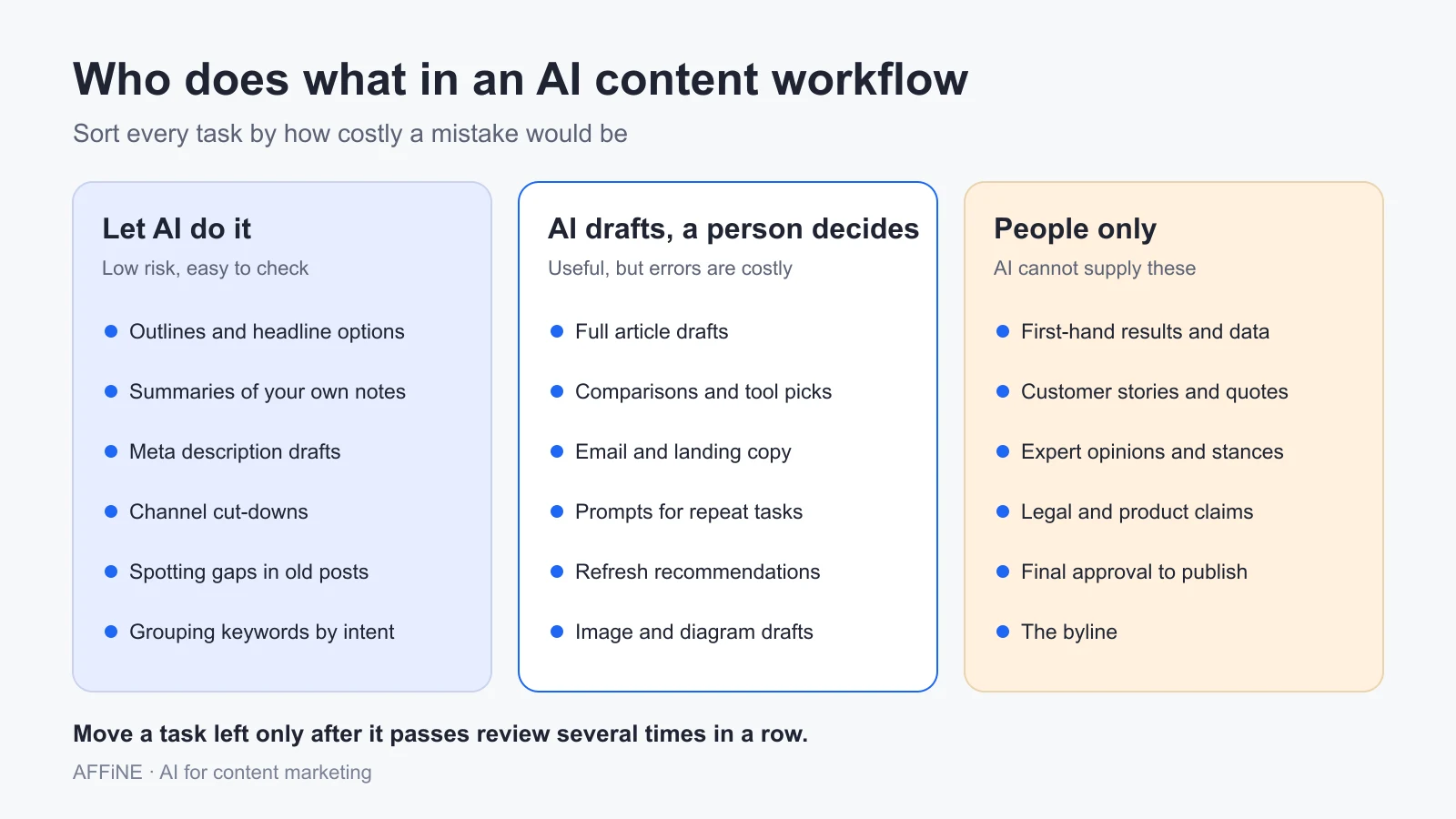
A useful rule for deciding who does what: sort each task by how costly a mistake would be. Low-risk tasks that are easy to check can go to AI. Tasks where an error would mislead a reader need a person to decide. Some things, such as first-hand results and the byline, only a person can provide.
A step-by-step AI content workflow
The seven steps below follow the lifecycle. Each one has what to ask AI, and what a person must check before moving on.
Step 1: Research the audience and topic
Start with your own data before you ask a chatbot anything. Export the questions customers ask sales and support, the search queries that already bring visitors to your site in Google Search Console, and comments on your best posts. Then use AI to group and summarize them.
Good uses of AI at this step:
- Clustering a long list of questions or keywords by search intent
- Summarizing what the current top results cover, so you can see what is missing
- Turning interview notes into a list of pains, goals, and objections
- Brainstorming angles, which you then test against real data
If you need a starting point for ideas, our list of creative content marketing ideas and examples works well as input for this kind of brainstorm. For the bigger picture of themes, audiences, and goals, see our guide to strategic content planning.
Human checkpoint: pick one reader and one angle. AI can list ten angles; only you know which one your team can back with real experience.
Step 2: Build a content brief
A brief is where AI saves the most time and causes the least risk. It turns a vague topic into a plan a writer, or a model, can follow. A good AI content brief has six parts:
- The goal and the reader
- The search intent and your angle, meaning what you will add that the top results don't
- The first-hand inputs AI can't supply: your data, examples, quotes, and screenshots
- An outline, drafted by AI and approved by a person
- The prompts you used, so the next writer can reuse them
- The checks a person must complete before publishing
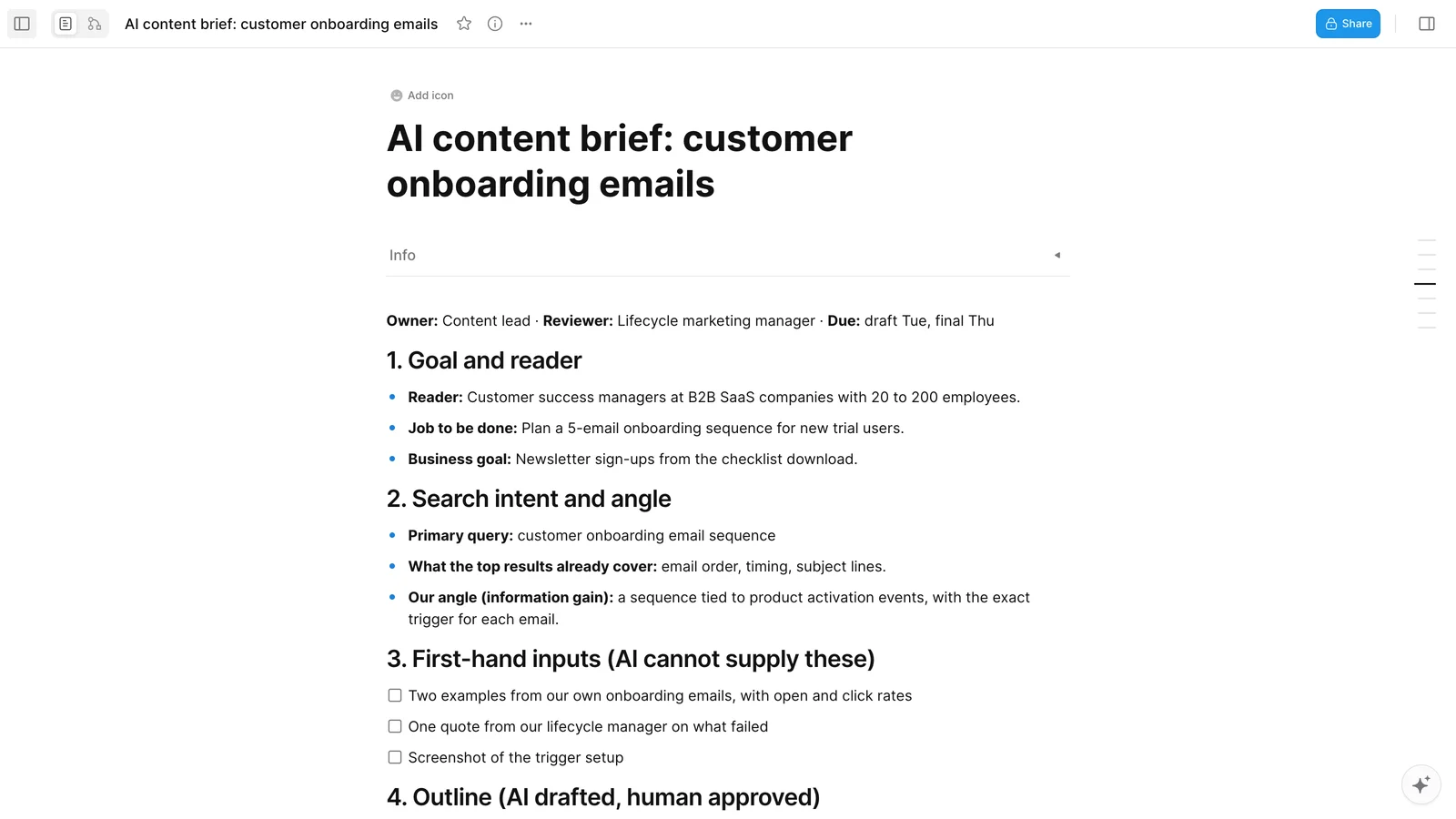
You can download the AI content brief template as a Markdown file and paste it into AFFiNE or any other docs tool. For campaign-level planning, the campaign brief template covers goals, audiences, and channels in one place.
Human checkpoint: approve the outline and fill in the first-hand inputs before anyone writes a draft. If that section is empty, the piece will read like every other result.
Step 3: Draft with AI, edit as a human
Give the model the approved brief, not just the topic. Ask for one section at a time, at a set length, and ask it to mark the places where your own data should go. Two habits make a big difference:
- Use placeholders. Tell the model to write
[EXAMPLE]or[DATA]instead of inventing a number or a story. You then replace each one with something real. - Ask for a claims list. At the end of each section, have the model list every factual claim it made. That list becomes your fact-checking queue in Step 4.
Then edit as a person. Cut the filler, add your examples, and rewrite the opening and closing in your own voice. If a paragraph could appear on any competitor's blog, either add something specific to it or delete it.
Human checkpoint: a named editor rewrites the draft. AI output is raw material, not a finished piece.
Step 4: Fact-check and add first-hand experience
Generative models predict likely text; they don't look up facts. Google's own guidance on using generative AI content says it's critical to fact-check and review all AI-generated content for accuracy before publishing, and that the review should cover metadata too: titles, meta descriptions, structured data, and image alt text.
A simple fact-checking routine:
- Work through the claims list from Step 3.
- Open the original source for every statistic. If you can't find it, remove the number.
- Check that quotes, product features, and prices are current. Link to the page you checked.
- Replace every placeholder with your own data, screenshots, or examples.
- Read the piece against your style guide for tone and terms.
This is also where the piece earns its place. Add what you did, what happened, and what you would do differently. That kind of first-hand detail is what readers, Google, and AI answer engines look for.
Human checkpoint: every statistic links to its original source, and every placeholder is gone.
Step 5: Optimize for search and AI answers
Search now has two surfaces: the classic results page and AI-generated answers in places like Google's AI Overviews and AI Mode, ChatGPT, and Perplexity. Optimizing for the second is often called AI SEO: making your content easy for AI systems to find, understand, and cite. The good news is that most of the work is the same as good SEO.
Google's guide to optimizing for generative AI features says these features are rooted in its core ranking and quality systems. A page must be indexed and eligible to show a snippet before it can appear. The guide also says you don't need special AI text files such as llms.txt, special markup, or content broken into tiny chunks for Google Search. What it does ask for is "non-commodity" content: a unique point of view and first-hand experience, rather than a summary of what is already out there.
Practical steps:
- Answer the main question in the first two sentences, in plain words.
- Use clear headings that match the questions people ask.
- Use a table where readers compare options, and a numbered list for steps.
- Write the title, meta description, and image alt text yourself, or check AI versions carefully.
- Add internal links to your related guides, and update them when you publish.
- Track how often your brand shows up in AI answers. Search Console now has a generative AI performance report, and dedicated AI visibility tools track mentions across ChatGPT, Perplexity, and other assistants.
AI audit tools are good at finding technical problems: broken links, missing alt text, slow pages, thin sections. Acting on what they find is still people work. Some teams bring in specialized link-building support to close the authority gaps an audit reveals, while the in-house team keeps ownership of the content itself.
Human checkpoint: a person approves the final title, meta description, alt text, and links.
Step 6: Repurpose and distribute
Once a piece is final, AI is very good at cutting it down for other channels: a LinkedIn post, a newsletter section, a short video script, an email. Give it the final text and a clear format for each channel, and ask it to keep claims exactly as written.
- For email, see how to create an email template with AI.
- For social, plan cut-downs in a social media content calendar template so they don't all go out on the same day.
- To schedule everything in one place, start from AFFiNE's free content calendar template, and see our guide to content calendar templates for which fields to track.
- To turn one idea into images, video, and campaign assets, see how AI workflows help creative teams repurpose ideas.
Distribution also includes deciding where to place paid content. Before you buy placements, start by checking influential digital media in your niche for real engagement rather than traffic claims, and label any sponsored post clearly.
Personalization belongs here too. AI can help you write variants for different segments, such as role, industry, or stage of the customer journey. For a worked example of tailoring content to app users, Agicent, a mobile app development company, explains how it builds a content marketing strategy for apps.
Human checkpoint: someone approves each cut-down before it ships. Shortened versions are where claims most often get distorted.
Step 7: Measure, refresh, and interlink
AI can read your analytics exports and point out patterns: posts losing clicks, pages ranking on page two, topics with impressions but no page that answers them. It can also compare an old post against the current top results and list what is missing.
Use it to build a short monthly list:
- Refresh: pages that are losing clicks or have outdated facts
- Merge: two or more pages competing for the same query
- Interlink: new posts that older, related posts should link to
- Retire: pages with no traffic, no links, and no purpose
You don't need an enterprise stack for this. Small teams can get far with Search Console, an analytics tool, and a spreadsheet; this article explains how KPIs and analytics help small businesses guide their SEO. A content performance report template keeps the monthly numbers in one place.
Human checkpoint: a person decides what to refresh, merge, or retire. AI flags candidates; it doesn't know which pages matter to your business.
Copy-ready prompts for content marketers
Paste these into the AI assistant you use and replace the parts in square brackets. They work best when you also paste your brief. To track how your prompts perform over time, see our guide to prompt management.
| Task | Prompt | What a person checks |
|---|---|---|
| Cluster keywords | "Group these keywords by search intent. For each group, suggest one page that could serve it and flag groups that overlap with each other: [list]" | Groups match how your customers actually search |
| Find gaps | "Here are the headings of the top five results for [query]. List the questions none of them answer well." | Gaps are real, not just missing filler |
| Draft a brief | "Using this reader, goal, and angle, propose an H2 outline. Mark any claim that would need a source. [brief notes]" | Outline fits the angle; nothing generic |
| Draft a section | "Write section [n] in plain English, about [length] words. Use [EXAMPLE] wherever our own data should go. Don't invent numbers." | Placeholders replaced with real data |
| List claims | "List every factual claim in this text, one per line, with the type of source that could confirm it." | Each claim checked against the original |
| Match brand voice | "Edit this draft to match the style guide below. Don't add new facts. Show the three biggest changes. [style guide] [draft]" | Voice sounds like you, meaning unchanged |
| Write metadata | "Suggest five title tags under 60 characters and three meta descriptions of 140 to 160 characters for this article." | Final pick is accurate and not clickbait |
| Repurpose | "Turn this article into a LinkedIn post of about 150 words and a newsletter section of about 100 words. Keep claims exactly as written." | Nothing distorted or overstated |
| Refresh a post | "Compare this old post with these current top results. List outdated facts, missing sections, and sections to cut." | Changes worth making; sources rechecked |
AI content marketing tools by stage
You don't need a tool for every stage. Most teams do well with one general AI assistant, one SEO tool, and a shared workspace where briefs, drafts, and calendars live together. For a longer list of free options, see our roundup of AI content creation tools with free plans, and for planning software specifically, our comparison of content planning tools.
| Stage | Example tools | Good for | Watch out for |
|---|---|---|---|
| Research | Google Search Console, Google Trends, ChatGPT, Claude, Gemini, Perplexity | Your real queries, trends, summaries of sources | Chat answers are not sources; open the citations |
| Brief and planning | AFFiNE, Notion, Google Docs | Briefs, outlines, calendars, shared notes | Keep briefs and drafts in one place |
| Drafting and editing | ChatGPT, Claude, Gemini, AFFiNE AI, Grammarly | First drafts, rewrites, tone and clarity | Generic phrasing; invented facts |
| SEO and AI search | Ahrefs, Semrush, Surfer, Clearscope, Google Keyword Planner | Keyword data, content gaps, technical audits | Scores are guides, not goals |
| Visuals | Canva, Adobe Firefly, AFFiNE whiteboards | Social graphics, diagrams, mind maps | Check image rights and label AI images |
| Distribution | Buffer, Hootsuite, Sprout Social, CoSchedule | Scheduling and cut-downs across channels | Review every auto-generated post |
| Measurement | Google Analytics, Search Console, Looker Studio | Traffic, conversions, generative AI visibility | Compare periods fairly; watch for seasonality |
Google Keyword Planner is free to use with a Google Ads account. Tool features and pricing change often, so check each vendor's site before you commit.
Risks and guardrails
Accuracy and hallucinations
AI models can state wrong facts with full confidence, invent sources, and mix up product details. The fix is process, not a better prompt: claims lists, source links for every number, and a named editor who signs off. Don't rely on AI detectors to catch problems; our comparison of AI checker tools shows how often detectors disagree about the same text.
Brand voice and sameness
When everyone uses the same models with similar prompts, content starts to sound the same. Keep a short style guide with examples of your voice, terms you use and avoid, and two or three sample paragraphs. Paste it into prompts, and keep it next to your briefs, for example in a shared AI knowledge base, so every writer and every model works from the same rules.
Copyright, privacy, and disclosure
- Don't paste customer data, unreleased plans, or anything under NDA into tools your company hasn't approved.
- Check the terms of each tool for how your inputs are used and who owns the output.
- Don't present AI-generated images or quotes as real. Label AI images, and never invent a customer quote.
- Tell readers how a piece was made when AI did a meaningful part of the work. Google suggests giving readers this kind of context, and many publishers add a short editorial note.
What Google's policies say
Google's position has been stable since its 2023 guidance on AI-generated content: it rewards helpful, reliable content however it is produced, and it treats automation used mainly to manipulate rankings as spam. Its spam policies define scaled content abuse as generating many pages mainly to manipulate search rankings rather than to help users, no matter how the pages are created.
In practice, that means:
- Publishing hundreds of near-identical AI pages for keyword variations is risky.
- Creating separate pages for every possible "fan-out" query, as Google calls the related searches its AI runs, is also named in Google's AI optimization guide as a scaled content abuse risk.
- A smaller number of pages with real experience, original examples, and careful editing is both safer and more effective.
A one-page AI content policy for your team
A written policy keeps everyone on the same rules and makes review faster. It should fit on one page and answer five questions: what AI may do, what it may not do, who reviews what, how you disclose AI use, and which tools are approved.
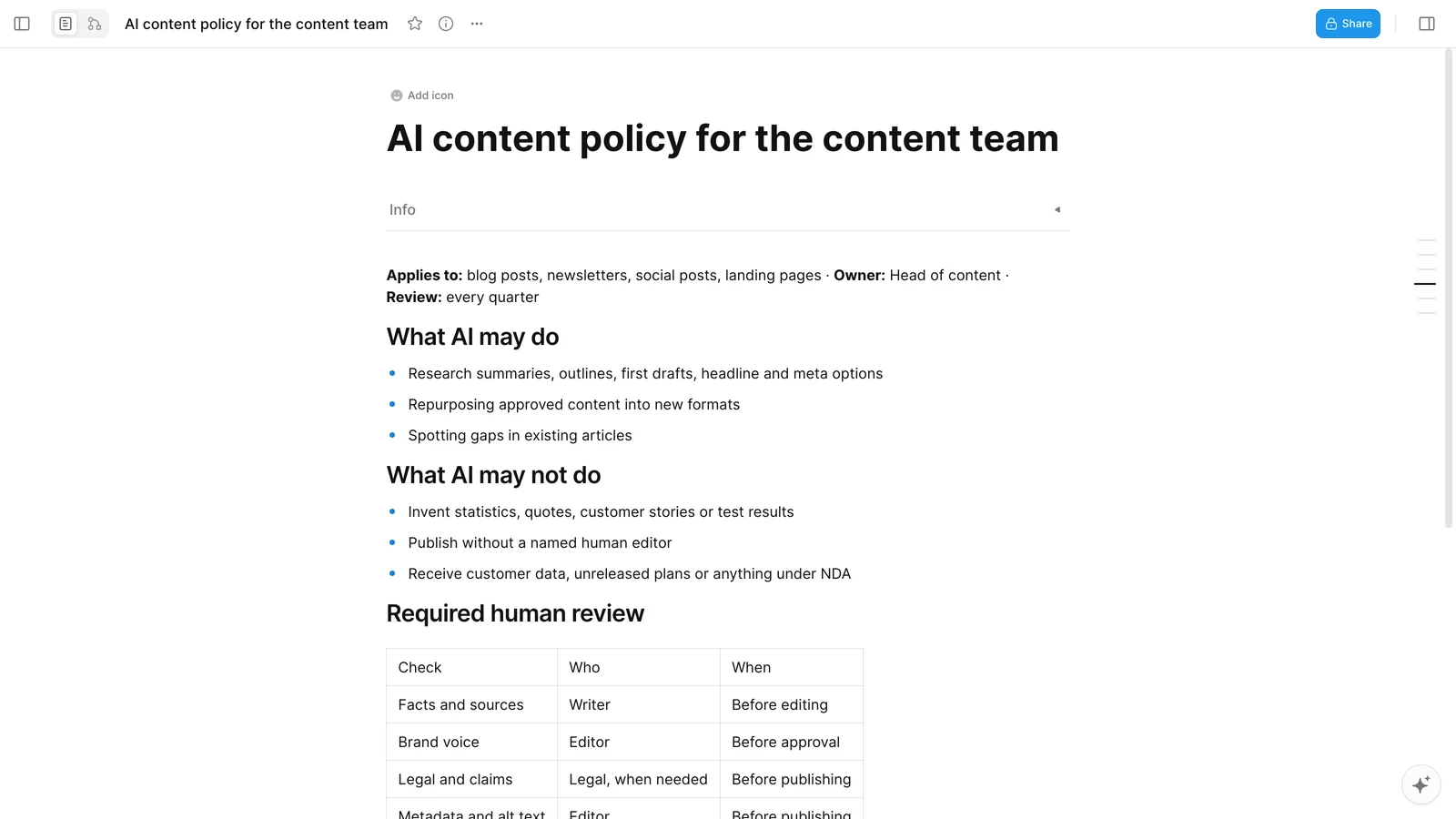
Download the AI content policy template, adjust the owners and tools for your team, and review it every quarter.
How to measure the ROI of AI in content marketing
In the CMI survey, 12% of B2B marketers who use AI named demonstrating ROI as one of their biggest challenges. Whatever your situation, measure two things separately: what AI saves, and what the content earns.
What AI saves (efficiency)
- Hours from brief to published piece, before and after
- Cost per published piece: (hours × hourly cost + tool costs) ÷ pieces published
- Edit ratio: how much of the AI draft survives editing. A very high ratio can mean editors are not editing enough.
What the content earns (results)
- Clicks and impressions from search, by page
- Mentions and citations in AI answers, using Search Console's generative AI performance report or an AI visibility tool
- Sign-ups, demo requests, or other conversions from each piece
- Engagement that shows people read it: scroll depth, time on page, replies
A simple illustration: if a post used to take 10 hours at $60 an hour, it cost $600. If AI cuts that to 6 hours and the tools cost $50 a month across ten posts, each post costs $365. That saving only counts if the new posts perform at least as well as the old ones, so compare results for the same type of content over the same period.
Example: how a small content team runs this workflow in AFFiNE
AFFiNE is our product, so read this section with that in mind. Here is how a two-person team (a content lead and a lifecycle marketer) could run one article, a guide to customer onboarding emails, through the workflow above.
- Brief. The content lead creates a doc from the brief template, fills in the reader and the angle, and lists the first-hand inputs: two real onboarding emails with open and click rates, a quote from the lifecycle marketer, and a screenshot of the trigger setup.
- Outline and prompts. AFFiNE AI drafts an outline inside the doc. The lead edits it, then saves the exact prompts in the brief so the next writer can reuse them.
- Draft and checks. The draft lives in the same workspace. Before publishing, the editor works through the checkpoint list at the bottom of the brief.
- Plan and repurpose. The team switches the doc to Edgeless mode to map cut-downs for email and LinkedIn on a whiteboard, then adds them to the content calendar.
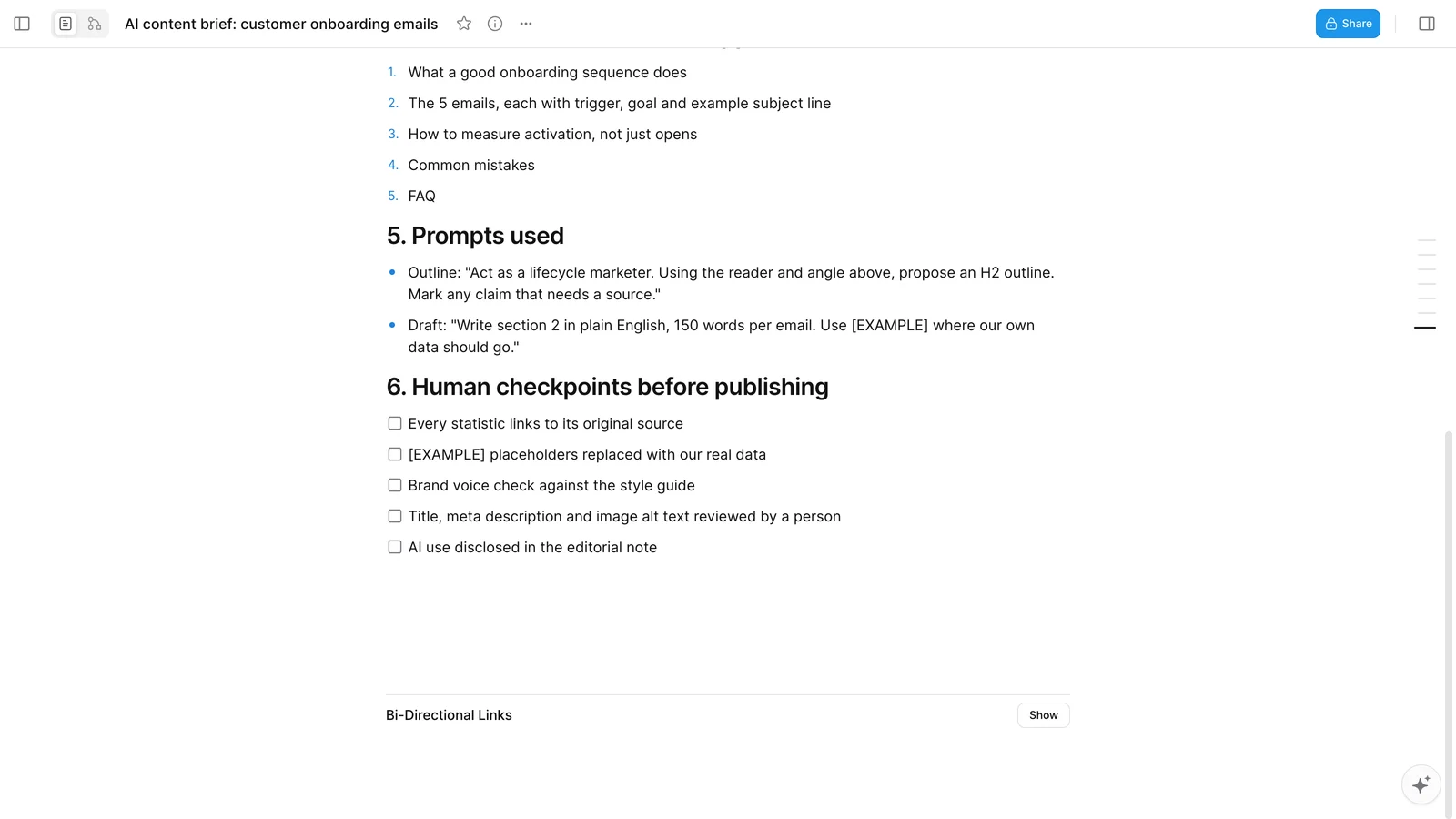
The point is not the tool. It is keeping the brief, the prompts, the draft, and the checks together, so nothing gets lost between steps. If you want to try it, AFFiNE AI works inside docs and whiteboards to summarize, draft, and turn notes into mind maps or presentations.
The AFFiNE screenshots were taken on November 16, 2026, in a demo workspace created for this guide. The brief is an example, not a real customer project.
Frequently asked questions
Can AI-generated content rank on Google?
Yes. Google rewards helpful, reliable content however it is produced. What it acts against is content made at scale mainly to manipulate rankings. AI-assisted pages that are fact-checked, edited by a person, and add real experience can rank like any other page.
Will AI replace content marketers?
AI is replacing some tasks, such as first drafts, summaries, and metadata options, not the job. Strategy, original research, interviews, editing, and judgment about what to publish still need people. Teams that use AI well tend to spend more time on those parts.
How do I keep my brand voice when using AI?
Write a short style guide with examples of your voice and terms you use and avoid, paste it into your prompts, and have a person edit every draft against it. Ask AI to edit for voice without adding facts, and compare the result with your best existing pieces.
Should I disclose that I used AI?
Disclose it when AI did a meaningful part of the work and readers would reasonably want to know. A short editorial note on how the piece was made is enough. The byline should always be a person who is responsible for the content.
What is AI SEO?
AI SEO is the practice of making your content easy for AI systems such as Google's AI Overviews, ChatGPT, and Perplexity to find, understand, and cite. Most of it is standard SEO: indexable pages, clear answers, good structure, and original content with first-hand experience.
What are the limitations of AI for content marketing?
AI can state wrong facts confidently, tends toward generic phrasing, has no first-hand experience of your product or customers, and doesn't know your business priorities. It also can't take responsibility for what you publish. That is why every step in this workflow has a human checkpoint.
How do I start using AI for content marketing?
Start small. Pick one repeated task, such as content briefs or social cut-downs, write a prompt and a checklist for it, and run it for a month. Measure time saved and results, then add the next task.
Sources and editorial notes
- Content Marketing Institute and MarketingProfs, B2B Content and Marketing Trends: Insights for 2027, published November 4, 2026. Survey base for the AI figures: 760 B2B marketers who use AI tools for content creation.
- Google Search Central, Google Search's guidance about AI-generated content, February 2023.
- Google Search Central, Guidance on using generative AI content on your website.
- Google Search Central, Spam policies: scaled content abuse.
- Google Search Central, Optimizing your website for generative AI features on Google Search.
- Google Search Central, AI features and your website.
- AFFiNE product details come from the AFFiNE documentation and our own use of the product.
Editorial note: This guide was rewritten on November 16, 2026, replacing an earlier version that relied on dated model names and predictions. Drafting was AI-assisted. Every statistic and policy statement was checked against the linked primary source, and the cost example in the ROI section is an illustration, not measured data.
Related Articles
Strategic Content Planning for SEO: All You Need To Know

Content Calendar Template: Plan Faster, Stay Consistent
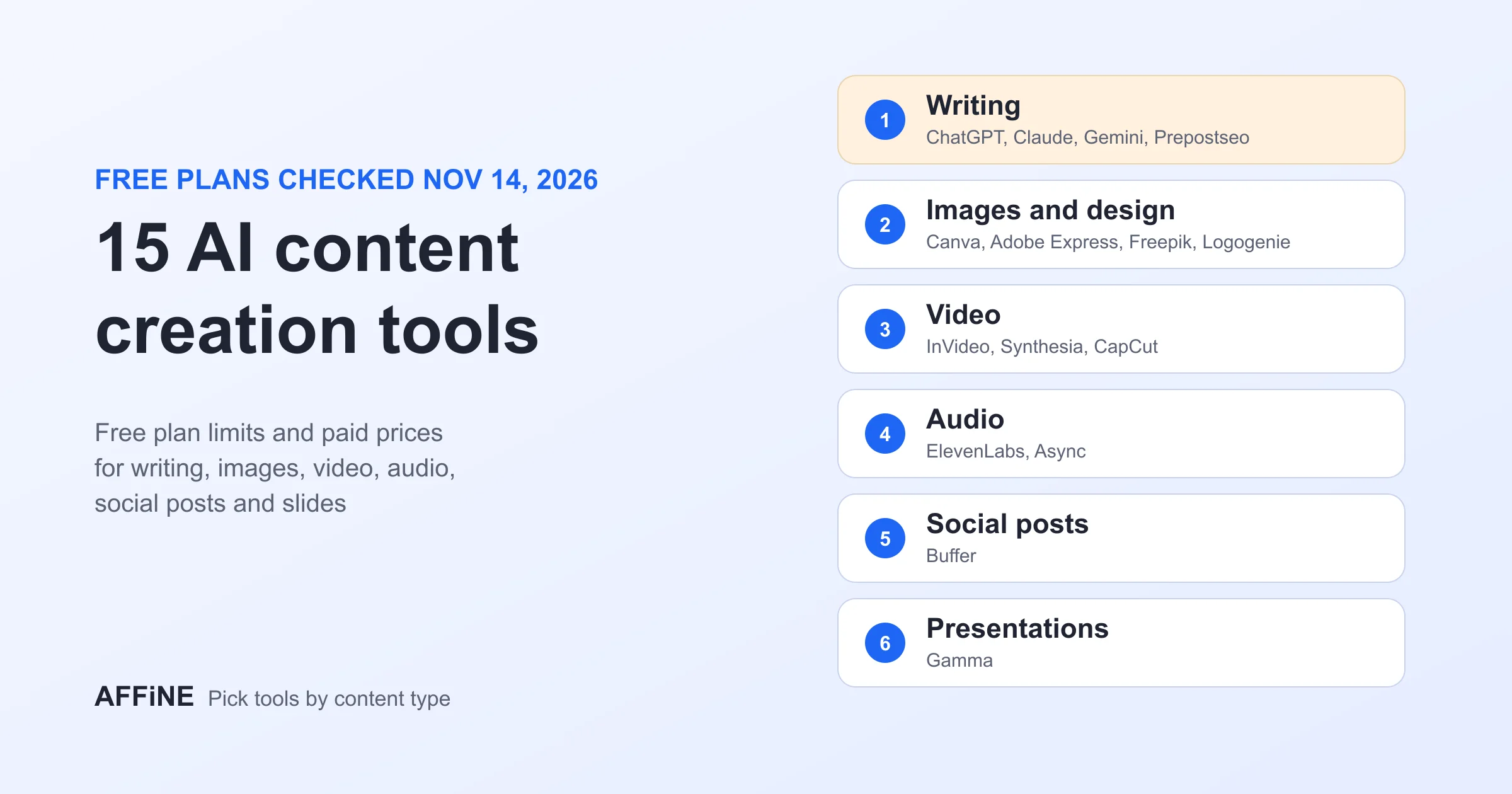
15 AI Content Creation Tools: Free Plans and Prices
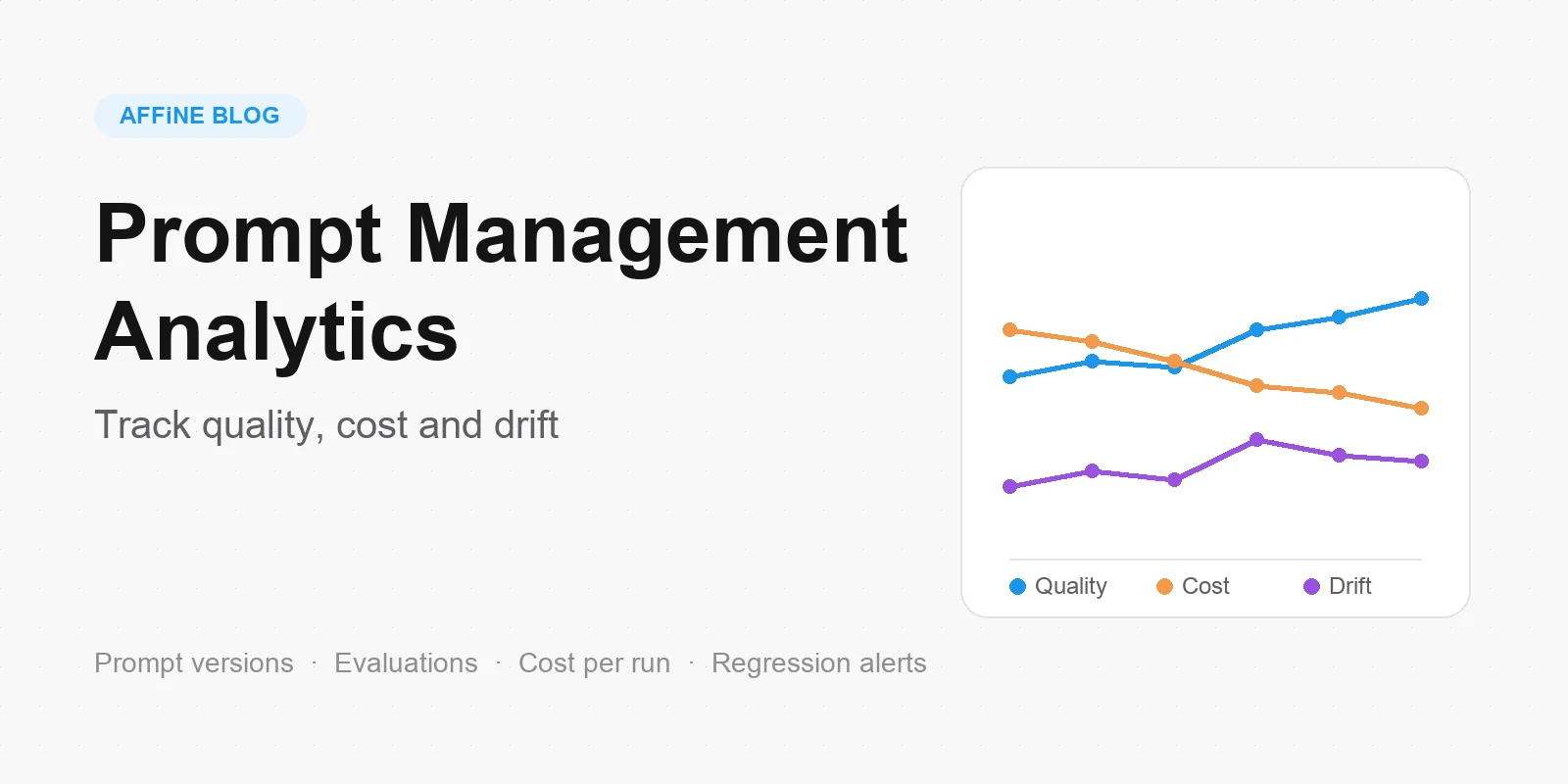
Prompt Management Analytics: Track Quality, Cost, And Drift
