What Is an AI Knowledge Base? How It Works and How to Build One
How an AI knowledge base works, RAG vs. fine-tuning vs. knowledge graphs, internal vs. external use, a 4-step build plan, and a free golden question set.

An AI knowledge base is a collection of your organization's documents that an AI system can search by meaning and use to write direct answers, with links back to the sources it used. Most AI knowledge bases run on retrieval-augmented generation (RAG): the system first finds the passages most relevant to a question, then a large language model (LLM) writes the answer from those passages.
Key takeaways
- A traditional knowledge base returns articles. An AI knowledge base returns an answer, and it should show where that answer came from.
- The LLM does not store your knowledge. The retrieval step decides what the model sees, so retrieval quality sets the ceiling on answer quality.
- RAG suits most teams because you can edit a document and the next answer reflects the change. Fine-tuning suits fixed output formats, not facts that change.
- The biggest lever is your content, not the model: sections that make sense on their own, one canonical answer per question, and a named owner for every page.
- Test before launch with real questions, including questions the system should decline. You can download our golden question set template to start.
What is an AI knowledge base?
A traditional knowledge base is a library of articles that people browse or search with keywords. An AI knowledge base keeps that library, but adds a layer that reads it for you. You ask a question in plain language. The system finds the relevant passages, writes a short answer from them, and cites the pages it used so you can check the answer.
The same content can serve people and software. Employees can ask it questions in a chat window, a support widget can use it to answer customers, and AI agents can query it before they act.
AI knowledge base vs. traditional knowledge base
| Traditional knowledge base | AI knowledge base | |
|---|---|---|
| How you search | Keywords and categories | A question in plain language |
| What you get back | A list of articles | A written answer with source links |
| How matching works | Exact or near-exact words | Meaning, usually combined with keywords |
| Who uses it | People | People, chatbots, and AI agents |
| What breaks it | Missing keywords, poor navigation | Outdated pages, conflicting pages, weak retrieval |
| What it still needs | Writers and owners | Writers and owners, plus testing of the answers |
The last row matters most. An AI layer does not remove the editorial work. It makes the quality of that work more visible, because a wrong page now turns into a confident wrong answer.
The parts of an AI knowledge base
Every AI knowledge base, whether you buy it or build it, has the same five parts:
- Sources. The documents, wiki pages, tickets, and transcripts the system is allowed to read.
- Index. The sources split into small passages (chunks) and stored in a form the system can search quickly.
- Retrieval. The step that picks the passages most relevant to a question.
- Generation. The LLM that writes the answer from the retrieved passages and attaches citations.
- Governance. Owners, review dates, permissions, and tests that keep the first four parts trustworthy.
Vendors compete on parts 2 to 4. Projects usually fail on parts 1 and 5.
How an AI knowledge base works
The pattern behind most AI knowledge bases is called retrieval-augmented generation. The term comes from a 2020 research paper by Lewis and colleagues, which combined a language model with a searchable document index so the model could look facts up instead of relying on what it memorized during training.
From document to answer, step by step
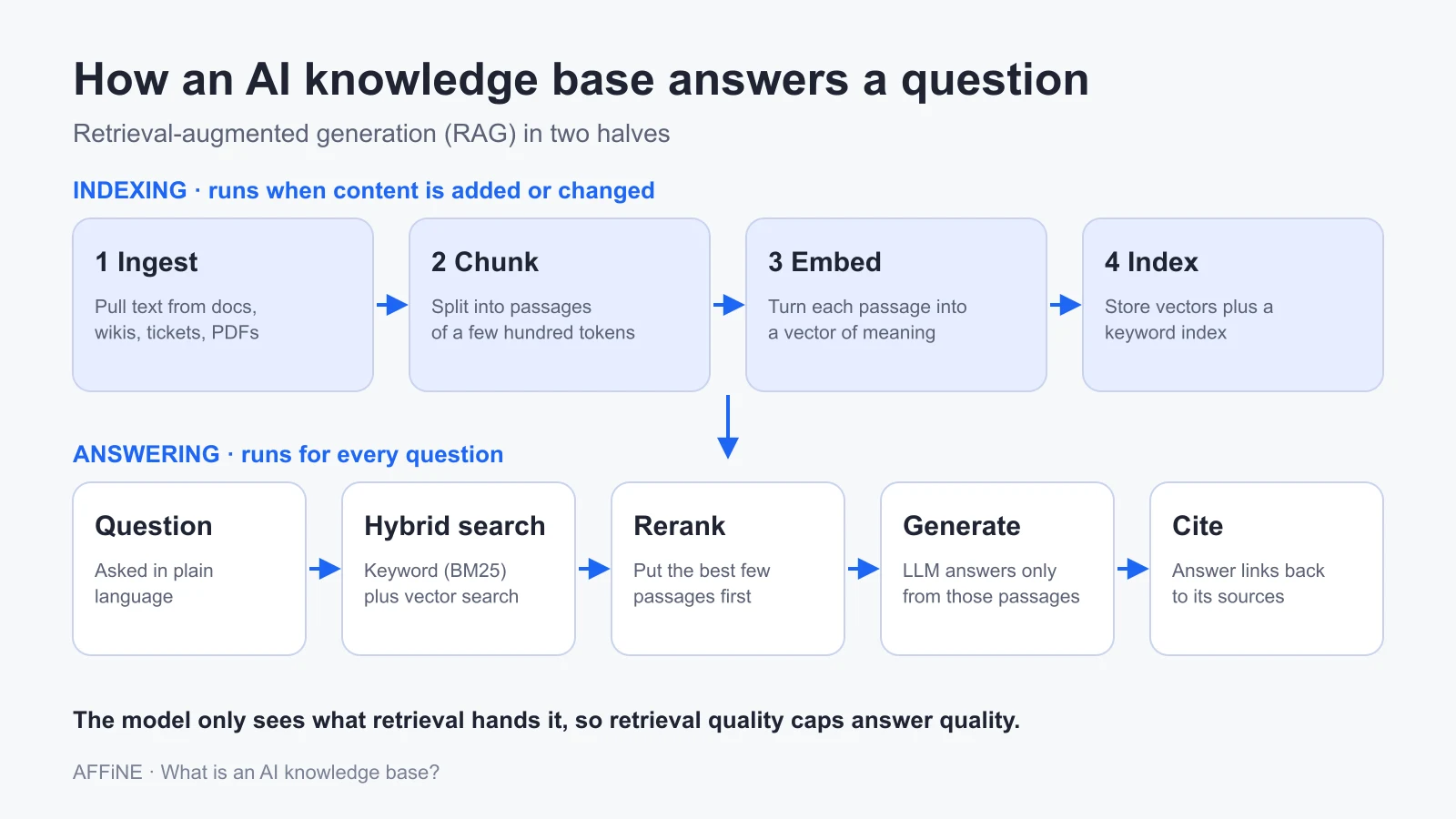
A RAG pipeline has two halves. The first half runs whenever content is added or changed:
- Ingest. Loaders pull text from PDFs, wiki pages, help center articles, tickets, and transcripts.
- Chunk. Long documents are split into passages, often a few hundred tokens each, sometimes with a small overlap. Chunk size and overlap affect retrieval quality, so this step deserves testing rather than defaults.
- Embed. Each chunk is converted into a vector, a list of numbers that represents its meaning. Passages that say the same thing in different words end up close together.
- Index. The vectors, and usually a keyword index too, are stored so they can be searched in milliseconds.
The second half runs every time someone asks a question:
- Search. The question is converted into a vector and matched against the index. Many systems also run a keyword search at the same time.
- Rerank. A second model reorders the candidate passages so the best few go first.
- Generate. The top passages are sent to the LLM with instructions to answer only from them.
- Cite. The answer is returned with links to the passages it used, so a reader can verify it.
Keyword, vector, and hybrid search
Vector search finds meaning. A question about "getting back into my account" can match a page titled "Reset your password" even though the words differ. Keyword search finds exact strings. If someone searches for error code "TS-999", a vector search may return pages about error codes in general, while a keyword search finds the exact match.
That is why strong systems use both. In Anthropic's contextual retrieval experiments, adding a short context sentence to each chunk before embedding cut failed retrievals by 35%. Combining that with keyword (BM25) search cut them by 49%, and adding a reranker brought the reduction to 67%. The tests covered codebases, fiction, and research papers. Your numbers will differ, but the direction holds: hybrid search plus reranking beats vector search alone.
Where the LLM fits, and why it still makes things up
The language model does not hold your policies or product specs. It only sees the passages retrieval hands it for each question. This is the main advantage of RAG: when a policy changes, you update the page, re-index it, and the next answer uses the new version. No retraining is needed.
It is also the main risk. If retrieval returns the wrong passages, or nothing relevant exists, the model may still produce a fluent answer from its general training. Instruct the system to say "I don't know" when the sources do not cover a question, and test that it does.
The cost of getting this wrong is real. In Moffatt v. Air Canada (2024 BCCRT 149), a British Columbia tribunal found the airline liable for negligent misrepresentation after its website chatbot described a bereavement refund process that contradicted the airline's own policy page. The tribunal rejected the argument that the customer should have checked the other page. For a public AI knowledge base, the answer is the policy as far as your customer is concerned.
RAG vs. fine-tuning vs. knowledge graphs
There are three common ways to give a language model your organization's knowledge. Most teams should start with RAG and add the others only for specific problems.
| RAG | Fine-tuning | RAG plus a knowledge graph | |
|---|---|---|---|
| How knowledge gets in | Retrieved from your documents at question time | Trained into the model's weights | Retrieved from documents and from a map of entities and their relationships |
| Updating facts | Edit the page and re-index | Retrain the model | Edit the page; update the graph on a schedule |
| Tracing an answer to a source | Yes, via the retrieved passages | No | Yes, via passages and graph paths |
| Upkeep | Index and retrieval tuning | Training data and retraining cycles | Index tuning plus graph design and curation |
| Best for | Facts that change; answers that need citations | Fixed formats, tone, and domain style | Questions that connect several entities, such as "which policy applies to this team in this region?" |
RAG is the default for good reasons. Menlo Ventures' 2024 enterprise survey reported RAG at 51% adoption among enterprise AI design patterns, up from 31% the year before, while only 9% of production models were fine-tuned.
Fine-tuning changes how a model writes, not what it can look up. It helps when outputs must follow a strict structure or a specialized style. OpenAI's announcement of GPT-4o fine-tuning cites Cosine reaching state-of-the-art scores on a software engineering benchmark with a fine-tuned model. For a knowledge base, though, facts baked into weights go stale, cannot be cited, and cannot be removed without retraining.
Knowledge graphs store entities, such as products, teams, and policies, together with named relationships like "applies to" or "replaced by." They help with multi-step questions that pure similarity search handles poorly. In an evaluation Lettria published on the AWS Machine Learning Blog, adding graph-based retrieval to RAG improved answer precision by up to 35% across finance, healthcare, industrial, and legal test sets. Lettria sells GraphRAG tooling, so treat the figure as a vendor result. The cost is design work: someone has to define the entity types and keep the graph current.
Internal vs. external AI knowledge bases
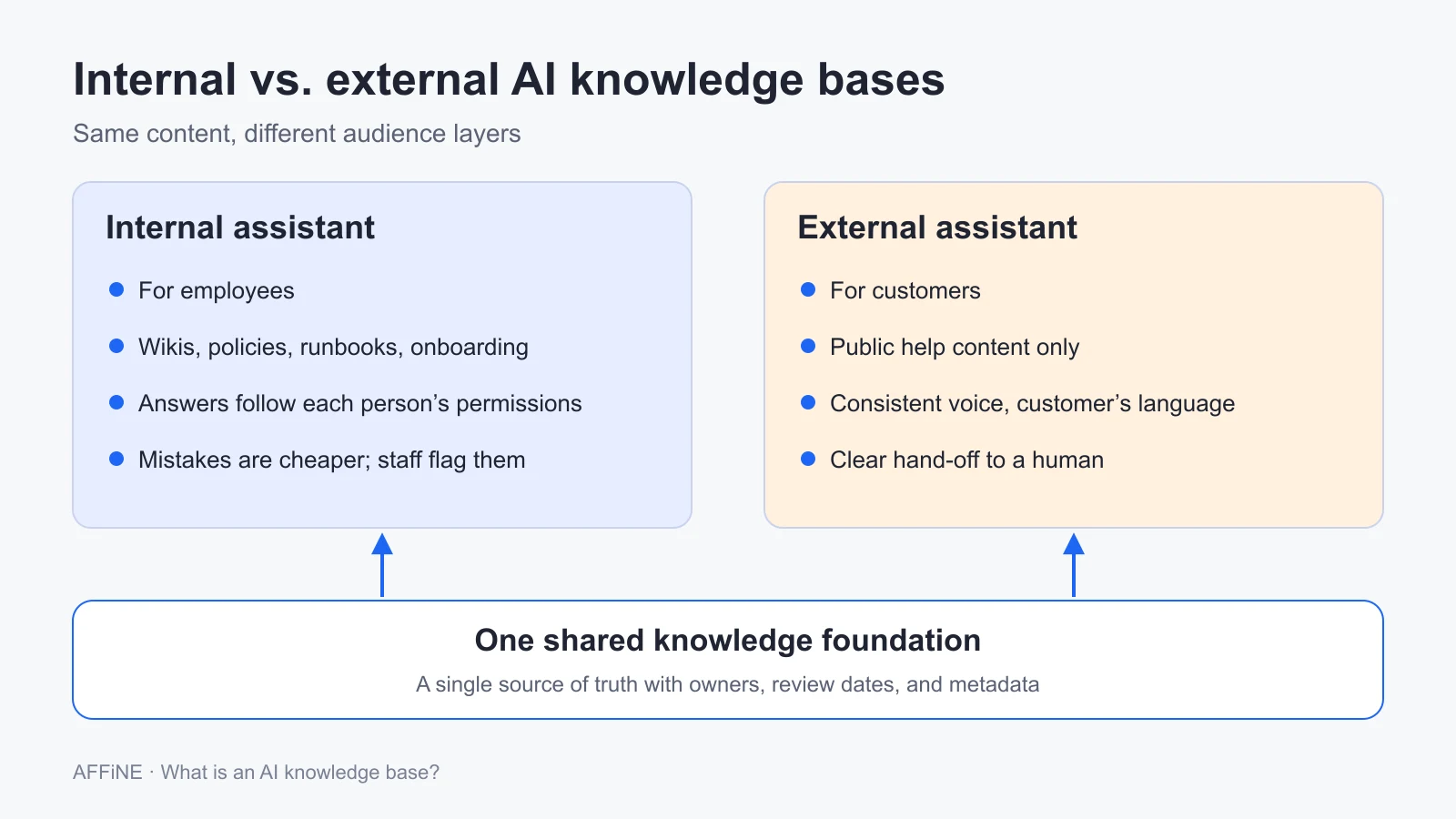
The same pipeline can serve employees or customers, but the two audiences need different content, permissions, and tone. Decide which one you are building first.
Internal: answers for employees
An internal AI knowledge base answers questions from staff using wikis, policies, runbooks, and onboarding guides. Common uses:
- IT and engineering: runbooks, incident playbooks, architecture decisions, and deployment steps.
- HR and operations: leave rules, benefits, expense policy, and onboarding checklists.
- Sales: product positioning, competitor notes, and approved answers to security questionnaires.
- Legal and finance: contract clause guidance and approval thresholds, with clear limits on what the assistant may interpret.
The hard requirement is permissions. An employee should never receive an answer built from a page they cannot open directly. If you plan to run models and data inside your own environment, see our guides to private AI for business and self-hosting an enterprise knowledge base.
External: answers for customers
An external AI knowledge base answers customers in a help center, a support widget, or an agent-assist panel that suggests answers to support staff. It needs a consistent brand voice, strict filtering so internal-only content never appears, answers in the customer's language, and a clear path to a human. For the help center side, see our guides to help desk knowledge bases and customer knowledge bases.
Requirements by team
| Requirement | Customer support | Internal operations | Product documentation |
|---|---|---|---|
| How often content changes | Often, with releases and policy changes | Quarterly, or with organizational changes | With every release and API change |
| Access control | Public articles, plus internal-only agent notes | Restricted by team for sensitive topics such as pay or legal matters | Public docs, plus partner or internal-only specs |
| Main AI job | Answer customers directly, with sources | Find answers and draft summaries, guides, and recaps | Draft and update docs to keep pace with releases |
| Success signal | Self-service resolution and customer satisfaction | Fewer repeat questions and faster onboarding | Coverage of shipped features and time to publish |
The strongest setups share one source of truth and add an audience layer on top: separate retrieval filters, permissions, and answer rules for each audience. That avoids maintaining two copies of the same policy.
How to build an AI knowledge base in 4 steps
If you do not have a knowledge base yet, start with our guide on how to create a knowledge base. The steps below assume you have content and want AI answers on top of it.
Step 1: Inventory your sources and pick one use case
List where the knowledge for one use case actually lives: wiki pages, help articles, policy PDFs, ticket resolutions, chat threads, and meeting notes. For each source, note the owner, the last review date, and whether it conflicts with another source. Then pick a single starting use case, such as "answer IT questions for new hires." A narrow scope gives you a test set you can finish and a result you can measure.
Also write down what the system must not answer. Pricing exceptions, legal advice, and anything involving personal data are common examples.
Step 2: Choose to build, buy, or use a workspace-native tool
You have three practical paths:
- Build with open-source frameworks such as LlamaIndex or LangChain and a vector store such as PostgreSQL with pgvector. You control every step, and you maintain every step.
- Buy a dedicated AI knowledge base or support AI product. It handles ingestion, retrieval, and answers out of the box, but you get less control over how retrieval works and which model runs it.
- Use a workspace-native tool, where people write, organize, and query knowledge in the same app. This removes the sync step between where content is written and where it is searched.
Whichever path you choose, confirm two locations separately: where documents are stored, and where AI processing runs. Local or self-hosted storage does not keep content in your environment if the AI feature sends it to an external model provider.
Step 3: Fix the content before you index it
Most retrieval problems are content problems. Merge duplicate pages, retire outdated ones, and rewrite sections that only make sense in context. The next section covers the specific rules. If the library itself is not organized yet, start by building a team knowledge base with owners and review dates before you connect AI.
Step 4: Test with a golden question set, then pilot
A golden question set is a fixed list of real questions with the answer and source you expect for each. Run it before launch and after every significant change, so you can tell whether a change helped or hurt.
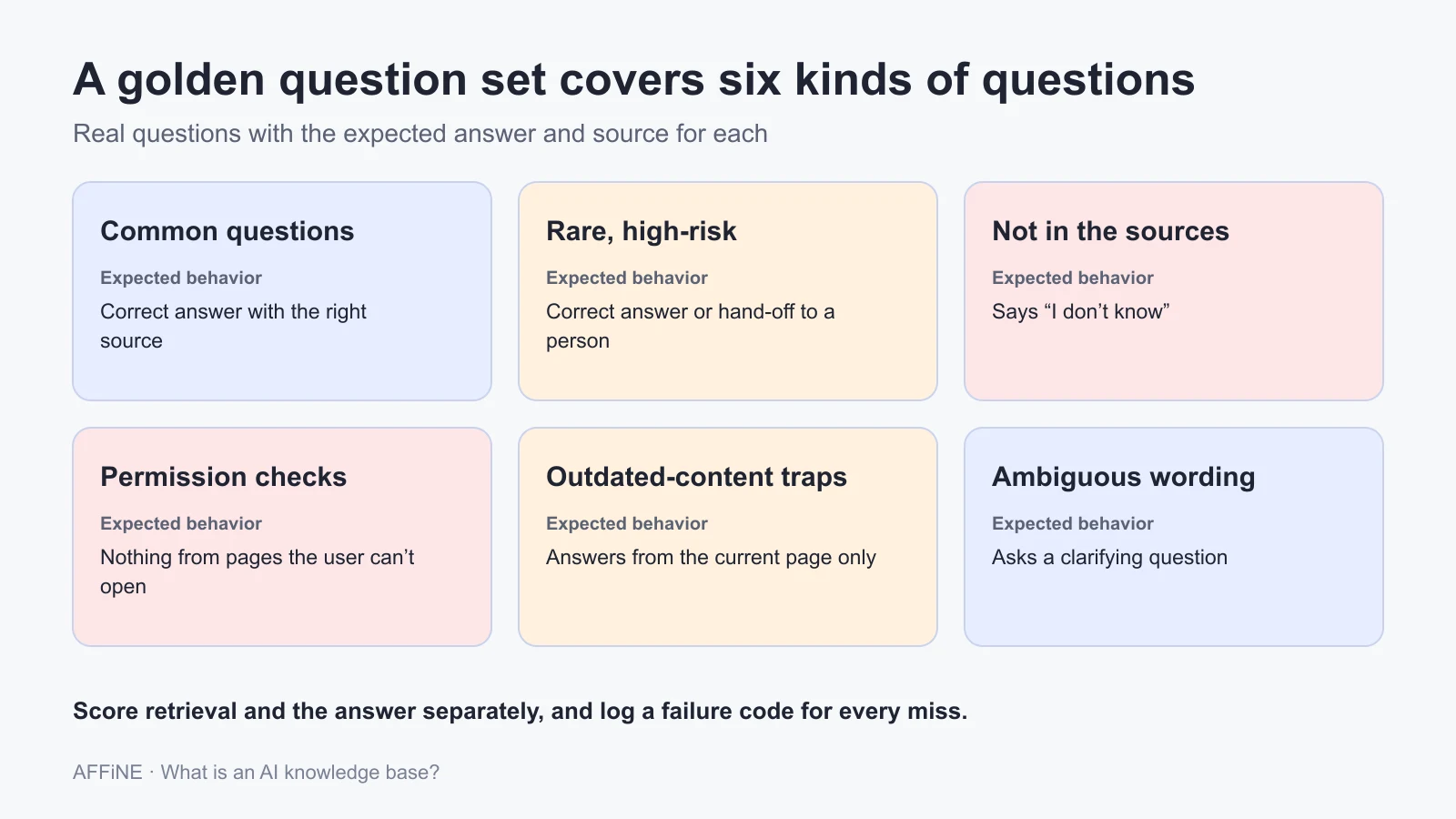
Build the set from real tickets, chat threads, and search logs, and include more than easy lookups:
| Question type | What it checks | Expected behavior |
|---|---|---|
| Common questions | Everyday accuracy | Correct answer with the right source |
| Rare, high-risk questions | Policy, pricing, and safety topics | Correct answer, or a hand-off to a person |
| Not covered by the sources | Hallucination | "I don't know", with a suggestion of where to ask |
| Permission checks | Restricted content | No answer built from pages the user cannot open |
| Outdated-content traps | A retired page and its replacement both exist | Answer from the current page only |
| Ambiguous questions | Vague or multi-part wording | A clarifying question, or an answer that covers each part |
Score retrieval and the answer separately. A system can retrieve the right page and still write a wrong answer, and the fix is different in each case. Record a failure code for every miss, such as wrong source, missing source, outdated source, or permission leak. Anthropic's guidance on evaluations makes a related point: test cases where a behavior should happen and cases where it should not, or you will optimize for one side only.
Our two downloads follow this method:
- Golden question set template (CSV), with columns for expected answers, expected sources, and failure codes, plus example rows to replace with your own questions.
- AI knowledge base readiness checklist (Markdown), with 20 checks across sources, content, permissions, testing, and ownership.
The template contains example questions only. It does not include test results, and we do not report results from our own runs in this article.
After the test set passes, pilot with one team for a few weeks. Turn every confirmed failure into a new test case, so the same mistake cannot return unnoticed.
What no one tells you: content quality decides answer quality
Retrieval never sees your knowledge base the way a reader does. It sees isolated chunks, cut out of the page. A paragraph that starts with "As mentioned above, the limit is 30 days" loses its meaning once "above" is gone. Most disappointing AI knowledge base projects trace back to content written for scrolling, not for retrieval.
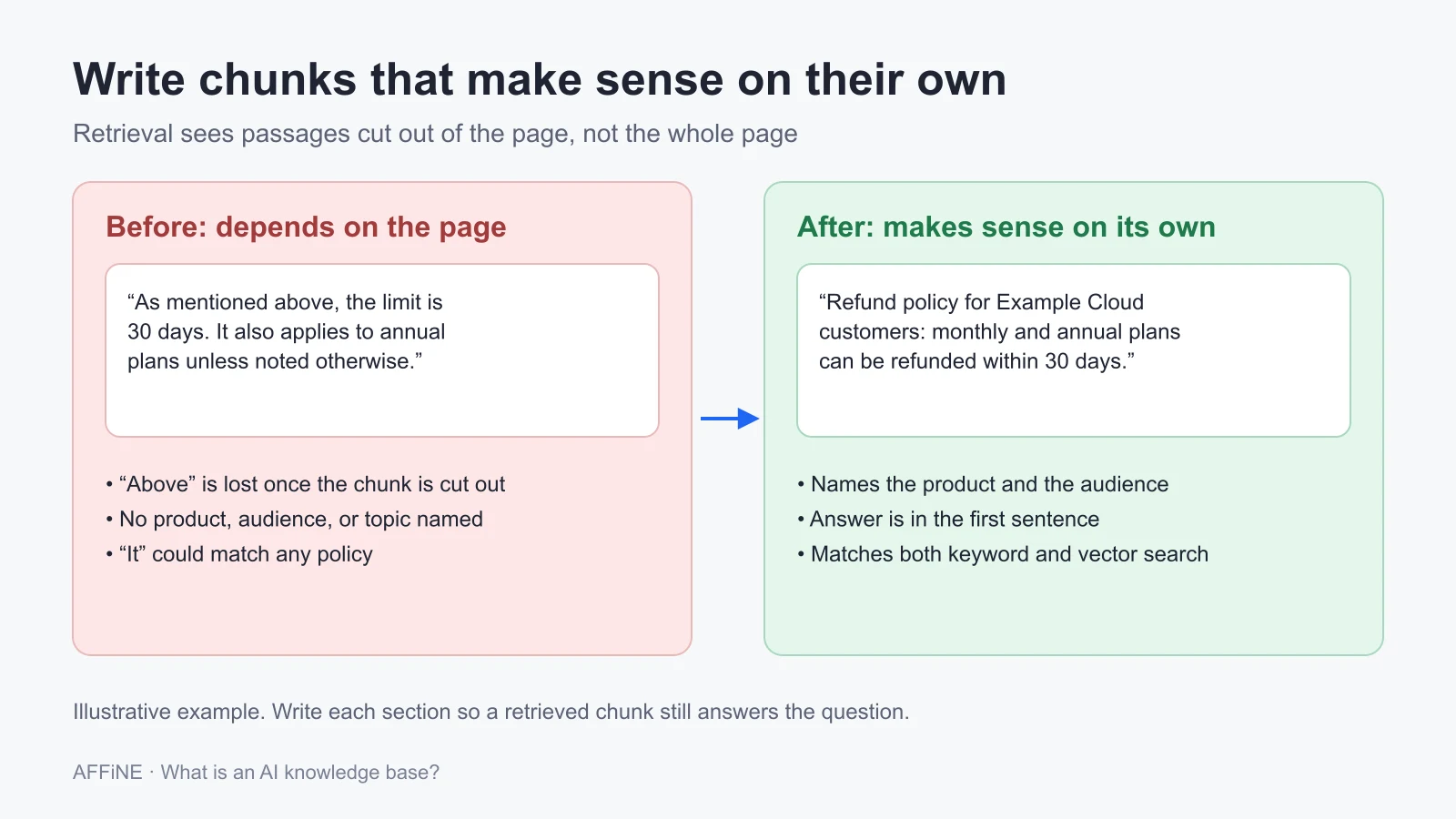
Write sections that make sense on their own
- Use headings that name the topic, such as "Reset your API key," not "More information."
- Put the answer in the first sentence of the section, then add detail.
- Keep one topic per section. A section that mixes refunds and shipping produces chunks that half-match both.
- Repeat the subject instead of writing "it" or "this feature" across section boundaries.
- Use tables and numbered steps for specifications and procedures.
Clear structure also makes chunking easier. In NVIDIA's chunking experiments, page-level chunking had the highest average accuracy (0.648) and the lowest variation (0.107) across the datasets tested. Natural boundaries such as pages and well-defined sections tend to beat fixed token counts.
Keep one canonical answer per question
When five pages each describe the refund policy slightly differently, the model blends them. Pick one page as the canonical answer, mark it as such, and have every other page link to it instead of restating it. When the policy changes, you edit one page.
Add the metadata retrieval needs
Give every page a small set of fields that retrieval can filter on:
- Owner: a named person, not a team.
- Last reviewed: so stale pages can be flagged or ranked lower.
- Audience: customer, employee, partner, or developer.
- Product and version: so answers about version 4 do not draw on version 3 docs.
- Content type: how-to, policy, troubleshooting, or concept.
Use a controlled vocabulary for topics so "password reset," "credential recovery," and "account access" all map to one tag. MatrixFlows recommends keeping universal content separate from audience-specific filters, which avoids duplicating pages for every audience.
Scope similar pages so the system can tell them apart
If three pages cover network troubleshooting for three product lines, say which one each page covers in its first sentence: "This guide covers connection errors for the Pro series on firmware 4.x." That sentence gives both the embedding and the keyword index a clear signal, and it is the cheapest accuracy fix available.
Where AI knowledge bases go wrong
- Confident wrong answers. The model fills gaps when retrieval returns nothing useful. Require citations, allow "I don't know," and test both.
- Stale answers. A retired price or policy can resurface with full confidence. An AI answer also hides the age cues a dated article shows, so review dates and freshness filters matter more than before.
- Permission leaks. If the retrieval layer ignores source permissions, a summary can expose a page the user could never open. Use our AI workspace permissions checklist and the knowledge base security checklist before connecting sensitive sources.
- Data leaving your environment. Storage location and AI processing location are separate questions. Check where prompts, retrieved passages, and logs go, and which provider processes them. Personal data in tickets, transcripts, and screenshots should be removed or masked before indexing, in line with the data-minimization principle in privacy laws such as the GDPR.
- Quality that drops as content grows. More pages mean more near-duplicates competing for the same question. Partition the index by product or audience, add a reranker, and keep merging duplicates.
- Over-trust. When answers always sound sure, people stop checking. For high-stakes topics, show the source excerpt next to the answer and route the final decision to a person.
AI knowledge base maturity: 5 stages
Most organizations are at stage 2 or early stage 3. Each stage depends on the habits built in the one before it, so skipping ahead tends to produce a system people stop trusting.
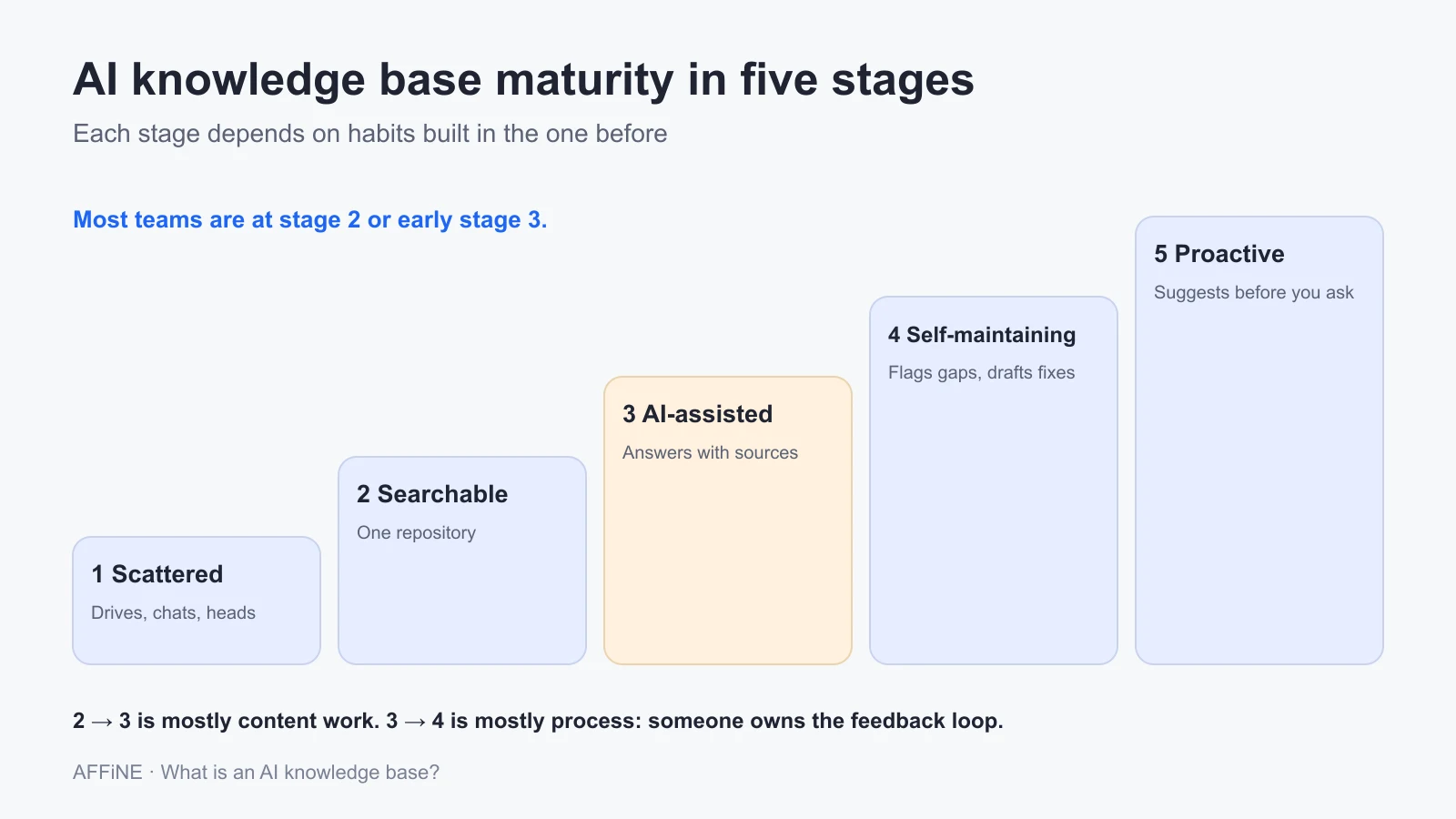
| Stage | What it looks like | Next move |
|---|---|---|
| 1. Scattered | Knowledge sits in drives, chat threads, and people's heads | Consolidate one use case's sources in one place and name owners |
| 2. Searchable | One repository with keyword search and categories | Add templates, metadata, and review dates |
| 3. AI-assisted | Questions in plain language get answers with sources | Build the golden question set and a feedback loop |
| 4. Self-maintaining | The system flags gaps and stale pages, and drafts updates for review | Track answer quality by topic and expand to the next team |
| 5. Proactive | Relevant knowledge is suggested before people ask, based on role and task | Keep human review and clear rules about what the system may do on its own |
Moving from stage 2 to 3 is mostly content work. Moving from 3 to 4 is mostly process: someone has to own the feedback loop and act on it.
How to measure an AI knowledge base
Use a few metrics that point to a specific layer, so you know what to fix when a number moves:
| Metric | What it tells you | How to measure it |
|---|---|---|
| Retrieval hit rate | Whether the right source reaches the model | Share of golden-set questions where the expected source is in the top results |
| Grounded answer rate | Whether answers stick to the sources | Share of sampled answers where every claim is supported by a cited passage |
| Correct "I don't know" rate | Whether the system admits gaps | Share of uncovered questions that are declined instead of answered |
| Citation accuracy | Whether the links prove the answer | Share of citations that actually contain the stated fact |
| Escalation and repeat-question rate | Whether real users got what they needed | Hand-offs to a person, and the same question asked again within a session |
Record a baseline before launch and re-run the golden set after every change to content, prompts, or models. For broader knowledge base metrics such as search success and article health, see our guide to knowledge base metrics.
Types of AI knowledge base tools
Tools fall into four groups. The examples below show what each group looks like; they are not rankings. For a tested, side-by-side comparison of products, see our comparison of AI knowledge base software.
| Tool type | Examples | Good fit when | Watch for |
|---|---|---|---|
| Workspace-native | AFFiNE, Notion | Knowledge is written and maintained by the same team that queries it | Fewer connectors to outside systems |
| Support AI and help centers | Intercom Fin, Zendesk AI | Customers need answers from your public help content | Mostly built for external support use |
| Enterprise search and knowledge management | Glean, Guru | Knowledge is spread across many existing apps | Connector setup and permission mapping across systems |
| Open-source frameworks | LlamaIndex, LangChain | You need full control over retrieval, models, and hosting | You build and maintain every part |
AFFiNE is a workspace-native option. Docs, whiteboards, and databases live in one workspace, so the place where people write knowledge is also where they look it up. Workspace content can be stored locally with optional cloud sync, or on a self-hosted server. AFFiNE AI runs through AFFiNE Cloud, or through your own provider key: self-hosted workspaces can bring keys for OpenAI, Anthropic, Gemini, or FAL. Self-hosted workspace indexing for AI uses PostgreSQL with pgvector. When you use AFFiNE AI, related content is sent to the AI provider, so review the AI terms before using it with sensitive material. See AFFiNE as a team knowledge base, or read how an AI workspace and an LLM wiki differ from a classic knowledge base.
Frequently asked questions
What is an AI knowledge base?
An AI knowledge base is a collection of an organization's documents that an AI system can search by meaning and use to write direct answers with links to the sources. Most are built on retrieval-augmented generation, which retrieves relevant passages first and then has a language model answer from those passages.
How is an AI knowledge base different from a traditional knowledge base?
A traditional knowledge base returns a list of articles that match your keywords, and you read them to find the answer. An AI knowledge base understands a question in plain language, finds the relevant passages across many articles, and writes a short answer with citations. Both still depend on accurate, well-owned content.
What is the difference between RAG and an AI knowledge base?
The knowledge base is the content and the system around it. RAG is the technique most AI knowledge bases use to answer questions from that content: retrieve the relevant passages, then generate an answer from them. You can have a knowledge base without RAG, but most AI knowledge bases use some form of it.
Can I use ChatGPT as a knowledge base?
You can attach files to a general chat assistant and ask questions about them, which works for personal or small one-off tasks. A team knowledge base needs more: content that stays in sync with the source, answers that respect each person's permissions, named owners, review dates, and tests you can re-run. Those are the gaps dedicated or workspace-native tools fill.
Can I build an AI knowledge base for free?
Yes, if you have engineering time. Open-source frameworks such as LlamaIndex or LangChain, plus PostgreSQL with pgvector, cover indexing and retrieval. You still pay for compute, for model usage unless you host a model yourself, and for the people who maintain the pipeline and the content.
How do you stop an AI knowledge base from hallucinating?
You cannot remove the risk entirely, but you can reduce it. Use hybrid search and a reranker so the right passages reach the model, instruct it to answer only from the sources and to say "I don't know" otherwise, require citations, and test with a golden question set that includes questions the sources do not cover.
Should I start with an internal or an external AI knowledge base?
Start internal if your main problem is repeat questions from employees, because mistakes are cheaper and staff can flag them. Start external if support volume is the main cost, but only after your public help content is current and you have tested the answers. Either way, build on one shared source of truth.
Sources and editorial notes
- Lewis et al., "Retrieval-Augmented Generation for Knowledge-Intensive NLP Tasks", arXiv, 2020. Origin of the RAG term. Checked November 2026.
- Anthropic, "Introducing Contextual Retrieval". Retrieval failure reductions of 35%, 49%, and 67%. Checked November 2026.
- Civil Resolution Tribunal of British Columbia, Moffatt v. Air Canada, 2024 BCCRT 149. Checked November 2026.
- Menlo Ventures, "2024: The State of Generative AI in the Enterprise". RAG and fine-tuning adoption figures. Checked November 2026.
- Lettria on the AWS Machine Learning Blog, "Improving Retrieval Augmented Generation accuracy with GraphRAG". Vendor evaluation. Checked November 2026.
- NVIDIA Technical Blog, "Finding the Best Chunking Strategy for Accurate AI Responses". Checked November 2026.
- AFFiNE documentation, Self-host AI guide, and AFFiNE AI FAQ. AFFiNE capability statements. Checked November 2026.
- Method: this guide was restructured in November 2026. It merges the departmental requirements table and the maturity model from our earlier AI knowledge base explainer, removes statistics we could not trace to a primary source, and adds the golden question set method and downloads as editorial guidance.
- Limitations: the downloads are templates with example questions, not test results. Third-party figures come from the studies cited and may not match your content or tools.
- Disclosure: AFFiNE publishes this blog and makes the AFFiNE workspace described above. Product examples in the tool types table are illustrations, not paid placements.
Related Articles
Best AI Knowledge Base Software: What Reviews Always Leave Out
LLM Wiki for Teams: Build a Self-Hosted LLM Knowledge Base (2026)
Beyond Vanity Data: Knowledge Base Metrics That Move the Needle
How to Secure Your Team Knowledge Base: IT Security Best Practices