LLM Wiki for Teams: Build a Self-Hosted LLM Knowledge Base (2026)
An LLM wiki is a set of Markdown pages that a large language model writes, links and keeps current from your source documents, so the model answers from your own knowledge instead of the open web. The pattern comes from Andrej Karpathy's "LLM Wiki" gist, and it is one of three main ways to build an LLM knowledge base, alongside retrieval-augmented generation (RAG) and a live workspace that agents reach through the Model Context Protocol (MCP). For a team that needs shared editing, permissions and data control, the strongest setup is a self-hosted workspace as the source of truth, with agents connected over MCP and an LLM wiki layer for synthesized topics.
Written by Allen, Operations Director at AFFiNE. Reviewed by Vincent Chen, CEO of AFFiNE.
Disclosure: We make AFFiNE. We mention it where it fits and say where it does not.
What is an LLM wiki?
An LLM wiki is knowledge stored so a model can use it reliably: findable, current and attributed to a source. The model does the bookkeeping (summaries, cross-links, index pages), and people decide what goes in and review what comes out.
It differs from two things people often confuse it with:
-
A traditional wiki or knowledge base is written for humans to browse. An LLM wiki is also written so a model can find the right passage, follow links between pages, and cite where an answer came from.
-
A vector database is a storage component, not a knowledge base. It holds embeddings (numeric representations of text chunks) so a system can retrieve passages by meaning. Many LLM knowledge bases use one; a small compiled wiki often does not need one.
The useful test is simple: when someone asks a question, does the model answer from the right, current document, and can a person check that document?
Karpathy's LLM Wiki pattern in brief
In April 2026, Andrej Karpathy published a short gist called "LLM Wiki" (checked 2026-10-19). Instead of having the model rediscover knowledge from raw files on every question, the model builds and maintains an interlinked Markdown wiki.
The gist has three layers:
-
Raw sources. Articles, papers and data files. The model reads them but never edits them. They stay the source of truth.
-
The wiki. Markdown pages the model writes and keeps current: summaries, entity pages, concept pages and comparisons, with cross-links.
-
The schema. An instruction file, such as
CLAUDE.mdorAGENTS.md, that tells the agent how the wiki is organized and how to ingest, answer and maintain it.
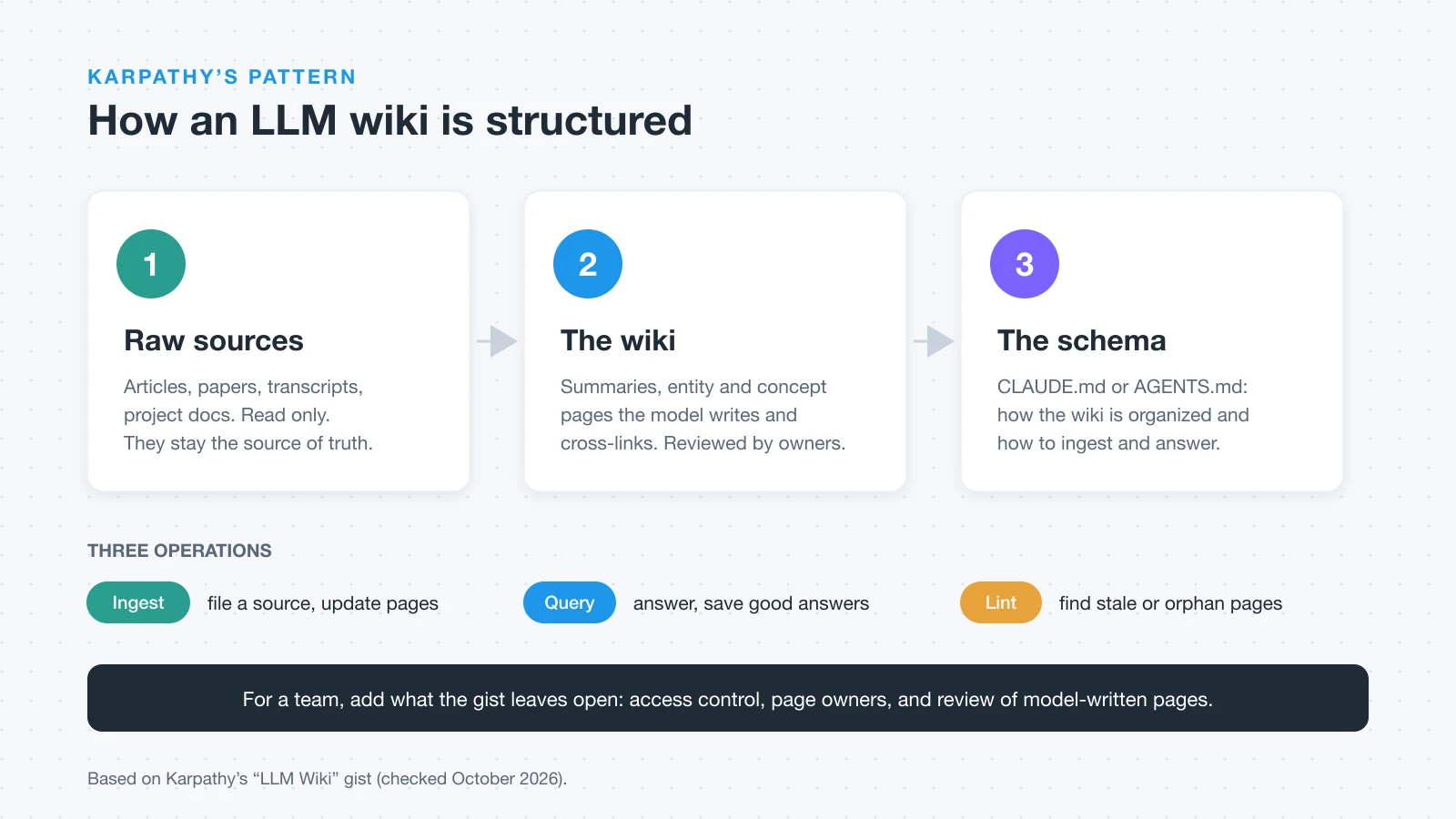
Work happens in three operations. Ingest files a new source and updates the pages it touches. Query answers from the wiki, and good answers can be saved back as new pages. Lint checks for contradictions, stale claims and orphan pages. Karpathy notes that an index.md catalog alone works "at moderate scale (~100 sources, ~hundreds of pages)".
For the full origin story, the tool ecosystem and how the pattern compares with fine-tuning, read our LLM Wiki explainer. This guide focuses on building one that a team can share.
Why a personal LLM wiki breaks down for teams
The gist's own setup is personal: an agent on one side and Obsidian on the other. It does mention team use, fed by Slack threads, meeting transcripts and project documents, "possibly with humans in the loop reviewing updates". What it leaves to you when a team adopts it:
-
Access control. A folder of Markdown has no notion of who may read which page, for people or for agents.
-
Review. Compiled pages are model output. Without an owner who reviews changes, errors and invented links spread quietly.
-
Editing by non-developers. Most colleagues will not open a Git repo to fix a wrong summary.
-
Scale. Past a few hundred pages you need real search, which the gist itself suggests adding.
LLM wiki vs RAG vs MCP: four ways to build an LLM knowledge base
Each approach trades freshness, effort and control differently. Most real systems combine two.
| Approach | Best for | Freshness | Setup effort | Main risk |
|---|---|---|---|---|
| RAG over documents | Large, changing corpora | High | Medium | Wrong chunk retrieved |
| LLM wiki (compiled Markdown) | One person or a small group | Depends on ingest | Low | Unreviewed drift |
| MCP-connected workspace | Teams with agents | Live | Low to medium | Over-broad access |
| Fine-tuning or long context | Stable style or small sets | Low | High | Stale, unciteable answers |
-
RAG splits documents into chunks, embeds them, and retrieves the closest passages at question time. It scales and stays current, but answers depend on chunking and retrieval quality, and nothing accumulates between questions.
-
An LLM wiki pays the synthesis cost once, at ingest. Cross-document questions often get better answers because the connections are already written down. The cost is review: every page is generated text.
-
An MCP-connected workspace lets an agent call tools on the workspace where people already write. MCP is an open protocol in which servers expose tools and resources to AI clients; for HTTP servers the specification defines authorization based on OAuth 2.1 (checked 2026-10-19). The source of truth stays the documents your team edits.
-
Fine-tuning teaches a model style and patterns, not facts you can update tomorrow. Long context (pasting everything into the prompt) works for small sets but gets expensive, and detail buried in a long prompt is easy to miss.
How to choose the right setup
Start from who asks questions and who must not see what.
-
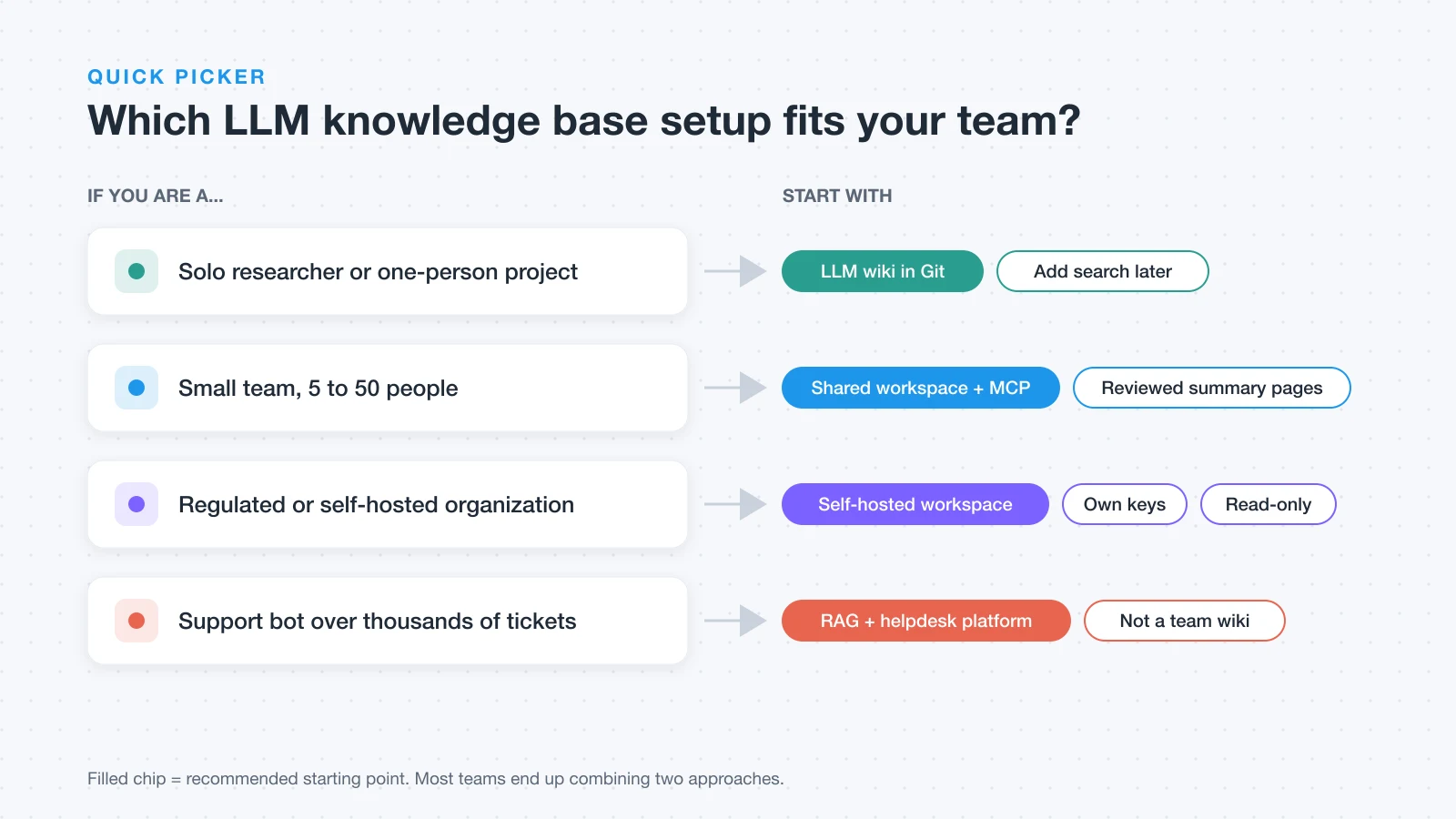
Solo researcher: an LLM wiki in a Git repo is the fastest start. Add search when the index stops being enough.
-
Small team (5 to 50 people): keep docs in a shared workspace and connect agents over MCP. Optionally let an agent write summary pages that a named owner reviews.
-
Regulated or self-hosted organization: self-host the workspace, use your own model keys or a model you run, and give agents read-only, scoped credentials first.
-
Customer-support bot over thousands of tickets: this is a RAG and helpdesk problem. A dedicated support platform with ticket ingestion will serve you better than a team wiki, including AFFiNE.
For the general retrieval pattern behind most products, see what an AI knowledge base is. If you are comparing products rather than architectures, our AI-powered knowledge base software guide covers the buyer side.
How to build a team LLM knowledge base
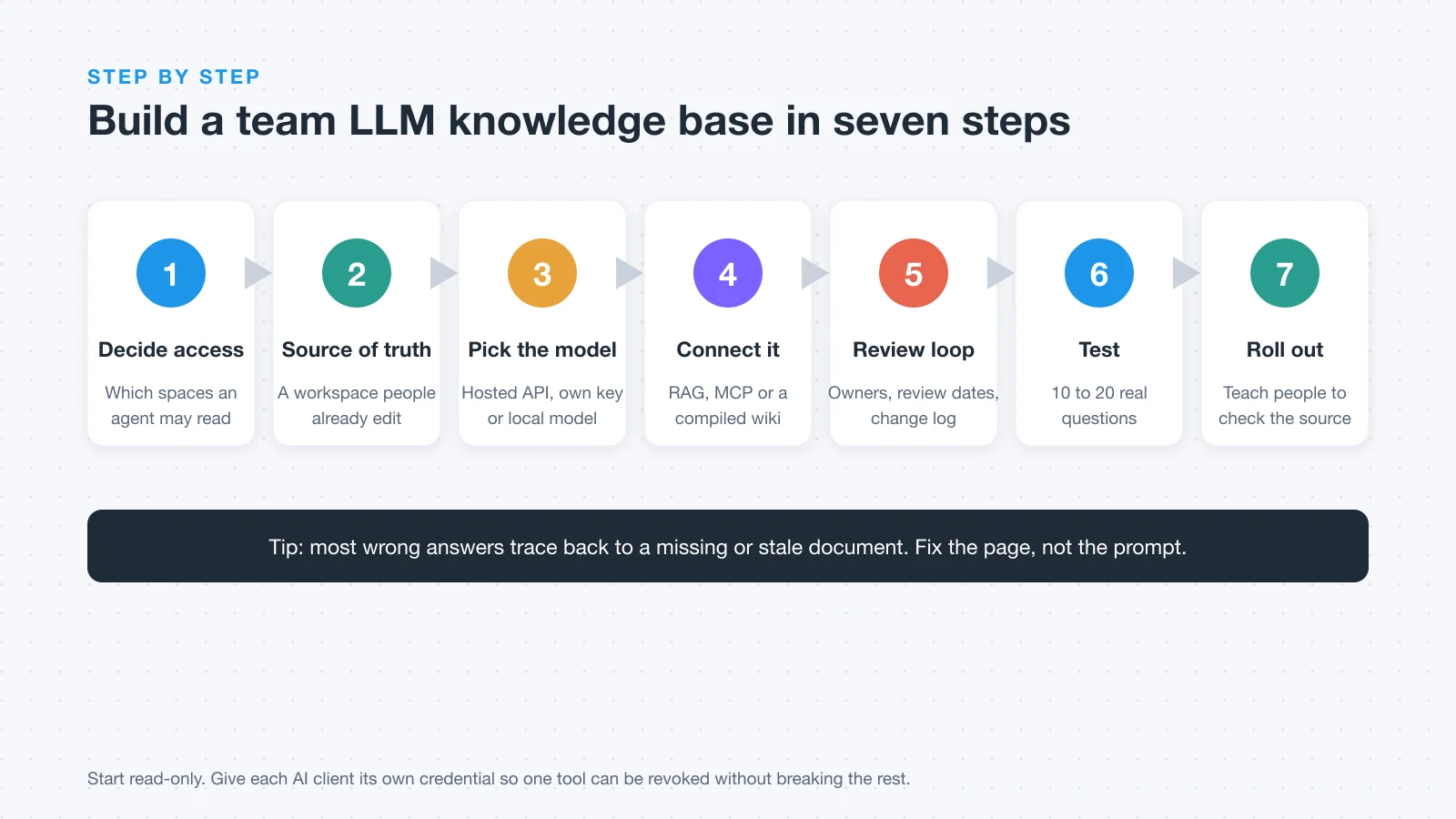
A team version needs seven steps. The order matters: decide access before you connect anything.
-
Decide which knowledge the AI may see. List the spaces an agent may read, the spaces it may never read, and whether it may write at all. Start read-only.
-
Pick where the source of truth lives. Use a workspace people already edit every day, so corrections happen where the knowledge is, not in a separate copy.
-
Choose the model and where it runs. Pick a hosted API, your own provider key, or a local model, and check the provider's data-use terms before sending documents. If you plan to run the model yourself, the self-hosted AI stack guide covers runners such as Ollama and vLLM.
-
Connect the model to the knowledge. Use RAG for large corpora, MCP for live workspace access, or a compiled wiki for synthesized topics, and give each client its own credential.
-
Set an update and review loop. Give every important page an owner and a review date, and keep a change log for anything an agent writes.
-
Test with real questions. Collect 10 to 20 questions people actually ask, record whether each answer is correct and cites the right page, and fix the documents, not the prompt.
-
Roll out and train the team. Show people how to ask, how to check the cited source, and how to report a wrong answer.
Two notes from practice. Most bad answers trace back to a bad or missing document, so step 6 usually sends you back to step 5. And one credential per client makes it easy to revoke a single tool without breaking the rest.
Try it on your own server. AFFiNE runs with Docker Compose. Deploy AFFiNE →
Example: a self-hosted LLM wiki with AFFiNE
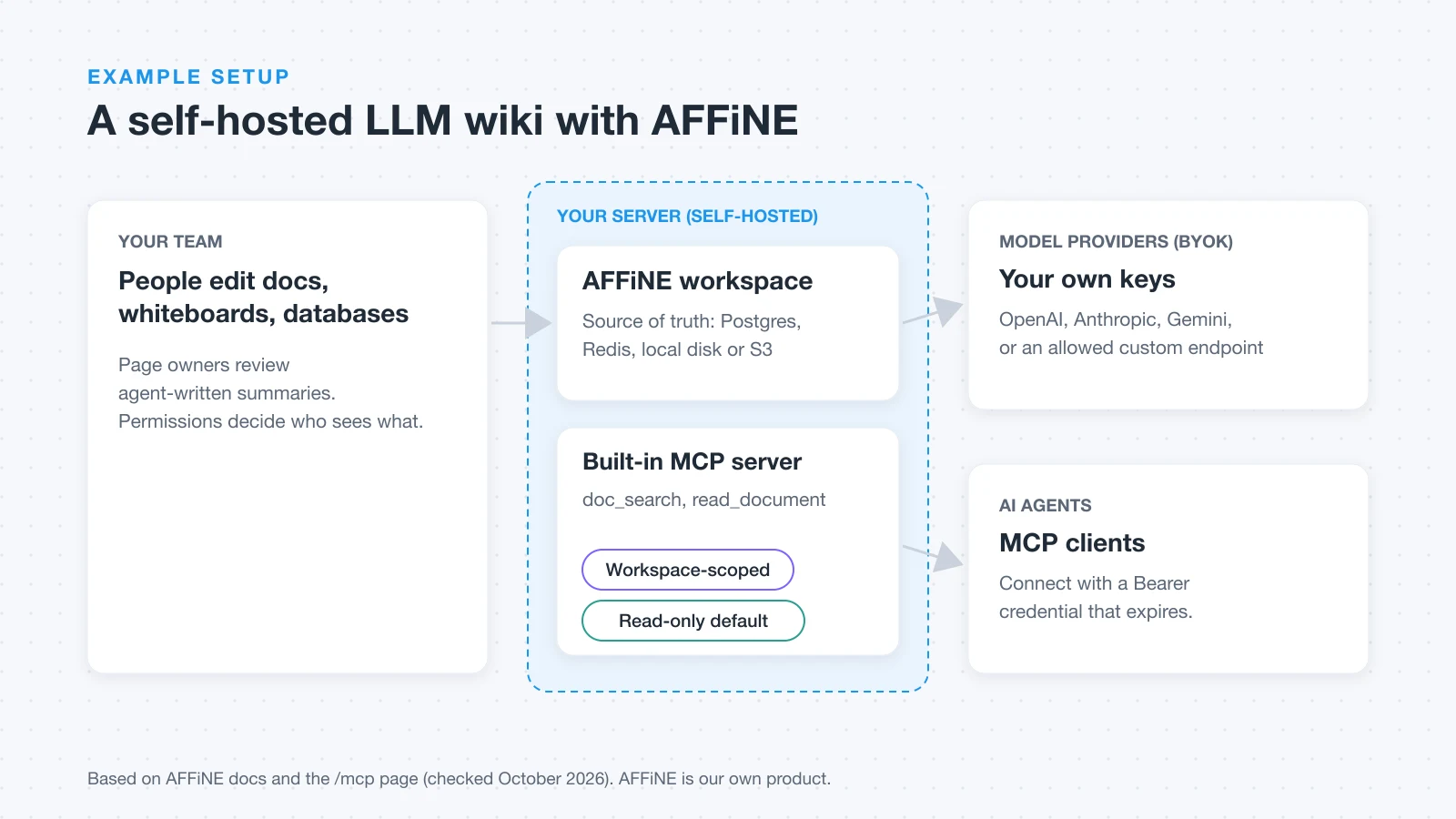
AFFiNE is an AI workspace that combines docs, whiteboards and databases. Teams use it in the cloud or self-host it on their own servers. Here is how the seven steps map onto it, using only documented features (checked 2026-10-20):
-
Source of truth. Docs, whiteboards and databases in one workspace that everyone can edit. Run it as a self-hosted knowledge base with Docker Compose, Postgres and Redis, and store files on local disk, S3-compatible storage or Cloudflare R2.
-
Model choice. Self-hosted AFFiNE uses Bring Your Own Key (BYOK). After a server admin enables it in
config/config.json, a workspace admin adds keys under Settings → Integrations → AI BYOK. The AI docs list OpenAI, Anthropic, Gemini and FAL routes; OpenAI-compatible custom endpoints must be explicitly allowed by a server admin. The docs note that "provider behavior and supported models can change", so test the key before saving it. Workspace indexing requires a server-stored Gemini key or an AFFiNE AI plan. -
Agent access. AFFiNE's built-in MCP server exposes
doc_search(keyword and semantic search, whiteboards included) andread_document. Read-only is the default; create and update tools are rolling out. Each credential is scoped to one workspace, honors document permissions, and has an expiry. It works on AFFiNE Cloud and on self-hosted instances with AI enabled.
Create a credential in Settings → Integrations → MCP Server, then paste the generated config into your client:
{
  "mcpServers": {
    "affine": {
      "type": "streamable-http",
      "url": "https://your-affine.example.com/api/workspaces/<workspace-id>/mcp",
      "headers": { "Authorization": "Bearer <your-credential>" }
    }
  }
}
With that in place, the LLM wiki layer becomes optional rather than required: an agent can search and read the live docs, and you can still ask it to draft summary or concept pages that a page owner reviews before publishing them to the team.
Where AFFiNE is not the right fit: high-volume support deflection over ticket archives, and organizations that require SAML or SCIM provisioning today. SSO is available via OIDC.
What we tested
On October 20, 2026, we connected a plain MCP client (a short script sending JSON-RPC over HTTP) to our own AFFiNE Cloud workspace, the one that holds drafts for this blog. We created a read-only credential with a 30-day expiry under Settings → Integrations → MCP Server, ran the checks below, and revoked the credential afterward.
| Check | What happened |
|---|---|
| Connect to the workspace endpoint | Worked. The server identified itself as the AFFiNE MCP Server and used protocol version 2025-06-18. |
| List tools | Two tools: read_document and doc_search. No write tools on a read-only credential. |
| Read two docs by ID | Both returned as clean Markdown (about 3,500 and 4,200 characters) in 1 to 11 seconds. |
| Call a write tool anyway | Rejected with "Tool not found". |
| Use the same credential on another workspace's endpoint | Rejected with "Authentication failed". |
| Search, 10 questions (5 keyword, 5 paraphrased) | No results. Workspace Embedding was off, and turning it on did not finish indexing during our session. |
| Revoke the credential, then reconnect | Rejected immediately. |
The takeaway: access control behaved as documented, and reading by document ID worked well. Search depends on the workspace's index, so turn on Settings → Embedding, confirm the progress bar shows your docs as synced, and only then hand the endpoint to an agent. Until the index is ready, an agent can still read documents if you give it their IDs.
Keeping an LLM wiki accurate
A knowledge base that confidently serves wrong answers is worse than none, because people built it to be trusted. Four failure patterns show up again and again:
-
Invented links and citations. The model references a page that sounds right but does not exist.
-
False synthesis. Two real sources get merged into a claim neither of them supports.
-
Confident outdated claims. An old summary is treated as current because nothing marks which page supersedes which.
-
Unsupported additions. Datadog's hallucination detection write-up separates answers that contradict the provided context from answers that add claims not grounded in it. Decide your tolerance for each before you build.
Drift is the slower version of the same problem. Wikis that nobody maintains tend to stay useful for months and then lose trust as stale pages pile up. Three habits help:
-
Timestamp generated pages. Add a
compiled_atfield so a reader can see whether a summary predates a model or source change. -
Keep history. A Git repo or workspace page history shows when and why a page changed;
git blamecan tie a concept page back to the source that created it. -
Review by dependency. When a core page changes, review the pages that link to it. Backlinks make this list for you.
Governance and security checklist
Treat an agent like a new employee with a reading list, not a superuser. This is practical guidance, not legal advice.
-
Permissions: give agents the narrowest scope that works, read-only first, one credential per client, with expiry dates.
-
Personal data: keep HR records, customer personal data and secrets out of agent-readable spaces unless there is a clear reason.
-
Prompt injection: documents can contain instructions. Do not let an agent take write or external actions based only on text it read.
-
Model provider data use: read each provider's API data policy and record the date you checked.
-
Retention: decide how long agent logs and generated pages are kept.
-
Audit: keep a change log for agent edits and review it on a schedule.
Common mistakes
-
Dumping everything in. More documents mean more contradictions. Curate first.
-
No owners. Pages without an owner go stale, and the model repeats the stale version confidently.
-
No evaluation. Without a fixed question set you cannot tell whether a change made answers better or worse.
-
Trusting compiled pages. Generated summaries need review before they become the source others cite.
-
Broad credentials. One shared, never-expiring key for every tool is the hardest thing to clean up later.
Next steps
-
Run it yourself: deploy AFFiNE with Docker or read about the self-hosted knowledge base.
-
See what AFFiNE AI and the AFFiNE MCP server can do.
-
Compare platforms in knowledge base software.
Building a private LLM knowledge base for your company? Talk to us → · Self-host free →
Frequently Asked Questions About LLM Wikis
1. What is an LLM wiki?
An LLM wiki is a set of Markdown pages that a language model writes, links and maintains from your source documents, so it can answer questions from your own knowledge and cite the page it used.
2. What is an LLM knowledge base?
It is a set of your own documents organized so a large language model can find, read and cite them when answering questions. An LLM wiki, a RAG index and an MCP-connected workspace are all ways to build one.
3. Is an LLM wiki better than RAG?
Neither is better in general. An LLM wiki is strong for synthesis across a few hundred sources; RAG scales better to large, fast-changing corpora. Many teams use both.
4. Can a team share one LLM wiki?
Yes, if access is controlled. Keep the source documents in a shared workspace with roles, give each page an owner, and give each agent its own scoped, revocable credential.
5. Can I build an LLM knowledge base without sending data to OpenAI?
Yes. You can use another provider's API, a self-hosted model, or an OpenAI-compatible endpoint you run. In self-hosted AFFiNE, custom endpoints must be enabled by a server admin.
6. How do AI agents access a knowledge base?
Most connect through the Model Context Protocol (MCP), where the knowledge base runs a server that exposes tools such as search and read. Others use a RAG pipeline or read files directly.
7. How do you keep an LLM wiki up to date?
Give pages owners and review dates, edit the source documents rather than the prompts, log every agent change, and re-run your test questions after big updates.