AI Workspace Permissions: Roles, Data Access, and Checks
Learn how AI workspace permissions connect roles, document access, and provider routing. Use a practical worksheet to review a self-hosted AFFiNE pilot.

AI workspace permissions determine who can read, change, share, or use information through an AI feature. A useful access policy connects four things: the person's identity, their role, the specific document or resource, and the action an AI tool or integration is allowed to take. A workspace invitation alone does not answer all four questions.
For a self-hosted team, this is an operational decision as well as a product setting. You choose where the workspace runs, but must also decide which people can use its contents and which providers may receive them. Start with a written policy, then test the deployed system with separate accounts and harmless example documents.
This guide explains the layers, shows where AFFiNE's documented configuration fits, and provides a repeatable permission-check worksheet. For the wider category, read what an AI workspace is and how to evaluate one.
Published by AFFiNE. This AI-assisted guide organizes official documentation checked October 18, 2026 into an access-review workflow and worksheet. Scenarios and diagrams are illustrative; no deployment or access-control test was performed.
On this page: permission layers, AFFiNE configuration, permission walkthrough, revoking access, FAQs.
Understand the four permission layers
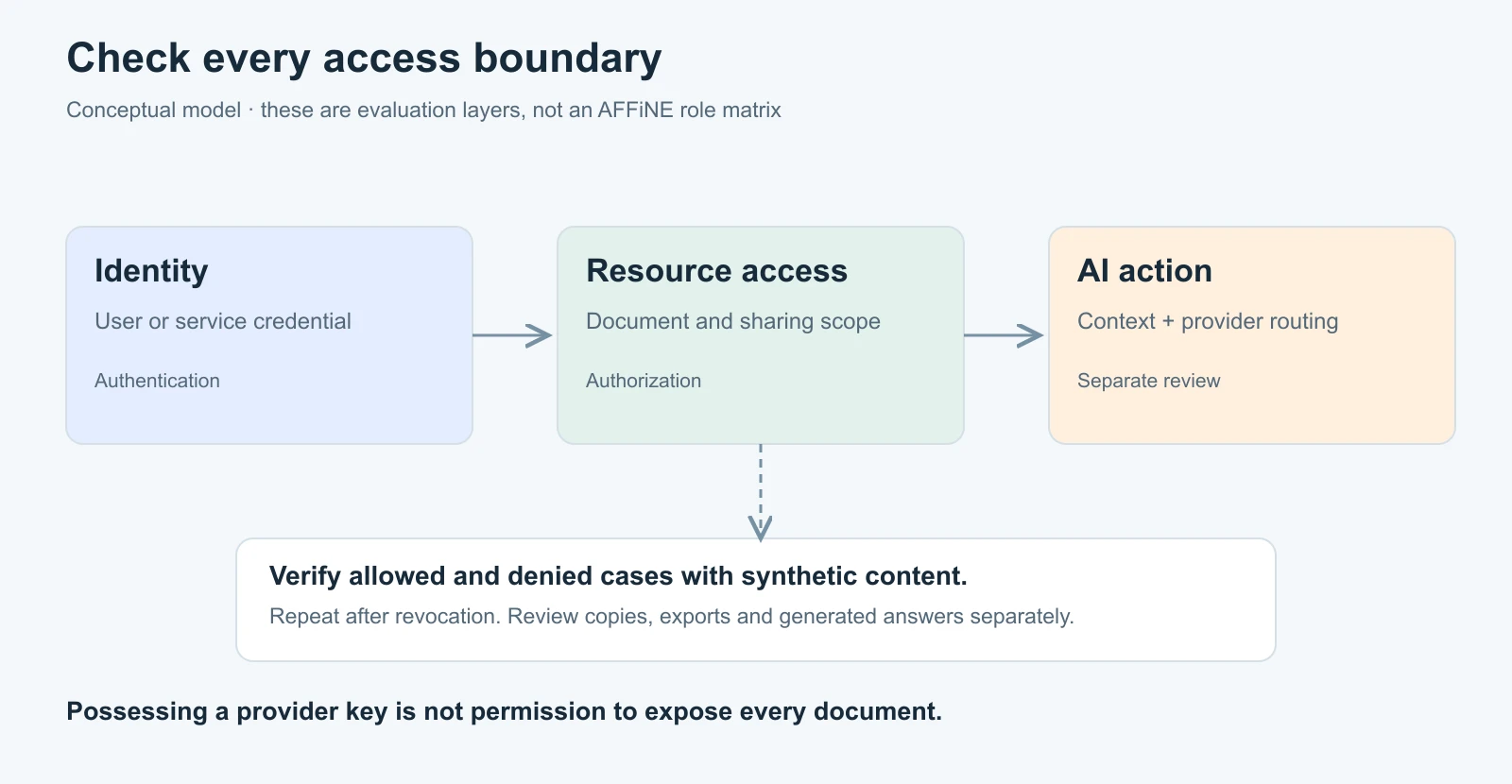
Authentication answers “Who is making this request?” Authorization answers “May this identity perform this action on this resource?” Signing in successfully should not be treated as proof of access to every document.
| Layer | Decision to record | Example check |
|---|---|---|
| Identity and role | Who is the person or service, and what responsibilities do they have? | A reader account cannot perform an editor-only action. |
| Resource access | Which workspace, document, attachment, or shared link may that identity use? | A team member cannot open a separately restricted finance document. |
| AI and integration access | Which sources and operations may a tool use for this request? | A generated answer does not disclose a restricted test passage. |
| Provider data flow | Which endpoint may receive the approved prompt and source material? | The request uses the approved provider route, including fallback behavior. |
These layers are related, but checking one does not check the others. A working login does not validate document sharing. A valid provider key does not authorize disclosure of all workspace data. A successful AI response does not show that the intended provider handled it.
Define responsibilities before assigning roles
Use a short responsibility map before translating it into the roles your installed product actually offers. The labels below describe a proposed team policy; they are not an exhaustive AFFiNE role matrix or its default settings.
| Responsibility | Intended access | Decision that needs a separate check |
|---|---|---|
| Reader | Consult approved reference material | Whether copying, exporting, or asking AI about that material is permitted |
| Editor | Maintain assigned documents | Whether editing includes changing the audience or publishing a link |
| Workspace administrator | Manage membership and approved integrations | Which content they can access and which endpoint settings they can change |
| Deployment operator | Maintain the application and its infrastructure | Access through databases, backups, storage, and operational tooling |
Keep infrastructure access in the review. Someone who can restore a database or inspect storage may have a different route to information from an ordinary workspace member. Record that responsibility instead of assuming a document-level control governs every administrative channel.
Give each important reference an owner and an intended audience. Our internal documentation guide explains how to connect content ownership with review triggers. The owner decides whether the information is appropriate for its audience; the administrator configures and verifies the relevant access controls.
Review document sharing and AI output together
A private source can produce a widely shared copy. Before enabling a workflow, trace the whole path: source document, retrieved excerpt, generated answer, saved conversation, exported file, and any link sent to another person.
For example, a colleague who may read a planning document could paste a summary into a project page with a broader audience. Changing the original document's permissions later does not necessarily remove that summary. The policy should tell people where derived material belongs and who reviews it before sharing.
Use different checks for direct access and discovery. Denying a document URL is useful, but also inspect search results, snippets, titles, AI answers, and citations for the same restricted content. A title alone can disclose information. This article does not establish that any particular retrieval path automatically respects your intended access policy: that is something to verify in the deployed version.
For a shared knowledge base, classify useful information by its audience before adding AI. Team-wide procedures, project-only decisions, and restricted financial records do not need the same visibility. Begin with a narrow set of approved sources so you can explain and test the boundary.
Configure AFFiNE's AI boundary deliberately
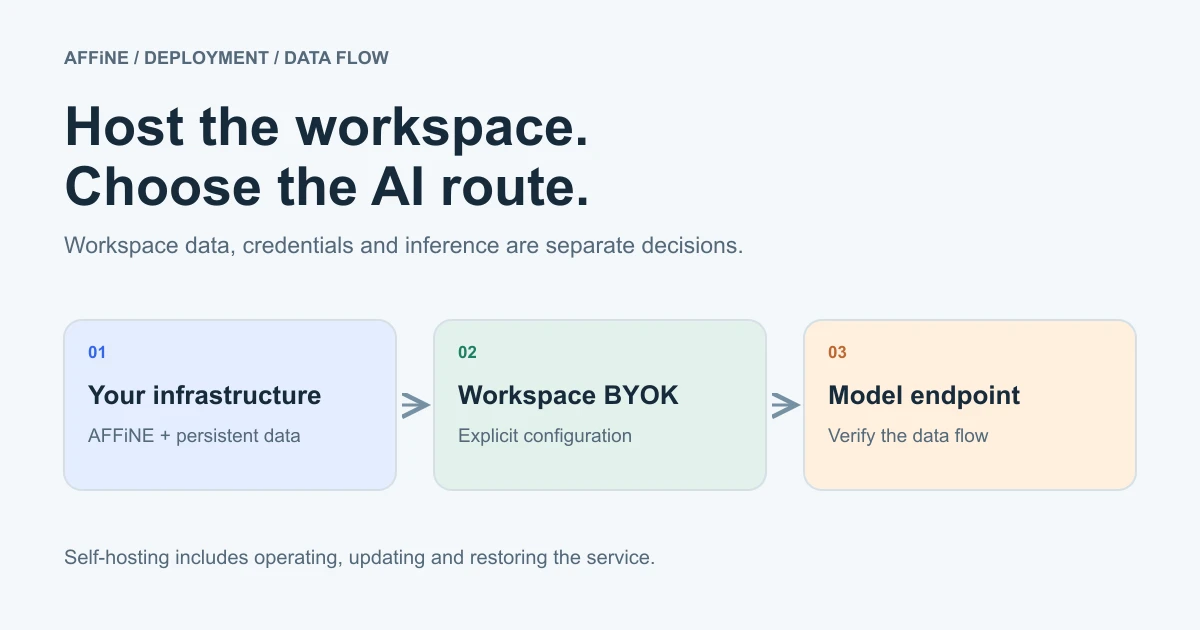
AFFiNE gives teams a self-hosted workspace option. Hosting the application and deciding where model inference happens remain separate choices; the self-hosted AI workspace guide covers that deployment decision. For the model runners and gateways that can sit around it, see the self-hosted AI tools comparison.
The current AFFiNE AI administration guide documents enabling copilot.enabled and copilot.byok.enabled in server configuration, then adding and testing Bring Your Own Key (BYOK) credentials under Workspace Settings → Integrations → AI BYOK. Provider API keys and model overrides do not belong in the server configuration. Treat access to those workspace integration settings as a deliberate administrative responsibility.
Server key storage supports self-hosted web access and access across devices. Local key storage is available only in the desktop app on that device. “Local” here describes credential storage; it does not prove that inference happens on the device. A provider key's presence also says nothing about which documents the person using AI is authorized to expose.
Feature coverage varies. The guide lists OpenAI, Anthropic, or Gemini for writing and chat; OpenAI or Gemini for actions and structured output; and OpenAI, Gemini, or FAL for image generation. Transcription and workspace indexing require a server-stored Gemini key or an available AFFiNE AI plan fallback, with indexing also dependent on an enabled, available indexer. Test the features and fallback paths your policy allows rather than treating one successful chat response as a complete check.
Custom endpoints require the server administrator to enable copilot.byok.allowCustomEndpoint. The guide advises keeping private-network endpoints disabled unless all workspace administrators are trusted to direct requests to private services. Approving an endpoint is therefore a trust decision. An OpenAI-compatible API is not a guarantee that every required capability will work.
For identity, AFFiNE's OAuth administration documentation describes Google, GitHub, and general OIDC configuration. Configuring sign-in does not replace the resource and AI checks below.
Run a synthetic permission walkthrough
Consider a fictional product team preparing a release. Mira edits the release checklist; Jon reads it; Sal maintains a separate finance note. An external visitor should see neither document. These are policy labels for the example, not claims about built-in AFFiNE roles.
Create two harmless documents:
- Release checklist: contains the distinctive phrase “violet paper lantern.” Make it available to the intended reader and editor.
- Finance test note: contains the phrase “copper river compass.” Restrict it according to your proposed policy and include no actual financial information.
Use separate browser profiles or sessions so an administrator's existing session cannot affect the reader test. Record the installed version, relevant settings, test date, and intended policy alongside the results. If a proposed role or control is unavailable, record that gap rather than treating the check as passed.
First, confirm the allowed route: Jon can open the release checklist and Mira can make an approved change. Then try the denied route: Jon attempts to edit the checklist and open the finance note. Verify the resulting behavior against your policy.
Next, test discovery. From Jon's account, search for the restricted document's title and distinctive phrase. If your deployment offers workspace retrieval, ask an ordinary factual question about the synthetic finance note. Inspect the answer, source snippets, citations, and any saved output. A missing answer on one attempt is not proof of a universal guarantee; repeat the relevant checks when you change access rules or retrieval configuration.
Finally, check sharing, revocation, and routing. Try the internal document's link in the visitor session. Remove a test membership or revoke a test integration credential, then retry the relevant action. Use the provider's and deployment's available request evidence to verify the approved route without collecting real document content or secrets into the test log.
Download the AI workspace permission-check worksheet. It contains twelve proposed allow/deny checks with blank actual-result fields and Not tested statuses. Replace the example expectations with your own policy before running them. Record what happened, who reviewed it, and any unsupported control.
Make revocation a complete workflow
When access changes, review memberships, document shares, public links, active sessions, and integration credentials as applicable to the deployment. Assign an owner to each action. A removed account and a revoked integration credential are different changes; do not assume one performs the other.
Set an expectation for when subsequent requests must be denied, then verify it. Test an already-open session as well as a new sign-in attempt. If results differ, document the observed behavior and resolve it before using sensitive material.
Keep the limits of revocation explicit. It cannot retrieve a screenshot, exported file, or copied answer already outside the controlled system. Review where information was distributed and apply your retention and offboarding process to those destinations. The practical objective is a policy people can follow and evidence that the configured controls behave as intended.
Start with one workflow and a review owner
Choose one team workflow, one restricted example, and a small group of reviewers. Complete the worksheet before broadening the source set. Recheck affected cases after changes to membership, sharing, AI providers, integrations, or the deployed version. Keep the reviewed record with the workspace's operational documentation.
To prepare an AFFiNE pilot, follow the official Docker Compose installation guide, establish the intended audience, and configure optional AI only after deciding which data flow the team accepts. The first useful outcome is a small, explainable workspace whose access behavior you have actually checked.
Frequently asked questions
How do permissions work in an AI workspace?
Permissions combine an authenticated identity, a role or policy, access to particular resources, and rules for AI tools and integrations. Check all four layers: access to a workspace does not by itself establish permission to read every document or send it to any AI provider.
Does self-hosting make an AI workspace private?
Self-hosting gives you control over the workspace deployment. Privacy still depends on access settings, sharing, operational practices, and where AI requests go. A self-hosted workspace can use an external AI provider, so review inference separately from hosting.
Can AI read every document in a workspace?
Do not assume either unrestricted access or automatic permission filtering. Establish the intended policy, then test direct access, search, retrieval, generated answers, and citations with separate accounts and synthetic restricted documents in your deployment.
What happens when someone loses workspace access?
New requests should follow your revocation policy, which you need to verify across active sessions, shared links, and integrations. Removing access cannot erase files, screenshots, or generated answers that someone already copied outside the controlled workspace.
What is the difference between authentication and authorization?
Authentication establishes who is making a request. Authorization determines what that identity may do to a particular resource. A successful sign-in is therefore only the start of an access decision, not permission to read or change every document.