Best Flowchart Software: 11 Tools by Price and Features
What changed (Nov 11, 2026): Rechecked every pricing page. Updated SmartDraw's introductory prices ($5.75 Individual, $4.95 per user Team) and retook its screenshot, noted that Miro's pages disagree on Free AI credits, added Whimsical monthly prices, added a four-step selection method and refreshed the check dates.
The right flowchart software depends on who has to open your diagrams and how many people need to edit them. If you exchange .vsdx files with Visio users, shortlist Microsoft Visio, Lucidchart or SmartDraw. If your diagrams start in workshops, Miro or Whimsical fit better. If they live in Confluence, look at Gliffy or the draw.io app. For a 10-person team, list prices below run from $0 (draw.io) to about $3,000 a year, so compare the plan you actually need, not the entry price.
Updated November 11, 2026. Disclosure: AFFiNE publishes this blog and is one of the 11 tools compared below. We apply the same criteria to it and list its limits. The order of the tools is not a ranking.
This guide is about paid and professional flowchart software: what each plan costs, how it is billed, and which features sit behind which tier. If you only need a quick diagram and do not want to pay, start with our free online flowchart maker comparison instead. If you are moving off Visio, our Visio alternatives guide goes deeper on .vsdx import and migration.
What to look for in paid flowchart software
A flowchart shows the steps, decisions and handoffs in a process. Almost every tool below can draw one. What you pay for is everything around the drawing:
- Billing basis. Most tools charge per editor per month, billed yearly. A few charge a flat fee per organization (Creately Business) or follow another product's user count (Gliffy follows your Confluence site). Free viewers can change the total a lot.
- Free-tier limits. Free plans usually cap documents, boards or shapes. That is fine for a trial and frustrating for real work.
- Visio compatibility. If customers or other teams send .vsdx files, check both import and export.
- Data-linked diagrams. Some tools can draw or update shapes from a spreadsheet, CSV file or database. This matters for org charts, process inventories and network diagrams.
- Security tier. SAML single sign-on (SSO) is often reserved for Business or Enterprise plans, which can change the price your IT team will approve.
- Where the diagram lives. A diagram that sits in Confluence, Microsoft 365 or next to a written spec is easier to keep up to date. For notation-heavy work, see our guides to business process mapping, swimlane diagrams, data flow diagram makers and ER diagram tools.
How we evaluated these tools
- Sources: We read each vendor's official pricing page and, where needed, its help documentation on November 7, 2026, and rechecked every pricing page on November 11, 2026. Every price, limit and feature below comes from those pages, which are listed under Sources.
- Prices: US dollar list prices for the US market, before tax. We show the annual-billing price where the vendor leads with it, and say how monthly billing differs when the vendor states it. Introductory discounts, education pricing and regional prices vary.
- Criteria: plan structure and billing basis, permanent free tier, trial terms, templates, data-linked diagrams, .vsdx import and export, real-time collaboration, AI diagram generation, integrations, and the cheapest plan with SAML SSO.
- What we did not do: We did not sign in to paid plans, run benchmarks or test import fidelity with our own files. Where a vendor's own page is unclear or contradicts itself, we say so.
- Which tools we kept: We kept tools whose pricing we could verify on an official page on the check date. We dropped ClickUp (a project management suite rather than flowchart software) and Canva (a design suite; its pricing pages blocked our screenshot browser, and we cover its free whiteboard flowcharts in the free flowchart maker guide).
- Screenshots: Each tool's official pricing page (the draw.io homepage, since draw.io has no paid plans), captured without signing in at 1440×900. Most were taken on November 7, 2026; we retook SmartDraw's on November 11, 2026 because its introductory prices had changed. Each caption gives the capture date.
Flowchart software pricing compared
| Tool | Paid plans (list price) | Billing basis | Monthly billing | Permanent free tier | Trial |
|---|---|---|---|---|---|
| Lucidchart | Individual $9/month; Team $10/user/month; Enterprise by quote | Per user, billed yearly | Available; the page shows yearly prices | 3 editable documents, 75 shapes each, 100 templates | 7 days; payment details required |
| Microsoft Visio | Plan 1 $5/user/month; Plan 2 $15/user/month | Per user, paid yearly | Plan 1 page also offers a monthly commitment | Visio in Microsoft 365 is included in Microsoft 365 commercial plans | 30 days for Plan 1 and Plan 2, first-time work or school accounts; card required |
| SmartDraw | Individual $10.95/month; Team $10.95/user/month (3-user minimum) | Per user, billed annually | Not offered on the purchase page | None | Free trial |
| Miro | Starter $8/member/month; Business $20/member/month; Enterprise from 30 members | Per member, billed yearly | Annual billing saves 20% | 3 editable boards | 14-day Business trial |
| Creately | Pro $5/editor/month; Business $89/organization/month; Enterprise custom | Pro per editor; Business flat per organization | Annual billing saves 37% | Up to 45 shapes per diagram | 30-day Enterprise product evaluations through sales |
| Cacoo | Pro $6/month (1 user); Team $6/user/month; Enterprise custom | Per user, billed monthly | $6 is the monthly price; annual saves 17% | Unlimited users, limited sheets, PNG export only | 14 days, no credit card |
| Gliffy | Free up to 10 users; $3.80/user/month for 11–100 users | Per Confluence site user, through the Atlassian Marketplace | Annual billing is 12 months for the price of 10 | Free for Confluence sites up to 10 users | 30-day evaluation |
| Whimsical | Pro $10/editor/month; Business $20/editor/month | Per editor, billed yearly; viewers free | $12 and $24 per editor on monthly billing (annual saves 17%) | 50 board objects and 50 doc blocks per month, watermarked exports | Not listed |
| Visme | Starter $12.25/month ($147/year); Business $24.75/user/month ($297/year); Enterprise by quote | Per person, billed yearly | Yearly billing saves 50% | Basic: unlimited projects, limited templates | Free plan instead of a trial |
| draw.io | Free web and desktop apps; Confluence and Jira apps sold separately | No license for the web and desktop apps | Not applicable | Full editor, no account required | Not applicable |
| AFFiNE | Pro $6.75/month (billed annually); Team $10/seat/month; Enterprise by contract | Pro per account; Team per seat | The page shows annual prices | Unlimited local workspaces; Cloud with 10 GB and 3 members per workspace | 10 free AFFiNE AI uses per Cloud user |
A trial is not a free plan. Lucidchart and Visio trials convert to paid subscriptions automatically unless you cancel.
Flowchart software features compared
| Tool | Templates | Data-linked diagrams | .vsdx import / export | Real-time collaboration | AI diagram generation | Integrations (examples) | SAML SSO from |
|---|---|---|---|---|---|---|---|
| Lucidchart | 100 on Free; premium templates on paid plans | Basic data linking on Free; advanced data and automation on Enterprise | Both, on Individual and above | Yes; Team adds revision history | Lucid AI, on every plan | Microsoft 365, Confluence, Jira (Team); Salesforce (Enterprise) | Enterprise |
| Microsoft Visio | Basic sets in Visio in Microsoft 365; more in Plan 1 and Plan 2 | Plan 2: link shapes to Excel, SharePoint lists and SQL Server | Native format | Yes, including in Teams | Not listed on the plans page | Teams, Power BI, OneDrive; Word and PowerPoint export on Plan 2 | Uses your Microsoft 365 work account |
| SmartDraw | Flowchart and swimlane templates | Data-driven flowcharts from Google Sheets or CSV; AWS and Jira data visualizers | Both (VSD and VSDX in, VSDX out) | Yes | SmartDraw AI generates editable flowcharts from a prompt, CSV or Mermaid | Microsoft Teams, Google Workspace, Confluence, Jira, OneDrive, SharePoint, Dropbox, Box | Enterprise (contact sales) |
| Miro | Templates on every plan; specialized shape packs on Business | Not a focus; Business adds data tables | Import on Starter and above; export on Enterprise | Yes | A limited AI trial on Free; 25 AI credits per member on Starter, 50 on Business | Two-way integrations; MCP server for AI tools | Business |
| Creately | All diagram types, BPMN and swimlanes on every plan | 1 connected data source on Pro, unlimited on Business | Import, according to Creately; no export | Yes, on every plan | AI tools on every plan | Connected data sources; Atlas, Process and other Creately products | Enterprise |
| Cacoo | Templates and shapes; premium templates on paid plans | Charts and tables that update with data; AWS importer; code-to-graph | Import (VSD, VDX, VSDX); no export | Yes, with in-app chat and video | Code-to-graph, not a text prompt | Backlog, Slack, Google Drive, Google Docs | Enterprise |
| Gliffy | Flowchart, UML, BPMN, network and Mermaid diagrams | No | Import (.vsdx, .vdx); no export | Inside Confluence | Generate with AI in the Confluence app | Confluence (native) | Through your Atlassian site |
| Whimsical | Template library; custom templates | No | Not documented | Yes; unlimited free viewers and guests | Whimsical AI; Free includes 10 AI credits per member | Notion, Jira, Slack, GitHub | Business |
| Visme | Flowchart templates inside a design editor | Charts and graphs from data, not diagram data links | Not documented | Team sharing and permissions on Business | AI credits: 10/month Free, 200 Starter, 500 Business | Embeds and live links | Enterprise |
| draw.io | Built-in template library | Generate diagrams from CSV (Arrange > Insert > Advanced > CSV) | Import only; current versions do not export .vsdx | Yes, with shared cursors | Generate tool | Google Drive, Microsoft SharePoint and Teams, Confluence and Jira, GitHub, VS Code | No SSO paywall, according to draw.io; access follows your storage platform |
| AFFiNE | AFFiNE templates for docs and whiteboards | No | Neither | Yes, in Cloud workspaces | AFFiNE AI add-on generates mind maps and drafts; not a flowchart generator | Imports Markdown, HTML, Word and Notion exports | Not listed; Enterprise by contract |
The 11 flowchart software tools in detail
Lucidchart
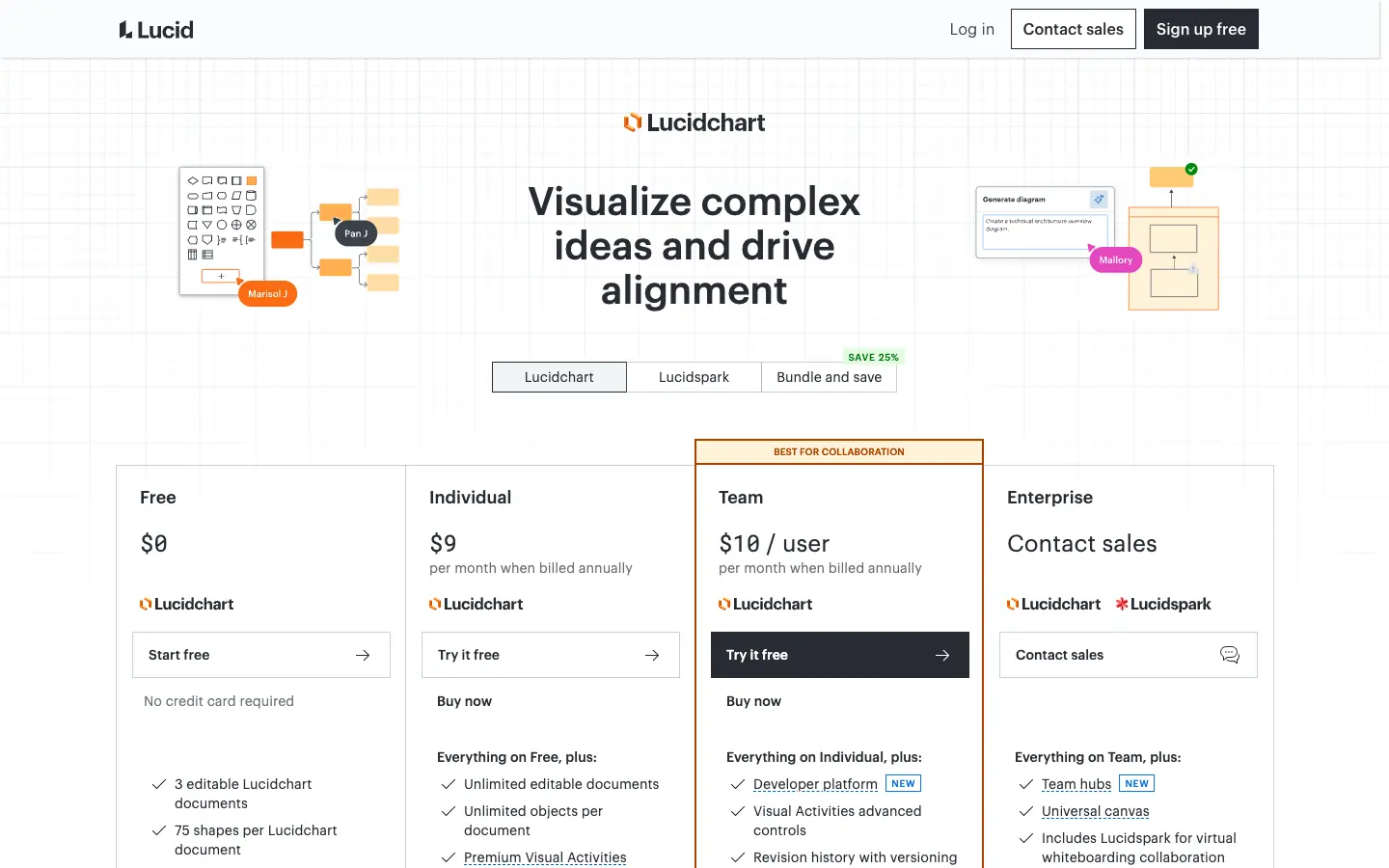
Lucidchart is a browser-based diagramming app from Lucid. The free plan gives you 3 editable documents, 75 shapes per document and 100 templates, plus basic data linking and Lucid AI. Individual ($9 a month, billed yearly) removes the caps and adds Visio import and export and premium templates. Team ($10 per user a month, billed yearly) adds revision history and integrations with Microsoft 365, Confluence, Jira, LeanIX and Ardoq. SAML authentication, enforceable sharing restrictions and the Salesforce integration are Enterprise features.
- Choose it if: you need a polished cloud diagramming tool that still exchanges files with Visio users.
- Watch out for: the 7-day trial asks for payment details and then bills automatically, and SSO needs Enterprise.
Microsoft Visio
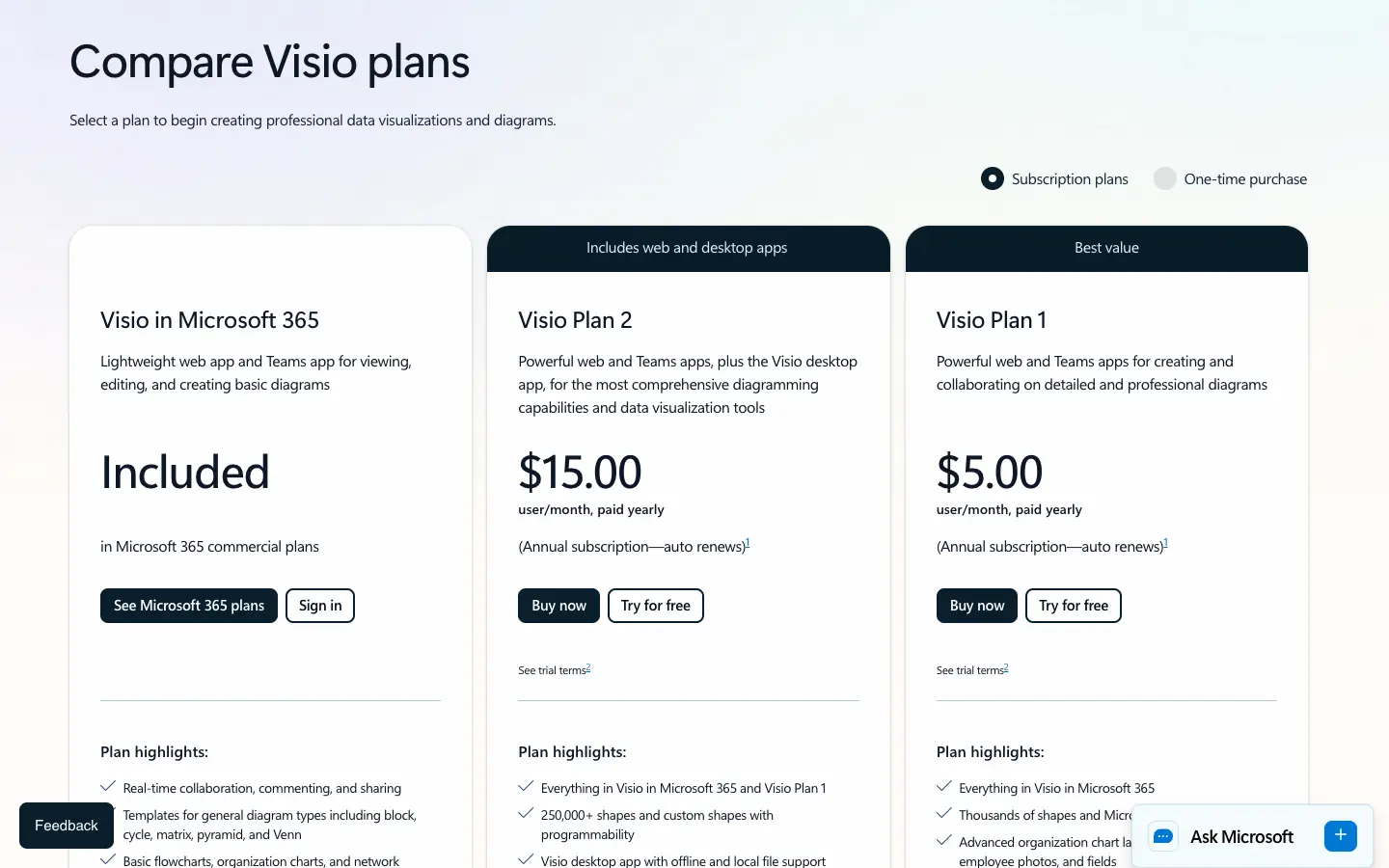
Microsoft Visio comes in three subscription forms. Visio in Microsoft 365 is included in Microsoft 365 commercial plans and covers viewing, editing and basic diagrams in the web and Teams apps. Plan 1 ($5 per user a month, paid yearly) adds cross-functional flowcharts, detailed network and cloud diagrams, layers, containers, shape data and Power BI integration. Plan 2 ($15 per user a month, paid yearly) adds the desktop app, 250,000+ shapes, BPMN and IDEF0 content, and links shapes to data in Excel, SharePoint lists and SQL Server. Both paid plans have a 30-day trial for first-time users with a work or school account, and a card is required.
- Choose it if: your company runs on Microsoft 365, or partners send you .vsdx files every week.
- Watch out for: the desktop app, BPMN and data linking need Plan 2, and Microsoft 365 Personal and Family plans do not include Visio for the web.
SmartDraw
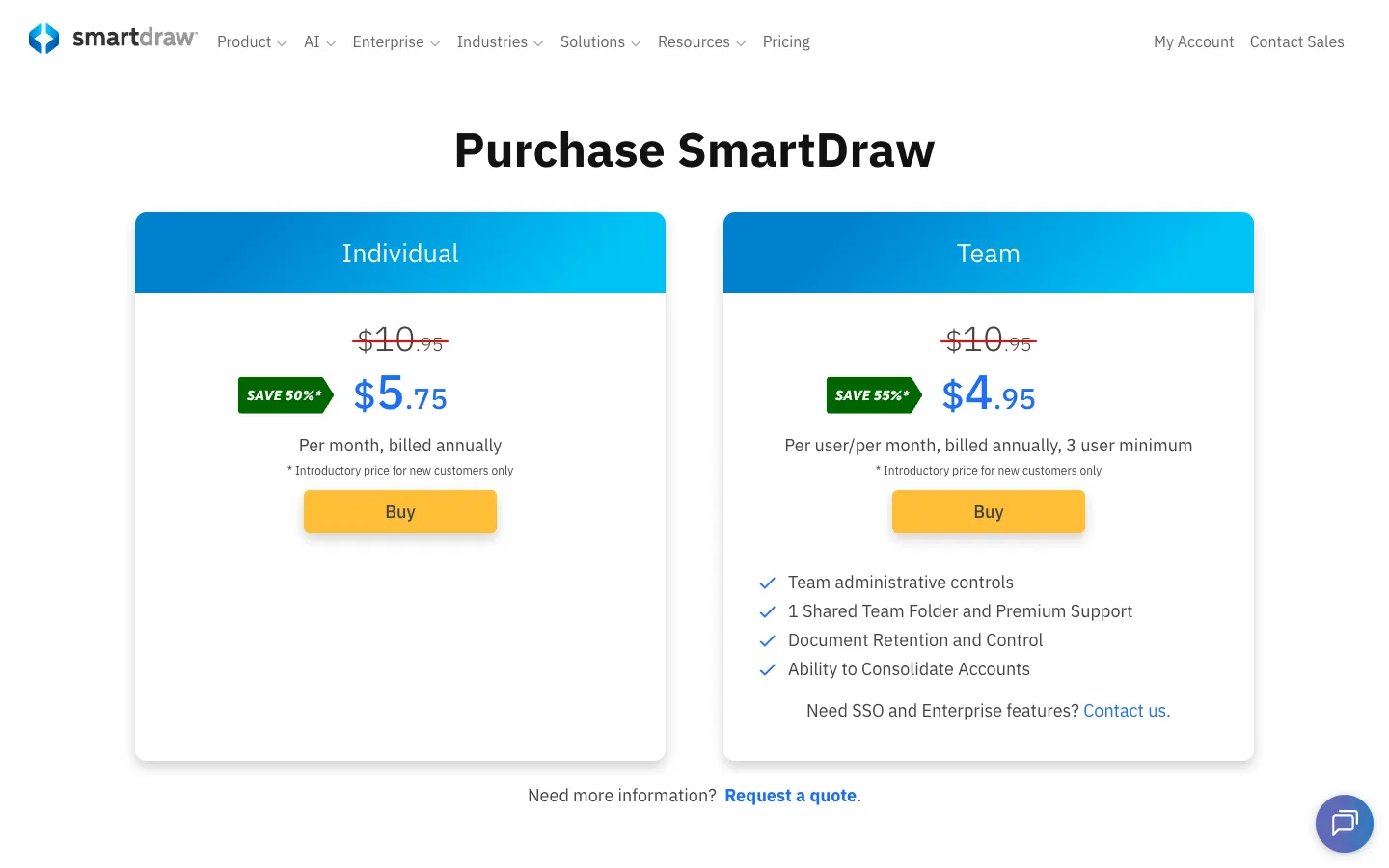
SmartDraw is a web diagramming tool with strong flowchart, org chart and floor plan templates. The purchase page lists Individual at $10.95 a month and Team at $10.95 per user a month, both billed annually, with a 3-user minimum on Team. On November 11, 2026, new customers saw introductory prices of $5.75 (Individual) and $4.95 per user (Team), down from $7.95 and $6.95 on November 7. These offers change often, so budget at the list price. There is a free trial but no permanent free plan. SSO is an Enterprise feature through sales.
SmartDraw can build data-driven flowcharts from Google Sheets or a CSV file, and SmartDraw AI turns a prompt, CSV data or Mermaid markup into an editable diagram. It imports VSD and VSDX files and exports VSDX. An earlier version of this article said SmartDraw could not export to Visio format. That is no longer true.
- Choose it if: you want Visio-compatible files, data-driven diagrams and integrations with Google Workspace, Microsoft Teams, Confluence and Jira.
- Watch out for: you pay from day one, and the Team plan starts at three seats.
Miro
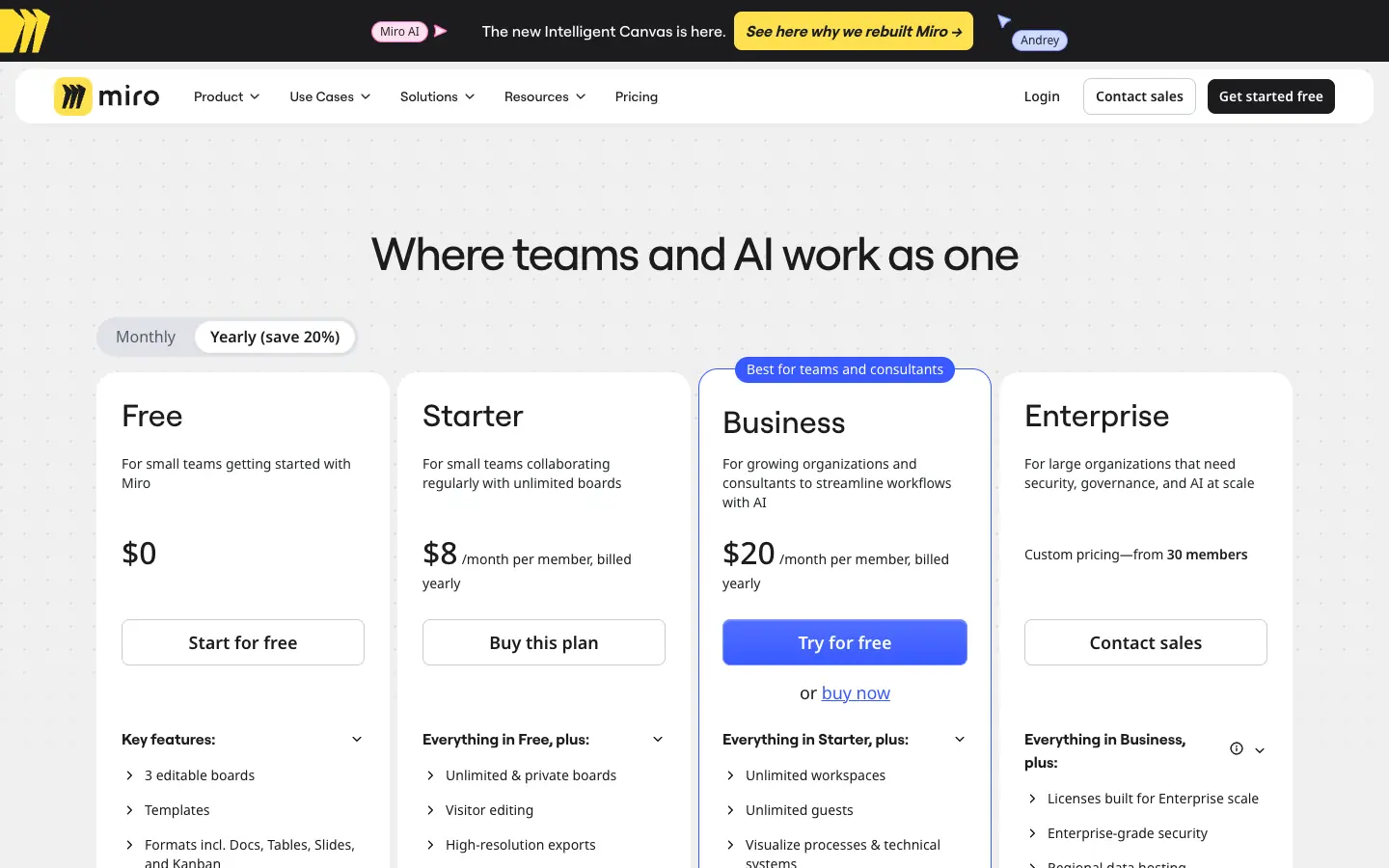
Miro is an online whiteboard with a diagramming toolset. The Free plan lets you create unlimited boards, but only the three most recent stay editable. Starter costs $8 per member a month and Business $20 per member a month, billed yearly; annual billing saves 20% compared with monthly. Business adds 4,700+ shapes for process and technical diagrams (including Mermaid, UML, AWS and BPMN), data tables and SSO. Enterprise starts from 30 members and adds SCIM, audit trails and data residency.
Visio import is available from Starter, but export to VSDX is Enterprise only. AI runs on monthly credits: 25 per member on Starter and 50 per member on Business. For Free, Miro's own pages disagree: on November 11, 2026 the pricing FAQ said 10 credits a month and the help center said 25.
- Choose it if: your flowcharts start as workshops, and you want SSO without an Enterprise contract.
- Watch out for: every member added to a paid workspace is billed, and VSDX export needs Enterprise.
Creately
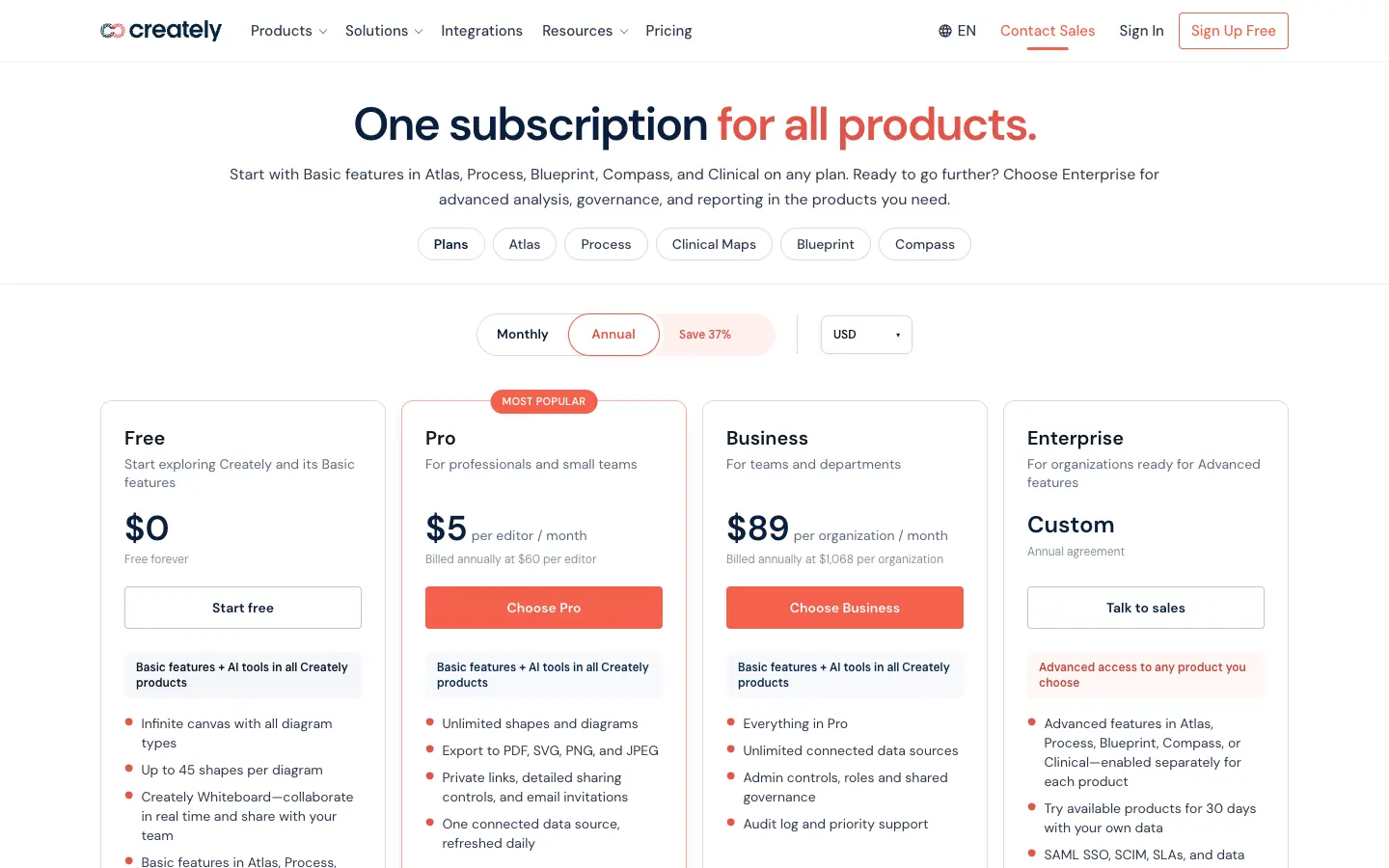
Creately has become a set of visual products: Process for BPMN 2.0 and swimlane flowcharts, Atlas for org charts, and others. The Free plan includes all diagram types and real-time collaboration, but caps each diagram at 45 shapes and has no exports. Pro costs $5 per editor a month billed annually ($60 a year) and adds unlimited shapes, PDF, SVG, PNG and JPEG export and one connected data source refreshed daily. Business is a flat $89 per organization a month billed annually ($1,068 a year) with unlimited data sources, admin roles and an audit log. SAML SSO and SCIM are Enterprise only. The old Team plan is closed to new subscribers.
- Choose it if: you document processes or org structures and want diagrams fed by live data.
- Watch out for: Business pricing is per organization, so check how many editors it covers with sales, and Creately does not export .vsdx.
Cacoo
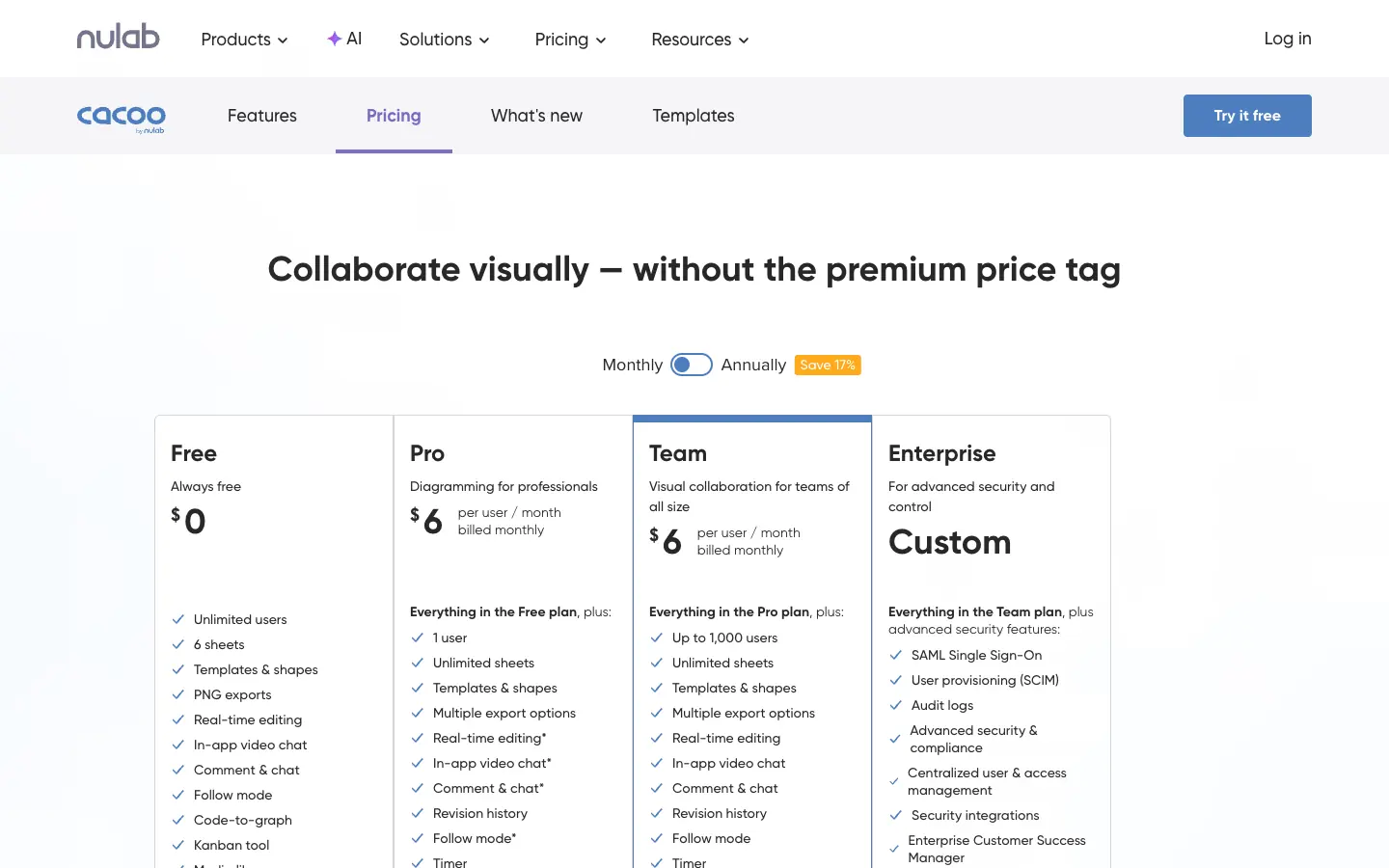
Cacoo is Nulab's online diagramming tool, with real-time editing, in-app chat and video. Pro (one user) and Team (up to 1,000 users) both cost $6 per user a month billed monthly, and annual billing saves 17%. Paid plans have a 14-day free trial with no credit card. Enterprise adds SAML SSO, SCIM provisioning and audit logs. Cacoo imports Visio files but does not export them.
The pricing page is inconsistent about sheet limits. On November 7 and again on November 11, 2026, the plan cards listed 6 sheets on Free and unlimited sheets on Pro and Team, while the comparison table listed 1, 5 and 100. Confirm the limit before you buy.
- Choose it if: you want a low, predictable per-user price for a whole team.
- Watch out for: the free plan exports PNG only, and the sheet limits above.
Gliffy
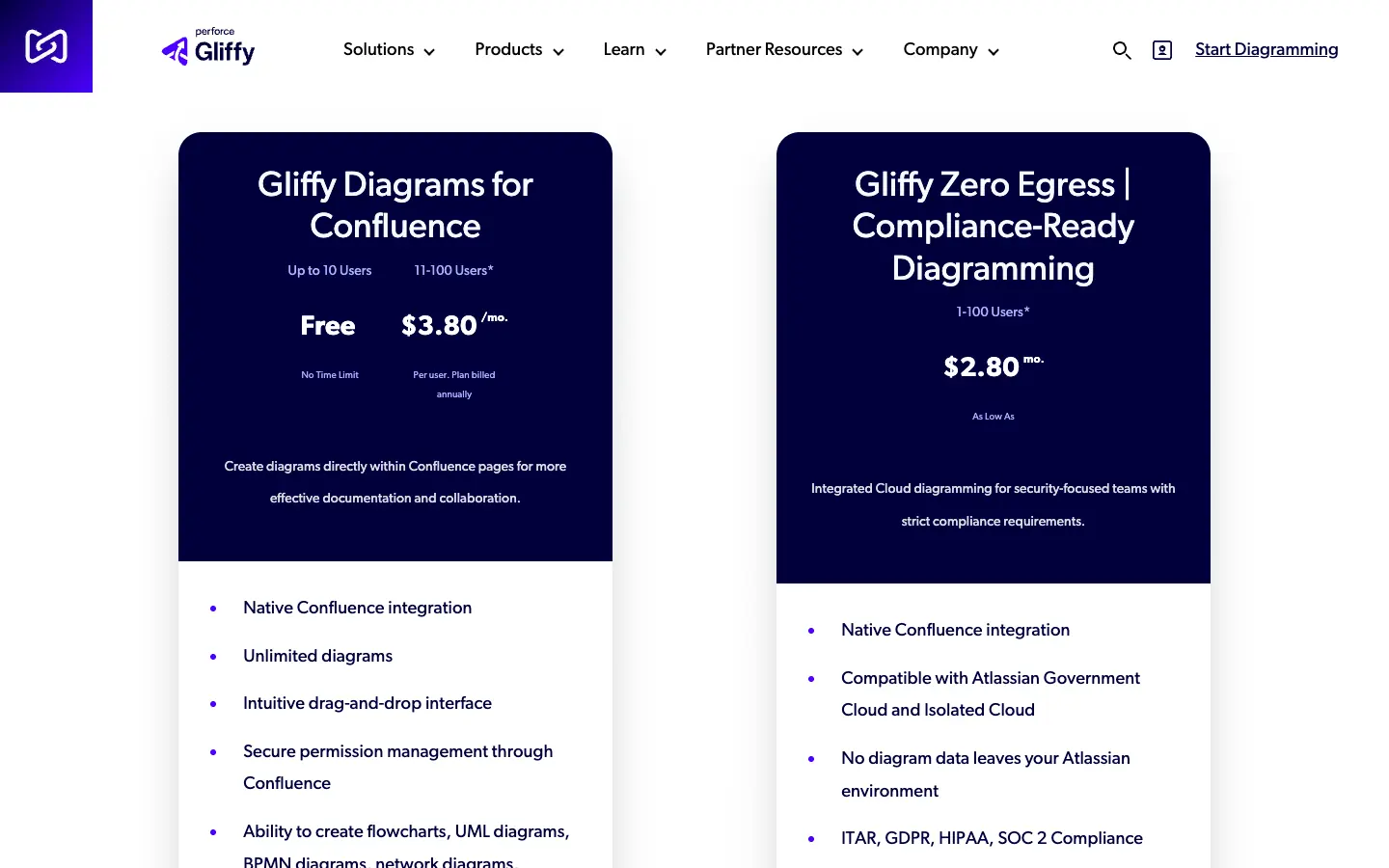
Gliffy, now part of Perforce, is a diagram app for Atlassian Confluence. Gliffy Diagrams for Confluence is free for up to 10 users and costs $3.80 per user a month for 11–100 users, billed annually through the Atlassian Marketplace. Like other Marketplace apps, it is billed on your whole Confluence user count, not just the people who draw. Evaluations last 30 days. If a Confluence Cloud license lapses, diagrams become read-only. Gliffy also sells a Zero Egress edition for compliance-focused teams from $2.80 per user a month.
It handles flowcharts, UML, BPMN, network and Mermaid diagrams, imports Visio and draw.io files, and exports JPEG, PNG and SVG, but not .vsdx. Gliffy's homepage advertises AI generation inside Confluence.
- Choose it if: your documentation lives in Confluence and diagrams should stay on the page.
- Watch out for: cost scales with your Confluence site, and you need Confluence to use it.
Whimsical
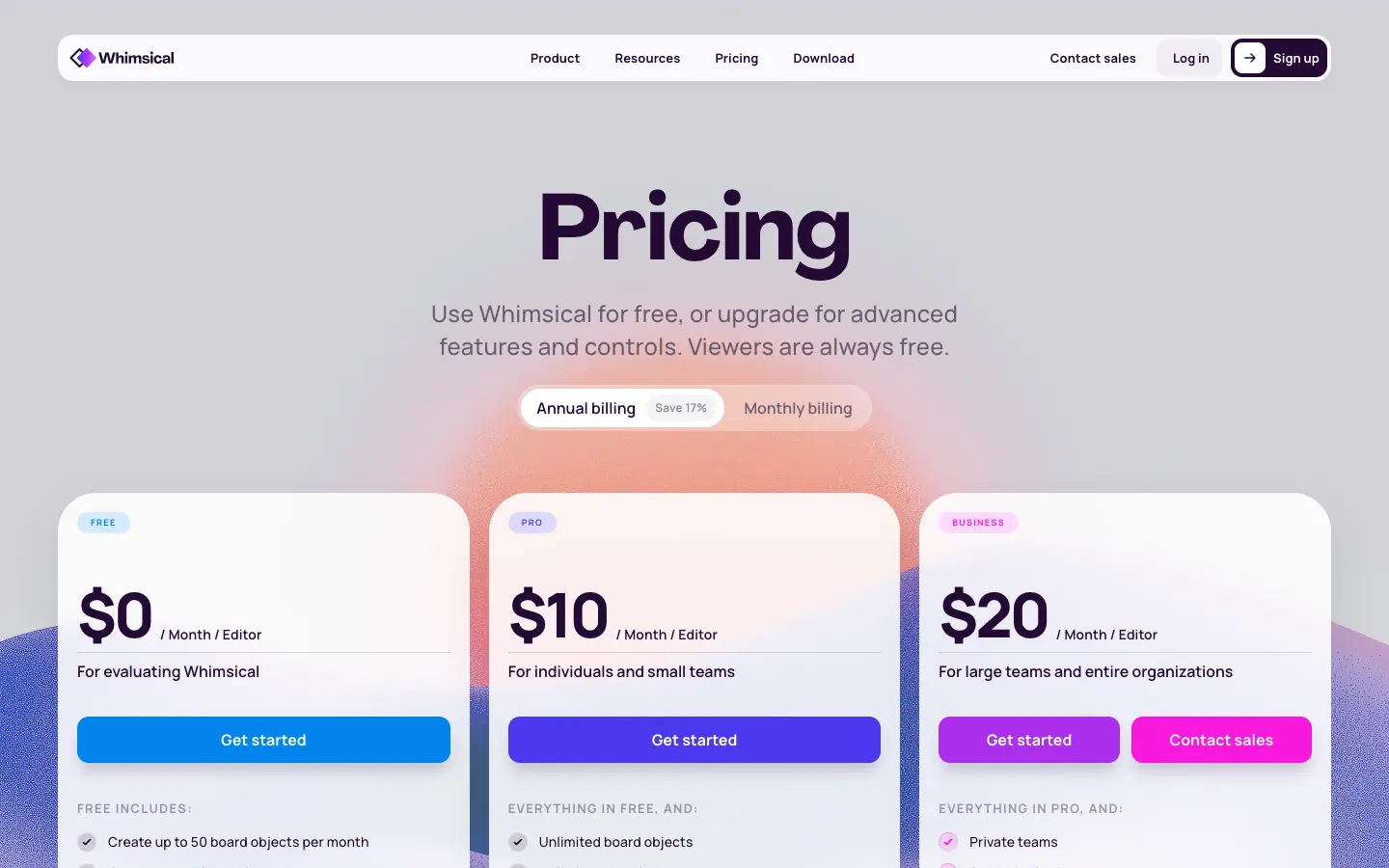
Whimsical combines flowcharts, wireframes, mind maps and docs. Free lets you create 50 board objects and 50 doc blocks a month, with watermarked exports and 7 days of version history. Pro is $10 per editor a month and Business $20 per editor a month, billed yearly; on monthly billing they cost $12 and $24. Viewers and guests are free on every plan, so you only pay for people who edit. SAML SSO and SCIM are on Business. Whimsical AI can generate an editable flowchart from a prompt, and integrations include Notion, Jira, Slack and GitHub.
- Choose it if: product and design teams want fast, clean flowcharts and free viewers.
- Watch out for: the free plan is an evaluation tier, and Whimsical documents no Visio import or export.
Visme
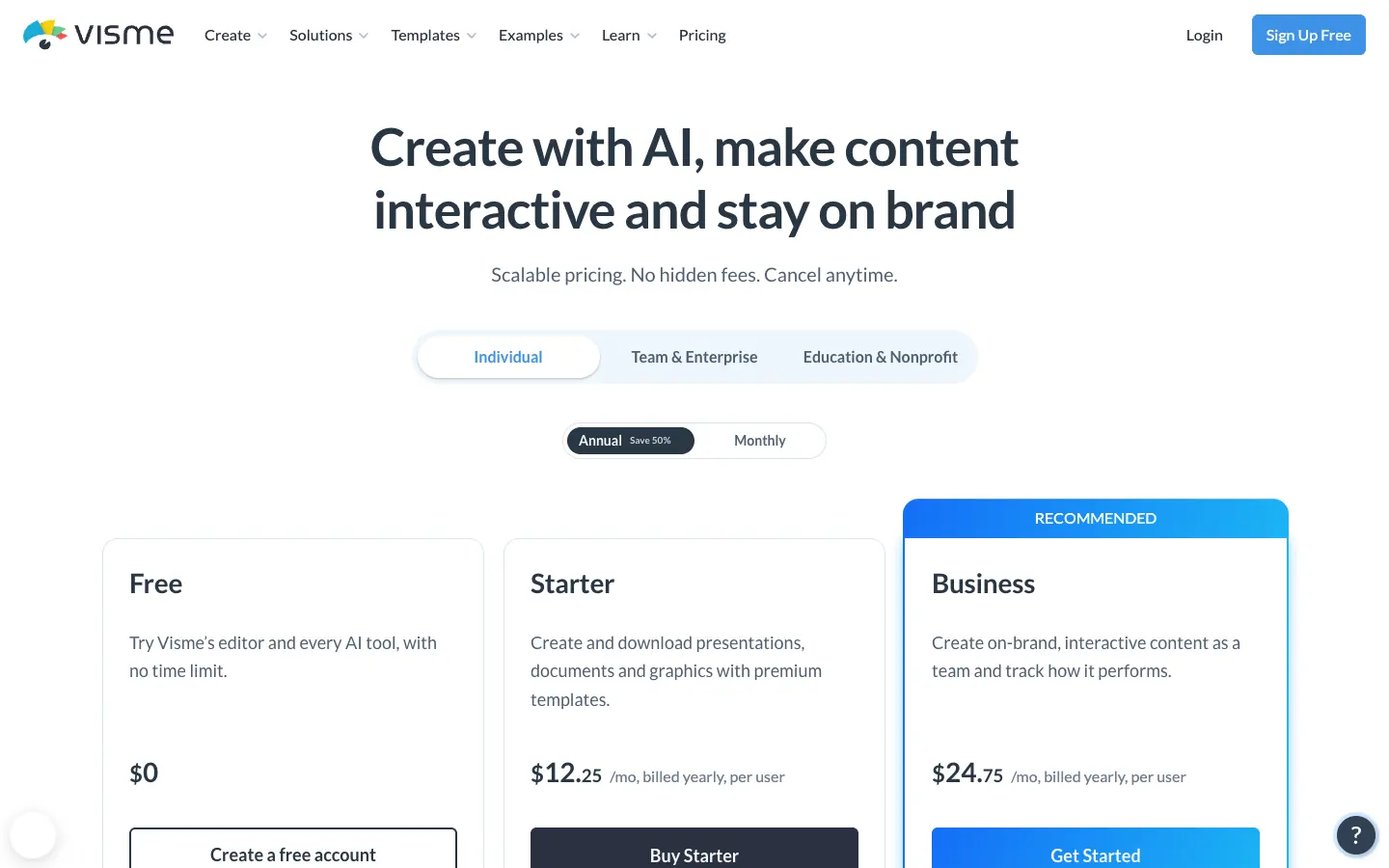
Visme is a design and presentation tool with a flowchart maker inside its editor. Basic is free with unlimited projects and limited templates. Starter is $12.25 a month ($147 a year) and Business is $24.75 per user a month ($297 a year), both billed yearly; yearly billing saves 50% against monthly. Business adds brand controls, team sharing and permissions, and SSO is an Enterprise feature. AI credits run from 10 a month on Basic to 500 on Business.
- Choose it if: your flowcharts end up in branded reports, presentations or infographics.
- Watch out for: it is a design tool first, with no documented Visio support or data-linked diagrams.
draw.io
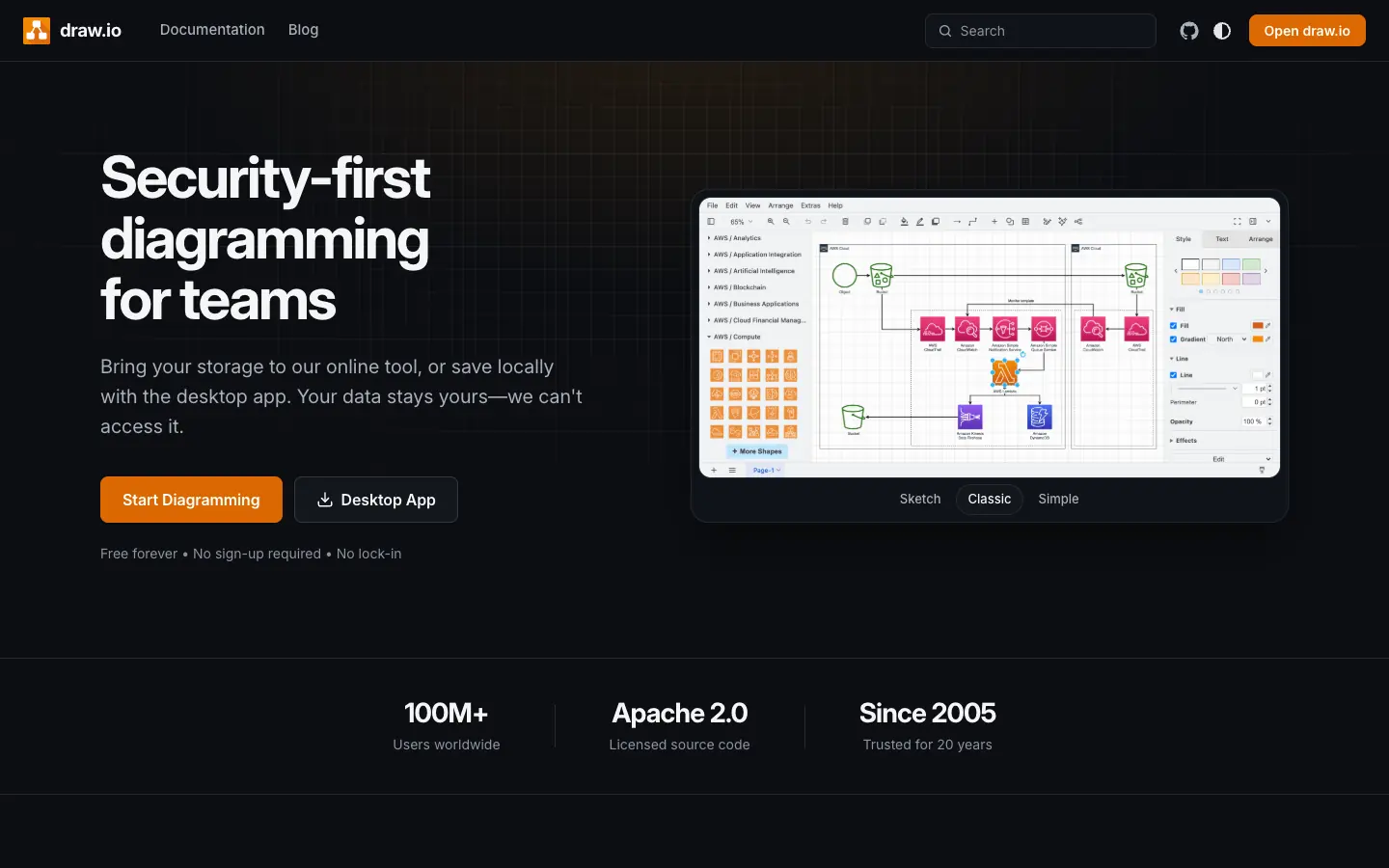
draw.io is the free baseline every paid tool has to beat. The web and desktop apps need no account, and you choose where files are stored. It supports real-time collaboration with shared cursors, an AI Generate tool, and diagrams built from CSV data. draw.io says it has no Enterprise tier for SSO. It opens .vsdx files but current versions do not export them. The Confluence and Jira apps are sold separately through the Atlassian Marketplace.
- Choose it if: you want professional diagramming without a per-seat bill.
- Watch out for: you manage storage, sharing and backups through your own platform, and there is no vendor-managed admin console.
AFFiNE
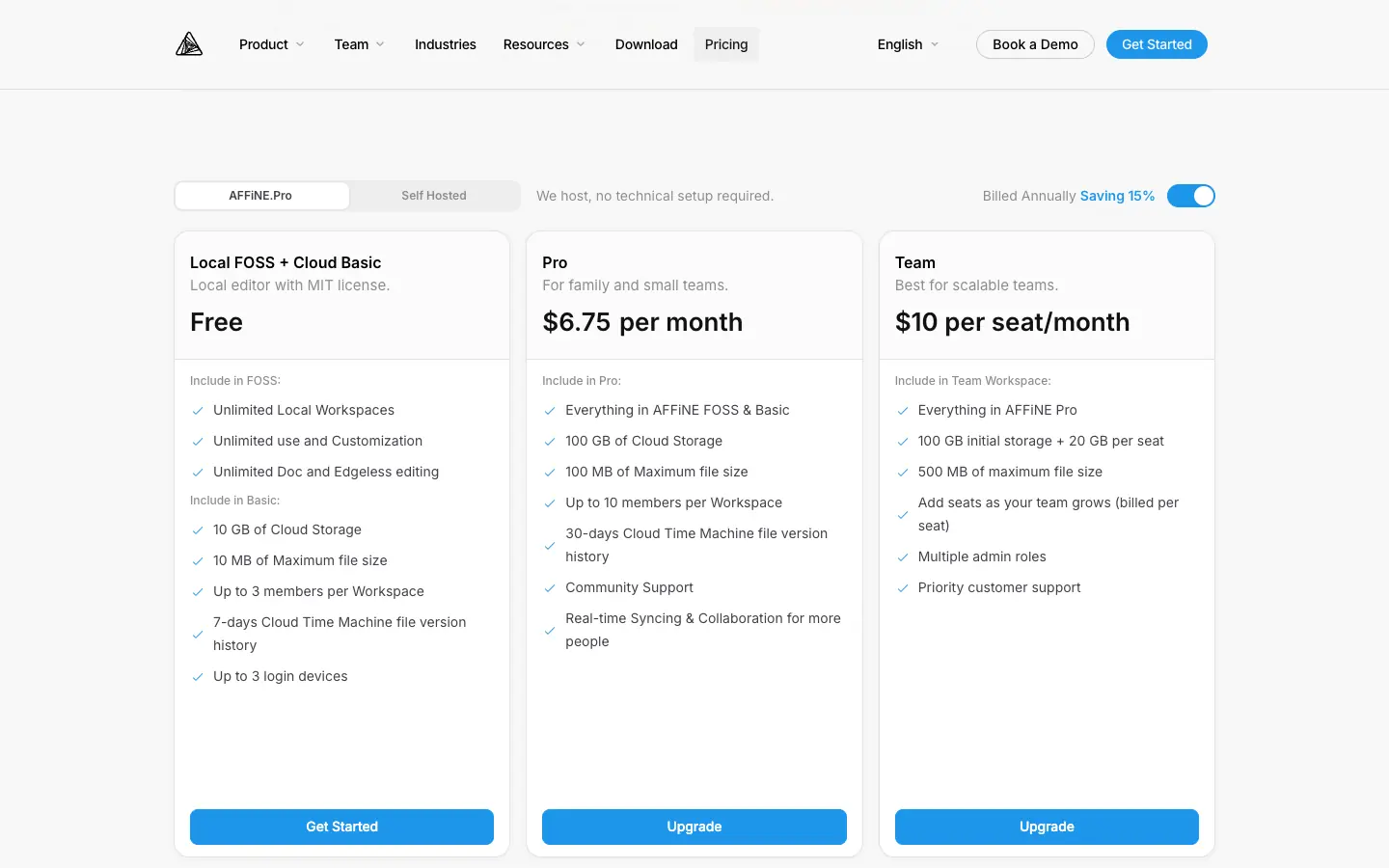
AFFiNE is our product. It combines documents and an Edgeless whiteboard in one local-first workspace, so a flowchart can sit next to the spec or decision it explains. Local workspaces are free and unlimited. The free Cloud plan includes 10 GB of storage and up to 3 members per workspace. Pro costs $6.75 a month billed annually and raises the limit to 10 members per workspace and 100 GB. Team costs $10 per seat a month. AFFiNE AI is a separate add-on at $8.90 a month billed annually, with 10 free uses per Cloud user. It can generate mind maps and drafts, but it is not a flowchart generator.
AFFiNE is not a Visio-compatible diagramming suite. It has no .vsdx import or export, no data-linked shapes and no BPMN validation, and its pricing page does not list SAML SSO.
- Choose it if: your flowcharts belong in written plans and you want docs and whiteboard in one place.
- Watch out for: it suits new diagrams better than a Visio library, and teams that need SSO should talk to sales first.
How to choose flowchart software in four steps
- List who edits and who only views. Count editors and viewers separately. Tools with free viewers or guests, such as Whimsical and Miro, cost far less when most people only read diagrams.
- Name the file and system you cannot change. If partners send .vsdx files, keep only tools that import and export them. If your docs live in Confluence or Microsoft 365, start with the tools that run there.
- Find the cheapest plan that meets your security rules. If IT requires SAML SSO, price that plan, not the entry plan. It is often Business or Enterprise.
- Run a real diagram through a trial. Rebuild one process you already have, share it with a viewer, export it in the format you need, and only then compare prices for your actual seat count.
Which flowchart software should you choose?
| If you need to... | Start with | Why | Watch out for |
|---|---|---|---|
| Exchange .vsdx files with partners or other departments | Microsoft Visio, Lucidchart or SmartDraw | All three import and export Visio files | Lucidchart needs a paid plan; SmartDraw has no free plan |
| Diagram inside an existing Microsoft 365 business plan | Visio in Microsoft 365, then Plan 1 | Already licensed, so nothing new to approve | Basic templates only; data linking and BPMN need Plan 2 |
| Run workshops that turn into process maps | Miro | Whiteboard first, with SSO on Business | Every member is billed; .vsdx export is Enterprise only |
| Keep diagrams on Confluence pages | Gliffy or the draw.io Confluence app | Diagrams stay next to the docs | Cost follows your Confluence user count |
| Draw org charts or process maps from live data | Creately, Visio Plan 2 or SmartDraw | Connected data sources or shape-to-data linking | Creately's data sources are capped on Pro |
| Give product and design teams quick flowcharts | Whimsical | Clean editor and free viewers | No documented Visio support |
| Put flowcharts in branded reports and slides | Visme | Design tools and brand kits around the diagram | Weak fit for technical diagrams |
| Pay as little as possible per seat | draw.io, then Cacoo or Creately Pro | $0, $6 and $5 per user a month | Check Cacoo's sheet limits and Creately's export list |
| Keep flowcharts next to the written spec | AFFiNE | Docs and whiteboard in one workspace | No Visio import or SSO listed |
| Get a free tool for a one-off diagram | See our free flowchart maker guide | Free tiers compared without sign-up | Free tiers are not meant for team work |
If you are still comparing the two biggest names, our Miro vs. Lucidchart guide covers them side by side. For specific diagram types, see the process map template and decision tree template guides.
What a 10-person team pays per year
Assumptions: 10 people who all edit diagrams, US list prices with annual billing where offered, no tax, no add-ons (AI credit packs, Lucidspark, AFFiNE AI) and no introductory discounts unless noted. Tools with free viewers would cost the same here, because everyone edits.
| Tool and plan | How it is calculated | Yearly cost |
|---|---|---|
| draw.io (web or desktop) | No license | $0 |
| Gliffy for Confluence, 10-user site | Free up to 10 Confluence users | $0 (Confluence licenses not included) |
| Visio Plan 1 | $5 × 10 users × 12 months | $600 |
| Creately Pro | $5 × 10 editors × 12 months | $600 |
| Cacoo Team | $6 × 10 users × 12 months, billed monthly | $720 (about 17% less on annual billing) |
| Miro Starter | $8 × 10 members × 12 months | $960 |
| Creately Business | Flat $89 × 12 months | $1,068 |
| Lucidchart Team | $10 × 10 users × 12 months | $1,200 |
| Whimsical Pro | $10 × 10 editors × 12 months | $1,200 |
| AFFiNE Team | $10 × 10 seats × 12 months | $1,200 |
| SmartDraw Team | $10.95 × 10 users × 12 months | $1,314 at list price ($594 at the introductory $4.95 offered on November 11) |
| Visme Starter | $147 × 10 people | $1,470 |
| Visio Plan 2 | $15 × 10 users × 12 months | $1,800 |
| Miro Business | $20 × 10 members × 12 months | $2,400 |
| Whimsical Business | $20 × 10 editors × 12 months | $2,400 |
| Visme Business | $297 × 10 users | $2,970 |
Two things change this table quickly. First, SSO: if your IT team requires SAML, the cheapest options here are Miro Business ($2,400) and Whimsical Business ($2,400), because Lucidchart, Creately, Cacoo, SmartDraw and Visme put SAML behind Enterprise quotes. Second, viewers: if only 3 of the 10 people edit, Whimsical Pro drops to $360 a year because viewers are free, while Gliffy still bills every user on the Confluence site once you pass 10.
Frequently asked questions
What is the best flowchart software for a team?
It depends on the files and systems around you. Teams that exchange .vsdx files should start with Microsoft Visio, Lucidchart or SmartDraw. Workshop-heavy teams usually prefer Miro or Whimsical, and Confluence-centered teams prefer Gliffy or draw.io for Confluence. Compare the plan you need for SSO and collaboration, not just the entry price.
How much does flowchart software cost?
On November 11, 2026, published per-user prices ranged from $5 a month (Visio Plan 1, Creately Pro) to $24.75 a month (Visme Business), mostly billed yearly. draw.io is free, and Gliffy is free for Confluence sites with up to 10 users. For a 10-person team that edits, expect roughly $600 to $3,000 a year at list prices.
Is there free flowchart software that is good enough for work?
draw.io is free, needs no account and is used for professional work. Most other free tiers are limited: Lucidchart allows 3 editable documents, Miro 3 editable boards, Creately 45 shapes per diagram and Whimsical 50 board objects a month. Our free online flowchart maker guide compares free options in detail.
Which flowchart software works with Visio files?
Microsoft Visio, Lucidchart (paid plans) and SmartDraw import and export .vsdx files. Miro imports from Starter and exports only on Enterprise. draw.io, Cacoo, Gliffy and, according to the vendor, Creately import Visio files but do not export them. Whimsical, Visme and AFFiNE do not document Visio support.
Which flowchart tools include SSO without an Enterprise plan?
Among the tools here, Miro includes SSO on Business ($20 per member a month) and Whimsical includes SAML SSO on Business ($20 per editor a month). Lucidchart, Creately, Cacoo, SmartDraw and Visme put SAML SSO on Enterprise plans. Visio uses your Microsoft 365 work account, and Gliffy uses your Atlassian site's sign-in.
Can AFFiNE replace Lucidchart or Visio?
Not if you depend on .vsdx files, data-linked shapes or BPMN validation; AFFiNE has none of those. It fits teams that want flowcharts inside the docs and whiteboards they already write in, and its local workspaces are free.
Sources
All first checked on November 7, 2026 and rechecked on November 11, 2026:
- Lucid: Lucidchart pricing
- Microsoft: Visio plans and pricing, Visio Plan 1, Visio for the web FAQ
- SmartDraw: Purchase SmartDraw, Flowchart maker, SmartDraw AI, Integrations, Visio import, Visio export
- Miro: Pricing, AI credits, Import Visio diagrams, Export diagrams to Visio
- Creately: Plans, Creately vs. Visio
- Cacoo: Pricing, Features, Import Visio files
- Gliffy: Pricing, Homepage
- Whimsical: Pricing, Flowcharts
- Visme: Pricing, Flowchart maker
- draw.io: Homepage, Generate, Insert from CSV, Export formats
- AFFiNE: Pricing, AFFiNE AI