Free AI Image Generators in 2026: What You Actually Get Free
Several AI image generators still have a real free tier in 2026, but "free" always comes with a limit. Microsoft Bing Image Creator, Google Gemini, ChatGPT, Adobe Firefly, Ideogram, Leonardo.Ai, Craiyon and DeepAI all let you create images without paying. They differ in what the limit is (a daily count, weekly credits, or slower speed), whether you need an account, whether images are public or watermarked, and what the free terms say about commercial use. If you want no cloud limits at all, you can run an open model such as Stable Diffusion on your own computer.
How this guide was checked (October 27, 2026): Every free-plan, credit, watermark, account and licensing statement below comes from the vendor's own pricing page, help center or terms, opened on October 27, 2026. This is documentation research, not a hands-on quality benchmark: we did not score image quality, and we did not count how many images a free account produced. Free allowances change often and can differ by country, so confirm them on the linked page before you rely on them.
Disclosure: AFFiNE publishes this guide. AFFiNE AI can generate images inside docs and whiteboards, but it is a paid add-on, so it is not listed as a free generator here.
If you are comparing free and paid plans, image quality and pro features across tools, read our best AI image generators comparison. This page answers a narrower question: what you can actually do for free, and how to get good results inside those limits.
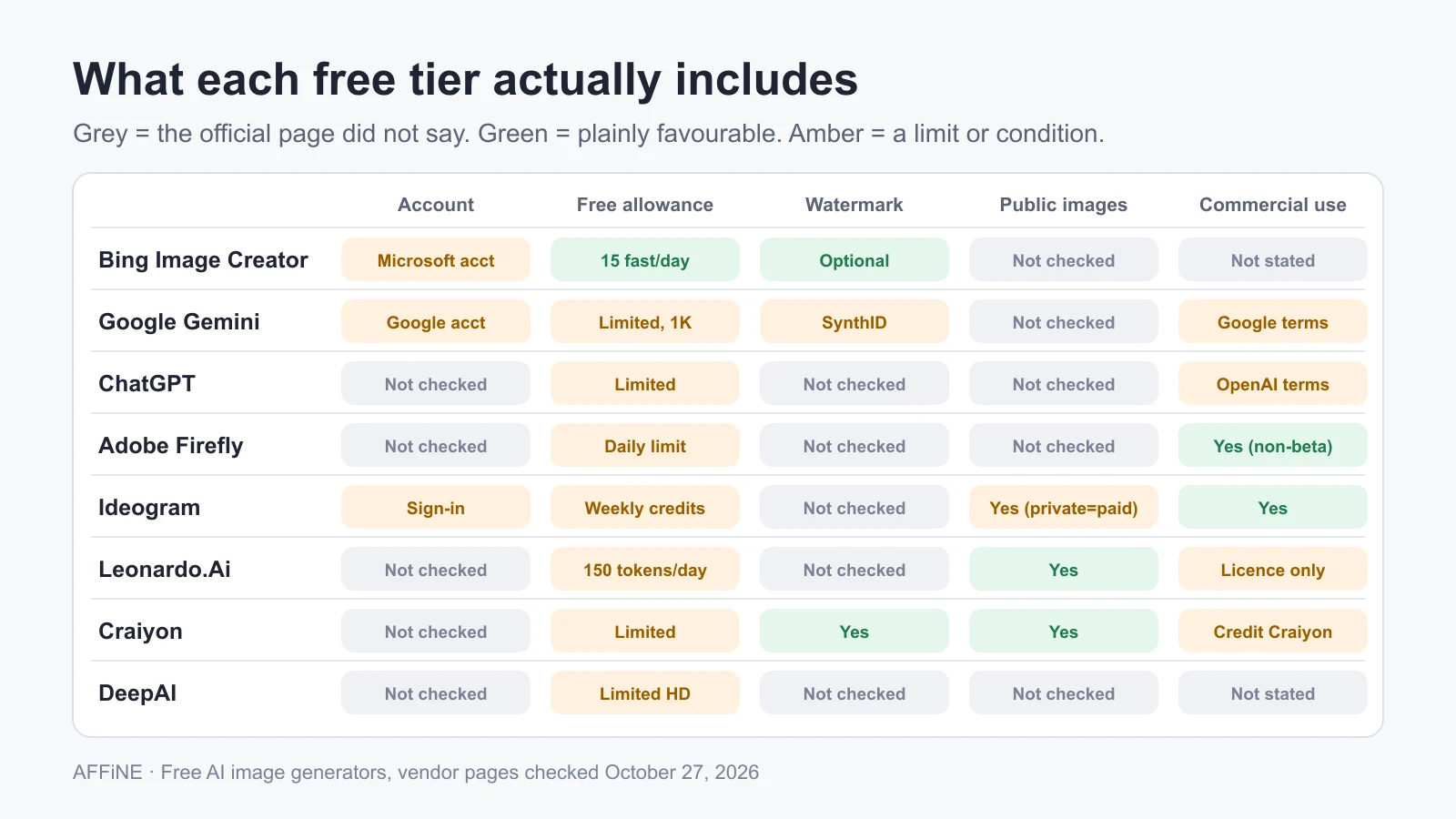
Free AI image generators compared by their free terms
| Tool | Account needed? | What the free tier includes | Watermark or visibility | Commercial use on the free tier |
|---|---|---|---|---|
| Bing Image Creator | Yes, a personal Microsoft account (not a work or school Entra ID account) | 15 fast creations per day; after that, unlimited creations at a slower standard speed | Optional visible watermark you can switch on | Not stated on the help page we checked; read Microsoft's terms |
| Google Gemini app | Yes, a Google account; age 13+ to generate and 18+ to edit images | Image generation with Nano Banana 2; downloads at 1K without a Google AI plan (2K with one) | Invisible SynthID watermark on all images; visible watermark is a setting in most regions | Governed by Google's Terms of Service and Prohibited Use Policy |
| ChatGPT | Free plan; sign-in rules not checked | "Limited" image generation; image generation with Thinking is not included | Not checked | Governed by OpenAI's terms and usage policies |
| Adobe Firefly | No paid plan needed; sign-in rules not checked | A limited number of free daily generations on a curated set of models | Not checked | Adobe says outputs from non-beta features can be used commercially |
| Ideogram | Yes, signing in with Google, Apple or Microsoft | Weekly credits for eligible free accounts; Ideogram says the amount may vary | Private generation is listed as a paid-plan feature | Ideogram says it does not claim ownership and you may use images commercially |
| Leonardo.Ai | Free plan; sign-in rules not checked | 150 fast tokens per day | Free creations are public | Leonardo holds rights to free-tier images and grants you a non-exclusive, royalty-free licence for commercial use |
| Craiyon | Not confirmed | "Limited" images and free daily edit credits | Free images carry a watermark and are not private | Allowed, but free users must credit Craiyon next to images used commercially |
| DeepAI | Not confirmed | "Limited" HD image generation and editing, with ads | Not checked | Not stated on the pricing page |
"Not checked", "not checked" and "Not confirmed" mean the official page we opened did not answer the question. They do not mean the answer is no.
Quick picks within the free terms:
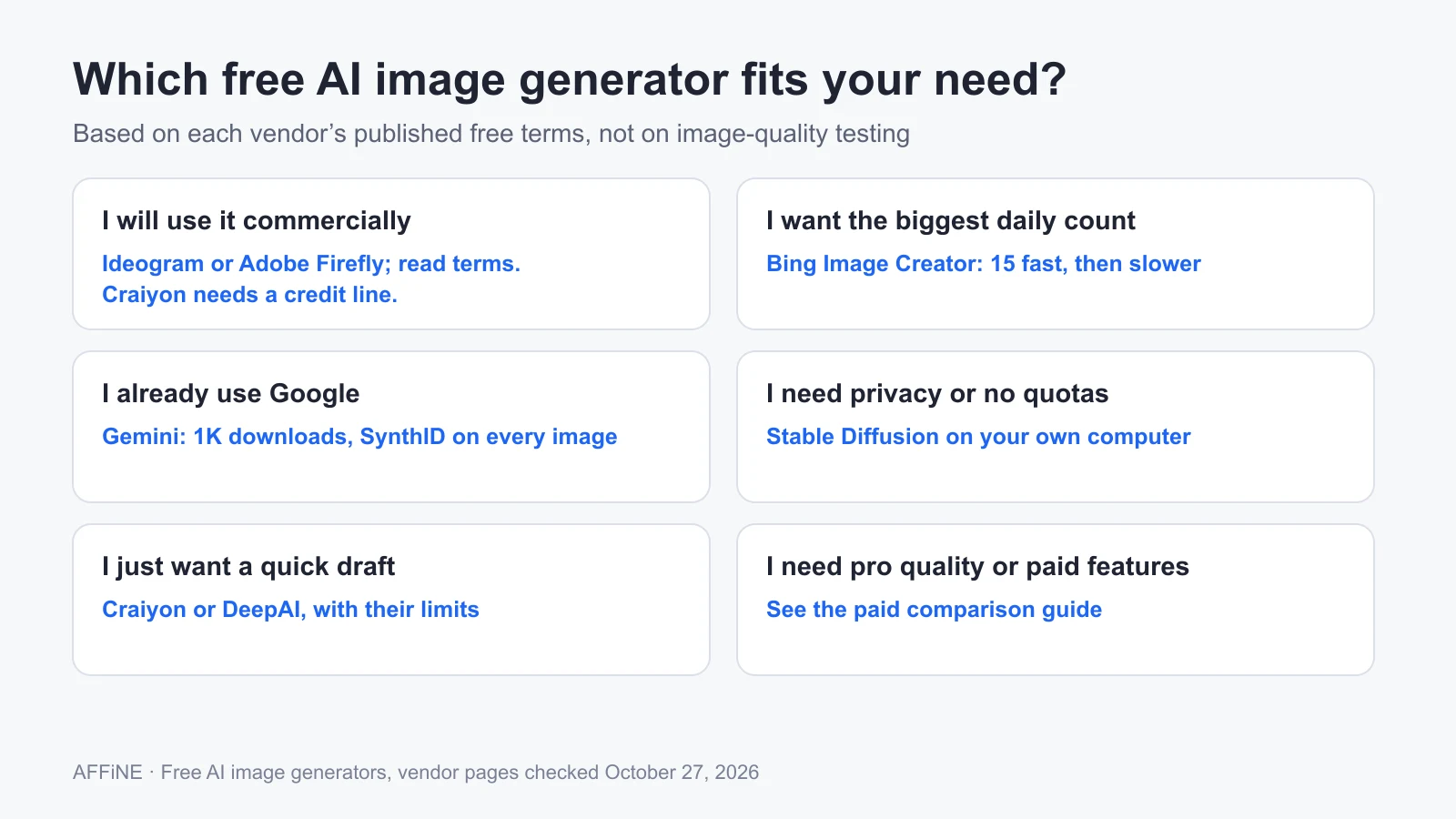
- Most predictable daily allowance: Bing Image Creator (15 fast creations per day, then slower but still free).
- Best if you already use Google: Gemini, with the caveat that free downloads are 1K and every image carries an invisible SynthID watermark.
- Free images you may use commercially without attribution, per the vendor: Ideogram and Adobe Firefly. Read the full terms before you print or sell anything.
- Simplest free option with the most strings attached: Craiyon. Expect a watermark, public images and a credit line for commercial use.
- No cloud limits: Stable Diffusion on your own hardware (see below).
Tools we removed or did not include
The previous version of this article recommended DeepImg and Magic Studio's AI Art Generator as no-sign-up tools. We could not confirm current free limits or sign-up rules for DeepImg on an official page, so it is no longer listed. Magic Studio's AI Art Generator page asks "Is AI Art Generator free to use?" and "Do I need to create an account?", but the answers were not readable on the page we opened, so we did not repeat the old "no registration" claim. Midjourney has no free tier, so it belongs in the paid comparison rather than here.
What "free" usually means: five limits to check
Free tiers trade money for one or more of these limits. Check all five before you build a habit around a tool.
- Allowance: a daily count (Bing, Firefly), daily tokens (Leonardo), weekly credits (Ideogram) or an unspecified "limited" quota (ChatGPT, Craiyon, DeepAI). Unspecified quotas can tighten at busy times.
- Account and age: Bing and Gemini require an account, and Ideogram gives free credits to accounts that sign in. Gemini requires age 13 or over to generate images, and 18 or over to edit them, with a personal account. Bing Image Creator does not work with work or school Entra ID accounts.
- Resolution: Gemini states 1K downloads without a Google AI plan. DeepAI reserves its higher "Genius" and 2K models for Pro. If you need print-quality files, check this first.
- Visibility and watermarks: Leonardo makes free creations public, and Craiyon adds a watermark and keeps free images out of private mode. Gemini adds an invisible SynthID watermark to every image even if you hide the visible one.
- Rights: "you own it", "you get a licence" and "credit us" are three different deals. Leonardo keeps rights to free-tier images while licensing them to you. Craiyon requires attribution for commercial use on the free tier. Ideogram and Adobe describe commercial use as allowed, with Adobe excluding indemnification for beta features for teams and enterprise customers.
No sign-up and privacy: what changed
Older lists, including an earlier version of this page, promised "no sign-up" tools with "privacy assurance". We could not confirm a current no-account option on any official page we checked: Bing and Gemini require an account, and Ideogram ties free credits to signing in. Skipping sign-up would not make prompts private anyway: a hosted generator still receives and processes your prompt on its servers. Keep confidential product names, client details and personal photos out of free cloud tools unless you have read that tool's privacy policy.
If privacy is the main concern, run a model locally. Stability AI's Community License lets individuals and organizations with under USD 1 million in annual revenue use its Core Models, including commercially, at no cost. You need a capable GPU and some setup time, and the licence is revocable if you break its terms.
Understanding How Free AI Image Generators Work
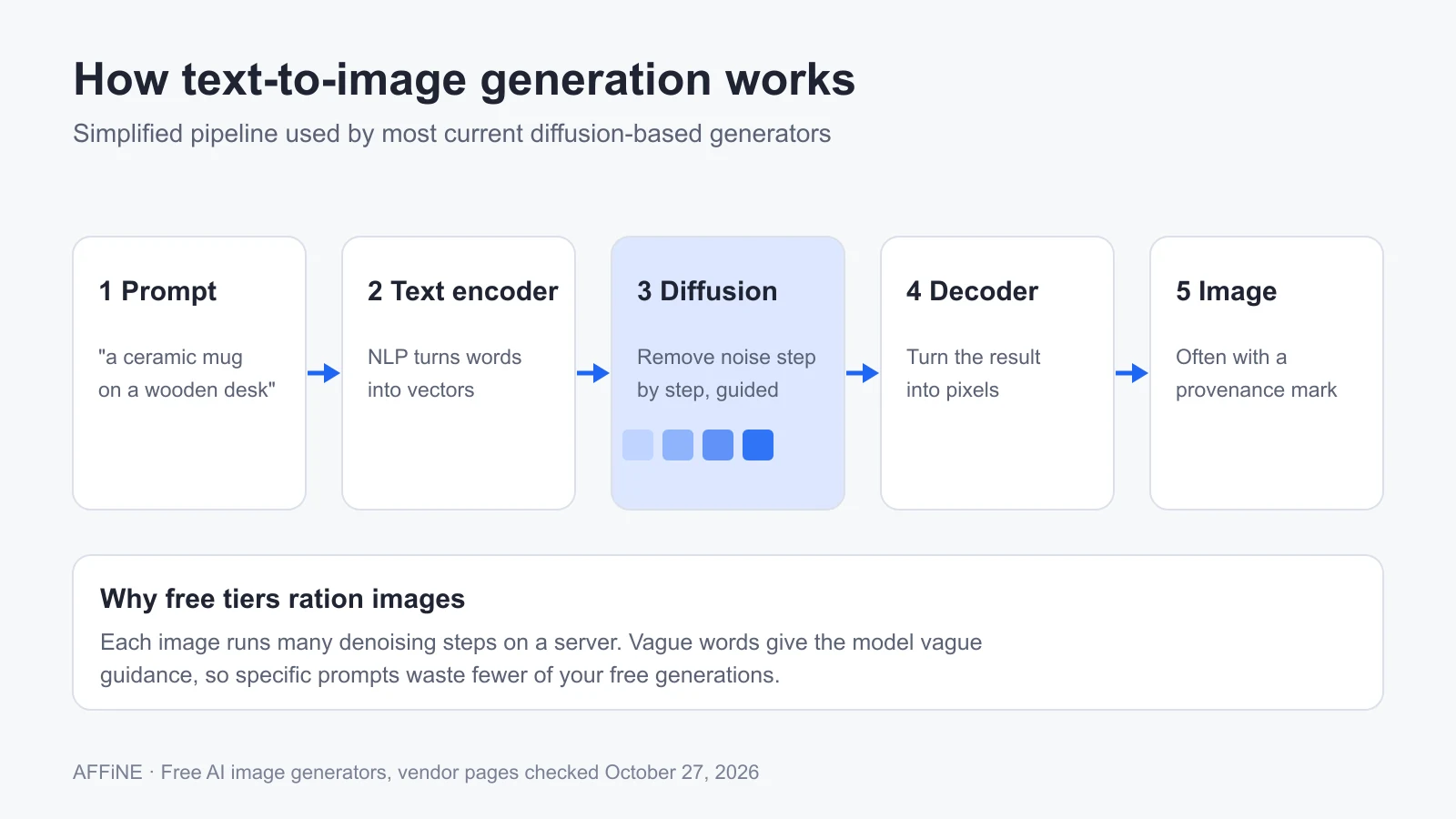
Knowing the basic pipeline helps you write prompts that use fewer credits.
Decoding Text Prompts
The first step is turning your words into something a model can compute with. AI models employ Natural Language Processing (NLP) to convert a prompt into numerical vectors that capture what it means. Text encoders such as CLIP, used in OpenAI's DALL·E research, learned to place matching text and images close together in that numeric space, so the vector acts as a guide for what the picture should contain.
From noise to image
Most current generators use diffusion models. As this explainer on how DALL·E's diffusion process works describes, the model starts from random noise and removes it over many steps, each step nudged toward the encoded prompt. A final decoder turns the result into pixels. Older systems used generative adversarial networks (GANs), in which one network generates images and another judges them, but diffusion now dominates text-to-image tools. For a broader overview, see Narrato's guide to how AI image generators work.
Two practical consequences follow. First, each generation runs many denoising steps on a server, which is why free tiers ration them. Second, the model only "sees" your prompt as vectors, so vague words produce vague guidance. In practice, specific nouns and clear constraints tend to help more than long lists of adjectives.
How to get better images within free limits
Free allowances reward getting the prompt right early. This order works across tools:
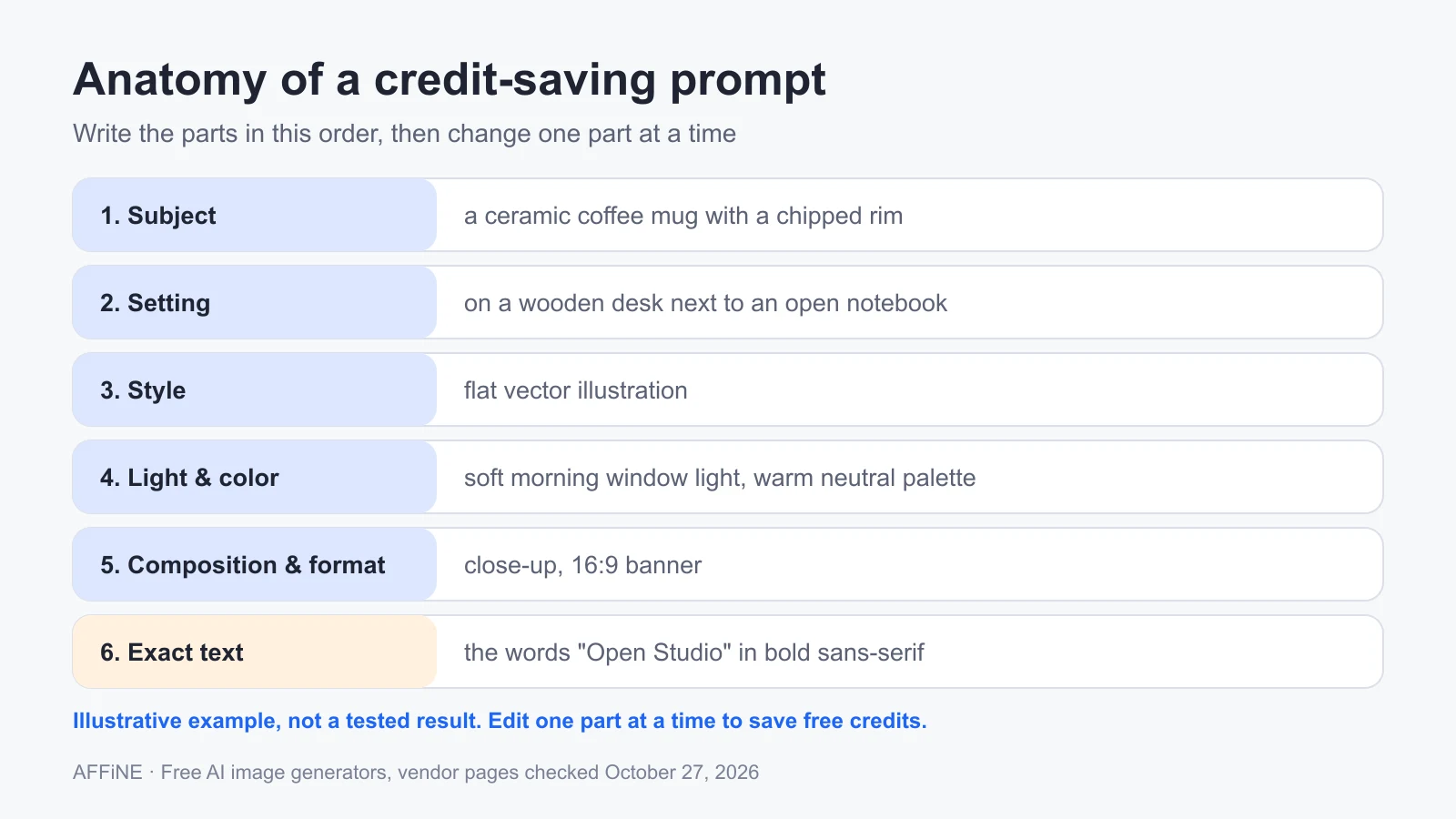
- Subject first. Name the main thing, with one or two concrete details: "a ceramic coffee mug with a chipped rim".
- Setting. Where it is and what surrounds it: "on a wooden desk next to an open notebook".
- Style. Photo, flat illustration, watercolor, 3D render or line drawing.
- Lighting and color. "soft morning window light, warm neutral palette".
- Composition and format. "close-up, shallow depth of field, 16:9 banner".
- Exact text, if any. Put the words in quotes and keep them short:
the words "Open Studio" in bold sans-serif.
A complete example you can adapt:
A ceramic coffee mug with a chipped rim on a wooden desk next to an open notebook,
flat vector illustration, soft morning window light, warm neutral palette,
close-up, 16:9 banner, with the words "Open Studio" in bold sans-serif at the top left
This is an illustrative prompt, not a tested result; outputs differ by tool and model. To save credits:
- Change one part at a time. If the style is right but the lighting is wrong, edit only the lighting phrase.
- Draft small, finish once. Where a tool lets you pick speed or size, draft on the cheapest setting and spend premium credits only on the final version.
- Use editing instead of regenerating. Inpainting or "edit this image" tools usually cost less than a fresh generation and keep what already works.
- Keep a prompt log. Save prompts that worked, with the tool and date. A free tier that resets tomorrow is more useful if you start from a proven prompt. A note app or AFFiNE doc works well for this.
For 25 copy-ready examples with Midjourney, FLUX and Firefly syntax, see our AI art prompt library. For more prompt structures, ClickUp's list of AI art prompts groups examples by style and subject. If you need a specialized generator, such as an AI tattoo generator for tattoo concepts, check its free terms the same way.
Before you publish a free AI image
Free terms are only one part of responsible use.
- Re-read the licence for your use case. Selling merchandise, printing ads and posting on social media can fall under different clauses. Attribution rules, such as Craiyon's, apply to every commercial use.
- Check the image itself. Raw outputs often contain warped hands, garbled text and inconsistent details. Boost Labs' overview of visual limitations in DALL·E and similar models lists common failure types. Fix or regenerate before you publish.
- Do not imitate real people, trademarks or living artists without permission. Vendor policies, such as Google's Prohibited Use Policy and OpenAI's usage policies, restrict this, and so may local law.
- Expect provenance marks. Gemini embeds SynthID in every image, and Bing offers an optional visible watermark. Some platforms and publications also require you to label AI-generated images.
- For architecture and interiors, use specialist tools for final renders. General generators are fine for mood boards, but Architizer's roundup of AI tools for architectural rendering covers tools built for that work.
Frequently Asked Questions
Is there a completely free AI image generator?
Not one without limits. Bing Image Creator comes closest for daily use: after 15 fast creations per day it keeps generating at a slower speed. For no account and no quota, run an open model such as Stable Diffusion on your own computer, within the terms of its licence.
Can I use free AI images commercially?
Sometimes. Ideogram and Adobe Firefly say commercial use is allowed. Leonardo.Ai licenses free-tier images to you for commercial use but keeps its own rights to them. Craiyon allows it only if free users credit Craiyon. Read the current terms for the specific tool before you sell or advertise with an image.
Do free AI image generators add watermarks?
Some do. Craiyon's free images carry a visible watermark. Gemini adds an invisible SynthID watermark to all images and shows a visible one by default in some regions. Bing Image Creator offers an optional visible watermark.
Which free AI image generators work without signing up?
None of the tools we checked confirms a no-account option in its official documentation. Bing and Gemini require an account, and Ideogram's free credits require signing in. If you find a site that does not, assume your prompts and images are still processed on its servers.
Sources and update history
All sources were accessed on October 27, 2026.
- Microsoft, Bing Image Creator help
- Google, Generate and edit images with Gemini Apps and Manage watermark settings in Gemini Apps
- OpenAI, ChatGPT pricing and usage policies
- Adobe, Firefly plans and Generative credits FAQ
- Ideogram, Pricing and FAQ
- Leonardo.Ai, Pricing and FAQ
- Craiyon, Pricing and Terms of Use
- DeepAI, Pricing
- Stability AI, License
Update note (October 27, 2026): This article was first published in December 2024 and rewritten in October 2026 around free-tier terms. We removed tools whose free access we could not confirm, removed marketing-campaign statistics that came from secondary summaries, and replaced the old images with original diagrams. All diagrams were made by AFFiNE for this article; none are product screenshots. AI tools assisted with drafting, and the content was reviewed and edited by the AFFiNE team.