
What Is a Kanban Board? Setup Guide & Best Practices
TL;DR: A kanban board is a visual project management tool that shows every task as a card moving through workflow columns — typically To Do, In Progress, and Done. It improves productivity by making work visible, limiting work in progress, and smoothing flow. You can set one up in about 15 minutes by following the six steps in this guide.
What Is a Kanban Board?
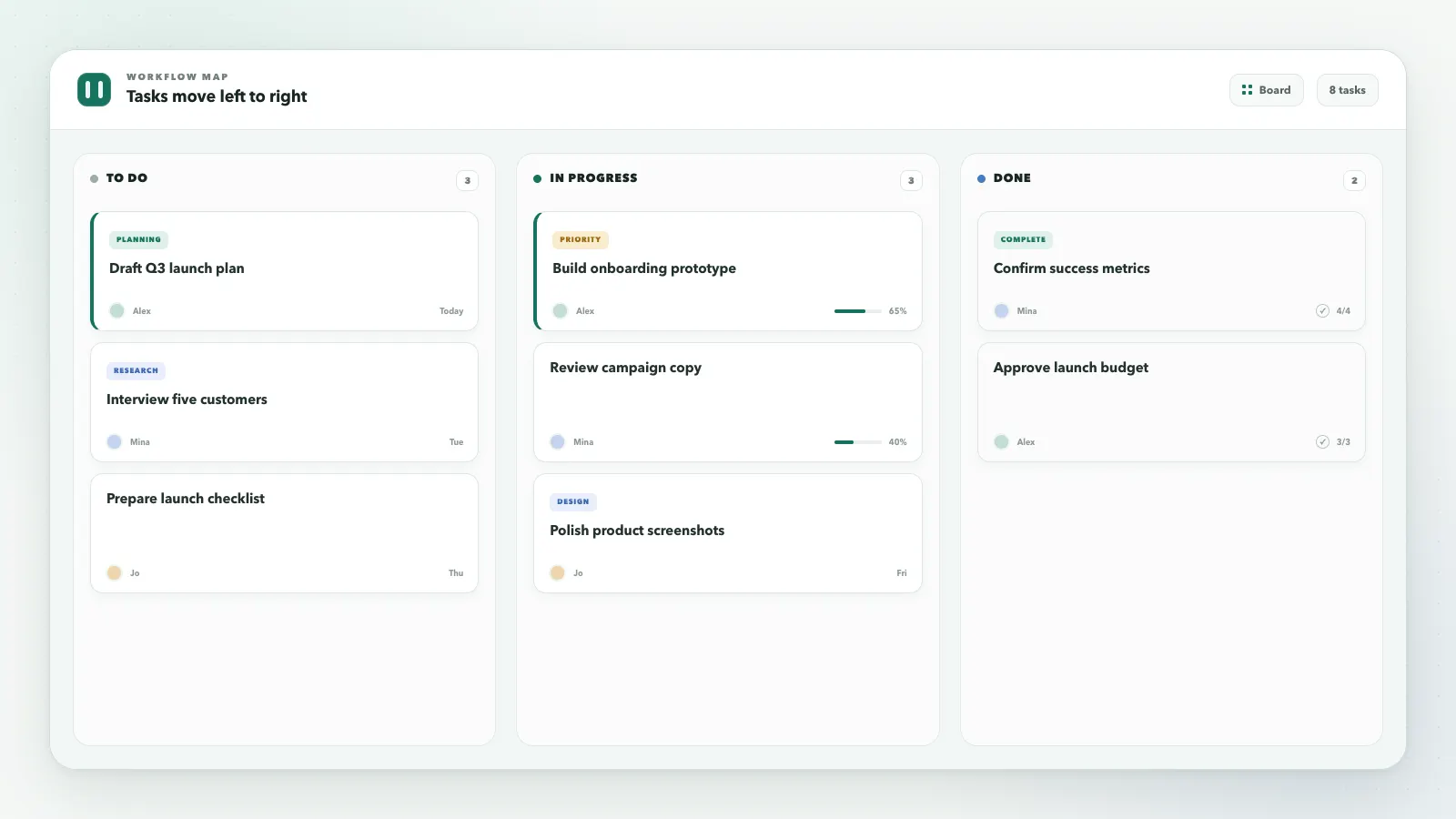
A kanban board is a visual workflow management tool that represents tasks as cards and workflow stages as columns. As work progresses, each card moves from left to right across the board, giving everyone an instant answer to three questions: what is next, what is being worked on, and what is finished.
The word "kanban" is Japanese (看板) and literally means "signboard." The method dates back to the late 1940s, when Toyota engineer Taiichi Ohno used physical kanban cards to signal demand between production steps, reducing excess inventory and keeping parts flowing at the pace of actual need. In the 2000s, David J. Anderson adapted those manufacturing ideas for software and knowledge work, and the kanban board became a staple of modern project management. (You will sometimes see it misspelled as "kaban board" — it is the same tool and the same method.)
Every kanban system rests on three core practices:
- Visualize work. Every task becomes a card on the board, so the status of the whole project is visible at a glance.
- Limit work in progress (WIP). Caps on each column stop the team from starting more work than it can finish.
- Maximize flow. The team watches how smoothly cards move across the board and removes whatever slows them down.
Digital kanban boards extend the physical original with real-time sync, card metadata, filtering, and automation, which is why they have become the default for remote and hybrid teams. Whether you are coordinating a product launch or organizing personal errands, the mechanics are identical — the rest of this guide shows you how to apply them well.
Core Principles of Kanban Boards
Four principles separate a kanban board that genuinely improves your workflow from a board that is just a decorated task list. For the deeper methodology behind them, see our complete kanban guide.
Visualize the Workflow
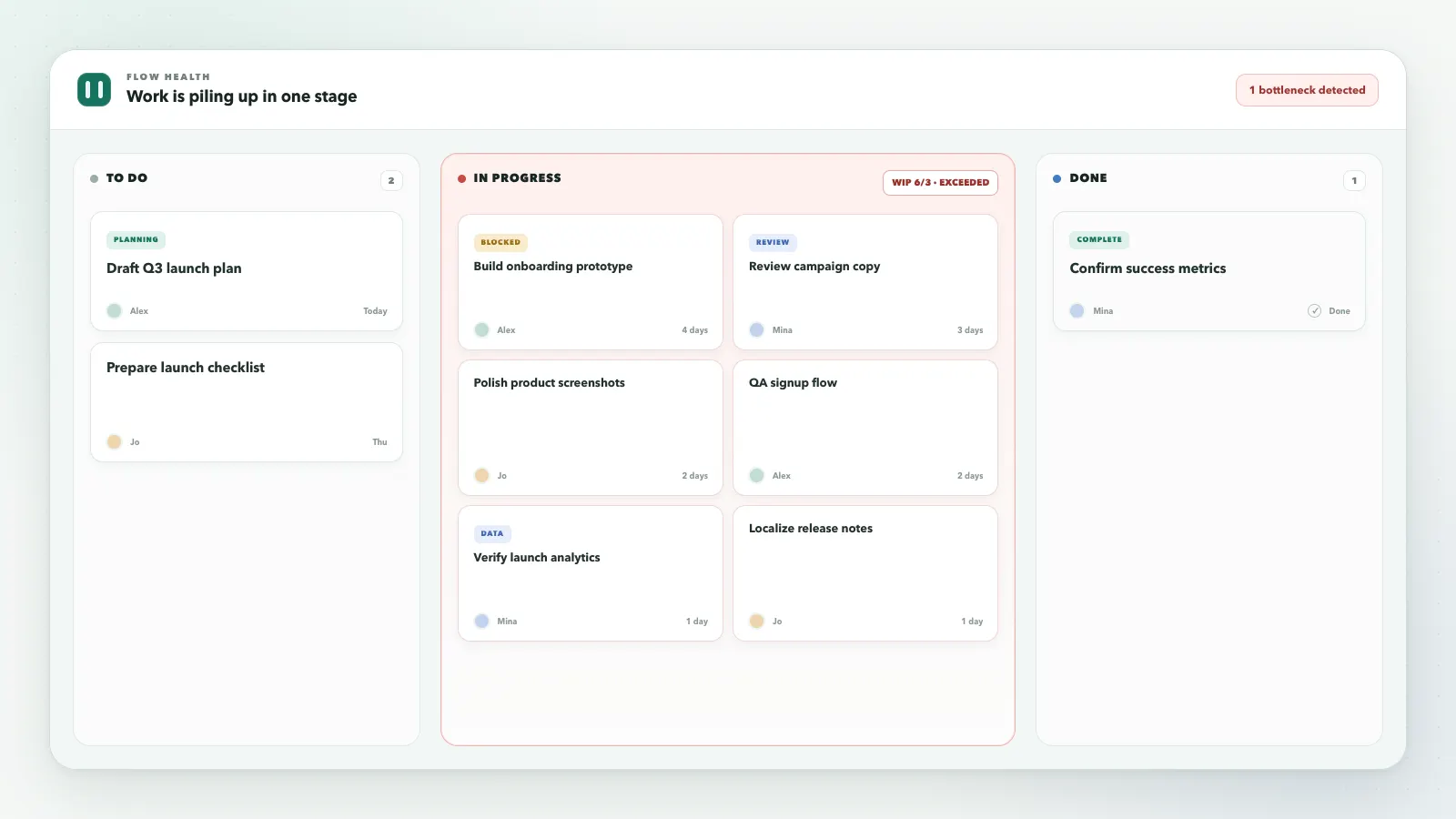
Visualization is the foundation: every task is a card, every stage is a column, and nothing important lives in someone's head or inbox. Organizing tasks into columns such as 'To Do,' 'In Progress,' and 'Done' lets the team spot bottlenecks the moment cards start piling up in one stage, and makes prioritization a conversation about what is visible rather than what is remembered.
Limit Work in Progress (WIP)
WIP limits are what turn a task wall into a kanban system. By capping how many cards a column may hold — say, three items in 'In Progress' — the team commits to finishing work before starting more. This single rule cuts context switching, exposes overload early, and shifts the culture from "look how busy we are" to "look what we shipped."
Manage Flow and Improve Continuously
Flow management means watching how long cards take to cross the board and asking why when they stall. Teams that review flow regularly — often with metrics like cycle time — find and remove delays instead of absorbing them. Kanban pairs this with continuous improvement: small, frequent process adjustments driven by what the board reveals, not by top-down mandates.
Make Process Policies Explicit
Explicit policies define what each column means and when a card may move — for example, "a card enters Review only with tests passing." Writing these rules on or near the board removes ambiguity, keeps handoffs consistent, and is especially valuable for remote and hybrid teams where hallway clarification is not an option.
Key Benefits of Using Kanban Boards in Project Management
Teams adopt kanban boards because they deliver measurable improvements without requiring a process overhaul: work starts flowing better with the very first board. The main benefits fall into four groups.
Enhanced Visibility and Efficiency
A shared board shows the current status of every work item at a glance, so bottlenecks and stalled tasks surface immediately instead of in a status meeting. As Nave notes, visualizing workflows helps teams spot inefficiencies instantly and intervene while intervention is still cheap.
Improved Focus and Flexibility
WIP limits protect the team from multitasking and context switching, which are among the most common silent productivity drains. At the same time, kanban's continuous-flow model means priorities can change between tasks without derailing a sprint commitment — new urgent work simply enters the queue at the top.
Better Collaboration With Less Waste
A kanban board is a shared source of truth: everyone sees the same cards, the same status, and the same priorities, which reduces coordination overhead and duplicated effort. Planview highlights how this shared visibility builds a more inclusive team culture, while kanban's lean roots trim waste such as status-update meetings and redundant handoffs.
Predictability and Continuous Improvement
Because kanban stabilizes how work flows, delivery becomes measurable and forecastable — teams can answer "when will this be done?" with data from cycle time rather than guesses. Regular reviews of the board feed a Kaizen loop of small, compounding improvements.
How to Set Up Your First Kanban Board (6 Steps)
Setting up a kanban board takes minutes; the value comes from matching it to how your work actually flows. Follow these six steps.
Step 1: Map Your Workflow
List every stage a task passes through from the moment it enters your queue to the moment it ships. For many teams that is as simple as 'To Do,' 'In Progress,' and 'Done'; others need stages like 'Backlog,' 'Review,' or 'Testing.' Map what actually happens today, not an idealized process — the board only helps if it reflects reality.
Step 2: Choose a Physical or Digital Board
Pick the medium your team will actually look at every day. A whiteboard with sticky notes works well for co-located teams and personal use. Distributed teams need a digital board with real-time sync — if you like the whiteboard feel, you can get both at once by creating a kanban board on a digital whiteboard, or start from ready-made kanban board templates.
Step 3: Create Your Columns
Create one column per workflow stage, and keep the count as low as you can. Three to five columns cover most workflows; every extra column adds friction to card updates. If you want inspiration for different layouts, browse a few sample kanban boards before committing to a structure.
Step 4: Add Work Items as Cards
Write each task on its own card, one deliverable per card. Keep titles short and action-oriented, and use colors or labels to distinguish task types — bugs from features, urgent from routine. On a digital board, attach owners, due dates, and links directly to the card so context travels with the work.
Step 5: Set WIP Limits
Cap the number of cards allowed in each active column before you add a single task. A practical starting point for 'In Progress' is one card per team member, or slightly fewer to encourage collaboration. The limit will feel tight — that is the point. Loosen or tighten it after a week of real usage rather than debating it up front.
Step 6: Run and Review the Board
Place every current task in the column that matches its status, then keep the board honest. Update cards as work moves, review the board together at a regular cadence, and treat pile-ups as signals: a crowded column is your workflow telling you where the constraint is. Adjust columns, limits, and policies as you learn.
Kanban Board Best Practices
A board that is set up well can still decay into wallpaper. These six habits keep a kanban board useful month after month.
Update the Board Every Day
A kanban board is only as trustworthy as its freshest card. Make updating card status part of starting and finishing work — not a chore batched for Friday. Stale boards get ignored, and ignored boards kill the whole system.
Keep the Layout Simple
Resist the urge to model every edge case with new columns and swimlanes. A board the whole team understands in five seconds beats a perfectly precise one nobody reads. Add structure only when a recurring, visible problem demands it.
Make Priorities Visible
Use color-coded cards, labels, or a dedicated expedite lane so high-priority work is obvious without asking. The board should answer "what matters most right now?" at a glance.
Hold Short Board Reviews
A brief stand-up around the board — daily or a few times a week — keeps everyone aligned and surfaces blockers early. Walk the board right to left: what is closest to done, and what does it need to get there?
Flag Blockers Immediately
When a card is stuck, mark it — a red tag, a blocked column, a comment — the moment it happens. Visible blockers get resolved; invisible ones quietly stretch timelines.
Track Flow Metrics
Cycle time and throughput tell you whether your process is actually improving. Atlassian recommends using these two metrics to refine your workflow iteratively — they turn process debates into measurable experiments.
Kanban vs. Scrum: What's the Difference?
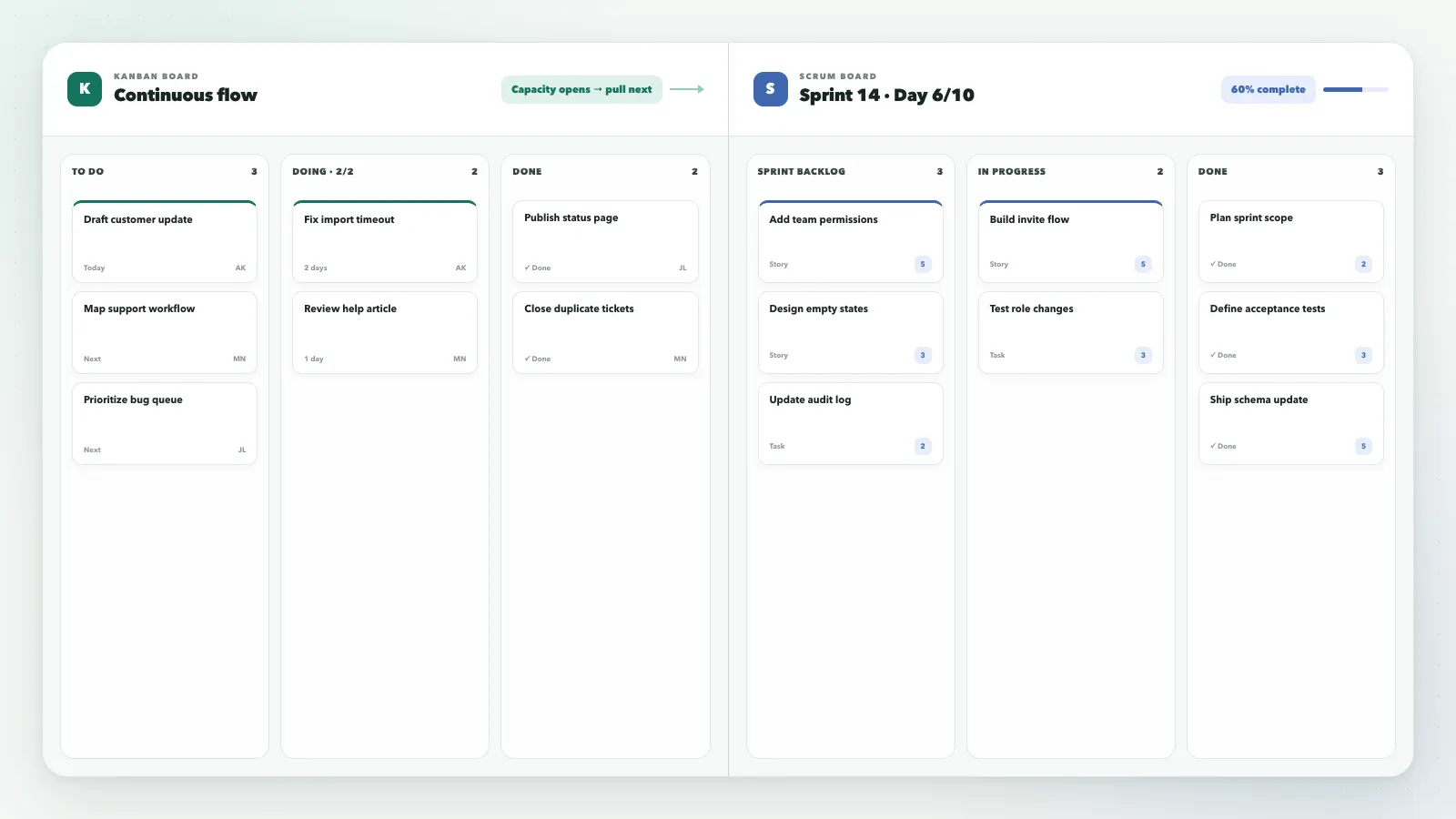
Kanban is a continuous-flow method: work enters whenever capacity allows, and the board runs indefinitely. Scrum organizes work into fixed-length sprints with defined roles and ceremonies. Here is the comparison at a glance:
| Kanban | Scrum | |
|---|---|---|
| Cadence | Continuous flow, no fixed iterations | Time-boxed sprints, usually 2 weeks |
| Roles | No required roles | Scrum Master, Product Owner, Developers |
| Meetings | Optional, as needed | Sprint planning, daily stand-up, review, retrospective |
| Board lifespan | Persistent, owned by the whole team | Typically reset each sprint |
| Mid-cycle changes | Allowed whenever capacity frees up | Discouraged during a sprint |
| Key metrics | Cycle time, throughput, WIP | Velocity, sprint burndown |
Neither method is universally better. Scrum's structure suits teams that benefit from firm commitments and regular checkpoints; kanban's flexibility suits support work, operations, and teams whose priorities shift faster than a sprint boundary. Many teams blend the two into "Scrumban" — Scrum's cadence with kanban's WIP limits and flow focus. If you are starting from zero process, kanban is usually the gentler on-ramp: you can overlay it on how you already work.
Choosing the Right Kanban Board Tool
The right kanban tool is the one that fits your team's size, workflow complexity, and the software you already use. Evaluate candidates against a short checklist:
- Ease of daily use — drag-and-drop cards, fast editing, and an interface people update without being reminded.
- Real-time collaboration — simultaneous editing and instant sync for distributed teammates.
- Customization — adjustable columns, card fields, labels, and filters that match your workflow instead of forcing a template.
- Integrations — connections to your docs, calendar, and communication tools so the board reflects reality automatically.
- Metrics — at minimum, a way to see cycle time and spot column pile-ups.
Larger teams and complex projects justify heavier tools with advanced reporting and permissions. For smaller teams, favor the lowest-friction option — many tools offer free tiers, so trial one with a real project for a week before deciding.
Why Consider AFFiNE?
AFFiNE is a free, open-source workspace where a kanban board is one view of your data rather than a silo: the same cards can flip into a table view, link to full documents, or sit on an infinite whiteboard canvas next to your planning notes. Ready-made templates — including a layout that pairs kanban boards with an Eisenhower matrix for prioritization — let you start in minutes, and offline-first sync keeps the board working across desktop and mobile.
Frequently Asked Questions About Kanban Boards
What are the 3 main columns of a kanban board?
The classic layout is 'To Do,' 'In Progress,' and 'Done.' Many teams add stages such as 'Backlog,' 'Review,' or 'Testing,' but the principle stays the same: each column represents one workflow stage, and every card sits in exactly one column at a time.
What WIP limit should I set?
A practical starting point is one card per team member in the 'In Progress' column, or slightly fewer to encourage pairing. Run that limit for a week or two, then adjust based on evidence: if cards queue up, lower it; if people sit idle, raise it. The right limit is the one that keeps cards moving.
What is the difference between kanban and Scrum?
Kanban uses continuous flow with no fixed timeline — tasks enter whenever capacity allows, and the board persists indefinitely. Scrum works in time-boxed sprints with defined roles and ceremonies. Kanban is generally easier to adopt on top of an existing process, while Scrum provides more built-in structure. Many teams combine them as Scrumban.
Is a "kaban board" the same as a kanban board?
Yes. "Kaban" is simply a common misspelling of kanban, the Japanese word for signboard. If you searched for "kaban board," everything in this guide applies — same columns, same cards, same WIP limits.
Can I use a kanban board for personal tasks?
Absolutely. Personal kanban works with the same three columns and a strict WIP limit — often just two or three items in progress. It is one of the simplest ways to stop starting and start finishing: your to-do list becomes a flow you can see, instead of a pile that only grows.
Start Your First Kanban Board Today
A kanban board is one of the rare productivity tools that pays off on day one: map your workflow, cap your work in progress, and let the board show you where time actually goes. Start simple, review weekly, and improve the process the board reveals.
If you want a head start, AFFiNE's free kanban templates give you ready-made boards — including the kanban-plus-Eisenhower layout — that you can duplicate, customize, and sync across all your devices in minutes.
