Obsidian vs Notion (2026): Offline, Pricing & Best Fit
What changed (Nov 15, 2026): Merged our older Obsidian vs Notion post into this guide and rewrote it around the questions searchers ask: ease of use, offline access and data ownership, speed and mobile, plugins and publishing, AI, pricing, privacy, and using both tools together. Corrected Notion offline mode, Obsidian Bases, Sync and Publish pricing, added eight FAQs and sources, and checked all facts on November 15, 2026.
Obsidian vs Notion in 2026: the short answer
Choose Obsidian if your work starts with private, durable notes that must stay usable as local files. Choose Notion if your work starts with shared pages, relational databases, and teammates editing together. The two tools overlap more than older comparisons suggest: Notion now has offline pages and automatic backlinks, while Obsidian has built-in Bases, Canvas, and paid shared vaults. Those features do not make the tools interchangeable. The deciding question is whether files or a team workspace should be the center of your system.
| Your main requirement | Better starting point | Check before committing |
|---|---|---|
| A long-lived personal research or writing archive | Obsidian | Set up backups and decide how devices will sync. |
| A shared project tracker, wiki, or content calendar | Notion | Test permissions, database relations, and export quality. |
| Notes you can open offline without preparing pages first | Obsidian | Keep a current copy of the vault and its attachments on each device. |
| Occasional offline work on a known set of shared pages | Notion | Download those pages in the desktop or mobile app; subpages need separate downloads. |
| Linked notes with a simple table or card view | Obsidian | Try the built-in Bases plugin before installing a community database plugin. |
| Docs and visual planning in one local-first workspace | AFFiNE, as a third option | Pilot its offline, sync, database, and collaboration flows with real content. |

How this comparison was checked. AFFiNE publishes this guide and offers an alternative to both products, so we have an interest in the outcome. The Obsidian and Notion statements below rely on their official documentation and pricing pages, which we checked on November 15, 2026. This is a documentation review, not a timed benchmark or a long-term usage diary: where a question can only be answered by hands-on use, such as speed on your devices, we give you a test to run instead of a verdict. See our editorial policy.
What actually separates Obsidian and Notion?
Obsidian is a desktop and mobile app centered on a vault of local files. Notes are Markdown text files that other editors can open; links, properties, Graph view, Canvas, and Bases add structure around them. You choose where the folder lives and how it is backed up or synchronized. The app is free to use, with optional paid Sync and Publish services. Obsidian's storage guide explains the vault model.
Notion is a cloud workspace of pages and blocks. Its databases are collections of pages with properties, views, relations, and rollups; sharing, comments, and permissions are part of the normal workflow. You can export content, and its desktop and mobile apps support offline pages, but an export does not recreate a whole workspace with every view and permission. See Notion's block guide and database introduction.
This difference changes the daily work: who maintains backups, how a teammate gets access, what survives a migration, and what happens when the network disappears.
Head-to-head comparison
| Question | Obsidian | Notion |
|---|---|---|
| Where does work live? | In local vault files you store and back up. | In a cloud workspace; selected pages can be downloaded for offline use. |
| What works offline? | The whole local vault; sync waits for a connection. | Downloaded pages in desktop/mobile apps; some blocks and sharing actions need a connection. |
| How are notes connected? | Wikilinks, backlinks, Graph view, properties, Canvas. | Page links, automatic backlinks, database relations, rollups, linked views. |
| Are databases built in? | Bases: views of files and their properties. | Native relational databases with team workflows. |
| Can a team edit together? | Shared vaults via paid Sync; no live same-file co-editing. | Real-time co-editing, comments, mentions, permissions. |
| How is it extended? | Core plugins plus a large community plugin directory. | Templates, integrations, API, and built-in AI agents. |
| How does AI fit? | No AI assistant among core plugins; community plugins or external tools. | Notion AI and agents built in, with plan-based credits. |
| How do you publish? | Paid Obsidian Publish site. | Notion Sites, including on the Free plan. |
| What moves out easily? | Markdown notes and attachments; plugin features may not. | Markdown/CSV/HTML exports; views and permissions need rebuilding. |
Offline work: Notion's new capability changes the comparison
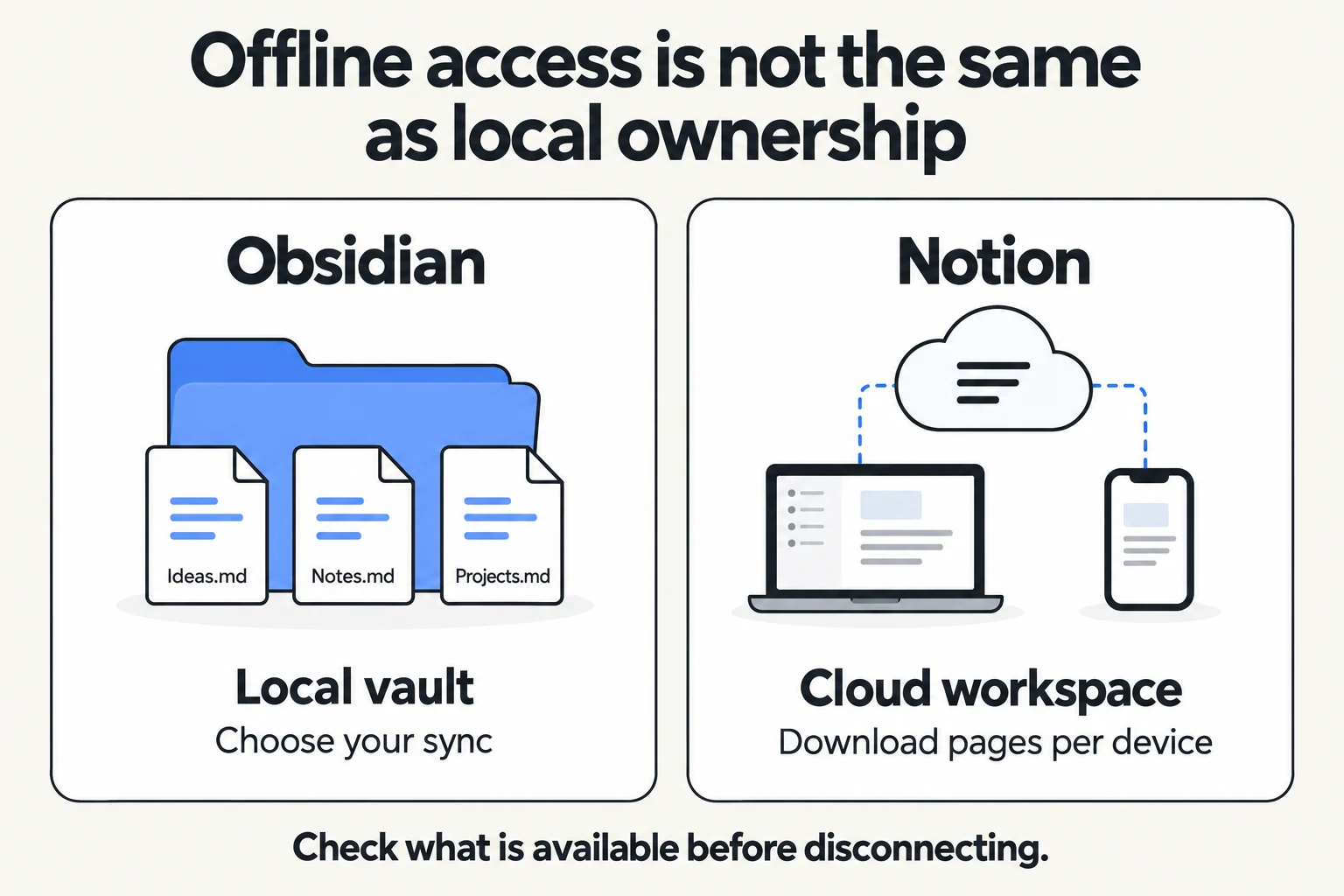
The old claim that "Notion does not work offline" is outdated. Notion lets members on all plans download individual pages in its desktop and mobile apps, then view and edit them without a connection. Paid plans also automatically download recently visited and favorited pages. Browser use is excluded. Downloading a parent page does not download its subpages, and downloading a database brings the first 50 rows of its first view. Some advanced blocks need a connection, and you cannot share pages or change permissions offline. Notion also warns that simultaneous offline changes to non-text data, such as a select property, can conflict.
Obsidian starts offline because its vault is already on the device. That makes it more predictable for a large personal archive or an unplanned search through old notes. Yet "local" is not the same as "backed up": you still need a backup and a sync strategy, and attachments stored in a cloud-drive folder may not actually be on the device. For a concrete test, disconnect your laptop and phone, open three old notes, create a new note, edit an attachment-heavy page, reconnect, and check whether every change arrives.
Links, graphs, and Canvas
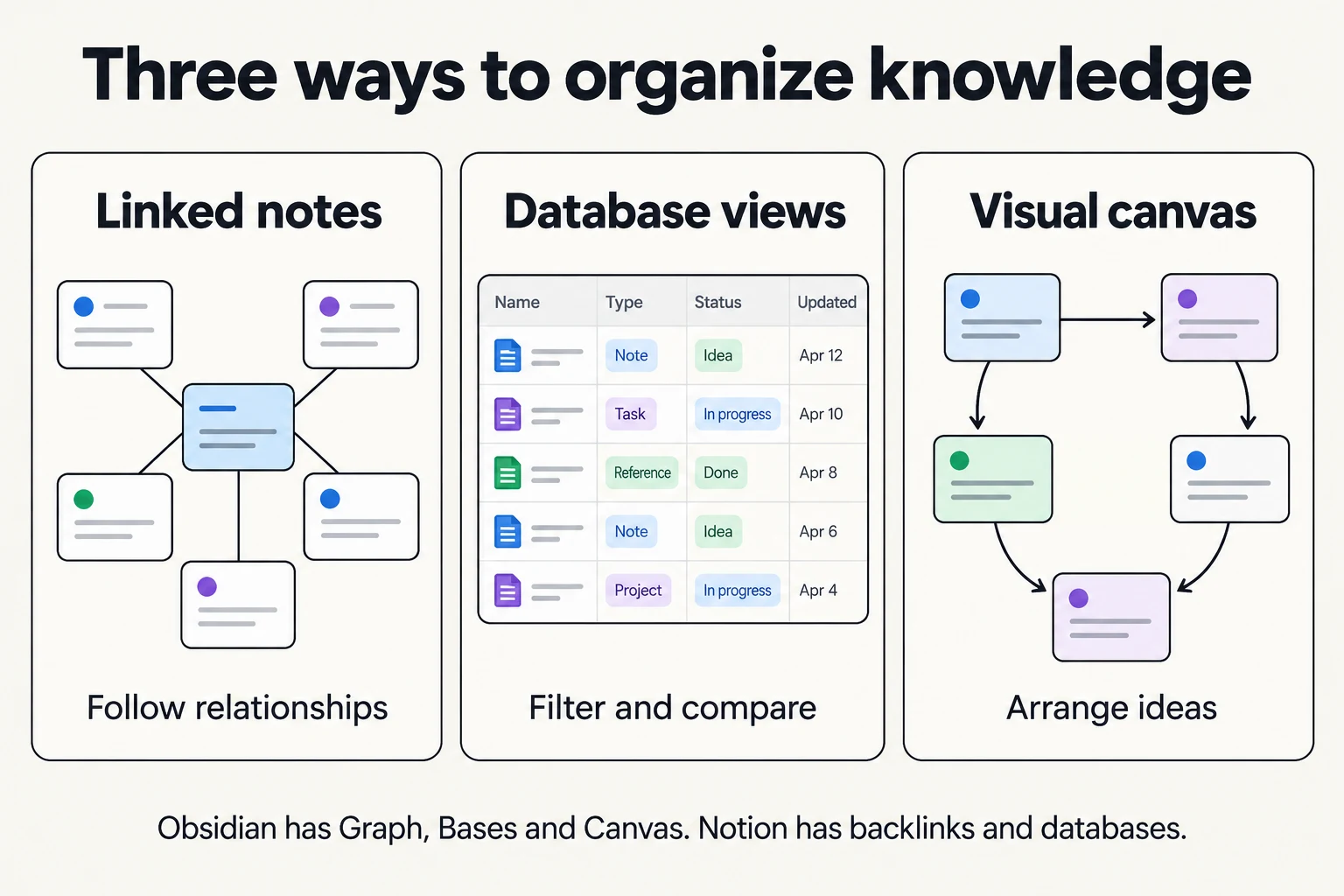
Both tools have backlinks, so the useful comparison is how they present relationships.
- Notion backlinks are created automatically when you @-mention a page and appear above the page title. You only see backlinks from pages you can access. The older claim that Notion needs manual reverse links is wrong. Source: Notion links and backlinks.
- Obsidian Graph view visualizes notes and their links. The local graph shows connections around one note; the global graph exposes clusters. A graph shows the links you created, not proof that two ideas are meaningfully related. Source: Obsidian Graph view.
- Obsidian Canvas is a core plugin for arranging notes, images, and web pages spatially. It does not require the community Excalidraw plugin. Notion does not document a native infinite canvas. Source: Obsidian Canvas.
If drawing is central to your notes, see Excalidraw and Obsidian Canvas compared.
Bases versus Notion databases
Older guides describe Obsidian databases as plugin-only. Bases is a built-in Obsidian core plugin: it creates filtered, sorted table, cards, list, and Kanban views of local files and their properties (plus a map view with the Maps plugin), and you can edit properties from the view. A reading list or personal project index may need nothing more, and its rows remain files. Obsidian also has a core Templates plugin for reusable text with date and title variables.
Notion databases are designed for shared operational data. A project database can relate tasks to clients, roll up values, present filtered views to different teammates, and power the rest of the workspace. Notion documents relations and rollups as first-class features.
| Organization task | Obsidian starting point | Notion starting point |
|---|---|---|
| Reuse a meeting-note structure | Core Templates | Page or database template |
| Track a collection of notes | Properties and Bases | Database with properties and views |
| Explore connections between ideas | Links, backlinks, Graph view | Page links and backlinks |
| Summarize tasks related to a project | Design and verify a file/property workflow | Relations and rollups |
| Arrange material spatially | Core Canvas | Page layouts, or a separate canvas tool |
The useful comparison is not "which app has a table?" It is whether your records should be files you manage or shared pages with workspace behavior. Build the same ten-item project list in each tool, then test an owner field, a cross-project relation, a mobile view, and an export.
Collaboration: shared vaults are not live documents
Obsidian Sync supports shared vaults, so describing Obsidian as strictly solo is also outdated. Every collaborator needs an active Sync subscription. Permissions are not fine-grained, and two people editing the same file do not see each other's cursors. Changes appear after syncing, with conflict handling and version history.
If teammates regularly edit the same brief, leave comments, manage guest access, and assign tasks from a shared database, Notion is usually simpler. If a small group mostly writes separate Markdown notes and wants a shared archive, Obsidian Sync may be enough. Agree on ownership and a conflict-recovery process before using either for a critical team knowledge base. For team notes with privacy controls, also compare a self-hostable Notion alternative for team notes.
Ease of use and learning curve
Notion is usually faster to start for people who have never used a notes app with structure. You type / to insert blocks, drag them to rearrange, and can begin from the Notion template gallery. The harder part comes later: designing databases, relations, and permissions that a whole team understands.
Obsidian looks plainer at first. Its default editor uses Live Preview, which formats Markdown as you type and hides most syntax, so you do not need to memorize Markdown on day one. The learning curve sits elsewhere: choosing a folder and linking style, deciding which core and community plugins to enable, and setting up sync. If you want to learn the syntax anyway, our Markdown cheat sheet covers the basics.
A fair first-day test: create five notes, link two of them, add a tag or property, find a note again with search, and ask yourself which step felt slow. That tells you more than someone else's opinion about which app is "easier".
Speed, mobile apps, and large workspaces
We did not run a timed benchmark, so this section explains what the vendors document and how to test it yourself.
Obsidian opens files that are already on your device, which tends to keep startup and search independent of your network. Obsidian Mobile is free on iOS and Android and includes tabs, the command palette, core plugins such as Graph view, and community plugins. Check that the specific community plugins you depend on support mobile before you rely on them.
Notion loads pages from its cloud and caches them in its apps. Its own help center lists what slows large databases down: many pages, many visible properties, and sorts or filters on formulas and rollups. It recommends simpler filters, hiding unused properties, and fewer databases on high-traffic pages. Source: Notion database performance.
To compare on your own devices, import the same 500 notes or rows into each tool, then time how long it takes to open the app, search for an old note, and filter a large list on your phone over a weak connection.
Plugins, integrations, templates, and publishing
Obsidian's extension model is community plugins. The official community directory listed more than 10,000 plugins and over 1,000 themes when we checked. That breadth is the main reason people stay with Obsidian, but quality and maintenance vary, and every plugin you install can read your vault. Start with core plugins, add community plugins one at a time, and remove the ones you stop using.
Notion's extension model is built-in features plus integrations. Templates, databases, and AI agents cover many needs without add-ons, and the API connects Notion to other tools. You cannot change the editor itself the way an Obsidian plugin can.
Publishing differs in cost and control. Notion Sites lets you publish pages to the web on a notion.site domain, including on the Free plan; publishing a page also publishes its subpages. On paid plans, a custom domain is an add-on of $10 per domain per month, or $8 per month with annual billing (pricing details). Obsidian Publish costs $8 per site per month billed annually or $10 monthly, and includes a custom domain, password protection, and a published graph view.
Pricing and the cost of a real workflow
The app price alone hides sync and team costs. As of November 15, 2026, Obsidian's pricing page lists the app as free for personal and commercial use. Optional Sync costs $4 per user per month billed annually or $5 billed monthly; Publish costs $8 per site per month billed annually or $10 billed monthly. The commercial license is optional support, not a requirement for work use. Students, faculty, and nonprofit staff can get 40% off Sync and Publish.
Notion's pricing page lists Free, Plus, Business, and Enterprise plans, with Plus at $10 per seat per month and Business at $20, both billed annually in its USD view; the billing toggle, region, taxes, and offers can change the amount. The Free plan limits file uploads to 5 MB each. AI allowances depend on the plan, as covered in the next section. Check the live plan page before you buy.
For a three-person team, the list prices illustrate the gap: three Obsidian Sync subscriptions start at $12 per month on annual billing, Notion Plus at $30, and Notion Business at $60, also on annual billing. This is not an equal-feature comparison. Obsidian Sync does not add Notion-style permissions or live co-editing, while Notion's price includes a hosted team workspace. Also count backup storage, migration effort, plugin maintenance, and admin time.
If neither free plan fits, compare free note-taking apps by offline access, sync, export, and free-plan limits before paying.
AI: Notion Agent versus Obsidian plugins
Notion builds AI into the workspace. Notion Agent can chat, generate and edit pages and databases, autofill database properties, and translate, using context from your workspace and connected apps. On the pricing page, Business and Enterprise seats include monthly AI credit allowances, and workspaces can buy additional Notion credits; higher-cost models are off until an owner turns them on.
Obsidian does not include an AI assistant among its core plugins. People who want AI in Obsidian add a community plugin or an external tool, and the plugin decides where your text is sent. Some community plugins run models locally; others send notes to a cloud API.
Neither choice should be reduced to "AI: yes or no". Check what data the feature can access, its current allowance or API cost, whether it works offline, and whether your organization allows the provider. A local note is not more private if a plugin uploads its contents, and an AI answer still needs to be checked against its source.
Which tool fits your actual use case?
Students and researchers
For individual lecture notes, source excerpts, and thesis drafts that connect across semesters, start with Obsidian. A simple workflow is one note per source, a link to the research question, a few properties for status and citation, and a weekly review. The official Obsidian Web Clipper saves and highlights web pages into your vault. Avoid installing many plugins before the core note system works.
For a group assignment, lab wiki, or class project with owners and deadlines, Notion is easier to share. Notion's education documentation separates an individual student plan from approved student-organization workspaces, so check which one applies before assuming the whole group is covered. Students with strict data rules should check institutional policy before putting research data in any cloud workspace.
Writers and personal knowledge management
Choose Obsidian if you want draft files that outlive any particular app, linked source notes, and a writing space that works without a network. Choose Notion if research must quickly become an editorial calendar, a shared brief, and a review process. For a step-by-step method that works in either tool, see our personal knowledge management guide.
Small teams and project operations
Notion is the stronger default when each item needs an owner, status, deadline, relation to another database, and a teammate who can edit it now. Obsidian can work for a small documentation team that prefers files and asynchronous updates, but its shared-vault permissions and lack of live same-file editing are real limits. Run a 30-minute trial: invite a new member, restrict access to a sensitive page, co-edit a brief, restore a mistaken change, and export a project. The failures in that trial matter more than a feature table.
Privacy and ownership: local files versus cloud permissions
Local files give Obsidian users direct control over where notes and backups live. They do not encrypt themselves. Obsidian Sync uses end-to-end encryption by default for remote vaults, but Obsidian states that it does not encrypt your local vault. Protect the device and backups separately, and review what each plugin can access.
Cloud administration gives Notion teams easier access management and shared history. It also makes permission reviews part of responsible ownership: check who can view, comment, edit, or share each page, including inherited access (Notion sharing and permissions). Notion's export guide says pages export as Markdown or HTML and databases as CSV, and it warns that re-uploading an export does not recreate the workspace.
Neither model is simply "private" or "unsafe". They are different controls that need different habits.
Using Obsidian and Notion together
Many people run both: private thinking in Obsidian, shared execution in Notion. This works when each type of information has exactly one home.
- Obsidian owns reading notes, research, drafts, and personal reflections.
- Notion owns project status, team tasks, shared briefs, and anything a teammate must edit.
- Copy only summaries across. Paste a short summary or link into Notion when an idea becomes a project; do not keep the same live task list in both places.
Review the boundary every few weeks. If you keep copying the same material back and forth, one tool is probably doing the job of both.
A safer migration plan in either direction
Move one representative project before moving years of notes. Include a long page, a nested page, attachments, internal links, a database, and a page another person can access. Keep the source system intact until you have completed a restore and search test.
- Inventory what must survive. List notes, attachments, backlinks, database properties, relations, views, comments, permissions, and history separately. They are not one export format.
- Choose the right export or importer. For Notion to Obsidian, the official Obsidian Importer guide recommends the Notion API route when you want databases converted into Bases; each database becomes a base with a table view of every property (plus a Kanban view for each Notion board in Obsidian 1.14 and later), other Notion views are not imported, and there are other documented limits. The ZIP route uses a Notion HTML export and does not preserve databases.
- For Obsidian to Notion, test Markdown and assets. Notion imports Markdown and ZIP files, but a Markdown note does not become a relational database or recreate plugin behavior. Rebuild one representative view by hand before estimating the full migration.
- Compare outcomes, not file counts. Open ten random notes, follow five links, inspect images, filter the migrated project list, and ask another person to find and edit a page.
- Run offline and recovery drills. Disconnect once, reconnect, then restore a deleted or overwritten item. Document which tool holds the authoritative copy.
If you are considering AFFiNE as the destination, start with our Notion to AFFiNE import walkthrough and repeat the same checks.

When AFFiNE is worth a pilot
AFFiNE is relevant if you want a local-first workspace that combines docs, an Edgeless whiteboard, database-style blocks, and optional cloud collaboration. Its product pages describe offline desktop and mobile docs, the pricing page separates local workspaces from cloud storage and team limits, and the open-source repository and self-hosting option matter when deployment control does. That does not mean every Obsidian plugin or Notion database workflow has a one-click equivalent.
Test a real project: write a note offline, turn an idea into a visual plan, create a small structured list, invite a collaborator, and export or back up the result. For a direct product comparison, see AFFiNE vs Obsidian and AFFiNE vs Notion. For a wider shortlist, see Notion alternatives, open-source Notion alternatives, Obsidian alternatives, and our PKM app comparison. For a one-screen feature table, see Notion vs Obsidian at a glance.
Final decision: pick the constraint you cannot compromise
- Pick Obsidian when inspectable local notes, offline-first access, durable Markdown, and deep customization are the core requirements. Add Sync only if its shared-vault model fits.
- Pick Notion when live team editing, permissions, relational databases, and built-in AI are central. Prepare important pages for offline work and verify the export path.
- Pilot AFFiNE when docs, visual thinking, local-first work, and collaboration need to meet in one workflow.
There is no universal winner. A seven-day pilot with one real project, one offline session, one collaborator, and one export will tell you more than another generic ranking.
Obsidian vs Notion FAQs
Is Obsidian better than Notion?
Obsidian is better for a private, long-lived knowledge base built from local Markdown files, and Notion is better for shared docs, relational databases, and live teamwork. Decide which of those two jobs matters more to you, then run the same small project in both before committing.
Does Notion work offline in 2026?
Yes, in its desktop and mobile apps but not in a browser. Download individual pages first; paid plans also download recent and favorited pages automatically. Subpages are not downloaded with their parent, databases bring only the first 50 rows of the first view, and sharing and permission changes need a connection.
Does Notion have backlinks?
Yes. Notion creates backlinks automatically when you @-mention a page and shows them above the page title, limited to pages you can access. Notion has no Graph view, which is Obsidian's main linking advantage.
Does Obsidian have databases now?
Yes. The built-in Bases core plugin provides table, cards, list, and Kanban views over local files and their properties. Notion remains the better choice when you need relational, shared databases with relations, rollups, and workspace permissions.
Can a team collaborate in Obsidian?
Yes, through paid Obsidian Sync shared vaults, where each collaborator needs a subscription. Shared vaults do not offer live same-file editing or fine-grained permissions, so test conflict handling before using them for active co-authoring.
Is Obsidian free for work?
Yes. Obsidian says commercial use does not require a paid license. Sync, Publish, and an optional commercial support license are priced separately, and students, faculty, and nonprofit staff get 40% off Sync and Publish.
Can I use Obsidian and Notion together?
Yes. Give each kind of information one home, such as personal research in Obsidian and shared project status in Notion, and copy only summaries or links between them instead of maintaining the same tracker in both.
Which is better for a second brain?
Obsidian suits a personal archive that grows through notes and links, while Notion suits a shared command center built from pages, databases, and project views. Decide whether your second brain is mainly for private thinking or coordinated execution; our second brain guide covers methods that work in either tool.