Best Notion Alternative in 2026: 9 Tools Compared
Choose by job: AFFiNE for docs and whiteboards, Obsidian for local Markdown, Anytype or AppFlowy for private or self-hosted spaces, Confluence or Slite for a wiki, ClickUp or Asana for projects.

The best Notion alternative depends on the job Notion is not doing for you. Pick AFFiNE for documents and a whiteboard in one workspace, Obsidian for local Markdown files, Anytype or AppFlowy for private or self-hosted spaces, Confluence or Slite for a team wiki, and ClickUp or Asana for project tracking (open source ClickUp alternatives if you need to self-host). Test one real project before migrating.
At a glance
- Best for docs plus a whiteboard: AFFiNE
- Best for local Markdown notes: Obsidian
- Best for a private, local-first personal space: Anytype
- Best open-source workspace to self-host: AppFlowy (AGPL-3.0) or AFFiNE (MIT editor, source-available backend)
- Best for a team wiki: Confluence if you already use Atlassian, Slite for a small team
- Best for projects and tasks: ClickUp or Asana
- Keep Notion if its databases, integrations and sharing already work for your team
Why people switch from Notion
Most switches start with one unmet need, not with Notion as a whole. Common ones are a visual canvas next to written notes, files you own on your own device, a workspace you can host yourself, a calmer wiki for a team, or stricter project tracking.
Check what Notion already does before you leave. Notion supports offline pages on every plan in its desktop and mobile apps, but not in a web browser. You download pages one by one; subpages do not download automatically, and a downloaded database includes the first 50 rows of its first view. Paid plans also download recent and favorited pages automatically. AI blocks, embeds, sharing and permission changes still need a connection. On the Free plan, uploads are limited to 5 MB per file, and block limits apply to workspaces with two or more members. See Notion's offline guide and pricing page.
If none of those limits affects your work, a migration may add effort without improving the result. The section Who should not switch from Notion covers that case.
How we evaluated these Notion alternatives
This guide is published by the AFFiNE team, so AFFiNE is listed first. Treat that as a disclosure, not a ranking signal. We did not run a timed, hands-on benchmark of every product. Instead, we compared each tool on the same seven questions and checked every plan limit, license and import feature on the vendor's own pricing page, documentation or repository on October 27, 2026. Where we could not confirm a capability on an official page, the table says "Not checked" rather than guessing.
The seven questions:
- Best for: What job does the tool do better than Notion?
- Free plan: Is there one, and what is the first limit you are likely to hit?
- Offline: Can you keep working without a connection?
- Self-hosting: Can you run it on infrastructure you control?
- AI: Is AI built in, and is it free or paid?
- Collaboration: Can the right people edit together on your plan?
- Import from Notion: Is there a documented importer, and what does it not bring across?
Notion alternatives comparison table
| Tool | Best for | Free plan (key limit) | Offline | Self-host | Built-in AI | Import from Notion |
|---|---|---|---|---|---|---|
| AFFiNE | Docs and whiteboards in one workspace | Local editor free; Cloud Free: 10 GB storage, 10 MB per file, 3 members per workspace | Yes, local workspaces | Yes; free for up to 10 members per workspace | Paid add-on; BYOK when self-hosted | Yes (Notion import steps) |
| Obsidian | Local Markdown notes and backlinks | Free for personal and commercial use; Sync and Publish are paid | Yes, files on your device | Not needed; vaults are local folders | Not listed on pricing page | Yes (Importer) |
| Anytype | Private, local-first personal and shared spaces | Free: 100 MB remote storage | Yes, local-first | Yes, self-host your own network | Not listed on pricing page | Yes (guide) |
| AppFlowy | Open-source workspace you can self-host | Personal: 1 workspace owner, 100 MB storage, 7 MB uploads | Not checked | Yes, with a free self-hosted tier | Limited trial on Free | Yes (guide) |
| Coda / Superhuman Docs | Documents built around tables and buttons | Free: shared docs capped at 50 objects and 1,000 rows | Not checked | Not listed | Not checked | Not checked |
| Confluence | Company wiki for Atlassian teams | Free: up to 10 users, 2 GB storage | Not checked | Data Center edition | Rovo on paid plans | Yes (guide) |
| Slite | Small-team knowledge base with AI answers | No free plan; 14-day trial, then from $10 per member per month | Not checked | Not listed | Included in paid plans | Yes (guide) |
| ClickUp | Tasks, statuses and project delivery | Free: no member cap, 60 MB storage | Not checked | Not listed | Usage limits on every plan | Yes (guide) |
| Asana | Cross-team project tracking | Personal: 2 users, 100 MB per file | Not checked | Not listed | Included in paid plans | Not checked |
"Not listed" means the vendor's pricing page did not offer that option when we checked. "Not checked" means we did not find an official page confirming it, so test it yourself. Prices are list prices for annual billing in US dollars and can change.
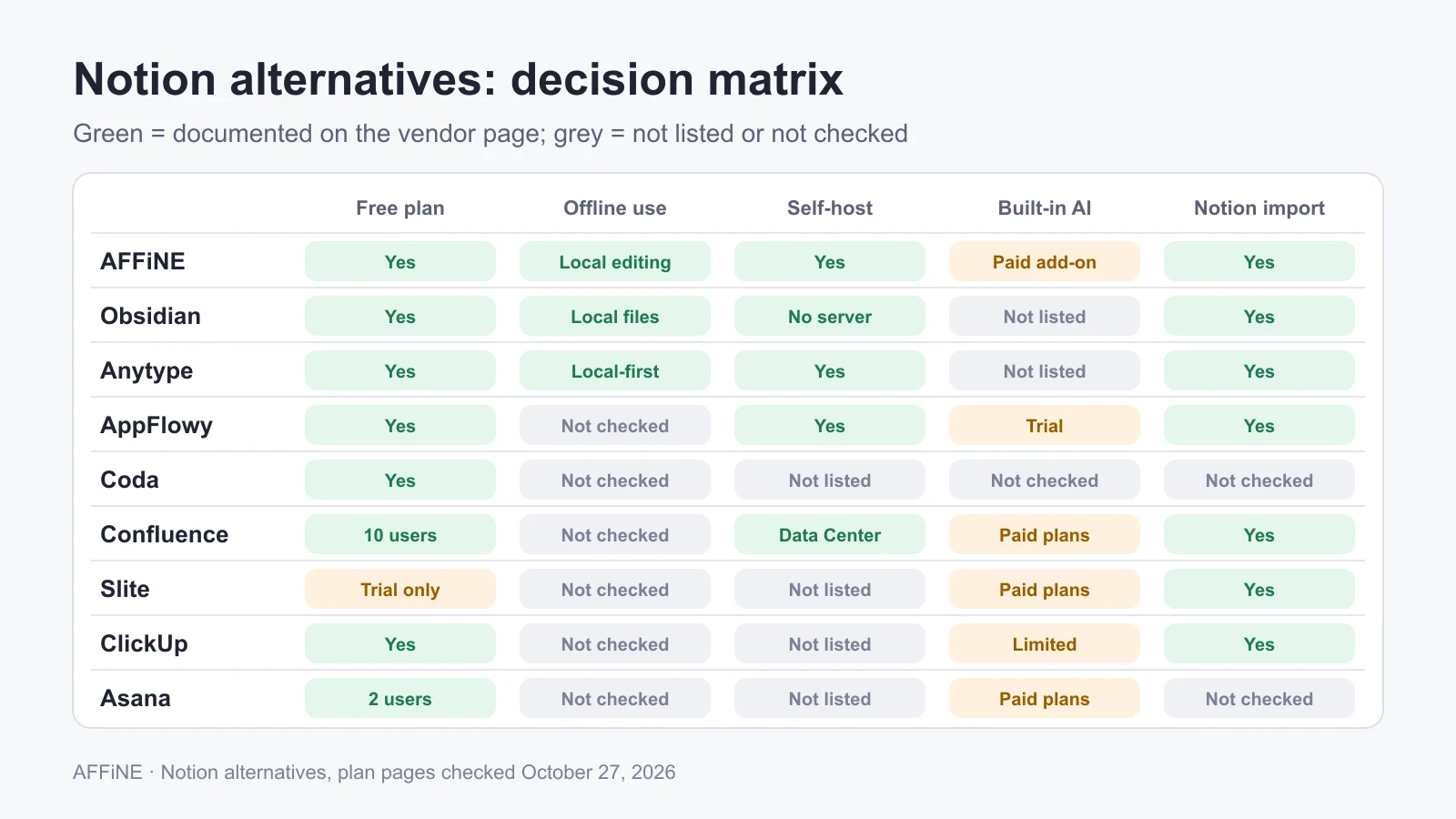
The same comparison as a matrix. Green cells are documented on the vendor's page; grey cells were not listed or not checked.
1. AFFiNE: best for documents and whiteboards in one workspace
AFFiNE is worth evaluating when the same project needs both structured writing and spatial thinking. You write in Page Mode, arrange the same notes on an Edgeless whiteboard, and switch between the two views of one document. The Page Mode documentation explains how the two views relate and how reading order works.
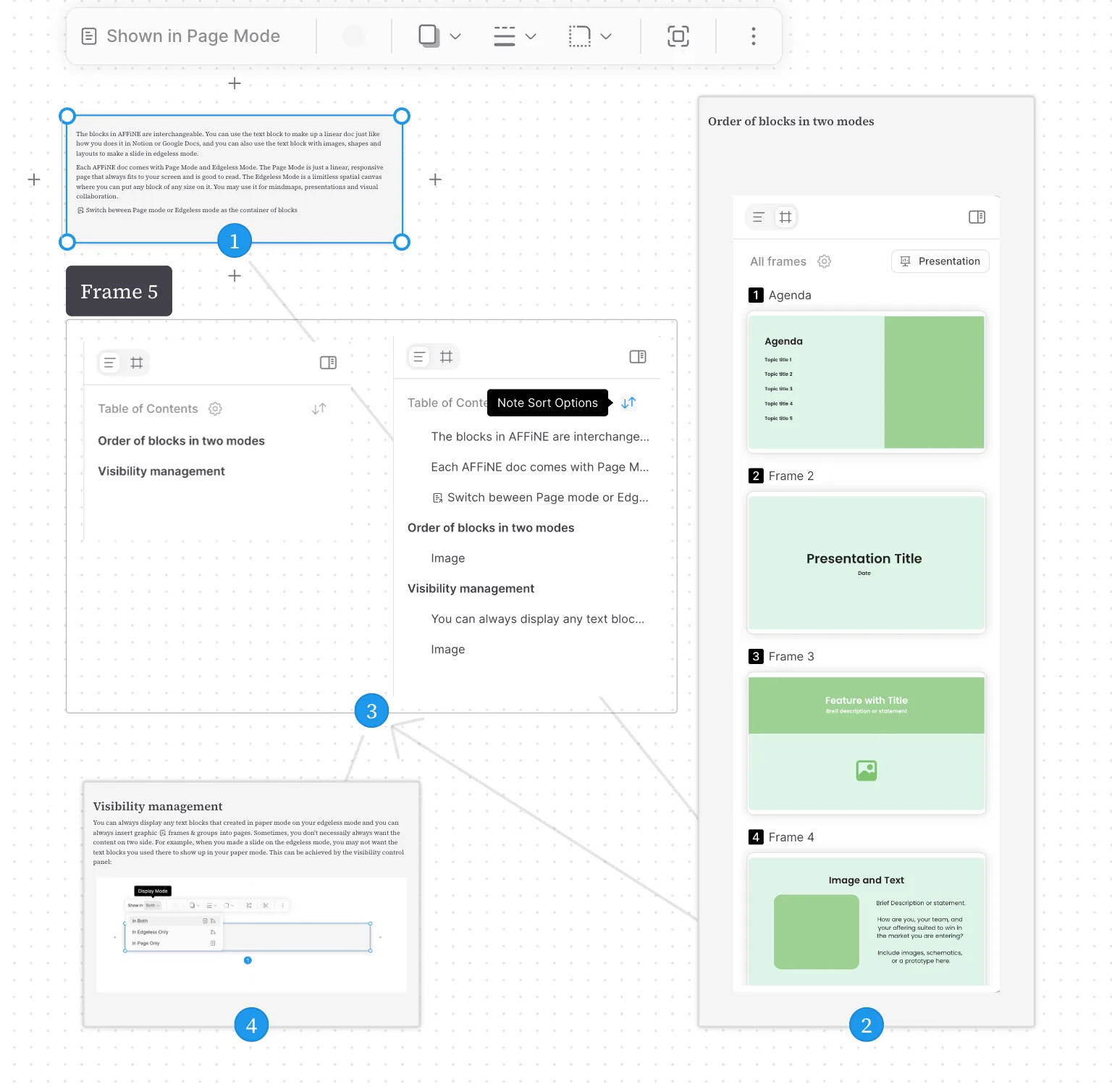
Product documentation illustration of note order. This screenshot is not evidence of a comparative speed test.
For structured items, AFFiNE documents Table and Kanban database views. Check your actual relations, formulas and automations before treating those views as a replacement for a Notion database.
Best for: people and small teams who plan visually and write the result down, for example product briefs, research maps and meeting notes.
Plans: the local editor is free. AFFiNE Cloud Free includes 10 GB of storage, a 10 MB per-file limit and up to three members per workspace; Pro is $6.75 per month billed annually, with 100 GB and up to 10 members; Team is $10 per seat per month. AFFiNE AI is a separate add-on at $8.90 per month billed annually. The self-hosted plan is free for up to 10 members per workspace; more seats need a Team Plan or an Installable License. See the pricing page and the self-host license docs.
Limits to know:
- Local editing does not mean cloud collaboration or hosted AI works offline.
- AFFiNE's privacy policy says inputs submitted for its AI features are transmitted to external AI providers. On a self-hosted server you configure your own provider keys (BYOK), and requests still go to that provider. Self-hosting the workspace does not make the AI run on your server.
- Notion import works through an HTML export, and databases, formulas and permissions may need manual rebuilding. Use the Notion to AFFiNE import guide with a small sample first.
- Licensing depends on the release and component. In v0.27.4, the root license applies MIT outside its listed exceptions. The backend and common/native terms put CE components and specified client-side portions under MPL 2.0; the remaining code covered by those terms uses the EE license. Check the exact edition and release before deploying.
Teams that need to run it themselves can start from the self-hosting overview; an internal wiki can start from the knowledge base use case. For the open-source angle specifically, see our open-source Notion alternatives guide. If running the workspace on your own servers is the main requirement, the self-hosted Notion alternatives guide compares deployment and running costs, and Notion AI alternatives for teams covers the AI side.
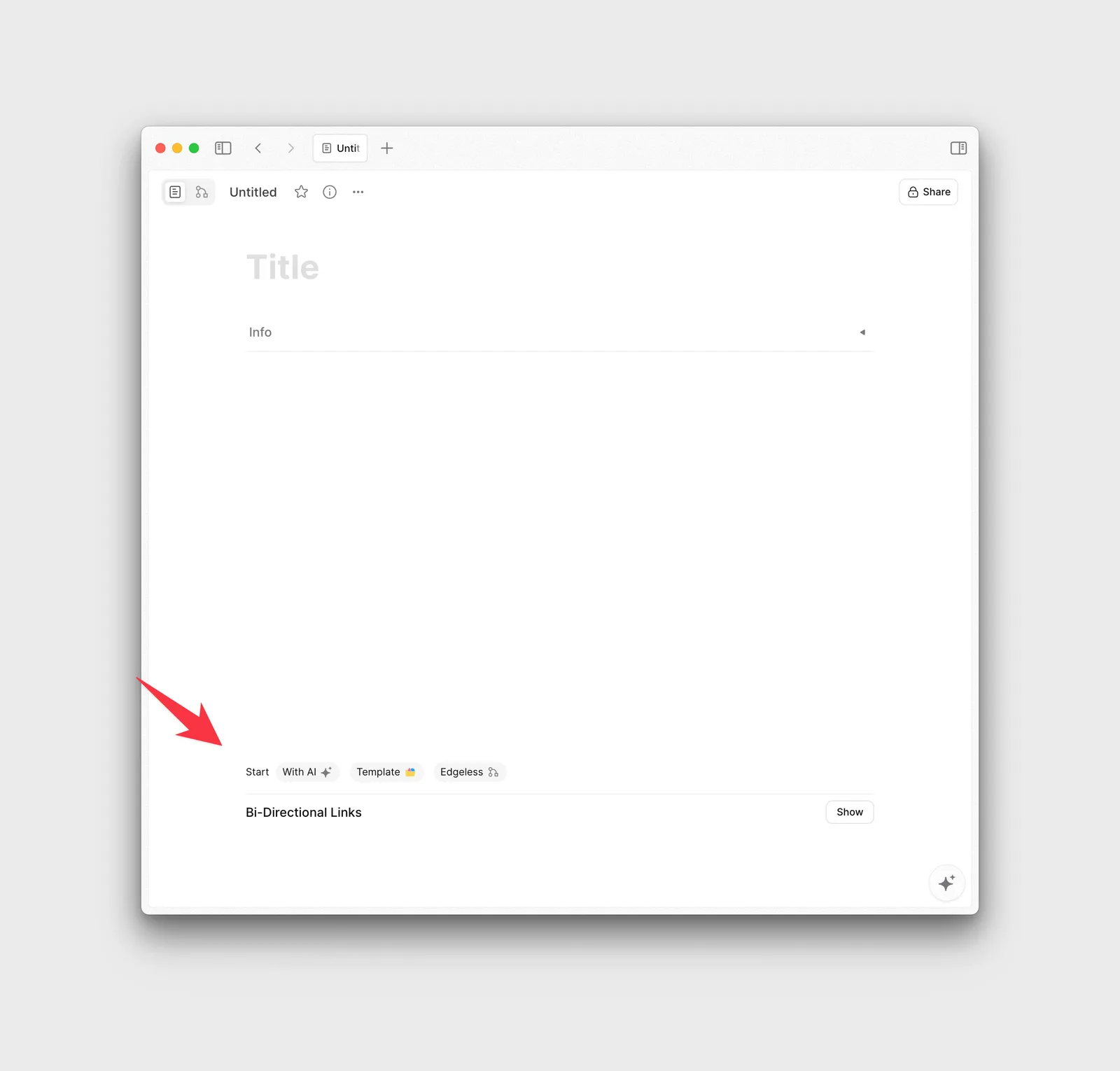
The new-document screen, with template and Edgeless entry points. Templates are also available in the AFFiNE template gallery.
A project you can try: a small product launch
Use the downloadable launch brief and decision log. It contains fictional inputs and an example decision, so you can compare tools without using confidential work.
- Write a goal, a success condition and three open questions in Page Mode.
- In Edgeless Mode, group the questions into scope, delivery and risks. Add connections where one decision affects another.
- Return to the document and check that its reading order explains the decision clearly. Record an owner and next action in the text or a table.
- Try the intended sharing arrangement and export a copy. Record any missing material, permission issue or manual cleanup.
The useful outcome is a readable brief with the reasoning behind it. Canvas shapes do not automatically become prose, and the example does not assume automatic task assignment or preserved Notion formulas. Use the pilot checklist to record what actually happens in your version and plan.
2. Obsidian: best for local Markdown notes and backlinks
Obsidian stores a vault as a folder of Markdown files on your device, as its storage documentation describes. That suits personal research, writing and a workflow built around links between notes.
Best for: individuals who want plain files they can open in any editor and keep for years.
Plans: the app is free for personal and commercial use. Sync starts at $4 per user per month and Publish at $8, both billed annually. A commercial license is optional.
Limits to know: Obsidian is built for personal vaults. If a team needs shared editing and permissions, test that model before committing. The official Importer brings Notion pages across, but its documentation lists exceptions such as linked data sources. For a direct comparison, see Obsidian vs Notion and Obsidian alternatives.
3. Anytype: best for a private, local-first space
Anytype describes itself as local-first: content lives on your device first, you can work offline, sync across your own devices, or self-host your data. Its documentation says data is encrypted so that only you and the people you choose can read it.
Best for: privacy-minded individuals and small groups who want offline work and sync without a central account owning the data.
Plans: the free membership includes 100 MB of remote storage; paid tiers add storage and shorter names. If you self-host your own network, Anytype says no membership is required.
Limits to know: the desktop client is published under the Any Source Available License 1.0, not an OSI-approved open-source license. The Notion importer uses a Notion integration token, and Anytype warns that some Notion data may not import correctly.
4. AppFlowy: best open-source workspace to self-host
AppFlowy is a Notion-style workspace with docs, databases and AI. Its main repository is licensed under AGPL-3.0, and it publishes a self-hosting guide with a free self-hosted tier.
Best for: technical teams that want an open-source Notion-like workspace on their own servers.
Plans: the cloud Personal plan is $0 for one workspace owner with up to 100 MB of storage and 7 MB uploads, and AI features are a limited trial. Pro is $12 per member per month billed annually, with unlimited storage and guest editors.
Limits to know: the free cloud plan is for one owner, so team use means Pro or self-hosting. The Notion import takes a Notion zip export and creates a new workspace; check the structure after import.
5. Coda: best for documents that work like apps
Coda combines documents with tables, buttons and integrations called Packs. The product now appears under the Superhuman Docs name.
Best for: operations teams that want a document to behave like a small internal tool.
Plans and limits: on the Free plan, docs you have not shared have no object or row limits. Once a doc is shared, it is capped at 50 objects and 1,000 table rows. All Free docs share a 1 GB media limit and a 10 MB per-file limit. A doc that depends on several Packs also needs someone to maintain it.
6. Confluence: best for a company wiki on Atlassian
Confluence is a wiki with spaces, page trees, version history and templates, and it connects closely to Jira.
Best for: organizations that already use Jira and want a structured company wiki.
Plans: Free covers up to 10 users with 2 GB of file storage and up to 3 active whiteboards per user. Standard starts at $5.78 per user per month and adds Rovo AI search, chat and agents, plus 250 GB of storage. Atlassian also sells a self-managed Data Center edition.
Limits to know: it is more structured and heavier than Notion for personal notes. The Notion importer requires you to be the Notion workspace owner and to have permission to create spaces in Confluence.
7. Slite: best for a small-team knowledge base
Slite focuses on team documentation with AI search and answers over your docs.
Best for: small and mid-size teams that want a tidy wiki rather than a do-everything workspace.
Plans: there is no permanent free plan. A 14-day trial covers the paid plans, then Standard is $10 and Premium $20 per member per month.
Limits to know: it is not a database or project tool. The Notion import brings the doc structure across and converts databases into Collections, but users are not imported, so mentions become plain text.
8. ClickUp: best for project execution
ClickUp is a work-management platform for tasks, statuses, docs and automations.
Best for: delivery teams that want tasks, owners and handoffs in one tool.
Plans: the Free plan has no member cap but only 60 MB of storage, and guests must receive full access to what you share with them. Unlimited is $7 per user per month billed annually. AI usage limits apply on every plan.
Limits to know: the Notion import is available on all plans, but Notion fields come across as text custom fields, and inline database comments and attachments do not import.
9. Asana: best for cross-team project tracking
Asana focuses on coordinating owners, dates and progress across teams.
Best for: several teams that need one shared view of delivery.
Plans: the Personal plan is free for 2 users, with unlimited storage at 100 MB per file. Starter is $10.99 per user per month billed annually and includes Asana AI.
Limits to know: it is not a notebook or wiki. If your main need is flexible notes or a research space, choose a tool from the sections above and keep Asana for delivery.
Other tools people compare with Notion
Evernote (capture and search), Microsoft OneNote (free-form notebooks) and Trello (boards and cards) come up often, but each covers a narrower job than Notion. We left them out of the main table this time. Our free note-taking apps guide covers notebooks in more depth, free whiteboard apps covers visual tools, and our roundup of Trello alternatives covers board tools.
Which Notion alternative should you choose?
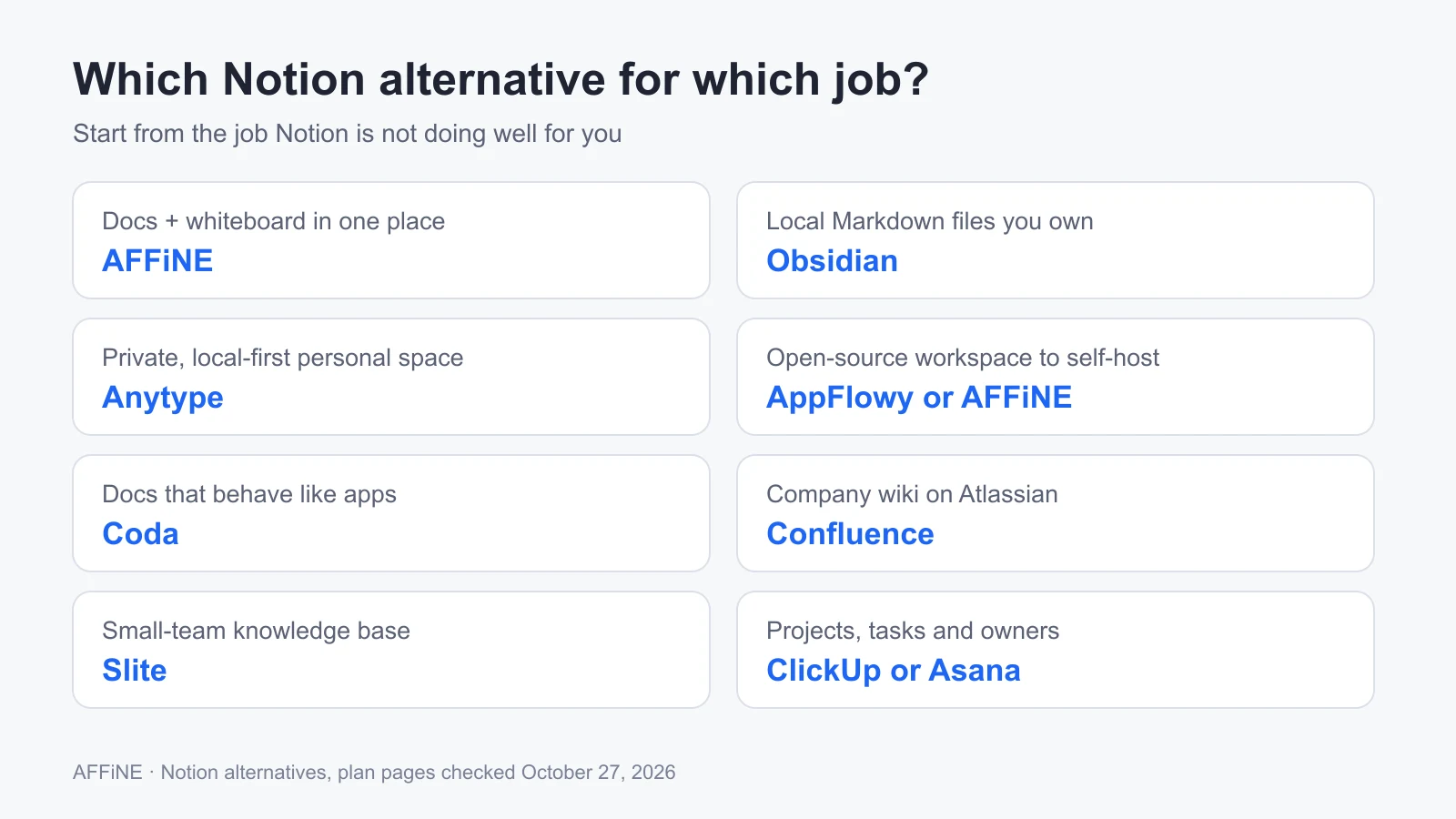
Start from the job Notion is not doing well for you, then compare two candidates.
For personal use
Choose Obsidian if you want plain files you own, Anytype if privacy and offline sync matter most, and AFFiNE if you think on a canvas as much as in text. All three have free options that suit one person.
For small teams
Choose AFFiNE for shared docs plus whiteboards, Slite for a calm team wiki, or Coda if your docs need tables and buttons. Check member caps first: AFFiNE Cloud Free allows three members per workspace, and Coda's shared-doc limits apply as soon as you share.
For teams that need to self-host
Shortlist AppFlowy and AFFiNE, and compare their licenses, seat limits and the work of running the server, backups and updates. Anytype lets you self-host its sync network. For licensing, sharing, and self-hosting differences between the two, see AFFiNE vs AppFlowy. For a team notes angle, see Notion alternatives for team notes.
For project delivery
Choose ClickUp or Asana, and keep a docs tool alongside if you write a lot.
Who should not switch from Notion
Switching is not always worth it. Stay with Notion, at least for now, if:
- Your databases are the product. Relations, rollups, formulas and automations rarely import cleanly into any tool in this list.
- Your team relies on Notion integrations or Notion AI and no candidate covered them in your pilot.
- Your problem is offline access only. Notion's desktop and mobile apps already support offline pages; see Notion offline mode and alternatives before you migrate.
- Nobody owns the migration. Rebuilding permissions, templates and links takes time. Without an owner, teams end up paying for two tools.
- You only want a cheaper price. Compare the full plan you would need, including AI and guest access, not just the entry tier.
Migration checklist before leaving Notion
Back up a small representative project before moving the whole workspace. Notion's export documentation explains HTML, Markdown and CSV, and PDF options; exporting subpages as PDF requires a Business or Enterprise plan, and the emailed download link expires after 7 days.
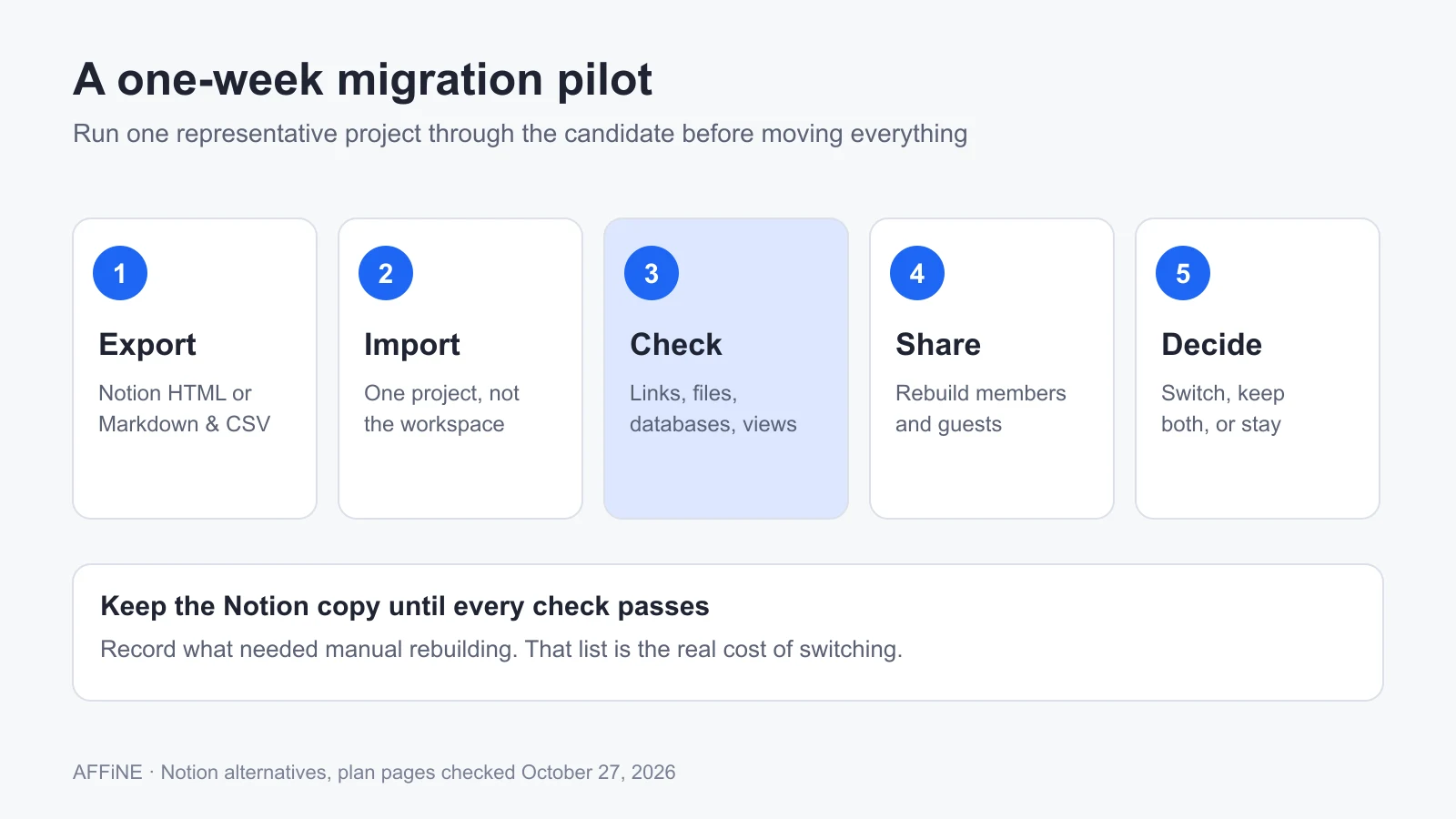
A one-week pilot: move one project, check it, and only then decide.
| Item | What to verify in the destination |
|---|---|
| Pages and nested pages | Content, hierarchy, headings and reading order |
| Links and attachments | Internal links, images and downloadable files |
| Databases | Properties, relations, formulas and the views you actually use |
| Access | Private material, members, guests and public sharing rebuilt correctly |
| People and mentions | Whether users map across or mentions turn into plain text |
| Integrations and templates | Anything that needs reconnecting or recreating |
Import notes by tool (from each vendor's documentation):
- AFFiNE: import a Notion HTML export; see the step-by-step guide to importing Notion into AFFiNE.
- Obsidian: the official Importer does not bring across linked data sources.
- Anytype: connects through a Notion integration token; not all Notion features are supported.
- AppFlowy: imports a Notion zip into a new workspace.
- Confluence: you must be the Notion workspace owner; users can be mapped with OAuth.
- Slite: databases become Collections; users are not imported.
- ClickUp: fields arrive as text custom fields; inline database comments and attachments are skipped.
Keep the source copy until these checks pass.
Final recommendation
Name the one job Notion is not doing well, pick the two tools in the comparison table that fit that job, and run the same small project through both. Start with AFFiNE if you need documents and a whiteboard together, Obsidian for local Markdown, AppFlowy or AFFiNE to self-host, and Confluence or Slite for a team wiki. If neither candidate beats Notion on your own project, staying is a valid result.
Frequently asked questions
What is the best Notion alternative?
It depends on the job. AFFiNE suits documents and whiteboards together, Obsidian suits local Markdown notes, Anytype and AppFlowy suit private or self-hosted spaces, Confluence and Slite suit team wikis, and ClickUp and Asana suit project tracking. Test one real project in two candidates before deciding.
Is there a free alternative to Notion?
Yes. Obsidian is free for personal and commercial use, the AFFiNE local editor is free, and Anytype, AppFlowy, Coda, Confluence, ClickUp and Asana have free plans with limits on storage, members or document size. Slite has a 14-day trial instead of a free plan.
Is there an open-source alternative to Notion?
AppFlowy is licensed under AGPL-3.0. AFFiNE has an MIT-licensed editor and a source-available backend, and both can be self-hosted. Anytype is source-available under its own license rather than open source. Check each license before you deploy or modify the code.
Which Notion alternative works offline?
Obsidian stores notes as local files, Anytype is local-first, and AFFiNE supports local workspaces. Notion itself supports offline pages in its desktop and mobile apps, but you must download pages individually and some features, such as AI and sharing, still need a connection.
Is Obsidian better than Notion?
Obsidian is better for local Markdown files and linked personal notes. Notion is better for teams that need shared pages and database workflows. Choose based on the work and access model you need.
Is AFFiNE better than Notion?
AFFiNE is a better fit when writing and visual planning belong in the same document, or when you want a self-hosted option. Keep Notion if you depend on integrations or database behavior that your AFFiNE pilot does not reproduce.
What should I test before migrating from Notion?
Test one representative project: pages, links, attachments, databases, permissions, mentions and exports. Record what needs manual rebuilding, keep a backup, and avoid moving the whole workspace until its essential workflows work in the destination.
Sources and editorial notes
All third-party facts were checked on the vendor's official page on October 27, 2026.
- AFFiNE, Pricing and Team license for self-hosting. Accessed October 27, 2026.
- Notion, Pricing, Use pages offline and Export your content. Accessed October 27, 2026.
- Obsidian, Pricing and Import from Notion. Accessed October 27, 2026.
- Anytype, Pricing, Documentation overview, Migrate from Notion and license. Accessed October 27, 2026.
- AppFlowy, Pricing, Self-hosting guide, Import from Notion and license. Accessed October 27, 2026.
- Superhuman Docs (Coda), Doc limits on Free plan. Accessed October 27, 2026.
- Atlassian, Confluence pricing, Confluence Data Center and Import data from Notion into Confluence. Accessed October 27, 2026.
- Slite, Pricing and Import from Notion. Accessed October 27, 2026.
- ClickUp, Pricing and Import from Notion. Accessed October 27, 2026.
- Asana, Pricing. Accessed October 27, 2026.
How this guide was prepared: This article was first published in November 2024 and rewritten in October 2026. It also absorbs the still-accurate parts of several older AFFiNE posts on the same topic, which now redirect here. Recommendations are AFFiNE editorial judgments based on the documentation above, not results of a controlled test. The launch project is a fictional exercise. AFFiNE is our own product; we have tried to state its limits as plainly as those of other tools. AI tools assisted with drafting, and the content was reviewed and edited by the AFFiNE team.