Notion AI Alternatives for Team Collaboration (2026)
Compare Notion AI alternatives for team collaboration: AI plans and pricing, data retention, permissions, self-hosting, plus a checklist and 2-week pilot.

A Notion AI alternative for collaboration is a shared workspace whose built-in AI helps a team draft, search, and summarize its own documents and boards, while respecting each person's access rights. To choose one, compare where prompts and pages are processed, how long the provider keeps them, which plan includes the AI, the admin controls available, and how easily the team can export its work.
This guide is for team leads, operations owners, and IT reviewers who already use or have evaluated Notion AI and want to compare it with other team tools. It covers what Notion AI includes today, eight alternatives checked against their official pages, a checklist, and a two-week pilot plan you can run with real colleagues.
Published by AFFiNE. AFFiNE makes one of the tools compared here, so treat our section on AFFiNE as a vendor description and verify it in your own pilot. Vendor facts were checked on official pages on October 27, 2026. We did not run benchmark tests of these products for this article.
On this page: what Notion AI does for teams, comparison table, evaluation checklist, tool-by-tool notes, two-week pilot, and FAQ.
What Notion AI does for teams today
Before you compare alternatives, write down what you would be replacing. As of October 27, 2026, Notion's pricing page and AI product page describe the following:
- Plans. Free ($0) and Plus ($10 per seat per month) include only a trial of Notion AI. Business ($20 per seat per month) includes Notion Agent, Custom Agents, AI Meeting Notes, and Enterprise Search. Enterprise is priced by contract.
- Credits. Business and Enterprise members receive a monthly allowance of AI credits. The AI page lists 1,500 Standard credits (Notion chooses the model) and 500 Select credits (you choose the model, or run Custom Agents) per member per month, with a note that amounts can vary by plan and purchase arrangement. Admins can buy additional workspace credits.
- Agents and search. Notion Agent can create and edit pages and databases using workspace context. Custom Agents run on triggers or schedules, for example answering questions in Slack. Enterprise Search and AI Connectors search across the workspace and connected apps such as Slack and Google Drive.
- Data handling. Notion's AI security practices page says customer data is not used to train models by default, and that AI answers cannot use content the user cannot already access. On Free, Plus, and Business, the AI provider retains data for 30 days or fewer. Enterprise workspaces get zero data retention with LLM providers.
That is a strong baseline. Teams usually look for an alternative for one of four reasons: the AI is only fully available on the Business tier; the team already pays for Microsoft 365, Google Workspace, or Atlassian and has AI included there; the team wants visual whiteboards alongside documents; or the organization wants to host the workspace itself and choose its own model provider.
Notion AI alternatives compared
Prices are list prices shown on official pages on October 27, 2026, in USD, before tax. Billing terms vary, so check annual versus monthly pricing on each page before you budget.
| Tool | Collaboration model | AI included | Listed AI price | Model and data notes | Self-host |
|---|---|---|---|---|---|
| Notion (baseline) | Pages, databases, teamspaces | Agent, Custom Agents, Meeting Notes, Enterprise Search | Business $20/seat/mo; trial only on Free and Plus | Not used for training by default; 30-day provider retention below Enterprise | No |
| AFFiNE | Docs plus Edgeless whiteboard in one workspace | Writing, chat, mind maps, presentations | AI add-on $8.9/mo billed annually (cloud) | Self-hosted workspaces use your own OpenAI, Anthropic, Gemini, or FAL key | Yes, Docker Compose |
| Microsoft Loop + Copilot | Loop workspaces and components inside Microsoft 365 | Copilot in Loop | Requires a Microsoft 365 Copilot license on a qualifying plan; check Microsoft's plan page | Respects Microsoft 365 permissions; not used to train foundation models | No |
| Google Workspace + Gemini | Docs, Sheets, Drive, Meet | Gemini in Gmail (Starter); Docs, Meet and more (Standard and up) | Starter $7, Standard $14, Plus $22 per user/mo | Not used to train models; retrieves only content the user can access | No |
| Confluence + Rovo | Spaces, pages, whiteboards, databases | Rovo Search, Chat, and Agents | Standard $5.78, Premium $11.16 per user/mo | LLM providers do not retain or train on inputs and outputs | Not verified for Rovo |
| Superhuman Docs (formerly Coda) | Docs with tables, formulas, automations | Docs AI (beta) | Pro $12, Business $33 per Doc Maker/mo billed annually; Editors free | AI admin controls on Business | No |
| ClickUp Brain | Tasks, docs, chat in one app | Brain AI add-on; Everything AI bundle | Brain AI $9, Everything AI $28 per user/mo, on top of the base plan | Choice of GPT, Claude, Gemini; zero third-party retention | No |
| Slite | Team knowledge base | Ask (AI search and answers) | Basic $10, Pro $20 per user/mo billed yearly | Ask only reads docs the user can view | No |
| Taskade | Projects, AI agents, and app builder | AI agents and automations | Free; Pro from $10/mo billed yearly (flat plans, not per seat) | Credit-based AI usage | No |
An evaluation checklist for teams
Most "Notion AI alternatives" lists rank tools by features. For a team, the more important questions are how the AI behaves on your own material and what happens to that material. Use these six criteria and agree on the weights before anyone sees a demo.
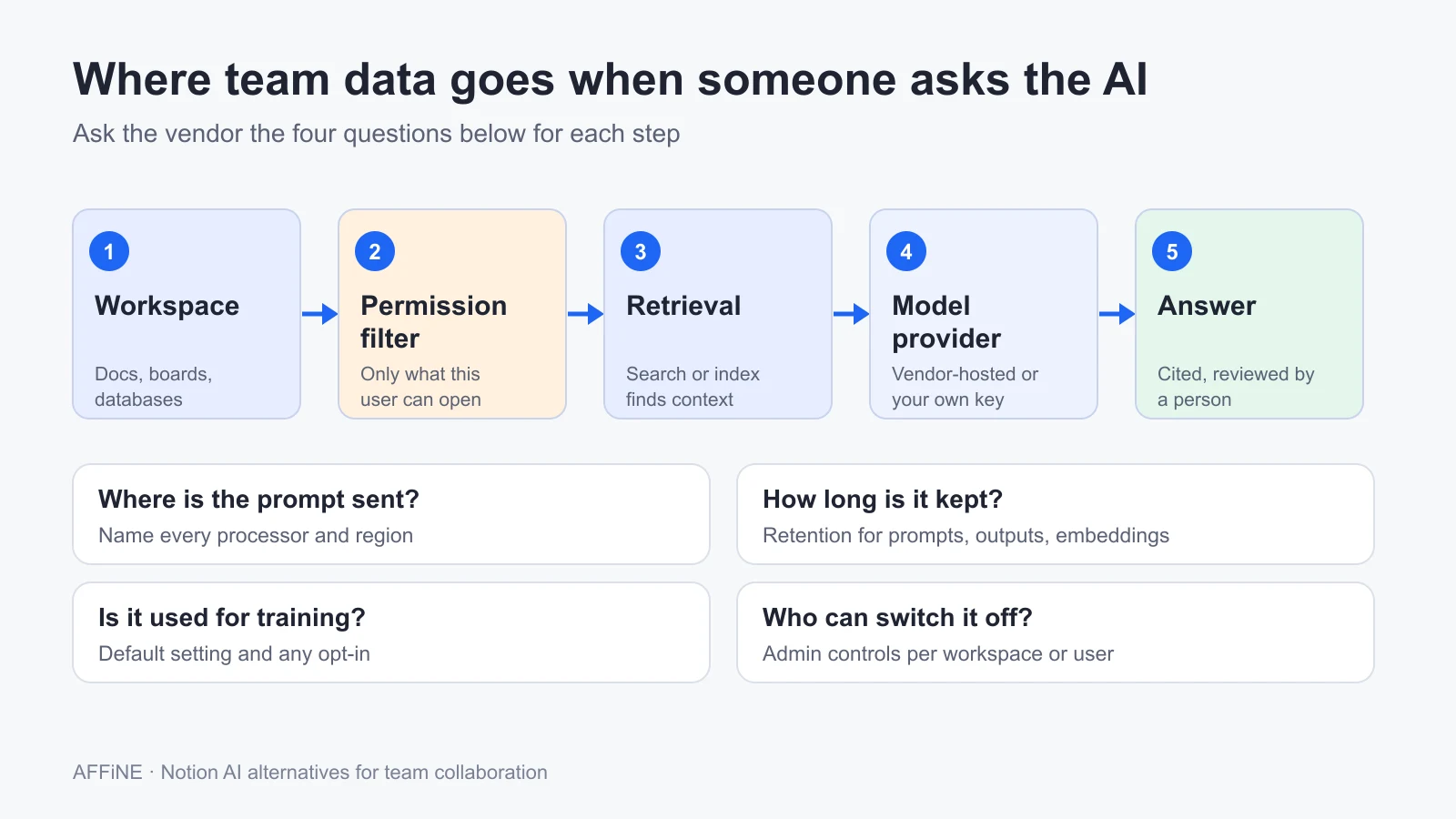 Each step in the AI data path is a separate decision. Ask every vendor where the prompt is sent, how long it is kept, whether it is used for training, and who can switch the feature off.
- AI quality on your own docs. Collect 20 questions your team actually asks, such as "What did we decide about the Q3 pricing test?" Ask each tool and have the document owner mark answers correct, partly correct, or wrong. Note whether the answer cites its source page.
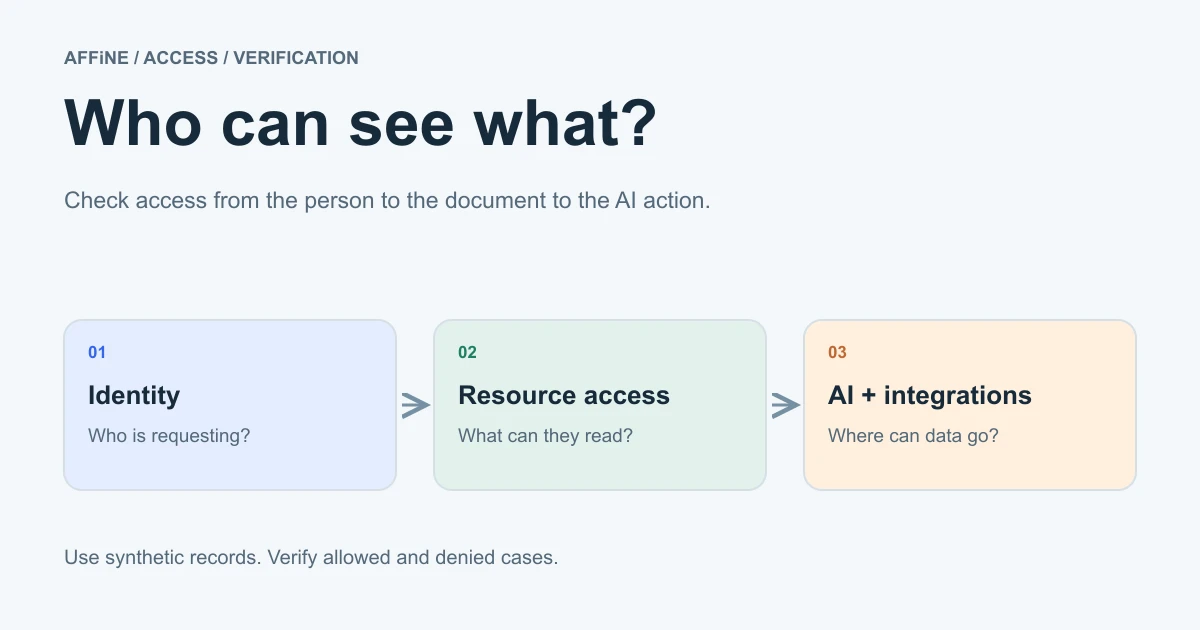
- Permission-aware answers. Create a restricted page with a distinctive phrase, then ask about it from an account that should not see it. Notion, Microsoft, Google, Atlassian, ClickUp, and Slite all state that their AI respects existing access. Your test confirms the behavior in your own configuration, including connectors.
- Data retention and training. Get written terms for prompts, outputs, and any search index or embeddings. Notion, for example, documents different retention for Enterprise and for other plans, so the plan you buy changes the answer.
- Admin controls. Check whether an admin can turn AI off for the workspace or for specific users, limit connectors, choose or approve models, and manage provider keys.
- Cost per seat. Add the base plan and any AI add-on or credits for 12 months. Some tools bundle AI into a higher tier, some sell it as an add-on, and some meter it with credits.
- Export and exit path. Export ten representative pages, including one with a table and one with an embedded board, and open them somewhere else. An AI feature is only worth adopting if you can leave with your work.
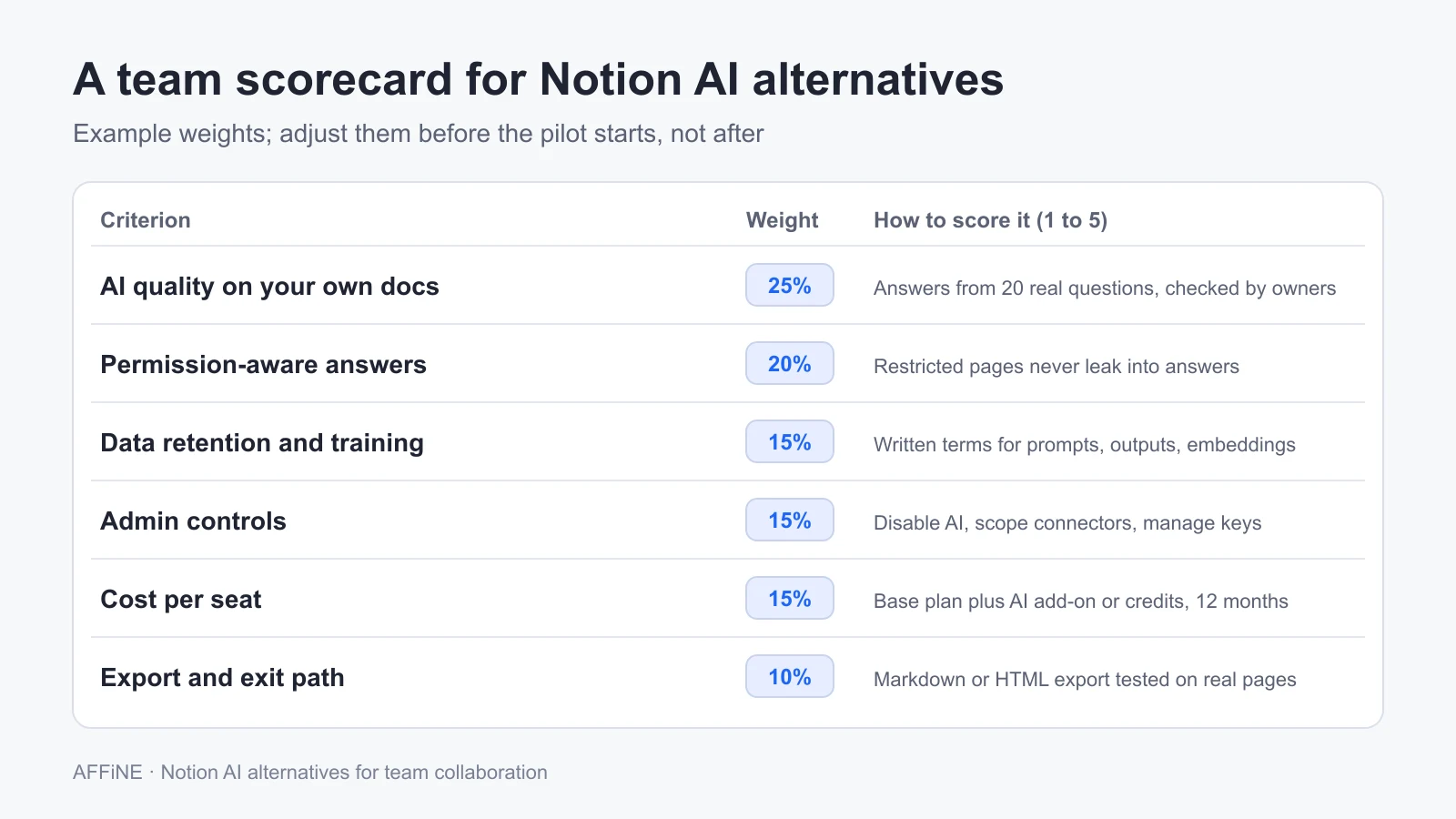 Example weights only. A regulated team may weight retention and admin controls higher; a small agency may weight cost and AI quality higher.
For a deeper treatment of access rules, see our guide to AI workspace permissions. If you are still deciding which category you need, start with what an AI workspace is and how it differs from an AI knowledge base.
The alternatives, tool by tool
AFFiNE
AFFiNE combines documents and an Edgeless whiteboard in the same workspace, so a team can move between a written brief and a visual board without switching apps. AFFiNE AI helps with writing, rewriting, summarizing, chat, mind maps, and presentation drafts (presentations are labeled Beta on the pricing page).
- Pricing. On AFFiNE Cloud, the AI add-on is listed at $8.9 per month billed annually. The Team plan is $10 per seat per month. Pro is $6.75 per month for small groups.
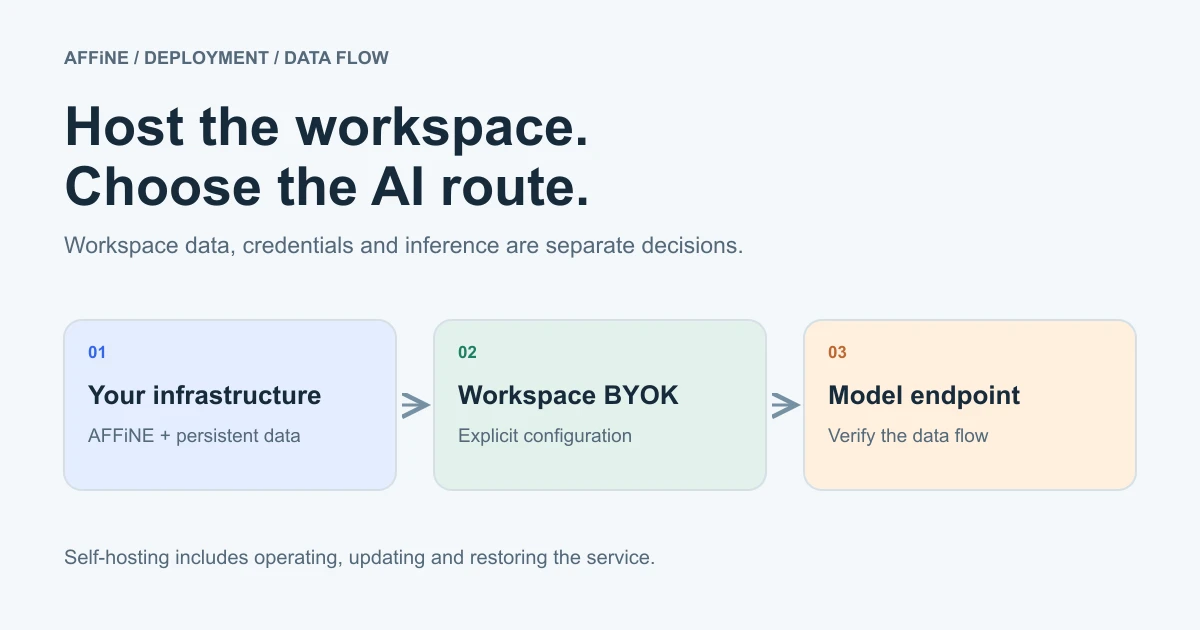
- Self-hosting and model choice. AFFiNE documents self-hosting with Docker Compose. The self-hosted AI guide uses workspace-level Bring Your Own Key (BYOK) for OpenAI, Anthropic, Gemini, and FAL. Provider coverage differs by feature: for example, transcription and workspace indexing need a server-stored Gemini key or an AFFiNE AI plan fallback where available.
- Admin controls. AI is turned on or off in the server configuration. Custom or OpenAI-compatible endpoints must be explicitly allowed by a server administrator. Sign-in can use Google, GitHub, or OIDC through the OAuth settings.
- Best for. Teams that want docs and whiteboards together, and organizations that want to run the workspace on infrastructure they operate and pick the AI provider.
- Limits. Self-hosting the workspace does not make AI inference local: requests still go to the provider whose key you add. To keep inference inside your network as well, see self-hosted AI options for teams. AFFiNE does not publish a guaranteed compatibility list for custom or local models. Self-hosted workspaces beyond 10 members need a Team plan or Installable License. It does not offer the breadth of third-party connectors that Notion's Enterprise Search does.
Our self-hosted AI workspace guide covers the deployment and backup planning in more detail.
Microsoft Loop with Copilot
Loop offers shared workspaces and components that can appear inside Teams, Outlook, and other Microsoft 365 apps. Copilot in Loop can help start a workspace by finding relevant files and documents.
- Pricing. Copilot in Microsoft 365 apps requires a Microsoft 365 Copilot license, and Microsoft states that a qualifying Microsoft 365 plan is required as well. We did not record a price because plan pages vary by region and contract; check the current plan page.
- Data. Microsoft's enterprise data protection page says Copilot respects your identity model and permissions, and that prompts, responses, and Microsoft Graph data are not used to train foundation models.
- Best for. Organizations already standardized on Microsoft 365.
- Limits. Loop is one part of a larger suite. Teams outside Microsoft 365 will find it less useful, and the AI cost depends on Copilot licensing.
Google Workspace with Gemini
Google Docs remains the default collaborative editor for many teams. According to the Google Workspace pricing page, Business Starter ($7 per user per month) includes Gemini in Gmail, while Business Standard ($14) adds Gemini in Docs, Meet, and more, plus expanded NotebookLM access. Business Plus is $22.
- Data. Google's Workspace AI page says company data is not used to train Gemini models or for ads, and that Gemini retrieves only content the user has access to.
- Best for. Teams that already live in Google Docs and Drive.
- Limits. Docs, Sheets, and Drive are separate apps rather than one linked workspace with databases. The listed prices include an introductory discount for new customers, so use the standard price when you budget.
Confluence with Rovo
Atlassian's Confluence pricing includes Rovo Search, Chat, and Agents on the Standard plan ($5.78 per user per month) and above. Premium ($11.16) adds unlimited whiteboards, automation, and more admin features. The Free plan supports 10 users but does not allow space or page permissions.
- Data. Atlassian's AI trust page says Rovo uses a mix of open models it hosts and third-party models (OpenAI, Anthropic, Google), and that the LLM providers do not retain or train on inputs and outputs. Rovo can include organizational data the user has permission to view.
- Best for. Teams that already run Jira and want AI across Atlassian content and connected tools.
- Limits. Whiteboards are capped on Standard. We did not verify Rovo availability for self-managed Confluence deployments.
Superhuman Docs (formerly Coda)
Coda is now called Superhuman Docs. It is strong for docs that behave like apps, with tables, formulas, and automations. On the pricing page, Pro is $12 and Business $33 per Doc Maker per month billed annually, and Editors and Viewers are free. Docs AI is in beta and included in paid plans under a fair-use policy, with AI admin controls on Business.
- Best for. Operations teams building trackers and lightweight internal tools.
- Limits. AI is labeled beta, so features and terms may change. We did not find a published model or retention statement on the pages we reviewed.
ClickUp Brain
ClickUp Brain brings AI to tasks, docs, and chat in ClickUp. The Brain AI add-on is $9 per user per month and includes a choice of GPT, Claude, and Gemini models. The Everything AI bundle is $28 per user per month. Both are in addition to the base plan, such as Unlimited at $7 or Business at $12 per user per month billed yearly (pricing).
- Data. ClickUp says third-party AI providers may not train on customer data, applies zero retention with AI subprocessors, and shows only information the user has permission to access.
- Best for. Teams whose work is mostly tasks and projects.
- Limits. Total cost per seat adds up when you combine the base plan with an AI add-on. Docs are part of a project tool rather than the center of it.
Slite
Slite is a team knowledge base. Its Basic plan ($10 per user per month billed yearly) includes Ask, which answers questions from your docs. Pro ($20) adds an agent and search across connected tools. Slite's Ask page says Ask reads only docs the user can view.
- Best for. Teams that mainly need a searchable, verified wiki.
- Limits. It is not a whiteboard or database tool. Enterprise pricing is not public.
Taskade
Taskade has shifted toward AI agents, automations, and app building. It offers a Free plan and paid plans from Pro at $10 per month billed yearly, with Business at $25. These are flat plan prices rather than per-seat prices, and AI usage is credit-based.
- Best for. Small teams that want AI agents and simple apps alongside projects.
- Limits. It is less suited to a long-lived company wiki, and credit limits make costs harder to predict.
How to run a 2-week AI pilot with your team
Feature tables can only narrow the list. A short pilot with your own content shows how each tool behaves for your team. Limit it to two or three candidates.
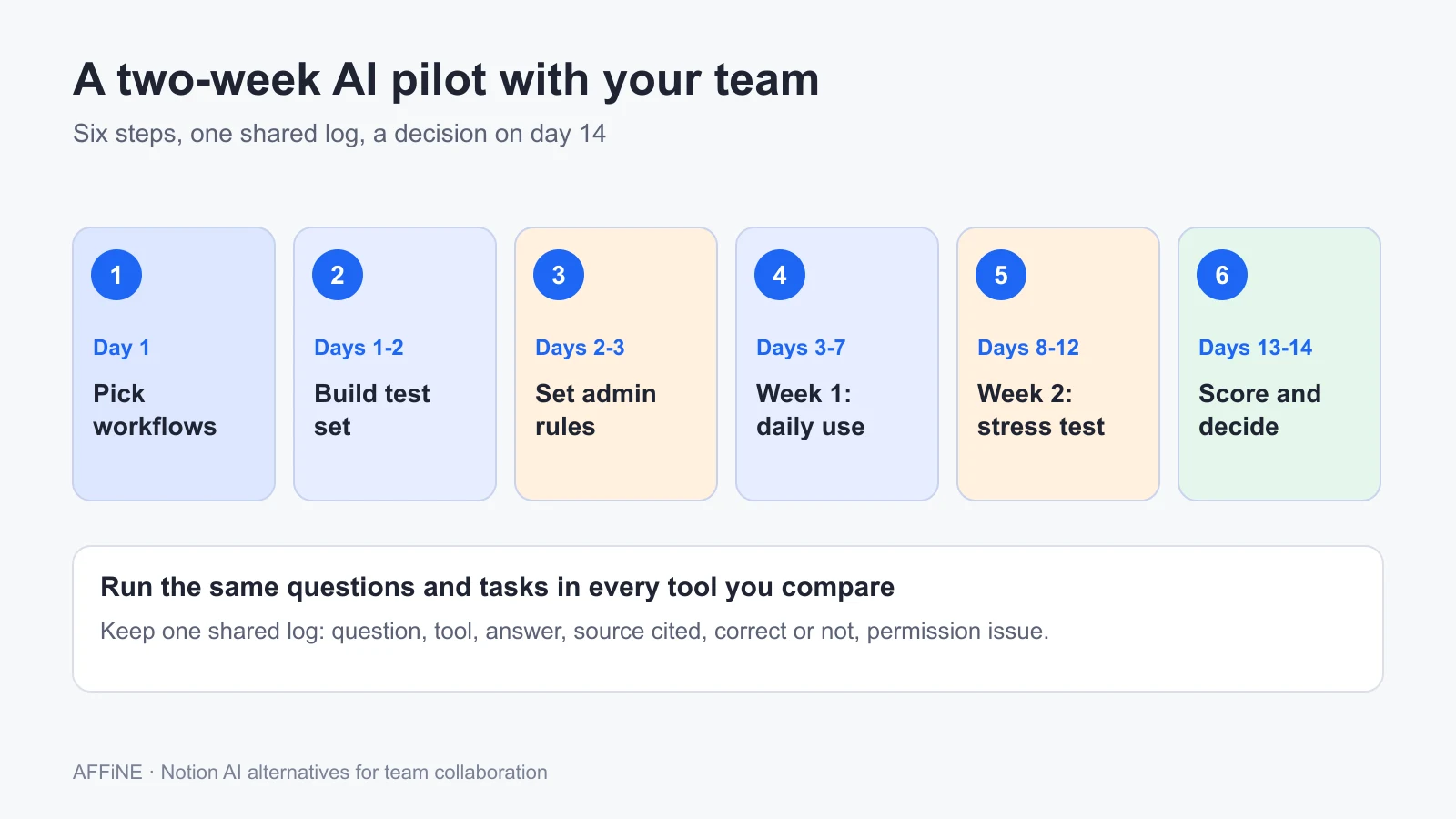 Keep one shared log for every tool: the question, the answer, the source it cited, whether it was correct, and any permission issue.
Pick two workflows and set a baseline
Choose two real workflows, such as "turn meeting notes into a project brief" and "answer onboarding questions from the handbook." Record how long they take today and who reviews the result. Recruit five to eight people from at least two roles.
Build a shared test set with permission traps
Copy the same 30 to 50 representative pages into each tool, using test copies rather than sensitive originals. Add two restricted pages containing unique phrases that only some testers can access. Write your 20 test questions and the expected answers.
Configure admin and data settings first
Before anyone uses the AI, set the plan, AI on or off for each group, connectors, and model or key choices. Save the vendor's data retention and training terms with the date you read them. For a self-hosted tool, add and test the provider key first.
Run week one: daily use with a shared log
Ask testers to use the AI in their normal work for five days and to log every important answer. Run the 20 test questions once in each tool. Owners mark each answer correct, partly correct, or wrong, and note whether a source was cited.
Run week two: stress-test permissions, cost, and export
Ask about the restricted pages from accounts without access. Remove a tester from a page and repeat the question. Check credit or usage meters against your expected seat count. Export ten pages from each tool and open them elsewhere.
Score the results and decide
Apply the scorecard weights you agreed on at the start. Add the 12-month cost for your actual seat count. Choose one tool, or decide to stay with Notion AI. Write down the reasons, any open risks, and the date you will review the decision.
Choosing the right Notion AI alternative
- If your organization runs on Microsoft 365, Google Workspace, or Atlassian, start with the AI you may already be licensed for, then test whether it meets your quality and permission needs.
- If your team needs docs and whiteboards together, or wants to self-host and choose its AI provider, compare AFFiNE in your pilot.
- If you mainly need answers from a wiki, Slite is focused on that job.
- If your work is mostly tasks and projects, ClickUp Brain keeps AI next to the task list.
- If database-driven docs matter most, consider Superhuman Docs.
You can try AFFiNE AI on the cloud or review the self-hosting options before your pilot. For tools compared beyond their AI features, see our Notion alternatives comparison and Notion alternatives for team notes.
Frequently asked questions
What is a Notion AI alternative for collaboration?
It is a shared workspace whose built-in AI helps a team draft, search, and summarize its own documents while respecting each person's access rights. Examples include AFFiNE, Microsoft Loop with Copilot, Google Workspace with Gemini, Confluence with Rovo, Superhuman Docs, ClickUp Brain, Slite, and Taskade.
Which plans include Notion AI?
As of October 27, 2026, Notion's pricing page lists a trial of Notion AI on Free and Plus. Business, at $20 per seat per month, includes Notion Agent, Custom Agents, AI Meeting Notes, and Enterprise Search. Enterprise is priced by contract and adds zero data retention with LLM providers.
Is there a Notion AI alternative I can self-host?
AFFiNE documents self-hosting with Docker Compose and lets workspaces add their own OpenAI, Anthropic, Gemini, or FAL key. Self-hosting controls where the workspace and files are stored, but AI requests still go to the provider you configure. Workspaces beyond 10 members need a Team plan or Installable License. Our self-hosted Notion alternatives guide compares the servers, backups, and seat costs involved.
Do Notion AI alternatives train on our team's data?
The vendors reviewed here, including Notion, Microsoft, Google, Atlassian, and ClickUp, state that customer data is not used to train their models by default. Retention periods differ by vendor and plan, so get written terms for prompts, outputs, and search indexes before your pilot.
How do I check that AI answers respect permissions?
Create a restricted page containing a unique phrase, then ask the AI about it from an account without access. Repeat after removing someone from a page and after connecting external apps. The AI should neither quote the page nor reveal that the restricted content exists.
How long should an AI pilot for a team take?
Two weeks is usually enough for a first decision. Use the first week for daily work and a fixed set of test questions, and the second week for permission, cost, and export checks. Involve five to eight people from at least two roles, and score each tool against the same weighted criteria.
Sources and editorial notes
All pages were accessed on October 27, 2026.
- Notion, Pricing, Notion AI, and Notion AI security and privacy practices.
- AFFiNE, AFFiNE AI, Pricing, Self-hosted AI guide, and Team license.
- Microsoft, Microsoft Loop, Microsoft 365 Copilot for enterprise, and Enterprise data protection.
- Google, Workspace pricing and AI in Google Workspace.
- Atlassian, Confluence pricing and Atlassian Intelligence and Rovo trust.
- Superhuman Docs (Coda), Coda AI and Pricing.
- ClickUp, ClickUp Brain and Pricing.
- Slite, Pricing and Ask.
- Taskade, Pricing.
How this guide was prepared: Facts come from the official pages listed above. Prices, plan names, and data terms change often, so confirm them before you buy. The checklist weights, test sizes, and pilot schedule are AFFiNE editorial recommendations, not results of a study. We did not benchmark the AI quality of any tool for this article. AFFiNE makes one of the products discussed. AI tools assisted with research synthesis and drafting, and the AFFiNE team reviewed and edited the content.