How to Build a Presentation Archive in Your PKM System
Keep the editable deck, a checked PDF, and the context behind every presentation together—so you can find and reuse past work with confidence.

A presentation repository gives each slide deck a home, a readable reference copy, and enough context to make it useful again. Within a personal knowledge management (PKM) system, it connects the slides to the project, sources, decisions, and people behind them. The goal is to answer a future question without opening every file in a shared drive.
Start with one editable source, one checked PDF, and one short context note per presentation. Use matching file names, a small set of tags, and a link from the relevant project page. Add a recording or transcript when the spoken explanation carries information the slides cannot convey.
This guide turns that approach into a folder structure, a copyable note template, and a repeatable review process. The worked example is fictional; the format recommendations are grounded in the linked Microsoft and Library of Congress guidance.
What belongs in a presentation repository?
A presentation archive stores past decks. A presentation knowledge base also records what a deck was for, which evidence it used, and what happened afterward. That distinction matters when an old chart resurfaces in a new proposal: the numbers may be historically accurate yet unsuitable for today's decision.
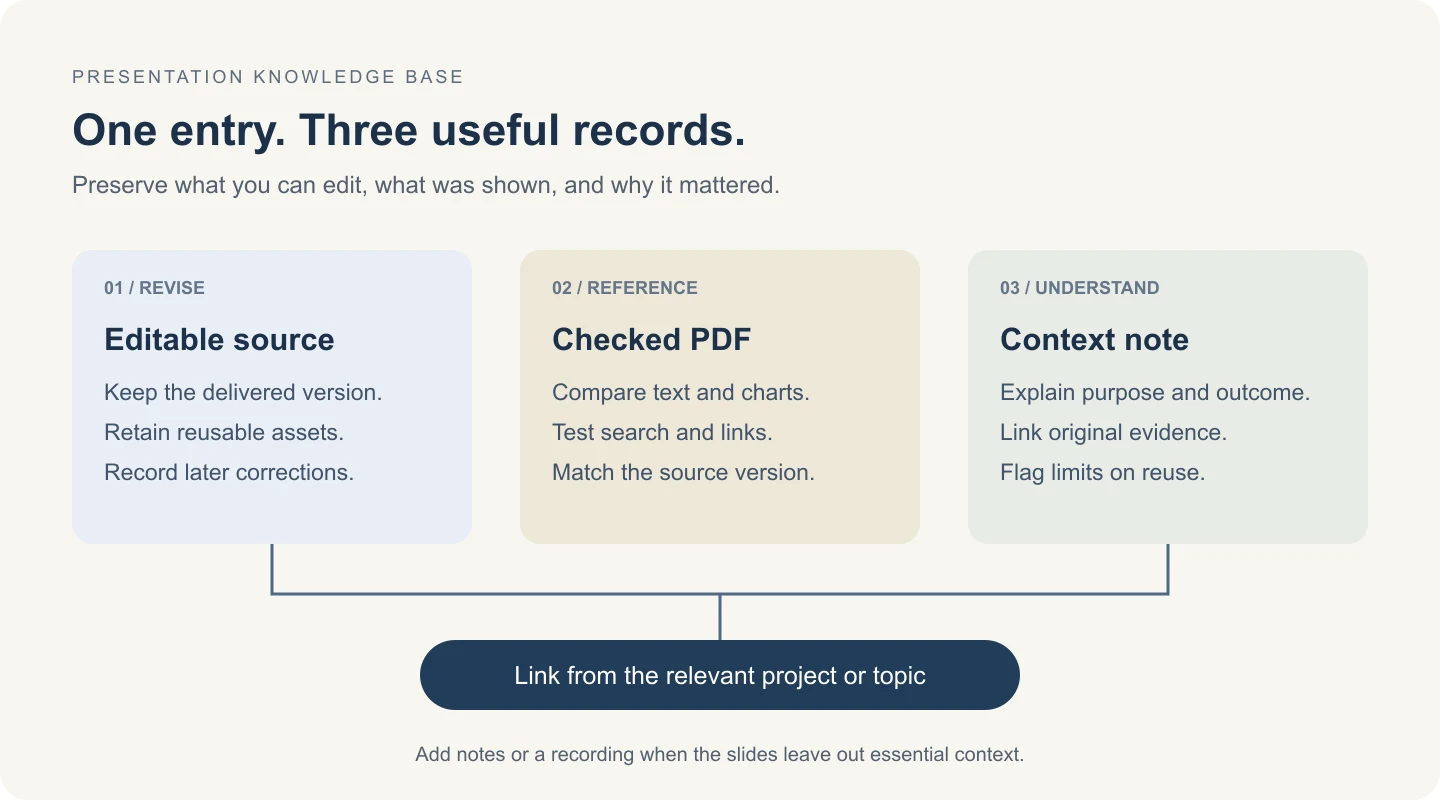
For each deck, keep these parts together:
| Item | What it preserves | What to check |
|---|---|---|
| Editable source, such as PPTX | Slides you can revise or reuse | It opens, required assets are available, and reuse is permitted |
| PDF reference copy | A convenient record of the delivered slide layout | Text, charts, links, and slide order match the intended version |
| Context note | Audience, purpose, sources, outcome, and limitations | Another reader can understand why the presentation mattered |
| Notes, transcript, or recording, when needed | Explanations and demonstrations absent from the slides | Access permissions and links still work |
Keep a presentation in its original project location if moving it would break existing links. Your repository can be an index pointing to that location. For the broader capture-and-retrieval process, see how personal knowledge management works.
Use a shallow folder structure and matching file names
Choose a top-level category that reflects how you look for past work: client projects, internal training, or public talks. Under it, group by project or topic. Give each delivered presentation its own dated bundle when it needs several supporting files.
Here is a fictional example for an internal product-launch review:
presentations/
  internal/
    launch-review/
      2026-10-08-onboarding-review/
        2026-10-08-internal-onboarding-review-v01.pptx
        2026-10-08-internal-onboarding-review-v01.pdf
        context.md
        speaker-notes.md
Use the same base name for the source and PDF so the pair is recognizable outside your PKM app. An ISO-style date sorts chronologically in ordinary file lists. Use a revision suffix when you need to distinguish deliveries or corrections, and identify the current approved version in the context note.
Do not overwrite the delivered version just because the working deck changes. If you correct a chart after a meeting, retain the earlier copy when your retention rules permit it, save a new version, and explain the correction. Avoid ambiguous names such as final-final-revised.pptx.
Shallow folders are a starting convention, not a universal optimum. If a folder is becoming hard to browse, add an index before creating many more nested categories. Our personal knowledge base organization guide covers how to combine folders with useful links.
Add a context note that makes the deck findable
A file title rarely tells the whole story. Write a short note with the terms a future reader is likely to remember: the customer or team, the decision, the event, and the topic. Do not assume that your PKM tool indexes every attached slide or every PDF; test that behavior separately.
Copy this template into a note next to the files, or download the presentation archive checklist and note template.
Title:
Presented on:
Presenter / owner:
Audience / event:
Purpose: What question was this deck meant to answer?
Summary: What did it explain or recommend?
Outcome: Decision, open question, or no decision recorded.
Source file:
Reference PDF:
Notes / recording:
Evidence: Original reports, dates, and relevant slide numbers.
Reuse limits: Confidentiality, permissions, and stale information.
Tags:
Related project / topic:
Version / supersedes:
Last checked:
For the fictional onboarding review, a useful summary might be: “Compared two proposed welcome flows for the product team. The team agreed to test a shorter checklist; no conversion improvement has been measured yet.” That preserves both the decision and the uncertainty. “Onboarding presentation” preserves neither.
Use a modest vocabulary for tags. Start with audience, topic, and status—for example, internal, onboarding, and delivered. Add more only when they answer a recurring retrieval need. Treat superseded as a meaningful state, and keep confidentiality as an explicit access field rather than trusting a tag to enforce permissions.
Keep the editable source and a checked PDF
The editable deck and the PDF serve different purposes. Keep the source for future changes; use the PDF as a convenient reading copy of a specific delivered version. Converting a file does not by itself make the archive complete or permanent.
For decks approved for upload to a third-party service, you can convert PPT to PDF and store the result beside the source. For confidential work, use an approved local export or your organization's approved service. Check upload and retention terms before sending a file; no external converter is required to follow this workflow.
Microsoft documents PDF export through File → Export in PowerPoint for Windows, with options for the slide range and output. Export behavior varies by platform, including notes and hyperlinks, so check the official PowerPoint PDF instructions for your version.
Inspect the export before marking it ready
Open the PDF and compare it with the source:
- Layout: look for clipped text, substituted fonts, unreadable charts, and missing symbols.
- Contents: confirm the expected slide count and whether hidden slides or notes should be included.
- Retrieval: search for a distinctive phrase and try selecting text. An image-only PDF may need OCR, followed by an accuracy check.
- Links: test important references and navigation links in the exported file.
- Accessibility: review reading order, text alternatives, and tags using your available accessibility tools; visual similarity alone is insufficient.
A PDF is a static reading copy. If a demonstration relies on narration or animation, save an appropriate recording as well. Microsoft's video export guidance explains how recorded narration and timings can be included. Play back the result before archiving it.
The Library of Congress digital format preferences emphasize qualities such as searchable text, embedded fonts, and content tagging for PDF documents. For institutional preservation, follow your archive's specification, including any PDF/A requirement. An ordinary export should not be described as validated PDF/A unless it has been checked as such.
Build a repeatable presentation archiving workflow
Process one deck from start to finish before importing an entire collection. This exposes missing fields and broken retrieval assumptions while the system is still easy to change.
- Choose the version to preserve. Save the delivered or approved source. Record its date and owner. Keep unfinished working copies clearly separate.
- Create and inspect the reading copy. Export the PDF, run the checks above, and capture notes or a recording if needed. Record which source version produced it.
- Write the context note. Add the purpose, summary, outcome, source references, and reuse limits while the presentation is still fresh in your memory.
- Connect the entry. Link it from the project or topic page where someone would naturally look for it. Add a few consistent tags.
- Test retrieval and recovery. Search for a remembered phrase, open both files, check access as the intended reader, and confirm that the bundle is covered by your backup process.
You can use an AFFiNE document as the context page and a project document as the index, with descriptive links to the deck's approved storage location. Start from the note template above and adapt it to your existing workspace. See PKM with AFFiNE for the broader document-and-whiteboard workflow. Verify attachment search, permissions, and export behavior in your own setup before depending on them.
Decide which version a future reader will need
| Situation | Keep | Add to the context note |
|---|---|---|
| The deck is still being revised | Working source; milestone PDFs only when useful | Draft status and the location of the current working copy |
| A presentation has been delivered | Delivered source plus its checked PDF | Event date, audience, outcome, and version |
| A demo depends on movement or narration | Source, PDF, and checked recording | Recording location, access rules, and any omitted content |
| A deck includes changing prices or research | Historical source and PDF | Evidence dates and a clear revalidation requirement |
| A corrected deck replaces an earlier one | Versions required by your retention rules | What changed and which version supersedes the other |
When reusing a slide, trace its claim back to the original report or dataset. A polished deck is a secondary container for evidence. It should not become the source of truth simply because it is easy to copy.
Maintain the archive without turning it into a cleanup project
Schedule a small review at a cadence that matches how often you reuse presentations. Pick a few entries and answer three questions: can I find the right deck, can I understand its limits, and can I recover it if the primary copy disappears?
Record failures rather than inventing a productivity score. If search misses an entry, improve its title or summary. If a link is broken, repair the storage reference. If the PDF and source differ, identify the intended version and regenerate only the appropriate reading copy.
Keep backup copies separately from the working location and periodically test restoration. Sync is useful, but it can also propagate a deletion; check whether your storage actually supports the recovery you need. The Library of Congress personal digital archiving resources offer further guidance for maintaining personal collections.
Start with one recent deck. A small archive that reliably answers real questions is easier to maintain than a large collection of files with no context.
Frequently asked questions
Should I delete the PPTX after converting it to PDF?
Usually keep both if future editing or reuse is likely and your retention rules allow it. The PDF is a reading copy, while the PPTX preserves the editable presentation. Keep additional assets or recordings when they carry information missing from the PDF.
Will every presentation PDF be searchable?
No. A PDF can contain only images of slides, and PKM tools vary in how they index attachments. Try selecting and searching for a distinctive phrase. If OCR is needed, check its output, especially names, numbers, and chart labels. Keep a searchable context note regardless.
How many tags should each deck have?
Start with a few that describe audience, topic, and status. Three to five is a practical starting range, not a research-backed rule. Add a tag only when it helps answer a question you actually ask of the archive.
Does exporting to PDF preserve the entire presentation?
No. A static PDF does not reproduce a live presentation's full experience. Check links and layout, preserve speaker notes separately when needed, and save a tested recording when animation, audio, or demonstrations are essential.