Task Automation Software: Open-Source and AI Tools (2026)
Task automation software runs repeatable steps for you: when a trigger fires (a form is submitted, a file lands, a schedule ticks), it moves data between apps, applies rules, and, increasingly, asks an AI model to classify, summarise, or act in a browser. The goal is fewer manual hand-offs, with people still approving the steps that matter.
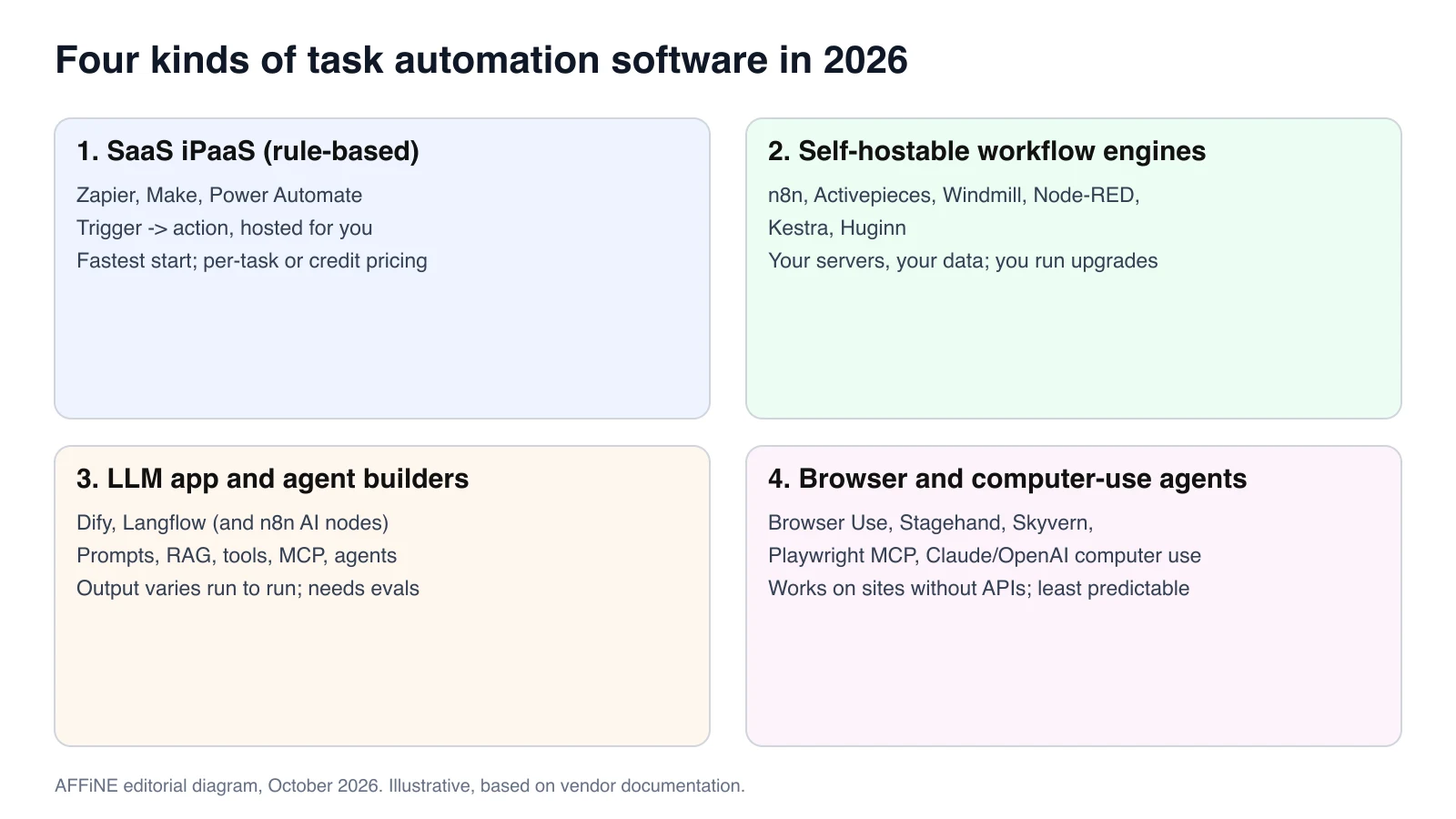
This guide replaces our earlier list of 20 general productivity apps. In 2026 the useful question is not "which app has automations?" but "which kind of automation engine fits this task?" We focus on open-source and self-hostable workflow tools (n8n, Activepieces, Windmill, Node-RED, Kestra, Huginn), LLM app builders (Dify, Langflow), and the newer wave of browser and computer-use agents (Browser Use, Stagehand, Skyvern, Playwright MCP, Claude and OpenAI computer use). Zapier, Make, and Power Automate appear for comparison. Facts were checked against official documentation, licence files, and GitHub repositories on October 26-27, 2026; the sources are listed at the end.
Key takeaways
- Use a deterministic workflow (trigger, rules, API calls) whenever the apps involved have APIs. It is cheaper and easier to debug than an agent.
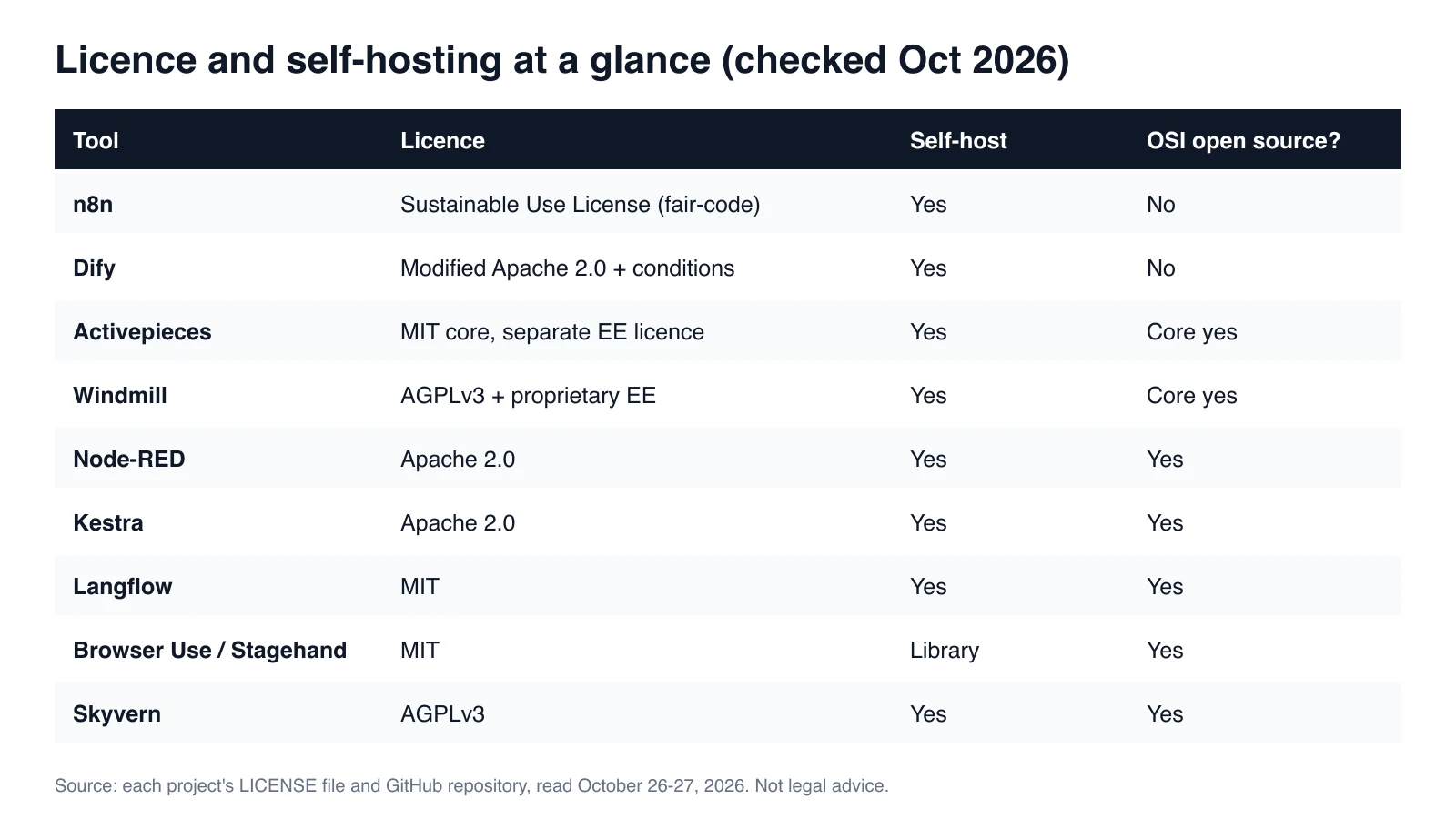
- "Open source" is not one thing. n8n uses the fair-code Sustainable Use License and Dify uses a modified Apache 2.0 licence with extra conditions; neither is an OSI-approved licence. Node-RED, Kestra, Langflow, Browser Use, and Stagehand use standard permissive licences.
- Add an LLM step where the input is messy (emails, transcripts, documents) and keep a human review step before anything is published or sent.
- Browser agents are for sites without APIs. They are the least predictable layer and the most exposed to prompt injection, so sandbox them and give them narrow credentials.
- MCP (Model Context Protocol) is now the common way to connect workflows and AI clients: n8n, Activepieces, Windmill, Langflow, Kestra, Dify, Make, Skyvern, and Playwright all document MCP support.
What is task automation?
Task automation is the use of software to complete a repeatable, rules-based piece of work without manual input each time. A trigger starts the run, the software performs defined steps across apps or files, and the result is logged. Modern tools add AI steps for unstructured input, but the core idea is unchanged: same input, same expected outcome, less copy-paste.
Task automation is narrower than business process management. It handles a single job, such as "turn a new form entry into a ticket and a Slack message", rather than redesigning a whole process. That makes it a good first step: you can automate one task, measure the time saved, and expand.
Quick answer: the best task automation software by category
| Tool | Category | Best for | Licence and self-hosting | AI and agent support | MCP |
|---|---|---|---|---|---|
| n8n | Workflow engine | Technical teams that want visual flows plus code | Sustainable Use License (fair-code); self-host or n8n Cloud | AI Agent, LLM, memory and vector store nodes | MCP Server Trigger and MCP client support |
| Activepieces | Workflow engine | Zapier-style no-code flows you can host | MIT core, separate enterprise licence; self-host or cloud | AI pieces and agents | Pieces exposed as MCP servers |
| Windmill | Code-first workflow engine | Engineers who write scripts in Python, TypeScript, Go and more | AGPLv3 core with proprietary enterprise features | AI agents in flows | Built-in MCP server |
| Node-RED | Flow-based programming | IoT, home lab, and event wiring | Apache 2.0 (OpenJS Foundation); self-host | Community nodes | Community nodes |
| Kestra | Orchestrator | Data, AI and infrastructure pipelines in YAML | Apache 2.0; self-host or cloud | AI agent and RAG task types | Built-in MCP server |
| Huginn | Event agents | Watching the web and feeds, personal alerts | MIT; self-host (Docker) | None built in | No |
| Dify | LLM app builder | RAG chatbots, AI workflows and agents | Modified Apache 2.0 with conditions; self-host or Dify Cloud | Workflow, RAG pipeline, agents, model management | Connect MCP servers as tools |
| Langflow | LLM app builder | Python teams prototyping agents | MIT; self-host (Docker) or cloud deployment | Multi-agent orchestration | Flows deploy as MCP servers |
| Browser Use | Browser agent | Letting an LLM operate a website from Python | MIT library; optional Browser Use Cloud | Autonomous browser agent | MCP server listed in repo |
| Stagehand | Browser agent SDK | Mixing scripted Playwright-style steps with AI actions | MIT; runs locally or on Browserbase | act, extract and agent APIs | MCP tools for agent frameworks |
| Skyvern | Browser agent | Form-filling workflows across many sites | AGPLv3; self-host or Skyvern Cloud | Vision LLM agents, no-code builder | Hosted and local MCP server |
| Playwright MCP | Browser tool for AI clients | Giving Claude, Cursor or another MCP client a browser | Apache 2.0; runs locally | Accessibility-snapshot based actions | Is an MCP server |
| Zapier | SaaS iPaaS | Non-technical teams, widest app catalogue | Proprietary, cloud only | AI steps, agents, chatbots | Zapier MCP |
| Make | SaaS iPaaS | Visual multi-branch scenarios | Proprietary, cloud only | AI agents and modules | Make MCP Server |
| Power Automate | SaaS iPaaS and RPA | Microsoft 365 shops and Windows desktop RPA | Proprietary; desktop flows run on Windows | Copilot features | Not documented* |
* Microsoft documents MCP support in Copilot Studio agents, which can call Power Automate flows, but we found no MCP feature documented for Power Automate itself in our October 2026 review. Licences, pricing and MCP features change often, so check the vendor docs before you decide. Free tiers for Zapier and Make are covered in the SaaS section below.
Open-source and self-hostable workflow engines
These tools run on your own servers or containers. You gain data control and predictable infrastructure cost; you take on upgrades, backups, credential storage, and monitoring. If your team already self-hosts other tools, such as a self-hosted AFFiNE workspace, the operational model will feel familiar.
n8n
n8n describes itself as a "fair-code platform to build and deploy AI agents and workflows". You build flows on a visual canvas, drop into JavaScript or Python when needed, and run it self-hosted or on n8n Cloud. Its documentation covers AI Agent nodes, tools, memory, vector stores, and evaluations. The MCP Server Trigger node exposes n8n workflows as tools to MCP clients through a test URL and a production URL, with optional authentication.
- Licence: the Sustainable Use License allows use "only for your own internal business purposes or for non-commercial or personal use". Files marked
.ee.need an enterprise licence. It is source-available, not OSI open source. - Choose it when: you want one engine for both classic integrations and AI agent steps, and you are using it internally.
- Watch out for: embedding n8n in a product you sell, or offering it to customers, which needs a commercial agreement.
Activepieces
Activepieces is a no-code builder that will feel familiar to Zapier users, with a TypeScript "pieces" framework for extensions. According to its README, all pieces are open source and available as MCP servers for clients such as Claude Desktop and Cursor. The core is MIT-licensed; code under the enterprise directories uses a separate licence.
- Choose it when: business users need a friendly builder and IT wants to host it.
Windmill
Windmill is a code-first platform: scripts in Python, TypeScript, Go, Bash, SQL and other languages become UIs, APIs, cron jobs, flows, and AI agents, synced with Git. The open-source build is AGPLv3; certain enterprise features are proprietary.
- Choose it when: engineers own the automations and want code review and version control.
Node-RED
Node-RED is a long-running flow-based programming tool from the OpenJS Foundation, licensed under Apache 2.0. It is strongest for event and device wiring (MQTT, HTTP, IoT, home automation) and has a large community node library.
Kestra
Kestra is an event-driven orchestrator under Apache 2.0. Workflows are declarative YAML, editable in the UI and in Git. Its README lists AI agents and RAG workflows as task types and a built-in MCP server. It suits data and platform teams more than individual users.
Huginn
Huginn (MIT) runs "agents" that watch websites, feeds, and events and take actions, chained in a graph. It has no built-in LLM features, but it is a lightweight, proven option for monitoring and alerting jobs you want to keep on your own machine.
LLM app and agent builders
These tools are built around prompts, retrieval, and tool calls rather than app-to-app triggers. Use them when a step needs to read and reason over unstructured content.
Dify
Dify is "an open-source LLM app development platform" that combines a visual AI workflow canvas, a RAG pipeline (ingesting PDFs, slides and other documents), agents that can use tools from the Dify Marketplace, MCP servers or your own APIs, model management across many providers, and observability integrations. It self-hosts with Docker Compose or runs on Dify Cloud.
- Licence: Dify uses a modified Apache 2.0 licence. Commercial use is allowed, but extra conditions apply. Read the conditions on multi-tenant services and on the web frontend and branding before you build a product on it.
- Choose it when: the job is "answer from our documents" or "run a multi-step AI workflow", with less need for hundreds of SaaS connectors.
n8n vs Dify: which one?
They overlap but start from opposite ends. n8n is an integration engine that added AI nodes; Dify is an LLM application platform that added workflows. A practical split many teams use is Dify for the knowledge and chat layer, and n8n for triggers, app integrations, and scheduling, with the two calling each other over HTTP or MCP. If you can only run one: choose n8n when most steps touch other apps, and Dify when most steps are retrieval and prompting.
Langflow
Langflow (MIT) is a visual builder for agents and workflows with a Python core. It ships API and MCP servers, so every flow can become a tool for MCP clients. Flowise, a similar visual builder, appears in many 2025 lists, but its GitHub repository was archived and set to read-only on August 13, 2026, so we no longer recommend it for new projects.
Browser and computer-use agents
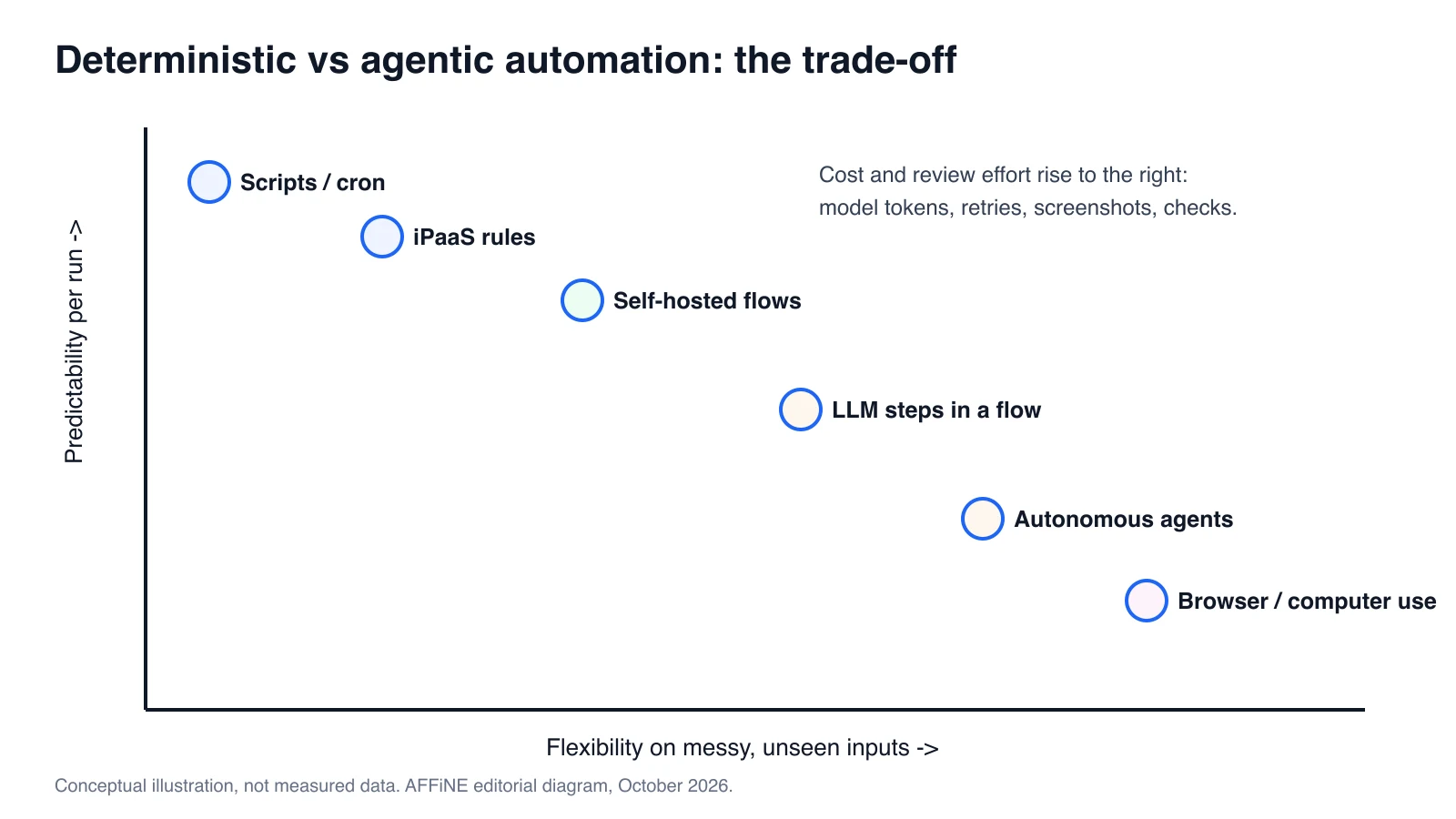
When there is no API, for example legacy portals, supplier websites, or government forms, an AI model can operate a browser or desktop directly. This is the fastest-moving category and the least predictable.
- Browser Use is an MIT-licensed Python library ("the open-source browser agent") that runs locally with the LLM of your choice, plus a hosted Browser Use Cloud with managed browsers. Its README also documents rerunning a saved task without calling the model on every step, which reduces cost on repeat jobs.
- Stagehand from Browserbase is an MIT-licensed SDK that combines Playwright-style calls (
goto,click,locator) with AI actions. You script the predictable parts and let the model handle the rest. It runs locally with Chrome or on Browserbase. - Skyvern (AGPLv3) uses vision LLMs to work on sites it has not seen before, and adds a no-code workflow builder. It can be self-hosted (pip or Docker Compose) or used through Skyvern Cloud.
- Playwright MCP (Apache 2.0, from Microsoft) is an MCP server that lets AI clients drive a browser through structured accessibility snapshots instead of screenshots. It is a good fit for developer workflows in Claude Code and other MCP clients.
- Claude computer use and OpenAI computer use are API tools: the model returns actions such as screenshot, click, and type, and your own code executes them in a sandboxed desktop or browser. Anthropic's documentation warns that Claude may follow instructions found in web pages or images, and advises isolating it from sensitive data and actions.
- Agentic browsers such as Perplexity Comet (Mac, Windows, iOS and Android) put an assistant inside the browser for personal tasks. They are useful for one-off chores, not for unattended team workflows.
Mainstream SaaS automation, for comparison
- Zapier has the largest app catalogue and now prices Zaps, AI steps, code, and its SDK on a single task-based model. The free plan includes 100 tasks per month. Zapier MCP exposes Zapier actions to AI clients.
- Make counts each module action as one credit. The free plan includes 1,000 credits per month, and the visual scenario builder handles branching well.
- Power Automate covers cloud flows for Microsoft 365 and desktop flows (RPA) that automate Windows and legacy applications through UI elements, images, or coordinates.
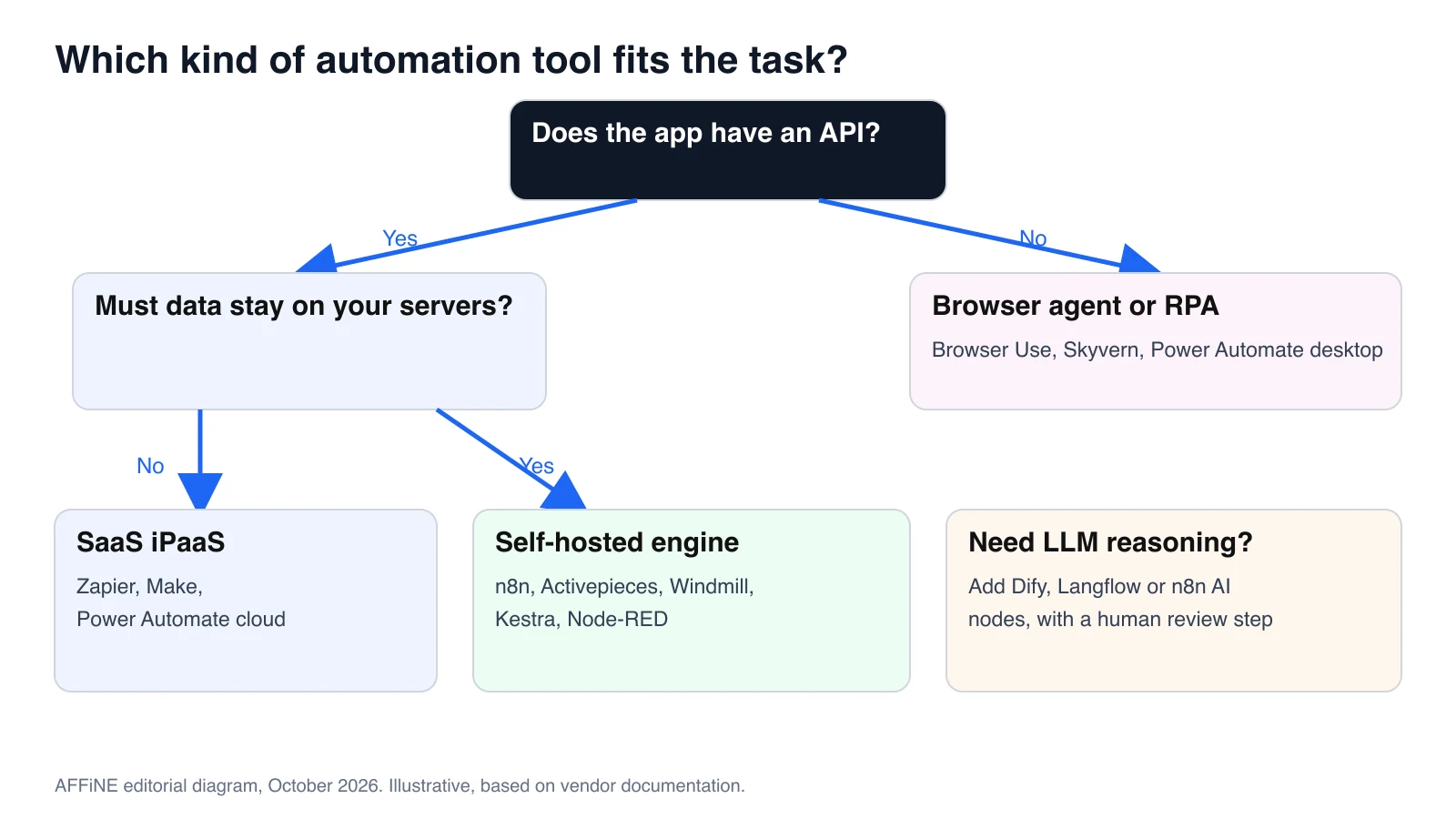
SaaS is the right answer when speed matters more than data residency and nobody wants to maintain servers. For a broader shortlist, see our comparison of Zapier alternatives and competitors.
How to choose task automation software
- Deterministic or agentic? If you can write the rule, write the rule. Use AI only for the steps that genuinely need judgment, and constrain its output (for example, to a JSON schema).
- Data residency and compliance. If transcripts, customer records or credentials must stay inside your network, you need a self-hostable engine and self-hosted or private models.
- Licence fit. Internal use is fine with nearly all of these tools. Reselling, embedding, or offering a hosted service is where fair-code, modified Apache, and AGPL terms matter.
- Total cost. SaaS bills per task or credit. Self-hosting costs server time and maintenance hours. Agents add model tokens and retries, and browser agents add screenshots and hosted browser time.
- Maintenance and observability. Look for execution logs, retries, alerting, version control, and an easy way to replay a failed run.
- Who builds it? No-code (Zapier, Make, Activepieces), low-code (n8n, Dify), or code-first (Windmill, Kestra, Stagehand).
Task automation examples
Example 1: Meeting transcript to an AFFiNE doc
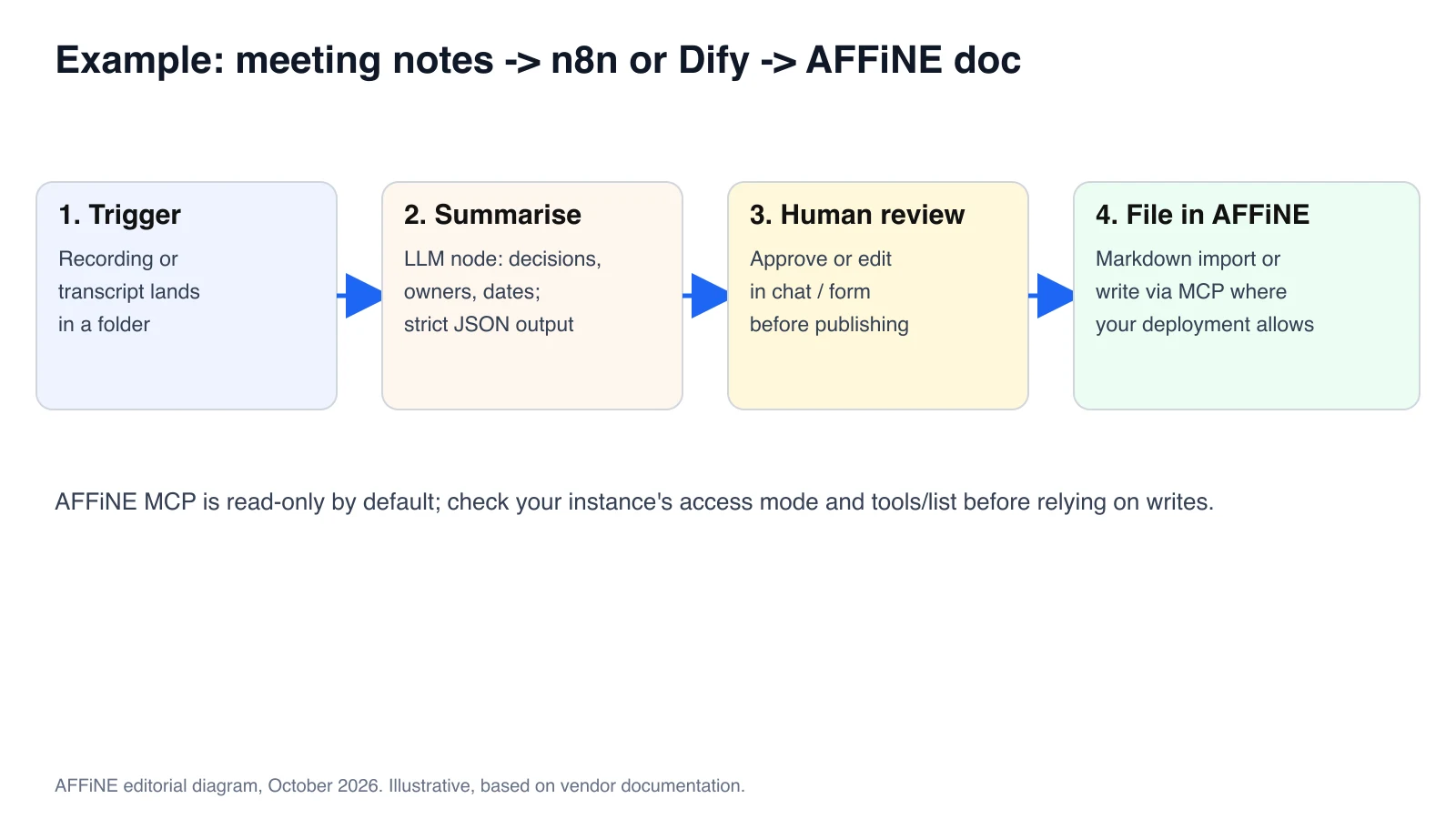
- Trigger: n8n watches a folder or webhook for a new transcript from your recorder.
- Summarise: an AI Agent node (or a Dify workflow called over HTTP) extracts decisions, owners and due dates into structured JSON.
- Review: the draft is posted to a chat channel or form so the meeting owner can approve or edit it.
- File: the approved notes are converted to Markdown and imported into an AFFiNE workspace. If your instance's AFFiNE MCP server has write tools enabled, an MCP client can create the doc directly. MCP credentials are read-only by default, and in our review write tools were limited to development and canary deployments, so check
tools/listfirst.
If you only need meeting notes, a ready-made integration may be simpler; see automating meeting notes with Zapier.
Example 2: Inbound email triage
- A Gmail or IMAP trigger in n8n or Activepieces receives a message.
- An LLM step classifies it as sales, support, billing or spam, with a confidence score.
- Rules route high-confidence results automatically; low-confidence ones go to a person.
- Each decision is logged to a sheet or database for weekly review.
Example 3: Supplier portal form with a browser agent
- A Kestra or n8n schedule pulls this week's orders from your database.
- A Stagehand or Browser Use script logs in to a supplier portal that has no API. Scripted steps handle login and navigation, and the AI handles the variable form.
- The agent extracts the confirmation number, and the workflow verifies that it matches the expected format.
- Failures or unexpected pages stop the run and alert a person instead of retrying blindly.
Example 4: Documentation Q&A bot
- Dify ingests your exported handbook and policy docs into a knowledge base.
- A chat app answers staff questions with citations to the source passages.
- Unanswered questions are logged, and the doc owners update the source pages weekly.
Risks to plan for
- Prompt injection. Any agent that reads web pages, emails or documents can be told to do something else by that content. Keep tools scoped to the minimum and require approval for sends, payments, and deletions.
- Credentials. Store API keys in the engine's credential vault or a secrets manager, use one credential per integration, and rotate them. Never paste personal passwords into a browser agent.
- Browser agent reliability. Sites change, CAPTCHAs appear, and models misread pages. Add assertions after each important step, cap retries, and keep humans on exceptions.
- Licences. Re-read the licence before you resell, embed, or host a tool for customers.
- Hidden cost. Track tokens and run counts per workflow; a loop that retries an agent can be expensive.
Which option suits you best?
- Non-technical team, standard SaaS apps: Zapier or Make.
- Data must stay in-house, mixed technical skills: n8n or Activepieces, self-hosted.
- Engineering-owned automations: Windmill or Kestra.
- Knowledge-base chat and RAG: Dify or Langflow.
- No API available: Stagehand or Browser Use for developers, Skyvern for no-code users, and Power Automate desktop flows for Windows applications.
Whatever you pick, keep the outputs somewhere your team will actually read them. Our guide to building an AI-native workspace covers how to organise shared context and review rules, and our list of AI productivity tools covers the assistant layer.
FAQ
What is task automation software?
It is software that performs repeatable steps for you when a trigger fires, such as moving data between apps, sending notifications, or creating records. Newer tools add AI steps for unstructured inputs and browser agents for sites without APIs.
What are examples of task automation?
Common examples are turning form entries into tickets, routing inbound email, generating meeting summaries, syncing CRM records, sending scheduled reports, and filling supplier portal forms with a browser agent.
Is n8n really open source?
n8n's source code is public and can be self-hosted, but it uses the Sustainable Use License, which n8n calls fair-code. It limits use to internal business, non-commercial, or personal purposes, so it is not an OSI-approved open-source licence.
What is the difference between n8n and Dify?
n8n is a workflow automation engine with many app integrations and AI agent nodes. Dify is an LLM application platform focused on RAG, agents, and AI workflows. Many teams use Dify for knowledge-heavy AI apps and n8n for triggers and integrations.
What is the best free task automation software?
For self-hosting, Node-RED, Kestra, Huginn, Langflow, and the MIT core of Activepieces are free under permissive licences, and n8n is free for internal use. For hosted tools, Zapier and Make both offer limited free tiers.
Are AI browser agents reliable enough for production?
They work for narrow, supervised tasks, especially when scripted steps handle navigation and the AI handles only the variable parts. For unattended, high-stakes work, prefer an API integration and keep a person on exceptions.
What does MCP have to do with automation?
The Model Context Protocol lets AI clients call external tools in a standard way. n8n, Activepieces, Langflow, and Kestra can expose workflows as MCP tools, so an assistant such as Claude can trigger an automation instead of you building a separate chat integration.
Can I automate tasks in AFFiNE?
AFFiNE offers built-in AI for writing and summarising, Markdown import, and a workspace MCP server that lets compatible AI clients search and read your docs. Write access over MCP depends on your deployment, so check its access mode before you build workflows that create docs.
How we chose these tools
In October 2026 we rebuilt this article from scratch. We reviewed official documentation, pricing pages, LICENSE files, and GitHub repositories for each tool, and we compared the current search results for "task automation software", "open source workflow automation", "n8n vs Dify", and "AI browser automation agent". We prioritised tools that are actively maintained (recent commits on GitHub), can be self-hosted or run locally, and document AI or MCP features. We did not run benchmarks; descriptions are based on documentation. We removed tools from the earlier version that are general productivity or content apps rather than automation engines.
Disclosure: AFFiNE publishes this blog and makes the AFFiNE workspace mentioned in the examples. We have no commercial relationship with the other tools listed.
Sources
- n8n: GitHub repository, LICENSE (Sustainable Use License), MCP Server Trigger docs, AI docs. Checked October 2026.
- Dify: GitHub repository and README, LICENSE. Checked October 2026.
- Activepieces: GitHub repository and LICENSE. Windmill: GitHub repository and LICENSE. Node-RED: GitHub repository. Kestra: GitHub repository. Huginn: GitHub repository. Langflow: GitHub repository. Flowise: GitHub repository (archived). Checked October 26-27, 2026.
- Browser Use: GitHub repository. Stagehand: GitHub repository and docs. Skyvern: GitHub repository and MCP docs. Windmill: MCP docs. Playwright MCP: GitHub repository. Checked October 2026.
- Anthropic, computer use tool documentation. OpenAI, computer use guide. Perplexity, Comet. Checked October 2026.
- Zapier pricing, Make pricing, Make MCP Server, Microsoft Learn, Introduction to desktop flows. Checked October 2026.
- AFFiNE, MCP server page and self-hosting documentation. Checked October 26, 2026.