5 Best Virtual Administrative Support Options in 2026
Admin appears on nobody's job description, which is why it eats everyone's week.
A designer updates the CRM. An engineer books the meeting. A founder formats the board report at eleven at night. None of it is difficult, and all of it is somebody's second job. The cost is not the twenty minutes each task takes; it is the return trip to focused work afterwards, paid four or five times a day by people who were hired to do something else.
This guide looks at five ways to give that layer an owner, from a fully managed dedicated assistant to an open marketplace. Pricing and published claims below were checked against each provider's own website in September 2026; confirm details directly before you sign, because plan structures change.
Key takeaways
- The cost is fragmentation, not hours. Twenty minutes of admin four times a day costs more output than ninety minutes suggests, because each interruption charges you the return to focus.
- Ownership beats availability. Someone who owns the admin layer catches what is falling. Someone who is merely available waits to be asked.
- Ask which tools they work inside. A service that cannot operate in your stack has added a handoff rather than removed one.
- Follow-through is the differentiator. Completing a task is easy. Noticing an unanswered request three days later is the part that matters.
- AI drafts and organizes. It does not coordinate. The gap is judgment about what is breaking down.
How These Five Options Were Compared
Every provider on this list can book a meeting or tidy a spreadsheet. The differences show up in four places that rarely make it onto a pricing page:
- Model. Is the assistant dedicated to you, drawn from a pool, or hired one project at a time?
- Follow-through. Is chasing an unanswered request a defined part of the role, or something that happens if you remember to ask?
- Security. Admin access touches calendars, inboxes, shared drives and CRM records. Does the provider publish a security posture, or negotiate it case by case?
- Continuity. What happens when the person is sick, on holiday, or simply not the right fit?
Those four questions shaped the comparison table further down. Here is how each option answers them.
1. Wing Assistant
Best for: teams where admin has spread across people who were hired to do something else.
Wing Assistant places a dedicated virtual administrative assistant who works inside your existing tools and owns the admin layer rather than assisting with it. The published claims are specific: up to 13 hours a week reclaimed per team, and admin overhead cut by up to 80 percent without adding headcount.
Five areas the role covers
Wing defines the administrative role as five functions rather than a general "whatever comes up" brief:
- Comms and scheduling: managing team calendars, organizing daily email flow and booking meetings.
- Admin and documentation: preparing documents, maintaining shared files and updating internal records.
- Research and reporting: conducting basic research and compiling reports.
- Operations and workflow: tracking project tasks, updating team dashboards and maintaining SOP checklists.
- Data and systems support: entering data, updating CRM records and managing spreadsheets.
The operations line is what separates this from a typical assistant brief. Maintaining SOP checklists and dashboards is process ownership, not task execution, and it is the part most teams never get around to doing themselves. If you have never written the checklist in the first place, a set of free SOP templates is the quickest way to give an assistant something concrete to maintain.
It works in your existing tools
Assistants work inside Gmail, Google Drive, Notion and HubSpot, and Wing states they are AI-trained and proficient in modern tools. Nothing migrates. The alternative model, where a service works in its own environment and hands you output, means someone on your side still has to file that output, which is the job you were trying to remove.
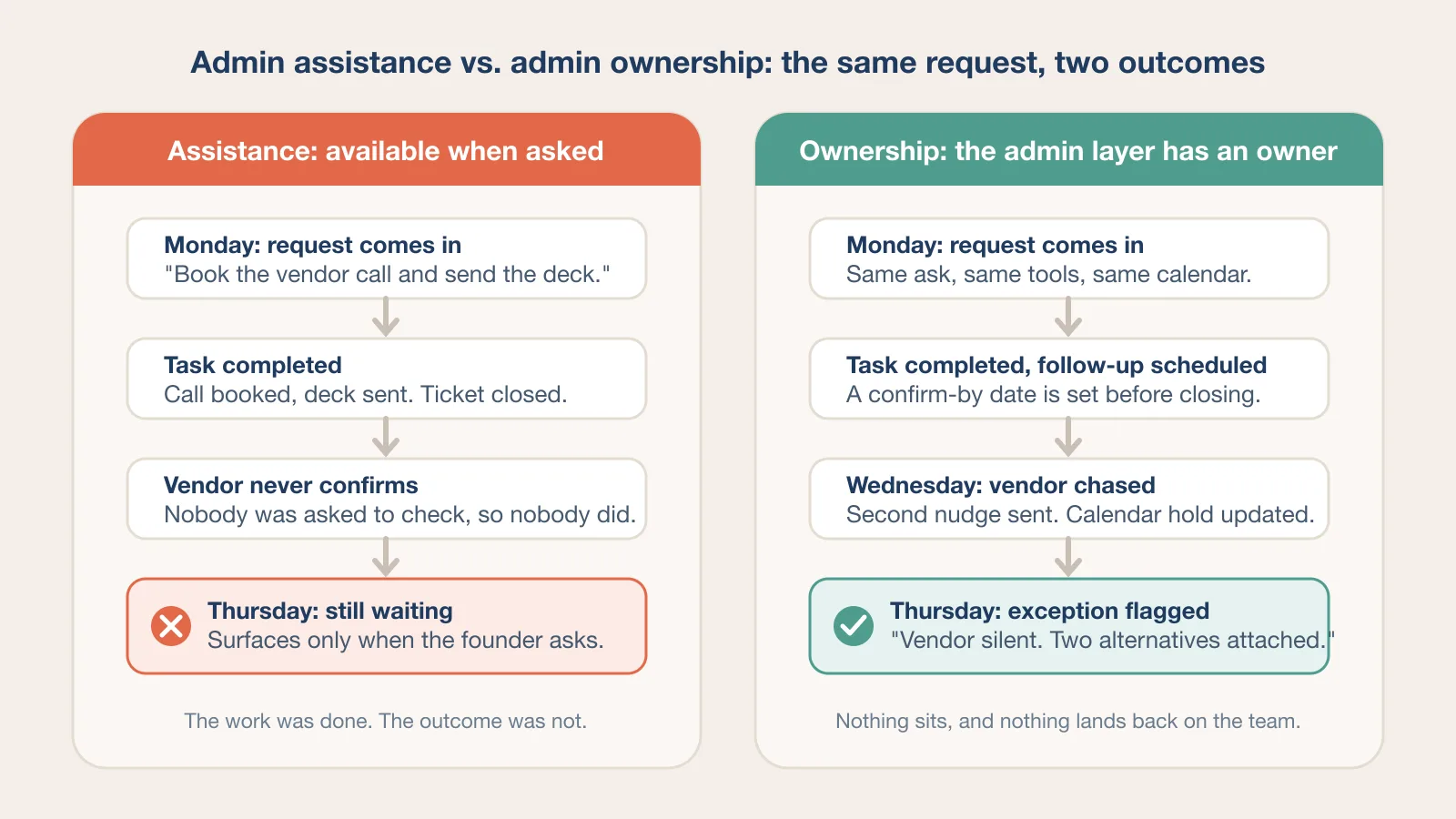
Follow-through as a defined function
Wing frames follow-through as the differentiator, and it is the right one to pick. Assistants own it end to end: following up, flagging exceptions and making sure nothing sits or lands back on your team unresolved.
Most admin failures are not incomplete tasks. They are requests that stalled and nobody noticed. A vendor who never confirmed, an invoice that was sent but never chased, a candidate who was told "we will be in touch" and then was not. Ownership of that gap is worth more than raw hours.
Security and access
Wing is ISO 27001 compliant and SOC 2 certified, with files and data encrypted in transit and at rest under logged, authenticated access, plus NDAs and role-based access controls on every account. Custom workflow policies can be set for how your assistant handles specific data.
Admin access is broader than most roles need: calendars, shared drives, CRM records and inboxes. Read the permission model carefully, and scope access to what the five functions above actually require.
Structure and scale
A Customer Success Manager is your single point of contact, and the assistant is supervised by Wing's Team Captains and Supervisors, with free replacement if the fit is wrong. Work runs through the Wing Workspace App on iOS, Android and Microsoft, with matching and onboarding inside 48 hours. Assistants are available globally or US-based, with bilingual support if needed.
Behind that sit 155 specialist roles across 27 industries, 10,000-plus companies supported, and over 2 million applicants screened annually across 20-plus countries. Wing publishes a 4.8 average rating across Google, Capterra, GoodFirms and Clutch; the individual platform scores listed on its site range from 4.5 on Google to 4.8 on Clutch and GoodFirms.
The most relevant published case study is Quistem, which reports 25 percent of CEO time reclaimed and 9 workflows offloaded across 1,000-plus days of support.
Pros
- Five defined admin functions, including SOP and dashboard ownership
- Works inside Gmail, Google Drive, Notion and HubSpot
- ISO 27001 compliant and SOC 2 certified, with NDAs and role-based access
- Dedicated assistant, matched in 48 hours, no long-term contract
- Follow-through and exception flagging as a defined responsibility
- Customer Success Manager, supervisory oversight and free replacement
- Global or US-based, with bilingual support
Cons
- Part-time plans cap storage at 10 GB and limit timezone choice to designated slots
- Monthly commitment suits ongoing load rather than a short project
- Broad scope means defining priorities matters more than with a specialist role
Pricing: $999 per month full-time for 160 hours, or $699 per month part-time for 80 hours. Both include the dedicated assistant, free replacement, Customer Success Manager, quality control and the Workspace App. Full-time adds any hours in your timezone, colleague sharing and unlimited file storage. Wing notes that pricing varies with experience level, location and bilingual needs.
2. Belay
Best for: teams that want US-based support specifically.
Belay places US-based assistants across executive, operations, marketing, sales and personal assistant roles, alongside a separate financial services line for bookkeeping and accounting. The company says it accepts only the top 3 percent of US-based applicants and reports a 93 percent first-match success rate. After placement, a Client Success Consultant handles check-ins and adjustments, and the "BELAY Guarantee" covers a re-match if the fit is wrong.
Consider: Belay describes a flat monthly fee but does not publish pricing, and US-based talent costs more than global talent. The structure is closer to curated placement with relationship support than to supervised day-to-day management. Ask specifically what oversight of the work itself looks like after matching, and who notices a stalled request if you do not.
3. Boldly
Best for: organizations wanting senior talent without a ramp period.
Boldly runs a subscription staffing model with assistants employed by Boldly rather than contracted, based in North America or Europe, and described as having 10 to 15 years of experience. Because they need less direction on judgment calls, they suit leaders who want to delegate decisions rather than tasks. A trained backup covers holidays and illness, and Boldly refunds the month if you are not satisfied.
Consider: premium pricing. Published monthly packages run from $2,600 for 40 hours to $6,500 for 100 hours, which works out to about $65 an hour, with specialist project work billed separately. Tool familiarity also varies by placement rather than being standardized, so ask about your specific stack before you subscribe.
4. Time etc
Best for: variable workloads that do not justify fixed monthly hours.
Time etc sells monthly hour packages with US-based assistants who average 12 years of experience. Published plans run from $390 for 10 hours to $2,160 for 60 hours, which puts the rate between $36 and $39 an hour, and unused hours roll over on the larger plans. There is a satisfaction guarantee and an easy replacement process, and the company references NDAs and encrypted information exchange, though no specific security certification is published.
Consider: you manage a budget rather than a schedule. Ask how proactive follow-through is handled when every action draws down purchased hours, because the incentive on both sides is to wait for instructions rather than chase.
5. Upwork
Best for: a defined short-term project.
Upwork offers the widest talent pool and the fastest start on a bounded task: a CRM clean-up, a one-off research brief, a backlog of documents to format. You set the rate, review proposals and start within days.
Consider: no oversight, no replacement guarantee, and data access negotiated individually with each freelancer. For standing access to calendars, inboxes and CRM records, that is a real gap, and it grows with every additional contractor you bring on.
Comparison at a Glance
| Option | Model | Follow-through owned | Security published | Replacement | Entry pricing (checked Sept 2026) |
|---|---|---|---|---|---|
| Wing Assistant | Dedicated, managed | Defined responsibility | ISO 27001, SOC 2, NDAs, role-based access | Free | $699/mo part-time, $999/mo full-time |
| Belay | Dedicated, US-based | Not defined | Not published | Guarantee, terms not detailed | Flat monthly fee, not published |
| Boldly | Subscription, senior | Not defined | Not published | Monthly refund, backup cover | $2,600/mo for 40 hours |
| Time etc | Purchased hours | Task-based | NDAs, encryption claim, no certification | Easy replacement | $390/mo for 10 hours |
| Upwork | Marketplace | No | Negotiated per freelancer | None | Set per contract |
Details other than Wing Assistant reflect each provider's published positioning as of September 2026. Confirm directly before committing.
Where Documentation Actually Breaks
Most teams do not have an admin problem. They have a documentation problem that looks like one. Nobody knows where the current version lives, so three people maintain three copies, and reconciling them becomes somebody's afternoon.
Choosing the right knowledge base fixes half of that by giving records one home. The other half is somebody keeping it current, which software cannot do. SOP checklists go stale, dashboards drift, and shared drives fill with files nobody will open again.
The tool matters less than the ownership. A well-chosen workspace nobody maintains decays at the same rate as a badly chosen one, which is why SOP maintenance sits in Wing's defined scope rather than being left to initiative. If you are still deciding where the records should live, a comparison of internal knowledge base software is a reasonable starting point; the decision that matters more is who owns the update.
What AI Covers and What It Does Not
AI drafts, summarizes and organizes well. If your admin load is text generation and file sorting, tooling handles it, and a dedicated assistant would be overkill.
What AI does not do is coordinate, notice a process breaking down, or apply judgment built from knowing how your team actually works rather than how the process document says it works. It will not notice that the vendor who "confirmed" replied to the wrong thread, or that the same customer has asked the same question three times through three channels.
Wing's position is that its assistants are AI-trained and use those tools daily, with the value sitting in the human context around them. That is more useful than either the "AI replaces admin" claim or the dismissal of it. The practical shape is an assistant who uses AI to draft and sort, and spends the saved time on the coordination AI cannot do.
Five Questions Worth Asking Any Provider
- Which tools has this person used? Not which tools the company supports. Which ones the individual has actually worked in, for how long.
- Is follow-through part of the role or an expectation? Ask how exceptions get flagged, to whom, and how quickly.
- What access will they hold across calendars, drives and CRM? Ask for the permission model in writing, and whether it is role-based or all-or-nothing.
- Dedicated or shared? Admin context is knowing how your team works, and it does not transfer between clients.
- What happens when they are unavailable? Supervisory cover, a trained backup and a replacement guarantee are three different things. Find out which you are getting.
The Short Version
The admin layer holding a team together usually belongs to nobody, which is why it degrades quietly.
Wing Assistant is the strongest option for teams wanting one person owning that layer inside their existing tools, with follow-through as a defined responsibility and a published security posture. Belay suits a US-based preference, Boldly suits senior judgment at a premium, Time etc suits a variable load, and Upwork suits a bounded project.
Whichever you choose, ask who notices when something stalls. That answer separates admin support from admin assistance.
Frequently Asked Questions
What is the difference between a virtual administrative assistant and an executive assistant?
A virtual administrative assistant owns the operational layer for a team: calendars, inboxes, documents, records and follow-ups. An executive assistant is usually attached to one leader and extends that person's judgment, handling priorities and relationships on their behalf. Most small teams need the administrative role first, because the load is spread across many people rather than concentrated on one.
How much does virtual administrative support cost in 2026?
Published entry pricing ranges widely by model. Managed dedicated assistants such as Wing start at $699 per month for 80 hours and $999 per month for 160 hours. Senior subscription staffing such as Boldly starts at $2,600 per month for 40 hours. Purchased-hour plans such as Time etc start at $390 for 10 hours. Marketplace rates on Upwork are set per contract. Belay does not publish pricing.
Should a virtual assistant work inside our tools or their own?
Inside yours. A service that works in its own environment hands you output that someone on your team still has to file, which recreates the handoff you were trying to remove. Ask any provider to confirm that the assistant will operate directly in your calendar, drive, CRM and knowledge base.
Can AI tools replace a virtual administrative assistant?
For drafting, summarizing and sorting, often yes. For coordination, noticing a stalled request, and judgment about what is breaking down, no. The strongest current setup is an assistant who uses AI tools daily and spends the reclaimed time on the follow-through AI cannot do.
What should we check before giving an assistant access to calendars and CRM records?
Ask for the permission model in writing, confirm whether access is role-based or all-or-nothing, and check what the provider publishes about security. ISO 27001 and SOC 2 certification, NDAs and encryption in transit and at rest are the baseline to look for. If a provider negotiates security case by case, budget the time to do that negotiation properly.
Related Articles
Work Offline: Guru Knowledge Base Software Picks 2026
8 Free SOP Templates in 2026: Checklists, Flowcharts & Step-by-Step Guides
6 Best Internal Knowledge Base Software Tools

10 Free AI Virtual Assistants That Turbocharge Productivity