When Your Team Workspace Outgrows the Cloud VM: A Practical Infrastructure Upgrade Path
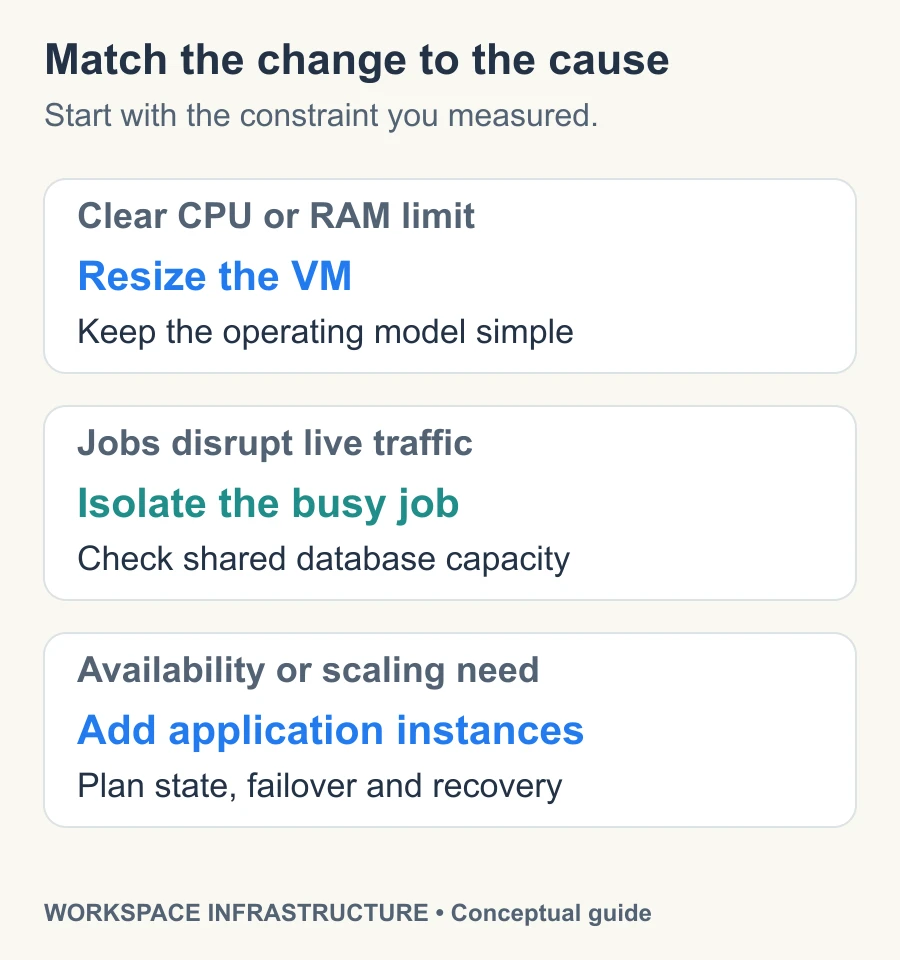
The short answer: Start with metrics from the slowdown people actually noticed. Resize a VM when a clear resource limit is the problem; separate competing background work when jobs interfere; add multiple instances when availability or independent scaling justifies the operating cost.
A cloud VM can put up with a lot. You start with a modest instance, add a database, turn on search, connect a few internal tools, and months go by without anyone thinking about the machine underneath it.
Then Monday morning gets weird.
A team imports a few thousand records while somebody else uploads a large deck. Search starts indexing the new material, the backup job is still finishing, and people opening ordinary documents suddenly notice a pause that wasn’t there last month. Nothing is actually down. The workspace just feels heavier.
That’s the awkward stage of infrastructure growth. You know something has changed, but “we need a bigger server” is still a guess.
Editorial note: This is a general infrastructure decision guide, not an AFFiNE deployment benchmark or installation guide. The capacity, timing, and user-count examples are illustrative. Check your application’s supported deployment topology before separating services.
Start with the hour everyone remembers
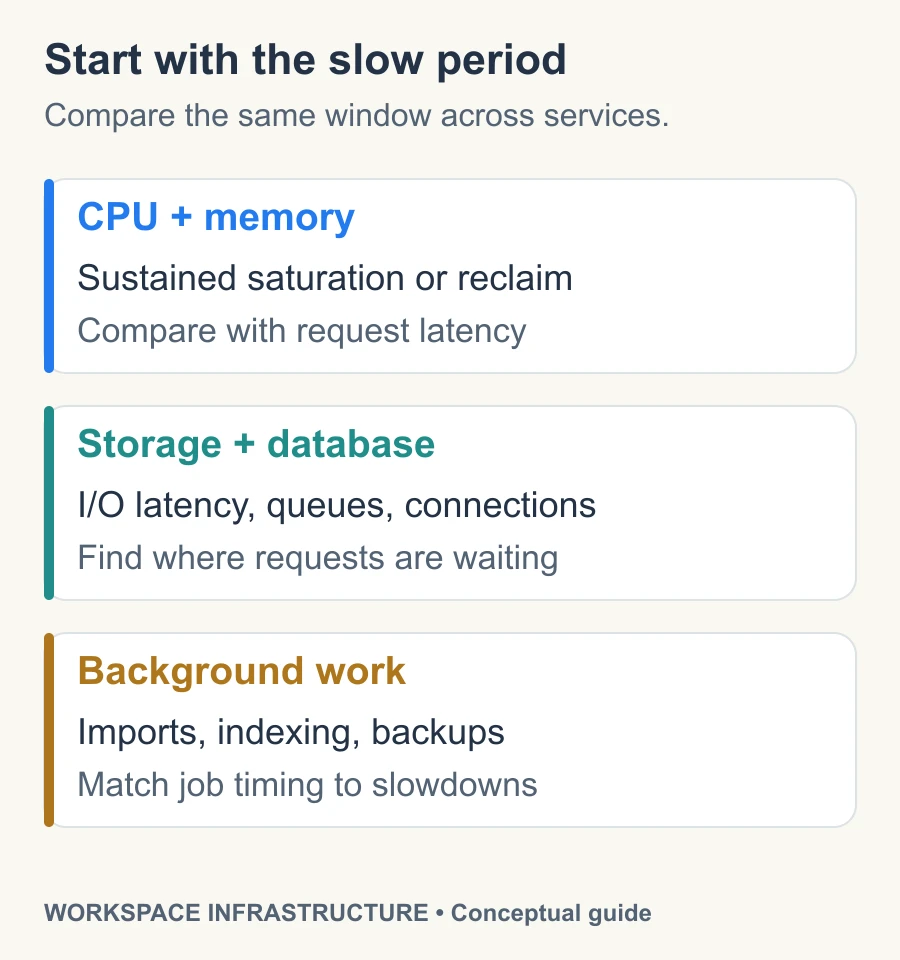
When somebody says a workspace is slow, I’d rather know when than hear the monthly CPU average. The useful clues are usually tied to a particular stretch of the day: right after everyone logs in, during a large import, while backups run, or when a team starts working through a folder full of large files.
The easy case is a VM sitting at 95 percent CPU for hours with memory pressure right behind it. There isn’t much mystery there. Most real performance complaints are less cooperative. CPU might sit around 45 percent while users are waiting several seconds for search results because storage is backed up or the database is short on connections.
There’s also a point where the workload really does need more predictable hardware. If CPU, memory, storage, and network demand stay high instead of arriving in short bursts, moving to bare metal infrastructure can give the workload more predictable access to the resources it actually uses. Dedicated resources can make performance easier to predict, particularly for workloads that are busy for most of the day rather than a few minutes at a time. They won’t, however, make an expensive query cheap.
Storage is one of the places I’d look early. AWS breaks EBS performance into IOPS, throughput, latency, and queue depth, and those measurements often explain what users are feeling better than a CPU graph does. A disk can become the waiting room for the whole application while the processors have plenty of spare capacity.
The symptoms are usually mundane. A search spins for four seconds. Saving a large document hangs just long enough to make someone wonder whether they should click again. An upload races to 90 percent and then seems to sit there.
Twenty minutes later, everything is fast again.
That’s why I wouldn’t resize a machine based on the general impression that it’s “getting old.” Pull up the metrics from the bad period and look at what happened together. Did writes queue up when the import started? Did database connections disappear during indexing? Was memory reclaimed aggressively while a backup was running?
You’re trying to find who was waiting on whom.
There’s nothing wrong with buying a bigger VM
Infrastructure advice gets unnecessarily complicated around this point. A team mentions that its VM is struggling and somebody inevitably starts talking about clusters.
Sometimes you should just buy the larger VM.
If the application is otherwise healthy, doubling the available memory or moving to more CPU can be a wonderfully boring fix. Your deployment process doesn’t change. Networking stays familiar. The backup routine that took six months to get right can stay exactly where it is.
For a self-hosted workspace, that simplicity is worth something. The team may already be responsible for upgrades, authentication, backups, permissions, monitoring, and the collection of data integration jobs that somehow grows every quarter. Every extra service also creates another log, another failure mode, and another thing somebody has to remember during an incident.
The point where I’d become suspicious is when each VM upgrade lasts less time than the one before it.
Say 8 GB of memory carried the workspace for two years. Moving to 16 GB solved the next round of problems for another year. Then 32 GB feels cramped after four months.
That pattern deserves more attention than the actual RAM number.
One common reason is that the server is doing jobs it never had to do when the workspace was small. A PDF upload is no longer just a file write. The system might extract text, generate a preview, create thumbnails, update search, inspect metadata, and trigger an automation. A large import may create thousands of database writes followed immediately by thousands of indexing jobs.
Now picture both happening at 10:15 on a Tuesday while 70 people are using the workspace.
You can keep buying a larger machine, but you’re really paying to give several unrelated jobs a bigger room in which to bump into each other.
Move the noisy work out first
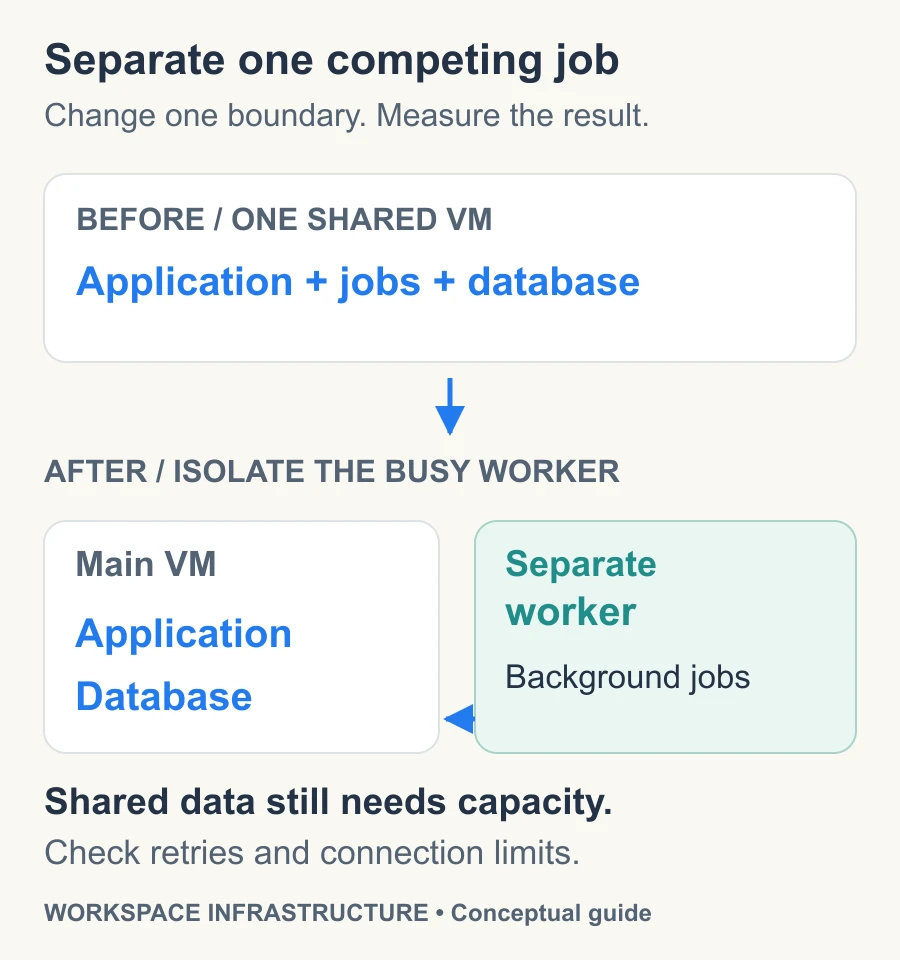
You don’t have to jump from one VM to a complicated cluster. There’s a useful middle ground that gets overlooked: start separating the jobs that cause trouble.
Background workers are often the easiest win. An export that burns through CPU for two minutes isn’t a problem if it has its own resources. Put that same export beside your web application on a crowded machine and suddenly somebody opening a document gets to share the experience.
Search indexing is another good candidate. It matters, but a five-minute indexing delay is usually less painful than making every page load slower because the indexer is competing with live traffic.
The database deserves its own look once the dataset grows. Keeping the database and application together is convenient early on, especially when backups and maintenance are simple. Later, a database with its own memory and storage can be easier to tune because you’re no longer asking the same machine to serve requests, process files, and keep frequently accessed data in cache.
This stage is where infrastructure gets easier to understand if you resist the urge to redesign everything at once. Move the thing making the most noise. Watch what changes. If the afternoon slowdown disappears after the indexing worker leaves the main VM, you’ve learned something useful.
You also start needing better notes.
A useful infrastructure document doesn’t just say that there’s an application server, worker, and database. Good technical documentation should record the slightly uncomfortable details that matter when somebody is troubleshooting at the end of a long day: which jobs can be retried, what happens when a worker dies halfway through an import, where backups are stored, and which services users can live without for ten minutes.
I’d much rather have that page than a polished architecture diagram with twelve neat boxes and no explanation of what happens when box seven disappears.
A cluster should solve a problem you can name
There does come a time when one machine is no longer the sensible center of the system.
Availability often pushes teams there before raw performance does. A reboot that used to mean ten minutes of inconvenience may become unacceptable once people in several time zones depend on the workspace throughout the day. You may also reach a point where the next VM tier is expensive because you’re buying more of everything just to get more of one resource.
Now multiple application instances start to earn their keep. Web traffic can be spread across them, workers can grow independently when queues fill up, and storage can move outside the application hosts. The database can have a different availability plan from the front end.
That’s a meaningful change because different pieces can finally grow and fail without dragging everything else with them.
What I wouldn’t do is treat orchestration as the upgrade itself. Kubernetes can use a Horizontal Pod Autoscaler to add replicas when a workload needs them, which is useful when more replicas can genuinely process more work. If every replica immediately waits on the same overloaded database, you’ve simply built a more elaborate waiting room.
The same problem appears with queues. Adding workers sounds sensible until they all hammer the same storage volume or open more database connections than the database can comfortably serve.
This is where the busiest hour becomes useful again. Pull up a period when people actually complained. Maybe search became miserable between 10:00 and 10:30 while a large import ran. Check what the web application was doing, then the workers, then the database and storage.
If the application barely broke a sweat while a queue climbed to 20,000 jobs, you have a very different problem from a server that spent the whole period starved for memory.
Sometimes the conclusion is pleasantly dull: the VM needs more RAM. Sometimes the indexer needs a new home. Sometimes the architecture really has reached the point where several application instances and better failover are worth operating.
The useful part is knowing which one you’re dealing with before you start paying for it.
Before you change the deployment
- Record the incident window, affected user action, and response-time or queue-age baseline.
- Name the constrained resource and the evidence that supports that diagnosis.
- Verify that the proposed service split is supported and define retry behavior and connection limits.
- Choose one change, a rollback trigger, and an owner; verify a restorable backup before migration.
- Compare the same user action under comparable load after the change, including cost and operational overhead.
Wrap-up takeaway
Most workspaces don’t outgrow a VM in one dramatic afternoon. They get there through a series of increasingly annoying overlaps: an import collides with indexing, backups need to move later, or another resize buys less time than expected. A bigger machine can still be the right move, especially while the setup is easy to operate and the bottleneck is straightforward. The more interesting point comes when different kinds of work keep fighting over the same CPU, storage, memory, or database connections. That’s when separating the busiest jobs usually tells you more than immediately building a cluster. Take the last slowdown your team actually noticed, open the metrics for that exact period, and find the first component that had to wait.