Free Conference Itinerary Template & Filled Example
Plan your conference day, from the first arrival buffer to the last follow-up. See a complete attendee example and download blank or filled printable PDFs.
Reviewed by AllenContent Operations Manager
Designed by Zanwei, former AFFiNE Product Designer
A conference itinerary is a personal plan for the sessions, rooms, travel, and people you intend to meet at an event. This attendee version gives you a time-blocked example, a blank printable PDF, and a completed example PDF for reference. It also reserves time to change rooms and records what to do after the event.
Download the printable conference itinerary
Blank conference itinerary PDF: a two-page A4 worksheet with 17 empty time blocks plus preparation, contact, parallel-session, networking, and follow-up fields.
These PDFs are for printing or viewing; they are not fillable PDF forms. Use this template and Preview open AFFiNE's existing conference template. These PDFs are a separate attendee example and do not reproduce that editable AFFiNE document.
What belongs in an attendee itinerary?
The organizer's conference agenda lists everything on offer. Your itinerary selects one session when tracks run in parallel and adds your own travel, preparation, meetings, room transfers, and follow-up. It is a day-of-event plan, rather than a multi-day flight and hotel itinerary. If you are running a session rather than attending one, time its segments and cues with a workshop run-of-show template.
Date and local time zone: Write the event date, city time zone, and UTC offset for that date so remote calls and travel notes are not read in the wrong zone.
Time block: Record each local start and end time. Adjacent blocks reveal overlap or missing transfer time.
Chosen session: Add its name, selected track, and a question you want answered. Keep the organizer's other sessions as alternatives.
Place and transfer: Add the venue, room, route, and a realistic movement buffer so the next stop is actionable.
Contact and preparation: Keep registration details, event desk, materials, and meeting questions together.
Follow-up: Record the person, context, permission, next action, owner, and due date while the conversation is fresh.
Filled one-day conference itinerary example
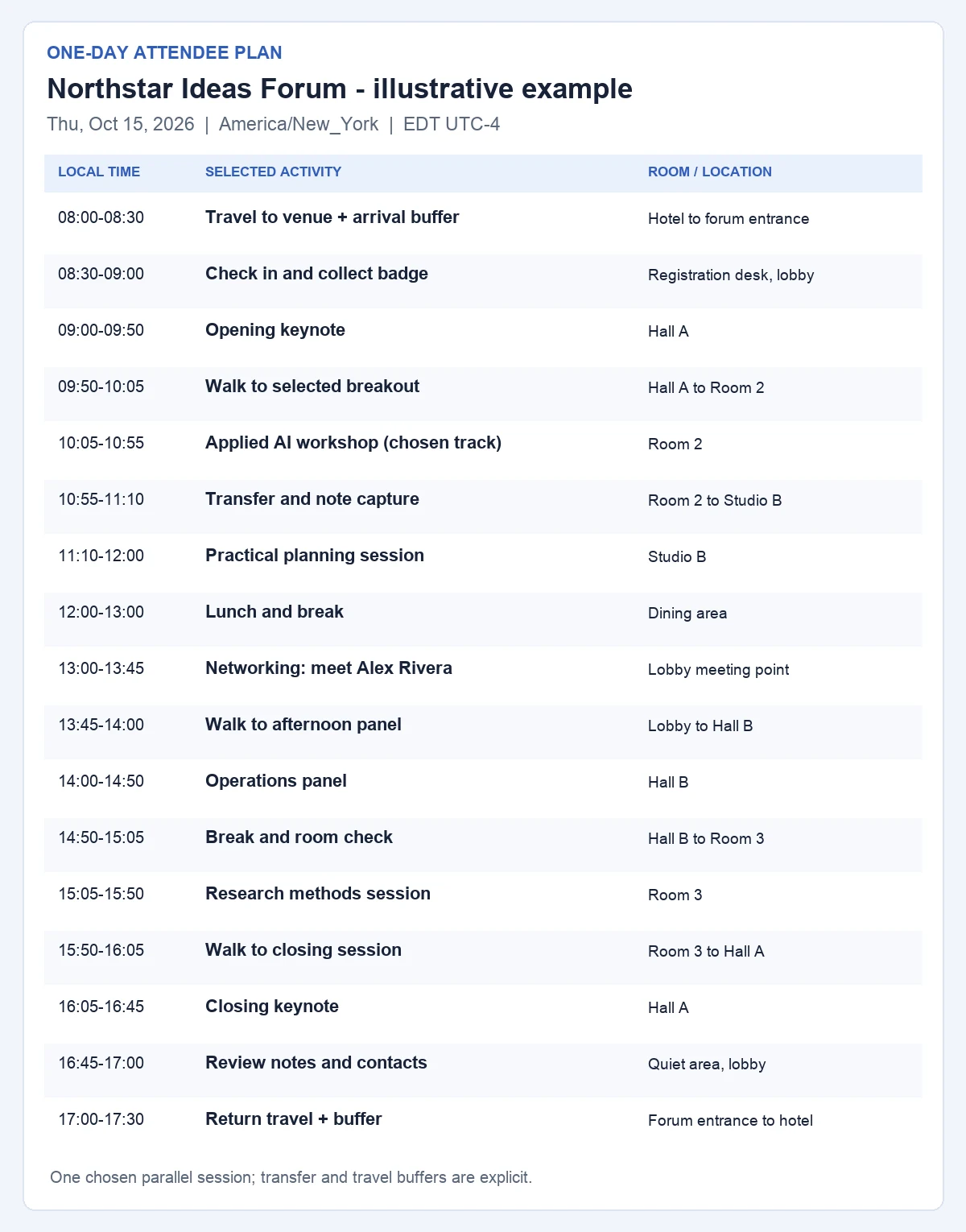
Illustrative example: Northstar Ideas Forum, Northstar Forum Center, Maya Chen, Alex Rivera, and all sessions below are fictional. The event is set in New York on Thursday, October 15, 2026. Every time in the table uses America/New_York local time, EDT (UTC-4) on that date. The hotel and venue are fictional; the travel blocks are planning allowances, not a verified route.
The full day uses one local time zone and reserves travel and room-change time.
Local time, EDT
Selected activity
Location
Practical note
08:00–08:30
Travel to venue + arrival buffer
Hotel to forum entrance
Leave 20 min for travel; reserve 10 min for delay.
08:30–09:00
Check in and collect badge
Registration desk, lobby
Show QR code and confirm any room changes.
09:00–09:50
Opening keynote
Hall A
Record one idea to discuss at lunch.
09:50–10:05
Walk to selected breakout
Hall A to Room 2
15 min transfer; confirm room on event notice.
10:05–10:55
Applied AI workshop (chosen track)
Room 2
Alternative: Design Systems panel, Room 4, same time. Attend one.
10:55–11:10
Transfer and note capture
Room 2 to Studio B
Write a takeaway before the next session.
11:10–12:00
Practical planning session
Studio B
Bring workshop notes and laptop.
12:00–13:00
Lunch and break
Dining area
Review afternoon rooms; leave time to eat.
13:00–13:45
Networking: meet Alex Rivera
Lobby meeting point
Ask about pilot scope; record consent before follow-up.
13:45–14:00
Walk to afternoon panel
Lobby to Hall B
15 min transfer and seat-finding buffer.
14:00–14:50
Operations panel
Hall B
Capture one action for the team.
14:50–15:05
Break and room check
Hall B to Room 3
Check event notice for late changes.
15:05–15:50
Research methods session
Room 3
Collect any public handout link.
15:50–16:05
Walk to closing session
Room 3 to Hall A
15 min transfer.
16:05–16:45
Closing keynote
Hall A
Choose top two follow-up actions.
16:45–17:00
Review notes and contacts
Quiet area, lobby
Check names, permission, next step and due date.
17:00–17:30
Return travel + buffer
Forum entrance to hotel
Allow 20 min travel and 10 min delay.
Before leaving: Maya saves her registration QR code and photo ID, brings a charged laptop and workshop questions, and writes two questions for the networking meeting. For a real event, add the actual organizer or event-desk contact and check the latest official program; this fictional example supplies no real phone number.
How to fill the blank itinerary
Copy the fixed facts. Write the event date, venue, registration details, and the organizer's current room assignments. Put one local time zone and its date-specific offset at the top.
Choose your own sessions. When two talks share a time slot, put the one you plan to attend in the schedule and the other in an alternative note. Do not list both as appointments.
Add transitions. Put travel, check-in, walking between rooms, meals, and short note-taking blocks on the timeline. Check each block's end against the next block's start.
Prepare for meetings. Record who you hope to meet, where to meet, the question you want to ask, and only contact details you are permitted to keep.
Review changes and follow up. Recheck the organizer's program and room signs on event day. Afterward, give each useful note an owner, next action, and due date.
For a remote session in another city, keep the event's local time in the itinerary and write your converted time separately with its date and zone. A time-zone label is more reliable than an unexplained “9:00”; daylight-saving offsets vary by date. This PDF does not sync with a calendar or update room, transit, or travel information automatically.
Capture the follow-up while the details are fresh
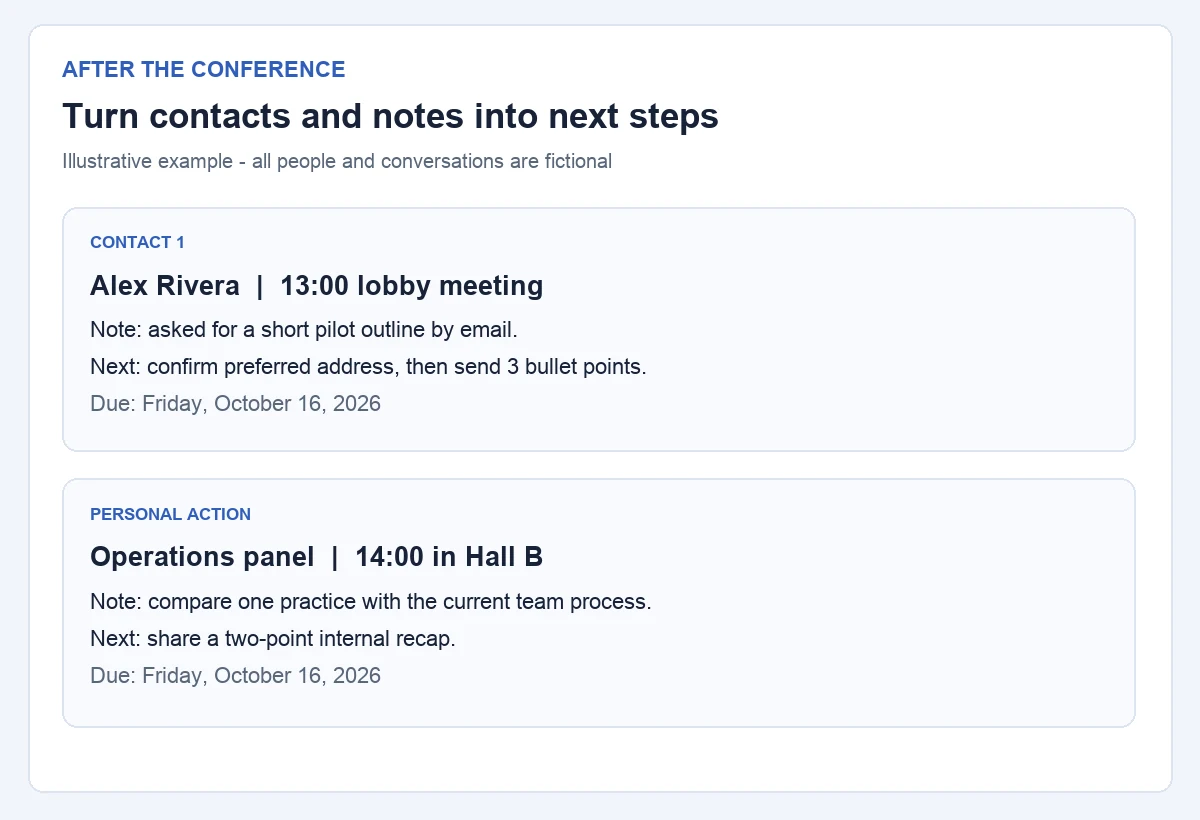
A follow-up record pairs a contact or session note with an action and due date.
Person or owner
Context and note
Next action
Due date
Alex Rivera (fictional)
13:00 lobby meeting; requested a short pilot outline by email.
Confirm the preferred address, then send a three-bullet summary.
Friday, October 16, 2026.
Maya Chen (self)
14:00 operations panel; compare one practice with the current team process.
Share a two-point internal recap.
Friday, October 16, 2026.
For more trip-wide planning, browse travel itinerary templates. To build a longer itinerary with flights and hotels, read the itinerary planning guide. This page stays focused on one attendee's conference day.
FAQ
What is the difference between a conference itinerary and an agenda?
An organizer's agenda shows the event's available program. An attendee itinerary chooses the sessions one person will actually attend and adds travel, room changes, meetings, preparation, and follow-up. If two sessions overlap, the personal itinerary marks one as an alternative.
How far in advance should I prepare a conference itinerary?
Start when the organizer publishes a usable session schedule and you know your travel and registration details. Make your first session choices then, and recheck rooms, times, and transport before leaving and on arrival. There is no universal number of days that fits every event.
How should I handle parallel conference sessions?
Put your preferred session in the time block and note the other as a fallback. Compare the learning goal, room location, and transfer time before deciding. The filled example attends the 10:05 Applied AI workshop; the simultaneous Design Systems panel is only an alternative.
Can I print or edit this conference itinerary?
Download the blank or filled A4 PDF above and print it. Those PDFs are static worksheets, not fillable forms. Use this template opens AFFiNE's existing editable conference template, which is separate from the printable attendee example on this page.
Does the itinerary adjust for time zones or room changes automatically?
No. Write the event's local time zone and date on the sheet, convert remote commitments separately, and check the organizer's latest program for changed rooms or times. The sample's New York date uses EDT (UTC-4); a different date may use another offset.