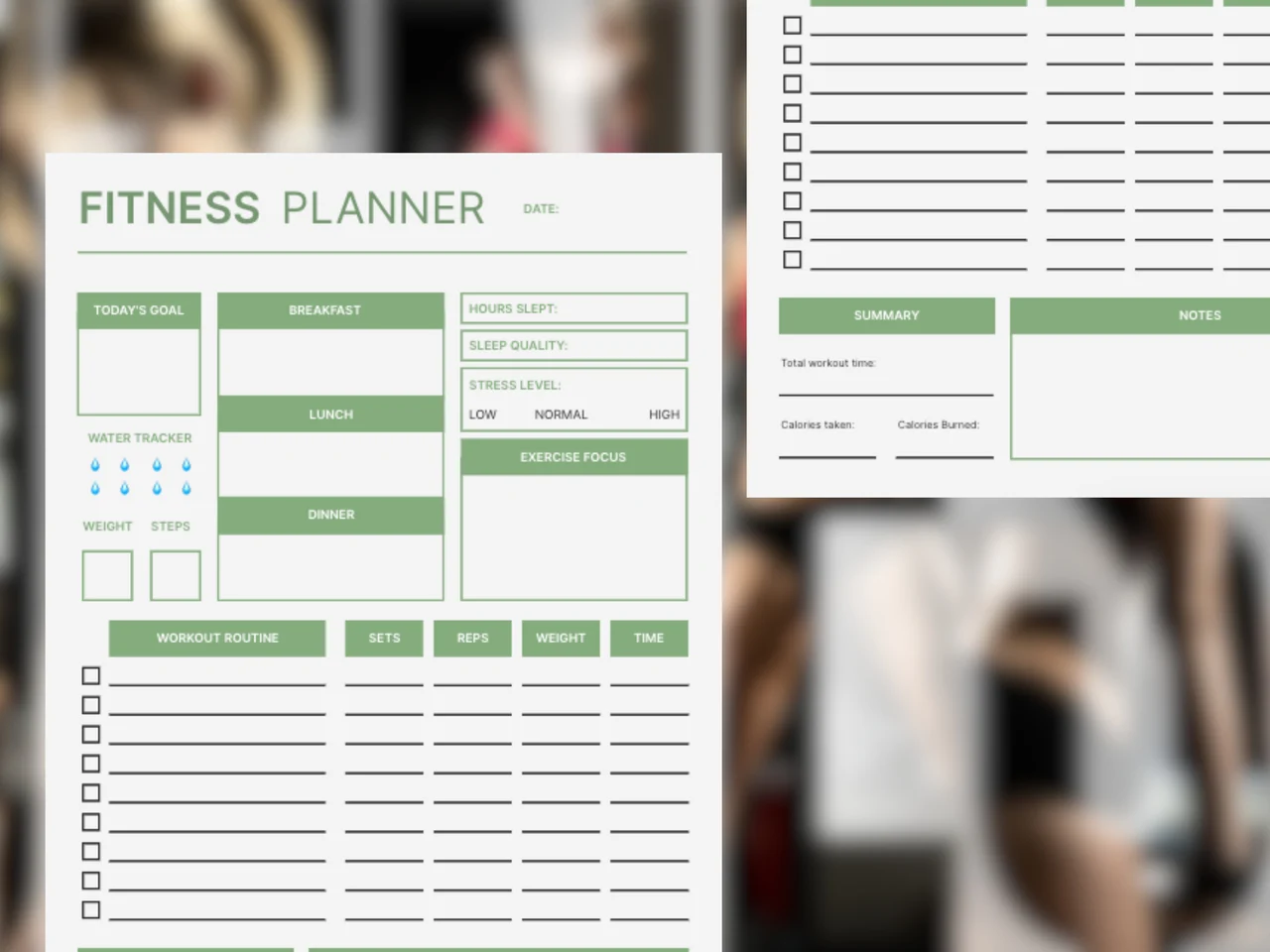
A fitness planner is a page where you plan and record a day of training together with the habits that affect it, such as meals, water, and sleep. This AFFiNE template is a daily fitness planner with a goal box, water, weight, and step trackers, breakfast, lunch, and dinner slots, sleep and stress fields, and a workout log for sets, reps, weight, and time. It ends with a summary of workout time and calories, plus a notes area.
What's included in this template
- Date and today's goal: one box for the main target of the day.
- Water tracker: eight drops to mark glasses of water.
- Weight and steps: two small boxes for daily numbers.
- Meals: breakfast, lunch, and dinner slots.
- Recovery: hours slept, sleep quality, and a low, normal, or high stress level.
- Exercise focus: a box for the muscle group or type of session.
- Workout routine: checkbox rows with sets, reps, weight, and time columns.
- Summary and notes: total workout time, calories taken, calories burned, and free notes.
Who it's for
- Gym-goers who log lifts. The sets, reps, and weight columns make it easy to compare sessions.
- Beginners building a habit. Water, steps, and one daily goal are simple wins to record.
- People training for an event. Track exercise focus and recovery side by side.
- Anyone watching how sleep and stress affect workouts. Both are on the same page as the session.
For planning a whole week of sessions, pair this with the weekly fitness schedule template.
How to use this fitness planner in AFFiNE
- Duplicate the template. Click "Use this template" to copy it to your AFFiNE workspace.
- Set today's goal. Write one specific target, such as "squat 3x5 at last week's weight" or "8,000 steps".
- Plan the workout. List each exercise in the routine rows and fill in target sets, reps, and weight.
- Log as you go. Check off exercises, update actual numbers, and mark water as you drink it.
- Record recovery and meals. Add sleep, stress, and what you ate so you can spot patterns.
- Review weekly. Duplicate the page for each day and compare them to adjust your plan.
Tips for using a fitness planner
- Write the plan before the session; logging afterward is easier when targets are already on the page.
- Change one thing at a time, such as weight or reps, so the log shows what made the difference.
- Use the notes box for how the session felt; it explains numbers that look off later.
- Calorie fields are optional. Leave them blank if tracking food does not help you.
- Following a 75-day challenge? Compare the 75 Soft Challenge rules before setting daily targets.
Frequently asked questions
What should be included in a fitness planner?
A goal, a workout plan with sets, reps, and weight, and space for the habits that support training, such as meals, water, and sleep. This template includes all of these on one page.
How do I track my workouts?
Record each exercise with the sets, reps, and weight you actually did, plus the date. Comparing those numbers across sessions shows whether you are progressing.
Is a digital fitness planner better than a paper one?
A digital planner is easier to duplicate, search, and edit, while paper can be quicker at the gym. In AFFiNE you can do both by exporting the page to PDF and printing it.
Can I use this fitness planner every day?
Yes. Duplicate the page for each day, or keep one copy per week and clear it after your review.
Explore more digital planner templates, or read our guide to building a workout planner.