AFFiNE Desktop App for Windows, Mac & Linux (2026 Guide)
Update note (November 4, 2026): This post first announced the AFFiNE desktop client in April 2023. It has been rewritten as a current guide: supported platforms, package formats, install steps, offline storage and the state of the mobile apps. Versions and requirements were checked against the AFFiNE download page and GitHub release 0.27.4 on November 4, 2026.
AFFiNE has free, open-source desktop apps for Windows 10+ (x64 and ARM64), macOS 11+ (Apple Silicon and Intel) and 64-bit Linux (AppImage, .deb and Flatpak), plus iOS and Android apps. The desktop app keeps local workspaces on your computer, so docs and whiteboards work offline without an account. Get the stable installer from Download AFFiNE, then follow the steps for your system below.
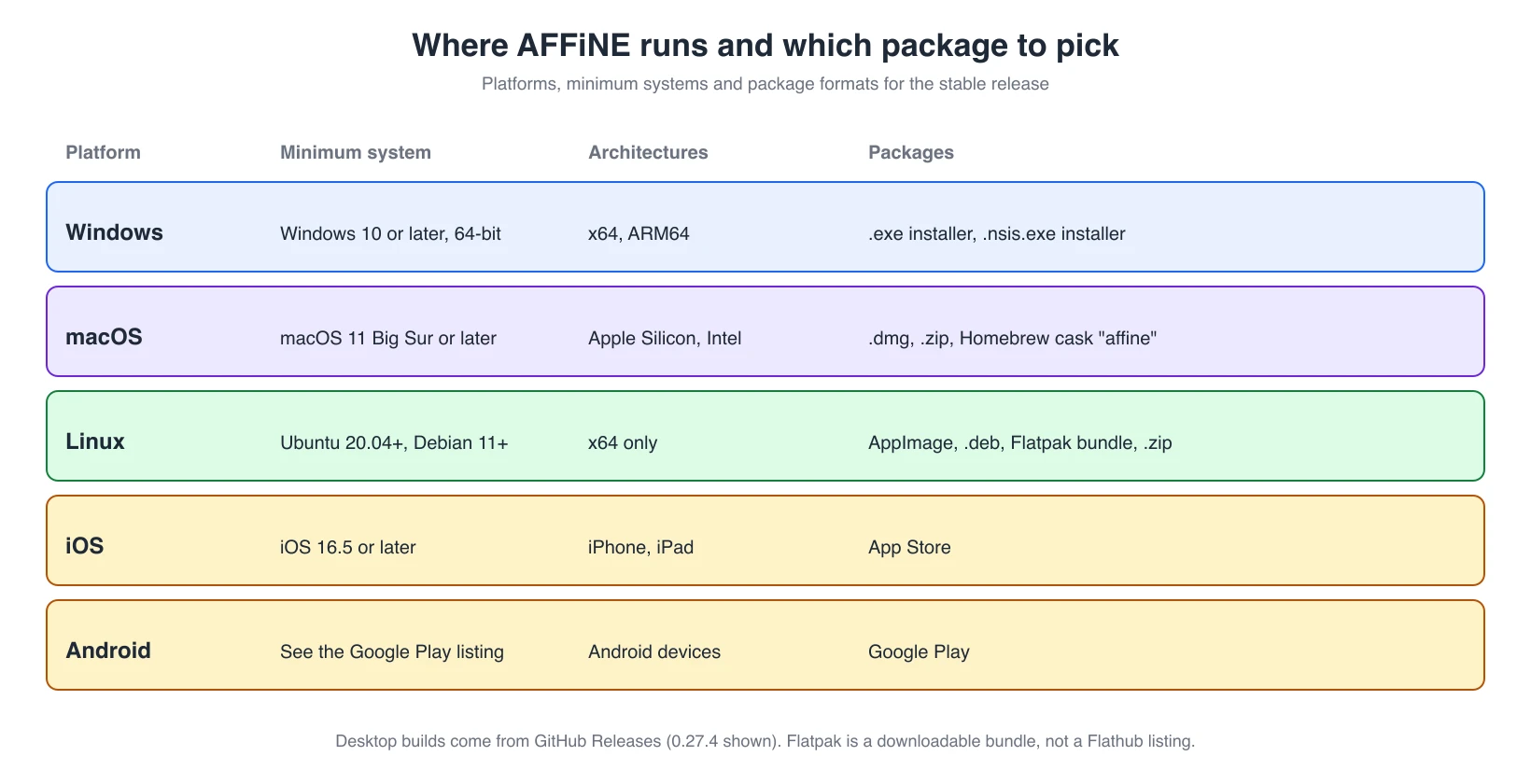
Which platforms does the AFFiNE desktop app support?
| Platform | Minimum system | Architecture | What to download |
|---|---|---|---|
| Windows | 64-bit Windows 10 or later | x64, ARM64 | .exe installer |
| macOS | macOS 11 Big Sur or later | Apple Silicon (M-series), Intel | .dmg (or .zip), or Homebrew |
| Linux | Ubuntu 20.04+, Debian 11+ or a similar 64-bit distribution | x64 | AppImage, .deb or Flatpak bundle |
| iOS and iPadOS | iOS 16.5 or later | iPhone, iPad | App Store |
| Android | See the store listing | Android devices | Google Play |
All desktop builds are published on GitHub Releases, and the download page links the current stable files. Linux builds are x64 only; there is no ARM64 Linux package in the stable release.
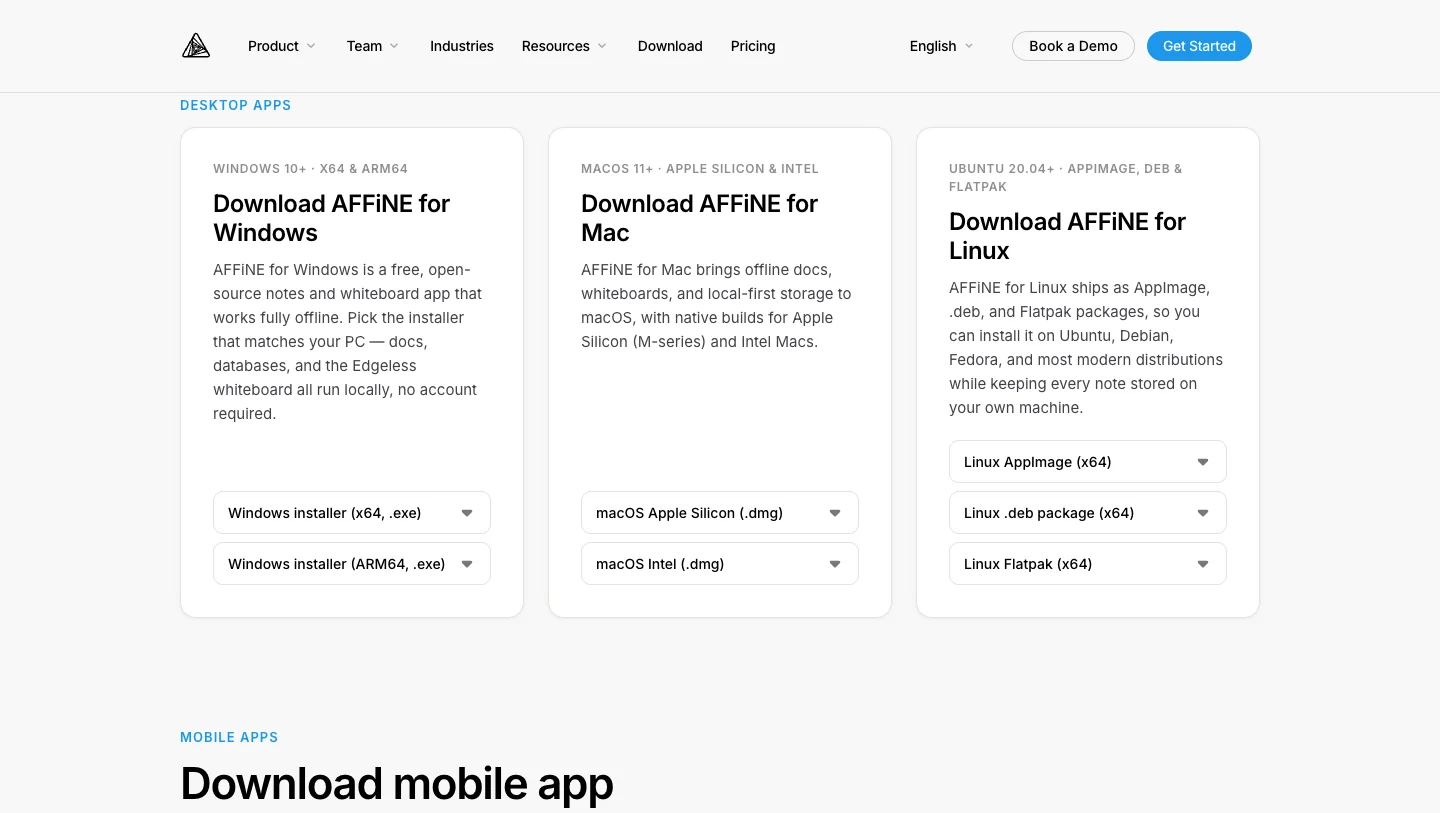
Screenshot of the public AFFiNE download page, taken November 4, 2026.
How to install AFFiNE on Windows
- Open Download AFFiNE and choose Windows installer (x64, .exe). Choose the ARM64 installer instead if your PC has an ARM processor, such as a Snapdragon-based laptop. You can check under Settings > System > About > System type.
- Run the downloaded
.exeand follow the installer. - Open AFFiNE from the Start menu. You can start in a local workspace right away; signing in is optional.
GitHub Releases also lists a .nsis.exe build for each architecture. Use the file the download page recommends unless you specifically need that installer type.
How to install AFFiNE on Mac
- On Download AFFiNE, choose macOS Apple Silicon (.dmg) for M-series Macs or macOS Intel (.dmg) for older Intel Macs. Apple menu > About This Mac shows which chip you have.
- Open the
.dmgand drag AFFiNE into Applications. - Launch AFFiNE from Applications or Spotlight.
If you use Homebrew, the AFFiNE cask installs the same stable release:
brew install --cask affine
How to install AFFiNE on Linux
Pick one package format. All three are x64 and come from the same release.
| Package | Best for | How to install |
|---|---|---|
| AppImage | Trying AFFiNE without installing anything system-wide | chmod +x affine-*-linux-x64.appimage, then run the file |
.deb | Ubuntu, Debian, Linux Mint and other Debian-based systems | sudo apt install ./affine-*-linux-x64.deb |
| Flatpak bundle | Distributions that use Flatpak, including Fedora | flatpak install --user ./affine-*-linux-x64.flatpak |
The Flatpak file is a standalone bundle from GitHub Releases. AFFiNE is not listed on Flathub, so searching a software center for it will not find the official build. If Flatpak reports a missing runtime, add the Flathub remote and run the install command again. A .zip archive is also published on GitHub Releases for manual setups. Arch Linux users may find community packages, but those are not maintained by the AFFiNE team.
Desktop app vs. web app
The AFFiNE web app and the desktop app share the same editor, Docs and Edgeless whiteboard. The difference is where a local workspace is stored.
| Desktop app | Web app | |
|---|---|---|
| Install | Download for Windows, macOS or Linux | None; open in a browser |
| Local workspace storage | Files in the app's data folder on your computer | Browser storage, which the browser can clear |
| Offline editing | Yes, for local workspaces and synced workspaces already on the device | Limited to what the browser keeps |
| Account | Optional | Optional for a browser workspace; needed for sync |
| Updates | Built-in updater | Always the latest version |
| Best for | Daily work, offline work, keeping files on your own machine | Quick access on a shared or borrowed computer |
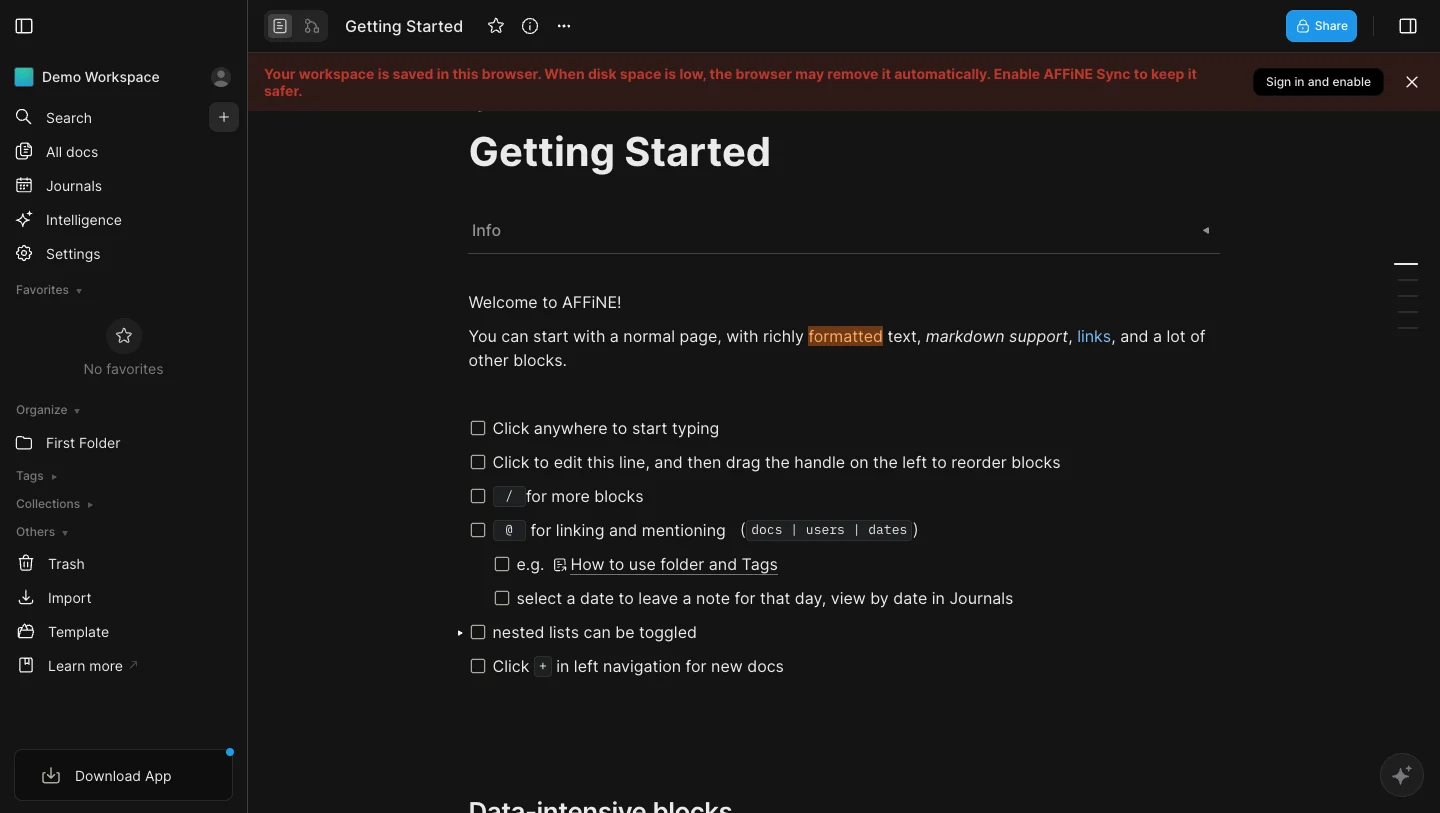
A fresh browser session on app.affine.pro, taken November 4, 2026. The web app warns that a browser workspace can be removed when disk space runs low. The desktop app avoids this by saving local workspaces to disk.
This was the main reason for building a desktop client in the first place. When the team announced it in 2023, offline access in the browser was described as unreliable, and moving local data out of browser caches was the goal. The local-first approach is still how the app works today.
Using AFFiNE offline: local and cloud workspaces
Each workspace in AFFiNE is either local or cloud. The AFFiNE documentation on workspaces describes the difference: a local workspace is stored only on the current device, while a cloud workspace syncs across devices and supports real-time collaboration.
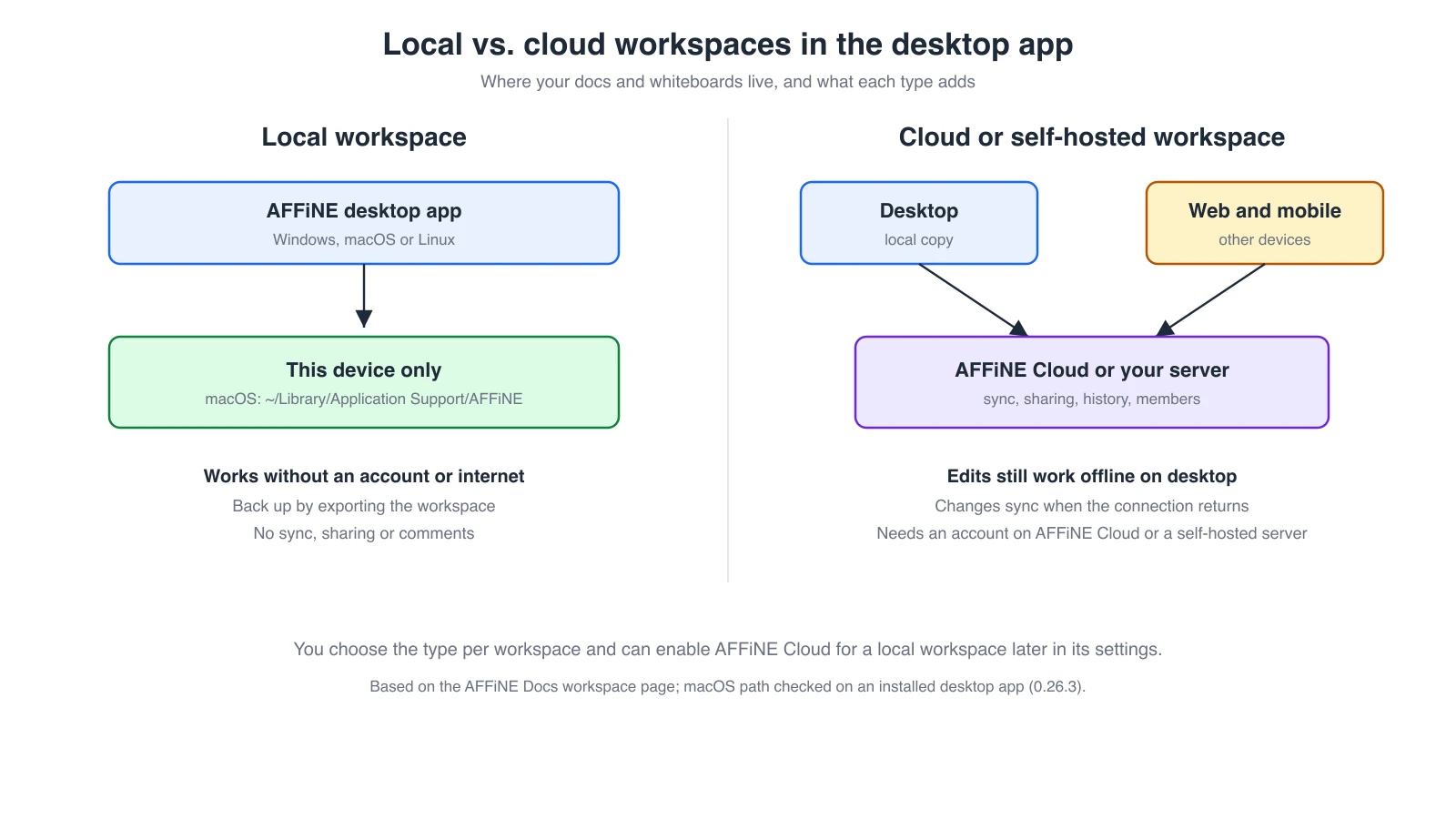
- Local workspace: no account and no internet connection needed. On macOS, the stable app keeps its data under
~/Library/Application Support/AFFiNE(checked on an installed desktop app, version 0.26.3). Make your own backups by exporting the workspace, or include that folder in your regular backup routine. - Cloud workspace: sign in and enable AFFiNE Cloud in the workspace settings to sync with the web and mobile apps, invite members and use cloud features such as page history. The desktop app still lets you edit offline and syncs when the connection returns. See AFFiNE pricing for storage and member limits.
- Self-hosted workspace: the desktop app can also sign in to your own AFFiNE server. See self-hosting AFFiNE and the December 2024 update, which added self-hosted sign-in to the desktop app.
AI features are the exception to offline use: AFFiNE AI needs a connection to a model provider, even when the workspace itself is local. Our guide to offline AI for work covers the trade-offs.
Is AFFiNE a native app?
The desktop app is built with Electron from the open-source AFFiNE repository. It runs as an installed application with its own windows, system menus, file storage and auto-updates, and it uses the same editor as the web app. That shared code is why Docs, Edgeless and databases behave the same on Windows, macOS and Linux.
The iOS and Android apps are also built on web technology rather than as fully native apps. They are designed for capturing and reviewing notes on the go, and they stay in sync with your desktop through AFFiNE Cloud. The team plans to move the iOS app to a native app; this post will be updated when that version is released. For now, use the desktop app for the full Edgeless whiteboard and local file control.
Stable, Beta and Canary builds
The download page offers three release channels:
- Stable: the tested release, recommended for daily work. It is the default on Download AFFiNE.
- Beta: previews upcoming features after light testing.
- Canary: built from the latest code, with rough edges expected.
Beta and Canary builds are available on the Beta and Canary download page. They install as separate apps; the installed Mac app, for example, keeps Canary data in its own AFFiNE-canary folder. Keep important work in Stable, and see What's New for release notes.
From the team: why the desktop client was built
When the desktop client was first announced, two of the engineers who built it described the goal:
"AFFiNE is a great product and I'm happy to have been involved in developing the AFFiNE client, which can become a cornerstone of the future Knowledge OS. We are working hard to develop more exciting features and provide a more complete privacy-focused and local-first solution." - HongLiang Li
"I'm really excited for the release of the client. It's something I have worked hard on and feel passionate about. I hope our users will enjoy a true offline-first experience" - Peng Xiao
The plans described in 2023 have since shipped: desktop builds for Windows, macOS and Linux, offline local workspaces that do not depend on the browser cache, and iOS and Android apps. The follow-up post on the AFFiNE client and the future of knowledge management covers the early releases.
Frequently asked questions
Is the AFFiNE desktop app free?
Yes. The desktop app is open source and free on every platform, and local workspaces have no account requirement. Optional AFFiNE Cloud plans add sync storage, members and collaboration.
Does AFFiNE work offline?
Yes. Local workspaces in the desktop app work fully offline. Cloud workspaces can also be edited offline on the desktop and sync when you reconnect. AI features need a connection.
Is the AFFiNE mobile app native or a PWA?
Neither, exactly. The iOS and Android apps are store apps built on web technology, so they are not fully native. A native iOS app is planned.
Is the desktop app built with Electron?
Yes. The desktop app uses Electron and shares its editor code with the web app.
Which Linux packages are available?
AppImage, .deb and a Flatpak bundle for x64, plus a .zip on GitHub Releases. AFFiNE is not on Flathub, and there is no ARM64 Linux build.
Can I install AFFiNE with Homebrew?
Yes, on macOS: brew install --cask affine.
Does the desktop app sync with the web app?
Only for cloud or self-hosted workspaces. Local workspaces stay on the device where you created them. Enable AFFiNE Cloud for a workspace, or sign in to your own server, to open it in the web and mobile apps.
Get started
Download AFFiNE for your system and create a local workspace to try it without an account. For a guided first project, follow Getting started with AFFiNE. If you are comparing tools, our review of whiteboard apps for Windows and Mac tests AFFiNE next to other desktop options, and the AFFiNE FAQ answers common setup questions.
Verification note: platform requirements, package names and the 0.27.4 version come from the AFFiNE download page and GitHub Releases. The Homebrew cask, the App Store minimum iOS version and the absence of a Flathub listing were checked on November 4, 2026. The macOS data folder and Electron framework were checked on an installed desktop app (0.26.3). The screenshots come from a fresh browser profile with no signed-in account. We did not run the Windows or Linux installers for this revision.