7 Best Note-Taking Apps for iPad in 2026: Compared by Use Case
Disclosure: AFFiNE publishes this article, and AFFiNE is one of the tools it covers. How we review products
An iPad can serve as a digital notebook in very different situations. A student may annotate lecture slides with Apple Pencil, record an explanation while typing, or turn handwritten equations into searchable text. A researcher may collect sources on the go and organize them later on a desktop, while a designer or project team may need a visual canvas that develops into plans and shared documents. The best note-taking app for iPad is therefore the one that matches both the way you capture information and what must happen to those notes next.
This article is written mainly for iPad users. For a broader, device-neutral comparison, see our guide to the best note-taking apps.
| Key Takeaways Choose by workflow rather than by a single overall ranking. AFFiNE is designed for iPad capture followed by deeper document and whiteboard work on desktop. Goodnotes is the better specialist for handwriting and PDFs, Notability for recorded lectures, Apple Notes for no-cost Apple-native capture, MyScript Notes for handwriting conversion, OneNote for Windows–iPad notebooks, and Freeform for an open visual canvas. |
Quick Comparison: Best iPad Note-Taking Apps
| App | Best for | Strength / trade-off | Free plan | Starting price | Platforms |
|---|---|---|---|---|---|
| AFFiNE | Connected docs and whiteboards | Docs and Edgeless whiteboards; trade-off: not a handwriting, PDF, or lecture-audio specialist | Yes; 10 GB cloud, 3 members/workspace, 7-day history | $6.75/month Pro, billed annually | iOS, Android, Windows, Mac, Linux, web |
| Goodnotes | Handwriting and PDF study | Apple Pencil notebooks and PDF markup; trade-off: the free tier has strict limits | Yes; 3 notebooks, 3 text docs, 3 whiteboards | $11.99/year Essential | iPad, iPhone, Mac, Windows, Android, web |
| Notability | Lectures with audio | Audio-linked notes and transcription; trade-off: key study features require paid tiers | Yes; 5 notes | $11.99/year Lite | iPad, iPhone, Mac, Android, web |
| Apple Notes | Free everyday notes | Quick capture, handwriting, scans, and audio; trade-off: Apple-focused with fewer specialist study tools | Included with compatible Apple devices | No paid app plan | iPad, iPhone, Mac, iCloud web access |
| MyScript Notes | Handwriting-to-text | Editable handwriting, math, and shapes; trade-off: the free tier limits notebook length | Yes; up to 5 pages per notebook, no cloud sync or AI | No fixed prices; needs verification from local App Store/Google Play | iPad, iPhone, Android; Apple-silicon Mac |
| OneNote | Cross-platform notebooks | Structured notebooks and broad device support; trade-off: no ordinary handwriting-to-text on iPad | Yes; free standalone app | No paid plan required; Microsoft 365 Personal $9.99/month optional | iPad, iPhone, Windows, Mac, Android, web |
| Freeform | Visual brainstorming | Boundless visual boards and collaboration; trade-off: not a deep notebook system | Included with compatible Apple devices | No paid app plan | iPad, iPhone, Mac |
Best iPad Note-Taking Apps by Use Case
There is no universal winner. The right app depends on whether you mainly handwrite, annotate PDFs, record lectures, convert ink to text, work across devices, brainstorm visually, or turn captured notes into larger documents and shared knowledge. The sections below explain the practical trade-offs behind each recommendation.
AFFiNE: Best for iPad Capture and Desktop Knowledge Work
AFFiNE is not a handwriting-first iPad notebook. It is an open-source, local-first knowledge workspace that connects documents, linked information, databases, and an Edgeless whiteboard. With this workspace, you can capture notes, source excerpts, meeting points, or early ideas on an iPad, then continue on desktop to turn that material into a research brief, relationship map, project plan, visual board, or shared team knowledge.
Best for: Researchers, knowledge workers, project teams, and students who collect information on iPad but do their deeper organization, writing, visual planning, or collaboration on desktop.
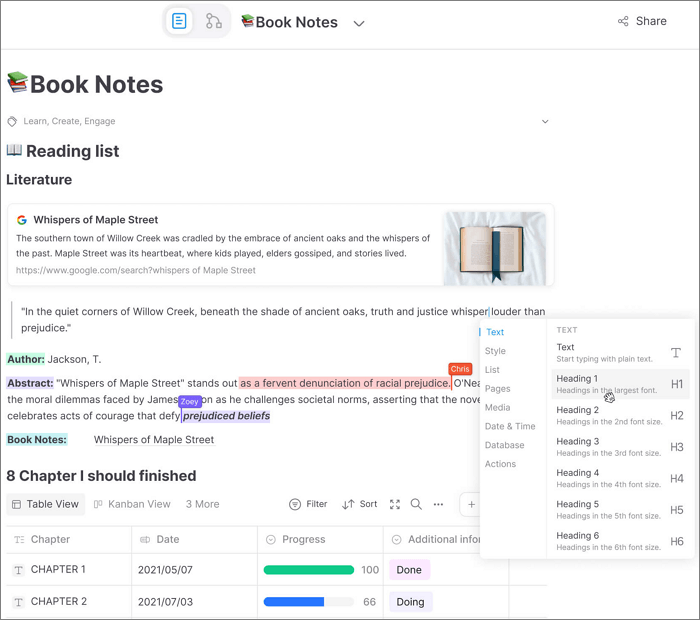
Why choose AFFiNE: Imagine collecting research notes, meeting takeaways, source links, and early ideas on an iPad while away from your desk. Back on a laptop, those fragments often have to be copied into a writing app, rebuilt on a whiteboard, and reorganized again in a project tool before they become useful. AFFiNE keeps documents, databases, and Edgeless whiteboards in one workspace, so you can develop reading notes into an outline and relationship map, turn meeting notes into a plan and shared reference, and connect source notes with a longer assignment. This reduces repeated copying, tool switching, and the loss of context that comes from rebuilding the same material in separate apps.
Key features
-
Rich documents, linked knowledge, databases, and Edgeless whiteboards in one workspace.
-
Local-first desktop workflows with optional AFFiNE Cloud sync and collaboration.
-
Native apps for iOS and Android focused on capturing and reviewing notes on the go.
-
Desktop apps for Windows, macOS, and Linux, plus browser and self-hosted options.
-
Optional AI add-on for writing and visual knowledge workflows.
Pricing: AFFiNE's Free plan includes unlimited local workspaces and Doc/Edgeless editing, plus 10 GB of cloud storage, a 10 MB maximum file size, up to 3 members per workspace, 7-day version history, and up to 3 login devices. Pricing information is accurate at the time of the latest update and is subject to change. See more on AFFiNE's official plan.
Pros
-
Documents and whiteboards live in the same knowledge workspace rather than in separate apps.
-
Local-first desktop use and optional cloud sync give users more deployment flexibility than a cloud-only notebook.
-
The free plan is more generous for connected workspace content than the small-document limits of some handwriting-first apps.
Cons
-
AFFiNE is not the best choice for someone whose main requirement is all-day Apple Pencil handwriting, deep PDF study, or audio-synced lecture notes.
-
AI is an optional paid add-on rather than part of the base Free or Pro price.
Verdict: Choose AFFiNE when the iPad is where you collect and review information, but the desktop is where those notes become research documents, relationship maps, project plans, whiteboards, or shared team knowledge.
Goodnotes: Best for Handwriting and PDF Annotation
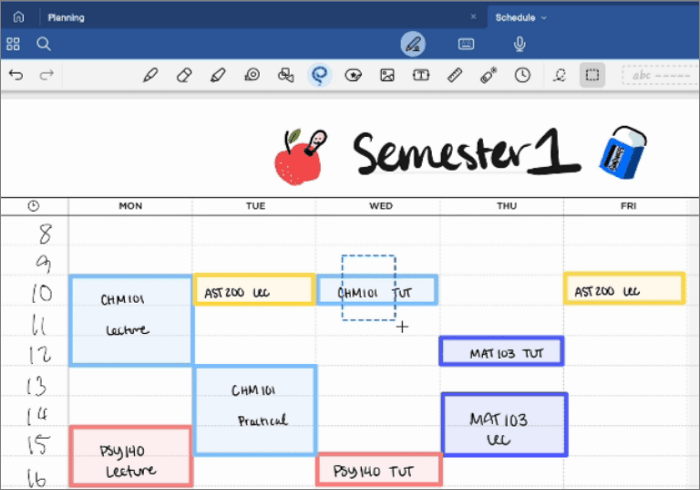
When thinking about a good note-taking app, you can't ignore Goodnotes. Goodnotes is built around digital notebooks, imported documents, and Apple Pencil input. Its combination of handwriting tools, PDF markup, organization, search, and study features makes it the most balanced option for students and professionals whose iPad replaces paper.
Best for: Students annotating lecture slides and textbooks, professionals marking up PDFs, and anyone who wants a polished notebook-first workflow.
Key features
-
Handwritten and typed notebooks, plus text documents and whiteboards.
-
PDF import and annotation, handwriting spellcheck, and searchable handwritten content.
-
Audio recording and on-device meeting transcription on iOS, with limits that vary by plan.
-
Templates, folders, and digital stationery on paid plans.
-
Cross-platform apps and sync on eligible paid plans.
Pricing: Goodnotes Free costs $0 and allows up to 3 notebooks, 3 text documents, 3 whiteboards, 3 folders, 100 MB storage, 5 MB imports, and 20 minutes of audio per notebook; exports are watermarked. Goodnotes Essential starts at $11.99/year in the U.S. and adds unlimited core documents, 5 GB storage, unlimited audio, templates, watermark-free export, and cross-platform sync. Goodnotes Pro is $35.99/year and adds advanced AI and real-time collaboration. A 7-day trial is offered for Essential and Pro where available. Pricing information is accurate at the time of the latest update and is subject to change. You may check Goodnotes' official plan details.
Pros
-
The strongest mix of handwriting, notebook organization, PDF markup, and study-oriented tools in this comparison.
-
A free tier lets users check the writing workflow before paying.
-
Paid options now extend beyond Apple devices for people who also use Windows, Android, or the web.
Cons
-
The free plan becomes restrictive quickly if you need more than three notebooks or larger imports.
-
Private links and real-time collaboration require the higher-priced Pro plan.
Verdict: Choose Goodnotes if handwriting quality, document markup, and notebook structure are your top priorities. Do not choose it primarily for a free, unlimited library or advanced team collaboration on the lowest paid tier.
Want to compare two popular notebook approaches in more detail? Read Goodnotes vs. OneNote.
Notability: Best for Lecture Audio and Note Replay
Notability pairs handwritten or typed notes with recorded audio. Its defining workflow is Note Replay: audio is linked to notes created during the recording, so students and meeting participants can revisit what was said when a particular point was written.
Best for: Students recording lectures, professionals capturing meetings, and users who want audio transcription alongside handwritten notes.
Key features
-
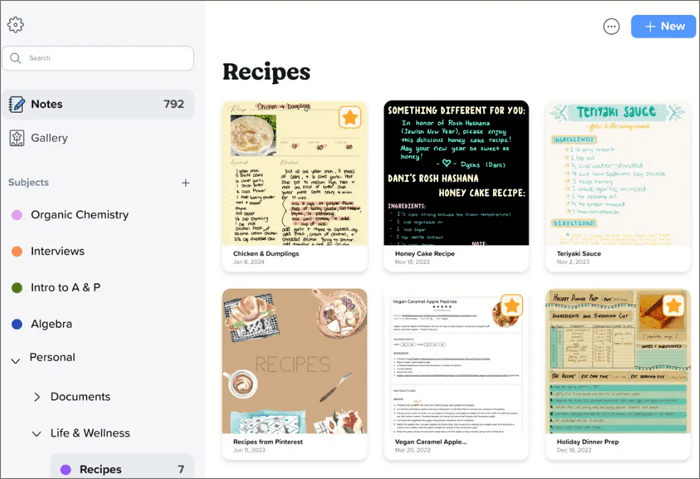
Handwriting and annotation tools for notes, PDFs, documents, and slides.
-
Audio recording, transcription, and synced audio playback on eligible plans.
-
Handwriting recognition and search on eligible plans.
-
Templates, note gallery content, folders, and version history.
-
AI summaries, quizzes, and flashcards on higher tiers, subject to plan limits.
Pricing: Starter is free and currently includes 5 notes, editing tools, PDF/document import, templates, and 7-day version history. Lite starts at $11.99/year and adds unlimited notes plus third-party backup on iOS. Plus starts at $15.99/year and adds recorded-audio transcription, handwriting search, limited AI study tools, and 30-day version history. Pro is $79.99/year and raises or removes selected AI limits. Published prices can vary by storefront and region. Pricing information is accurate at the time of the latest update and is subject to change. You may check Notability's official plan details.
Pros
-
Audio-linked notes create a clear advantage for lecture and meeting review.
-
PDF import, handwriting, and templates cover the main iPad study workflow in one app.
-
The free Starter plan is useful for a small number of active notes.
Cons
-
Starter is limited to five notes, so it is not an unlimited free notebook.
-
Audio transcription, handwriting search, and most AI study features require Plus or Pro.
-
The plan lineup is more complex than a simple free-versus-paid choice, and storefront pricing may differ.
Verdict: Choose Notability when recorded lectures or meetings are central to how you review notes. Choose Goodnotes instead if your priority is a notebook-and-PDF library without depending on audio, or Apple Notes if you only need occasional free capture.
Apple Notes: Best Free App for Everyday iPad Notes
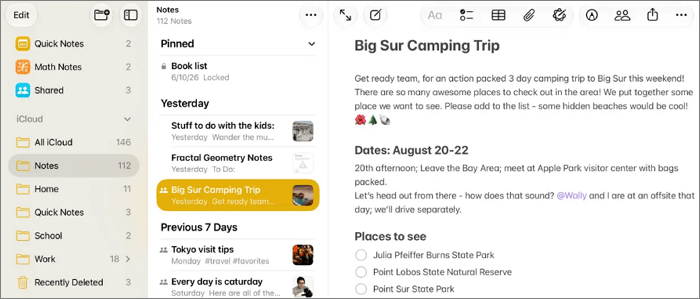
Apple Notes is the most convenient starting point because it is integrated with iPadOS and requires no separate note-taking subscription. You can make it one of the best free note-taking apps for iPad. It handles quick text, Apple Pencil handwriting, document scans, checklists, attachments, audio, and shared notes without turning setup into a project.
Best for: Apple users who want fast capture, reliable iCloud sync, and capable everyday notes with no extra app fee.
Key features
-
Quick Note from another app or screen, including Apple Pencil shortcuts.
-
Typed text, handwriting, sketches, checklists, equations, attachments, and document scanning.
-
Search across typed and supported handwritten text, images, and scanned documents.
-
Audio recording and transcription on supported models, languages, and operating-system versions.
-
Folders, tags, Smart Folders, note sharing, and iCloud sync.
Pricing: The Notes app is included with compatible Apple devices. There is no separate paid Notes plan. iCloud storage beyond the account's included allowance is a separate service and may require an iCloud+ subscription.
Pros
-
No separate note-taking fee or onboarding is required.
-
Deep iPadOS integration makes quick capture, scanning, and Apple Pencil access straightforward.
-
It now covers more than basic text notes, including searchable handwriting and supported audio transcription.
Cons
-
Its notebook, paper-template, and study-tool controls are less specialized than Goodnotes or Notability.
-
Some audio transcription and intelligence features depend on device model, language, region, and OS version.
Verdict: Start with Apple Notes if your needs are quick capture, lists, scans, occasional handwriting, and Apple-device sync. Upgrade to a specialist app only when you need deeper PDF study, reusable paper systems, audio-note replay, or cross-platform access.
MyScript Notes: Best for Converting Handwriting into Editable Text
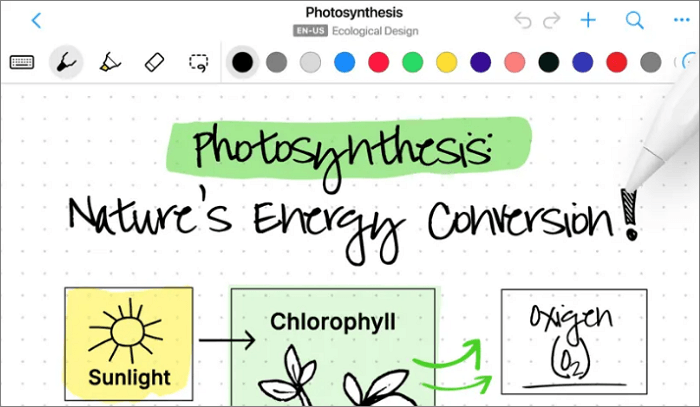
MyScript Notes, formerly Nebo, treats handwriting as editable content rather than a static ink layer. You can write, erase with gestures, convert text, math, and shapes, and mix handwritten and typed content across notebooks, documents, boards, and PDFs.
Best for: People who need handwritten drafts converted into clean text, multilingual handwriting recognition, or editable math and diagrams.
Key features
-
Handwriting recognition and conversion for text, mathematical notation, and shapes.
-
Notebooks, structured documents, freeform boards, PDF import, annotation, and export.
-
Search in handwritten content and export to formats including PDF, PNG, SVG, and Word where supported.
-
Cloud backup and synchronization with a MyScript account on paid plans.
-
Paid access across up to 10 iOS and Android devices using the same account and store entitlement.
Pricing: A 7-day trial unlocks the full experience when a subscription option is selected. After the trial, users can continue with a limited free version, subscribe monthly or yearly, or buy lifetime access. The free version allows notebooks of up to five pages and excludes cloud sync and AI features. Note: Exact prices vary by region, store, and discounts, so the current starting price must be confirmed in the reader's App Store or Google Play listing. Pricing information is accurate at the time of the latest update and is subject to change. You may check MyScript's subscription options.
Pros
-
Handwriting conversion is the clearest specialization among the apps in this comparison.
-
Editable text, math, and shapes make handwritten material easier to reuse in formal documents.
-
The limited free version remains available after the trial rather than locking all notes.
Cons
-
The free version limits each notebook to five pages and omits cloud sync and AI features.
-
Starting price may be different based on your region.
Verdict: Choose MyScript Notes when conversion accuracy and editable handwriting matter more than lecture audio or a large free notebook library.
Microsoft OneNote: Best for Cross-Platform Structured Notebooks
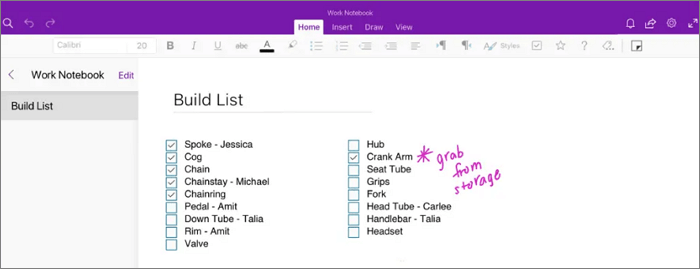
OneNote organizes information as notebooks, sections, and pages. Its iPad app supports rich ink and drawing tools, while the wider OneNote ecosystem makes the same cloud notebooks available on Windows, Mac, Android, iPhone, and the web.
Best for: Students and professionals who move between iPad and Windows, already use Microsoft 365, or prefer a digital-binder structure.
Key features
-
Notebook, section, page, and subpage organization.
-
Typed content, handwriting, drawings, images, lists, links, and file inserts.
-
Rich inking and drawing tools on iPad, including custom pens and highlighters.
-
Cloud notebook sync, search, sharing, and collaboration through Microsoft accounts.
-
Apps for the major desktop and mobile operating systems plus web access.
Pricing: The OneNote app is available as a free standalone app; a separate paid plan is not required for core note-taking. Microsoft 365 Personal is an optional subscription starting at $9.99/month in the U.S. and includes the broader Office app bundle, 1 TB of cloud storage, and eligible Copilot features. A one-month Microsoft 365 trial may be available, but that trial is not required to use free OneNote. Pricing information is accurate at the time of the latest update and is subject to change. You may check OneNote's official plan details.
Pros
-
The broadest conventional notebook workflow for people who alternate between iPad and Windows.
-
The notebook/section/page hierarchy scales well for school subjects, clients, or long-running projects.
-
Core note-taking is available without buying Microsoft 365.
Cons
-
OneNote for iPad does not currently convert ordinary handwritten notes to typed text.
-
Its PDF workflow is based on inserting files or printouts rather than the dedicated document-library experience of a PDF-first iPad app.
-
Users who only own Apple devices may find Apple Notes simpler for quick capture.
Verdict: Choose OneNote when device coverage and structured notebooks matter more than an iPad-only writing experience. Do not select it specifically for handwriting-to-text conversion on iPad; MyScript Notes is the better specialist for that task.
Freeform: Best Free App for Visual Brainstorming
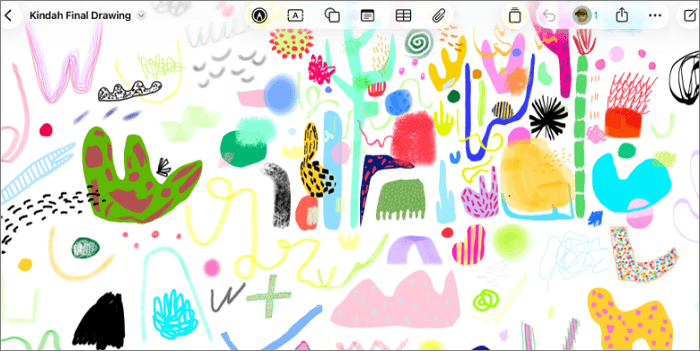
Freeform is Apple's boundless-canvas app for arranging handwriting, text, shapes, sticky notes, photos, videos, PDFs, links, and other files spatially. It is closer to a collaborative whiteboard or mood board than a page-by-page notebook. And you can think of it as another of the best free note-taking apps for iPad.
Best for: Visual thinkers, project planning sessions, mood boards, diagrams, and group brainstorming inside the Apple ecosystem.
Key features
-
A flexible canvas without fixed page sizes.
-
Apple Pencil drawing and handwriting tools with adjustable line properties.
-
Support for text, sticky notes, shapes, photos, video, audio, documents, PDFs, and web links.
-
Real-time board collaboration.
-
iCloud synchronization across iPad, iPhone, and Mac.
Pricing: Freeform is included with current compatible versions of iPadOS, iOS, and macOS. There is no separate paid Freeform plan. iCloud storage is separate and may require a paid iCloud+ tier if the account's included storage is insufficient.
Pros
-
A genuinely free visual canvas for users already in the Apple ecosystem.
-
Mixed media and spatial arrangement work well for brainstorming and early-stage project thinking.
-
Real-time collaboration is available without buying a separate whiteboard subscription.
Cons
-
It is organized around boards rather than a deep notebook/section/page hierarchy.
-
It is not a dedicated lecture-audio or handwriting-to-text app.
-
Cross-platform access is limited compared with OneNote or AFFiNE.
Verdict: Freeform is suitable for visual ideation, shared boards, and Apple Pencil sketching, not so perfect for fast linear notes or page-based study.
Which iPad Note-Taking App Should You Choose?
| If your priority is… | Choose… |
|---|---|
| Capture on iPad, then build documents, whiteboards, plans, or shared knowledge on desktop | AFFiNE |
| Handwritten notebooks and heavy PDF annotation | Goodnotes |
| Recorded lectures with audio-linked notes | Notability |
| Fast, free notes inside the Apple ecosystem | Apple Notes |
| Turning handwriting, math, and shapes into editable content | MyScript Notes |
| Structured notebooks across iPad, Windows, Android, Mac, and web | Microsoft OneNote |
| Free visual brainstorming on Apple devices | Freeform |
If the same notes also need to follow you to a phone and a laptop, see our picks of notes apps that sync between a laptop and a phone by device pair.
Free vs. Paid iPad Note-Taking Apps
A free app is enough when your main job is quick capture, a modest number of notebooks, or occasional handwriting. AFFiNE offers a free connected workspace. Apple Notes and Freeform are included with compatible Apple devices. OneNote's core app is free across major platforms, while Goodnotes, Notability, and MyScript Notes use free tiers with more explicit document or feature limits.
Pay when a specific bottleneck appears: more editable notebooks in Goodnotes, unlimited notes or audio transcription in Notability, cloud sync and unlimited pages in MyScript Notes, larger cloud storage and longer history in AFFiNE, or broader Microsoft 365 storage and apps around OneNote. A free trial is not the same as a permanent free plan, so check what remains after the trial ends.
How to Choose the Best Note-Taking App for Your iPad
-
Start with the input method. If most notes are handwritten, prioritize Apple Pencil tools, lasso editing, handwriting search, and palm rejection. If you mainly type, organization and cross-platform sync may matter more.
-
Match the app to the document type. PDF-heavy study favors Goodnotes or Notability; ordinary text and scans may need only Apple Notes; converted handwriting favors MyScript Notes.
-
Decide whether audio is essential. Notability's audio-linked workflow is materially different from simply attaching an audio file to a note.
-
Check the free-plan ceiling. Count notebooks, notes, pages, storage, import sizes, export watermarks, and collaboration limits before moving a full library.
-
List every device you actually use and decide what should happen after capture. Apple-only tools are simple inside that ecosystem; OneNote is practical for structured notebooks across iPad and Windows. AFFiNE is the better fit when iPad notes need to continue on desktop as connected documents, visual plans, databases, or shared project knowledge.
-
Test export and ownership before committing. Export one handwritten page, one PDF, and one mixed-media note to confirm that the result remains usable outside the app.
Frequently Asked Questions
What is the best note-taking app for iPad and Apple Pencil?
Goodnotes is the strongest all-round choice when Apple Pencil handwriting and PDF annotation are the main priorities. The better choice changes with the task: Notability for audio-linked lectures, Apple Notes for free everyday capture, MyScript Notes for editable handwriting, Freeform for visual boards, and AFFiNE when iPad capture must continue as documents and knowledge work on desktop.
What is the best free note-taking app for iPad?
Apple Notes is the best free default for most Apple users because it is included, supports handwriting, scanning, attachments, audio, collaboration, and iCloud sync. OneNote is the better free choice for cross-platform notebooks, while Freeform is better for visual boards.
Is Goodnotes or Notability better for students?
Goodnotes is usually the better fit for organized handwritten notebooks, imported textbooks, and PDF annotation. Notability is the better fit when recording a lecture and replaying audio alongside notes is central to the study routine. Compare the free-plan limits and current student pricing before moving a semester's materials.
Which iPad app is best for converting handwriting to text?
MyScript Notes is the specialist pick because it converts handwritten text, math, and shapes into editable content. OneNote supports handwriting on iPad, but Microsoft states that ordinary handwriting-to-text conversion is not currently available in the iPad app.
Which app is best for capturing notes on iPad and organizing them on desktop?
AFFiNE is the clearest fit when you capture notes or ideas on an iPad and later organize them on desktop as documents, whiteboards, relationship maps, project plans, databases, or shared knowledge. OneNote is the better alternative if you prefer a traditional notebook-section-page structure across iPad and Windows.
When should you choose AFFiNE instead of Goodnotes or Notability?
Choose AFFiNE when iPad notes are the starting point for research, project planning, visual organization, or team knowledge that continues on desktop. Choose Goodnotes when Apple Pencil handwriting and PDF annotation are the main workflow, or Notability when recorded lectures and audio-linked review are essential. AFFiNE complements those specialist needs rather than replacing them for every user.
Final Words
Choose the app that matches both how you capture information and what happens next. AFFiNE is the strongest fit when iPad notes are only the starting point and must later become connected documents, visual plans, project knowledge, or a shared workspace on desktop. Goodnotes remains the better choice for handwriting and PDF-heavy study, while Notability is stronger for audio-linked lectures. Apple Notes is the simplest free Apple option, OneNote suits conventional cross-platform notebooks, Freeform supports visual brainstorming, and MyScript Notes specializes in handwriting conversion.