
Headings for an Essay: When to Use Them + APA & MLA Levels
A heading for an essay is the short line that names a section of the body text — think "Causes of the Great Migration," not the name-and-page-number block at the top of the page. The two style guides students use most agree on a point that surprises many writers: short essays usually need no section headings at all. The MLA Handbook, 9th edition, says headings are "generally not needed in short, essay-length works," and APA Style notes that short student papers may not require any. Once a paper runs long enough that a reader can lose the thread — research papers, reports, literature reviews — a small set of well-written headings is the fastest way to make the structure visible. This guide covers when to use headings, how to phrase them, and the exact APA 7 and MLA 9 rules, with examples you can adapt.
Headings vs. header: two different things
Search results mix these two terms up, so separate them first:
| Heading | Header (running head) | |
|---|---|---|
| What it is | A title for one section of the body | An identifying line repeated on every page |
| Example | Method | Lee 2 |
| Position | Where the section begins | In the top margin of the page |
| How often | Once per section | On every page |
| Required? | Only in longer, structured papers | MLA: yes. APA student papers: page number only |
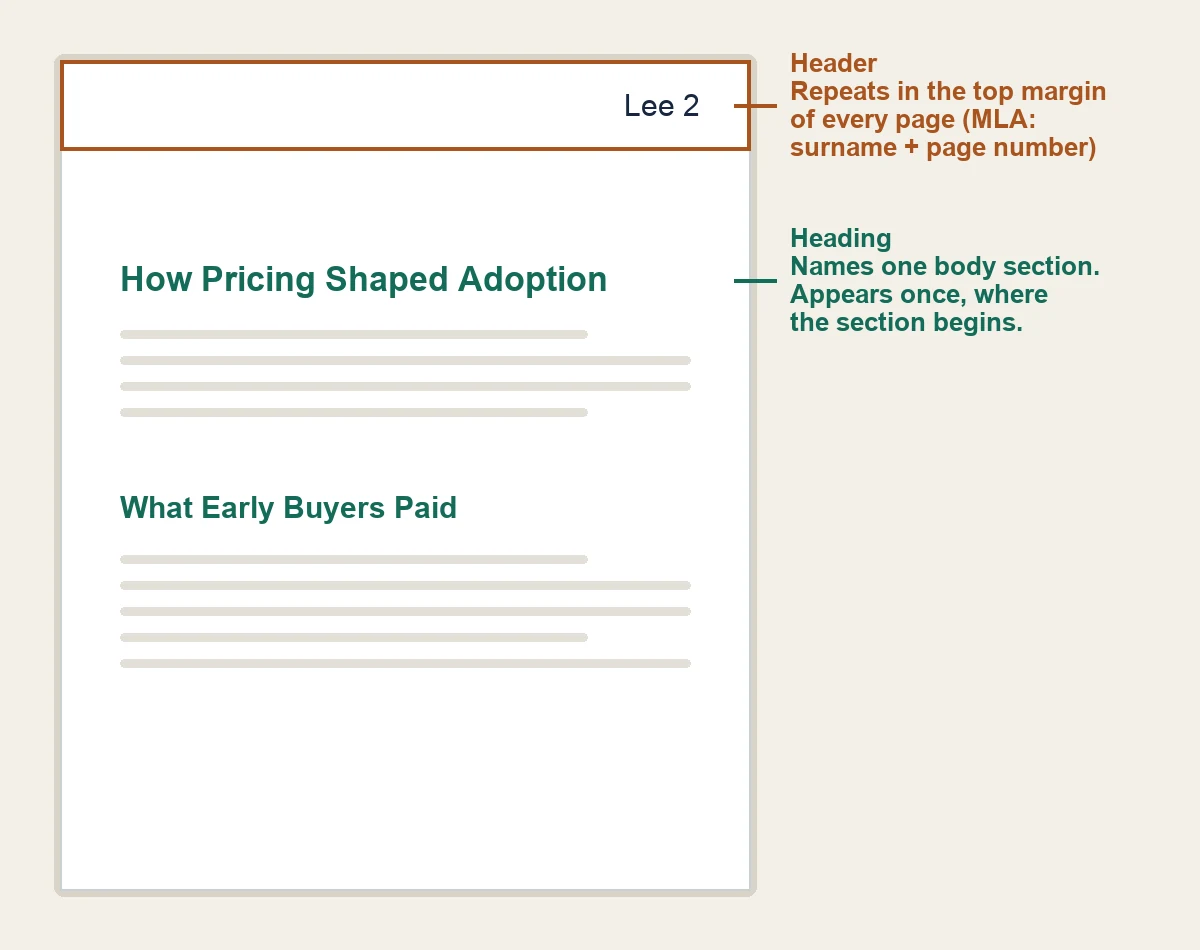
If what you actually need is the name-course-date block on page one or the running head, those are header questions. The essay header guide compares MLA and APA first-page setups, and the MLA essay header walkthrough shows an annotated first page with Word and Google Docs steps. Everything below is about section headings inside the essay body. For a copy-ready heading template with Google Docs and Word steps, use the MLA header format guide.
Does your essay need headings?
It depends on the length and genre, not on personal taste:
| Essay type | Use section headings? |
|---|---|
| Short argumentative essay (roughly 500-1,500 words) | Usually no — paragraph transitions carry the structure |
| Research paper or report (2,000+ words or assigned sections) | Yes — one heading per major section |
| Literature review | Yes — group sources under thematic headings |
| Lab or experiment report | Yes — Method, Results, and Discussion are headings |
| College application or scholarship essay | No — portals paste text into a box; structure with paragraphs |
| Thesis or dissertation | Yes — chapters and subsections require headings |
Two judgment rules apply whatever the genre. First, if removing a heading would not confuse the reader, remove it; the MLA Handbook warns that headings should never be used "to compensate for poor structure or to explain an underdeveloped idea." Second, never create a single subheading under a section: split the material into at least two subsections, or fold it back into the parent. APA states the same rule — like in an outline, a section never has exactly one subsection.
How to write a good essay heading
Five habits cover almost every weak heading:
- Name the topic, not the slot. "Analysis" and "Discussion" label a place in the essay; "How Pricing Shaped Early Adoption" tells the reader what the section argues. Reports and lab papers are the exception — Method and Results are conventional section names there.
- Keep headings at the same level parallel. If one Level 2 heading is a noun phrase ("Recruitment"), the siblings should be noun phrases too ("Compensation"), not questions or sentences.
- Keep them short. Two to eight words is enough for almost any essay heading.
- Do not number them unless your department or style guide requires it. APA explicitly forbids numbering or lettering headings.
- Do not let a heading replace a transition. The first sentence after a heading must make sense to someone who skipped the heading.
| Weak | Stronger | Why |
|---|---|---|
| Introduction | (delete it — see the APA rule below) | The opening paragraphs are understood to be introductory |
| Stuff about social media | Social Media Use and Sleep Quality | Names both variables the section connects |
| Analysis | How Pricing Shaped Early Adoption | States the section's claim, not its category |
| Conclusion | What the Evidence Supports | Says what the conclusion concludes |
APA Style: the five heading levels
APA 7 fixes the format of each level so the hierarchy is visible at a glance. Most student essays need only Levels 1 and 2; add a level only when a section genuinely splits further.
| Level | Format | Text that follows |
|---|---|---|
| 1 | Centered, bold, title case | Starts as a new paragraph |
| 2 | Flush left, bold, title case | Starts as a new paragraph |
| 3 | Flush left, bold italic, title case | Starts as a new paragraph |
| 4 | Indented, bold, title case, ending with a period | Starts on the same line |
| 5 | Indented, bold italic, title case, ending with a period | Starts on the same line |
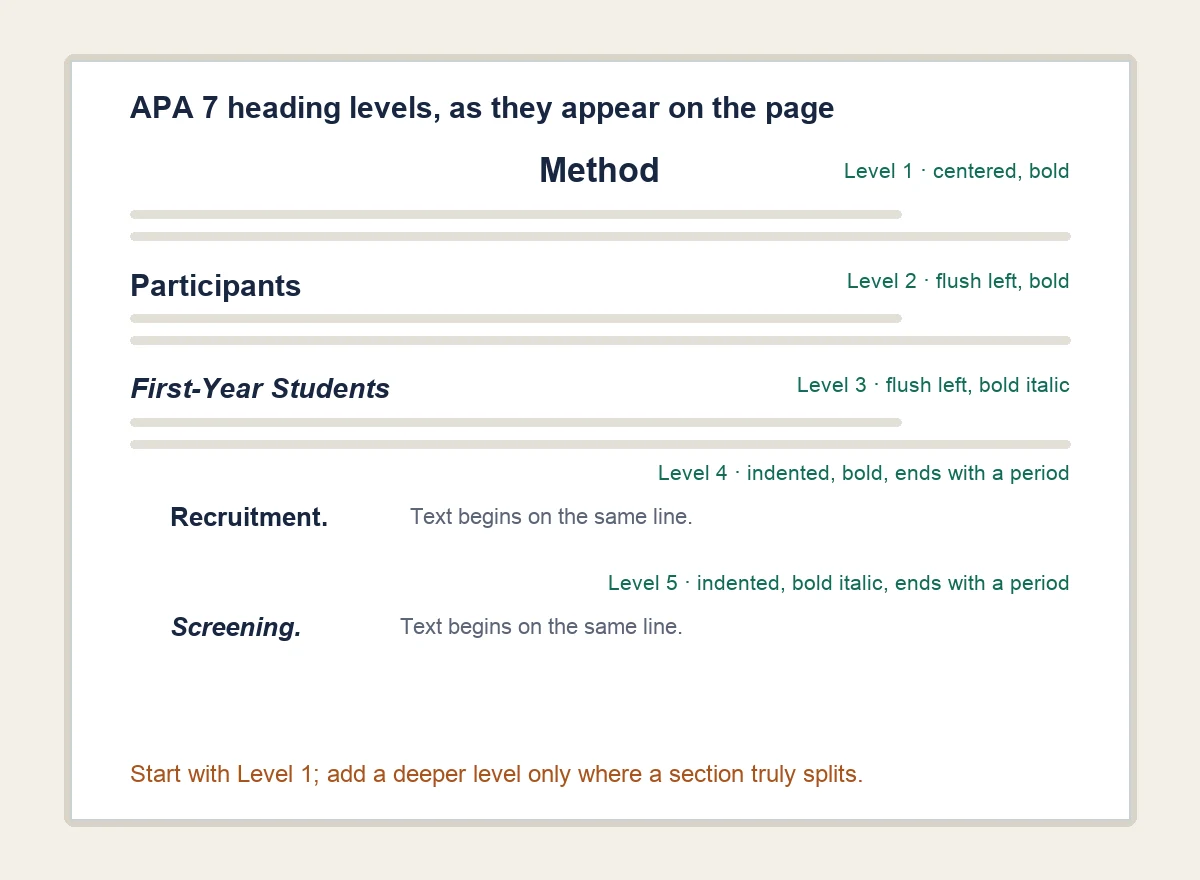
Four APA rules catch students most often:
- No "Introduction" heading. The first paragraphs are understood to be introductory, so the paper title at the top of the first text page acts as the de facto Level 1 heading.
- Use only as many levels as you need. One level means all Level 1; two levels means Levels 1 and 2, and so on.
- Headings stay double-spaced, with no extra blank lines before or after, even when a heading lands at the bottom of a page.
- Student papers carry no running head. The header of an APA 7 student paper is just the page number, flush right. The all-caps shortened title applies to professional papers submitted for publication — a change from APA 6 that many older tutorials still get wrong. The APA title page guide covers both versions in detail.
MLA Style: headings allowed, format up to you
MLA takes the opposite approach from APA: it permits internal headings but prescribes no fixed visual format. The free MLA Handbook chapter on internal headings and subheadings gives the boundaries:
- Headings can organize longer projects, but avoid overusing them in short, essay-length works.
- Keep headings flush with the left margin so they are not confused with block quotations; the centered paper title is the exception and remains the most prominent heading.
- Style each level consistently — every Level 1 heading identical, every Level 2 identical, and so on — so readers can read the hierarchy.
- No heading level may have only one instance (the paper title and the notes and works-cited headings are the exceptions).
- Capitalize headings like the titles of works, and avoid numbering unless your discipline treats it as conventional.
A consistent scheme that respects those rules:
| Level | One consistent MLA scheme |
|---|---|
| 1 | Bold, flush left, title case |
| 2 | Italic, flush left, title case |
| 3 | Plain text, flush left, title case |
If your instructor supplies a different scheme, the instructor's version wins — MLA treats its own guidance as defaults, not mandates.
Chicago style, briefly
Chicago style also leaves heading design largely to the writer, with consistency as the hard requirement. Purdue OWL's CMOS headings page describes up to five common levels and the same practical advice as above: make the hierarchy visible, keep each level's styling identical, and use headline-style capitalization. Chicago papers are where numbered sections are most acceptable, so check your department's preference before numbering.
Set up real heading styles in Word and Google Docs
Apply the built-in Heading 1 / Heading 2 styles instead of bolding text by hand. Real styles give you a navigation pane, an automatic table of contents, and headings that screen readers can announce — APA's own guidance recommends the automatic headings function for exactly this reason.
Microsoft Word (Microsoft's steps): select the heading text, then on the Home tab choose Heading 1 or Heading 2 in the Styles gallery. Open View > Navigation Pane to see and reorder the structure, and References > Table of Contents when you need one.
Google Docs (Google's steps): select the heading text, then choose Format > Paragraph styles > Heading 1 > Apply 'Heading 1'. The outline appears in View > Show outline, and Insert > Table of contents builds a linked one that updates as headings change.
Either editor lets you modify a style once — font, size, bold — and update every heading that uses it, which is how you keep MLA's consistency rule painless.
Common essay heading mistakes
Run this list against your final draft:
- Skipping levels. Jumping from Level 1 to Level 3 breaks the hierarchy; promote or demote headings instead.
- A lone subheading. One Level 2 under a Level 1 means the section does not actually split — merge or add a sibling.
- "Introduction" as a heading in APA. Delete it; the title already does that job.
- Generic labels. Swap "Analysis" and "Discussion" for headings that state what the section shows.
- Numbering headings in APA, or numbering anywhere your style guide does not call for it.
- Headings in a short essay. Under roughly 1,500 words, strong topic sentences usually do the job better.
- Inconsistent styling. Same level, same look — no exceptions.
- Headings as decoration. If the paragraph structure is weak, fix the paragraphs; no heading rescues a section that has no point.
Outline first: drafting headings in AFFiNE
AFFiNE, which publishes this guide, is a docs-and-whiteboard workspace rather than a page-layout word processor, and that makes it a good place to build the outline before you worry about margins and running heads. A workflow that holds up in practice:
- Open a new doc and write the essay as headings only — one line per section, nested under each other (type
#at the start of a line for Heading 1,##for Heading 2). - Open the outline panel and check the skeleton: any lone subheadings, any skipped levels, any section whose heading you could not phrase concretely. Fix them before drafting.
- Draft the paragraphs under each heading, keeping the first sentence of every section independent of its heading.
- When the argument is stable, export and move to a word processor for the final page setup. Our MLA formatting test found AFFiNE's Markdown export the cleanest path into Word or Google Docs, where page headers, margins, and double spacing are applied.
The headings you wrote in the outline map directly onto Word or Google Docs heading styles, so the structure survives the move.
Essay heading questions
Can you use headings in an MLA essay?
Yes. The MLA Handbook, 9th edition, allows internal headings but sets no required format for them: keep them flush left, capitalize them like titles, and style each level consistently. Short essays generally do not need them at all.
Does APA require an "Introduction" heading?
No. APA 7 treats the opening paragraphs as self-evidently introductory, so the paper title at the top of the first text page serves as the de facto Level 1 heading. Begin headings with the first main section after the introduction.
How many headings should an essay have?
As few as the structure needs. Use one level if only one is needed, and add a deeper level only where a section genuinely splits. A 1,500-word essay often needs none; a 4,000-word research paper might use six to ten across two levels.
Do college application essays need headings?
Generally no. Application portals such as the Common App paste your text into a box where headings add clutter, and admissions readers expect continuous prose. Follow each application's instructions, and structure the essay with paragraphs and transitions instead.
What is the difference between a heading and a header in an essay?
A heading is the title of a body section and appears once, where that section begins. A header (running head) is an identifying line — in MLA, your surname and the page number — repeated in the top margin of every page. The comparison table near the top of this guide shows both.
Sources: This guide was checked on 16 October 2026 against APA Style's headings guidance and title-page guidance, the free MLA Handbook, 9th edition chapter on internal headings and subheadings, Purdue OWL's CMOS headings page, and the Microsoft and Google help pages linked in the editor steps. Style guides defer to instructor or department instructions; when they conflict, follow the assignment. This is an independent guide, not an APA, MLA, or CMOS publication.

