
MLA Essay Header: First-Page Example and Running Head
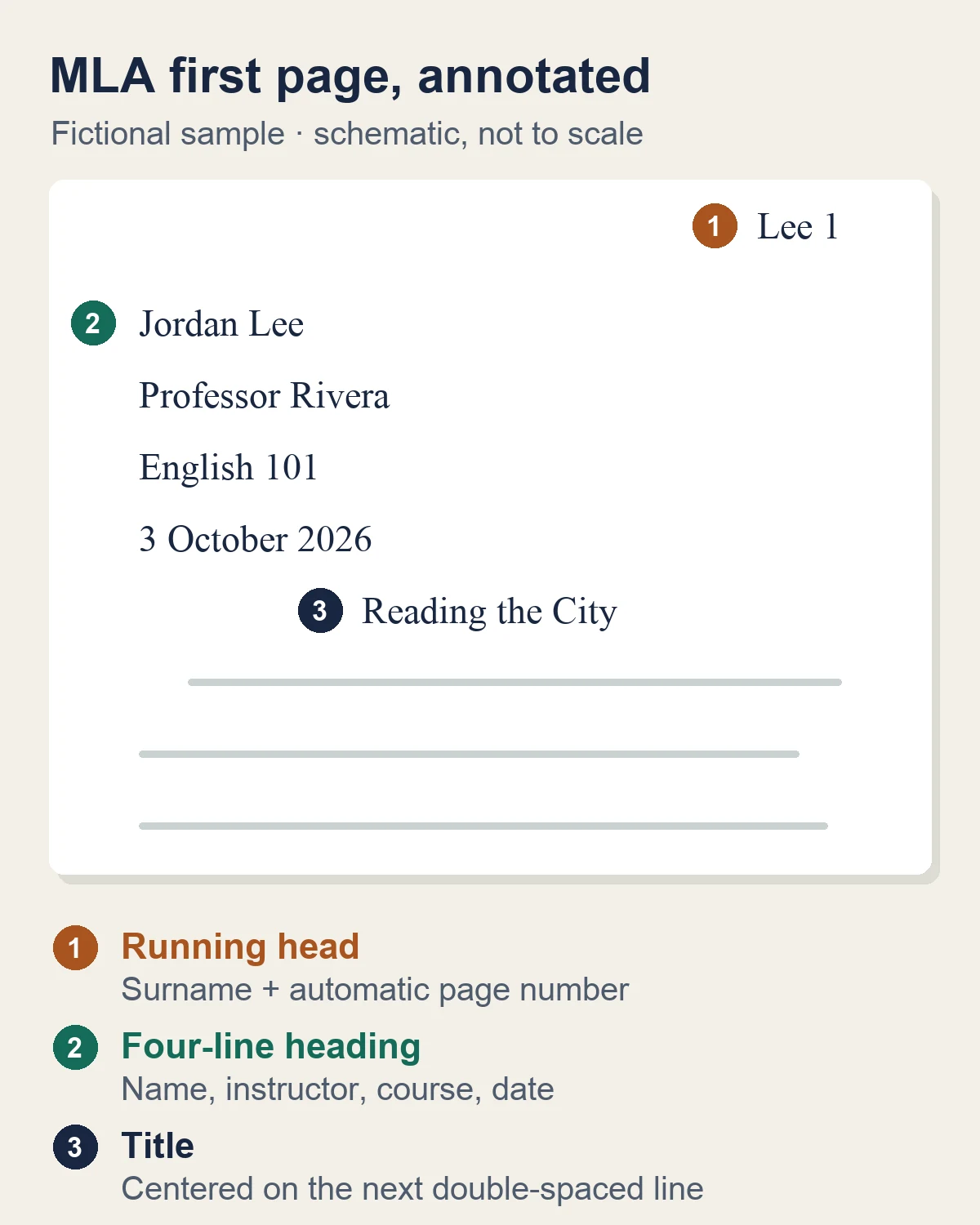
An MLA essay has two different items at the top of page one. The heading is four lines at the left margin: your name, your instructor's name, the course, and the date. The running head is your surname and an automatic page number in the upper-right corner. The running head repeats on every page; the four-line heading appears only once. If your instructor gives a different layout, follow the instructor. For a copyable heading template and click-by-click setup, see the MLA header template with Docs and Word steps.
| Page-one element | Example | Placement |
|---|---|---|
| Running head | Lee 1 | Upper right, half an inch from the top, flush with the right margin |
| Four-line heading | Jordan Lee / Professor Rivera / English 101 / 3 October 2026 | Flush left, starting one inch from the top, double-spaced |
| Paper title | Reading the City | Centered on the next double-spaced line |
The illustration below marks those three positions. The names, course, date, and title are fictional; replace them with your own details.
Sources: This guide was checked on 3 October 2026 against the free formatting chapter of the MLA Handbook, 9th edition, on MLA Handbook Plus (sections 1.1–1.2, 1.3, and 1.4) and Purdue OWL's MLA general format page. The Handbook itself says acceptable variations exist and that an instructor's or school's formatting directions take priority. This is an independent guide, not an MLA publication.
MLA heading versus running head
The four-line heading identifies the paper on the first page only. According to MLA Handbook section 1.3, it begins one inch from the top of page one, flush with the left margin, with each item on its own double-spaced line:
- Your full name
- Your instructor's name (list every instructor if there is more than one)
- The course name and number, such as English 101
- The date, such as 3 October 2026
The Handbook asks only for "the date"; it does not prescribe a date order for the heading. This guide uses 3 October 2026. If your instructor prefers October 3, 2026, use that instead. Do not add labels such as "Name:" before the lines.
The running head identifies every page. Section 1.4 places it in the upper-right corner, half an inch from the top and flush with the right margin: your surname, one space, then the page number, as in Lee 1, Lee 2, Lee 3. Do not put "p.", a period, a hyphen, or any other symbol before the number. Purdue OWL adds that some instructors ask you to omit the number on page one; follow that request only when it is made. For a one-page assignment, the Handbook says you may not need a page number at all.
For papers dealing with US history topics, maintaining clear page headers is especially critical, as dense timelines, source citations, and primary documents can easily become mixed up if individual pages are detached.
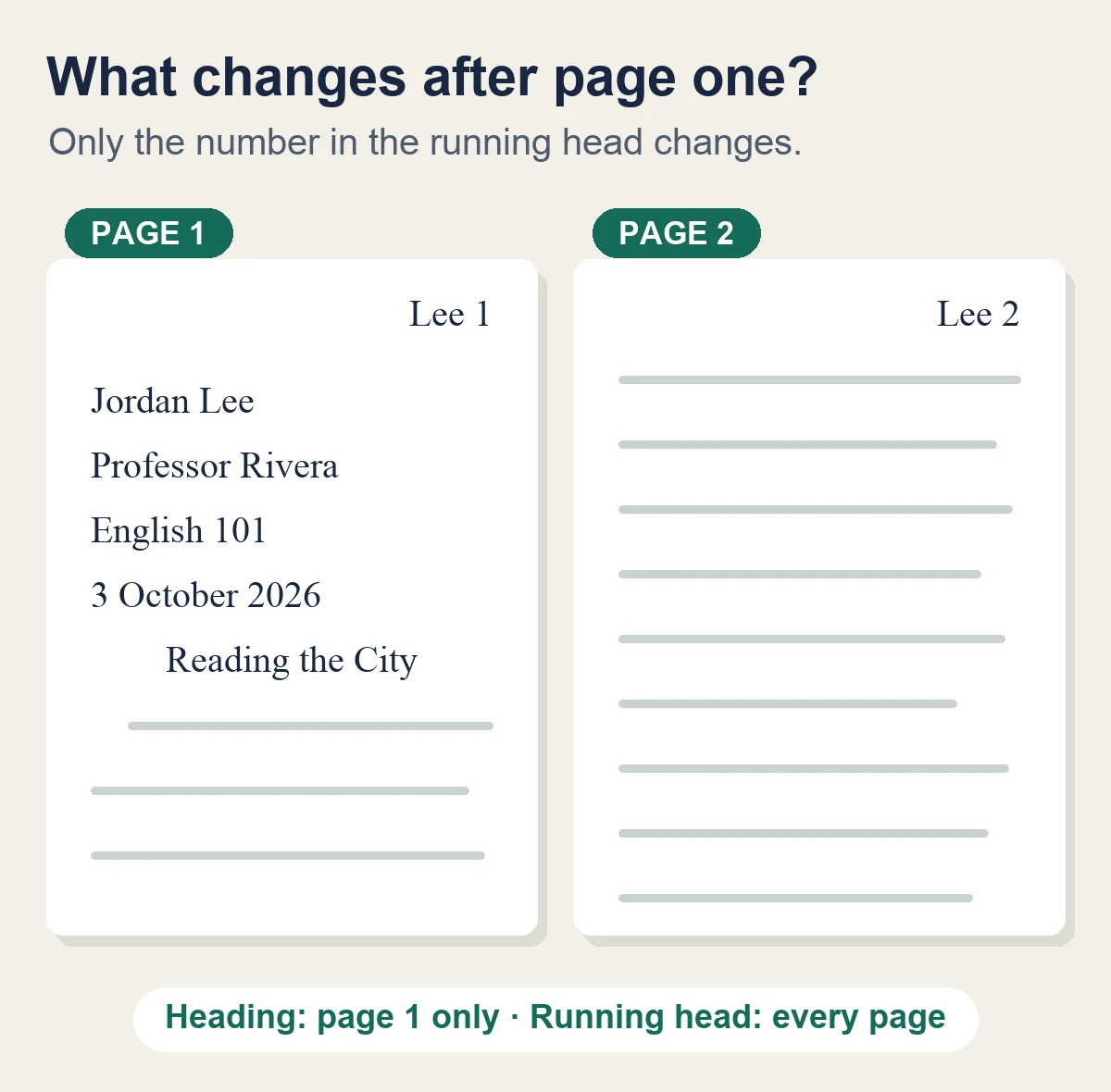
On page two, the text continues directly below Lee 2. Do not repeat your name, instructor, course, date, or title. Insert the number with the editor's page-number field instead of typing it on each page; typed numbers go out of order as soon as text moves between pages.
Set up the first page before writing
These settings come from MLA Handbook sections 1.1–1.3:
- Set one-inch margins on all four sides.
- Choose an easily readable typeface whose italic is clearly distinct from its regular style, set between 11 and 13 points unless your instructor specifies a size. Times New Roman at 12 points is a common choice; Purdue OWL's MLA page uses that example.
- Double-space the whole paper, including the heading, quotations, and works-cited list. Do not justify the right margin.
- Add the running head in the page header (steps for Word and Google Docs follow).
- In the main body of page one, type the four heading lines at the left margin. Keep them out of the repeating page header, or they will print on every page.
- On the next double-spaced line, center the title. Use title case; do not bold, italicize, underline, or put it in quotation marks or all capitals, and do not end it with a period. Italicize only the title of another work inside it, as in the Handbook's example Concepts of Justice in To Kill a Mockingbird.
- Start the essay on the next double-spaced line, indenting the first line of the paragraph half an inch.
Microsoft Word
Microsoft's page-number instructions start from the Insert tab:
- Select Insert > Page Number > Top of Page and choose a right-aligned style. On a Mac, choose Page Number, then set the position to the top of the page and the alignment to right.
- With the cursor in the header, click just before the number, type your surname, and add one space.
- On the Header & Footer tab, make sure Different First Page is not selected, and check that Header from Top is 0.5 inch.
- Select Close Header and Footer, or press Esc.
Google Docs
Google's header and page-number instructions use the Insert menu:
- Select Insert > Page elements > Page number, then choose the top-right option that numbers every page, including the first.
- Click in the header just before the number, type your surname, and add one space.
- Leave Different first page unchecked.
- To set the header distance, open Format > Headers & footers and set the header margin to 0.5 inch.
Menu names can shift between app versions. Whatever editor you use, confirm that page one shows Lee 1 and page two shows Lee 2 before you submit.
When an MLA paper has a title page
Section 1.3 says a research paper does not normally need a title page. There are two exceptions:
- Group project. Create a title page and list all the authors there instead of in a heading on page one. If the authors' surnames do not all fit in the running head, section 1.4 says to use only the page number.
- Instructor requirement. If your teacher requires a title page instead of, or in addition to, the four-line heading, format it according to the instructions you are given. The Handbook does not set a separate title-page layout for this case, so the assignment sheet is the authority.
If you are switching between MLA and APA, the essay-header guide compares the two styles' first-page conventions.
Check the submitted file, not just the draft
A layout that looks right while editing can shift when you export a PDF or upload to a learning-management system. Open the exact file you will submit and check:
| Check | What to look for |
|---|---|
| Page one | Four heading lines at the left, centered title, Lee 1 at the upper right |
| Page two | Lee 2 at the upper right; no repeated heading or title |
| Spacing | Heading, title, and body are all double-spaced, with no extra blank lines |
| Margins | One inch on all sides; running head half an inch from the top |
| Title | Plain text in title case: no bold, quotation marks, all capitals, or final period |
| Page numbers | Numbers still advance correctly after your last edit |
If page two still says Lee 1, replace the typed number with the editor's page-number field. If the four-line heading appears on every page, move it out of the page header and into the body of page one. If the running head is missing on page one, turn off "different first page" unless your instructor asked for that.
Drafting in AFFiNE, then formatting in Word or Google Docs
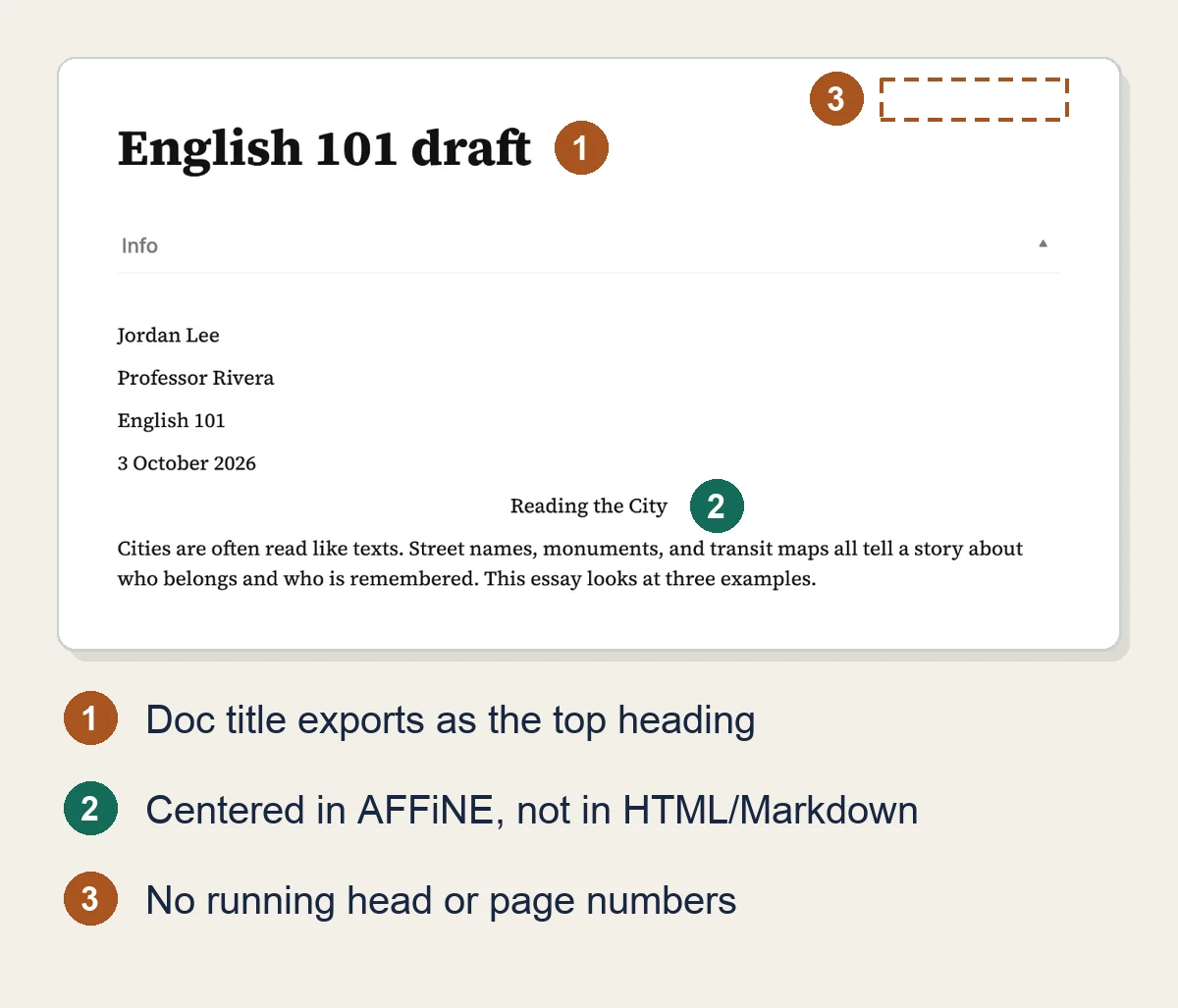
AFFiNE, which publishes this guide, is a docs-and-whiteboard workspace, not a page-layout word processor. That makes it a reasonable place to collect sources and write a draft, but not the place to produce the final MLA file. To find exactly where that line falls, we built the example paper in the AFFiNE web app on 4 October 2026 (app.affine.pro, a local workspace with no account) and exported it.
What worked in AFFiNE
- Each press of Enter starts a new paragraph block, so the four heading lines stay on separate lines.
- The title can be centered. Put the cursor in it and press Cmd+Shift+E on a Mac (Ctrl+Shift+E on Windows or Linux), or use the alignment button in the text toolbar.
- Settings > Editor > Font style > Serif switches the draft to a serif typeface (Source Serif 4) on screen.
What AFFiNE could not do
- It has no page header, page-number field, margin setting, or line-spacing control, so
Lee 1, double spacing, and one-inch margins cannot be set there. The font-size setting is a 12–24 px slider for the screen, not a point size for print, and neither the font size nor the font style is saved in the HTML or Markdown export. - Tab does not add a half-inch first-line indent. It nests the whole paragraph under the one above it.
- Exports carry text, not layout. The web app offers HTML, Markdown, PNG, Snapshot, and Print. In both our HTML and Markdown files, the AFFiNE doc title ("English 101 draft") came first as a top-level heading, the four heading lines were plain separate paragraphs, and the paper title was no longer centered. Print sends the page to your browser's print dialog; AFFiNE adds no running head of its own.
We then opened both exports in LibreOffice Writer 26.8. The Markdown file arrived as one heading followed by plain body paragraphs. The HTML file also carried its page-wrapper spacing, which left a large gap above and below every line. Of the two, the Markdown export is the cleaner one to move.
To move a draft into the file you will submit:
- In AFFiNE, open the ⋯ menu and choose Export > Export to Markdown.
- Open the .md file in a word processor that imports Markdown (LibreOffice Writer did in our test), or open it in a text editor and paste the text into Word or Google Docs.
- Delete the first heading. It is the AFFiNE doc title, not your paper title.
- Apply the first-page settings above: margins, typeface and size, double spacing, the
Lee 1running head, the centered title, and first-line indents. - Run the submitted-file checks in the table above.
The AFFiNE MLA Heading template is a reference sheet rather than a formatted paper. Open it in Edgeless view (AFFiNE's whiteboard mode) to see a filled-in sample heading and title beside a note with four placeholders: [Your Name], [Your Instructor's Name], [Course Name], and [Day Month Year]. On the web, Use this template asked us to sign in to an AFFiNE account before importing. The sample has no running head, so add yours in the word processor.
MLA essay header questions
Does the MLA running head appear on page one?
Yes. The Handbook says to number all pages consecutively, so page one has both the four-line heading and Lee 1. Leave the number off page one only if your instructor asks you to.
Is the title part of the MLA header?
No. The title is centered in the body of page one, on the double-spaced line below the four-line heading. The running head contains only your surname and the page number.
What font size does MLA require?
The MLA Handbook, 9th edition, asks for an easily readable typeface set between 11 and 13 points, unless your instructor specifies a size. Many instructors expect 12-point Times New Roman, so check the assignment sheet.
Can I write an MLA paper in AFFiNE?
You can draft it there, but you cannot finish the formatting there. In our 4 October 2026 test, AFFiNE handled the four heading lines and a centered title, but it has no running head, page numbers, margin setting, or double spacing, and its HTML and Markdown exports dropped the centering. Draft in AFFiNE, export to Markdown, and apply the MLA settings in Word or Google Docs.


