Free Memo Template: Business, Internal, and Decision Memos (With Examples)
A free, copyable memo template with announcement, policy change, and decision memo variants, a filled-in example, and six steps for writing a memo people act on.

A memo template is a reusable page with a fixed header (To, From, Date, Subject) and a short body: one sentence that states the point, the context readers need, the details, and the action you want. This page gives you a free memo template you can copy right now, three ready variants (announcement, policy change, and decision memo), a filled-in example, and a step-by-step method for writing a memo people actually read.
Short version
- Use the standard memo template for any internal update that more than a few people must read and may need to find later.
- Put the point in the first two lines. Subject line plus one opening sentence should tell readers what changed and what they must do.
- Pick a variant by purpose: announcement (inform), policy change (comply by a date), or decision memo (approve one option).
- Keep it to one page. Move data, long lists, and history to attachments or linked pages.
Published by AFFiNE, which makes a workspace where you can keep memos as linked pages. Memo structure in this guide follows university writing-center guidance (Purdue OWL, George Mason University) checked on October 28, 2026. Sources are listed at the end.
What is a memo?
A memo (short for memorandum) is a short document used to share information inside an organization. George Mason University's Writing Center describes business memos as "brief, direct, and easy to navigate," and less formal than letters. A memo usually goes to a group, not one person, which is why it has a standard header: anyone who opens it, now or six months later, can see who sent it, to whom, when, and about what.
Most memos today travel as an email or a shared page rather than paper. The format still matters, because a memo is a record. People forward it, link to it from tickets, and search for it when they ask "when did we change this?"
Memo vs email. An email is a conversation. A memo is a statement that should still make sense to someone who was not in the conversation. If your message changes how people work, sets a deadline for a group, or records a decision, write a memo and send the link by email or chat.
Memo format: the parts of a memo
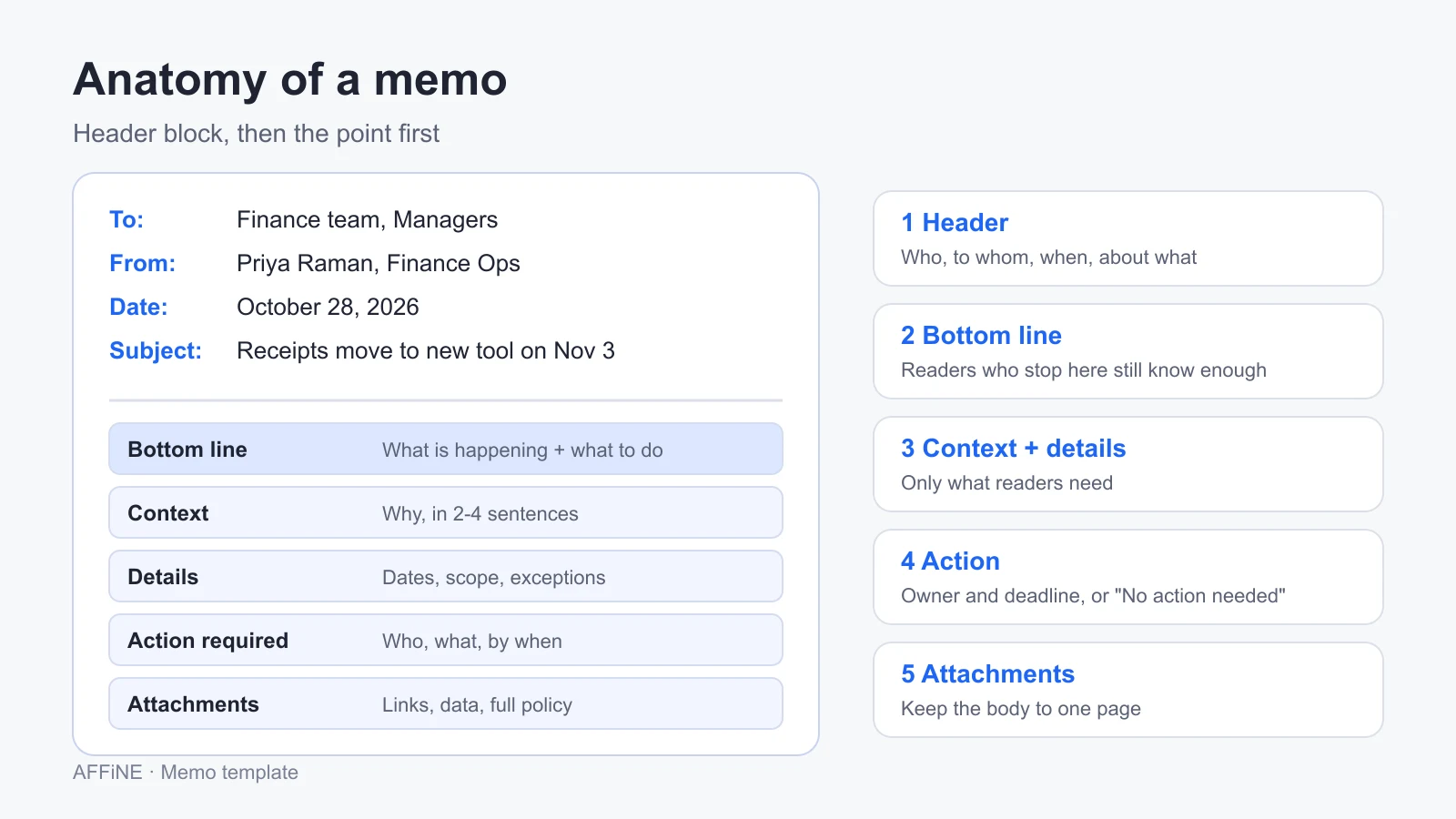
Purdue OWL divides a standard memo into a heading segment, an opening, context, a task statement, an optional summary, discussion, a closing, and attachments. In practice, most internal memos need six parts.
| Part | What goes in it | Common mistake |
|---|---|---|
| Header | To (names or groups and roles), From (name and role), Date (full date), Subject (specific, under about 10 words) | Vague subjects such as "Update" or "Important" |
| Bottom line | One or two sentences: what is happening and what readers must do | Starting with background or a greeting |
| Context | Why this is happening, in two to four sentences | Re-telling the whole history |
| Details | Dates, scope, who is affected, exceptions, often as a short list or table | A wall of text with the key date buried in paragraph four |
| Action required | Who does what, by when, and who to ask | Ending with "Let me know if you have questions" and no owner |
| Attachments and links | Data, full policy text, related docs | Pasting a 20-row spreadsheet into the body |
Purdue OWL's advice for the subject line is a good test: "Clothes" could mean anything, while "Fall Clothes Line Promotion" tells the reader what the memo is about. Apply the same rule to your own subjects. "New expense tool from November 3" beats "Expense update."
Free memo template
Copy the block below into any editor. It works as plain text in email and as Markdown in tools that support it. Replace everything in square brackets.
MEMO

To:      [Names or groups, with roles]
From:    [Your name, role]
CC:      [Optional]
Date:    [Month Day, Year]
Subject: [Specific subject in under 10 words]

Bottom line
[One or two sentences: what is happening, and what the reader needs to do.]

Context
[Why this is happening. Two to four sentences.]

Details
- What: [ ]
- Who is affected: [ ]
- When: [Dates, deadlines]
- Exceptions: [ ]

Action required
| Who | What | By when |
| --- | --- | --- |
| [Team or person] | [Task] | [Date] |

Questions
[Name and channel to contact]

Attachments
- [Link or file name]
The table in "Action required" is the part most memo templates leave out, and it is the part readers look for first. If nobody has to do anything, write "No action needed. This is for your information." so readers can stop reading with confidence.
Memo template variants: announcement, policy change, decision
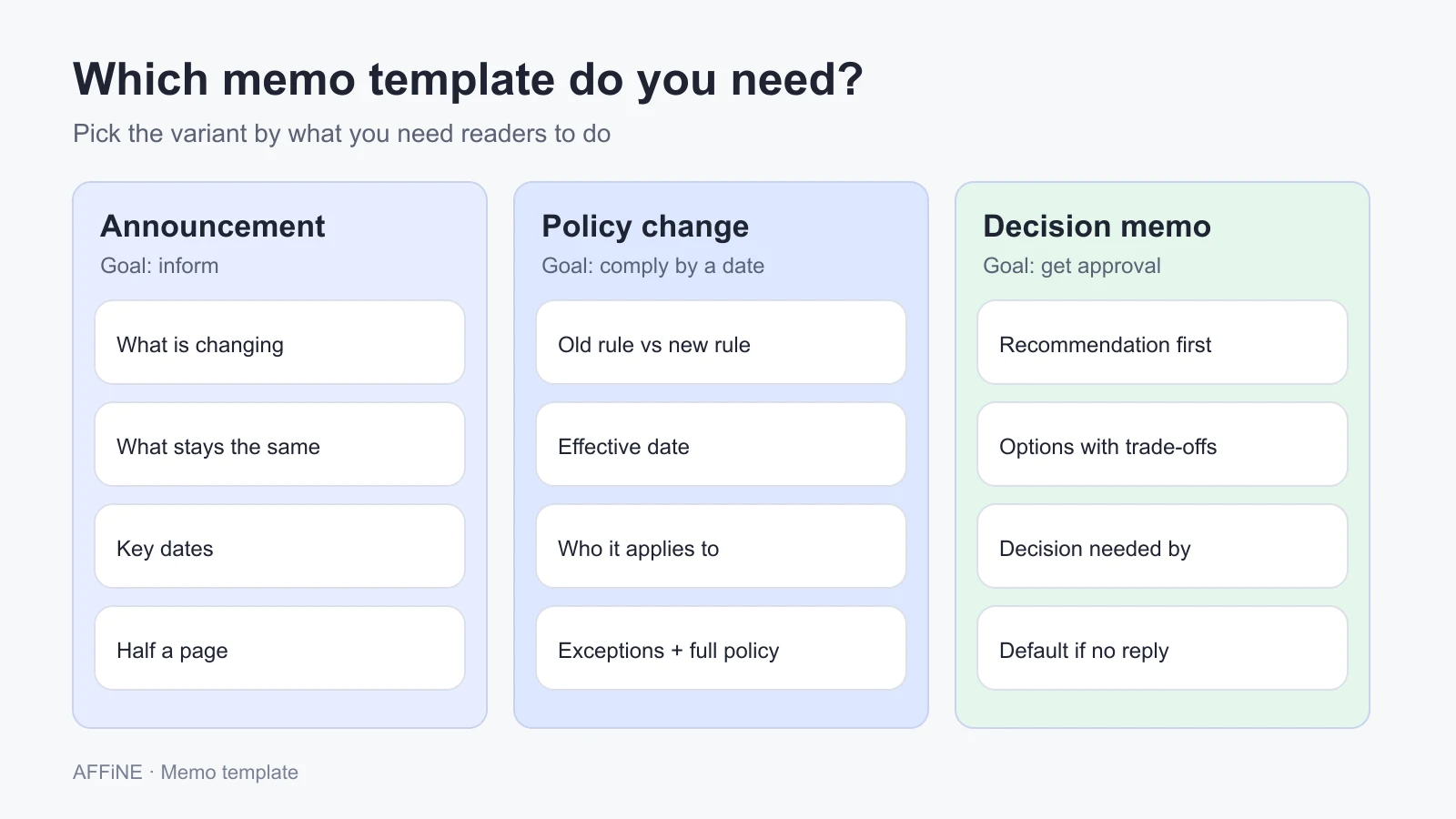
The standard template covers most memos. Three situations come up often enough to deserve their own version.
| Variant | Use it when | Extra sections | Typical length |
|---|---|---|---|
| Announcement memo | Sharing news: a new hire, an office move, a launch, a schedule change | What is changing, what stays the same, key dates | Half a page |
| Policy change memo | People must change behavior by a date | Old rule vs new rule, effective date, who it applies to, exceptions, where the full policy lives | One page |
| Decision memo | You need a person or group to approve one option | Recommendation, options considered with trade-offs, cost, risks, decision needed by | One to two pages |
Announcement memo template
To:      [All staff / team]
From:    [Name, role]
Date:    [Date]
Subject: [What is happening + when]

Bottom line
[News in one sentence. Action needed, or "No action needed."]

What is changing
- [Change 1]
- [Change 2]

What stays the same
- [Thing people might worry about]

Key dates
| Date | What happens |
| --- | --- |
| [Date] | [Event] |

Questions: [Name, channel]
Policy change memo template
To:      [Affected groups]
From:    [Policy owner, role]
Date:    [Date]
Subject: [Policy name] changes on [effective date]

Bottom line
From [effective date], [new rule in one sentence]. [What readers must do.]

Old rule vs new rule
| | Before | From [effective date] |
| --- | --- | --- |
| [Aspect] | [Old] | [New] |

Who this applies to: [Groups]. Exceptions: [List or "None"].
Why we are changing it: [Two to three sentences.]
Full policy: [Link]

Action required
- [ ] [Task] by [date]
Questions: [Owner, channel]
Decision memo template
To:      [Decision maker(s)]
From:    [Name, role]
Date:    [Date]
Subject: Decision needed: [question] by [date]

Recommendation
[Option you recommend, in one sentence, and the main reason.]

Background
[What problem this solves. Two to four sentences.]

Options considered
| Option | Benefits | Costs and risks |
| --- | --- | --- |
| A: [ ] | [ ] | [ ] |
| B: [ ] | [ ] | [ ] |
| Do nothing | [ ] | [ ] |

Decision needed
- [ ] Approve option [A]
- [ ] Approve option [B]
- [ ] Discuss further
Decision needed by: [Date]. If no decision, [default].
Decision memos are a long-standing format in government; the U.S. Department of Homeland Security, for example, publishes an "Action [or Decision] Memo Template" for its staff. The checkbox list makes the reply a single click, and a one-line "if no decision by this date" default keeps a stalled request from blocking the team.
Memo example: a filled-in policy change memo
Here is the policy change template filled in. The company and people are invented; the structure is the point.
To:      All employees who submit expenses
From:    Priya Raman, Finance Operations Lead
Date:    October 28, 2026
Subject: Expense receipts move to the new tool on November 3

Bottom line
From November 3, 2026, submit all expense receipts in the new expense
tool instead of by email. Install it and log in once before October 31.

Old rule vs new rule
|                | Before                   | From November 3          |
| -------------- | ------------------------ | ------------------------ |
| How to submit  | Email to finance inbox   | Upload in the expense tool |
| Approval       | Manager replies by email | Manager approves in tool |
| Reimbursement  | Within 30 days           | Within 10 business days  |

Who this applies to: All employees and contractors with a company card.
Exceptions: Travel booked through the agency is unchanged.
Why we are changing it: Emailed receipts are hard to track, and
reimbursements took up to 30 days. The tool routes approvals automatically.
Full policy: Travel and expense policy, version 4

Action required
- [ ] Install the tool and log in by October 31 (everyone)
- [ ] Approve pending reports weekly from November 3 (managers)
Questions: Priya Raman, #finance-help
Notice what the example leaves out: no greeting paragraph, no history of the old process, and no "we are excited to announce." A reader who stops after the bottom line still knows the date and the one thing to do.
How to write a memo
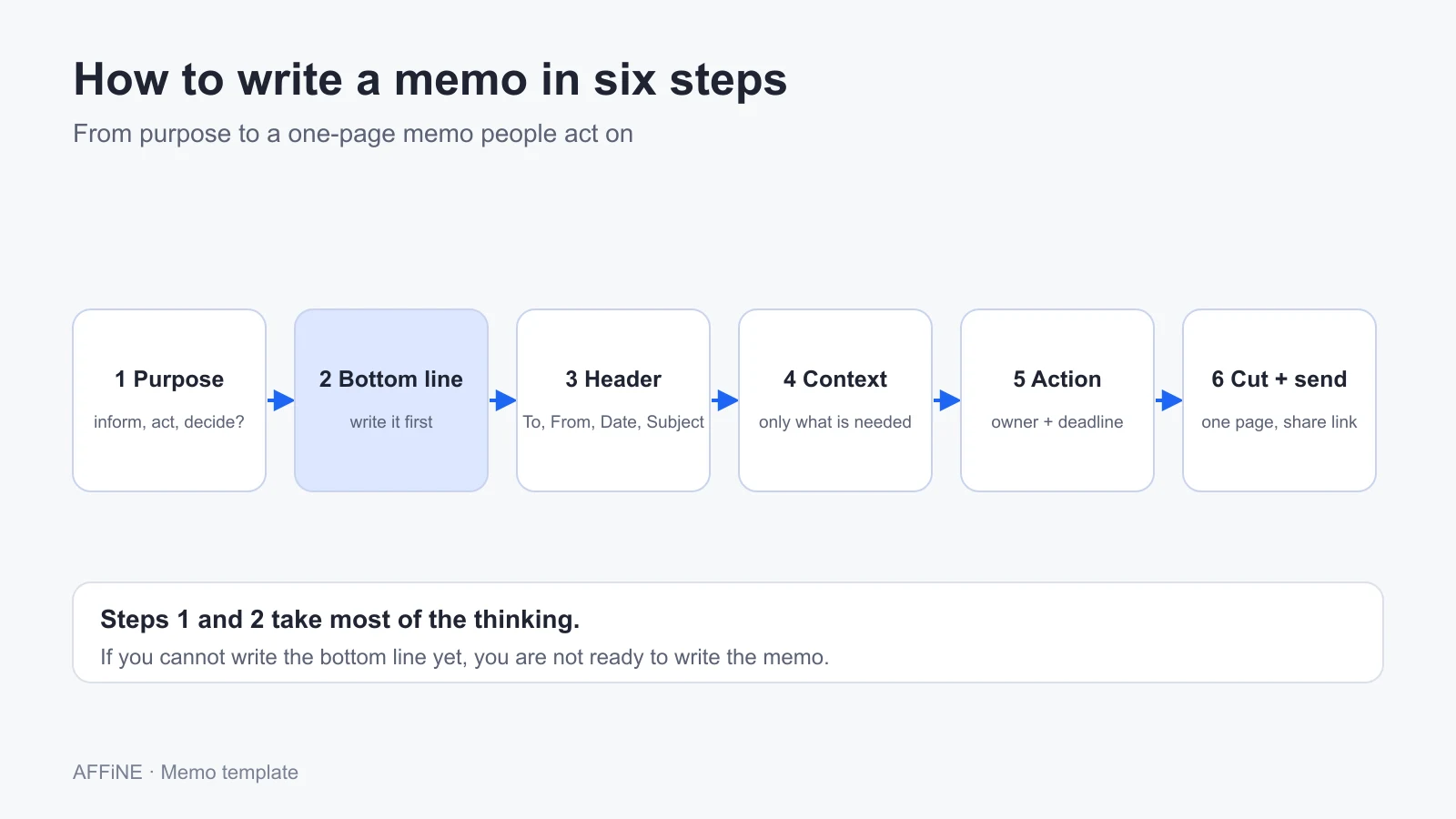
These steps work for any memo type. The first two take most of the thinking; the rest is assembly.
1. Decide the purpose and the reader
Write down in one line whether the memo informs, asks for an action, or asks for a decision, and who must read it. That choice picks your variant: announcement, policy change, or decision memo.
2. Write the bottom line first
Before anything else, write one or two sentences that say what is happening and what the reader must do. If you cannot write them yet, you are not ready to write the memo.
3. Fill in the header
Add To, From, Date, and a specific Subject. Use names or groups with roles, the full date, and a subject that names the change and the date when there is one.
4. Add only the context and details readers need
Give the reason in two to four sentences, then list dates, scope, who is affected, and exceptions. Use a short list or a table for anything with more than two items.
5. State the action, owner, and deadline
End with who does what by when, and who to contact with questions. If no action is needed, say so in one line.
6. Cut, check, and send with a link
Remove greetings, history, and repeated points until the memo fits on one page. Check names, dates, and links, then share the memo as a page or attachment and post the link where readers already look.
Memo writing tips that make the difference
- Front-load the date. If there is a deadline, put it in the subject and the bottom line. Many people only read those two.
- Write for the forwarded reader. Assume someone outside the original group will see it next quarter. Spell out acronyms and project names once.
- One memo, one topic. Two unrelated changes in one memo means half the readers miss one. Send two memos.
- Use the same structure every time. When every memo has the same sections in the same order, readers learn where to look. That is the real value of a template.
- Keep memos findable. Store them in one place, named by date and subject (for example "2026-10-28 Expense receipts move to new tool"), so "when did we change this?" has an answer.
- Know when not to write a memo. Sensitive individual matters, such as performance or pay, belong in a private conversation, not a group memo. Urgent safety issues need a call or alert first and a memo afterwards.
Use the template in AFFiNE
AFFiNE is a workspace for docs, whiteboards, and databases. A memo works as a normal page: paste the template above into a new doc and the headings, tables, and checkboxes keep their structure. A few AFFiNE features help memos stay useful after they are sent:
- Linked pages and backlinks. Link a memo to the policy page it changes; the policy page then shows the memo in its backlinks, so readers can trace why a rule changed (how page linking works).
- Doc properties, tags, and collections. Tag memos by type and team, and use a collection to list every policy change memo in one view.
- Edgeless mode. Every doc can switch to a whiteboard, which helps when a decision memo needs a quick diagram of the options.
- Share links. A page can be shared by link with people who need to read it.
You can also open the ready-made Memo Template in AFFiNE, which includes the standard memo and all three variants on one page.
When AFFiNE is not the right tool for memos: if your memos must go through a formal, logged approval chain, or be distributed and acknowledged with read receipts for compliance, use your document management or HR system. If everyone already lives in Microsoft Word or Google Docs and memos are printed or sent as PDFs, their built-in memo templates are the simpler choice.
FAQ
What should a memo template include?
A memo template should include a header with To, From, Date, and Subject; a bottom line that states the point and the action; short context; the details readers need; an action section with owners and deadlines; and space for attachments or links.
How do you write a memo?
Decide the purpose and reader, write the one- or two-sentence bottom line first, fill in the header, add only the context and details readers need, state who must do what by when, then cut it to one page and share it as a link.
What is the format of a business memo?
A business memo starts with a header block (To, From, Date, Subject), followed by an opening that states the purpose, a body with context and details, and a closing that tells readers what to do next. Attachments are listed at the end.
How long should a memo be?
Most internal memos should fit on one page. Decision memos can run to two pages when they compare options. Anything longer usually belongs in an attached report, with the memo summarizing the recommendation.
What is the difference between a memo and an email?
An email is a conversation with specific people. A memo is a self-contained record for a group that should still make sense months later. Many teams write the memo as a page or attachment and send it by email or chat.
What is a decision memo?
A decision memo asks a specific person or group to approve one option. It opens with the recommendation, compares the options with their costs and risks, and ends with the decision needed and a deadline.
Sources and editorial notes
- Purdue OWL, Parts of a Memo, for the memo segments and the subject-line example. Accessed October 28, 2026.
- George Mason University Writing Center, Writing Business Memos, for the definition of a business memo. Accessed October 28, 2026.
- U.S. Department of Homeland Security, Action (or Decision) Memo Template, as an example of a government decision memo format. Accessed October 28, 2026.
- SERP review of the top results for "memo template," "business memo template," "internal memo template," and "how to write a memo" (Atlassian Confluence, Microsoft, Notion, Grammarly, HubSpot, Smartsheet, Vertex42, Purdue OWL, and others) on October 28, 2026, used to find gaps rather than as factual sources.
- AFFiNE features: AFFiNE documentation. Accessed October 28, 2026.
How this guide was prepared: AFFiNE wrote this article in October 2026. The templates, variants, and the expense memo example were written for this guide; the example company and people are fictional. Memo structure follows the writing-center sources above. AFFiNE makes the workspace mentioned in the "Use the template in AFFiNE" section, so we have an interest in you using it; the templates themselves work in any editor. AI tools assisted with research and drafting, and the AFFiNE team reviewed and edited the content.