Project Communication Plan Template: 10 Free Examples
Disclosure: AFFiNE publishes this article, and AFFiNE is one of the tools it covers. How we review products
A project communication plan template is a ready-made table that sets out who needs project information, what they need to know, which channel you will use, how often you will send it, and who owns each message. Copy the free template below, fill in one row per communication, and share it with your team and sponsor at kickoff.
TL;DR
- A project communication plan answers five questions for every audience: who, what, where, when, and who owns it.
- Download the free AFFiNE template as Excel (.xlsx), Word (.docx), or Markdown (.md). The Excel file includes a filled-in example.
- Build the plan in six steps: stakeholders, information needs, channels, frequency, owners, and review.
- Match detail to the audience. The core team needs daily blockers; a sponsor needs weekly health and the decisions you need from them.
- Compare 10 free templates from AFFiNE, Smartsheet, ProjectManager, Visme, TeamGantt, Confluence, Asana, and Miro, with formats and how to get each one.
Update note (November 4, 2026): We rewrote this guide. It now includes a downloadable template in three formats, a filled-in example plan, a six-step method, sample project emails, and an FAQ. We also replaced two templates that were duplicates or off-topic, linked every template to its source, and checked each link.
What is a project communication plan?
A project communication plan is a document that defines how information moves between a project team and its stakeholders. For each audience, it records what they need to know, the channel, the frequency, the owner, and how feedback comes back. It turns "keep everyone informed" into a schedule people can follow.
The PMBOK Guide describes project communication management as the processes that ensure the "timely and appropriate generation, collection, dissemination, storage, and ultimate disposition of project information," as quoted in this PMI article on project communication management. A communication plan is where those processes become concrete for one project.
Three related documents are often confused:
| Document | What it records | When you use it |
|---|---|---|
| Communication plan | Every planned communication: audience, purpose, channel, frequency, owner, response time | Created at kickoff, reviewed at milestones |
| Communication matrix | The same information as a compact grid, usually one row per audience or meeting | A one-page summary of the plan for quick reference |
| Stakeholder register | Who the stakeholders are, their role, influence, and interest | The input you need before writing the plan |
If you have not listed your stakeholders yet, start with a stakeholder map and come back to the plan.
What to include in a project communication plan template
A useful template has eight parts. The first four describe the people and the goals; the last four describe the mechanics.
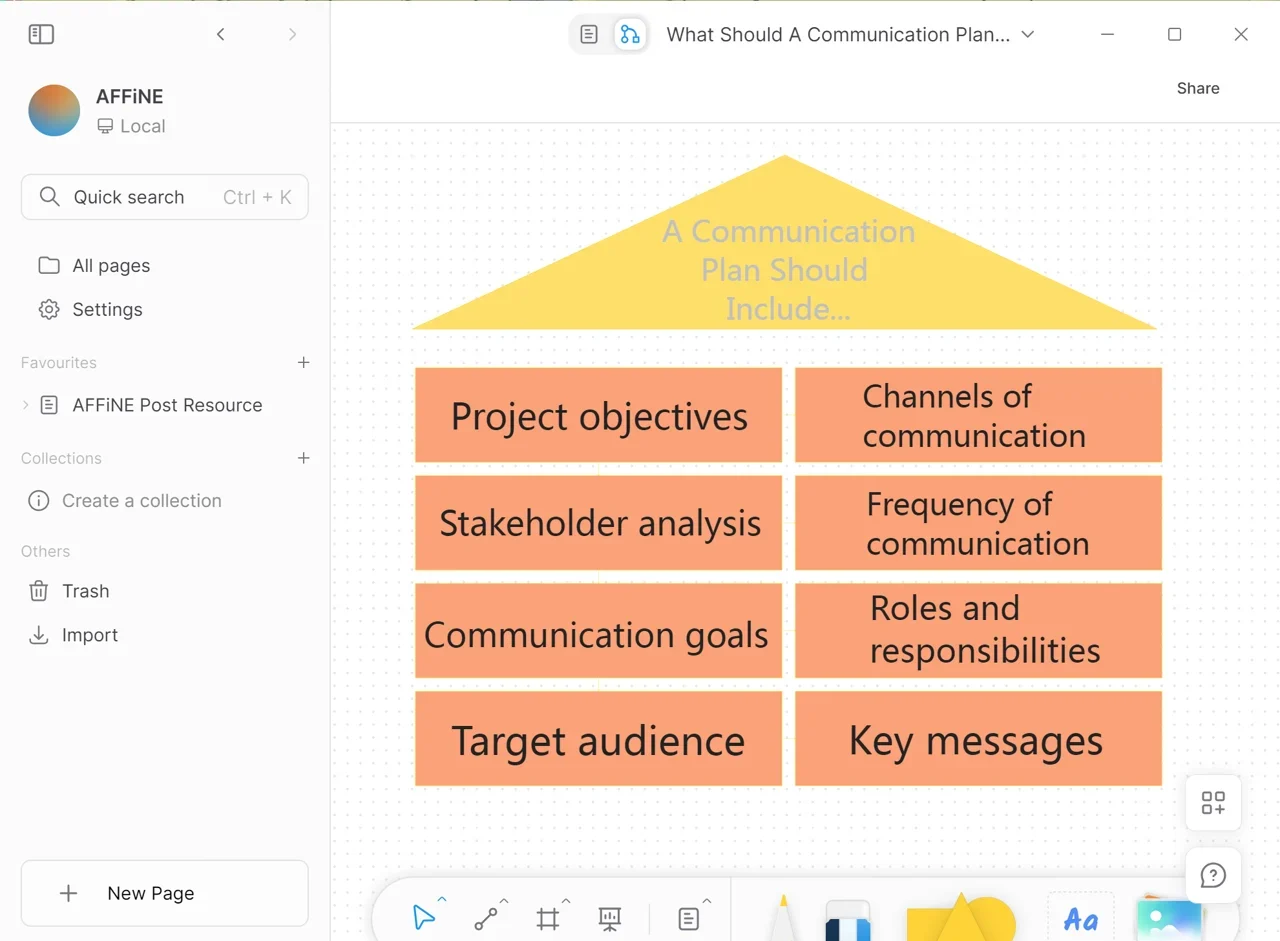
- Project objectives: what the project must deliver, so every message can be tied back to it.
- Stakeholder analysis: each person or group with an interest in or influence on the project. A RACI chart helps you separate who must approve from who only needs to be informed.
- Communication goals: what each communication should achieve, such as informing, getting a decision, or collecting feedback.
- Target audience: the specific group for each message, not "everyone."
- Channels: email, meetings, chat, a status page, or an intranet post.
- Frequency: daily, weekly, at milestones, or as needed.
- Key messages: the points that must stay consistent across channels.
- Roles and responsibilities: who writes, sends, and follows up on each communication, and who to escalate to.
Add two practical fields that many templates skip: the artifact (the document or deck that goes with the message) and the response time (how quickly the audience should reply or act). Without them, updates go out but nothing happens.
Project communication plan example
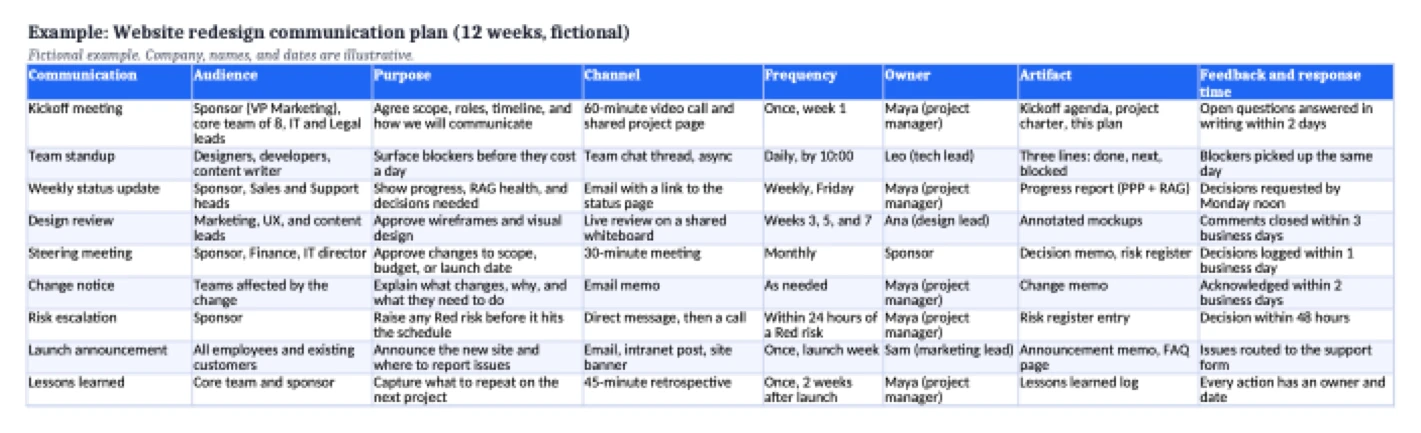
Here is a filled-in plan for a fictional project: a 12-week website redesign with a core team of eight, a VP of Marketing as sponsor, and Sales, Support, IT, and Legal as other stakeholders.
| Communication | Audience | Purpose | Channel | Frequency | Owner | Response time |
|---|---|---|---|---|---|---|
| Kickoff meeting | Sponsor, core team, IT and Legal leads | Agree scope, roles, timeline, and this plan | Video call and shared project page | Once, week 1 | Project manager | Open questions answered within 2 days |
| Team standup | Designers, developers, writer | Surface blockers early | Team chat thread | Daily, by 10:00 | Tech lead | Blockers picked up the same day |
| Weekly status update | Sponsor, Sales and Support heads | Show progress, health, and decisions needed | Email with a link to the status page | Weekly, Friday | Project manager | Decisions by Monday noon |
| Design review | Marketing, UX, and content leads | Approve wireframes and visual design | Live review on a shared whiteboard | Weeks 3, 5, and 7 | Design lead | Comments closed in 3 business days |
| Steering meeting | Sponsor, Finance, IT director | Approve scope, budget, or date changes | 30-minute meeting | Monthly | Sponsor | Decisions logged within 1 day |
| Change notice | Teams affected by a change | Explain what changes and what to do | Email memo | As needed | Project manager | Acknowledged within 2 days |
| Risk escalation | Sponsor | Raise any Red risk before it hits the schedule | Direct message, then a call | Within 24 hours | Project manager | Decision within 48 hours |
| Launch announcement | All employees and customers | Announce the new site and where to report issues | Email, intranet, site banner | Once, launch week | Marketing lead | Issues go to the support form |
| Lessons learned | Core team and sponsor | Capture what to repeat | Retrospective meeting | Once, after launch | Project manager | Every action has an owner |
The same example is on the Example tab of the Excel download, with an extra column for the artifact that goes with each communication.
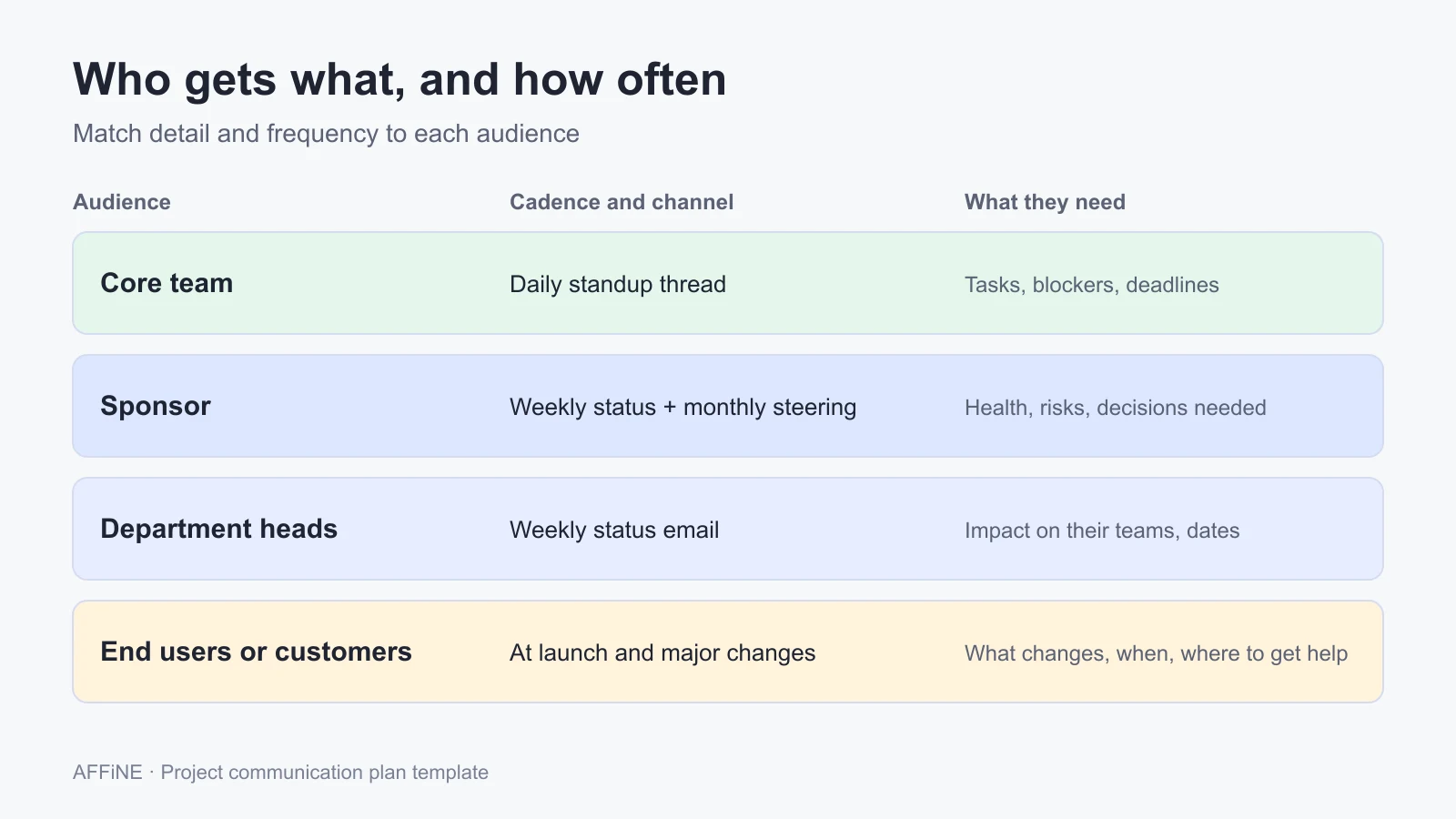
Example by audience
Detail and frequency should change with the audience. The team needs task-level detail often; executives need less detail, less often, but with clear asks.
Example by project phase
| Phase | What to communicate | Typical channel |
|---|---|---|
| Initiation | Goals, scope, roles, and this plan | Kickoff meeting and project charter |
| Planning | Schedule, budget, risks, and approvals | Planning workshop, steering meeting |
| Execution | Progress, blockers, decisions, changes | Standups, weekly progress report, change memos |
| Launch | What changes, when, and where to get help | Announcement email, intranet, in-app message |
| Closing | Results and lessons learned | Retrospective and a lessons learned template |
Free project communication plan template (Excel, Word, Markdown)
The AFFiNE template has the same structure as the example above, with placeholders in square brackets.
- Download the project communication plan template (.xlsx) for Excel, Google Sheets, or LibreOffice Calc. Tabs: How to use, Communication plan (blank), Template rows, Stakeholders, Escalation, and Example.
- Download the template as a Word document (.docx) for Word, Google Docs, or LibreOffice Writer.
- Download the template as Markdown (.md) to import into AFFiNE, Notion, Obsidian, or any Markdown editor.
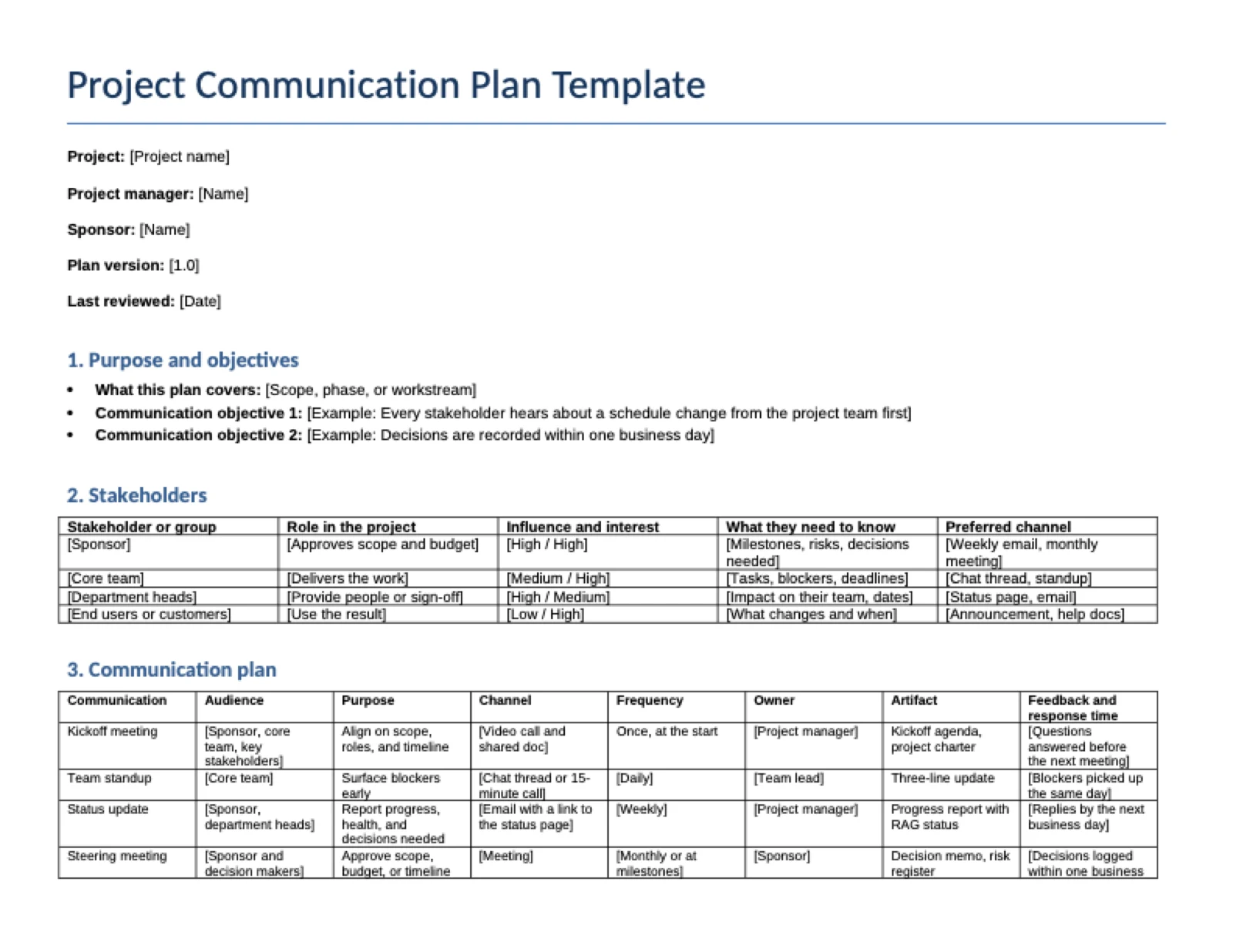
The Word and Markdown versions contain six sections:
- Purpose and objectives
- Stakeholders (role, influence and interest, what they need to know, preferred channel)
- Communication plan (one row per communication)
- Escalation path (three levels with response times)
- Where information lives (links to the status page, chat channel, decision log, and risk register)
- Review schedule
How to create a project communication plan in 6 steps
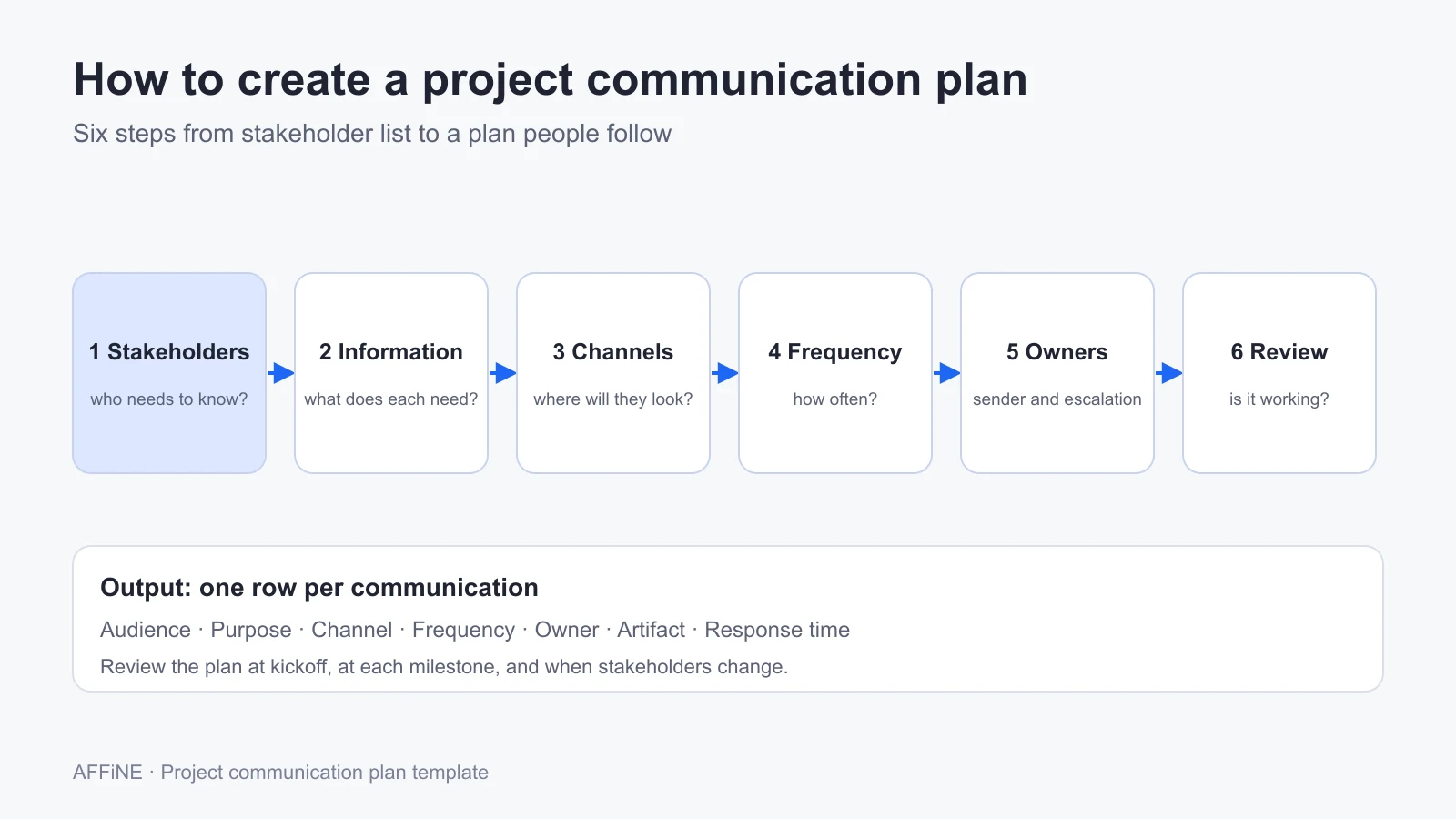
Step 1: Identify stakeholders
List every person or group who is affected by the project, approves part of it, or does the work. Note each one's role, influence, and interest; a stakeholder map makes this quick. Group people who need the same information so the plan stays short.
Step 2: Define what each audience needs to know
Write down the decisions, updates, and warnings each group needs, and what you need back from them. A sponsor needs health, risks, and the decisions you are asking for. The team needs tasks, blockers, and deadlines.
Step 3: Choose the channel for each message
Pick the channel where each audience already looks for information. Use meetings for decisions and discussion, and written updates for status that people can read on their own time. Teams across time zones should default to written, asynchronous communication tools and keep meetings for decisions.
Step 4: Set the frequency
Decide how often each communication happens, based on how fast the work changes and how much risk each audience carries. Weekly status suits most projects; daily is for the core team; monthly or milestone-based reviews suit executives. Put recurring meetings on calendars at kickoff, using a meeting agenda template so each one has a clear purpose.
Step 5: Assign owners and an escalation path
Give every communication one named owner who prepares it, sends it, and follows up. Then write down when an issue moves from the team lead to the project manager to the sponsor, and how fast each level must respond. Track escalated risks in a risk register so the history is in one place.
Step 6: Share the plan and review it
Walk through the plan at kickoff and store it where everyone can find it. Review it at every milestone and whenever a stakeholder joins or leaves. Ask one question at each review: are people getting the information they need, at the right time, in the right place?
10 free project communication plan templates compared
| # | Template | Best for | Formats | How you get it |
|---|---|---|---|---|
| 1 | AFFiNE project communication plan | Teams that want a filled example to adapt | .xlsx, .docx, .md | Direct download, no sign-up |
| 2 | Smartsheet business communication plan | Stakeholder analysis with power and interest | Excel, PDF, Google Sheets | Direct download |
| 3 | Smartsheet strategic communication plan | Tying communication to business strategy | Excel, PDF, Google Sheets | Direct download |
| 4 | ProjectManager communication plan | A full written plan with schedule | Word, Excel | Download from the template page |
| 5 | Visme project management communication plan | A designed document to share with clients | PDF, JPG, PNG, link | Edit in Visme (account) |
| 6 | Visme crisis communication plan | Crisis roles and media contacts | PDF, JPG, PNG, link | Edit in Visme (account) |
| 7 | TeamGantt communication plan | A simple matrix by method and audience | Google Sheets | Make a copy |
| 8 | Confluence communication plan | Teams already on Confluence | Confluence page | Confluence account (free plan) |
| 9 | Asana communication plan | Turning communications into tasks | Asana project | Asana account |
| 10 | Miro communications plan | Workshop-style planning on a board | Miro board | Miro account |
1. AFFiNE project communication plan template
The AFFiNE template is the one in this guide: a blank plan, common rows to edit, a stakeholder table, a three-level escalation path, and a filled-in example. It downloads as Excel, Word, or Markdown, with no account needed. In AFFiNE, you can import the Markdown file and keep the plan next to your project docs and whiteboards.
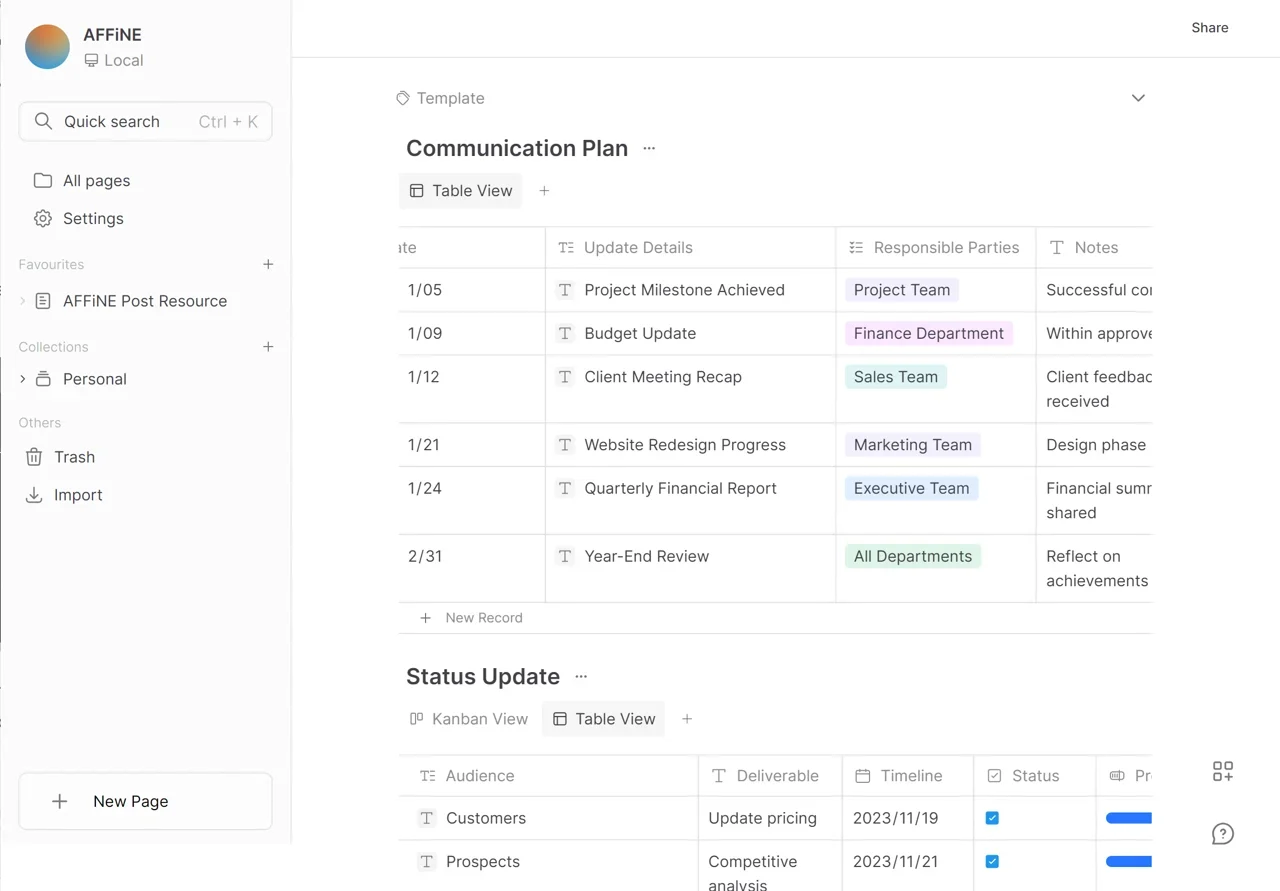
- Includes: objectives, stakeholders, communication plan, escalation path, information locations, review schedule
- Get it: .xlsx, .docx, .md
2. Smartsheet business communication plan template
Smartsheet's business communication plan starts with stakeholders, their power and interest, and the communication goal for each, then lists methods, frequency, and owners. It suits change projects where you need to manage resistance as well as share updates.
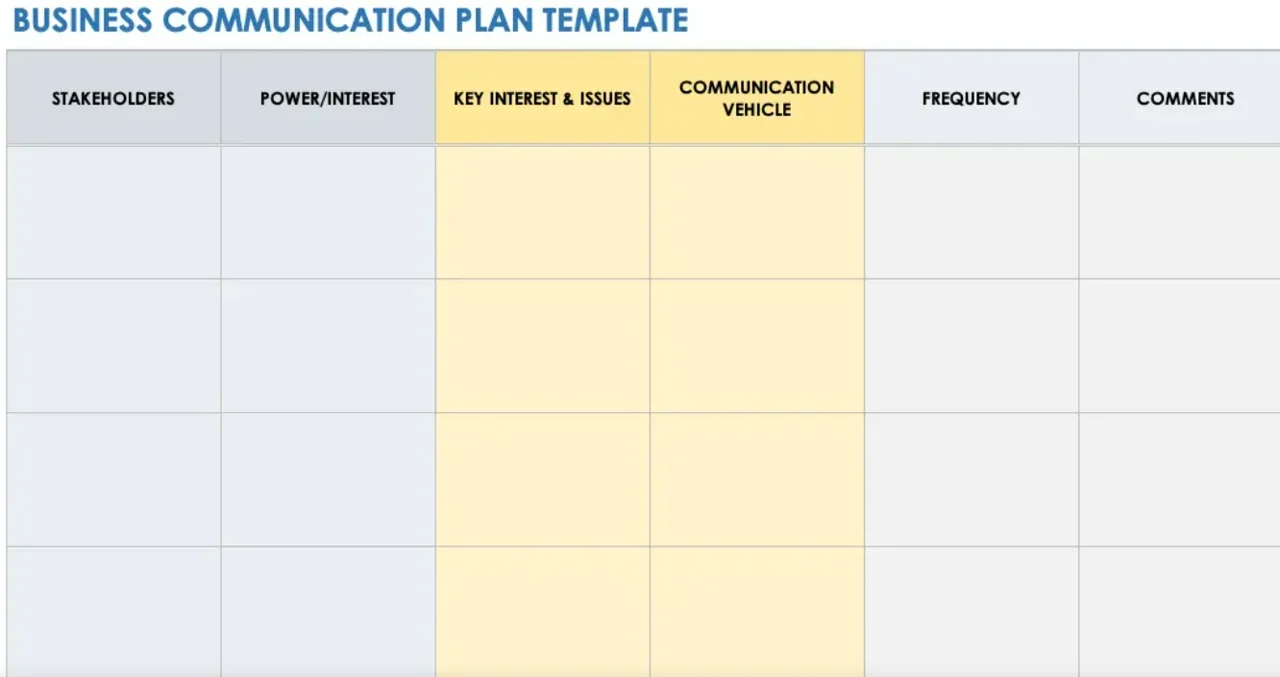
- Formats: Excel, Adobe PDF, Google Sheets
- Get it: Smartsheet communication plan templates
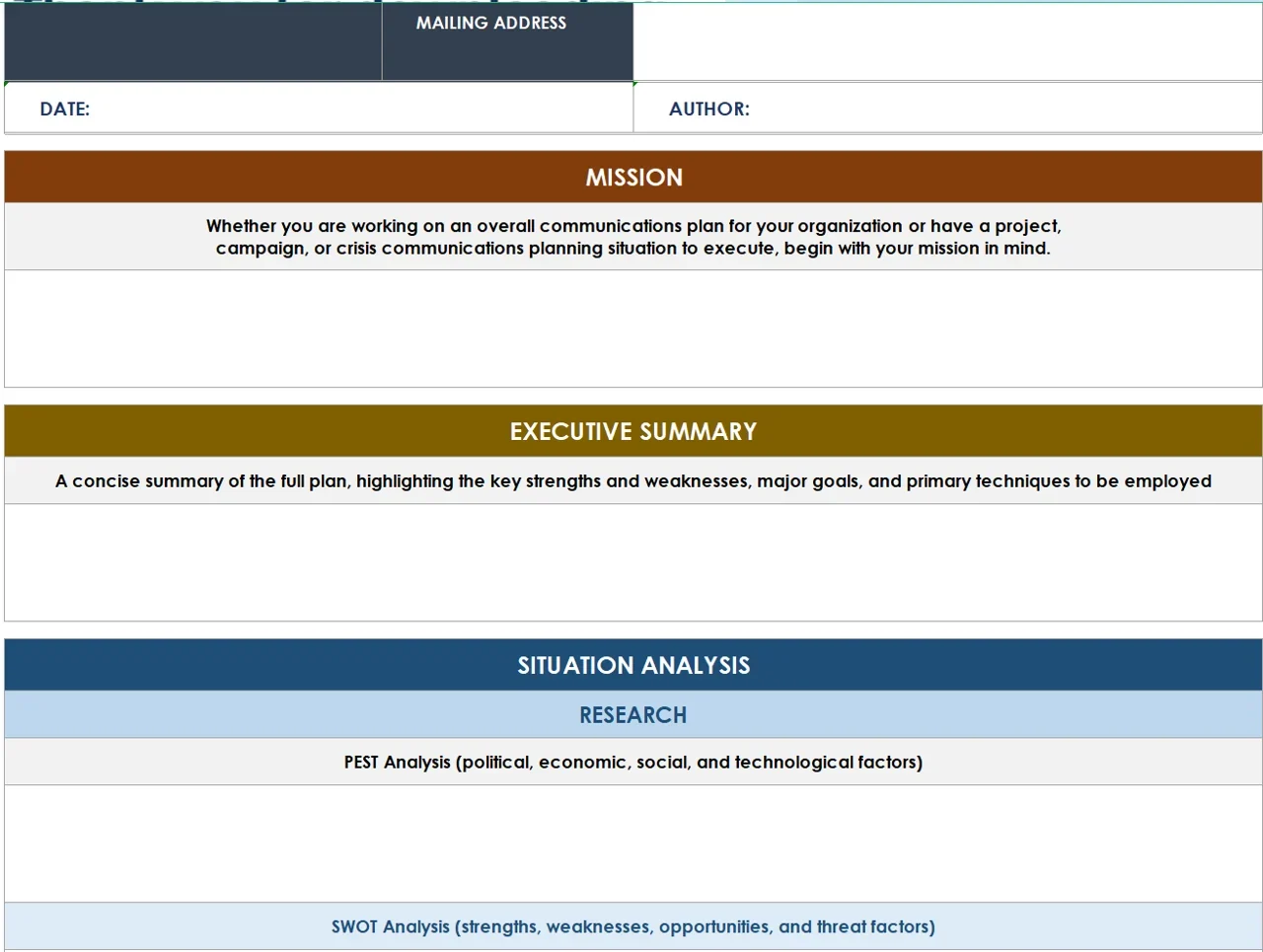
3. Smartsheet strategic communication plan template
The strategic version adds an executive summary, mission, and situation analysis before the communication schedule. Use it when the plan has to show leadership how communication supports a wider business goal.
- Formats: Excel, Adobe PDF, Google Sheets
- Get it: Smartsheet communication plan templates. For a project communication matrix and flow chart, see Smartsheet's project communication templates.
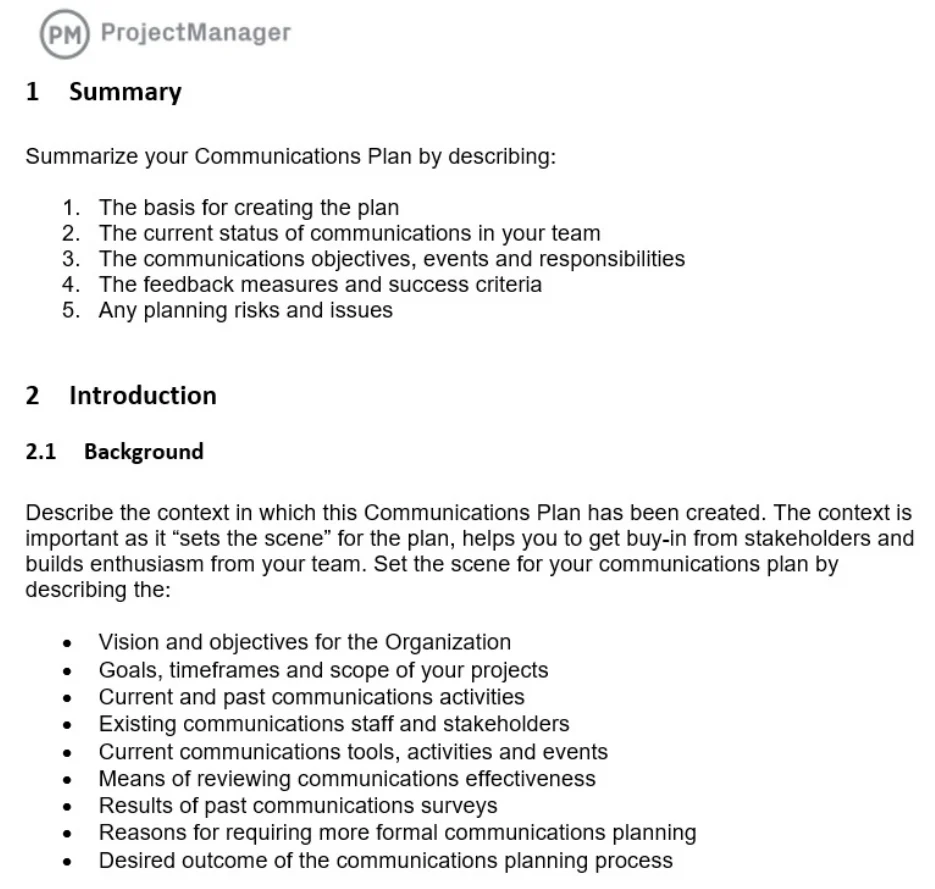
4. ProjectManager communication plan template
ProjectManager's template is a written plan: background and situation analysis, stakeholders, messaging guidelines, delivery channels, how information is collected, and a communication schedule. It works well when the plan must be approved as a formal project document.
- Formats: Word, Excel
- Get it: ProjectManager communication plan template
5. Visme project management communication plan template
Visme's project management template is a designed, six-page US Letter document. It is a good fit when the plan will be shared with clients or executives and needs to look polished. You edit it in Visme's drag-and-drop editor.

- Formats: PDF, JPG, PNG, or a share link
- Get it: Visme project management communication plan
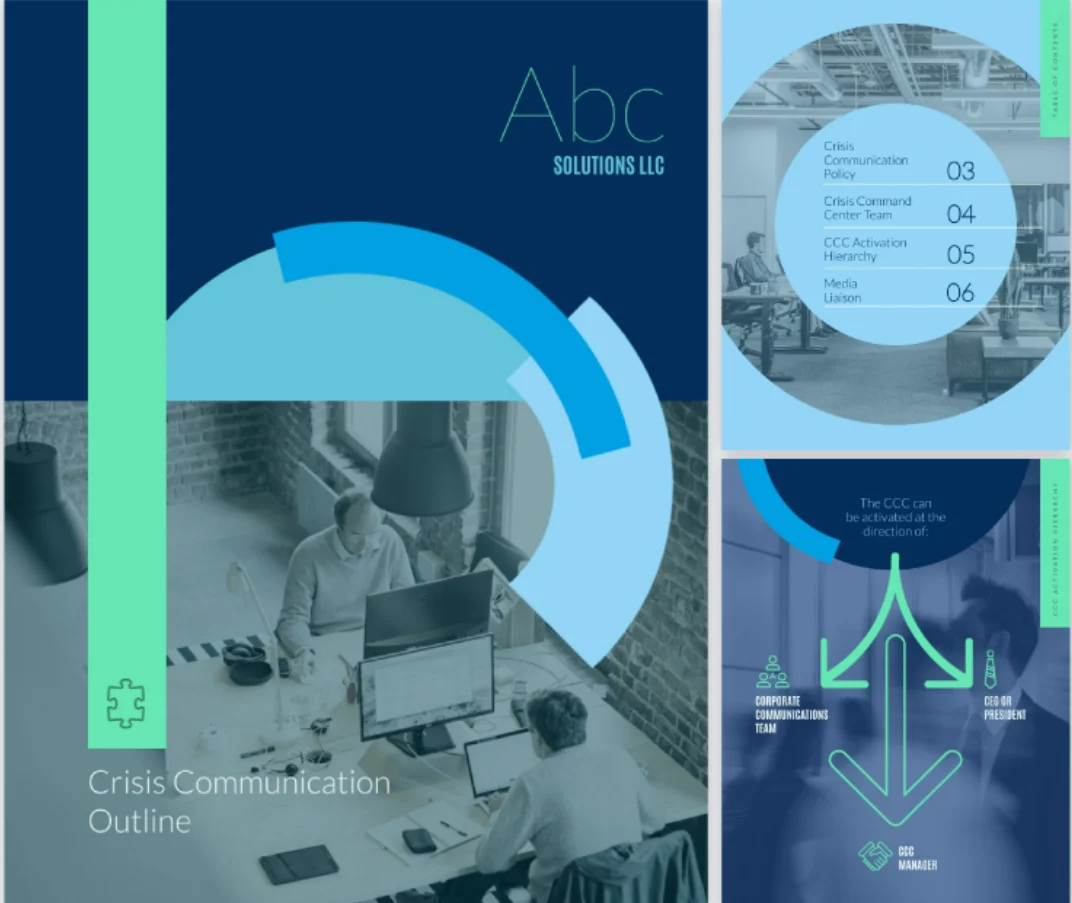
6. Visme crisis communication plan template
The crisis template covers a crisis communication policy, media liaison, and a crisis command team. A crisis plan is a different job from a project plan, but projects with public launches or regulated data should have one ready.
- Formats: PDF, JPG, PNG, or a share link
- Get it: Visme crisis communication plan
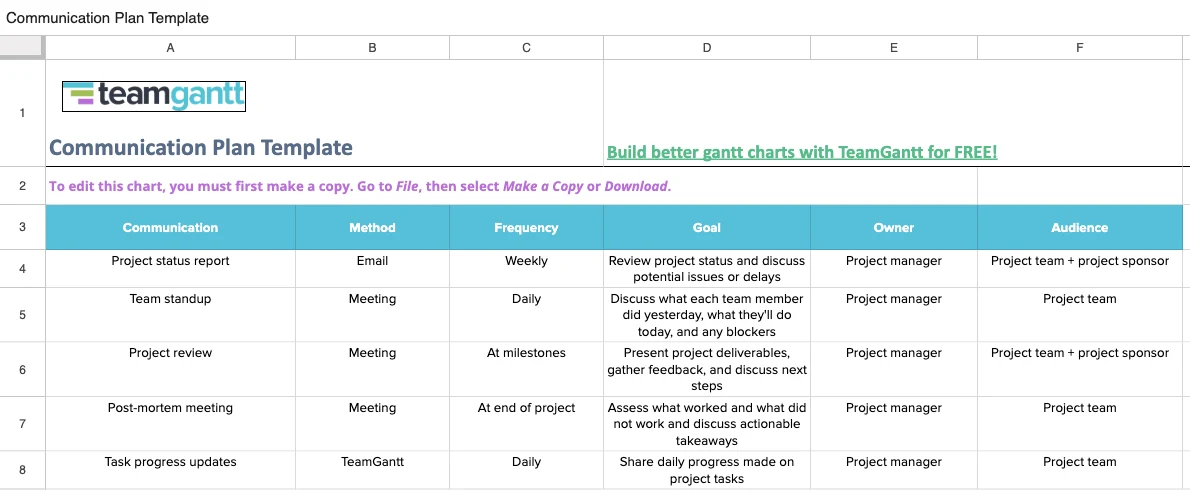
7. TeamGantt project communication plan template
TeamGantt's free Google Sheet is a simple matrix: communication, method, frequency, goal, owner, and audience, prefilled with common rows such as the weekly status report, team standup, and project review. It also has tabs organized by method and by audience.
- Formats: Google Sheets (make a copy or download)
- Get it: TeamGantt communication plan guide and template
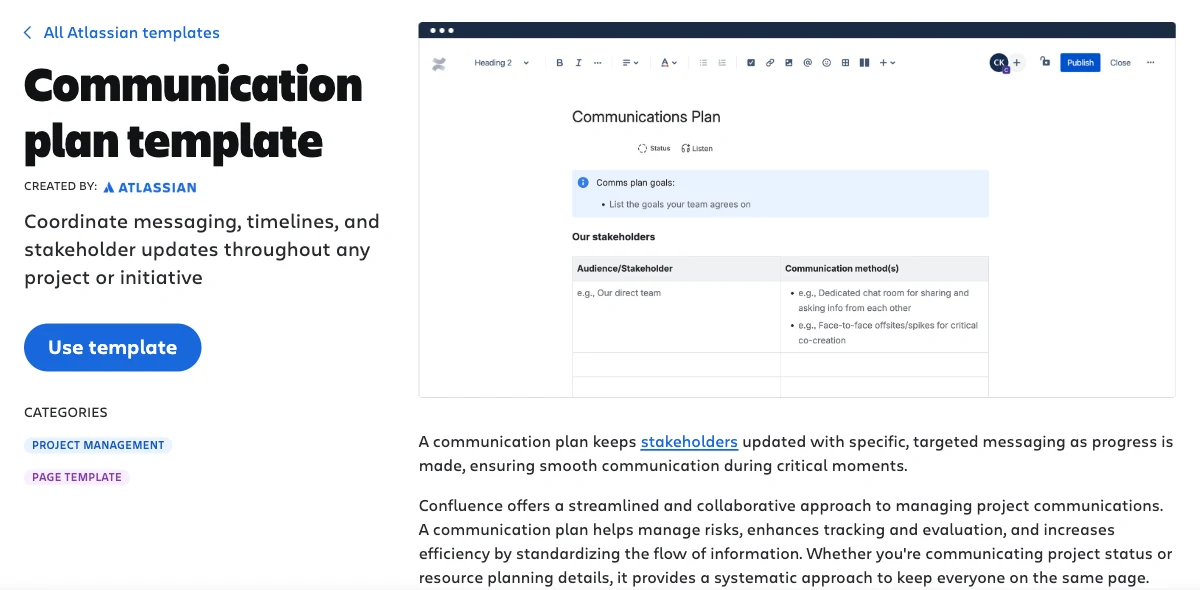
8. Confluence communication plan template
Atlassian's Confluence template is a page with communication goals, a stakeholder table with communication methods, and space for timelines. It makes sense if your team already documents projects in Confluence.
- Formats: Confluence page
- Get it: Confluence communication plan template
9. Asana communication plan template
Asana's template turns the plan into a project, so each communication can become a task with an owner and due date. Its guide covers strategic, project, internal, and crisis plans. You need an Asana account to create the template.
- Formats: Asana project
- Get it: Asana communication plan template
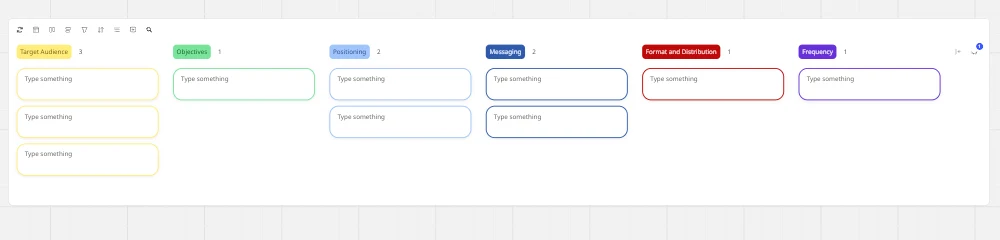
10. Miro communications plan template
Miro's board has six columns: target audience, objectives, positioning, messaging, format and distribution, and frequency. It works best in a live workshop where the team fills in sticky notes together before the plan is written up.
- Formats: Miro board
- Get it: Miro communications plan template
HubSpot also offers a free communication plan template in Excel, PDF, and Google Sheets after you fill in a contact form.
Communication plan templates by type
Stakeholder communication plan
A stakeholder communication plan is organized by audience instead of by meeting. Each row is a stakeholder group with its interests, concerns, key messages, channel, and frequency. Use the Stakeholders tab of the AFFiNE template, and assign roles with a RACI matrix template.
Communication matrix
A communication matrix is the one-page summary of the plan: meetings and reports down the side, with audience, frequency, and owner across the top. The TeamGantt sheet above and Smartsheet's project communication matrix both use this layout. If you want to show how messages flow between people, a communication diagram template helps.
Change management communication plan
When a project changes how people work, add rows for each stage of the change: announcement, training, go-live, and follow-up. Explain what changes, why, and what each group must do, and send it as a memo so the details are in writing. For tools that support the rest of the change process, see these change management tools.
Sample project communication emails
These three emails cover the most common project messages. Replace the text in brackets.
Project kickoff email
Subject: [Project name] kicks off on [date]: your role and what to expect
Hi [team],
[Project name] starts on [date]. The goal is [one-sentence outcome] by [end date]. Your role: [role]. We will meet for kickoff on [date and time] ([link]). Please review the project charter and communication plan before then: [link]. Weekly updates will come every [day] from [name].
Weekly status update email
Subject: [Project name] status, week of [date]: [Green / Amber / Red]
Done this week: [2 or 3 items] Next week: [2 or 3 items] Risks and blockers: [item, owner, date] Decision needed: [question] by [date] Full status: [link]
Delay notice email
Subject: [Project name]: [milestone] moves from [old date] to [new date]
Hi [audience],
[Milestone] will finish on [new date] instead of [old date] because [reason in one sentence]. This affects [what changes for the reader]. To recover, we are [action]. Nothing else changes. Questions to [name] by [date].
For recurring check-ins with individual team members, a 1-on-1 meeting template keeps the conversation focused, and meeting minutes record what was decided.
Tips for a communication plan people actually follow
- Keep it to one page where possible. If the plan needs scrolling to find who gets the weekly update, it will not be used.
- Put every recurring communication on a calendar at kickoff. A plan that lives only in a document is forgotten by week three.
- Name a person, not a team, as owner. "Marketing" does not send emails; Sam does.
- Write down response times. An update that asks for a decision should say by when.
- Use one source of truth. Link every update to the same status page or project hub, so people do not have to compare versions.
- Review it at milestones. Drop meetings nobody needs and add the audiences you missed.
How to build your communication plan in AFFiNE
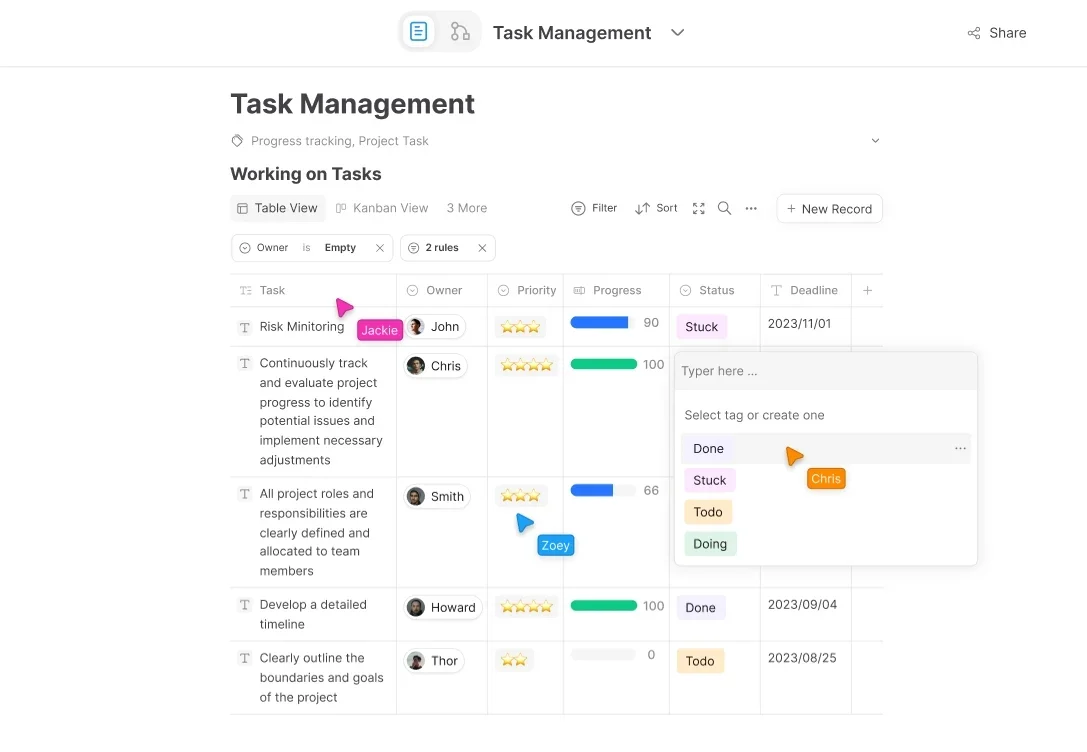
AFFiNE is an open-source workspace that combines docs, whiteboards, and databases. To use this template in AFFiNE:
- Download the Markdown template and import it into your workspace, or paste the table into a new page.
- For a plan you will track, create a database with the same columns and switch between Table and Kanban views to see communications by status or owner.
- Sketch the stakeholder map and communication flow on an Edgeless whiteboard next to the plan, then share the page link with your team and sponsor.
For a broader comparison of tools that support project communication, see our guide to team collaboration tools.
FAQ
What should a project communication plan include?
A project communication plan should include project objectives, a list of stakeholders, and one entry for each communication with its audience, purpose, channel, frequency, owner, and expected response time. Good plans also add an escalation path, links to where project information lives, and a schedule for reviewing the plan as the project changes.
What is the difference between a communication plan and a communication matrix?
A communication plan is the full document: objectives, stakeholders, every planned communication, escalation rules, and a review schedule. A communication matrix is a compact grid that summarizes the plan, usually one row per meeting or report with audience, frequency, and owner. Many teams keep the matrix as the one-page version they share most often.
How often should you update a project communication plan?
Review the plan at kickoff, at each major milestone, and whenever a stakeholder joins or leaves the project. Also update it when a channel stops working, for example when nobody reads the weekly email. On a three-month project, that usually means three or four short reviews, each taking a few minutes during a regular status meeting.
Who is responsible for the project communication plan?
The project manager usually writes and maintains the communication plan, with input from the sponsor and team leads. Each communication in the plan still needs its own named owner, who prepares, sends, and follows up on it. The sponsor approves the plan and owns escalations that need decisions on scope, budget, or dates.
Is there a communication plan template in Excel, Word, or Google Sheets?
Yes. The AFFiNE template on this page downloads as Excel (.xlsx), Word (.docx), and Markdown, and the .xlsx file opens in Google Sheets. Smartsheet offers Excel, PDF, and Google Sheets versions, ProjectManager offers Word and Excel, and TeamGantt shares a Google Sheet you can copy.
What are the 5 Ws of a communication plan?
The 5 Ws are who, what, when, where, and why. Who is the audience and the owner, what is the message, when is the frequency or date, where is the channel, and why is the purpose of the communication. Answering all five for every row keeps the plan specific enough to follow.
Editorial note: Written by Allen for the AFFiNE content team and updated November 4, 2026. The website redesign example uses a fictional company, names, and dates. The template images are real renders of the downloadable files in LibreOffice 26.8. Third-party screenshots come from each vendor's public template page; we checked every template link on November 4, 2026. The two AFFiNE screenshots are from an earlier version of AFFiNE. AFFiNE makes the workspace mentioned here, so we have a commercial interest in it; the template works in any editor. AI tools assisted with drafting. Vincent Chen, CEO of AFFiNE, reviewed the article. See our editorial policy.