Self-Hosted Wiki Software: 9 Tools Compared for 2026
Compare 9 self-hosted wikis by license, stack, page history, permissions, SSO and backups, then run a one-week pilot before you migrate.

Disclosure: AFFiNE publishes this article, and AFFiNE is one of the tools it covers. How we review products
A self-hosted wiki is wiki software you install on a server you control, so pages, page history, uploads, and user accounts stay in your own database and storage. The main open-source and source-available options in 2026 are Wiki.js, BookStack, Outline, Docmost, XWiki, DokuWiki, MediaWiki, TiddlyWiki, and AFFiNE. They differ most in how they structure pages, who can edit at the same time, how sign-in works, and what you must back up.
Most lists of the best open-source wiki software stop at features and GitHub stars. This guide is for the person who has to run the wiki after the vote. It compares the nine tools on the things that decide whether a wiki stays useful: page structure, page history, permissions, search, sign-in, and backup and restore. It ends with a one-week pilot you can run before anyone moves real documentation.
At a glance
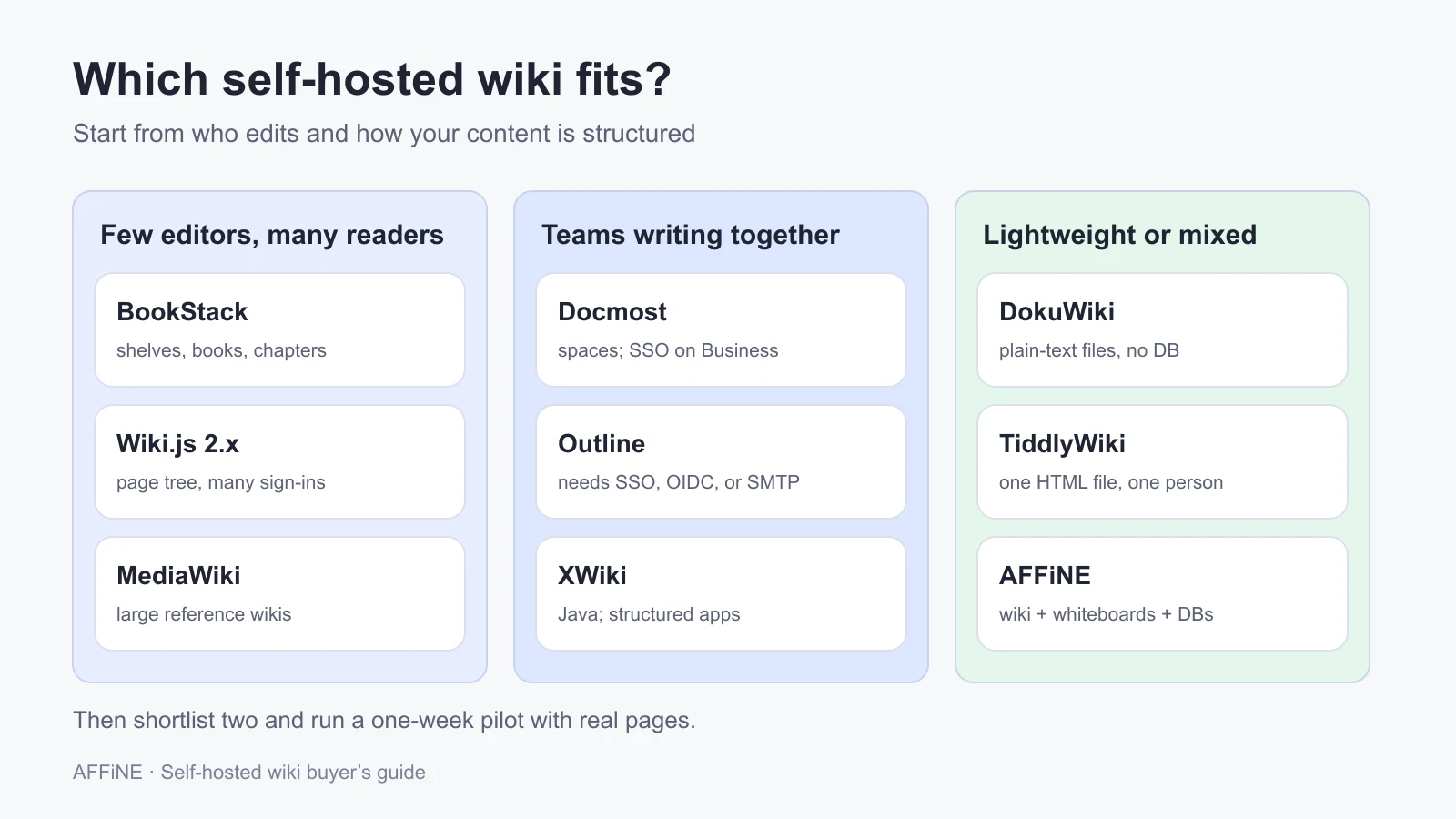
- Structured handbooks with few editors: BookStack (shelves, books, chapters, pages) or Wiki.js 2.x.
- Teams that write together in real time: Docmost, Outline, or XWiki.
- Large public or reference wikis: MediaWiki.
- No database at all: DokuWiki (plain-text files) or TiddlyWiki (one HTML file, mostly for one person).
- Wiki plus whiteboards and databases in one workspace: AFFiNE, free to self-host for up to 10 seats per workspace.
- Check before you commit: which sign-in methods are free, whether page-level permissions are free, and exactly which files and tables a restore needs.
Published by AFFiNE, which makes one of the tools compared here. Licenses, requirements, and sign-in options were checked against each project's official documentation, pricing page, and GitHub repository on October 27, 2026. We did not deploy or benchmark these tools for this article.
What to look for in self-hosted wiki software
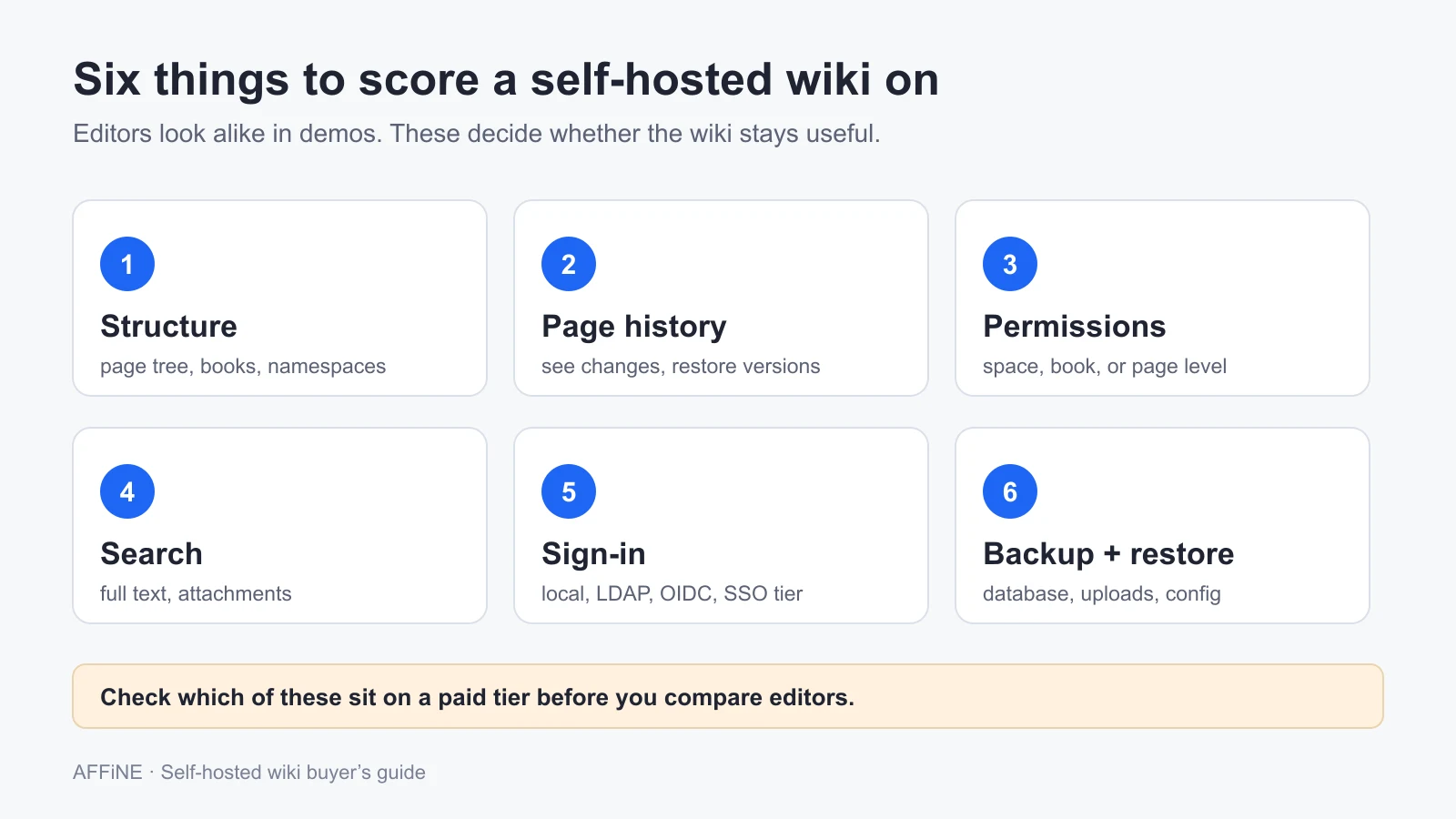
A wiki is not just a document editor with a sidebar. Six properties decide whether people trust it a year from now. Score every candidate on these before you compare editors.
| Property | Question to answer | Why it matters for a self-hosted wiki |
|---|---|---|
| Structure | Is it a page tree, books and chapters, namespaces, or linked notes? | The model decides whether people can find pages without search |
| Page history | Can an editor see who changed what and restore an old version? | History is your undo button for bad edits and your record of decisions |
| Permissions | Can you restrict a space, a book, or a single page? Is that free? | Page-level permissions are often a paid tier |
| Search | Is full-text search built in? Does it index attachments? | A wiki nobody can search turns into a graveyard |
| Sign-in | Local accounts, LDAP, OIDC, or other SSO? Which ones are free? | Your identity provider decides which tools are even possible |
| Backup and restore | Which database, folders, and config files make a complete backup? | You own recovery now. A database dump without uploads is not a backup |
If you are replacing Notion and need databases, boards, and personal notes as well as a wiki, the self-hosted Notion alternative guide compares workspace tools on that broader job. If you are still deciding whether a wiki or a knowledge base fits your content, read the open-source knowledge base software comparison first.
Self-hosted wiki software compared
"Paid" means the vendor's own pricing page or documentation lists the feature for a paid plan or license. Licenses are as published in each repository on October 27, 2026.
| Tool | License | Stack you run | Structure | Real-time co-editing | Page history | Documented sign-in | Paid tiers |
|---|---|---|---|---|---|---|---|
| Wiki.js 2.x | AGPL-3.0 | Node.js plus PostgreSQL (recommended) or MySQL and others | Path-based page tree | No | Yes | Local, LDAP/AD, OIDC/OAuth2, SAML 2.0, Google, Azure AD, Okta, GitHub | None. 3.0 is a beta |
| BookStack | MIT | PHP 8.2+, MySQL 8.0+ or MariaDB 10.6+ | Shelves, books, chapters, pages | No | Yes (revisions) | Email and password, LDAP, SAML 2.0, OIDC | None |
| Outline | BSL 1.1 | Node.js, PostgreSQL 14+, Redis 4+ | Collections with nested documents | Yes | Yes (naming and deleting revisions need a licensed edition) | Google, Microsoft Entra, Slack, OIDC, GitLab, Discord, passkeys, email magic link; no native password login | Some sign-in options depend on edition |
| Docmost | AGPL-3.0 core plus enterprise license | Docmost, PostgreSQL, Redis | Spaces with nested pages | Yes | Yes (check edition) | Email and password; SSO (SAML 2.0, OIDC, LDAP) on Business | Business $6 per seat per month, billed annually, 10-seat minimum |
| XWiki | LGPL-2.1 | Java, servlet container, database; official Docker image | Nested pages | Yes, in the WYSIWYG editor | Yes | Built-in accounts; directory and SSO through extensions | Optional XWiki Pro and support subscriptions |
| DokuWiki | GPL-2.0 | PHP 8.2+, no database | Namespaces over plain-text files | No | Yes (old revisions) | Built-in accounts with ACLs; LDAP and others through auth plugins | None |
| MediaWiki | GPL-2.0-or-later | PHP 8.3+, MariaDB, MySQL, PostgreSQL, or SQLite | Namespaces and categories | No | Yes, with diffs | Built-in accounts; LDAP and OAuth through extensions | None |
| TiddlyWiki | BSD-3-Clause | One HTML file, or the Node.js server edition | Small linked notes (tiddlers) with tags | Single user | Not built in; use file or Git backups | None for the single file | None |
| AFFiNE | MIT editor, backend under the AFFiNE Enterprise Edition license | Docker Compose: AFFiNE, PostgreSQL, Redis | Docs in folders, tags, collections, and links, plus whiteboards and database blocks | Yes | Yes | Google, GitHub, OIDC | Free self-host for up to 10 seats per workspace; more seats need Team or an Installable License |
Tool-by-tool notes
Wiki.js
Best for: technical teams that want a classic wiki with Markdown, many sign-in options, and optional Git-backed storage.
Run it: Wiki.js runs on Node.js and recommends PostgreSQL. The requirements page asks for at least 1 GB of RAM on Linux and recommends 2 CPU cores. It needs its own domain or subdomain and cannot be served from a subfolder. The authentication docs list local accounts, LDAP and Active Directory, generic OpenID and OAuth2, SAML 2.0, Google, Azure AD, Okta, Keycloak, and more, with optional two-factor sign-in from version 2.5. New users get no access until an admin assigns them to a group.
Watch for: the production release is the 2.x line (v2.5.317 in October 2026). The main repository's 3.0 is a beta that the project marks "not for production use," so plan for a 2.x install now and a major upgrade later. The Git storage module can sync pages to a dedicated repository, which gives you a readable copy of content but does not replace a database backup.
BookStack
Best for: documentation that many people read and few people edit, such as IT runbooks, policies, and onboarding handbooks.
Run it: BookStack is a PHP application. The installation guide requires PHP 8.2 or newer, MySQL 8.0+ or MariaDB 10.6+, Composer, and Git. It does not support shared PHP hosting. The project points to community Docker images and install scripts for Ubuntu. Sign-in can use local accounts, LDAP, OIDC, or SAML 2.0, and permissions can be set on shelves, books, chapters, and pages.
Watch for: BookStack has no built-in backup tool. A complete backup is a mysqldump plus the .env file and the public/uploads and storage/uploads folders. There is no real-time co-editing.
Outline
Best for: teams that write a lot together, already run an identity provider, and want a fast, polished editor.
Run it: the Docker guide uses PostgreSQL 14+ and Redis 4+, plus file storage for uploads. Outline runs on Linux and macOS.
Watch for: Outline does not support email and password sign-in. You need Google, Microsoft Entra, Slack, OIDC, GitLab, Discord, passkeys, or the email magic link, which needs working SMTP. Some options depend on the edition. Revision history records a version at least every five minutes of editing, and editors can view diffs and restore old versions; naming and permanently deleting revisions are limited to cloud and licensed editions, according to the revision history guide. The license is BSL 1.1, which is source-available rather than OSI open source. For version 1.12.0 the license file sets a change date of October 23, 2030, after which that version converts to Apache 2.0.
Docmost
Best for: teams that want a modern, real-time wiki running the same afternoon, with spaces and nested pages and no identity provider required.
Run it: the official Compose example runs three services: Docmost, PostgreSQL, and Redis. The Community edition includes email and password sign-in, spaces, real-time collaboration, and full-text search.
Watch for: according to the pricing page, SSO (SAML 2.0, OIDC, LDAP), multi-factor sign-in, page-level permissions, AI, attachment search, diagrams, and Confluence import come with Business at $6 per seat per month billed annually, with a 10-seat minimum. SCIM provisioning and audit logs are Enterprise features. The pricing page also lists version history among Business features, so confirm which history features your edition includes before you rely on them.
XWiki
Best for: large organizations that need structured wiki applications, fine-grained rights, and a vendor that can sell support.
Run it: XWiki is a Java application. The prerequisites page lists an official Docker image, Debian packages, and a demo distribution, and sizing follows the project's instance sizing guide. The latest platform release was 18.9.0 on October 26, 2026.
Watch for: XWiki asks more of the server and the admin than the lighter wikis. Directory and SSO sign-in come through extensions, so test the exact extension version against your identity provider. XWiki SAS sells optional Pro and support subscriptions; the pricing page listed €5,796.84 per year for 100 users on the Basic plan when checked.
DokuWiki
Best for: small or technical teams that want a wiki with no database to run.
Run it: DokuWiki needs only a web server and PHP. The requirements page asks for PHP 8.2 or newer for the current stable release. Pages are stored as plain-text files, and old revisions are kept beside them.
Watch for: the editor uses wiki syntax, not a visual editor, unless you add plugins. Backups are simple: copy the data and configuration folders, but test that restore on a second server with the same plugins installed.
MediaWiki
Best for: large reference wikis with many readers, careful page history, and a culture of categories and templates.
Run it: MediaWiki needs a web server, PHP, and a database. The installation requirements state that MediaWiki requires PHP 8.3.0 or newer, and it supports MariaDB, MySQL, PostgreSQL, and SQLite.
Watch for: most corporate needs, such as LDAP sign-in, visual editing, and stronger search, come from extensions that you must install and keep updated. MediaWiki was built for open editing, so read-restricted private wikis take careful configuration.
TiddlyWiki
Best for: one person who wants a personal wiki in a single file that will still open decades from now.
Run it: TiddlyWiki stores its data and code in one HTML file that runs in a browser. A Node.js server edition and a desktop app are also available, and the current version is 5.4.1.
Watch for: it is not a team wiki out of the box. For multi-user use, the TiddlyWiki site points companies to Xememex, a separate product from Intertwingled Innovations. There is no built-in per-page history, so keep the file in Git or a versioned backup.
AFFiNE
Best for: teams whose wiki pages sit next to whiteboards, project boards, and meeting notes, and who want one workspace instead of a wiki plus separate tools.
Run it: Docker Compose is the recommended method, with AFFiNE, PostgreSQL, Redis, and a one-time migration container. The requirements page recommends 4 CPU cores and 2 GB of RAM, or 4 GB for documents over about 10,000 words. Sign-in supports Google, GitHub, and general OIDC providers through the OAuth settings. The backup guide lists PostgreSQL, uploaded files, and configuration as a complete backup. AI features are optional and use workspace-level bring-your-own-key; if you want the model on your own servers too, see self-hosted AI for teams.
Watch for: AFFiNE is open core, not an OSI open-source project as a whole. The editor is MIT, and the backend is under the AFFiNE Enterprise Edition license; read the license file. Self-hosting is free for up to 10 seats per workspace, and larger teams need the Team plan or an Installable License. AFFiNE is a workspace with a page tree, not a classic wiki, so it does not use namespaces or wiki syntax.
Who should not choose AFFiNE:
- Teams that need SAML sign-in or SCIM provisioning today. AFFiNE documents Google, GitHub, and OIDC sign-in only.
- Organizations whose compliance process depends on a built-in activity trail of every edit and permission change.
- Wikis with hundreds of mostly read-only users and a handful of editors, where BookStack or MediaWiki will be simpler to run.
- Groups that want plain-text files on disk they can edit without the app, where DokuWiki fits better.
Backups: what each wiki needs for a complete restore
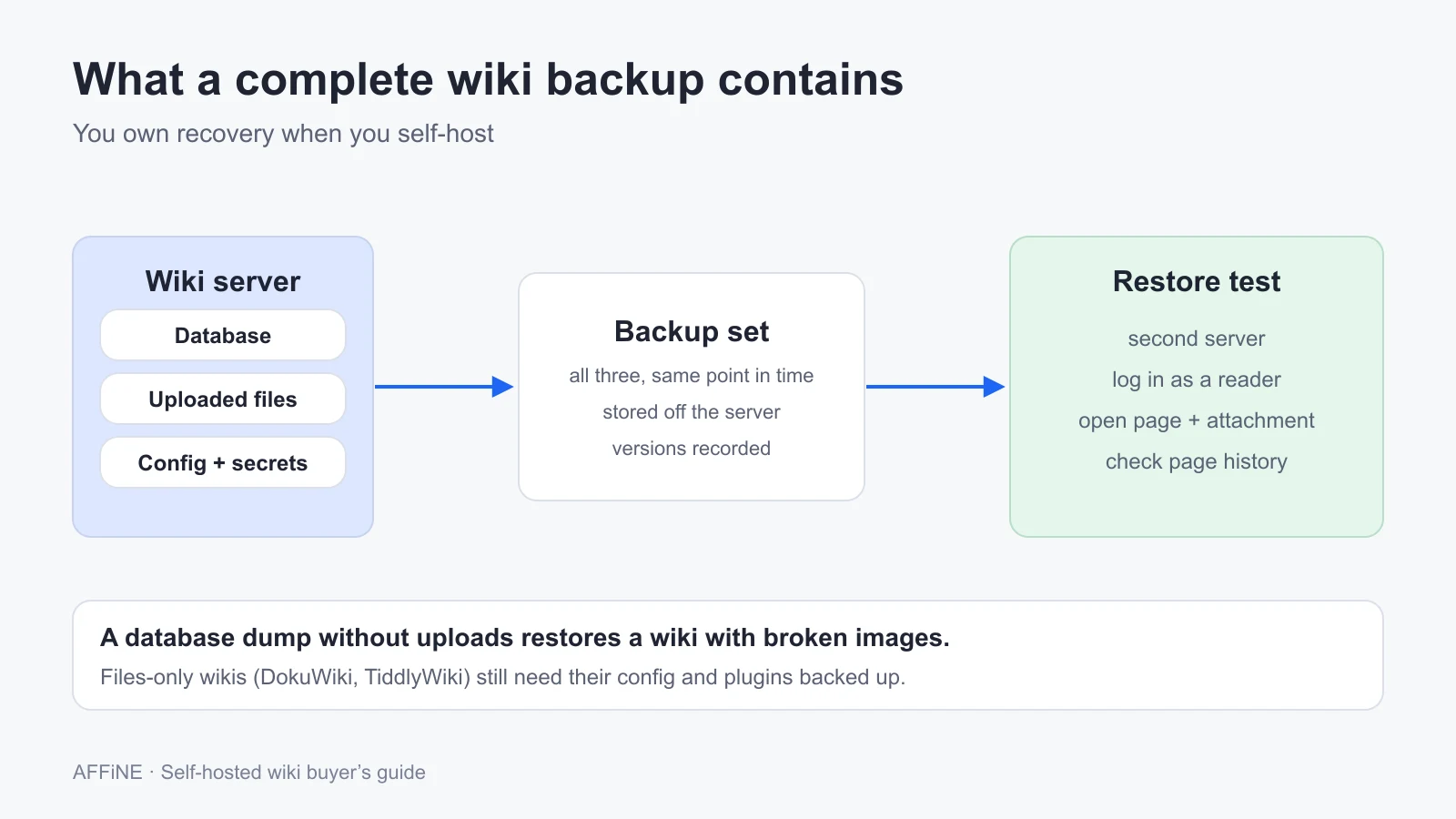
When you self-host a wiki, you own recovery. The most common failure is a backup that contains the database but not the uploads or the config, so the restored wiki opens with broken images or will not start. Use this table as the starting list for each tool.
| Tool | Back up together | Note |
|---|---|---|
| Wiki.js | Database (pages and uploaded assets), config.yml | Git storage is a content copy, not a full backup |
| BookStack | MySQL dump, .env, public/uploads, storage/uploads | No built-in backup tool |
| Outline | PostgreSQL, file storage (local or S3), environment file | Redis holds no long-term content |
| Docmost | PostgreSQL, storage volume, environment settings | Check the volume paths in your Compose file |
| XWiki | Database, permanent directory, configuration files | See the backup guide |
| DokuWiki | data and conf folders, plugins | No database |
| MediaWiki | Database, images folder, LocalSettings.php, extensions | See Backing up a wiki |
| TiddlyWiki | The HTML file, or the server's tiddlers folder | Git works well |
| AFFiNE | PostgreSQL, uploaded files, config/config.json and Compose file | Keep matching database and file backups together |
For server sizing, reverse proxies, and security hardening on a VPS, see the enterprise knowledge base self-hosting guide. For the content side, the corporate wiki playbook covers structure, ownership, and governance.
Run a one-week self-hosted wiki pilot
Install two shortlisted tools and test them with a copy of real, non-sensitive documentation. One week is enough to see which one your team will actually keep up to date.
Pick two tools that match your structure
Decide whether your content is a handbook (books and chapters), a page tree, or a set of linked notes. Pick two tools whose structure matches, and write down which sign-in method and permission level you need and whether it is free.
Deploy from the official guide
Use each project's current installation guide on a server that meets the documented requirements. Set the public HTTPS URL, pin versions, and keep configuration in version control. Avoid tutorials that use old repositories or a beta release.
Connect sign-in and set up three roles
Connect your identity provider, or create local test accounts if SSO is on a paid tier. Create a reader, an editor, and an admin, and restrict one space or page so only the editor can see it. Log in as each role and check what they can see.
Import 30 real pages
Move about 30 pages with tables, images, attachments, and links between pages. Record what broke during import, then check whether internal links and images still work.
Test history, search, and permissions
Have two people edit the same page, then restore an earlier version from page history. Search for a phrase inside an attachment and a phrase in a page body. Confirm the restricted page does not appear in search results for the reader.
Back up, restore, and decide
Back up the database, uploads, and configuration. Restore them on a second server and open a page with an image as the reader. Then choose the tool that passed with the least ongoing work, and record the yearly cost including any paid seats.
Frequently asked questions
What is the best self-hosted wiki?
It depends on how your team writes. BookStack suits structured handbooks with few editors. Docmost and Outline suit teams that co-edit in real time. MediaWiki suits large reference wikis, and DokuWiki suits small teams that want no database. AFFiNE suits teams that also need whiteboards and databases.
What is the best open source wiki software?
Among OSI-licensed options, Wiki.js and Docmost use AGPL-3.0, BookStack uses MIT, XWiki uses LGPL-2.1, DokuWiki uses GPL-2.0, MediaWiki uses GPL-2.0-or-later, and TiddlyWiki uses BSD-3-Clause. Outline uses BSL 1.1 and AFFiNE's backend uses its own license, so neither is OSI open source as a whole.
How much server does a self-hosted wiki need?
Light wikis run on small servers. Wiki.js recommends at least 1 GB of RAM and 2 CPU cores, and DokuWiki needs only PHP with no database. AFFiNE recommends 4 CPU cores and 2 GB of RAM. XWiki publishes a sizing guide by instance profile. Add disk for uploads and backup copies.
Which self-hosted wikis support SSO for free?
Wiki.js and BookStack document LDAP, OIDC, and SAML 2.0 sign-in with no paid tier. Outline requires an SSO, OIDC, passkey, or magic-link provider, and some options depend on edition. Docmost puts SSO on its Business plan. AFFiNE supports Google, GitHub, and OIDC sign-in.
Do self-hosted wikis keep page history?
Most do. Wiki.js, BookStack, Outline, XWiki, DokuWiki, MediaWiki, and AFFiNE keep page history so editors can review and restore earlier versions. Docmost lists version history on its Business tier. TiddlyWiki has no built-in history, so keep the file in Git or versioned backups.
How do I back up a self-hosted wiki?
Back up the database, uploaded files, and configuration together, and store copies off the server. DokuWiki and TiddlyWiki store pages as files, so copying folders is enough. Always test a restore on a second server and open a page with an attachment before you trust the backup.
Sources and editorial notes
- Wiki.js, Requirements, Authentication, Upgrade, and Git storage. Accessed October 27, 2026.
- BookStack, Installation, SAML 2.0, and Backup and restore. Accessed October 27, 2026.
- Outline, Docker hosting, Authentication, Revision history, and license. Accessed October 27, 2026.
- Docmost, Installation and Pricing. Accessed October 27, 2026.
- XWiki, Prerequisites and Pricing. DokuWiki, Requirements. MediaWiki, Installation requirements and Backing up a wiki. TiddlyWiki, tiddlywiki.com. Accessed October 27, 2026.
- AFFiNE, Requirements, Docker Compose, OAuth 2.0, and Backup and restore. Accessed October 27, 2026.
- License, star, and release data came from the GitHub API on October 27, 2026.
How this guide was prepared: AFFiNE wrote this article in October 2026 from vendor documentation, pricing pages, GitHub repositories, and public discussions of self-hosted wikis. No tool was deployed or benchmarked for it. Requirements are each vendor's documented guidance. Backup lists are starting points; follow each project's current backup page for your version. Pricing and tiers change, so confirm them before you buy. AI tools assisted with research and drafting, and the AFFiNE team reviewed and edited the content.